

Google Workspace মডেল কন্টেক্সট প্রোটোকল (MCP) সার্ভার, ব্যবহারকারীর ডেটা সুরক্ষিত রাখতে সার্ভার-চালিত হিউম্যান-ইন-দ্য-লুপ অনুমোদন ব্যবহার করে। AI এজেন্ট কোনও অ্যাকশন নেওয়ার আগে এটি করা হয়, যেমন ইমেল পাঠানো, ক্যালেন্ডার ইভেন্ট পরিবর্তন করা, ফাইল আপডেট করা বা ট্র্যাশ করা অথবা ডেটা ও মেটাডেটা পড়া। এইসব অ্যাকশন ব্যবহারকারী ও অ্যাডমিনিস্ট্রেটর নীতি দ্বারাও পরিচালিত হয়। সার্ভার MCP ফর্ম মোড এলিসিটেশন ব্যবহার করে এইসব অনুমোদনের অনুরোধ করে।
যেমন, Gmail মেসেজ পাঠানোর জন্য অনুমোদনের ডায়ালগ এইরকম দেখতে হতে পারে:
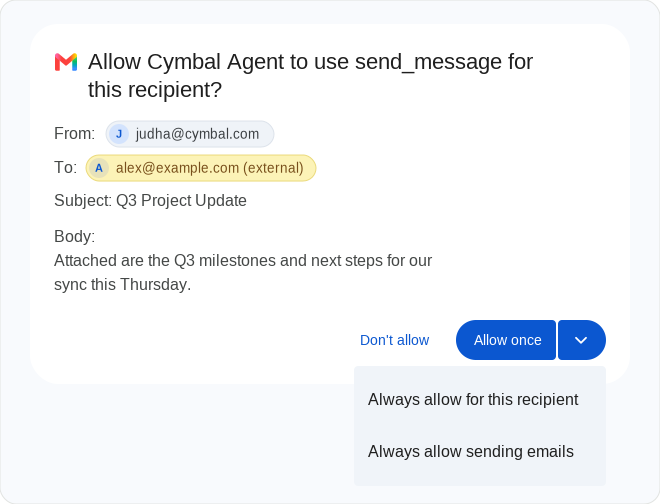
এই নির্দেশিকা থেকে আপনি জানতে পারবেন কীভাবে /mcp/v1 এন্ডপয়েন্টে কানেক্ট করতে হয়, ব্যবহারকারীর সেরা অভিজ্ঞতার জন্য অনুমোদনের ডায়ালগ ডিজাইন করতে হয় এবং MCP হোস্ট, MCP ক্লায়েন্ট বা এজেন্ট হার্নেসে স্টেটলেস ফর্ম এলিসিটেশন প্রোটোকল প্রয়োগ করতে হয়।
শুরু করার আগে
MCP ফর্ম পূরণ করার সুবিধা প্রয়োগ বা কনফিগার করার আগে, প্রয়োজনীয় শর্তাবলী পূরণ করুন, আপনার MCP হোস্ট বা ক্লায়েন্টের কাস্টম ফর্ম পূরণ করার সুবিধা প্রয়োজন কিনা তা নির্ধারণ করুন এবং সার্ভার এন্ডপয়েন্ট পর্যালোচনা করুন।
পূর্বশর্ত
কাস্টম MCP হোস্ট বা ক্লায়েন্টে ফর্ম পূরণের সুবিধা প্রয়োগ করার আগে, নিম্নলিখিত সেট-আপ সংক্রান্ত প্রয়োজনীয়তা পূরণ করুন:
- একই Google Cloud প্রোজেক্টে API ও MCP সার্ভার চালু করা: একই Google Cloud প্রোজেক্টে আপনার OAuth 2.0 ক্লায়েন্ট আইডি তৈরি করুন যেখানে আপনি টার্গেট Google Workspace API ও MCP সার্ভার এন্ডপয়েন্ট চালু করেন। OAuth ক্লায়েন্ট তৈরি করার সময় AI-পরিচালিত এজেন্টের জন্য এই ক্লায়েন্ট ব্যবহার করুন বিকল্প বেছে নিন। সম্পূর্ণ নির্দেশাবলীর জন্য, Google Workspace MCP সার্ভার কনফিগার করুন দেখুন।
- আপনার টার্গেট টুলের জন্য প্রয়োজনীয় OAuth 2.0 স্কোপের অনুরোধ করুন:
tools/call-এর মাধ্যমে কোনও টুল কল করতে OAuth 2.0Bearerঅ্যাক্সেস টোকেন প্রয়োজন হয়, যার মধ্যে সেই টুলের জন্য প্রয়োজনীয় স্কোপ অন্তর্ভুক্ত থাকে, যদিওtools/listটোকেন স্কোপ থেকে স্বতন্ত্রভাবে উপলভ্য টুল রিটার্ন করে। প্রতিটি টুলের জন্য প্রয়োজনীয় OAuth স্কোপের জন্য সার্ভারের MCP রেফারেন্স ওভারভিউ পৃষ্ঠা চেক করুন।
ফর্ম এলিসিটেশন প্রয়োগ করতে হবে কিনা তা চেক করুন
আমরা সাজেস্ট করি যে আপনি MCP ফর্ম এলিসিটেশনের মাধ্যমে /mcp/v1 এন্ডপয়েন্টের সাথে কানেক্ট করুন যাতে
আপনার এজেন্ট Google Workspace টুল ও ফলাফলের সম্পূর্ণ সেট অ্যাক্সেস করতে
পারে। আপনাকে কোড লিখতে হবে কিনা তা নির্ভর করে আপনার
MCP হোস্ট এবং MCP ক্লায়েন্ট কীভাবে তৈরি করা হয়েছে তার উপর:
- আগে থেকে তৈরি MCP হোস্ট কনফিগার করা: আপনি যদি আগে থেকে তৈরি MCP হোস্ট অ্যাপ্লিকেশন
কানেক্ট করেন, যেমন Google Antigravity বা Claude Desktop, যা MCP ফর্ম এলিসিটেশন
সাপোর্ট করে, তাহলে আপনাকে ফর্ম এলিসিটেশন কোড লিখতে হবে না:
/mcp/v1এন্ডপয়েন্টে কানেক্ট করুন। সেট-আপের ধাপের জন্য, Google Workspace MCP সার্ভার কনফিগার করুন দেখুন।/mcp/v1-এ Google Workspace MCP সার্ভারের জন্য হোস্টের বিল্ট-ইন লোকাল টুল কনফার্মেশন সেটিং সবসময় অনুমতি দিন হিসেবে সেট করুন যাতে ব্যবহারকারীদের একই অ্যাকশনের জন্য দুবার প্রম্পট করা না হয়।- আপনার আগে থেকে তৈরি করা MCP হোস্ট এখনও ফর্ম এলিসিটেশন সাপোর্ট না করলে, আপনি সীমিত
/mcp/v1selfফলব্যাক এন্ডপয়েন্টের সাথে কানেক্ট করতে পারেন, যা ফর্ম এলিসিটেশন ছাড়াই উপযোগী টুল দেখায়, যদিও নির্দিষ্ট কলের জন্য এখনও অনুমোদনের প্রয়োজন হতে পারে।
- আপনার MCP হোস্টে MCP ক্লায়েন্ট SDK বা এজেন্ট ফ্রেমওয়ার্ক ইন্টিগ্রেট করা: আপনি
যদি Agent Development Kit (ADK)-এর মতো MCP ক্লায়েন্ট লাইব্রেরি বা এজেন্ট ফ্রেমওয়ার্ক
ব্যবহার করেন যা প্রোটোকল লেয়ারে ফর্ম এলিসিটেশন ম্যানেজ করে, তাহলেও আপনাকে
MCP হোস্টের UI বা CLI সারফেসে এলিসিটেশন হ্যান্ডলার ওয়্যার করতে হবে।
/mcp/v1-এ ব্যবহারকারীকে সেরা অভিজ্ঞতা প্রদান করতে এই গাইডে উল্লেখ করা অনুমোদন UI সংক্রান্ত সাজেশন প্রয়োগ করুন। - কাস্টম MCP ক্লায়েন্ট ও হোস্ট তৈরি করা: আপনি নিজের MCP ক্লায়েন্ট ও হোস্ট ইন্টিগ্রেশন তৈরি করলে,
স্টেটলেস ফর্ম এলিসিটেশন প্রোটোকল ও অনুমোদন UI সংক্রান্ত সাজেশন,
উভয়ই এই গাইডে প্রয়োগ করুন যাতে
/mcp/v1-এর সাথে কানেক্ট করা যায়।
সার্ভার এন্ডপয়েন্ট
জেনেরাল অ্যাভেইলেবিলিটি Google Workspace MCP সার্ভার এবং Universal
Search MCP সার্ভার প্রাইমারি /mcp/v1 এন্ডপয়েন্ট এবং সীমিত
/mcp/v1self ফলব্যাক এন্ডপয়েন্ট অফার করে:
| এন্ডপয়েন্ট | সার্ভার URL | ফর্ম এলিসিটেশন সংক্রান্ত প্রয়োজনীয়তা | উপলভ্য টুল |
|---|---|---|---|
/mcp/v1 |
|
সাজেস্ট করা প্রাথমিক এন্ডপয়েন্ট। mode: "form"
এলিসিটেশনের সাথে ব্যবহার করুন।
|
সার্ভারের জন্য সমস্ত টুল এবং সম্পূর্ণ ফলাফল সেট প্রকাশ করে, যার মধ্যে এমন টুলও রয়েছে যা ডিফল্ট নীতির অধীনে সর্বদা ব্যবহারকারীর অনুমোদনের প্রয়োজন হয়। |
/mcp/v1self |
|
ফলব্যাক এন্ডপয়েন্ট। নির্দিষ্ট কলের ক্ষেত্রে এখনও নীতি ও টার্গেট রিসোর্সের উপর নির্ভর করে ফর্ম এলিসিটেশনের প্রয়োজন হতে পারে। |
ডিফল্ট নীতি অনুযায়ী সবসময় অনুমোদনের প্রয়োজন হয় এমন টুল বাদ দেয় এবং
শুধুমাত্র সেইসব টুল দেখায় যেগুলি ফর্ম এলিসিটেশন ছাড়াই উপযোগী, যেমন
update_doc। তালিকা ও সার্চ পদ্ধতি যেমন
list_threads সম্পূর্ণ অ্যাক্সেসের জন্য প্রম্পট করার পরিবর্তে অনুমোদনের প্রয়োজন ছাড়াই
অ্যাক্সেসযোগ্য ফলাফলের সাবসেট ফেরত দেয়।
|
যখনই সম্ভব, ফর্ম গ্রহণ করার সাথে /mcp/v1 ব্যবহার করুন এবং MCP হোস্টের জন্য /mcp/v1self
রিজার্ভ করুন যেখানে আপনি ফর্ম গ্রহণ করার জন্য সহায়তা যোগ করতে পারবেন না। কোনও ক্লায়েন্ট যদি এমনভাবে কোনও টুল কল করে যাতে ফর্ম পূরণের সুবিধা সংক্রান্ত সহায়তা ঘোষণা না করেই যেকোনও এন্ডপয়েন্টে ব্যবহারকারীর অনুমোদনের প্রয়োজন হয়, তাহলে সার্ভার কলটি ব্লক করে দেয় এবং একটি MissingRequiredClientCapability ত্রুটি রিটার্ন করে।
প্রতিটি পরিষেবার জন্য /mcp/v1 এবং /mcp/v1self-এ কোন কোন টুল উপলভ্য তা দেখতে, সার্ভারের টুল রেফারেন্স ওভারভিউ পৃষ্ঠা চেক করুন:
- Gmail MCP রেফারেন্স
- Drive MCP রেফারেন্স
- Docs MCP রেফারেন্স
- Sheets MCP রেফারেন্স
- Slides MCP রেফারেন্স
- Calendar MCP রেফারেন্স
- Chat MCP রেফারেন্স
- ইউনিভার্সাল সার্চ MCP রেফারেন্স
ফর্ম এলিসিটেশন কীভাবে কাজ করে
Google Workspace MCP সার্ভার, ২৮-০৭-২০২৬ MCP এলিসিটেশন স্পেসিফিকেশন-এর উপর ভিত্তি করে স্টেটলেস, সিঙ্গল-কানেকশন অনুরোধ এবং রিট্রাই ফ্লো ব্যবহার করে।
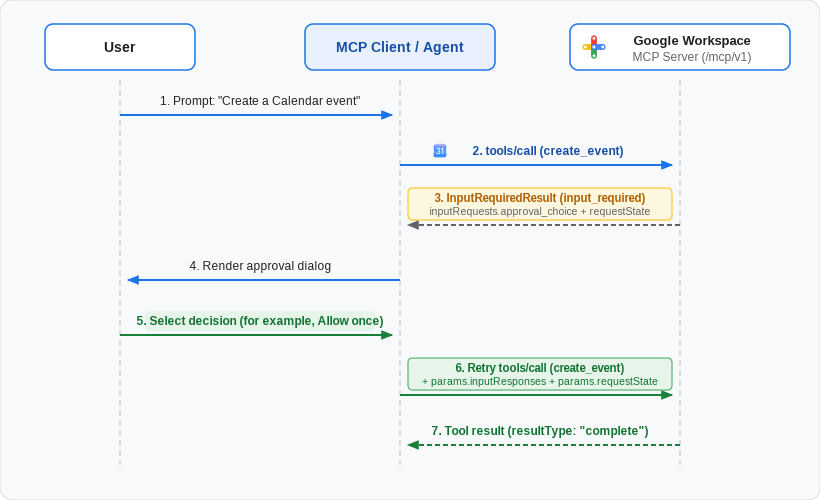
ফর্ম এলিসিটেশন লাইফসাইকেল এইসব ধাপ অনুসরণ করে:
- ব্যবহারকারীর প্রম্পট: ব্যবহারকারী এজেন্টকে কোনও অ্যাকশন পারফর্ম করতে বলেন, যেমন Calendar ইভেন্ট তৈরি করা।
- প্রাথমিক
tools/callঅনুরোধ: MCP ক্লায়েন্টcreate_event-এর মতো টুলের জন্য/mcp/v1এন্ডপয়েন্টেtools/callঅনুরোধ পাঠায় এবংparams._meta-এelicitationক্ষমতা ঘোষণা করে। InputRequiredResultউত্তর: অনুরোধ করা অ্যাকশনের জন্য ব্যবহারকারীর অনুমোদনের প্রয়োজন হলে, টুলটি চালানোর আগে সার্ভার এক্সিকিউশন পজ করে দেয়। সার্ভারresultঅবজেক্ট সহresultType: "input_required",inputRequestsম্যাপ"approval_choice"-এর মাধ্যমে কী করা, যাতেelicitation/createঅনুরোধ সহmode: "form"এবং একটি অস্বচ্ছrequestStateস্ট্রিং থাকে।- অনুমোদন ডায়ালগ: MCP ক্লায়েন্ট একটি অনুমোদন ডায়ালগ রেন্ডার করে যা
টার্গেট Google Workspace প্রোডাক্ট ও টুল, Markdown কনফার্মেশন
মেসেজ, সিদ্ধান্ত সংক্রান্ত প্রশ্ন এবং
enumওenumNamesথেকে অনুমোদিত পছন্দ দেখায়। - ব্যবহারকারীর সিদ্ধান্ত: ব্যবহারকারী অনুমোদনের বিকল্প বেছে নেন, যেমন একবার অনুমতি দিন বা অনুমতি দেবেন না।
inputResponsesওrequestState-এর সাথেtools/callআবার চেষ্টা করুন: MCP ক্লায়েন্ট একই টুলnameওarguments-এর সাথে দ্বিতীয়tools/callঅনুরোধ পাঠায়, সাথে টপ-লেভেলparams.requestStateওparams.inputResponsesফিল্ড থাকে যাতে"approval_choice"-এর জন্য ব্যবহারকারীর বেছে নেওয়া বিকল্প থাকে।- টুল এক্সিকিউশন ফলাফল: সার্ভার যাচাই করে যে
requestStateপ্রাথমিক কল থেকে সঠিক টুল আর্গুমেন্টের সাথে বাধ্য, ব্যবহারকারীর সিদ্ধান্ত মূল্যায়ন করে, টুল কল এক্সিকিউট বা শেষ করে এবংresultType: "complete"সহ একটি চূড়ান্তresultপ্রদান করে।
অনুমোদনের অনুরোধ করা হলে
টুল কল elicitation/create চ্যালেঞ্জ ট্রিগার করে কিনা তা সিস্টেম, ব্যবহারকারী এবং অ্যাডমিনিস্ট্রেটর গভর্নেন্স নীতির উপর ভিত্তি করে Google Workspace MCP সার্ভার দ্বারা ডাইনামিকভাবে নির্ধারিত হয়। নীতি মূল্যায়নের সময় নিম্নলিখিত বিষয়গুলি
বিবেচনা করা হতে পারে:
- অ্যাকশনের ধরন: যেসব অ্যাকশন কোনও অডিয়েন্সের সাথে ডেটা শেয়ার করে বা শেয়ার করা রিসোর্স পরিবর্তন করে, সেগুলি সাধারণত ব্যবহারকারীর কনফার্মেশন চায়, যদি না ব্যবহারকারী বা অ্যাডমিনিস্ট্রেটর নীতিতে অনুমতি দেওয়া থাকে। অন্যদিকে, ব্যক্তিগত ফাইল তৈরি করার মতো সেল্ফ-রাইট অ্যাকশন সাধারণত কনফার্মেশন ছাড়াই কাজ করে। ট্র্যাশ করার অ্যাকশনের জন্য সবসময় প্রতিবার কল করার সময় কনফার্মেশন প্রয়োজন হয়, স্থায়ী অনুমোদন কাজ করে না এবং ব্যবহারকারী বা অ্যাডমিনিস্ট্রেটরের নীতি অনুযায়ী রিড বা মেটাডেটা অ্যাকশনের জন্যও কনফার্মেশন প্রয়োজন হতে পারে।
- কন্টেন্টের মালিকানা ও দৃশ্যমানতা: অন্য ব্যবহারকারীর মালিকানাধীন বা ব্যবহারকারীর সংস্থার বাইরে শেয়ার করা ফাইল অ্যাক্সেস বা পরিবর্তন করার জন্য অনুমোদনের প্রয়োজন হতে পারে।
- এক্সটার্নাল প্রাপক: ব্যবহারকারীর ডোমেনের বাইরে মেসেজ পাঠানো, ফাইল শেয়ার করা বা অংশগ্রহণকারীদের আমন্ত্রণ জানানোর জন্য সাধারণত স্পষ্ট কনফার্মেশনের প্রয়োজন হয়।
- ব্যবহারকারী ও অ্যাডমিনিস্ট্রেটরের পছন্দ: আগের ট্রানজ্যাকশন থেকে সেভ করা অনুমোদনের পছন্দ বা ডোমেন-ব্যাপী অ্যাডমিনিস্ট্রেটরের নিয়ম নির্দিষ্ট টুলের জন্য কনফার্মেশন চাইতে বা বাইপাস করতে পারে।
যেহেতু প্রতিটি কলে সার্ভার-সাইডে নীতি মূল্যায়ন করা হয়, তাই আপনার ক্লায়েন্টকে অবশ্যই
যেকোনও tools/call
ইনভোকেশনে InputRequiredResult উত্তর ম্যানেজ করার জন্য প্রস্তুত থাকতে হবে। কখনও টুল সংবেদনশীলতা সংক্রান্ত নিয়ম হার্ডকোড করবেন না বা ক্লায়েন্টে অনুমোদনের সিদ্ধান্ত ক্যাশে করবেন না।
অনুমোদন সংক্রান্ত পছন্দের রেফারেন্স
requestedSchema.properties.approval_choice-এ, সার্ভার সমান্তরাল
enum এবং enumNames অ্যারে রিটার্ন করে যা বর্তমান অনুরোধের জন্য উপলভ্য পছন্দগুলি দেখায়। Google Workspace MCP সার্ভার জুড়ে, নিম্নলিখিত
enum ভ্যালু কাজ করে:
enumটি |
ইংরেজিতে ডিফল্ট enumNames লেবেল |
এক্সিকিউশনের অনুমতি দেয় | কখন অফার করা হয় এবং আচরণ |
|---|---|---|---|
ALLOW_ONCE |
একবার অনুমতি দিন | হ্যাঁ | প্রতিটি অনুমোদনের প্রম্পটে অফার করা হয়। স্থায়ী নিয়ম রেকর্ড না করে বর্তমান টুল কল একবার রান করে। |
DENY_ONCE |
অনুমতি দেবেন না | না |
প্রতিটি অনুমোদনের প্রম্পটে অফার করা হয়। স্থায়ী নিয়ম রেকর্ড না করে
UserDeniedAction সমস্যার সাথে বর্তমান টুল কল শেষ করে।
|
ALLOW_TOOL_ALWAYS |
এই টুলকে সবসময় অনুমতি দিন | হ্যাঁ | ব্যবহারকারী এবং অ্যাডমিনিস্ট্রেটর নীতি টুল-ব্যাপী স্থায়ী অনুমোদনের অনুমতি দিলে অফার করা হয়। বর্তমান কলটি চালায় এবং একই এজেন্টের থেকে একই টুলে ভবিষ্যতের কলগুলি আগে থেকে অনুমোদন করে। |
ALLOW_RESOURCE_ALWAYS |
এই ফাইল / ফোল্ডার / ড্রাইভ / ইমেল / ইভেন্ট / স্পেস / চ্যাট / গ্রুপ চ্যাট / টাস্ক / আইটেম ব্যবহারের জন্য সবসময় অনুমতি দিন | হ্যাঁ | একই ধরনের সর্বাধিক ১০০টি রিসোর্স অ্যাক্সেস বা পরিবর্তন করার সময় অফার করা হয়। কল একাধিক রিসোর্সকে টার্গেট করলে, এইসব ফাইলের জন্য সবসময় অনুমতি দিন-এর মতো বহুবচন শব্দ ব্যবহার করে। বর্তমান কল রান করে এবং একই রিসোর্স আইডিতে একই এজেন্টের থেকে আসা ভবিষ্যতের কল প্রি-অ্যাপ্রুভ করে। |
ALLOW_AUDIENCE_ALWAYS |
এই প্রাপক / এইসব প্রাপকের জন্য সবসময় অনুমতি দিন | হ্যাঁ | সর্বাধিক ১০০ জন প্রাপককে টার্গেট করে পাঠানো, শেয়ার করা এবং আমন্ত্রণ জানানোর অ্যাকশনের জন্য অফার করা হয়। বর্তমান কলটি চালায় এবং একই এজেন্টের থেকে একই প্রাপক সেটে ভবিষ্যতের কলগুলি আগে থেকে অনুমোদন করে। |
ALLOW_OWNER_ALWAYS |
এই মালিক / এইসব মালিকের জন্য সবসময় অনুমতি দিন | হ্যাঁ | সর্বাধিক ৩ জন আলাদা মালিকের আইটেম স্পর্শ করে রিড বা গ্রাউন্ডিং প্রম্পটে অফার করা হয়। বর্তমান কলটি চালায় এবং একই এজেন্টের থেকে সেইসব ব্যবহারকারীর মালিকানাধীন আইটেমের জন্য ভবিষ্যতের কলগুলি আগে থেকে অনুমোদন করে। |
যেকোনও স্বতন্ত্র InputRequiredResult-এ শুধুমাত্র সেইসব বিকল্পের সাবসেট অন্তর্ভুক্ত থাকে যা
নির্দিষ্ট টুল কলের ক্ষেত্রে প্রযোজ্য:
- ধ্বংসাত্মক ও ট্র্যাশ করার অ্যাকশন: যেসব অ্যাকশন রিসোর্স স্থায়ীভাবে মুছে দেয় বা
ট্র্যাশ করে অথবা যেসব অ্যাকশন অ্যাডমিনিস্ট্রেটর নীতি দ্বারা পরিচালিত হয়, সেগুলির ক্ষেত্রে প্রতিটি কলের জন্য কনফার্মেশন প্রয়োজন হয়, শুধুমাত্র
ALLOW_ONCEওDENY_ONCEঅফার করে। - স্কোপ করা অ্যাকশন: স্থায়ী অনুমোদনের অনুমতি দেওয়া হলে, সার্ভার
ALLOW_ONCE, প্রযোজ্য সংকীর্ণ স্কোপ যেমনALLOW_AUDIENCE_ALWAYSবাALLOW_RESOURCE_ALWAYS,ALLOW_TOOL_ALWAYS, এবংDENY_ONCEফিরিয়ে দেয়।
বর্তমান অনুরোধের জন্য হার্ডকোডিং বোতামের ভ্যালুর পরিবর্তে enum এবং enumNames-এ ফেরত আসা সঠিক বিকল্পগুলি সর্বদা রেন্ডার করুন।
ব্যবহারকারীকে সেরা অভিজ্ঞতা প্রদান করার জন্য সাজেস্ট করা পদ্ধতি
স্ট্যান্ডার্ড MCP ক্লায়েন্ট যা ফর্ম গ্রহণ করা সাপোর্ট করে তা /mcp/v1-এর সাথে
আউট অফ দ্য বক্স কাজ করে। তবে, জেনেরিক ফর্ম রেন্ডারার প্রায়ই একটি রেডিও গ্রুপ বা ড্রপ-ডাউন মেনু হিসেবে
একক-বাছাই সিদ্ধান্ত দেখায়, যা একটি আলাদা জমা দিন
বোতামের সাথে পেয়ার করা থাকে। এর জন্য অতিরিক্ত ক্লিক করতে হয় এবং টার্গেট
Google Workspace অ্যাপের প্রসঙ্গ লুকিয়ে যায়।
ফর্ম এলিসিটেশন সংক্রান্ত সেরা ব্যবহারকারীর অভিজ্ঞতা পেতে, আপনার MCP ক্লায়েন্টে নিম্নলিখিত পাঁচটি সাজেশন প্রয়োগ করুন। ১ থেকে ৩ নম্বর সাজেশন, নিম্নলিখিত অনুমোদন ডায়ালগ ইলাস্ট্রেশনে নম্বরযুক্ত কলআউটের সাথে সম্পর্কিত:
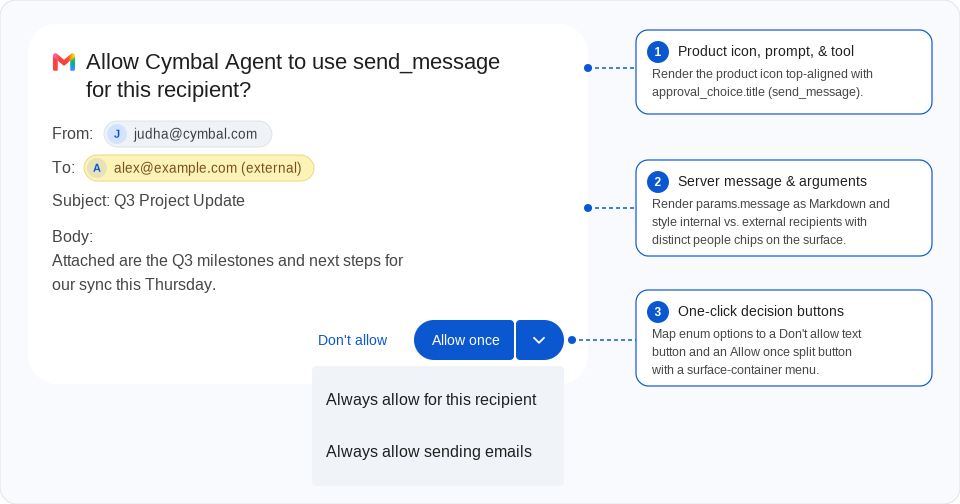
১. প্রোডাক্টের নাম, আইকন ও টুল দেখানো
এজেন্ট কোন Google Workspace প্রোডাক্ট ও টুল কল করতে চায়, তা ব্যবহারকারীকে অবিলম্বে দেখতে হবে:
- ইনিশিয়ালাইজেশন বা
server/discoverথেকে MCP সার্ভারেরserverInfoমেটাডেটা ম্যাপ করুন অথবা Google Workspace প্রোডাক্টের নাম ও আইকনেcalendarmcp.googleapis.com-এর মতো হোস্টনেমের অনুরোধ করুন। _meta-এর প্রেজেন্টেশন সংক্রান্ত ইঙ্গিতInputRequiredResult-এtitle,iconsওisConfirmation-এর মতো ঐচ্ছিক এনহ্যান্সমেন্ট হিসেবে বিবেচনা করুন। Production Google Workspace MCP সার্ভার এখনও এইসব_metaফিল্ড এমিট করে না, তাই আপনার UI-কে এগুলির উপর নির্ভর করতে হবে না।params.nameথেকে টার্গেট টুলের নাম দেখান যাতে ব্যবহারকারীরাcreate_draftওcreate_event-এর মতো অপারেশনের মধ্যে পার্থক্য করতে পারেন।
২. সার্ভার মেসেজ ও enumNames রেন্ডার করুন
আপনার ক্লায়েন্ট প্রেজেন্টেশন লেয়ার সহজ রাখুন এবং সার্ভার-প্রোভাইডেড অনুমোদন কন্টেন্ট সরাসরি রেন্ডার করুন:
params.message-কে Markdown হিসেবে রেন্ডার করুন এবংapproval_choice.titleদেখান: Google Workspace MCP সার্ভার আগে থেকেই অ্যাকশনের বিবরণinputRequests.approval_choice.params.message-এ Markdown হিসেবে ফর্ম্যাট করে এবংrequestedSchema.properties.approval_choice.title-এ লোকালাইজ করা কনফার্মেশন প্রশ্ন প্রদান করে। রেন্ডারmessageসরাসরি একটি নিরাপদ মার্কডাউন রেন্ডারার দিয়ে, কাঁচা মার্কডাউন প্রদর্শন করার পরিবর্তে প্রতীক বা কাস্টম প্রতি-টুল আর্গুমেন্ট ফরম্যাটিং লজিক লেখা, এবং প্রদর্শনtitleঅ্যাকশন বোতামের উপরে স্পষ্টভাবে।enumNamesলেবেলের সাথেenumভ্যালু পেয়ার করুন:requestedSchema.properties.approval_choiceডায়নামিকভাবে পরীক্ষা করুন।enum-এ প্রতিটি আইডেন্টিফায়ারকেenumNames-এ একই ইন্ডেক্সে মানুষের-পঠনযোগ্য লেবেলের সাথে পেয়ার করুন এবংoneOfব্যবহার করে এমন অন্যান্য MCP সার্ভারের সাথে ইন্টার্যাক্ট করলে JSON স্কিমাoneOfএন্ট্রিতে ফিরে যান।
৩. এক-ক্লিক বোতামের সাহায্যে সিদ্ধান্ত নেওয়া সহজ করুন
requestedSchema-এ একটিমাত্র enum প্রপার্টি থাকলে, রেডিও বোতামের তালিকা বা ড্রপ-ডাউন মেনু রেন্ডার করবেন না, কারণ সেক্ষেত্রে আলাদা করে জমা দিন বোতামে ক্লিক করতে হয়:
- দুটি বিকল্প যেমন
Allow onceএবংDon't allow: পাশাপাশি দুটি বোতাম দেখানো হয়। যেকোনও বোতামে ক্লিক করলে, আবার চেষ্টা করার অনুরোধ অবিলম্বে জমা পড়ে যায়। - অনুমতি দেওয়ার একাধিক বিকল্প: সার্ভার যখন
ALLOW_ONCE, এক বা একাধিক স্থায়ী অনুমতির স্কোপ যেমনALLOW_AUDIENCE_ALWAYSবাALLOW_TOOL_ALWAYSএবংDENY_ONCEফিরিয়ে দেয়, তখন একটি প্রাথমিক স্প্লিট বোতাম রেন্ডার করে যা ডিফল্ট হিসেবে একবার অনুমতি দিন বিকল্পে সেট করা থাকে এবং এর সাথে অতিরিক্ত অনুমতির বিকল্পের জন্য একটি ক্যারেট মেনু থাকে, যা আলাদা অনুমতি দেবেন না বোতামের সাথে পেয়ার করা থাকে।
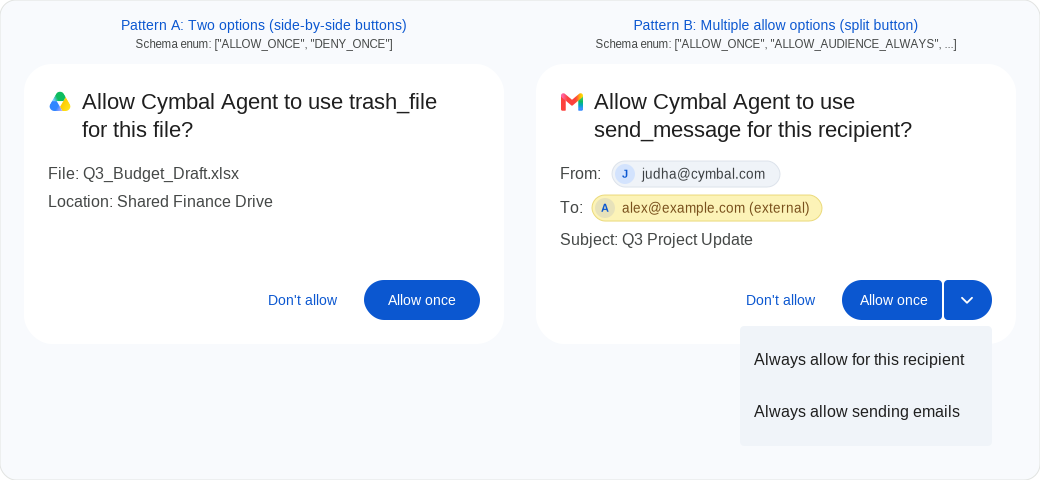
প্যাটার্ন A-তে, Drive-এর কোনও ধ্বংসাত্মক অ্যাকশন শুধুমাত্র
ALLOW_ONCE এবং DENY_ONCE ফিরিয়ে দেয়, যা ক্লায়েন্ট অনুমতি দেবেন না এবং একবার অনুমতি দিন-এর জন্য পাশাপাশি দুটি
বোতাম হিসেবে দেখায়। প্যাটার্ন খ-তে,
Gmail অ্যাকশন ALLOW_ONCE, ALLOW_AUDIENCE_ALWAYS,
ALLOW_TOOL_ALWAYS ও DENY_ONCE ফিরিয়ে দেয়, যা ক্লায়েন্ট অনুমতি
দেবেন না বোতাম হিসেবে রেন্ডার করে, এর সাথে থাকে একবার অনুমতি দিন স্প্লিট বোতাম, যার মেনু স্থায়ীভাবে অনুমতি দেওয়ার বিকল্প দেখায়।
৪. /mcp/v1-এ ডুপ্লিকেট প্রম্পট এড়িয়ে চলুন
অনেক MCP হোস্টে কোনও এক্সটার্নাল টুল এক্সিকিউট করার আগে একটি বিল্ট-ইন লোকাল কনফার্মেশন প্রম্পট অন্তর্ভুক্ত থাকে। ফর্ম এলিসিটেশন চালু থাকা অবস্থায় Google Workspace MCP সার্ভার কল করার সময়, লোকাল প্রি-এক্সিকিউশন প্রম্পট একটি অপ্রয়োজনীয় ডবল-প্রম্পট অভিজ্ঞতা তৈরি করে, কারণ সার্ভার তার নিজস্ব নীতি-সচেতন এলিসিটেশন চ্যালেঞ্জ প্রয়োগ করে।
- আপনি যদি ফর্ম এলিসিটেশন সহ আগে থেকে তৈরি MCP হোস্ট কনফিগার করেন:
/mcp/v1-এ Google Workspace MCP সার্ভারের জন্য হোস্টের লোকাল টুল কনফার্মেশন সেটিং সবসময় অনুমতি দিন-এ সেট করুন এবং সার্ভার-ইনিশিয়েটেড এলিসিটেশন ডায়ালগের উপর নির্ভর করুন। আপনার হোস্ট যদি ফর্ম এলিসিটেশন সাপোর্ট না করে এবং/mcp/v1self-এর সাথে কানেক্ট করে, তাহলে আপনি যদি এমন কলের জন্য ক্লায়েন্ট-সাইড প্রম্পট চান যা সার্ভার-সাইড অনুমোদন ট্রিগার করে না, তাহলে লোকাল টুল কনফার্মেশন চালু রাখুন। - আপনি যদি MCP হোস্ট তৈরি করেন:
*mcp.googleapis.comএবংpeople.googleapis.com-এর জন্য ফর্ম এলিসিটেশন চালু থাকলে, আপনার হোস্টের জেনেরিক প্রি-কল কনফার্মেশন ডায়ালগ বন্ধ করুন, যেমনgmailmcp.googleapis.com,calendarmcp.googleapis.com,drivemcp.googleapis.comএবংworkspacemcp.googleapis.com। সার্ভারresultType: "input_required"সহInputRequiredResultরিটার্ন করলে তবেই ব্যবহারকারীকে প্রম্পট করুন।
৫. টুল ও প্রত্যাখ্যানের জন্য এজেন্টের আচরণ গাইড করুন
রিজনিং মডেল দুইভাবে হিউম্যান-ইন-দ্য-লুপ অনুমোদন ফ্লো ভুলভাবে ব্যাখ্যা করতে পারে:
- রাইট টুল ব্যবহার করা এড়িয়ে যাওয়া: কোনও মডেল যদি অনুমান করে যে
send_message-এর মতো রাইট টুল কল করলে ব্যবহারকারীর রিভিউ ছাড়াই তা অবিলম্বে কার্যকর হয়, তাহলে ব্যবহারকারী ইমেল পাঠানোর অনুরোধ করলেও মডেলটিcreate_draft-এর মতো ড্রাফ্ট টুল ব্যবহার করতে পারে। - প্রত্যাখ্যানের পরে বিকল্প রাইটিং টুল ব্যবহার করে আবার চেষ্টা করা: ব্যবহারকারী যদি
অনুমোদন ডায়ালগে অনুমতি দেবেন না বিকল্পে ক্লিক করেন এবং সার্ভার
UserDeniedActionসমস্যার ফলাফল দেখায়, তাহলে মডেলটি প্রত্যাখ্যানকে ক্ষণস্থায়ী টুল ব্যর্থতা হিসেবে বিবেচনা করতে পারে এবং অন্য একটি রাইটিং টুল ব্যবহার করে একই লক্ষ্য পূরণ করার চেষ্টা করতে পারে, যার ফলে একটি অবাঞ্ছিত দ্বিতীয় অনুমোদন প্রম্পট ট্রিগার হয়।
দুটি সমস্যাই এড়াতে, আপনার এজেন্টের সিস্টেম প্রম্পটে নিম্নলিখিত নির্দেশাবলী অন্তর্ভুক্ত করুন:
প্রম্পট
When calling Google Workspace MCP tools:
1. Select the tool that directly matches the user's intent (for example,
   use send_message when asked to send an email). Sensitive tools
   automatically pause for user confirmation through MCP form elicitation
   before executing.
2. If a tool call fails because the user denied, declined, or canceled the
   approval request, stop immediately and acknowledge the user's decision.
   Do not retry the same action or call an alternative write tool unless
   the user explicitly asks you to do so in a new message.
ট্রান্সপোর্ট ও স্টেটলেস প্রোটোকল সংক্রান্ত প্রয়োজনীয়তা
Google Workspace MCP সার্ভার স্টেটলেস স্ট্রিমেবল HTTP-এর মাধ্যমে কাজ করে। কাস্টম MCP ক্লায়েন্ট তৈরি করার সময়, প্রতিটি অনুরোধে এই ওয়্যার সংক্রান্ত প্রয়োজনীয়তা অনুসরণ করুন:
- HTTP হেডার:
/mcp/v1-এ করা সবPOSTঅনুরোধে নিম্নলিখিত হেডার অন্তর্ভুক্ত করুন:Authorization: Bearer ACCESS_TOKENContent-Type: application/jsonAccept: application/json, text/event-streamMCP-Protocol-Version: 2026-07-28Accept-Language: BCP_47_LANGUAGE_TAGব্যবহারকারীর পছন্দের ভাষায় কনফার্মেশন মেসেজ, প্রশ্ন ওenumNamesলেবেল লোকালাইজ করতে, যেমনes-419, es;q=0.9, en;q=0.8। বাদ দেওয়া হলে, টেক্সট ডিফল্ট হিসেবেen-US-এ সেট হয়ে যায়।
- রেসপন্স কন্টেন্টের ধরন: সার্ভার ও অনুরোধের ধরনের উপর নির্ভর করে, HTTP রেসপন্স বডিকে
Content-Type: application/jsonসহ স্ট্যান্ডার্ড JSON হিসেবে অথবাContent-Type: text/event-streamসহ সার্ভার-প্রেরিত ইভেন্ট (SSE) হিসেবে ফর্ম্যাট করা যেতে পারে যেখানে JSON-RPC পেলোডdata: {...}লাইনে দেখা যায়। আপনার HTTP ট্রান্সপোর্ট পার্সারকে দুটি ফর্ম্যাটই গ্রহণ করতে হবে। - স্টেটলেস ডিসকভারি: Google Workspace MCP সার্ভার স্টেটফুল
initializeসেশন মেইনটেইন করে না। স্টার্টআপে সার্ভার মেটাডেটা ও ক্ষমতা ফেচ করতে,"method": "server/discover"ও"params": {}সহ JSON-RPC অনুরোধ পাঠান, যাresult._meta["io.modelcontextprotocol/serverInfo"]-এ সার্ভার মেটাডেটা ফেরত পাঠায়। কাস্টম কনফার্মেশন_metaইঙ্গিত যেমনisConfirmation,titleএবংiconsএখনও প্রোডাকশনInputRequiredResultউত্তরে নির্গত হয় না, তাই সবসময়_metaপ্রেজেন্টেশন ফিল্ডকে ঐচ্ছিক হিসেবে বিবেচনা করুন এবংserverInfoবা সার্ভার হোস্টনেমে ফিরে যান। - প্রতি-অনুরোধে
_metaক্ষমতা: যেহেতু ট্রান্সপোর্ট স্টেটলেস, তাই নিম্নলিখিত কী সহ প্রতিটিtools/listএবংtools/callঅনুরোধেparams-এর মধ্যে_metaঅন্তর্ভুক্ত করুন:"io.modelcontextprotocol/protocolVersion": "2026-07-28""io.modelcontextprotocol/clientInfo":{"name": "YOUR_APP_NAME","version": "VERSION"}"io.modelcontextprotocol/clientCapabilities":{"elicitation": {"form": {}}}
সমস্যা ম্যানেজ করা ও প্যারামিটার বাইন্ডিং
কোনও টুল কল ব্লক করা হলে বা আবার চেষ্টা করার সময় যাচাইকরণ ব্যর্থ হলে, সার্ভার ব্যর্থতার বিভাগের উপর নির্ভর করে টুল-লেভেল ত্রুটি ফলাফল বা টপ-লেভেল JSON-RPC ত্রুটি অবজেক্ট ফেরত পাঠায়:
UserDeniedActionএবংAdminPolicyBlock: কোনও ব্যবহারকারী অনুমোদনের প্রম্পট প্রত্যাখ্যান করলে অথবা অ্যাডমিনিস্ট্রেটর নীতি অ্যাকশনটি ব্লক করলে, সার্ভার JSON-RPCresultফিরিয়ে দেয়, যার সাথে"resultType": "complete","isError": trueএবংresult.content-এ লোকালাইজ করা ত্রুটি মেসেজ থাকে। পরিষেবা ও এনভায়রনমেন্টের জন্য চালু করা থাকলে, সার্ভারresult._meta["google.com/error"]-এ স্ট্রাকচার্ড ত্রুটি মেটাডেটাও অন্তর্ভুক্ত করে। যেহেতুresult._meta["google.com/error"]প্রতিটি পরিষেবা এবং পরিবেশ অনুযায়ী গেট করা থাকে, তাইresult._meta["google.com/error"]অনুপস্থিত থাকলে আপনার ক্লায়েন্টকে অবশ্যইresult.contentথেকে ত্রুটি মেসেজ পড়ার জন্য ফিরে যেতে হবে:UserDeniedAction: ব্যবহারকারীDENY_ONCEবেছে নিলে, অনুমোদন ফর্ম বাতিল বা প্রত্যাখ্যান করলে এটি দেখানো হয়। ডিফল্ট ইংরেজি মেসেজ হল"Action canceled. The user declined the confirmation request."AdminPolicyBlock: কোনও সংস্থার অ্যাডমিনিস্ট্রেটর নীতি এজেন্টকে অপারেশনটি করতে বাধা দিলে এটি রিটার্ন করা হয়। ডিফল্ট ইংরেজি মেসেজ হল"Action could not be completed. Your administrator has blocked third-party agents from performing this action."
JSON
{ "jsonrpc": "2.0", "id": 3, "result": { "resultType": "complete", "isError": true, "content": [ { "type": "text", "text": "Action canceled. The user declined the confirmation request." } ], "_meta": { "google.com/error": { "code": 400, "message": "Action canceled. The user declined the confirmation request.", "status": "FAILED_PRECONDITION", "details": [ { "@type": "type.googleapis.com/google.rpc.ErrorInfo", "reason": "UserDeniedAction", "domain": "mcp.googleapis.com" } ] } } } }MissingRequiredClientCapability: কোনও ক্লায়েন্ট এমনভাবে টুল কল করলে এটি রিটার্ন করা হয় যাতে/mcp/v1বা/mcp/v1self-এর মধ্যে যেকোনও একটিতে ব্যবহারকারীর কনফার্মেশন প্রয়োজন হয়, তবে_meta["io.modelcontextprotocol/clientCapabilities"]-এ ফর্ম পূরণের সুবিধা ঘোষণা করা হয় না। সার্ভার এই সমস্যাকে-32021কোড সহ টপ-লেভেল JSON-RPCerrorঅবজেক্টে এবংerror.data.requiredCapabilities-এ প্রয়োজনীয় ক্যাপাবিলিটি অবজেক্টে অনুবাদ করে:JSON
{
  "jsonrpc": "2.0",
  "id": 2,
  "error": {
    "code": -32021,
    "message": "Action could not be completed. This action requires user confirmation, which this client does not support. Use a client that supports form elicitation to perform this action.",
    "data": {
      "requiredCapabilities": {
        "elicitation": {
          "form": {}
        }
      }
    }
  }
}
প্যারামিটার-বাইন্ডিং এনফোর্সমেন্ট:
requestBindingটোকেনrequestStateক্রিপ্টোগ্রাফিকভাবে প্রাথমিক অনুমোদনের চ্যালেঞ্জকে প্রথম কলে পাঠানো সঠিক টুলarguments-এর সাথে বাইন্ড করে। ক্লায়েন্ট যদি আবার কল করার সময়params.arguments-এর কোনও ফিল্ড পরিবর্তন করে অথবা ভুলভাবে ফর্ম্যাট করা বা আনবাউন্ডparams.requestStateপাস করে, তাহলে সার্ভার হয় ভুল অনুমোদন উপেক্ষা করে নতুনInputRequiredResultচ্যালেঞ্জ রিটার্ন করে অথবা ভুল-প্যারামিটার বা ব্যর্থ-প্রি-কন্ডিশন সংক্রান্ত সমস্যা রিটার্ন করে ক্লায়েন্টকেinputResponsesছাড়া আবার চেষ্টা করার নির্দেশ দেয়।
প্রয়োগের উদাহরণ
নিম্নলিখিত এন্ড-টু-এন্ড ওয়াকথ্রু থেকে বোঝা যায় যে কীভাবে একটি MCP ক্লায়েন্ট
Calendar create_event টুল কল করে, ব্রাউজার UI বা টার্মিনাল CLI-তে সার্ভারের অনুমোদনের
প্রম্পট রেন্ডার করে এবং TypeScript ও Python-এ ব্যবহারকারীর সিদ্ধান্ত জমা দেয়,
যার পরে কোডিং এজেন্টের জন্য একটি পুনর্ব্যবহারযোগ্য এজেন্ট স্কিল থাকে।
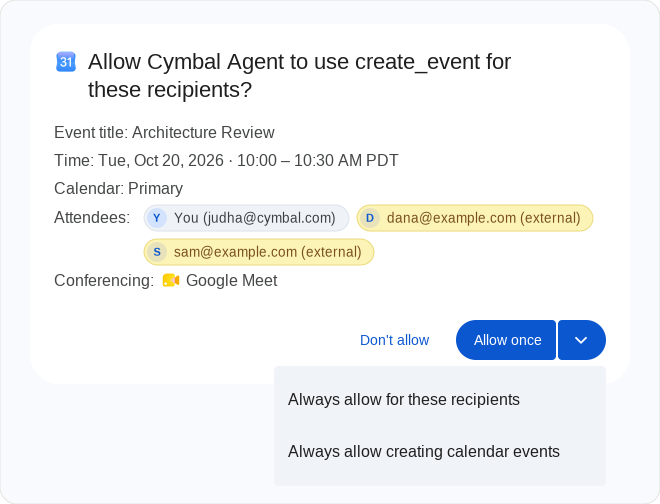
ক্লায়েন্ট অনুমোদনের সারফেস
ব্রাউজার-ভিত্তিক MCP ক্লায়েন্টে, TypeScript ইমপ্লিমেন্টেশন একটি ভিজ্যুয়াল
অনুমোদন কার্ড রেন্ডার করে, যেখানে Calendar আইকন, সার্ভার হোস্টনেম, টুলের
নাম, সার্ভার থেকে রেন্ডার করা Markdown message প্রিভিউ, কনফার্মেশন
প্রশ্ন, একটি অনুমতি দেবেন না বোতাম এবং একটি একবার অনুমতি দিন স্প্লিট বোতাম দেখানো হয়:
টার্মিনাল-ভিত্তিক MCP ক্লায়েন্টে, Python CLI ইমপ্লিমেন্টেশন একই
InputRequiredResult পেলোডকে ইন্টার্যাক্টিভ নম্বরযুক্ত প্রম্পট হিসেবে রেন্ডার করে:
CLI
=== Google Calendar (create_event) ===
Architecture Review
Tue, Oct 20 · 10:00 - 10:30 AM PDT · 🟢 No calendar conflicts
You, dana@example.com, sam@example.com
Conferencing: Google Meet

Allow Cymbal Agent to use create_event for these recipients?
  [1] Allow once (ALLOW_ONCE)
  [2] Always allow for these recipients (ALLOW_AUDIENCE_ALWAYS)
  [3] Always allow this tool (ALLOW_TOOL_ALWAYS)
  [4] Don't allow (DENY_ONCE)
Enter choice (1-4, or c to cancel):
প্রাথমিক কল এবং তথ্য বের করার জন্য উত্তর
ক্লায়েন্ট create_event টুল ব্যবহার করে ক্যালেন্ডার ইভেন্ট তৈরি করার জন্য
tools/call অনুরোধ পাঠিয়ে শুরু করে:
JSON
{
  "jsonrpc": "2.0",
  "id": 2,
  "method": "tools/call",
  "params": {
    "name": "create_event",
    "arguments": {
      "calendarId": "primary",
      "summary": "Architecture Review",
      "startTime": "2026-10-20T10:00:00",
      "endTime": "2026-10-20T10:30:00",
      "timeZone": "America/Los_Angeles",
      "attendees": [
        {
          "email": "dana@example.com"
        },
        {
          "email": "sam@example.com"
        }
      ],
      "addGoogleMeetUrl": true
    },
    "_meta": {
      "io.modelcontextprotocol/protocolVersion": "2026-07-28",
      "io.modelcontextprotocol/clientInfo": {
        "name": "Cymbal Agent",
        "version": "1.0.0"
      },
      "io.modelcontextprotocol/clientCapabilities": {
        "elicitation": {
          "form": {}
        }
      }
    }
  }
}
অনুমোদনের প্রয়োজন হলে, সার্ভার InputRequiredResult সহ উত্তর দেয়:
JSON
{
  "jsonrpc": "2.0",
  "id": 2,
  "result": {
    "resultType": "input_required",
    "inputRequests": {
      "approval_choice": {
        "method": "elicitation/create",
        "params": {
          "mode": "form",
          "message": "**Architecture Review**  \nTue, Oct 20 · 10:00 - 10:30 AM PDT · 🟢 No calendar conflicts  \nYou, dana@example.com, sam@example.com  \n**Conferencing:** Google Meet",
          "requestedSchema": {
            "type": "object",
            "required": ["approval_choice"],
            "properties": {
              "approval_choice": {
                "type": "string",
                "title": "Allow Cymbal Agent to use create_event for these recipients?",
                "enum": [
                  "ALLOW_ONCE",
                  "ALLOW_AUDIENCE_ALWAYS",
                  "ALLOW_TOOL_ALWAYS",
                  "DENY_ONCE"
                ],
                "enumNames": [
                  "Allow once",
                  "Always allow for these recipients",
                  "Always allow this tool",
                  "Don't allow"
                ]
              }
            }
          }
        }
      }
    },
    "requestState": "{\"elicitationId\":\"...\",\"requestBinding\":\"...\"}"
  }
}
InputRequiredResult রেসপন্সে নিম্নলিখিত মূল ফিল্ড অন্তর্ভুক্ত থাকে:
result.resultType: ব্যবহারকারীর ইনপুটের জন্য সার্ভার এক্সিকিউশন পজ করলে"input_required"-এ সেট করুন এবং টুল এক্সিকিউশন শেষ করলে"complete"-এ সেট করুন।result.inputRequests: অনুরোধ শনাক্তকারী দ্বারা চিহ্নিত একটি ম্যাপ"approval_choice". প্রতিটি এন্ট্রিতে"method": "elicitation/create"এবং"mode": "form"সহparamsঅবজেক্ট আছে।_metaপ্রেজেন্টেশন সংক্রান্ত ইঙ্গিত:isConfirmation,titleএবংicons-এর মতো ঐচ্ছিক ফিল্ড এখনও প্রোডাকশনInputRequiredResultউত্তরে নির্গত হয় না।_metaফিল্ডকে সবসময় ঐচ্ছিক হিসেবে বিবেচনা করুন এবংserverInfoবা সার্ভার হোস্টনেম থেকে প্রোডাক্টের নাম ও আইকন সমাধান করুন।inputRequests.approval_choice.params.message: সার্ভার দ্বারা জেনারেট করা অ্যাকশনের মার্কডাউন-ফর্ম্যাট করা প্রিভিউ অথবা টুলটি আলাদা প্রিভিউ কার্ড জেনারেট না করলে কনফার্মেশন প্রশ্ন।inputRequests.approval_choice.params.requestedSchema: একটি JSON স্কিমা অবজেক্ট যারproperties.approval_choiceসংজ্ঞায় নিম্নলিখিত ফিল্ডগুলি রয়েছে:title: স্থানীয় ভাষায় কনফার্মেশন প্রশ্ন, যেমন"Allow Cymbal Agent to use create_event for these recipients?"। অনুরোধে আপনি_meta["io.modelcontextprotocol/clientInfo"].nameপ্রদান করলে, সার্ভার এই প্রশ্নে আপনার অ্যাপ্লিকেশনের নাম অন্তর্ভুক্ত করে।enum:ApprovalChoiceশনাক্তকারীর একটি অর্ডার করা অ্যারে, যেমনALLOW_ONCE,ALLOW_AUDIENCE_ALWAYS,ALLOW_TOOL_ALWAYSএবংDENY_ONCE।enumNames:enum-এর প্রতিটি এন্ট্রির সাথে সম্পর্কিত স্থানীয়করণ করা মানুষের-পঠনযোগ্য লেবেলের সমান্তরাল অ্যারে, যেমনAllow once,Always allow for these recipients,Always allow this toolএবংDon't allow।
result.requestState: সার্ভারেরelicitationIdএবং ক্রিপ্টোগ্রাফিকrequestBindingটোকেন সহ একটি অস্বচ্ছ JSON-এনকোড করা স্ট্রিং। আবার কল করার সময় আপনাকেparams.requestState-এ এই স্ট্রিং অপরিবর্তিত রেখে ইকো করতে হবে।
আবার চেষ্টা করা, প্রত্যাখ্যান করা ও বাতিল করার পে-লোড
ব্যবহারকারী অনুমতি দেওয়ার বিকল্প বেছে নেওয়ার পরে, একই name ও arguments সহ
দ্বিতীয় tools/call অনুরোধ পাঠান এবং params-এর মধ্যে টপ-লেভেল ফিল্ড হিসেবে
requestState ও inputResponses পাস করুন:
JSON
{
  "jsonrpc": "2.0",
  "id": 3,
  "method": "tools/call",
  "params": {
    "name": "create_event",
    "arguments": {
      "calendarId": "primary",
      "summary": "Architecture Review",
      "startTime": "2026-10-20T10:00:00",
      "endTime": "2026-10-20T10:30:00",
      "timeZone": "America/Los_Angeles",
      "attendees": [
        {
          "email": "dana@example.com"
        },
        {
          "email": "sam@example.com"
        }
      ],
      "addGoogleMeetUrl": true
    },
    "requestState": "{\"elicitationId\":\"...\",\"requestBinding\":\"...\"}",
    "inputResponses": {
      "approval_choice": {
        "action": "accept",
        "content": {
          "approval_choice": "ALLOW_ONCE"
        }
      }
    },
    "_meta": {
      "io.modelcontextprotocol/protocolVersion": "2026-07-28",
      "io.modelcontextprotocol/clientInfo": {
        "name": "Cymbal Agent",
        "version": "1.0.0"
      },
      "io.modelcontextprotocol/clientCapabilities": {
        "elicitation": {
          "form": {}
        }
      }
    }
  }
}
MCP এলিসিটেশন স্পেসিফিকেশন ফর্মের ভ্যালু জমা দেওয়া
এবং ডায়ালগ বাতিল করার মধ্যে পার্থক্য করে। আপনি params.inputResponses-এ ব্যবহারকারীর নেতিবাচক সিদ্ধান্ত
দুটি উপায়ে দেখাতে পারেন:
DENY_ONCEবিকল্প জমা দেওয়া: ব্যবহারকারীDENY_ONCE-এর সাথে সংশ্লিষ্ট অনুমতি দেবেন না বোতামে ক্লিক করলে,"content": {"approval_choice": "DENY_ONCE"}-এর সাথে"action": "accept"পাঠান:JSON
{
  "jsonrpc": "2.0",
  "id": 3,
  "method": "tools/call",
  "params": {
    "name": "create_event",
    "arguments": {
      "calendarId": "primary",
      "summary": "Architecture Review",
      "startTime": "2026-10-20T10:00:00",
      "endTime": "2026-10-20T10:30:00",
      "timeZone": "America/Los_Angeles",
      "attendees": [
        {
          "email": "dana@example.com"
        },
        {
          "email": "sam@example.com"
        }
      ],
      "addGoogleMeetUrl": true
    },
    "requestState": "{\"elicitationId\":\"...\",\"requestBinding\":\"...\"}",
    "inputResponses": {
      "approval_choice": {
        "action": "accept",
        "content": {
          "approval_choice": "DENY_ONCE"
        }
      }
    },
    "_meta": {
      "io.modelcontextprotocol/protocolVersion": "2026-07-28",
      "io.modelcontextprotocol/clientInfo": {
        "name": "Cymbal Agent",
        "version": "1.0.0"
      },
      "io.modelcontextprotocol/clientCapabilities": {
        "elicitation": {
          "form": {}
        }
      }
    }
  }
}
ডায়ালগ বাতিল বা প্রত্যাখ্যান করা: ব্যবহারকারী যদি অনুমতি দেওয়ার বিকল্প বেছে না নিয়ে ডায়ালগ বন্ধ বা বাতিল করে দেন, তাহলে
"action": "decline"বা"action": "cancel"পাঠান এবংcontentফিল্ড বাদ দিন:JSON
"inputResponses": {
  "approval_choice": {
    "action": "cancel"
  }
}
উভয় ক্ষেত্রেই, সার্ভার উত্তরটিকে DENY_ONCE হিসেবে বিবেচনা করে, টুল
এক্সিকিউশন শেষ করে এবং একটি টুল সংক্রান্ত সমস্যার ফলাফল প্রদান করে।
TypeScript ওয়েব ক্লায়েন্ট
নিম্নলিখিত TypeScript উদাহরণটি সরাসরি InputRequiredResult পেলোড থেকে Markdown message, কনফার্মেশন
প্রশ্ন এবং অনুমোদিত বিকল্পগুলি এক্সট্র্যাক্ট করে,
ঐচ্ছিক _meta ইঙ্গিত বা সার্ভার হোস্টনেম থেকে প্রোডাক্টের নাম সমাধান করে,
এবং ব্যবহারকারীর সিদ্ধান্তের সাথে tools/call রিপ্লে করে:
TypeScript
const PROTOCOL_VERSION = "2026-07-28";
const CLIENT_INFO = { name: "Cymbal Agent", version: "1.0.0" };
const MAX_ELICITATION_ROUNDS = 3;

const HOST_TITLES: Record<string, string> = {
  "gmailmcp.googleapis.com": "Gmail",
  "calendarmcp.googleapis.com": "Google Calendar",
  "drivemcp.googleapis.com": "Google Drive",
  "docsmcp.googleapis.com": "Google Docs",
  "sheetsmcp.googleapis.com": "Google Sheets",
  "slidesmcp.googleapis.com": "Google Slides",
  "chatmcp.googleapis.com": "Google Chat",
  "people.googleapis.com": "Google Contacts",
  "tasksmcp.googleapis.com": "Google Tasks",
  "workspacemcp.googleapis.com": "Google Workspace",
};

interface ElicitationOption {
  value: string;
  label: string;
}

export interface ElicitationCardModel {
  requestKey: string;
  serverTitle: string;
  serverIconUrl?: string;
  toolName: string;
  markdownMessage: string;
  questionTitle: string;
  decisionFieldKey: string;
  denyOption?: ElicitationOption;
  primaryAllowOption?: ElicitationOption;
  secondaryAllowOptions: ElicitationOption[];
}

function buildBaseMeta(): Record<string, unknown> {
  return {
    "io.modelcontextprotocol/protocolVersion": PROTOCOL_VERSION,
    "io.modelcontextprotocol/clientInfo": CLIENT_INFO,
    "io.modelcontextprotocol/clientCapabilities": {
      elicitation: { form: {} },
    },
  };
}

/**
 * Extracts a UI view model directly from an InputRequiredResult response.
 * Render card.markdownMessage with a safe Markdown renderer in your UI.
 */
export function extractCardModel(
  rpcResult: Record<string, any>,
  toolName: string,
  serverHost = "workspacemcp.googleapis.com",
): ElicitationCardModel | null {
  const inputRequests: Record<string, any> = rpcResult.inputRequests ?? {};
  const requestEntry = Object.entries(inputRequests).find(
    ([, req]: [string, any]) =>
      req?.method === "elicitation/create" && req?.params?.mode === "form",
  );
  if (!requestEntry) {
    return null;
  }
  const [requestKey, elicitationReq] = requestEntry;

  const reqMeta = elicitationReq.params?._meta ?? {};
  const resultMeta = rpcResult._meta ?? {};
  const serverInfo = resultMeta["io.modelcontextprotocol/serverInfo"] ?? {};
  const icons: Array<{ src: string; mimeType?: string }> =
    reqMeta.icons ?? resultMeta.icons ?? serverInfo.icons ?? [];
  const preferredIcon =
    icons.find((icon) => icon.mimeType === "image/svg+xml") ?? icons[0];

  const properties: Record<string, any> =
    elicitationReq.params?.requestedSchema?.properties ?? {};
  const firstProperty = Object.entries(properties)[0];
  if (!firstProperty) {
    return null;
  }
  const [decisionFieldKey, fieldSchema] = firstProperty as [
    string,
    Record<string, any>,
  ];

  let options: ElicitationOption[] = [];
  if (Array.isArray(fieldSchema.enum)) {
    const enumNames: string[] = Array.isArray(fieldSchema.enumNames)
      ? fieldSchema.enumNames
      : [];
    options = fieldSchema.enum.map((val: string, idx: number) => ({
      value: val,
      label: enumNames[idx] ?? val,
    }));
  } else if (Array.isArray(fieldSchema.oneOf)) {
    options = fieldSchema.oneOf.map((opt: any) => ({
      value: opt.const,
      label: opt.title ?? opt.const,
    }));
  }

  const denyOption = options.find((opt) => opt.value.startsWith("DENY"));
  const allowOptions = options.filter(
    (opt) => !opt.value.startsWith("DENY"),
  );

  return {
    requestKey,
    serverTitle:
      reqMeta.title ??
      resultMeta.title ??
      serverInfo.title ??
      serverInfo.name ??
      HOST_TITLES[serverHost] ??
      "Google Workspace",
    serverIconUrl: preferredIcon?.src,
    toolName,
    markdownMessage:
      elicitationReq.params?.message ?? "Confirm this action.",
    questionTitle: fieldSchema.title ?? "Confirm this action?",
    decisionFieldKey,
    denyOption,
    primaryAllowOption: allowOptions[0],
    secondaryAllowOptions: allowOptions.slice(1),
  };
}

/**
 * Executes tools/call and replays with requestState and inputResponses
 * when the server returns an InputRequiredResult.
 */
export async function handleToolCallWithElicitation(
  sendRpc: (payload: Record<string, unknown>) => Promise<Record<string, any>>,
  promptUserInUi: (card: ElicitationCardModel) => Promise<string | null>,
  toolName: string,
  toolArgs: Record<string, unknown>,
  serverHost = "calendarmcp.googleapis.com",
): Promise<Record<string, any>> {
  let requestId = 1;
  let response = await sendRpc({
    jsonrpc: "2.0",
    id: requestId,
    method: "tools/call",
    params: {
      name: toolName,
      arguments: structuredClone(toolArgs),
      _meta: buildBaseMeta(),
    },
  });

  for (let round = 0; round < MAX_ELICITATION_ROUNDS; round++) {
    const result = response.result ?? {};
    if (result.resultType !== "input_required") {
      return response;
    }

    const card = extractCardModel(result, toolName, serverHost);
    if (!card) {
      return response;
    }

    const selectedValue = await promptUserInUi(card);
    const userResponse = selectedValue
      ? {
          action: "accept",
          content: { [card.decisionFieldKey]: selectedValue },
        }
      : { action: "cancel" };

    requestId += 1;
    response = await sendRpc({
      jsonrpc: "2.0",
      id: requestId,
      method: "tools/call",
      params: {
        name: toolName,
        arguments: structuredClone(toolArgs),
        ...(result.requestState !== undefined
          ? { requestState: result.requestState }
          : {}),
        inputResponses: {
          [card.requestKey]: userResponse,
        },
        _meta: buildBaseMeta(),
      },
    });
  }

  return response;
}
Python CLI ক্লায়েন্ট
Python
import copy
import re
from typing import Any

PROTOCOL_VERSION = "2026-07-28"
CLIENT_INFO = {"name": "Cymbal CLI Agent", "version": "1.0.0"}
MAX_ELICITATION_ROUNDS = 3
HOST_TITLES = {
    "gmailmcp.googleapis.com": "Gmail",
    "calendarmcp.googleapis.com": "Google Calendar",
    "drivemcp.googleapis.com": "Google Drive",
    "docsmcp.googleapis.com": "Google Docs",
    "sheetsmcp.googleapis.com": "Google Sheets",
    "slidesmcp.googleapis.com": "Google Slides",
    "chatmcp.googleapis.com": "Google Chat",
    "people.googleapis.com": "Google Contacts",
    "tasksmcp.googleapis.com": "Google Tasks",
    "workspacemcp.googleapis.com": "Google Workspace",
}

def build_base_meta() -> dict[str, Any]:
  """Returns the required per-request _meta block for /mcp/v1 calls."""
  return {
      "io.modelcontextprotocol/protocolVersion": PROTOCOL_VERSION,
      "io.modelcontextprotocol/clientInfo": CLIENT_INFO,
      "io.modelcontextprotocol/clientCapabilities": {
          "elicitation": {"form": {}}
      },
  }

def strip_markdown(text: str) -> str:
  """Minimal example that strips basic Markdown for terminal display."""
  text = re.sub(r"\[([^\]]+)\]\(([^)]+)\)", r"\1 (\2)", text)
  text = re.sub(r"\*\*(.*?)\*\*", r"\1", text)
  return re.sub(r"`([^`]+)`", r"\1", text)

def extract_decision_options(
    requested_schema: dict[str, Any],
) -> tuple[str | None, str, list[dict[str, str]]]:
  """Extracts the property key, question title, and options from schema."""
  properties = requested_schema.get("properties", {})
  first_entry = next(iter(properties.items()), None)
  if first_entry is None:
    return None, "Confirm this action?", []

  field_key, field_schema = first_entry
  question_title = field_schema.get("title", "Confirm this action?")

  if "enum" in field_schema:
    enum_values = field_schema.get("enum", [])
    enum_names = field_schema.get("enumNames", [])
    options = [
        {
            "value": val,
            "label": enum_names[idx] if idx < len(enum_names) else val,
        }
        for idx, val in enumerate(enum_values)
    ]
  elif "oneOf" in field_schema:
    options = [
        {
            "value": item["const"],
            "label": item.get("title", item["const"]),
        }
        for item in field_schema["oneOf"]
    ]
  else:
    options = []
  return field_key, question_title, options

def prompt_user_in_cli(
    elicitation_req: dict[str, Any],
    result_meta: dict[str, Any],
    tool_name: str,
    server_host: str = "calendarmcp.googleapis.com",
) -> dict[str, Any]:
  """Renders a CLI approval prompt and returns the inputResponses entry."""
  params = elicitation_req.get("params", {})
  req_meta = params.get("_meta", {})
  server_info = result_meta.get(
      "io.modelcontextprotocol/serverInfo", {}
  )
  server_title = (
      req_meta.get("title")
      or result_meta.get("title")
      or server_info.get("title")
      or server_info.get("name")
      or HOST_TITLES.get(server_host, "Google Workspace MCP")
  )
  message = strip_markdown(params.get("message", "Confirm this action."))
  field_key, question_title, options = extract_decision_options(
      params.get("requestedSchema", {})
  )
  if not field_key or not options:
    return {"action": "cancel"}

  print(f"\n=== {server_title} ({tool_name}) ===")
  print(message)
  print(f"\n{strip_markdown(question_title)}")
  for idx, opt in enumerate(options, start=1):
    print(f"  [{idx}] {opt['label']} ({opt['value']})")

  choice = input(
      f"Enter choice (1-{len(options)}, or c to cancel): "
  ).strip()
  try:
    selected_idx = int(choice) - 1
    if 0 <= selected_idx < len(options):
      selected_value = options[selected_idx]["value"]
      return {
          "action": "accept",
          "content": {field_key: selected_value},
      }
  except ValueError:
    pass

  return {"action": "cancel"}

def handle_tool_call_with_elicitation(
    send_rpc_fn: Any, tool_name: str, tool_args: dict[str, Any]
) -> dict[str, Any]:
  """Executes tools/call and retries with inputResponses when elicited."""
  base_params = {
      "name": tool_name,
      "arguments": copy.deepcopy(tool_args),
      "_meta": build_base_meta(),
  }
  request_id = 1
  response = send_rpc_fn(
      {
          "jsonrpc": "2.0",
          "id": request_id,
          "method": "tools/call",
          "params": copy.deepcopy(base_params),
      }
  )

  for _ in range(MAX_ELICITATION_ROUNDS):
    result = response.get("result", {})
    if result.get("resultType") != "input_required":
      return response

    input_requests = result.get("inputRequests", {})
    if not isinstance(input_requests, dict) or not input_requests:
      return response

    result_meta = result.get("_meta", {})
    input_responses: dict[str, Any] = {}
    for req_key, req in input_requests.items():
      if (
          isinstance(req, dict)
          and req.get("method") == "elicitation/create"
          and req.get("params", {}).get("mode") == "form"
      ):
        input_responses[req_key] = prompt_user_in_cli(
            req, result_meta, tool_name
        )

    if not input_responses:
      return response

    request_id += 1
    retry_params = copy.deepcopy(base_params)
    request_state = result.get("requestState")
    if request_state is not None:
      retry_params["requestState"] = request_state
    retry_params["inputResponses"] = input_responses
    response = send_rpc_fn(
        {
            "jsonrpc": "2.0",
            "id": request_id,
            "method": "tools/call",
            "params": retry_params,
        }
    )

  return response
এজেন্টের স্কিল
আপনার এজেন্ট হারনেসের জন্য ফর্ম এলিসিটেশন প্রয়োগ করতে আপনার কোডিং এজেন্টের জন্য একটি দক্ষতা বা প্রম্পট হিসেবে নিম্নলিখিতগুলি ব্যবহার করুন:
প্রম্পট
---
name: google-workspace-mcp-elicitation
metadata:
  version: "1.0.0"
  category: GoogleWorkspace
description: >-
  Implements Model Context Protocol (MCP) form elicitation
  (`elicitation/create`) for Human-in-the-Loop (HITL) approvals with Google
  Workspace MCP servers (Gmail, Calendar, Drive, Docs, Sheets, Slides, Chat,
  Contacts). Use when adding HITL confirmation prompts to an agent, handling
  Stateless HTTP (`2026-07-28`) Multi Round-Trip Requests
  (`resultType: "input_required"`), mapping elicitation schemas or `_meta`
  hints to UI controls, or troubleshooting Workspace MCP `401`/`403`/`405`
  and capability errors. Don't use for general OAuth 2.0 app setup unrelated
  to MCP or for authoring custom MCP servers.
---

# Implementing Google Workspace MCP Form Elicitation (HITL)

Use this guide to support **Model Context Protocol (MCP) Form Elicitation**
for Human-in-the-Loop (HITL) confirmations when integrating **Google
Workspace MCP servers** into an AI agent.

Rather than duplicating the MCP specification, this guide references the
canonical specs and focuses on **Google Workspace server nuances**, **mapping
protocol message fields to UI**, **upcoming Google Workspace `_meta`
extensions**, and **practical integration boundaries**:

- [MCP Elicitation Specification][mcp-elicitation]
- [MCP Multi Round-Trip Requests (MRTR) Specification][mcp-mrtr]
- [MCP Lifecycle & Initialization][mcp-life]
- [MCP Icons Utility Specification][mcp-icon]

---

## 1. Prerequisites, Nuances & Architectural Boundaries

### Prerequisites (Assumed Configured)

This skill focuses on **handling elicitation requests and mapping them to
UI**. It assumes the host application already has Google Workspace MCP
connectivity and OAuth 2.0 configured. If not yet set up, follow the
[Google Workspace MCP Server Configuration Guide][ws-mcp-setup] to configure:

1. **Google Cloud Project & Service Enablement**: A Google Cloud project with
   the target Google Workspace APIs and MCP endpoints enabled.
2. **OAuth 2.0 Bearer Authentication**: An OAuth 2.0 flow issuing user access
   tokens with the required service scopes, passed as
   `Authorization: Bearer {access_token}` on MCP HTTP `POST` requests. When
   using standard 3-legged OAuth 2.0, the OAuth client configuration must
   have the **"Used by an agent"** checkbox enabled.

Canonical MCP server URLs and default OAuth 2.0 scopes by service:

- **Gmail** (`https://gmailmcp.googleapis.com/mcp/v1`):
  - `https://www.googleapis.com/auth/gmail.modify`
  - `https://www.googleapis.com/auth/gmail.settings.basic`
- **Google Calendar** (`https://calendarmcp.googleapis.com/mcp/v1`):
  - `https://www.googleapis.com/auth/calendar.events`
  - `https://www.googleapis.com/auth/calendar.readonly`
- **Google Drive** (`https://drivemcp.googleapis.com/mcp/v1`):
  - `https://www.googleapis.com/auth/drive`
- **Google Docs** (`https://docsmcp.googleapis.com/mcp/v1`):
  - `https://www.googleapis.com/auth/documents`
- **Google Sheets** (`https://sheetsmcp.googleapis.com/mcp/v1`):
  - `https://www.googleapis.com/auth/spreadsheets`
- **Google Slides** (`https://slidesmcp.googleapis.com/mcp/v1`):
  - `https://www.googleapis.com/auth/presentations`
- **Google Chat** (`https://chatmcp.googleapis.com/mcp/v1`):
  - `https://www.googleapis.com/auth/chat.messages`
- **Google Contacts (preview)** (`https://people.googleapis.com/mcp/v1`):
  - `https://www.googleapis.com/auth/contacts`
- **Google Tasks** (`https://tasksmcp.googleapis.com/mcp/v1`):
  - `https://www.googleapis.com/auth/tasks`
- **Universal Search** (`https://workspacemcp.googleapis.com/mcp/v1`):
  - `https://www.googleapis.com/auth/gmail.readonly`
  - `https://www.googleapis.com/auth/drive.readonly`
  - `https://www.googleapis.com/auth/calendar.readonly`
  - `https://www.googleapis.com/auth/chat.messages.readonly`
  - `https://www.googleapis.com/auth/chat.spaces.readonly`
  - `https://www.googleapis.com/auth/chat.memberships.readonly`

### Key Nuances for Google Workspace MCP Servers

- **Markdown Messages**: Google Workspace MCP servers format `params.message`
  as **GitHub-Flavored Markdown** (headings, bold labels, bulleted lists of
  parameters, links). Render `params.message` with a Markdown renderer rather
  than plain text.
- **Selective Server-Side Gate (Writes & Sensitive/Shared Reads)**: Workspace
  form elicitation selectively gates sensitive operations on the server, such
  as **high-impact write operations** (for example, sending an email,
  scheduling a meeting with external attendees, modifying a shared document)
  as well as **reads of sensitive or externally shared data**, rather than
  triggering on every tool call or validating general agent intent. Because
  these sensitive actions already trigger a server-side `elicitation/create`
  prompt, enabling unconditional client-side pre-tool approvals (such as
  `needsApproval: true` on all tools) can double-prompt the user. Factor this
  server-side gate into your risk assessment when deciding whether to
  auto-approve tool calls, gate specific tools, or require pre-execution
  approval across the board.

### Architectural Boundaries: Do Not Fight the Framework

Pausing an in-flight tool call, presenting a prompt to a user, and resuming
execution cuts across the host application's language, agent framework, MCP
SDK, and UI surface. **Do not fight the host framework or re-implement MCP
from scratch**. Reuse what the framework and SDK already provide to the
fullest extent possible:

- **Reuse Built-In Framework & MCP SDK Elicitation Support First**: Before
  writing protocol or transport code, inspect the host application's agent
  framework and MCP client library for existing MCP tool adapters, capability
  negotiation, elicitation callbacks, and HITL interrupt/checkpoint
  mechanisms. Wire elicitation through those built-in extension points rather
  than replacing the SDK with a hand-rolled JSON-RPC client or custom
  tool-calling loop.
- **Stateless HTTP (`2026-07-28`) MRTR & Adapting Stateful Implementations**:
  Google Workspace MCP servers use Stateless HTTP (`2026-07-28`)
  [Multi Round-Trip Requests (MRTR)][mcp-mrtr] (`POST`-only, where `GET`
  returns `405`) to deliver `elicitation/create` prompts inside `tools/call`
  responses via `result.resultType === "input_required"`
  (`result.requestState`, `result.inputRequests`) and resume when
  `tools/call` is replayed with `params.requestState` and
  `params.inputResponses`. Supporting older stateful transports is not
  required for Google Workspace, but existing elicitation support in an SDK
  or host application might assume stateful server-initiated streams
  (`2025-11-25`). Verify how the existing client handles elicitation: if it
  already implements Stateless HTTP MRTR, use it directly. If it only listens
  for stateful server-to-client stream requests (or strips MRTR fields during
  typed deserialization), adapt the transport layer so `input_required`
  responses route through the SDK's registered elicitation handler and replay
  `tools/call` with `requestState` and `inputResponses`.
- **Elicitation Rendering Is a Presentation-Layer Concern**: Keep protocol
  and transport handling decoupled from UI rendering. Pass the structured
  elicitation request (`message`, `requestedSchema`, and `_meta`) to the host
  application's presentation layer rather than embedding UI markup inside
  agent or transport code, and render it using the application's native UI
  paradigm rather than assuming HTML.
- **Suspension & Resumption Principles**: Regardless of how the host
  application is deployed, suspending and resuming an elicitation must
  satisfy three behaviors:
  1. *Yield Cleanly Waiting for User Input*: Pause the in-flight tool
     execution while waiting for the user's decision, using the host
     runtime's native mechanism (such as awaiting an async callback/channel
     in-memory or yielding via the framework's checkpoint/interrupt
     primitive).
  2. *Preserve Correlation & Continuation Context*: Retain the correlation ID
     (`requestId`), opaque server `requestState`, and original tool call
     context (`name`, `arguments`, and any prior `inputResponses`) across the
     pause, in memory if the session stays alive or in durable storage if the
     process or turn can terminate before the user responds.
  3. *Accumulate Multi-Round-Trip Responses*: When replaying `tools/call`
     with `requestState` and `inputResponses`, keep accumulating responses
     across rounds if the server returns subsequent `input_required` stages
     until the tool returns a final `CallToolResult`.

---

## 2. Phase 1: Core Form Elicitation Support (Priority)

Start by supporting standard [MCP Form Elicitation][mcp-elicitation]
end-to-end using your framework's and MCP SDK's built-in primitives so any
schema renders and resolves cleanly on the host UI surface.

### Step 1: Enable Elicitation & Register Handler

1. Register an `elicitation/create` handler through your agent framework or
   MCP client SDK, and ensure the client advertises the `elicitation`
   capability during initialization (and in per-request capability metadata
   when using Stateless HTTP discovery):

   ```json
 {
   "capabilities": {
     "elicitation": {}
   }
 }
 ```

2. Verify that your client handles Stateless HTTP (`2026-07-28`)
   [MRTR][mcp-mrtr] (`result.resultType === "input_required"`). If the SDK
   does not yet handle `input_required` natively, adapt the transport so each
   entry in `result.inputRequests` (preserving `_meta` hints) is passed to
   your registered elicitation handler and `tools/call` is replayed with
   `params.requestState` and `params.inputResponses`.

### Step 2: Render Prompt on the Host UI Surface & Collect User Input

1. **Map Protocol Fields to the Host UI Surface**:
   - Render `params.message` using a **Markdown renderer appropriate for the
     host surface** (for example, GFM component in a web UI, formatted text
     widgets in a chat card, or terminal Markdown in a CLI/TUI).
   - Present input controls for `params.requestedSchema.properties` covering
     all [MCP Elicitation supported schema types][mcp-schema-types]
     (`string`, `number`, `integer`, `boolean`, and `enum` / `oneOf`).
2. **Collect the User's Decision**: Format the user's response per the
   [MCP Elicitation response specification][mcp-elicitation]:
   - **Submit Form / Select Option**:
     `{ "action": "accept", "content": { ... } }` *(Note: When the schema
     presents explicit `ALLOW_*` and `DENY_*` enum options, selecting a
     `DENY_*` option is still submitted with `action: "accept"` and the
     selected enum value in `content`.)*
   - **Decline**: `{ "action": "decline" }`
   - **Cancel / Dismiss**: `{ "action": "cancel" }`

### Step 3: Return the Elicitation Result

Return the `{ action, content }` result from your elicitation handler (or
pass it to your framework's resume mechanism) so the MCP client completes the
tool call and returns the final `CallToolResult` to the agent.

---

## 3. Phase 2: Optional UX Enhancements & Custom `_meta` Extensions

Once generic form elicitation works, you can optionally enhance the UX for
single-enum prompts and Google Workspace `_meta` extensions on your target UI
surface. Always treat `_meta` fields as optional (`undefined`-safe) so the UI
degrades cleanly to the Phase 1 form.

> [!NOTE]
> Google Workspace MCP servers define custom `_meta` presentation attributes
> (`isConfirmation`, `title`, `icons`, `learn_more_url`), but do not yet emit
> them in production responses. **Enhancement A** works today for `<= 4` enum
 options using standard schema fields, whereas **Enhancements B and C** rely
> on upcoming `_meta` attributes. **Only implement Enhancements B and C if
> explicitly directed to by the user.**

### Enhancement A: Single-Enum Auto-Submitting Action Buttons / Quick Choices

Most HITL confirmations ask a single multiple-choice question (where
`requestedSchema.properties` has **1 property** defining `enum` or `oneOf`).

- **When to Apply**: Present a single-enum schema as direct auto-submitting
  action buttons (or single-step quick choices in a TUI/CLI) **if and only
  if**:
  1. The single enum has **`<= 4` options**, **or**
  2. The prompt is explicitly flagged as a HITL confirmation
     (`params._meta?.isConfirmation === true`). Otherwise (for example, a
     generic single-enum prompt with `> 4` options), fall back to the
     standard Phase 1 selection form/menu.
- **Option Labels, Hierarchy & Submission**: Use `enumNames[i]` or
  `oneOf[i].title` (falling back to a human-readable format of the enum
  value) as the option label, assign visual emphasis in enum order
  (`1st option -> primary`, `2nd option -> secondary`,
  `3rd+ option -> tertiary`), and immediately submit
  `{ "action": "accept", "content": { "{field_name}": "{selected_value}" } }`
  when chosen, even when the user selects a `DENY_*` option.
- **Hide or De-Emphasize Redundant Decline/Cancel Controls**: Because HITL
  schemas already include explicit `DENY_*` enum options (which are
  functionally equivalent to declining/canceling on the server), presenting
  separate generic `Decline` and `Cancel` buttons alongside `Allow` and
  `Deny` enum choices is redundant. In this single-enum action view, omit a
  separate `Decline` control and map `{ "action": "cancel" }` only to a
  de-emphasized dismiss affordance appropriate to the surface (such as a
  corner close `x` icon / `Escape` key in a GUI, or a `[c] Cancel` key in a
  TUI).

### Enhancement B: Dynamic Button Stacking (Only If Explicitly Requested)

- **When to Apply**: On surfaces that support grouped/split buttons (or
  grouped action menus), stack related options **if and only if**
  `params._meta?.isConfirmation === true`. Never stack options based on enum
  names alone when `isConfirmation` is not `true`.
- **Do Not Assume a Fixed Enum Set (`ALLOW_*` / `DENY_*` Convention)**: The
  exact approval enum values are not a fixed list and might change over time
  (for example, `ALLOW_ONCE`, `ALLOW_SESSION`, `ALWAYS_ALLOW`, `DENY_ONCE`),
  following the `ALLOW_*` and `DENY_*` convention.
  1. **Group by Action Prefix (`ALLOW` vs. `DENY`)**: Group options
     dynamically by their action token/prefix, normalizing leading modifiers
     like `ALWAYS_` or `ONCE_` so all `ALLOW` variants (such as `ALLOW_ONCE`,
     `ALLOW_SESSION`, `ALWAYS_ALLOW`) stack into one group and `DENY`
     variants (such as `DENY_ONCE`) group into another.
  2. **Intra-Group Order**: Within each group, use the **first option in the
     schema's enum order** as the primary action, and place remaining options
     in that group (if any) into its secondary/split menu in enum order
     (rendering a standalone button/action when a group has only one option).
  3. **Inter-Group Hierarchy**: Order groups by their first appearance in the
     enum and assign visual emphasis accordingly (`1st group -> primary`,
     `2nd group -> secondary`, `3rd+ group -> tertiary`).

### Enhancement C: Custom `_meta` & `serverInfo` Hints (Only If Requested)

When present in the elicitation request's `params._meta` or the MCP server's
`Implementation` metadata (`serverInfo` from [MCP initialization][mcp-life]
or discovery), map these optional presentation fields to the confirmation
prompt (adapting to what the host UI surface supports):

- **Title (`params._meta?.title`)**: Use `params._meta.title` if non-empty.
  Otherwise fall back to `"{server_name} confirmation"`.
- **Service Icon (`params._meta?.icons` / `serverInfo?.icons`)**: Check
  `params._meta?.icons?.[0]?.src` first, then fall back to
  `serverInfo?.icons?.[0]?.src` (per the [MCP Icons specification][mcp-icon]).
  On graphical/card surfaces, render the icon only when a URL is present and
  hide it on load error.
- **Learn More Link (`params._meta?.learn_more_url`)**: If present, display a
  subtle "Learn more" link or URL reference in the prompt footer pointing to
  `learn_more_url`.

---

## 4. Verification & Troubleshooting

### Verification: Triggering Conditions & Expected Behavior

Because Google Workspace MCP servers apply **context-aware server-side
policies**, **not every tool call or write operation triggers an
elicitation**:

- **Absence of an Elicitation Is Often Expected**: Operations confined to the
  user's own private resources (for example, creating a Calendar event with
  no attendees, or editing a private unshared Google Doc) might execute
  immediately without an elicitation prompt. Do **not** treat a tool call
  succeeding without an elicitation as a bug in your client implementation.
- **Scenarios That Reliably Trigger Elicitation**: To test your elicitation
  flow end-to-end, use prompts that cross external or shared-resource
  boundaries, such as:
  - **Google Calendar**: Creating or updating an event **with an external
    participant** (such as `dana@example.com`), or deleting an event with
    attendees.
  - **Gmail**: Sending an email to a recipient, deleting a draft, or creating
    a mail filter.
  - **Google Docs / Drive**: Updating **a shared document** or reading
    sensitive/externally shared content.
- **End-to-End Validation Checklist**: Run a test prompt against one of the
  scenarios above, verify each item below, and if any step fails, diagnose
  the failure using the troubleshooting list below, apply the fix, and re-run
  the check until all items pass:
  - [ ] `params.message` renders as formatted Markdown on the target UI
    surface.
  - [ ] Approving (`accept`) replays `tools/call` with `requestState` and
    `inputResponses` and returns the completed tool output.
  - [ ] Declining (`decline`) or canceling (`cancel`) resolves cleanly
    without hanging the agent turn.

### Troubleshooting Definitive Errors (`40x` & Protocol Failures)

- **Server refuses to execute `tools/call` stating elicitation is not
  supported**:
  - *Root cause*: Definitive signal that the client did not advertise
    `elicitation` capability correctly.
  - *Resolution*: Ensure `capabilities: { elicitation: {} }` is sent during
    initialization (and in per-request client capability metadata if using
    Stateless HTTP discovery), and verify that your 3-legged OAuth 2.0 client
    has **"Used by an agent"** enabled.
- **`tools/call` returns `resultType: "input_required"` as raw tool output
  (no prompt shown)**:
  - *Root cause*: Definitive signal that the server triggered an elicitation,
    but the MCP client did not handle the Stateless HTTP (`2026-07-28`)
    [MRTR][mcp-mrtr] response (or stripped MRTR fields during typed
    deserialization).
  - *Resolution*: Verify your MCP client library supports Stateless HTTP MRTR
    (`2026-07-28`) and preserves `resultType`, `requestState`,
    `inputRequests`, and `_meta`, or handle `input_required` and replay
    `tools/call` with `requestState` and `inputResponses`.
- **`401 Unauthorized`**:
  - *Root cause*: Missing, expired, or invalid OAuth 2.0 access token.
  - *Resolution*: Verify `Authorization: Bearer {access_token}` is attached
    to every MCP HTTP `POST` request and refresh expired tokens.
- **`403 Forbidden` (Standard JSON error body)**:
  - *Root cause*: OAuth token is missing required Google Workspace scopes for
    the target server/tool, or the user lacks resource permission.
  - *Resolution*: Compare granted token scopes against the default OAuth 2.0
    scopes in Section 1 and re-consent.
- **`403 Forbidden` (Response body contains `{"result":{"tools":[...]}}`
  schema dump)**:
  - *Root cause*: Google Cloud project has not enabled the target Workspace
    MCP service (or is not allowlisted). Because unauthenticated `tools/list`
    discovery is permitted on the endpoint, the server returns the full
    `tools/list` schema payload in the HTTP `403` error body while keeping
    the `403` status code.
  - *Resolution*: Enable the corresponding MCP service on the OAuth client's
    Google Cloud project per the [Workspace MCP setup guide][ws-mcp-setup].
    Summarize this error in logs to avoid dumping 50KB+ of tool schemas.
- **`405 Method Not Allowed`**:
  - *Root cause*: MCP client or SDK sent an HTTP `GET` request (probing for
    legacy SSE) instead of `POST`.
  - *Resolution*: Google Workspace MCP endpoints are Stateless HTTP
    `POST`-only. Configure the transport for `POST`-only or short-circuit
    `GET` probes locally with `405`.

[mcp-elicitation]:
  https://modelcontextprotocol.io/specification/latest/client/elicitation
[mcp-mrtr]:
  https://modelcontextprotocol.io/specification/latest/basic/patterns/mrtr
[mcp-life]:
  https://modelcontextprotocol.io/specification/latest/basic/lifecycle
[mcp-icon]:
  https://modelcontextprotocol.io/specification/latest/basic/utilities/icons
[mcp-schema-types]:
  https://modelcontextprotocol.io/specification/latest/client/elicitation#supported-schema-types
[ws-mcp-setup]:
  https://developers.google.com/workspace/guides/configure-mcp-servers