

تستخدم خوادم بروتوكول سياق النموذج (MCP) في Google Workspace الموافقات التي تتطلب المشاركة البشرية والتي يطلبها الخادم لحماية بيانات المستخدمين قبل أن ينفّذ وكيل الذكاء الاصطناعي إجراءات، مثل إرسال رسالة إلكترونية أو تعديل حدث في التقويم أو تعديل ملف أو نقله إلى المهملات أو قراءة البيانات والبيانات الوصفية. وتخضع هذه الإجراءات أيضًا لسياسات المستخدمين والمشرفين. تطلب الخوادم هذه الموافقات باستخدام استخلاص وضع نموذج MCP.
على سبيل المثال، قد يظهر مربّع حوار الموافقة على إرسال رسالة Gmail على النحو التالي:
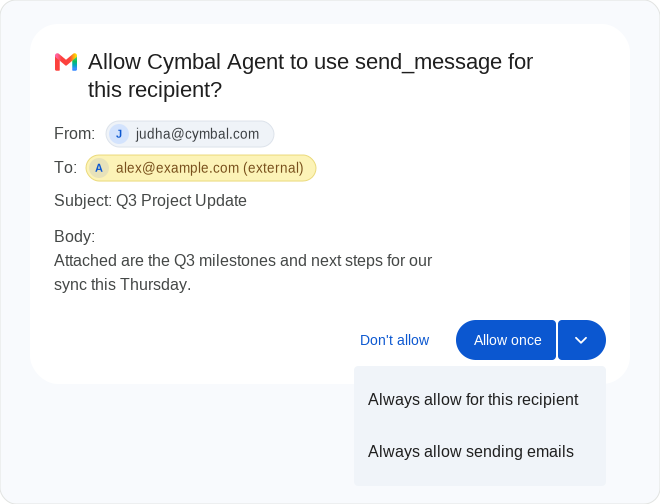
يشرح هذا الدليل كيفية الربط بنقطة نهاية /mcp/v1، وتصميم مربّعات حوار الموافقة لتقديم أفضل تجربة للمستخدم، وتنفيذ بروتوكول استخلاص النماذج بدون حالة في مضيف MCP أو عميل MCP أو نظام توجيه الوكلاء.
قبل البدء
قبل تنفيذ ميزة "استخلاص النماذج" في بروتوكول MCP أو ضبطها، عليك إكمال المتطلبات الأساسية وتحديد ما إذا كان مضيف أو عميل MCP يحتاج إلى دعم مخصّص للاستخلاص، ومراجعة نقاط نهاية الخادم.
المتطلبات الأساسية
قبل تنفيذ ميزة "استخلاص النماذج" في مضيف أو عميل MCP مخصّص، يجب إكمال متطلبات الإعداد التالية:
- تفعيل واجهات برمجة التطبيقات وخوادم MCP في مشروع Google Cloud نفسه: أنشِئ معرّف عميل OAuth 2.0 في مشروع Google Cloud نفسه الذي تفعّل فيه واجهات برمجة التطبيقات المستهدَفة في Google Workspace ونقاط نهاية خادم MCP. اختَر استخدام هذا العميل لوكيل مستنِد إلى الذكاء الاصطناعي عند إنشاء عميل OAuth. للحصول على تعليمات كاملة، يُرجى الاطّلاع على مقالة ضبط خوادم MCP في Google Workspace.
- طلب نطاقات OAuth 2.0 المطلوبة لأدواتك المستهدَفة: يتطلّب استدعاء
أداة باستخدام
tools/callرمز دخول OAuth 2.0Bearerيتضمّن النطاق المطلوب لتلك الأداة، على الرغم من أنّtools/listيعرض الأدوات المتاحة بشكل مستقل عن نطاقات الرموز المميّزة. يُرجى مراجعة صفحة النظرة العامة على مرجع MCP الخاص بالخادم لمعرفة نطاقات OAuth المطلوبة لكل أداة.
التحقّق مما إذا كنت بحاجة إلى تنفيذ ميزة "استخلاص المعلومات من النماذج"
ننصحك بالربط بنقطة نهاية /mcp/v1 مع استخلاص نموذج MCP لكي يتمكّن وكيلك من الوصول إلى المجموعة الكاملة من أدوات ونتائج Google Workspace. تعتمد الحاجة إلى كتابة رمز برمجي على طريقة إنشاء
مضيف MCP وعميل MCP:
- إعداد مضيف MCP مُعدّ مسبقًا: إذا كنت تربط تطبيق مضيف MCP مُعدّ مسبقًا، مثل Google Antigravity أو Claude Desktop، يدعم استخلاص النماذج من خلال MCP، لن تحتاج إلى كتابة رمز استخلاص النماذج:
- اتصِل بنقطة نهاية
/mcp/v1. للاطّلاع على خطوات الإعداد، يُرجى مراجعة مقالة ضبط خوادم MCP في Google Workspace. - اضبط إعدادات تأكيد الأداة المحلية المضمّنة في المضيف على السماح دائمًا لخوادم MCP في Google Workspace على
/mcp/v1كي لا يُطلب من المستخدمين تأكيد الإجراء نفسه مرتين. - إذا كان مضيف MCP المُعدّ مسبقًا لا يتيح استخراج النماذج بعد، يمكنك
الاتصال بنقطة نهاية
/mcp/v1selfالاحتياطية المحدودة، التي تعرض الأدوات المفيدة بدون استخراج النماذج، مع أنّ بعض الطلبات المحدّدة قد تتطلّب الموافقة.
- اتصِل بنقطة نهاية
- دمج حزمة تطوير البرامج (SDK) لعميل MCP أو إطار عمل الوكيل في مضيف MCP: إذا
كنت تستخدم مكتبة عميل MCP أو إطار عمل الوكيل مثل حزمة تطوير
الوكيل (ADK) التي تتعامل مع استخلاص النماذج في طبقة البروتوكول، فستظل
بحاجة إلى ربط معالج الاستخلاص بواجهة مستخدم مضيف MCP أو واجهة سطر الأوامر
(CLI). يُرجى تنفيذ اقتراحات واجهة المستخدم الخاصة بالموافقة في
هذا الدليل للحصول على أفضل تجربة للمستخدم على
/mcp/v1. - إنشاء عميل ومضيف مخصّصين لبروتوكول MCP: إذا كنت بصدد إنشاء عملية دمج خاصة بك لعميل ومضيف بروتوكول MCP، عليك تنفيذ كل من بروتوكول استخلاص النماذج بدون حالة واقتراحات واجهة المستخدم للموافقة في هذا الدليل للربط بـ
/mcp/v1.
نقاط نهاية الخادم
توفّر خوادم MCP في Google Workspace وخادم MCP في "البحث الشامل" المتوفرة للجمهور العام نقطة نهاية /mcp/v1 الأساسية ونقطة نهاية احتياطية محدودة لـ /mcp/v1self:
| نقطة نهاية | عناوين URL للخادم | متطلبات استخلاص النماذج | الأدوات المتاحة |
|---|---|---|---|
/mcp/v1 |
|
نقطة النهاية الأساسية المقترَحة استخدِمها مع استخلاص mode: "form".
|
تتيح هذه السياسة الوصول إلى جميع الأدوات ومجموعات النتائج الكاملة للخادم، بما في ذلك الأدوات التي تتطلّب دائمًا موافقة المستخدم بموجب السياسة التلقائية. |
/mcp/v1self |
|
نقطة النهاية الاحتياطية قد تتطلّب بعض الطلبات المحدّدة استخراج النماذج حسب السياسة والموارد المستهدَفة. |
يتم حذف الأدوات التي تتطلّب دائمًا الموافقة بموجب السياسة التلقائية،
ويتم عرض الأدوات المفيدة فقط بدون استخلاص النماذج، مثل
update_doc. تعرض طرق البحث والقائمة، مثل list_threads، فقط المجموعة الفرعية من النتائج التي يمكن الوصول إليها بدون موافقة بدلاً من طلب الوصول الكامل.
|
استخدِم /mcp/v1 مع ميزة "استخلاص المعلومات من النماذج" كلما أمكن، واحتفظ بـ /mcp/v1self
لمضيفي MCP الذين لا يمكنك إضافة ميزة "استخلاص المعلومات من النماذج" إليهم. إذا طلب العميل أداة بطريقة تتطلّب موافقة المستخدم على أي من نقطتَي النهاية بدون الإشارة إلى إتاحة استخلاص النماذج، يحظر الخادم الطلب ويعرض الخطأ MissingRequiredClientCapability.
للاطّلاع على الأدوات المتاحة في /mcp/v1 و/mcp/v1self لكل خدمة، يُرجى مراجعة صفحة النظرة العامة على المراجع الخاصة بأدوات الخادم:
- مرجع Gmail MCP
- مرجع بروتوكول MCP في Drive
- مرجع MCP في "مستندات Google"
- مرجع بروتوكول سياق النموذج (MCP) في "جداول بيانات Google"
- مرجع MCP في "العروض التقديمية من Google"
- مرجع MCP في "تقويم Google"
- مرجع بروتوكول سياق النموذج (MCP) في Chat
- مرجع MCP الخاص بـ Universal Search
آلية عمل استخراج النماذج
تستخدم خوادم MCP في Google Workspace مسارًا لطلب إعادة المحاولة بدون حالة وباتصال واحد، وذلك استنادًا إلى مواصفات استخلاص المعلومات من MCP بتاريخ 28 يوليو 2026.
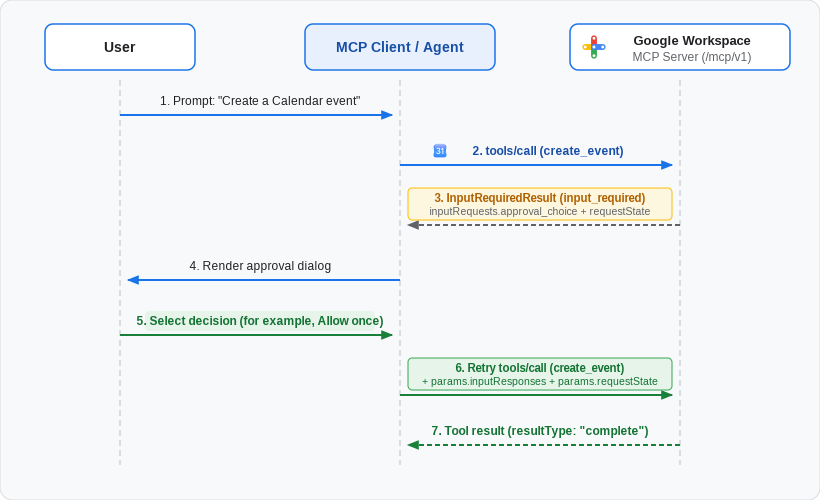
تتّبع دورة حياة استخلاص النماذج الخطوات التالية:
- طلب المستخدم: يطلب المستخدم من الوكيل تنفيذ إجراء، مثل إنشاء حدث في التقويم.
- طلب
tools/callالأولي: يرسل عميل MCP طلبtools/callإلى نقطة النهاية/mcp/v1لأداة مثلcreate_eventويعلن عن إمكانيةelicitationفيparams._meta. InputRequiredResultيجب اتخاذ إجراء: عندما يتطلّب الإجراء المطلوب موافقة المستخدم، يوقف الخادم التنفيذ مؤقتًا قبل تشغيل الأداة. يعرض الخادم عنصرresultمعresultType: "input_required"، وهو خريطةinputRequestsتم ترميزها بواسطة"approval_choice"وتحتوي على طلبelicitation/createمعmode: "form"وسلسلةrequestStateغير واضحة.- مربّع حوار الموافقة: يعرض عميل MCP مربّع حوار موافقة يعرض منتج وأداة Google Workspace المستهدَفين، ورسالة تأكيد Markdown، وسؤال القرار، والخيارات المسموح بها من
enumوenumNames. - قرار المستخدم: يحدّد المستخدم خيار الموافقة، مثل السماح لمرة واحدة أو عدم السماح.
- إعادة محاولة تنفيذ
tools/callباستخدامinputResponsesوrequestState: يرسل عميل بروتوكول MCP طلبtools/callثانيًا باستخدام الأداة نفسهاnameوarguments، بالإضافة إلى حقلَيparams.requestStateوparams.inputResponsesعلى المستوى الأعلى اللذين يحتويان على خيار المستخدم المحدّد لـ"approval_choice". - نتيجة تنفيذ الأداة: يتحقّق الخادم من أنّ
requestStateمرتبط بوسيطات الأداة نفسها من الطلب الأولي، ويقيّم قرار المستخدم، وينفّذ طلب الأداة أو ينهيه، ويعرضresultنهائيًا معresultType: "complete".
عند طلب الموافقة
يتم تحديد ما إذا كان استدعاء الأداة يؤدي إلى ظهور طلب elicitation/create
بشكل ديناميكي من خلال خادم MCP في Google Workspace استنادًا إلى سياسات الإدارة الخاصة بالنظام والمستخدم
والمشرف. يمكن أن يأخذ تقييم السياسة في الاعتبار العوامل التالية:
- نوع الإجراء: تتطلّب إجراءات الكتابة التي تشارك البيانات مع الجمهور أو تعدّل الموارد المشتركة تأكيدًا من المستخدم تلقائيًا ما لم تسمح بها سياسة المستخدم أو المشرف، في حين يتم تنفيذ عمليات الكتابة الذاتية، مثل إنشاء ملف خاص، بدون تأكيد تلقائيًا. تتطلب إجراءات النقل إلى المهملات دائمًا تأكيدًا لكل مكالمة بدون موافقة مستمرة، ويمكن أن تتطلب إجراءات القراءة أو البيانات الوصفية أيضًا تأكيدًا بناءً على سياسة المستخدم أو المشرف.
- ملكية المحتوى ومستوى عرضه: قد يتطلّب الوصول إلى الملفات التي يملكها مستخدمون آخرون أو تعديلها أو مشاركتها خارج مؤسسة المستخدم الحصول على موافقة.
- المستلِمون الخارجيون: يتطلّب إرسال الرسائل أو مشاركة الملفات أو دعوة المشاركين من خارج نطاق المستخدم عادةً تأكيدًا صريحًا.
- إعدادات المستخدم والمشرف المفضّلة: يمكن أن تتطلّب إعدادات الموافقة المفضّلة المحفوظة من المعاملات السابقة أو قواعد المشرف على مستوى النطاق تأكيدًا لأدوات معيّنة أو أن تتجاوزها.
بما أنّ تقييم السياسة يتم على جهة الخادم في كل طلب، يجب أن يكون العميل مستعدًا للتعامل مع استجابة InputRequiredResult في أي استدعاء لـ tools/call. لا تضع قواعد حساسية الأداة أو قرارات الموافقة على ذاكرة التخزين المؤقت في رمز العميل.
مرجع خيارات الموافقة
في requestedSchema.properties.approval_choice، يعرض الخادم مصفوفات enum وenumNames متوازية تمثّل الخيارات المتاحة للطلب الحالي. في خوادم MCP في Google Workspace، تتوفّر قيم enum التالية:
قيمة enum |
تصنيف enumNames التلقائي باللغة الإنجليزية |
يسمح بالتنفيذ | وقت العرض والسلوك |
|---|---|---|---|
ALLOW_ONCE |
السماح مرّة واحدة | نعم | يظهر هذا الخيار في كل طلب موافقة. يؤدي هذا الإجراء إلى تشغيل طلب الأداة الحالي مرة واحدة بدون تسجيل قاعدة دائمة. |
DENY_ONCE |
عدم السماح | لا |
يظهر هذا الخيار في كل طلب موافقة. يؤدي هذا الإجراء إلى إنهاء طلب الأداة الحالي مع ظهور خطأ UserDeniedAction بدون تسجيل قاعدة ثابتة.
|
ALLOW_TOOL_ALWAYS |
السماح دائمًا لهذه الأداة | نعم | يتم عرض هذا الخيار عندما تسمح سياسات المستخدم والمشرف بالموافقة المستمرة على مستوى الأداة. يتم تنفيذ الطلب الحالي والموافقة مسبقًا على الطلبات المستقبلية للأداة نفسها من الوكيل نفسه. |
ALLOW_RESOURCE_ALWAYS |
مسموح باستخدامه دومًا لهذا الملف / المجلد / مساحة التخزين السحابي / الرسالة الإلكترونية / الحدث / المساحة / المحادثة / المحادثة الجماعية / المهمة / العنصر | نعم | يتم تقديمها عند تعديل ما يصل إلى 100 مورد من النوع نفسه أو الوصول إليها. يستخدم صيغة الجمع، مثل مسموح باستخدامه دومًا لهذه الملفات عندما يستهدف الطلب موارد متعددة. يؤدي هذا الخيار إلى تنفيذ الطلب الحالي والموافقة مسبقًا على الطلبات المستقبلية من الوكيل نفسه على أرقام تعريف الموارد نفسها. |
ALLOW_AUDIENCE_ALWAYS |
السماح دائمًا لهذا المستلِم / لهؤلاء المستلِمين | نعم | تتوفّر هذه الميزة لإجراءات الإرسال والمشاركة والدعوة التي تستهدف ما يصل إلى 100 مستلِم. يتم إجراء المكالمة الحالية والموافقة مسبقًا على المكالمات المستقبلية من الوكيل نفسه إلى مجموعة المستلِمين نفسها. |
ALLOW_OWNER_ALWAYS |
السماح دائمًا لهذا المالك / لهؤلاء المالكين | نعم | يتم تقديمها عند قراءة الطلبات أو ربطها بمصادر خارجية تتناول عناصر من ما يصل إلى 3 مالكين مختلفين. يتم تنفيذ الطلب الحالي والموافقة مسبقًا على الطلبات المستقبلية من الوكيل نفسه للعناصر التي يملكها هؤلاء المستخدمون. |
يتضمّن أي InputRequiredResult فردي فقط المجموعة الفرعية من الخيارات التي
تنطبق على طلب الأداة المحدّد:
- الإجراءات المدمّرة وإجراءات النقل إلى المهملات: الإجراءات التي تؤدي إلى حذف الموارد نهائيًا أو نقلها إلى المهملات، أو الإجراءات التي تخضع لسياسة مشرف تتطلّب التأكيد على كل طلب، لا تقدّم سوى
ALLOW_ONCEوDENY_ONCE. - الإجراءات المحدودة النطاق: عندما تكون الموافقات الدائمة مسموحًا بها، يعرض الخادم
ALLOW_ONCE، والنطاق الضيق الساري مثلALLOW_AUDIENCE_ALWAYSأوALLOW_RESOURCE_ALWAYSوALLOW_TOOL_ALWAYSوDENY_ONCE.
يجب دائمًا عرض الخيارات المحددة التي تم عرضها في enum وenumNames للطلب الحالي بدلاً من ترميز قيم الأزرار بشكل ثابت.
الممارسات المقترَحة للحصول على أفضل تجربة للمستخدم
تعمل برامج MCP العادية التي تتيح استخلاص النماذج تلقائيًا مع
/mcp/v1. ومع ذلك، غالبًا ما تعرض أدوات عرض النماذج العامة قرارات الاختيار الفردي كمجموعة أزرار اختيار أو قائمة منسدلة مقترنة بزر إرسال منفصل، ما يتطلب نقرات إضافية ويخفي سياق تطبيق Google Workspace المستهدف.
للحصول على أفضل تجربة مستخدم في ما يتعلّق باستخراج النماذج، ننصحك بتطبيق الاقتراحات الخمسة التالية في عميل MCP. تتوافق التوصيات من 1 إلى 3 مع وسائل الشرح المرقمة في الرسم التوضيحي التالي لمربع حوار الموافقة:
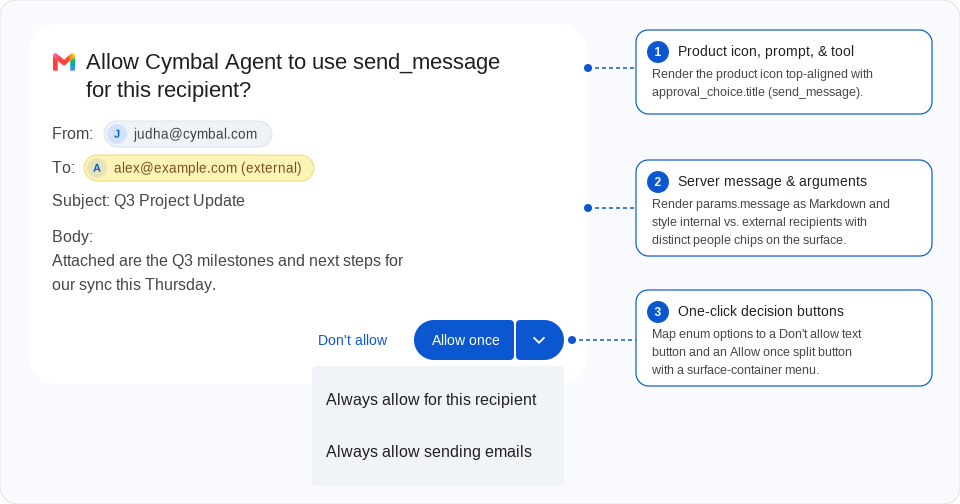
1. عرض أسماء المنتجات والرموز والأدوات
يجب أن يرى المستخدمون على الفور منتج وأداة Google Workspace التي يريد الوكيل استدعاءها:
- يمكنك ربط البيانات الوصفية
serverInfoلخادم MCP من عملية الإعداد أوserver/discover، أو اسم مضيف الطلب مثلcalendarmcp.googleapis.com، باسم منتج Google Workspace ورمزه. - يجب التعامل مع تلميحات العرض التقديمي
_metaفيInputRequiredResult، مثلtitleوiconsوisConfirmation، على أنّها تحسينات اختيارية. Production Google Workspace MCP servers don't emit these_metafields yet, so your UI shouldn't depend on them. - عرض اسم الأداة المستهدَفة من
params.nameليتمكّن المستخدمون من التمييز بين عمليات مثلcreate_draftوcreate_event
2. عرض رسائل الخادم وenumNames
اجعل طبقة العرض لدى العميل بسيطة واعرض محتوى الموافقة الذي يوفّره الخادم مباشرةً:
- عرض
params.messageبتنسيق Markdown وعرضapproval_choice.title: تنسِّق خوادم MCP في Google Workspace تفاصيل الإجراءات بتنسيق Markdown فيinputRequests.approval_choice.params.messageوتقدّم سؤال تأكيد مترجَمًا فيrequestedSchema.properties.approval_choice.title. يجب عرضmessageمباشرةً باستخدام أداة عرض Markdown آمنة بدلاً من عرض رموز Markdown الأولية أو كتابة منطق مخصّص لتنسيق الوسيطات لكل أداة، وعرضtitleبوضوح فوق أزرار الإجراءات. - إقران قيم
enumبتصنيفاتenumNames: يمكنك فحصrequestedSchema.properties.approval_choiceبشكل ديناميكي. يجب إقران كل معرّف فيenumبالتصنيف الذي يمكن لشخص عادي قراءته في الفهرس نفسه فيenumNames، والرجوع إلى إدخالاتoneOfفي JSON Schema في حال التفاعل مع خوادم MCP الأخرى التي تستخدمoneOf.
3- تبسيط القرارات باستخدام أزرار بنقرة واحدة
عندما يحتوي requestedSchema على سمة تعداد واحدة، تجنَّب عرض قائمة أزرار اختيار أو قائمة منسدلة تتطلّب النقر على إرسال بشكل منفصل:
- خياران مثل
Allow onceوDon't allow: يتم عرض زرَّين جنبًا إلى جنب. يؤدي النقر على أي من الزرين إلى إرسال طلب إعادة المحاولة على الفور. - خيارات متعددة للسماح: عندما يعرض الخادم
ALLOW_ONCE، يعرض نطاق واحد أو أكثر من نطاقات السماح الدائمة، مثلALLOW_AUDIENCE_ALWAYSأوALLOW_TOOL_ALWAYSوDENY_ONCE، زر تقسيم أساسي يتم ضبطه تلقائيًا على السماح مرة واحدة مع قائمة علامة الإقحام لخيارات السماح الإضافية، مقترنة بزر عدم السماح منفصل.
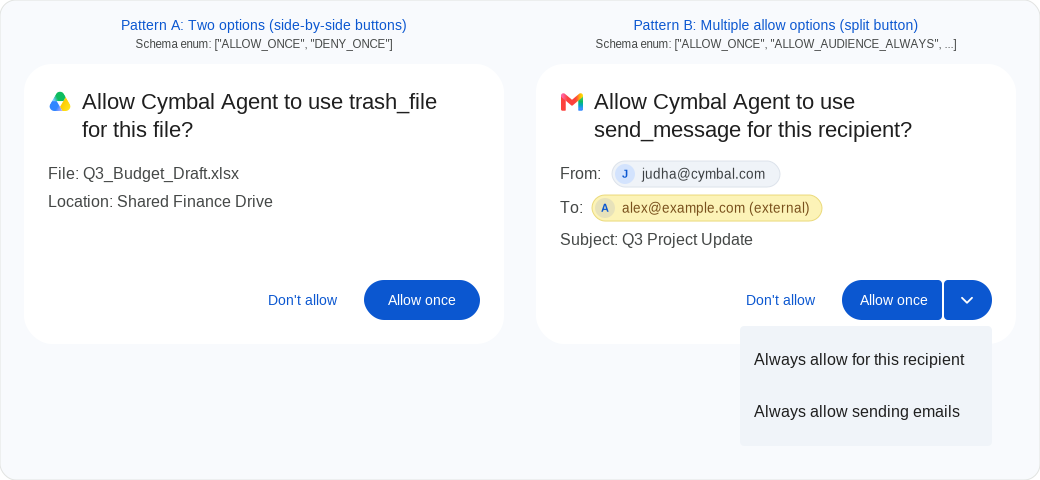
في النمط "أ"، يؤدي إجراء مدمّر في Drive إلى عرض ALLOW_ONCE وDENY_ONCE فقط، ويعرضهما العميل كزرَّين متجاورَين لـ عدم السماح والسماح لمرة واحدة. وفي النمط "ب"، يعرض إجراء Gmail القيم ALLOW_ONCE وALLOW_AUDIENCE_ALWAYS وALLOW_TOOL_ALWAYS وDENY_ONCE، والتي يعرضها العميل كزر عدم السماح بجانب زر تقسيم السماح مرة واحدة الذي تعرض قائمته خيارات السماح الدائمة.
4. تجنُّب الطلبات المكرّرة على "/mcp/v1"
تتضمّن العديد من مضيفات MCP طلب تأكيد محليًا مدمجًا قبل تنفيذ أي أداة خارجية. عند استدعاء خوادم MCP في Google Workspace مع تفعيل ميزة استخلاص النماذج، تؤدي الطلبات المحلية قبل التنفيذ إلى تجربة طلب مزدوجة زائدة عن الحاجة لأنّ الخادم يفرض تحدي الاستخلاص الخاص به والمتوافق مع السياسات.
- في حال ضبط مضيف بروتوكول سياق النموذج (MCP) مُعدّ مسبقًا مع ميزة استخلاص النماذج: اضبط إعداد تأكيد الأداة المحلية للمضيف لخوادم بروتوكول سياق النموذج (MCP) في Google Workspace على
/mcp/v1على مسموح باستخدامه دومًا، واعتمد على مربّع حوار الاستخلاص الذي يبدأه الخادم. إذا كان المضيف لا يتيح استخلاص النماذج ويتصل بـ/mcp/v1self، يجب إبقاء تأكيدات الأدوات المحلية مفعَّلة إذا أردت تلقّي طلبات من جهة العميل للمكالمات التي لا تتطلّب موافقة من جهة الخادم. - إذا كنت تنشئ مضيفًا لبروتوكول MCP: يمكنك إيقاف مربّع حوار التأكيد العام قبل المكالمة في المضيف عند تفعيل ميزة استخراج البيانات من النماذج لـ
*mcp.googleapis.comوpeople.googleapis.com، مثلgmailmcp.googleapis.comوcalendarmcp.googleapis.comوdrivemcp.googleapis.comوworkspacemcp.googleapis.com. يجب عدم مطالبة المستخدم إلا عندما يعرض الخادمInputRequiredResultمعresultType: "input_required".
5- توجيه سلوك الوكيل في ما يتعلّق بالأدوات وحالات الرفض
يمكن أن تسيء نماذج الاستدلال تفسير مسارات الموافقة التي تتطلّب مشاركة بشرية بطريقتَين:
- تجنُّب أدوات الكتابة بشكل استباقي: إذا افترض النموذج أنّ استدعاء أداة كتابة مثل
send_messageيتم تنفيذه على الفور بدون مراجعة المستخدم، قد يلجأ النموذج إلى أداة مسودة مثلcreate_draftحتى عندما يطلب المستخدم إرسال رسالة إلكترونية. - إعادة المحاولة باستخدام أدوات كتابة بديلة بعد الرفض: إذا نقر المستخدم على
عدم السماح في مربّع حوار الموافقة وأرجع الخادم
نتيجة خطأ
UserDeniedAction، قد يتعامل النموذج مع الرفض على أنّه عطل مؤقت في الأداة ويحاول تحقيق الهدف نفسه باستخدام أداة كتابة أخرى، ما يؤدي إلى ظهور طلب موافقة ثانٍ غير مرغوب فيه.
لتجنُّب كلتا المشكلتَين، أدرِج التعليمات التالية في طلب النظام الخاص بوكيلك:
الطلب
When calling Google Workspace MCP tools:
1. Select the tool that directly matches the user's intent (for example,
   use send_message when asked to send an email). Sensitive tools
   automatically pause for user confirmation through MCP form elicitation
   before executing.
2. If a tool call fails because the user denied, declined, or canceled the
   approval request, stop immediately and acknowledge the user's decision.
   Do not retry the same action or call an alternative write tool unless
   the user explicitly asks you to do so in a new message.
متطلبات بروتوكول النقل والبروتوكول عديم الحالة
تعمل خوادم MCP في Google Workspace عبر بروتوكول Streamable HTTP عديم الحالة. عند إنشاء عميل MCP مخصّص، يجب اتّباع متطلبات الاتصال التالية في كل طلب:
- عناوين HTTP: يجب تضمين العناوين التالية في جميع طلبات
POSTإلى/mcp/v1:Authorization: Bearer ACCESS_TOKENContent-Type: application/jsonAccept: application/json, text/event-streamMCP-Protocol-Version: 2026-07-28Accept-Language: BCP_47_LANGUAGE_TAGلترجمة رسائل التأكيد والأسئلة وتصنيفاتenumNamesإلى لغة المستخدم المفضّلة، مثلes-419, es;q=0.9, en;q=0.8. في حال حذف هذه السمة، يتم ضبط النص تلقائيًا علىen-US.
- أنواع محتوى الاستجابة: استنادًا إلى الخادم ونوع الطلب، يمكن تنسيق نص استجابة HTTP كملف JSON عادي باستخدام
Content-Type: application/jsonأو كأحداث مُرسَلة من الخادم (SSE) باستخدامContent-Type: text/event-streamحيث تظهر حمولات JSON-RPC على أسطرdata: {...}. يجب أن يقبل المحلل اللغوي لنقل HTTP كلا التنسيقَين. - الاستكشاف بدون حالة: لا تحتفظ خوادم "بروتوكول سياق النموذج" في Google Workspace بجلسات
initializeذات حالة. لجلب البيانات الوصفية وإمكانات الخادم عند بدء التشغيل، أرسِل طلب JSON-RPC يتضمّن"method": "server/discover"و"params": {}، ما يؤدي إلى عرض البيانات الوصفية للخادم فيresult._meta["io.modelcontextprotocol/serverInfo"]._metaلا يتم بعد إرسال تلميحات التأكيد المخصّصة، مثلisConfirmationوtitleوicons، في ردودInputRequiredResultفي مرحلة الإنتاج، لذا يجب دائمًا التعامل مع حقول العرض_metaعلى أنّها اختيارية والرجوع إلىserverInfoأو اسم مضيف الخادم. - إمكانات
_metaلكل طلب: نظرًا لأنّ عملية النقل لا تتضمّن حالة، يجب تضمين_metaداخلparamsفي كل طلبtools/listوtools/callباستخدام المفاتيح التالية:"io.modelcontextprotocol/protocolVersion": "2026-07-28""io.modelcontextprotocol/clientInfo":{"name": "YOUR_APP_NAME","version": "VERSION"}-
"io.modelcontextprotocol/clientCapabilities":{"elicitation": {"form": {}}}
معالجة الأخطاء وربط المَعلمات
عند حظر طلب أداة أو تعذُّر التحقّق من صحة إعادة المحاولة، يعرض الخادم إما نتيجة خطأ على مستوى الأداة أو عنصر خطأ JSON-RPC على المستوى الأعلى حسب فئة الخطأ:
UserDeniedActionوAdminPolicyBlock: عندما يرفض المستخدم طلب الموافقة أو عندما تحظر سياسة المشرف الإجراء، يعرض الخادم JSON-RPCresultمع"resultType": "complete"و"isError": trueورسالة خطأ مترجَمة فيresult.content. وعند تفعيل هذه الميزة للخدمة والبيئة، يتضمّن الخادم أيضًا بيانات وصفية منظَّمة للأخطاء فيresult._meta["google.com/error"]. بما أنّresult._meta["google.com/error"]يتم حظرها لكل خدمة وبيئة، يجب أن يعود العميل إلى قراءة رسالة الخطأ منresult.contentعندما لا تكونresult._meta["google.com/error"]متوفّرة:-
UserDeniedAction: يتم عرض هذه القيمة عندما يختار المستخدمDENY_ONCEأو يرفض نموذج الموافقة أو يلغيه. الرسالة التلقائية باللغة الإنجليزية هي"Action canceled. The user declined the confirmation request."
AdminPolicyBlock: يتم عرض هذا الخطأ عندما تمنع سياسة مشرف المؤسسة الوكيل من تنفيذ العملية. الرسالة التلقائية باللغة الإنجليزية هي"Action could not be completed. Your administrator has blocked third-party agents from performing this action."
JSON
{ "jsonrpc": "2.0", "id": 3, "result": { "resultType": "complete", "isError": true, "content": [ { "type": "text", "text": "Action canceled. The user declined the confirmation request." } ], "_meta": { "google.com/error": { "code": 400, "message": "Action canceled. The user declined the confirmation request.", "status": "FAILED_PRECONDITION", "details": [ { "@type": "type.googleapis.com/google.rpc.ErrorInfo", "reason": "UserDeniedAction", "domain": "mcp.googleapis.com" } ] } } } }-
MissingRequiredClientCapability: يتم عرض هذا الخطأ عندما يطلب العميل أداة بطريقة تتطلّب تأكيدًا من المستخدم على/mcp/v1أو/mcp/v1selfبدون الإشارة إلى إتاحة استخلاص النماذج في_meta["io.modelcontextprotocol/clientCapabilities"]. يترجم الخادم هذا الخطأ إلى عنصر JSON-RPCerrorذي مستوى أعلى مع الرمز-32021وعنصر الإمكانية المطلوبة فيerror.data.requiredCapabilities:JSON
{
  "jsonrpc": "2.0",
  "id": 2,
  "error": {
    "code": -32021,
    "message": "Action could not be completed. This action requires user confirmation, which this client does not support. Use a client that supports form elicitation to perform this action.",
    "data": {
      "requiredCapabilities": {
        "elicitation": {
          "form": {}
        }
      }
    }
  }
}
فرض ربط المَعلمات: يربط الرمز المميّز
requestBindingداخلrequestStateتحدي الموافقة الأولي تشفيريًا بالأداة المحددةargumentsالتي تم إرسالها في الطلب الأول. إذا عدّل العميل أي حقل فيparams.argumentsفي طلب إعادة المحاولة، أو أرسلparams.requestStateغير صالح أو غير مرتبط، سيتجاهل الخادم الموافقة غير الصالحة ويعرض اختبار تحقق جديدًا منInputRequiredResult، أو يعرض خطأً في المَعلمة غير الصالحة أو الشرط المسبق الذي لم يتم استيفاؤه، ما يوجّه العميل إلى إعادة المحاولة بدونinputResponses.
مثال على عملية التنفيذ
يوضّح الدليل الإرشادي الشامل التالي كيفية استدعاء عميل MCP لأداة create_event في "تقويم Google"، وعرض طلب الموافقة من الخادم في واجهة مستخدم المتصفّح أو واجهة سطر الأوامر في Terminal، وإرسال قرار المستخدم بلغتَي TypeScript وPython، متبوعًا بمهارة وكيل قابلة لإعادة الاستخدام لوكلاء الترميز.
مساحات عرض موافقة العميل
في عميل MCP المستنِد إلى المتصفّح، يعرض تنفيذ TypeScript بطاقة موافقة مرئية تعرض رمز "تقويم Google" واسم مضيف الخادم واسم الأداة ومعاينة Markdown message المعروضة من الخادم وسؤال التأكيد وزر عدم السماح وزر تقسيم السماح مرة واحدة:
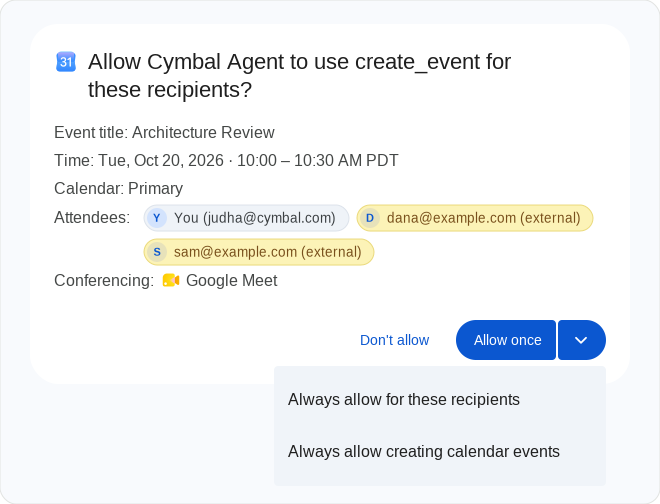
في عميل MCP مستند إلى وحدة طرفية، يعرض تنفيذ واجهة سطر الأوامر في Python حمولة InputRequiredResult نفسها كطلب مرقّم تفاعلي:
CLI
=== Google Calendar (create_event) ===
Architecture Review
Tue, Oct 20 · 10:00 - 10:30 AM PDT · 🟢 No calendar conflicts
You, dana@example.com, sam@example.com
Conferencing: Google Meet

Allow Cymbal Agent to use create_event for these recipients?
  [1] Allow once (ALLOW_ONCE)
  [2] Always allow for these recipients (ALLOW_AUDIENCE_ALWAYS)
  [3] Always allow this tool (ALLOW_TOOL_ALWAYS)
  [4] Don't allow (DENY_ONCE)
Enter choice (1-4, or c to cancel):
المكالمة الأولية والردّ على الاستفسارات
يبدأ العميل بإرسال طلب tools/call لإنشاء
حدث في التقويم باستخدام أداة create_event:
JSON
{
  "jsonrpc": "2.0",
  "id": 2,
  "method": "tools/call",
  "params": {
    "name": "create_event",
    "arguments": {
      "calendarId": "primary",
      "summary": "Architecture Review",
      "startTime": "2026-10-20T10:00:00",
      "endTime": "2026-10-20T10:30:00",
      "timeZone": "America/Los_Angeles",
      "attendees": [
        {
          "email": "dana@example.com"
        },
        {
          "email": "sam@example.com"
        }
      ],
      "addGoogleMeetUrl": true
    },
    "_meta": {
      "io.modelcontextprotocol/protocolVersion": "2026-07-28",
      "io.modelcontextprotocol/clientInfo": {
        "name": "Cymbal Agent",
        "version": "1.0.0"
      },
      "io.modelcontextprotocol/clientCapabilities": {
        "elicitation": {
          "form": {}
        }
      }
    }
  }
}
عندما تكون الموافقة مطلوبة، يستجيب الخادم بالرمز InputRequiredResult:
JSON
{
  "jsonrpc": "2.0",
  "id": 2,
  "result": {
    "resultType": "input_required",
    "inputRequests": {
      "approval_choice": {
        "method": "elicitation/create",
        "params": {
          "mode": "form",
          "message": "**Architecture Review**  \nTue, Oct 20 · 10:00 - 10:30 AM PDT · 🟢 No calendar conflicts  \nYou, dana@example.com, sam@example.com  \n**Conferencing:** Google Meet",
          "requestedSchema": {
            "type": "object",
            "required": ["approval_choice"],
            "properties": {
              "approval_choice": {
                "type": "string",
                "title": "Allow Cymbal Agent to use create_event for these recipients?",
                "enum": [
                  "ALLOW_ONCE",
                  "ALLOW_AUDIENCE_ALWAYS",
                  "ALLOW_TOOL_ALWAYS",
                  "DENY_ONCE"
                ],
                "enumNames": [
                  "Allow once",
                  "Always allow for these recipients",
                  "Always allow this tool",
                  "Don't allow"
                ]
              }
            }
          }
        }
      }
    },
    "requestState": "{\"elicitationId\":\"...\",\"requestBinding\":\"...\"}"
  }
}
تتضمّن استجابة InputRequiredResult الحقول الرئيسية التالية:
-
result.resultType: يتم ضبطها على"input_required"عندما يوقف الخادم التنفيذ مؤقتًا لانتظار إدخال المستخدم، وعلى"complete"عندما تنتهي الأداة من التنفيذ. -
result.inputRequests: خريطة يتم الوصول إليها من خلال معرّف الطلب"approval_choice". يحتوي كل إدخال على"method": "elicitation/create"وعنصرparamsمع"mode": "form". _metaتلميحات العرض: الحقول الاختيارية مثلisConfirmationوtitleوiconsلا تظهر بعد في ردودInputRequiredResultفي الإصدار العلني. يجب دائمًا التعامل مع حقول_metaعلى أنّها اختيارية، ويجب حلّ اسم المنتج ورمزه منserverInfoأو اسم مضيف الخادم في حال عدم توفّرهما.-
inputRequests.approval_choice.params.message: معاينة بتنسيق Markdown للإجراء الذي أنشأه الخادم، أو سؤال التأكيد إذا لم تنشئ الأداة بطاقة معاينة منفصلة. -
inputRequests.approval_choice.params.requestedSchema: عنصر JSON Schema يحتوي تعريفهproperties.approval_choiceعلى الحقول التالية:-
title: سؤال التأكيد المترجَم، مثل"Allow Cymbal Agent to use create_event for these recipients?". عندما توفّر_meta["io.modelcontextprotocol/clientInfo"].nameفي الطلب، يدمج الخادم اسم تطبيقك في هذا السؤال. enum: مصفوفة مرتبة من معرّفاتApprovalChoice، مثلALLOW_ONCEوALLOW_AUDIENCE_ALWAYSوALLOW_TOOL_ALWAYSوDENY_ONCE.-
enumNames: مصفوفة موازية من التصنيفات المترجمة التي يمكن لشخص عادي قراءتها وتتوافق مع كل إدخال فيenum، مثلAllow onceوAlways allow for these recipientsوAlways allow this toolوDon't allow.
-
-
result.requestState: سلسلة بترميز JSON غير واضحة تحتوي علىelicitationIdالخاص بالخادم ورمزrequestBindingالمشفّر. يجب تكرار هذه السلسلة بدون تغيير فيparams.requestStateعند إعادة المحاولة.
بيانات إعادة المحاولة والرفض والإلغاء
بعد أن يحدّد المستخدم خيار السماح، أرسِل طلب tools/call ثانيًا يتضمّن
name وarguments نفسهما تمامًا، ومرِّر requestState وinputResponses
كحقلَين ذوي مستوى أعلى داخل params:
JSON
{
  "jsonrpc": "2.0",
  "id": 3,
  "method": "tools/call",
  "params": {
    "name": "create_event",
    "arguments": {
      "calendarId": "primary",
      "summary": "Architecture Review",
      "startTime": "2026-10-20T10:00:00",
      "endTime": "2026-10-20T10:30:00",
      "timeZone": "America/Los_Angeles",
      "attendees": [
        {
          "email": "dana@example.com"
        },
        {
          "email": "sam@example.com"
        }
      ],
      "addGoogleMeetUrl": true
    },
    "requestState": "{\"elicitationId\":\"...\",\"requestBinding\":\"...\"}",
    "inputResponses": {
      "approval_choice": {
        "action": "accept",
        "content": {
          "approval_choice": "ALLOW_ONCE"
        }
      }
    },
    "_meta": {
      "io.modelcontextprotocol/protocolVersion": "2026-07-28",
      "io.modelcontextprotocol/clientInfo": {
        "name": "Cymbal Agent",
        "version": "1.0.0"
      },
      "io.modelcontextprotocol/clientCapabilities": {
        "elicitation": {
          "form": {}
        }
      }
    }
  }
}
تميّز مواصفات MCP Elicitation بين إرسال قيمة نموذج
وإغلاق مربّع الحوار. يمكنك تمثيل قرار المستخدم السلبي في
params.inputResponses بطريقتَين:
إرسال خيار
DENY_ONCE: عندما ينقر المستخدم على زر عدم السماح المقابل لـDENY_ONCE، يتم إرسال"action": "accept"مع"content": {"approval_choice": "DENY_ONCE"}:JSON
{
  "jsonrpc": "2.0",
  "id": 3,
  "method": "tools/call",
  "params": {
    "name": "create_event",
    "arguments": {
      "calendarId": "primary",
      "summary": "Architecture Review",
      "startTime": "2026-10-20T10:00:00",
      "endTime": "2026-10-20T10:30:00",
      "timeZone": "America/Los_Angeles",
      "attendees": [
        {
          "email": "dana@example.com"
        },
        {
          "email": "sam@example.com"
        }
      ],
      "addGoogleMeetUrl": true
    },
    "requestState": "{\"elicitationId\":\"...\",\"requestBinding\":\"...\"}",
    "inputResponses": {
      "approval_choice": {
        "action": "accept",
        "content": {
          "approval_choice": "DENY_ONCE"
        }
      }
    },
    "_meta": {
      "io.modelcontextprotocol/protocolVersion": "2026-07-28",
      "io.modelcontextprotocol/clientInfo": {
        "name": "Cymbal Agent",
        "version": "1.0.0"
      },
      "io.modelcontextprotocol/clientCapabilities": {
        "elicitation": {
          "form": {}
        }
      }
    }
  }
}
رفض مربّع الحوار أو إلغاؤه: إذا أغلق المستخدم مربّع الحوار أو ألغاه بدون تحديد خيار السماح، أرسِل
"action": "decline"أو"action": "cancel"واحذف الحقلcontent:JSON
"inputResponses": {
  "approval_choice": {
    "action": "cancel"
  }
}
في كلتا الحالتَين، يتعامل الخادم مع الردّ على أنّه DENY_ONCE، وينهي تنفيذ الأداة، ويعرض نتيجة خطأ في الأداة.
عميل ويب TypeScript
The following TypeScript example extracts the Markdown message, confirmation
question, and allowed options directly from the InputRequiredResult payload,
resolves the product title from optional _meta hints or the server hostname,
and replays tools/call with the user's decision:
TypeScript
const PROTOCOL_VERSION = "2026-07-28";
const CLIENT_INFO = { name: "Cymbal Agent", version: "1.0.0" };
const MAX_ELICITATION_ROUNDS = 3;

const HOST_TITLES: Record<string, string> = {
  "gmailmcp.googleapis.com": "Gmail",
  "calendarmcp.googleapis.com": "Google Calendar",
  "drivemcp.googleapis.com": "Google Drive",
  "docsmcp.googleapis.com": "Google Docs",
  "sheetsmcp.googleapis.com": "Google Sheets",
  "slidesmcp.googleapis.com": "Google Slides",
  "chatmcp.googleapis.com": "Google Chat",
  "people.googleapis.com": "Google Contacts",
  "tasksmcp.googleapis.com": "Google Tasks",
  "workspacemcp.googleapis.com": "Google Workspace",
};

interface ElicitationOption {
  value: string;
  label: string;
}

export interface ElicitationCardModel {
  requestKey: string;
  serverTitle: string;
  serverIconUrl?: string;
  toolName: string;
  markdownMessage: string;
  questionTitle: string;
  decisionFieldKey: string;
  denyOption?: ElicitationOption;
  primaryAllowOption?: ElicitationOption;
  secondaryAllowOptions: ElicitationOption[];
}

function buildBaseMeta(): Record<string, unknown> {
  return {
    "io.modelcontextprotocol/protocolVersion": PROTOCOL_VERSION,
    "io.modelcontextprotocol/clientInfo": CLIENT_INFO,
    "io.modelcontextprotocol/clientCapabilities": {
      elicitation: { form: {} },
    },
  };
}

/**
 * Extracts a UI view model directly from an InputRequiredResult response.
 * Render card.markdownMessage with a safe Markdown renderer in your UI.
 */
export function extractCardModel(
  rpcResult: Record<string, any>,
  toolName: string,
  serverHost = "workspacemcp.googleapis.com",
): ElicitationCardModel | null {
  const inputRequests: Record<string, any> = rpcResult.inputRequests ?? {};
  const requestEntry = Object.entries(inputRequests).find(
    ([, req]: [string, any]) =>
      req?.method === "elicitation/create" && req?.params?.mode === "form",
  );
  if (!requestEntry) {
    return null;
  }
  const [requestKey, elicitationReq] = requestEntry;

  const reqMeta = elicitationReq.params?._meta ?? {};
  const resultMeta = rpcResult._meta ?? {};
  const serverInfo = resultMeta["io.modelcontextprotocol/serverInfo"] ?? {};
  const icons: Array<{ src: string; mimeType?: string }> =
    reqMeta.icons ?? resultMeta.icons ?? serverInfo.icons ?? [];
  const preferredIcon =
    icons.find((icon) => icon.mimeType === "image/svg+xml") ?? icons[0];

  const properties: Record<string, any> =
    elicitationReq.params?.requestedSchema?.properties ?? {};
  const firstProperty = Object.entries(properties)[0];
  if (!firstProperty) {
    return null;
  }
  const [decisionFieldKey, fieldSchema] = firstProperty as [
    string,
    Record<string, any>,
  ];

  let options: ElicitationOption[] = [];
  if (Array.isArray(fieldSchema.enum)) {
    const enumNames: string[] = Array.isArray(fieldSchema.enumNames)
      ? fieldSchema.enumNames
      : [];
    options = fieldSchema.enum.map((val: string, idx: number) => ({
      value: val,
      label: enumNames[idx] ?? val,
    }));
  } else if (Array.isArray(fieldSchema.oneOf)) {
    options = fieldSchema.oneOf.map((opt: any) => ({
      value: opt.const,
      label: opt.title ?? opt.const,
    }));
  }

  const denyOption = options.find((opt) => opt.value.startsWith("DENY"));
  const allowOptions = options.filter(
    (opt) => !opt.value.startsWith("DENY"),
  );

  return {
    requestKey,
    serverTitle:
      reqMeta.title ??
      resultMeta.title ??
      serverInfo.title ??
      serverInfo.name ??
      HOST_TITLES[serverHost] ??
      "Google Workspace",
    serverIconUrl: preferredIcon?.src,
    toolName,
    markdownMessage:
      elicitationReq.params?.message ?? "Confirm this action.",
    questionTitle: fieldSchema.title ?? "Confirm this action?",
    decisionFieldKey,
    denyOption,
    primaryAllowOption: allowOptions[0],
    secondaryAllowOptions: allowOptions.slice(1),
  };
}

/**
 * Executes tools/call and replays with requestState and inputResponses
 * when the server returns an InputRequiredResult.
 */
export async function handleToolCallWithElicitation(
  sendRpc: (payload: Record<string, unknown>) => Promise<Record<string, any>>,
  promptUserInUi: (card: ElicitationCardModel) => Promise<string | null>,
  toolName: string,
  toolArgs: Record<string, unknown>,
  serverHost = "calendarmcp.googleapis.com",
): Promise<Record<string, any>> {
  let requestId = 1;
  let response = await sendRpc({
    jsonrpc: "2.0",
    id: requestId,
    method: "tools/call",
    params: {
      name: toolName,
      arguments: structuredClone(toolArgs),
      _meta: buildBaseMeta(),
    },
  });

  for (let round = 0; round < MAX_ELICITATION_ROUNDS; round++) {
    const result = response.result ?? {};
    if (result.resultType !== "input_required") {
      return response;
    }

    const card = extractCardModel(result, toolName, serverHost);
    if (!card) {
      return response;
    }

    const selectedValue = await promptUserInUi(card);
    const userResponse = selectedValue
      ? {
          action: "accept",
          content: { [card.decisionFieldKey]: selectedValue },
        }
      : { action: "cancel" };

    requestId += 1;
    response = await sendRpc({
      jsonrpc: "2.0",
      id: requestId,
      method: "tools/call",
      params: {
        name: toolName,
        arguments: structuredClone(toolArgs),
        ...(result.requestState !== undefined
          ? { requestState: result.requestState }
          : {}),
        inputResponses: {
          [card.requestKey]: userResponse,
        },
        _meta: buildBaseMeta(),
      },
    });
  }

  return response;
}
عميل Python CLI
Python
import copy
import re
from typing import Any

PROTOCOL_VERSION = "2026-07-28"
CLIENT_INFO = {"name": "Cymbal CLI Agent", "version": "1.0.0"}
MAX_ELICITATION_ROUNDS = 3
HOST_TITLES = {
    "gmailmcp.googleapis.com": "Gmail",
    "calendarmcp.googleapis.com": "Google Calendar",
    "drivemcp.googleapis.com": "Google Drive",
    "docsmcp.googleapis.com": "Google Docs",
    "sheetsmcp.googleapis.com": "Google Sheets",
    "slidesmcp.googleapis.com": "Google Slides",
    "chatmcp.googleapis.com": "Google Chat",
    "people.googleapis.com": "Google Contacts",
    "tasksmcp.googleapis.com": "Google Tasks",
    "workspacemcp.googleapis.com": "Google Workspace",
}

def build_base_meta() -> dict[str, Any]:
  """Returns the required per-request _meta block for /mcp/v1 calls."""
  return {
      "io.modelcontextprotocol/protocolVersion": PROTOCOL_VERSION,
      "io.modelcontextprotocol/clientInfo": CLIENT_INFO,
      "io.modelcontextprotocol/clientCapabilities": {
          "elicitation": {"form": {}}
      },
  }

def strip_markdown(text: str) -> str:
  """Minimal example that strips basic Markdown for terminal display."""
  text = re.sub(r"\[([^\]]+)\]\(([^)]+)\)", r"\1 (\2)", text)
  text = re.sub(r"\*\*(.*?)\*\*", r"\1", text)
  return re.sub(r"`([^`]+)`", r"\1", text)

def extract_decision_options(
    requested_schema: dict[str, Any],
) -> tuple[str | None, str, list[dict[str, str]]]:
  """Extracts the property key, question title, and options from schema."""
  properties = requested_schema.get("properties", {})
  first_entry = next(iter(properties.items()), None)
  if first_entry is None:
    return None, "Confirm this action?", []

  field_key, field_schema = first_entry
  question_title = field_schema.get("title", "Confirm this action?")

  if "enum" in field_schema:
    enum_values = field_schema.get("enum", [])
    enum_names = field_schema.get("enumNames", [])
    options = [
        {
            "value": val,
            "label": enum_names[idx] if idx < len(enum_names) else val,
        }
        for idx, val in enumerate(enum_values)
    ]
  elif "oneOf" in field_schema:
    options = [
        {
            "value": item["const"],
            "label": item.get("title", item["const"]),
        }
        for item in field_schema["oneOf"]
    ]
  else:
    options = []
  return field_key, question_title, options

def prompt_user_in_cli(
    elicitation_req: dict[str, Any],
    result_meta: dict[str, Any],
    tool_name: str,
    server_host: str = "calendarmcp.googleapis.com",
) -> dict[str, Any]:
  """Renders a CLI approval prompt and returns the inputResponses entry."""
  params = elicitation_req.get("params", {})
  req_meta = params.get("_meta", {})
  server_info = result_meta.get(
      "io.modelcontextprotocol/serverInfo", {}
  )
  server_title = (
      req_meta.get("title")
      or result_meta.get("title")
      or server_info.get("title")
      or server_info.get("name")
      or HOST_TITLES.get(server_host, "Google Workspace MCP")
  )
  message = strip_markdown(params.get("message", "Confirm this action."))
  field_key, question_title, options = extract_decision_options(
      params.get("requestedSchema", {})
  )
  if not field_key or not options:
    return {"action": "cancel"}

  print(f"\n=== {server_title} ({tool_name}) ===")
  print(message)
  print(f"\n{strip_markdown(question_title)}")
  for idx, opt in enumerate(options, start=1):
    print(f"  [{idx}] {opt['label']} ({opt['value']})")

  choice = input(
      f"Enter choice (1-{len(options)}, or c to cancel): "
  ).strip()
  try:
    selected_idx = int(choice) - 1
    if 0 <= selected_idx < len(options):
      selected_value = options[selected_idx]["value"]
      return {
          "action": "accept",
          "content": {field_key: selected_value},
      }
  except ValueError:
    pass

  return {"action": "cancel"}

def handle_tool_call_with_elicitation(
    send_rpc_fn: Any, tool_name: str, tool_args: dict[str, Any]
) -> dict[str, Any]:
  """Executes tools/call and retries with inputResponses when elicited."""
  base_params = {
      "name": tool_name,
      "arguments": copy.deepcopy(tool_args),
      "_meta": build_base_meta(),
  }
  request_id = 1
  response = send_rpc_fn(
      {
          "jsonrpc": "2.0",
          "id": request_id,
          "method": "tools/call",
          "params": copy.deepcopy(base_params),
      }
  )

  for _ in range(MAX_ELICITATION_ROUNDS):
    result = response.get("result", {})
    if result.get("resultType") != "input_required":
      return response

    input_requests = result.get("inputRequests", {})
    if not isinstance(input_requests, dict) or not input_requests:
      return response

    result_meta = result.get("_meta", {})
    input_responses: dict[str, Any] = {}
    for req_key, req in input_requests.items():
      if (
          isinstance(req, dict)
          and req.get("method") == "elicitation/create"
          and req.get("params", {}).get("mode") == "form"
      ):
        input_responses[req_key] = prompt_user_in_cli(
            req, result_meta, tool_name
        )

    if not input_responses:
      return response

    request_id += 1
    retry_params = copy.deepcopy(base_params)
    request_state = result.get("requestState")
    if request_state is not None:
      retry_params["requestState"] = request_state
    retry_params["inputResponses"] = input_responses
    response = send_rpc_fn(
        {
            "jsonrpc": "2.0",
            "id": request_id,
            "method": "tools/call",
            "params": retry_params,
        }
    )

  return response
مهارة الوكيل
يمكنك استخدام ما يلي كمهارة أو طلب لوكيل الترميز لتنفيذ استخلاص النماذج لنظام توجيه الوكلاء:
الطلب
---
name: google-workspace-mcp-elicitation
metadata:
  version: "1.0.0"
  category: GoogleWorkspace
description: >-
  Implements Model Context Protocol (MCP) form elicitation
  (`elicitation/create`) for Human-in-the-Loop (HITL) approvals with Google
  Workspace MCP servers (Gmail, Calendar, Drive, Docs, Sheets, Slides, Chat,
  Contacts). Use when adding HITL confirmation prompts to an agent, handling
  Stateless HTTP (`2026-07-28`) Multi Round-Trip Requests
  (`resultType: "input_required"`), mapping elicitation schemas or `_meta`
  hints to UI controls, or troubleshooting Workspace MCP `401`/`403`/`405`
  and capability errors. Don't use for general OAuth 2.0 app setup unrelated
  to MCP or for authoring custom MCP servers.
---

# Implementing Google Workspace MCP Form Elicitation (HITL)

Use this guide to support **Model Context Protocol (MCP) Form Elicitation**
for Human-in-the-Loop (HITL) confirmations when integrating **Google
Workspace MCP servers** into an AI agent.

Rather than duplicating the MCP specification, this guide references the
canonical specs and focuses on **Google Workspace server nuances**, **mapping
protocol message fields to UI**, **upcoming Google Workspace `_meta`
extensions**, and **practical integration boundaries**:

- [MCP Elicitation Specification][mcp-elicitation]
- [MCP Multi Round-Trip Requests (MRTR) Specification][mcp-mrtr]
- [MCP Lifecycle & Initialization][mcp-life]
- [MCP Icons Utility Specification][mcp-icon]

---

## 1. Prerequisites, Nuances & Architectural Boundaries

### Prerequisites (Assumed Configured)

This skill focuses on **handling elicitation requests and mapping them to
UI**. It assumes the host application already has Google Workspace MCP
connectivity and OAuth 2.0 configured. If not yet set up, follow the
[Google Workspace MCP Server Configuration Guide][ws-mcp-setup] to configure:

1. **Google Cloud Project & Service Enablement**: A Google Cloud project with
   the target Google Workspace APIs and MCP endpoints enabled.
2. **OAuth 2.0 Bearer Authentication**: An OAuth 2.0 flow issuing user access
   tokens with the required service scopes, passed as
   `Authorization: Bearer {access_token}` on MCP HTTP `POST` requests. When
   using standard 3-legged OAuth 2.0, the OAuth client configuration must
   have the **"Used by an agent"** checkbox enabled.

Canonical MCP server URLs and default OAuth 2.0 scopes by service:

- **Gmail** (`https://gmailmcp.googleapis.com/mcp/v1`):
  - `https://www.googleapis.com/auth/gmail.modify`
  - `https://www.googleapis.com/auth/gmail.settings.basic`
- **Google Calendar** (`https://calendarmcp.googleapis.com/mcp/v1`):
  - `https://www.googleapis.com/auth/calendar.events`
  - `https://www.googleapis.com/auth/calendar.readonly`
- **Google Drive** (`https://drivemcp.googleapis.com/mcp/v1`):
  - `https://www.googleapis.com/auth/drive`
- **Google Docs** (`https://docsmcp.googleapis.com/mcp/v1`):
  - `https://www.googleapis.com/auth/documents`
- **Google Sheets** (`https://sheetsmcp.googleapis.com/mcp/v1`):
  - `https://www.googleapis.com/auth/spreadsheets`
- **Google Slides** (`https://slidesmcp.googleapis.com/mcp/v1`):
  - `https://www.googleapis.com/auth/presentations`
- **Google Chat** (`https://chatmcp.googleapis.com/mcp/v1`):
  - `https://www.googleapis.com/auth/chat.messages`
- **Google Contacts (preview)** (`https://people.googleapis.com/mcp/v1`):
  - `https://www.googleapis.com/auth/contacts`
- **Google Tasks** (`https://tasksmcp.googleapis.com/mcp/v1`):
  - `https://www.googleapis.com/auth/tasks`
- **Universal Search** (`https://workspacemcp.googleapis.com/mcp/v1`):
  - `https://www.googleapis.com/auth/gmail.readonly`
  - `https://www.googleapis.com/auth/drive.readonly`
  - `https://www.googleapis.com/auth/calendar.readonly`
  - `https://www.googleapis.com/auth/chat.messages.readonly`
  - `https://www.googleapis.com/auth/chat.spaces.readonly`
  - `https://www.googleapis.com/auth/chat.memberships.readonly`

### Key Nuances for Google Workspace MCP Servers

- **Markdown Messages**: Google Workspace MCP servers format `params.message`
  as **GitHub-Flavored Markdown** (headings, bold labels, bulleted lists of
  parameters, links). Render `params.message` with a Markdown renderer rather
  than plain text.
- **Selective Server-Side Gate (Writes & Sensitive/Shared Reads)**: Workspace
  form elicitation selectively gates sensitive operations on the server, such
  as **high-impact write operations** (for example, sending an email,
  scheduling a meeting with external attendees, modifying a shared document)
  as well as **reads of sensitive or externally shared data**, rather than
  triggering on every tool call or validating general agent intent. Because
  these sensitive actions already trigger a server-side `elicitation/create`
  prompt, enabling unconditional client-side pre-tool approvals (such as
  `needsApproval: true` on all tools) can double-prompt the user. Factor this
  server-side gate into your risk assessment when deciding whether to
  auto-approve tool calls, gate specific tools, or require pre-execution
  approval across the board.

### Architectural Boundaries: Do Not Fight the Framework

Pausing an in-flight tool call, presenting a prompt to a user, and resuming
execution cuts across the host application's language, agent framework, MCP
SDK, and UI surface. **Do not fight the host framework or re-implement MCP
from scratch**. Reuse what the framework and SDK already provide to the
fullest extent possible:

- **Reuse Built-In Framework & MCP SDK Elicitation Support First**: Before
  writing protocol or transport code, inspect the host application's agent
  framework and MCP client library for existing MCP tool adapters, capability
  negotiation, elicitation callbacks, and HITL interrupt/checkpoint
  mechanisms. Wire elicitation through those built-in extension points rather
  than replacing the SDK with a hand-rolled JSON-RPC client or custom
  tool-calling loop.
- **Stateless HTTP (`2026-07-28`) MRTR & Adapting Stateful Implementations**:
  Google Workspace MCP servers use Stateless HTTP (`2026-07-28`)
  [Multi Round-Trip Requests (MRTR)][mcp-mrtr] (`POST`-only, where `GET`
  returns `405`) to deliver `elicitation/create` prompts inside `tools/call`
  responses via `result.resultType === "input_required"`
  (`result.requestState`, `result.inputRequests`) and resume when
  `tools/call` is replayed with `params.requestState` and
  `params.inputResponses`. Supporting older stateful transports is not
  required for Google Workspace, but existing elicitation support in an SDK
  or host application might assume stateful server-initiated streams
  (`2025-11-25`). Verify how the existing client handles elicitation: if it
  already implements Stateless HTTP MRTR, use it directly. If it only listens
  for stateful server-to-client stream requests (or strips MRTR fields during
  typed deserialization), adapt the transport layer so `input_required`
  responses route through the SDK's registered elicitation handler and replay
  `tools/call` with `requestState` and `inputResponses`.
- **Elicitation Rendering Is a Presentation-Layer Concern**: Keep protocol
  and transport handling decoupled from UI rendering. Pass the structured
  elicitation request (`message`, `requestedSchema`, and `_meta`) to the host
  application's presentation layer rather than embedding UI markup inside
  agent or transport code, and render it using the application's native UI
  paradigm rather than assuming HTML.
- **Suspension & Resumption Principles**: Regardless of how the host
  application is deployed, suspending and resuming an elicitation must
  satisfy three behaviors:
  1. *Yield Cleanly Waiting for User Input*: Pause the in-flight tool
     execution while waiting for the user's decision, using the host
     runtime's native mechanism (such as awaiting an async callback/channel
     in-memory or yielding via the framework's checkpoint/interrupt
     primitive).
  2. *Preserve Correlation & Continuation Context*: Retain the correlation ID
     (`requestId`), opaque server `requestState`, and original tool call
     context (`name`, `arguments`, and any prior `inputResponses`) across the
     pause, in memory if the session stays alive or in durable storage if the
     process or turn can terminate before the user responds.
  3. *Accumulate Multi-Round-Trip Responses*: When replaying `tools/call`
     with `requestState` and `inputResponses`, keep accumulating responses
     across rounds if the server returns subsequent `input_required` stages
     until the tool returns a final `CallToolResult`.

---

## 2. Phase 1: Core Form Elicitation Support (Priority)

Start by supporting standard [MCP Form Elicitation][mcp-elicitation]
end-to-end using your framework's and MCP SDK's built-in primitives so any
schema renders and resolves cleanly on the host UI surface.

### Step 1: Enable Elicitation & Register Handler

1. Register an `elicitation/create` handler through your agent framework or
   MCP client SDK, and ensure the client advertises the `elicitation`
   capability during initialization (and in per-request capability metadata
   when using Stateless HTTP discovery):

   ```json
 {
   "capabilities": {
     "elicitation": {}
   }
 }
 ```

2. Verify that your client handles Stateless HTTP (`2026-07-28`)
   [MRTR][mcp-mrtr] (`result.resultType === "input_required"`). If the SDK
   does not yet handle `input_required` natively, adapt the transport so each
   entry in `result.inputRequests` (preserving `_meta` hints) is passed to
   your registered elicitation handler and `tools/call` is replayed with
   `params.requestState` and `params.inputResponses`.

### Step 2: Render Prompt on the Host UI Surface & Collect User Input

1. **Map Protocol Fields to the Host UI Surface**:
   - Render `params.message` using a **Markdown renderer appropriate for the
     host surface** (for example, GFM component in a web UI, formatted text
     widgets in a chat card, or terminal Markdown in a CLI/TUI).
   - Present input controls for `params.requestedSchema.properties` covering
     all [MCP Elicitation supported schema types][mcp-schema-types]
     (`string`, `number`, `integer`, `boolean`, and `enum` / `oneOf`).
2. **Collect the User's Decision**: Format the user's response per the
   [MCP Elicitation response specification][mcp-elicitation]:
   - **Submit Form / Select Option**:
     `{ "action": "accept", "content": { ... } }` *(Note: When the schema
     presents explicit `ALLOW_*` and `DENY_*` enum options, selecting a
     `DENY_*` option is still submitted with `action: "accept"` and the
     selected enum value in `content`.)*
   - **Decline**: `{ "action": "decline" }`
   - **Cancel / Dismiss**: `{ "action": "cancel" }`

### Step 3: Return the Elicitation Result

Return the `{ action, content }` result from your elicitation handler (or
pass it to your framework's resume mechanism) so the MCP client completes the
tool call and returns the final `CallToolResult` to the agent.

---

## 3. Phase 2: Optional UX Enhancements & Custom `_meta` Extensions

Once generic form elicitation works, you can optionally enhance the UX for
single-enum prompts and Google Workspace `_meta` extensions on your target UI
surface. Always treat `_meta` fields as optional (`undefined`-safe) so the UI
degrades cleanly to the Phase 1 form.

> [!NOTE]
> Google Workspace MCP servers define custom `_meta` presentation attributes
> (`isConfirmation`, `title`, `icons`, `learn_more_url`), but do not yet emit
> them in production responses. **Enhancement A** works today for `<= 4` enum
 options using standard schema fields, whereas **Enhancements B and C** rely
> on upcoming `_meta` attributes. **Only implement Enhancements B and C if
> explicitly directed to by the user.**

### Enhancement A: Single-Enum Auto-Submitting Action Buttons / Quick Choices

Most HITL confirmations ask a single multiple-choice question (where
`requestedSchema.properties` has **1 property** defining `enum` or `oneOf`).

- **When to Apply**: Present a single-enum schema as direct auto-submitting
  action buttons (or single-step quick choices in a TUI/CLI) **if and only
  if**:
  1. The single enum has **`<= 4` options**, **or**
  2. The prompt is explicitly flagged as a HITL confirmation
     (`params._meta?.isConfirmation === true`). Otherwise (for example, a
     generic single-enum prompt with `> 4` options), fall back to the
     standard Phase 1 selection form/menu.
- **Option Labels, Hierarchy & Submission**: Use `enumNames[i]` or
  `oneOf[i].title` (falling back to a human-readable format of the enum
  value) as the option label, assign visual emphasis in enum order
  (`1st option -> primary`, `2nd option -> secondary`,
  `3rd+ option -> tertiary`), and immediately submit
  `{ "action": "accept", "content": { "{field_name}": "{selected_value}" } }`
  when chosen, even when the user selects a `DENY_*` option.
- **Hide or De-Emphasize Redundant Decline/Cancel Controls**: Because HITL
  schemas already include explicit `DENY_*` enum options (which are
  functionally equivalent to declining/canceling on the server), presenting
  separate generic `Decline` and `Cancel` buttons alongside `Allow` and
  `Deny` enum choices is redundant. In this single-enum action view, omit a
  separate `Decline` control and map `{ "action": "cancel" }` only to a
  de-emphasized dismiss affordance appropriate to the surface (such as a
  corner close `x` icon / `Escape` key in a GUI, or a `[c] Cancel` key in a
  TUI).

### Enhancement B: Dynamic Button Stacking (Only If Explicitly Requested)

- **When to Apply**: On surfaces that support grouped/split buttons (or
  grouped action menus), stack related options **if and only if**
  `params._meta?.isConfirmation === true`. Never stack options based on enum
  names alone when `isConfirmation` is not `true`.
- **Do Not Assume a Fixed Enum Set (`ALLOW_*` / `DENY_*` Convention)**: The
  exact approval enum values are not a fixed list and might change over time
  (for example, `ALLOW_ONCE`, `ALLOW_SESSION`, `ALWAYS_ALLOW`, `DENY_ONCE`),
  following the `ALLOW_*` and `DENY_*` convention.
  1. **Group by Action Prefix (`ALLOW` vs. `DENY`)**: Group options
     dynamically by their action token/prefix, normalizing leading modifiers
     like `ALWAYS_` or `ONCE_` so all `ALLOW` variants (such as `ALLOW_ONCE`,
     `ALLOW_SESSION`, `ALWAYS_ALLOW`) stack into one group and `DENY`
     variants (such as `DENY_ONCE`) group into another.
  2. **Intra-Group Order**: Within each group, use the **first option in the
     schema's enum order** as the primary action, and place remaining options
     in that group (if any) into its secondary/split menu in enum order
     (rendering a standalone button/action when a group has only one option).
  3. **Inter-Group Hierarchy**: Order groups by their first appearance in the
     enum and assign visual emphasis accordingly (`1st group -> primary`,
     `2nd group -> secondary`, `3rd+ group -> tertiary`).

### Enhancement C: Custom `_meta` & `serverInfo` Hints (Only If Requested)

When present in the elicitation request's `params._meta` or the MCP server's
`Implementation` metadata (`serverInfo` from [MCP initialization][mcp-life]
or discovery), map these optional presentation fields to the confirmation
prompt (adapting to what the host UI surface supports):

- **Title (`params._meta?.title`)**: Use `params._meta.title` if non-empty.
  Otherwise fall back to `"{server_name} confirmation"`.
- **Service Icon (`params._meta?.icons` / `serverInfo?.icons`)**: Check
  `params._meta?.icons?.[0]?.src` first, then fall back to
  `serverInfo?.icons?.[0]?.src` (per the [MCP Icons specification][mcp-icon]).
  On graphical/card surfaces, render the icon only when a URL is present and
  hide it on load error.
- **Learn More Link (`params._meta?.learn_more_url`)**: If present, display a
  subtle "Learn more" link or URL reference in the prompt footer pointing to
  `learn_more_url`.

---

## 4. Verification & Troubleshooting

### Verification: Triggering Conditions & Expected Behavior

Because Google Workspace MCP servers apply **context-aware server-side
policies**, **not every tool call or write operation triggers an
elicitation**:

- **Absence of an Elicitation Is Often Expected**: Operations confined to the
  user's own private resources (for example, creating a Calendar event with
  no attendees, or editing a private unshared Google Doc) might execute
  immediately without an elicitation prompt. Do **not** treat a tool call
  succeeding without an elicitation as a bug in your client implementation.
- **Scenarios That Reliably Trigger Elicitation**: To test your elicitation
  flow end-to-end, use prompts that cross external or shared-resource
  boundaries, such as:
  - **Google Calendar**: Creating or updating an event **with an external
    participant** (such as `dana@example.com`), or deleting an event with
    attendees.
  - **Gmail**: Sending an email to a recipient, deleting a draft, or creating
    a mail filter.
  - **Google Docs / Drive**: Updating **a shared document** or reading
    sensitive/externally shared content.
- **End-to-End Validation Checklist**: Run a test prompt against one of the
  scenarios above, verify each item below, and if any step fails, diagnose
  the failure using the troubleshooting list below, apply the fix, and re-run
  the check until all items pass:
  - [ ] `params.message` renders as formatted Markdown on the target UI
    surface.
  - [ ] Approving (`accept`) replays `tools/call` with `requestState` and
    `inputResponses` and returns the completed tool output.
  - [ ] Declining (`decline`) or canceling (`cancel`) resolves cleanly
    without hanging the agent turn.

### Troubleshooting Definitive Errors (`40x` & Protocol Failures)

- **Server refuses to execute `tools/call` stating elicitation is not
  supported**:
  - *Root cause*: Definitive signal that the client did not advertise
    `elicitation` capability correctly.
  - *Resolution*: Ensure `capabilities: { elicitation: {} }` is sent during
    initialization (and in per-request client capability metadata if using
    Stateless HTTP discovery), and verify that your 3-legged OAuth 2.0 client
    has **"Used by an agent"** enabled.
- **`tools/call` returns `resultType: "input_required"` as raw tool output
  (no prompt shown)**:
  - *Root cause*: Definitive signal that the server triggered an elicitation,
    but the MCP client did not handle the Stateless HTTP (`2026-07-28`)
    [MRTR][mcp-mrtr] response (or stripped MRTR fields during typed
    deserialization).
  - *Resolution*: Verify your MCP client library supports Stateless HTTP MRTR
    (`2026-07-28`) and preserves `resultType`, `requestState`,
    `inputRequests`, and `_meta`, or handle `input_required` and replay
    `tools/call` with `requestState` and `inputResponses`.
- **`401 Unauthorized`**:
  - *Root cause*: Missing, expired, or invalid OAuth 2.0 access token.
  - *Resolution*: Verify `Authorization: Bearer {access_token}` is attached
    to every MCP HTTP `POST` request and refresh expired tokens.
- **`403 Forbidden` (Standard JSON error body)**:
  - *Root cause*: OAuth token is missing required Google Workspace scopes for
    the target server/tool, or the user lacks resource permission.
  - *Resolution*: Compare granted token scopes against the default OAuth 2.0
    scopes in Section 1 and re-consent.
- **`403 Forbidden` (Response body contains `{"result":{"tools":[...]}}`
  schema dump)**:
  - *Root cause*: Google Cloud project has not enabled the target Workspace
    MCP service (or is not allowlisted). Because unauthenticated `tools/list`
    discovery is permitted on the endpoint, the server returns the full
    `tools/list` schema payload in the HTTP `403` error body while keeping
    the `403` status code.
  - *Resolution*: Enable the corresponding MCP service on the OAuth client's
    Google Cloud project per the [Workspace MCP setup guide][ws-mcp-setup].
    Summarize this error in logs to avoid dumping 50KB+ of tool schemas.
- **`405 Method Not Allowed`**:
  - *Root cause*: MCP client or SDK sent an HTTP `GET` request (probing for
    legacy SSE) instead of `POST`.
  - *Resolution*: Google Workspace MCP endpoints are Stateless HTTP
    `POST`-only. Configure the transport for `POST`-only or short-circuit
    `GET` probes locally with `405`.

[mcp-elicitation]:
  https://modelcontextprotocol.io/specification/latest/client/elicitation
[mcp-mrtr]:
  https://modelcontextprotocol.io/specification/latest/basic/patterns/mrtr
[mcp-life]:
  https://modelcontextprotocol.io/specification/latest/basic/lifecycle
[mcp-icon]:
  https://modelcontextprotocol.io/specification/latest/basic/utilities/icons
[mcp-schema-types]:
  https://modelcontextprotocol.io/specification/latest/client/elicitation#supported-schema-types
[ws-mcp-setup]:
  https://developers.google.com/workspace/guides/configure-mcp-servers