Package google.chat.v1

সূচী

চ্যাট পরিষেবা

ডেভেলপারদের গুগল চ্যাট প্ল্যাটফর্মে চ্যাট অ্যাপ এবং ইন্টিগ্রেশন তৈরি করতে সক্ষম করে।

কমপ্লিটইম্পোর্টস্পেস

rpc CompleteImportSpace( CompleteImportSpaceRequest ) returns ( CompleteImportSpaceResponse )

নির্দিষ্ট স্থানের জন্য আমদানি প্রক্রিয়া সম্পন্ন করে এবং এটিকে ব্যবহারকারীদের কাছে দৃশ্যমান করে তোলে।

ব্যবহারকারীর প্রমাণীকরণ এবং অনুমোদনের পরিধি সহ ডোমেন-ব্যাপী প্রতিনিধি নিয়োগ প্রয়োজন:

  • https://www.googleapis.com/auth/chat.import

আরও তথ্যের জন্য, গুগল চ্যাট অ্যাপগুলিকে ডেটা ইম্পোর্ট করার অনুমোদন দিন দেখুন।

অনুমোদনের পরিধি

নিম্নলিখিত OAuth স্কোপ প্রয়োজন:

  • https://www.googleapis.com/auth/chat.import

আরও তথ্যের জন্য, অনুমোদন নির্দেশিকা দেখুন।

কাস্টম ইমোজি তৈরি করুন

rpc CreateCustomEmoji( CreateCustomEmojiRequest ) returns ( CustomEmoji )

নিজস্ব ইমোজি তৈরি করে।

কাস্টম ইমোজি শুধুমাত্র গুগল ওয়ার্কস্পেস অ্যাকাউন্টের জন্য উপলব্ধ, এবং অ্যাডমিনিস্ট্রেটরকে অবশ্যই প্রতিষ্ঠানের জন্য কাস্টম ইমোজি চালু করতে হবে। আরও তথ্যের জন্য, গুগল চ্যাটে কাস্টম ইমোজি সম্পর্কে জানুন এবং কাস্টম ইমোজির অনুমতি পরিচালনা দেখুন

অনুমোদনের পরিধি সহ ব্যবহারকারীর প্রমাণীকরণ প্রয়োজন:

  • https://www.googleapis.com/auth/chat.customemojis
অনুমোদনের পরিধি

নিম্নলিখিত OAuth স্কোপ প্রয়োজন:

  • https://www.googleapis.com/auth/chat.customemojis

আরও তথ্যের জন্য, অনুমোদন নির্দেশিকা দেখুন।

সদস্যপদ তৈরি করুন

rpc CreateMembership( CreateMembershipRequest ) returns ( Membership )

কলকারী চ্যাট অ্যাপ, কোনো ব্যবহারকারী বা গুগল গ্রুপের জন্য মেম্বারশিপ তৈরি করে। অন্যান্য চ্যাট অ্যাপের জন্য মেম্বারশিপ তৈরি করা সমর্থিত নয়। মেম্বারশিপ তৈরি করার সময়, যদি নির্দিষ্ট সদস্যের অটো-অ্যাকসেপ্ট পলিসি বন্ধ করা থাকে, তাহলে তাকে আমন্ত্রণ জানানো হয় এবং যোগদানের আগে অবশ্যই স্পেসের আমন্ত্রণটি গ্রহণ করতে হবে। অন্যথায়, মেম্বারশিপ তৈরি করলে সদস্য সরাসরি নির্দিষ্ট স্পেসে যুক্ত হয়ে যান।

নিম্নলিখিত ধরণের প্রমাণীকরণ সমর্থন করে:

  • প্রশাসকের অনুমোদন এবং অনুমোদনের পরিধি সহ অ্যাপের প্রমাণীকরণ :

    • https://www.googleapis.com/auth/chat.app.memberships
  • নিম্নলিখিত অনুমোদন পরিধিগুলির মধ্যে একটি ব্যবহার করে ব্যবহারকারীর প্রমাণীকরণ :

    • https://www.googleapis.com/auth/chat.memberships
    • https://www.googleapis.com/auth/chat.memberships.app (স্পেসটিতে কলিং অ্যাপ যোগ করার জন্য)
    • https://www.googleapis.com/auth/chat.import (ইম্পোর্ট মোডে শুধুমাত্র স্পেস)
    • ব্যবহারকারী প্রমাণীকরণ অ্যাডমিনিস্ট্রেটর বিশেষাধিকার প্রদান করে যখন একটি অ্যাডমিনিস্ট্রেটর অ্যাকাউন্ট প্রমাণীকরণ করে, use_admin_access true হয়, এবং নিম্নলিখিত অনুমোদন পরিধি ব্যবহৃত হয়:
      • https://www.googleapis.com/auth/chat.admin.memberships

নিম্নলিখিত ব্যবহারের ক্ষেত্রগুলির জন্য অ্যাপ প্রমাণীকরণ সমর্থিত নয়:

  • যে ওয়ার্কস্পেসটির মালিক, সেই অর্গানাইজেশনের বাইরের ব্যবহারকারীদের আমন্ত্রণ জানানো।
  • একটি স্পেসে গুগল গ্রুপ যোগ করা।
  • কোনো স্পেসে একটি চ্যাট অ্যাপ যোগ করা।

ব্যবহারের উদাহরণের জন্য দেখুন:

অনুমোদনের পরিধি

নিম্নলিখিত OAuth স্কোপগুলির মধ্যে একটি প্রয়োজন:

  • https://www.googleapis.com/auth/chat.app.memberships
  • https://www.googleapis.com/auth/chat.admin.memberships
  • https://www.googleapis.com/auth/chat.import
  • https://www.googleapis.com/auth/chat.memberships
  • https://www.googleapis.com/auth/chat.memberships.app

আরও তথ্যের জন্য, অনুমোদন নির্দেশিকা দেখুন।

CreateMessage

rpc CreateMessage( CreateMessageRequest ) returns ( Message )

গুগল চ্যাট স্পেসে একটি বার্তা তৈরি করে। উদাহরণের জন্য, ‘একটি বার্তা পাঠান’ দেখুন।

নিম্নলিখিত ধরণের প্রমাণীকরণ সমর্থন করে:

  • অনুমোদন পরিধি সহ অ্যাপ প্রমাণীকরণ :
    • https://www.googleapis.com/auth/chat.bot
  • নিম্নলিখিত অনুমোদন পরিধিগুলির মধ্যে একটি ব্যবহার করে ব্যবহারকারীর প্রমাণীকরণ :
    • https://www.googleapis.com/auth/chat.messages.create
    • https://www.googleapis.com/auth/chat.messages
    • https://www.googleapis.com/auth/chat.import (ইম্পোর্ট মোডে শুধুমাত্র স্পেস)

আপনার অনুরোধে ব্যবহৃত প্রমাণীকরণের ধরনের ওপর নির্ভর করে চ্যাট বার্তা প্রেরককে ভিন্নভাবে চিহ্নিত করে।

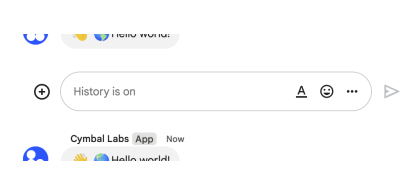
নিচের ছবিতে দেখানো হয়েছে, অ্যাপ অথেন্টিকেশন ব্যবহার করার সময় চ্যাট কীভাবে একটি মেসেজকে অ্যাট্রিবিউট করে। চ্যাট অ্যাপটিকে মেসেজ প্রেরক হিসেবে প্রদর্শন করে। মেসেজের কন্টেন্টে টেক্সট ( text ), কার্ড ( cardsV2 ), এবং অ্যাক্সেসরি উইজেট ( accessoryWidgets ) থাকতে পারে।

অ্যাপ প্রমাণীকরণের মাধ্যমে বার্তা পাঠানো হয়েছে।

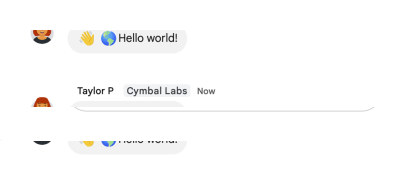
নিচের ছবিতে দেখানো হয়েছে, ব্যবহারকারী প্রমাণীকরণ ব্যবহার করার সময় চ্যাট কীভাবে একটি বার্তার উৎস নির্ধারণ করে। চ্যাট ব্যবহারকারীকে বার্তার প্রেরক হিসেবে দেখায় এবং বার্তার নাম প্রদর্শন করে চ্যাট অ্যাপটিকে বার্তার উৎস হিসেবে চিহ্নিত করে। বার্তার বিষয়বস্তুতে শুধুমাত্র টেক্সট ( text ) থাকতে পারে।

ব্যবহারকারীর প্রমাণীকরণের মাধ্যমে বার্তা পাঠানো হয়েছে।

বার্তার বিষয়বস্তুসহ সর্বোচ্চ বার্তার আকার হলো ৩২,০০০ বাইট।

ওয়েবহুক অনুরোধের ক্ষেত্রে, প্রতিক্রিয়াতে সম্পূর্ণ বার্তাটি থাকে না। অনুরোধে থাকা তথ্যের পাশাপাশি প্রতিক্রিয়াটি কেবল ' name এবং thread.name ফিল্ডগুলো পূরণ করে।

অনুমোদনের পরিধি

নিম্নলিখিত OAuth স্কোপগুলির মধ্যে একটি প্রয়োজন:

  • https://www.googleapis.com/auth/chat.bot
  • https://www.googleapis.com/auth/chat.import
  • https://www.googleapis.com/auth/chat.messages
  • https://www.googleapis.com/auth/chat.messages.create

আরও তথ্যের জন্য, অনুমোদন নির্দেশিকা দেখুন।

CreateMessagePin

rpc CreateMessagePin( CreateMessagePinRequest ) returns ( MessagePin )

একটি মেসেজ পিন তৈরি করে।

নিম্নলিখিত অনুমোদন পরিধিগুলির মধ্যে যেকোনো একটির মাধ্যমে ব্যবহারকারীর প্রমাণীকরণ প্রয়োজন:

  • https://www.googleapis.com/auth/chat.spaces.pins
  • https://www.googleapis.com/auth/chat.spaces
অনুমোদনের পরিধি

নিম্নলিখিত OAuth স্কোপগুলির মধ্যে একটি প্রয়োজন:

  • https://www.googleapis.com/auth/chat.spaces.pins
  • https://www.googleapis.com/auth/chat.spaces

আরও তথ্যের জন্য, অনুমোদন নির্দেশিকা দেখুন।

CreateReaction

rpc CreateReaction( CreateReactionRequest ) returns ( Reaction )

একটি প্রতিক্রিয়া তৈরি করে এবং সেটিকে একটি বার্তায় যুক্ত করে। একটি উদাহরণের জন্য, ‘বার্তায় একটি প্রতিক্রিয়া যোগ করুন’ দেখুন।

নিম্নলিখিত অনুমোদন পরিধিগুলির মধ্যে যেকোনো একটির মাধ্যমে ব্যবহারকারীর প্রমাণীকরণ প্রয়োজন:

  • https://www.googleapis.com/auth/chat.messages.reactions.create
  • https://www.googleapis.com/auth/chat.messages.reactions
  • https://www.googleapis.com/auth/chat.messages
  • https://www.googleapis.com/auth/chat.import (ইম্পোর্ট মোডে শুধুমাত্র স্পেস)
অনুমোদনের পরিধি

নিম্নলিখিত OAuth স্কোপগুলির মধ্যে একটি প্রয়োজন:

  • https://www.googleapis.com/auth/chat.import
  • https://www.googleapis.com/auth/chat.messages
  • https://www.googleapis.com/auth/chat.messages.reactions
  • https://www.googleapis.com/auth/chat.messages.reactions.create

আরও তথ্যের জন্য, অনুমোদন নির্দেশিকা দেখুন।

CreateSection

rpc CreateSection( CreateSectionRequest ) returns ( Section )

গুগল চ্যাটে একটি সেকশন তৈরি করে। সেকশন ব্যবহারকারীদের কথোপকথনগুলোকে একত্রিত করতে এবং চ্যাট নেভিগেশন প্যানেলে প্রদর্শিত স্থানগুলোর তালিকা কাস্টমাইজ করতে সাহায্য করে। শুধুমাত্র CUSTOM_SECTION টাইপের সেকশনই তৈরি করা যায়। বিস্তারিত জানতে, গুগল চ্যাটে সেকশন তৈরি ও সাজানো দেখুন।

অনুমোদনের পরিধি সহ ব্যবহারকারীর প্রমাণীকরণ প্রয়োজন:

  • https://www.googleapis.com/auth/chat.users.sections
অনুমোদনের পরিধি

নিম্নলিখিত OAuth স্কোপ প্রয়োজন:

  • https://www.googleapis.com/auth/chat.users.sections

আরও তথ্যের জন্য, অনুমোদন নির্দেশিকা দেখুন।

CreateSpace

rpc CreateSpace( CreateSpaceRequest ) returns ( Space )

একটি স্পেস তৈরি করে। এটি ব্যবহার করে Import mode একটি নামযুক্ত স্পেস বা গ্রুপ চ্যাট তৈরি করা যায়। একটি উদাহরণের জন্য, ‘একটি স্পেস তৈরি করুন’ দেখুন।

নিম্নলিখিত ধরণের প্রমাণীকরণ সমর্থন করে:

অ্যাপ হিসেবে প্রমাণীকরণের সময়, অনুরোধে space.customer ফিল্ডটি অবশ্যই সেট করতে হবে।

একটি অ্যাপ হিসেবে প্রমাণীকরণের সময়, চ্যাট অ্যাপটি স্পেসের সদস্য হিসেবে যুক্ত হয়। তবে, মানুষের দ্বারা প্রমাণীকরণের মতো নয়, চ্যাট অ্যাপটি স্পেস ম্যানেজার হিসেবে যুক্ত হয় না। ডিফল্টরূপে, স্পেসের সকল সদস্য চ্যাট অ্যাপটিকে স্পেস থেকে সরিয়ে ফেলতে পারে। শুধুমাত্র স্পেস ম্যানেজারদের অ্যাপটি স্পেস থেকে সরানোর অনুমতি দিতে, space.permission_settings.manage_apps কে managers_allowed এ সেট করুন।

স্পেস তৈরির সময় এর সদস্যপদ নির্ভর করে স্পেসটি Import mode তৈরি করা হয়েছে কিনা তার উপর।

  • ইম্পোর্ট মোড: কোনো সদস্য তৈরি করা হয়নি।
  • অন্যান্য সকল মোড: কলকারী ব্যবহারকারীকে সদস্য হিসেবে যুক্ত করা হয়। এটি হলো:
    • অ্যাপ অথেন্টিকেশন ব্যবহার করার সময় অ্যাপটি নিজেই।
    • ব্যবহারকারী প্রমাণীকরণ ব্যবহার করার সময় মানব ব্যবহারকারী।

স্পেস তৈরি করার সময় যদি ALREADY_EXISTS ত্রুটি বার্তাটি পান, তাহলে একটি ভিন্ন displayName ব্যবহার করে দেখুন। Google Workspace সংস্থার মধ্যে থাকা কোনো বিদ্যমান স্পেস হয়তো ইতিমধ্যেই এই display name-টি ব্যবহার করছে।

অনুমোদনের পরিধি

নিম্নলিখিত OAuth স্কোপগুলির মধ্যে একটি প্রয়োজন:

  • https://www.googleapis.com/auth/chat.app.spaces.create
  • https://www.googleapis.com/auth/chat.app.spaces
  • https://www.googleapis.com/auth/chat.import
  • https://www.googleapis.com/auth/chat.spaces
  • https://www.googleapis.com/auth/chat.spaces.create

আরও তথ্যের জন্য, অনুমোদন নির্দেশিকা দেখুন।

কাস্টম ইমোজি মুছুন

rpc DeleteCustomEmoji( DeleteCustomEmojiRequest ) returns ( Empty )

একটি কাস্টম ইমোজি মুছে ফেলে। ডিফল্টরূপে, ব্যবহারকারীরা শুধুমাত্র তাদের নিজেদের তৈরি করা কাস্টম ইমোজিই মুছতে পারেন। অ্যাডমিনিস্ট্রেটর কর্তৃক নিযুক্ত ইমোজি ম্যানেজাররা প্রতিষ্ঠানের যেকোনো কাস্টম ইমোজি মুছে ফেলতে পারেন। গুগল চ্যাটে কাস্টম ইমোজি সম্পর্কে জানতে দেখুন।

কাস্টম ইমোজি শুধুমাত্র গুগল ওয়ার্কস্পেস অ্যাকাউন্টের জন্য উপলব্ধ, এবং অ্যাডমিনিস্ট্রেটরকে অবশ্যই প্রতিষ্ঠানের জন্য কাস্টম ইমোজি চালু করতে হবে। আরও তথ্যের জন্য, গুগল চ্যাটে কাস্টম ইমোজি সম্পর্কে জানুন এবং কাস্টম ইমোজির অনুমতি পরিচালনা দেখুন

অনুমোদনের পরিধি সহ ব্যবহারকারীর প্রমাণীকরণ প্রয়োজন:

  • https://www.googleapis.com/auth/chat.customemojis
অনুমোদনের পরিধি

নিম্নলিখিত OAuth স্কোপ প্রয়োজন:

  • https://www.googleapis.com/auth/chat.customemojis

আরও তথ্যের জন্য, অনুমোদন নির্দেশিকা দেখুন।

সদস্যপদ মুছুন

rpc DeleteMembership( DeleteMembershipRequest ) returns ( Membership )

সদস্যপদ মুছে ফেলে। উদাহরণস্বরূপ, একটি স্পেস থেকে একজন ব্যবহারকারী বা গুগল চ্যাট অ্যাপ সরান দেখুন।

নিম্নলিখিত ধরণের প্রমাণীকরণ সমর্থন করে:

  • প্রশাসকের অনুমোদন এবং অনুমোদনের পরিধি সহ অ্যাপের প্রমাণীকরণ :

    • https://www.googleapis.com/auth/chat.app.memberships
  • নিম্নলিখিত অনুমোদন পরিধিগুলির মধ্যে একটি ব্যবহার করে ব্যবহারকারীর প্রমাণীকরণ :

    • https://www.googleapis.com/auth/chat.memberships
    • https://www.googleapis.com/auth/chat.memberships.app (স্পেস থেকে কলিং অ্যাপটি সরানোর জন্য)
    • https://www.googleapis.com/auth/chat.import (ইম্পোর্ট মোডে শুধুমাত্র স্পেস)
    • ব্যবহারকারী প্রমাণীকরণ অ্যাডমিনিস্ট্রেটর বিশেষাধিকার প্রদান করে যখন একটি অ্যাডমিনিস্ট্রেটর অ্যাকাউন্ট প্রমাণীকরণ করে, use_admin_access true হয়, এবং নিম্নলিখিত অনুমোদন পরিধি ব্যবহৃত হয়:
      • https://www.googleapis.com/auth/chat.admin.memberships

নিম্নলিখিত ব্যবহারের ক্ষেত্রগুলির জন্য অ্যাপ প্রমাণীকরণ সমর্থিত নয়:

  • একটি স্পেস থেকে গুগল গ্রুপ অপসারণ করা।
  • কোনো স্থান থেকে চ্যাট অ্যাপ সরানো।

স্পেস ম্যানেজারদের মেম্বারশিপ ডিলিট করতে হলে, অনুরোধকারীকে অবশ্যই একজন স্পেস ম্যানেজার হতে হবে। আপনি যদি অ্যাপ অথেন্টিকেশন ব্যবহার করেন, তবে চ্যাট অ্যাপটিকেই স্পেস ক্রিয়েটর হতে হবে।

অনুমোদনের পরিধি

নিম্নলিখিত OAuth স্কোপগুলির মধ্যে একটি প্রয়োজন:

  • https://www.googleapis.com/auth/chat.app.memberships
  • https://www.googleapis.com/auth/chat.admin.memberships
  • https://www.googleapis.com/auth/chat.import
  • https://www.googleapis.com/auth/chat.memberships
  • https://www.googleapis.com/auth/chat.memberships.app

আরও তথ্যের জন্য, অনুমোদন নির্দেশিকা দেখুন।

DeleteMessage

rpc DeleteMessage( DeleteMessageRequest ) returns ( Empty )

একটি বার্তা মুছে ফেলে। উদাহরণের জন্য, ‘একটি বার্তা মুছুন’ দেখুন।

নিম্নলিখিত ধরণের প্রমাণীকরণ সমর্থন করে:

অ্যাপ অথেন্টিকেশন ব্যবহার করা হলে, অনুরোধগুলো শুধুমাত্র কলকারী চ্যাট অ্যাপ দ্বারা তৈরি করা মেসেজগুলোই ডিলিট করতে পারে।

অনুমোদনের পরিধি

নিম্নলিখিত OAuth স্কোপগুলির মধ্যে একটি প্রয়োজন:

  • https://www.googleapis.com/auth/chat.bot
  • https://www.googleapis.com/auth/chat.import
  • https://www.googleapis.com/auth/chat.messages

আরও তথ্যের জন্য, অনুমোদন নির্দেশিকা দেখুন।

মেসেজপিন মুছুন

rpc DeleteMessagePin( DeleteMessagePinRequest ) returns ( Empty )

মেসেজ পিন মুছে দেয়।

নিম্নলিখিত অনুমোদন পরিধিগুলির মধ্যে যেকোনো একটির মাধ্যমে ব্যবহারকারীর প্রমাণীকরণ প্রয়োজন:

  • https://www.googleapis.com/auth/chat.spaces.pins
  • https://www.googleapis.com/auth/chat.spaces
অনুমোদনের পরিধি

নিম্নলিখিত OAuth স্কোপগুলির মধ্যে একটি প্রয়োজন:

  • https://www.googleapis.com/auth/chat.spaces.pins
  • https://www.googleapis.com/auth/chat.spaces

আরও তথ্যের জন্য, অনুমোদন নির্দেশিকা দেখুন।

ডিলিটরিঅ্যাকশন

rpc DeleteReaction( DeleteReactionRequest ) returns ( Empty )

কোনো বার্তার প্রতিক্রিয়া মুছে দেয়। উদাহরণের জন্য, ‘প্রতিক্রিয়া মুছুন’ দেখুন।

নিম্নলিখিত অনুমোদন পরিধিগুলির মধ্যে যেকোনো একটির মাধ্যমে ব্যবহারকারীর প্রমাণীকরণ প্রয়োজন:

  • https://www.googleapis.com/auth/chat.messages.reactions
  • https://www.googleapis.com/auth/chat.messages
  • https://www.googleapis.com/auth/chat.import (ইম্পোর্ট মোডে শুধুমাত্র স্পেস)
অনুমোদনের পরিধি

নিম্নলিখিত OAuth স্কোপগুলির মধ্যে একটি প্রয়োজন:

  • https://www.googleapis.com/auth/chat.import
  • https://www.googleapis.com/auth/chat.messages
  • https://www.googleapis.com/auth/chat.messages.reactions

আরও তথ্যের জন্য, অনুমোদন নির্দেশিকা দেখুন।

ডিলিটসেকশন

rpc DeleteSection( DeleteSectionRequest ) returns ( Empty )

CUSTOM_SECTION টাইপের একটি সেকশন মুছে ফেলে।

যদি সেকশনটিতে স্পেসের মতো কোনো আইটেম থাকে, তাহলে সেই আইটেমগুলো গুগল চ্যাটের ডিফল্ট সেকশনে সরিয়ে দেওয়া হয় এবং মুছে ফেলা হয় না।

বিস্তারিত জানতে, গুগল চ্যাটে সেকশন তৈরি ও সাজানো দেখুন।

অনুমোদনের পরিধি সহ ব্যবহারকারীর প্রমাণীকরণ প্রয়োজন:

  • https://www.googleapis.com/auth/chat.users.sections
অনুমোদনের পরিধি

নিম্নলিখিত OAuth স্কোপ প্রয়োজন:

  • https://www.googleapis.com/auth/chat.users.sections

আরও তথ্যের জন্য, অনুমোদন নির্দেশিকা দেখুন।

DeleteSpace

rpc DeleteSpace( DeleteSpaceRequest ) returns ( Empty )

একটি নামযুক্ত স্পেস মুছে ফেলে। এটি সর্বদা একটি ক্যাসকেডিং ডিলিট প্রক্রিয়া সম্পাদন করে, যার অর্থ হলো স্পেসটির অধীনস্থ রিসোর্সগুলো—যেমন স্পেসটিতে পোস্ট করা বার্তা এবং স্পেসের সদস্যপদ—সেগুলোও মুছে ফেলা হয়। একটি উদাহরণের জন্য, “একটি স্পেস মুছুন” দেখুন।

নিম্নলিখিত ধরণের প্রমাণীকরণ সমর্থন করে:

  • প্রশাসকের অনুমোদন এবং অনুমোদনের পরিধি সহ অ্যাপের প্রমাণীকরণ :

    • https://www.googleapis.com/auth/chat.app.delete (শুধুমাত্র অ্যাপ দ্বারা তৈরি করা স্থানগুলিতে)
  • নিম্নলিখিত অনুমোদন পরিধিগুলির মধ্যে একটি ব্যবহার করে ব্যবহারকারীর প্রমাণীকরণ :

    • https://www.googleapis.com/auth/chat.delete
    • https://www.googleapis.com/auth/chat.import (ইম্পোর্ট মোডে শুধুমাত্র স্পেস)
    • ব্যবহারকারী প্রমাণীকরণ অ্যাডমিনিস্ট্রেটর বিশেষাধিকার প্রদান করে যখন একটি অ্যাডমিনিস্ট্রেটর অ্যাকাউন্ট প্রমাণীকরণ করে, use_admin_access true হয়, এবং নিম্নলিখিত অনুমোদন পরিধি ব্যবহৃত হয়:
      • https://www.googleapis.com/auth/chat.admin.delete
অনুমোদনের পরিধি

নিম্নলিখিত OAuth স্কোপগুলির মধ্যে একটি প্রয়োজন:

  • https://www.googleapis.com/auth/chat.app.delete
  • https://www.googleapis.com/auth/chat.admin.delete
  • https://www.googleapis.com/auth/chat.import
  • https://www.googleapis.com/auth/chat.delete

আরও তথ্যের জন্য, অনুমোদন নির্দেশিকা দেখুন।

FindDirectMessage

rpc FindDirectMessage( FindDirectMessageRequest ) returns ( Space )

নির্দিষ্ট ব্যবহারকারীর সাথে বিদ্যমান সরাসরি বার্তাটি ফেরত দেয়। যদি সরাসরি বার্তা পাঠানোর জন্য কোনো জায়গা খুঁজে না পাওয়া যায়, তাহলে একটি 404 NOT_FOUND ত্রুটি ফেরত দেয়। একটি উদাহরণের জন্য, ‘একটি সরাসরি বার্তা খুঁজুন’ দেখুন।

অ্যাপ প্রমাণীকরণের মাধ্যমে, নির্দিষ্ট ব্যবহারকারী এবং কলকারী চ্যাট অ্যাপের মধ্যেকার সরাসরি বার্তা আদান-প্রদানের স্থানটি ফেরত দেওয়া হয়।

ব্যবহারকারী প্রমাণীকরণের মাধ্যমে, নির্দিষ্ট ব্যবহারকারী এবং প্রমাণীকৃত ব্যবহারকারীর মধ্যেকার সরাসরি বার্তা আদান-প্রদানের স্থানটি ফেরত দেওয়া হয়।

নিম্নলিখিত ধরণের প্রমাণীকরণ সমর্থন করে:

অনুমোদনের পরিধি

নিম্নলিখিত OAuth স্কোপগুলির মধ্যে একটি প্রয়োজন:

  • https://www.googleapis.com/auth/chat.spaces
  • https://www.googleapis.com/auth/chat.spaces.readonly
  • https://www.googleapis.com/auth/chat.bot

আরও তথ্যের জন্য, অনুমোদন নির্দেশিকা দেখুন।

গ্রুপ চ্যাট খুঁজুন

rpc FindGroupChats( FindGroupChatsRequest ) returns ( FindGroupChatsResponse )

spaceType == GROUP_CHAT টাইপের সমস্ত স্পেস ফেরত দেয়, যেগুলোর সদস্য তালিকায় ঠিক কলিং ইউজার এবং FindGroupChatsRequest.users এ উল্লেখিত ইউজাররা অন্তর্ভুক্ত। শুধুমাত্র কথোপকথনে যোগদানকারী সদস্যরাই সমর্থিত। একটি উদাহরণের জন্য, `Find group chats` দেখুন।

যদি কলকারী ব্যবহারকারী কিছু ব্যবহারকারীকে ব্লক করে, অথবা তাদের দ্বারা ব্লক হয়, এবং নির্দিষ্ট সকল ব্যবহারকারীসহ কোনো স্পেস খুঁজে না পাওয়া যায়, তাহলে এই মেথডটি সেইসব স্পেস রিটার্ন করে যেগুলিতে ব্লক করা বা ব্লককারী ব্যবহারকারীরা অন্তর্ভুক্ত নয়।

নির্দিষ্ট ব্যবহারকারী সেটে শুধুমাত্র মানব (নন-অ্যাপ) সদস্যপদ থাকতে হবে। যে অনুরোধে অ-মানব ব্যবহারকারী থাকে, তা কোনো স্পেস ফেরত দেয় না।

নিম্নলিখিত অনুমোদন পরিধিগুলির মধ্যে যেকোনো একটির মাধ্যমে ব্যবহারকারীর প্রমাণীকরণ প্রয়োজন:

  • https://www.googleapis.com/auth/chat.memberships.readonly
  • https://www.googleapis.com/auth/chat.memberships
অনুমোদনের পরিধি

নিম্নলিখিত OAuth স্কোপগুলির মধ্যে একটি প্রয়োজন:

  • https://www.googleapis.com/auth/chat.memberships
  • https://www.googleapis.com/auth/chat.memberships.readonly

আরও তথ্যের জন্য, অনুমোদন নির্দেশিকা দেখুন।

GetAttachment

rpc GetAttachment( GetAttachmentRequest ) returns ( Attachment )

একটি মেসেজ অ্যাটাচমেন্টের মেটাডেটা পাওয়া যায়। মিডিয়া এপিআই (media API ) ব্যবহার করে অ্যাটাচমেন্টের ডেটা সংগ্রহ করা হয়। একটি উদাহরণের জন্য, “Get metadata about a message attachment” দেখুন।

অনুমোদনের পরিধি সহ অ্যাপের প্রমাণীকরণ প্রয়োজন:

  • https://www.googleapis.com/auth/chat.bot
অনুমোদনের পরিধি

নিম্নলিখিত OAuth স্কোপ প্রয়োজন:

  • https://www.googleapis.com/auth/chat.bot

আরও তথ্যের জন্য, অনুমোদন নির্দেশিকা দেখুন।

প্রাপ্যতা পান

rpc GetAvailability( GetAvailabilityRequest ) returns ( Availability )

গুগল চ্যাটে কোনো ব্যবহারকারীর উপলব্ধতার তথ্য প্রদান করে। উদাহরণস্বরূপ, কোনো ব্যবহারকারী অনলাইন আছেন নাকি অনুপস্থিত, তা যাচাই করতে অথবা তার নিজস্ব স্ট্যাটাস বার্তা পেতে এটি ব্যবহার করা যেতে পারে।

এই পদ্ধতিটি শুধুমাত্র প্রমাণীকৃত ব্যবহারকারীর প্রাপ্যতা পুনরুদ্ধার করে।

নিম্নলিখিত অনুমোদন পরিধিগুলির মধ্যে যেকোনো একটির মাধ্যমে ব্যবহারকারীর প্রমাণীকরণ প্রয়োজন:

  • https://www.googleapis.com/auth/chat.users.availability.readonly
  • https://www.googleapis.com/auth/chat.users.availability
অনুমোদনের পরিধি

নিম্নলিখিত OAuth স্কোপগুলির মধ্যে একটি প্রয়োজন:

  • https://www.googleapis.com/auth/chat.users.readstate
  • https://www.googleapis.com/auth/chat.users.availability
  • https://www.googleapis.com/auth/chat.users.availability.readonly

আরও তথ্যের জন্য, অনুমোদন নির্দেশিকা দেখুন।

GetCustomEmoji

rpc GetCustomEmoji( GetCustomEmojiRequest ) returns ( CustomEmoji )

কাস্টম ইমোজি সম্পর্কে বিস্তারিত তথ্য প্রদান করে।

কাস্টম ইমোজি শুধুমাত্র গুগল ওয়ার্কস্পেস অ্যাকাউন্টের জন্য উপলব্ধ, এবং অ্যাডমিনিস্ট্রেটরকে অবশ্যই প্রতিষ্ঠানের জন্য কাস্টম ইমোজি চালু করতে হবে। আরও তথ্যের জন্য, গুগল চ্যাটে কাস্টম ইমোজি সম্পর্কে জানুন এবং কাস্টম ইমোজির অনুমতি পরিচালনা দেখুন

নিম্নলিখিত অনুমোদন পরিধিগুলির মধ্যে যেকোনো একটির মাধ্যমে ব্যবহারকারীর প্রমাণীকরণ প্রয়োজন:

  • https://www.googleapis.com/auth/chat.customemojis.readonly
  • https://www.googleapis.com/auth/chat.customemojis
অনুমোদনের পরিধি

নিম্নলিখিত OAuth স্কোপগুলির মধ্যে একটি প্রয়োজন:

  • https://www.googleapis.com/auth/chat.customemojis
  • https://www.googleapis.com/auth/chat.customemojis.readonly

আরও তথ্যের জন্য, অনুমোদন নির্দেশিকা দেখুন।

সদস্যপদ পান

rpc GetMembership( GetMembershipRequest ) returns ( Membership )

কোনো সদস্যপদ সম্পর্কে বিস্তারিত তথ্য প্রদান করে। উদাহরণস্বরূপ, কোনো ব্যবহারকারী বা গুগল চ্যাট অ্যাপের সদস্যপদ সম্পর্কে বিস্তারিত তথ্য জানুন দেখুন।

নিম্নলিখিত ধরণের প্রমাণীকরণ সমর্থন করে:

  • নিম্নলিখিত অনুমোদন পরিধিগুলির মধ্যে একটি ব্যবহার করে অ্যাপের প্রমাণীকরণ :

  • নিম্নলিখিত অনুমোদন পরিধিগুলির মধ্যে একটি ব্যবহার করে ব্যবহারকারীর প্রমাণীকরণ :

    • https://www.googleapis.com/auth/chat.memberships.readonly
    • https://www.googleapis.com/auth/chat.memberships
    • ব্যবহারকারী প্রমাণীকরণ অ্যাডমিনিস্ট্রেটর বিশেষাধিকার প্রদান করে যখন একটি অ্যাডমিনিস্ট্রেটর অ্যাকাউন্ট প্রমাণীকরণ করে, use_admin_access true হয়, এবং নিম্নলিখিত অনুমোদন স্কোপগুলির মধ্যে একটি ব্যবহৃত হয়:
      • https://www.googleapis.com/auth/chat.admin.memberships.readonly
      • https://www.googleapis.com/auth/chat.admin.memberships
অনুমোদনের পরিধি

নিম্নলিখিত OAuth স্কোপগুলির মধ্যে একটি প্রয়োজন:

  • https://www.googleapis.com/auth/chat.admin.memberships
  • https://www.googleapis.com/auth/chat.admin.memberships.readonly
  • https://www.googleapis.com/auth/chat.app.memberships
  • https://www.googleapis.com/auth/chat.bot
  • https://www.googleapis.com/auth/chat.memberships
  • https://www.googleapis.com/auth/chat.memberships.readonly

আরও তথ্যের জন্য, অনুমোদন নির্দেশিকা দেখুন।

GetMessage

rpc GetMessage( GetMessageRequest ) returns ( Message )

একটি বার্তা সম্পর্কে বিস্তারিত তথ্য প্রদান করে। একটি উদাহরণের জন্য, ‘একটি বার্তা সম্পর্কে বিস্তারিত তথ্য জানুন’ দেখুন।

নিম্নলিখিত ধরণের প্রমাণীকরণ সমর্থন করে:

  • নিম্নলিখিত অনুমোদন পরিধিগুলির মধ্যে একটি ব্যবহার করে অ্যাপের প্রমাণীকরণ :

    • https://www.googleapis.com/auth/chat.bot : এই অথরাইজেশন স্কোপটি ব্যবহার করার সময়, এই মেথডটি এমন মেসেজের বিবরণ রিটার্ন করে যেটিতে চ্যাট অ্যাপের অ্যাক্সেস আছে, যেমন ডিরেক্ট মেসেজ এবং স্ল্যাশ কমান্ড যা চ্যাট অ্যাপটিকে চালু করে।
    • অ্যাডমিনিস্ট্রেটরের অনুমোদন সাপেক্ষে https://www.googleapis.com/auth/chat.app.messages.readonly । এই অথেনটিকেশন স্কোপ ব্যবহার করার সময়, এই মেথডটি একটি স্পেসের মধ্যে থাকা পাবলিক মেসেজের বিস্তারিত তথ্য রিটার্ন করে।
  • নিম্নলিখিত অনুমোদন পরিধিগুলির মধ্যে একটি ব্যবহার করে ব্যবহারকারীর প্রমাণীকরণ :

    • https://www.googleapis.com/auth/chat.messages.readonly
    • https://www.googleapis.com/auth/chat.messages

দ্রষ্টব্য: ব্লক করা কোনো সদস্য বা স্পেস থেকে বার্তা আসতে পারে।

অনুমোদনের পরিধি

নিম্নলিখিত OAuth স্কোপগুলির মধ্যে একটি প্রয়োজন:

  • https://www.googleapis.com/auth/chat.bot
  • https://www.googleapis.com/auth/chat.messages
  • https://www.googleapis.com/auth/chat.messages.readonly
  • https://www.googleapis.com/auth/chat.app.messages.readonly

আরও তথ্যের জন্য, অনুমোদন নির্দেশিকা দেখুন।

গেটস্পেস

rpc GetSpace( GetSpaceRequest ) returns ( Space )

একটি স্পেস সম্পর্কে বিস্তারিত তথ্য প্রদান করে। একটি উদাহরণের জন্য, ‘একটি স্পেস সম্পর্কে বিস্তারিত তথ্য জানুন’ দেখুন।

নিম্নলিখিত ধরণের প্রমাণীকরণ সমর্থন করে:

  • নিম্নলিখিত অনুমোদন পরিধিগুলির মধ্যে একটি ব্যবহার করে অ্যাপের প্রমাণীকরণ :

  • নিম্নলিখিত অনুমোদন পরিধিগুলির মধ্যে একটি ব্যবহার করে ব্যবহারকারীর প্রমাণীকরণ :

    • https://www.googleapis.com/auth/chat.spaces.readonly
    • https://www.googleapis.com/auth/chat.spaces
    • ব্যবহারকারী প্রমাণীকরণ অ্যাডমিনিস্ট্রেটর বিশেষাধিকার প্রদান করে যখন একটি অ্যাডমিনিস্ট্রেটর অ্যাকাউন্ট প্রমাণীকরণ করে, use_admin_access true হয়, এবং নিম্নলিখিত অনুমোদন স্কোপগুলির মধ্যে একটি ব্যবহৃত হয়:
      • https://www.googleapis.com/auth/chat.admin.spaces.readonly
      • https://www.googleapis.com/auth/chat.admin.spaces

অ্যাপ প্রমাণীকরণের নিম্নলিখিত সীমাবদ্ধতাগুলো রয়েছে:

  • space.access_settings শুধুমাত্র chat.app.spaces স্কোপ ব্যবহার করার সময়ই পূরণ করা হয়।
  • space.predefind_permission_settings এবং space.permission_settings শুধুমাত্র chat.app.spaces স্কোপ ব্যবহার করার সময় এবং কেবল অ্যাপ দ্বারা তৈরি স্পেসগুলির জন্যই পূরণ করা হয়।
অনুমোদনের পরিধি

নিম্নলিখিত OAuth স্কোপগুলির মধ্যে একটি প্রয়োজন:

  • https://www.googleapis.com/auth/chat.admin.spaces
  • https://www.googleapis.com/auth/chat.admin.spaces.readonly
  • https://www.googleapis.com/auth/chat.spaces
  • https://www.googleapis.com/auth/chat.spaces.readonly
  • https://www.googleapis.com/auth/chat.bot
  • https://www.googleapis.com/auth/chat.app.spaces

আরও তথ্যের জন্য, অনুমোদন নির্দেশিকা দেখুন।

গেটস্পেসইভেন্ট

rpc GetSpaceEvent( GetSpaceEventRequest ) returns ( SpaceEvent )

একটি গুগল চ্যাট স্পেস থেকে একটি ইভেন্ট ফেরত দেয়। ইভেন্ট পেলোডে পরিবর্তিত রিসোর্সটির সর্বশেষ সংস্করণ থাকে। উদাহরণস্বরূপ, আপনি যদি একটি নতুন বার্তা সম্পর্কে ইভেন্টের অনুরোধ করেন কিন্তু বার্তাটি পরে আপডেট করা হয়, তাহলে সার্ভার ইভেন্ট পেলোডে আপডেট করা Message রিসোর্সটি ফেরত দেয়।

দ্রষ্টব্য: এই অনুরোধের জন্য স্পেস ইভেন্ট ডেটার স্পেস অবজেক্টে permissionSettings ফিল্ডটি ফেরত দেওয়া হয় না।

অনুরোধকৃত ডেটা পড়ার জন্য উপযুক্ত অনুমোদন পরিধি সহ নিম্নলিখিত ধরণের প্রমাণীকরণ সমর্থন করে:

  • নিম্নলিখিত অনুমোদন পরিধিগুলির মধ্যে একটি ব্যবহার করে প্রশাসকের অনুমোদনের মাধ্যমে অ্যাপের প্রমাণীকরণ :

    • https://www.googleapis.com/auth/chat.app.spaces
    • https://www.googleapis.com/auth/chat.app.spaces.readonly
    • https://www.googleapis.com/auth/chat.app.messages.readonly
    • https://www.googleapis.com/auth/chat.app.memberships
    • https://www.googleapis.com/auth/chat.app.memberships.readonly
  • নিম্নলিখিত অনুমোদন পরিধিগুলির মধ্যে একটি ব্যবহার করে ব্যবহারকারীর প্রমাণীকরণ :

    • https://www.googleapis.com/auth/chat.spaces.readonly
    • https://www.googleapis.com/auth/chat.spaces
    • https://www.googleapis.com/auth/chat.messages.readonly
    • https://www.googleapis.com/auth/chat.messages
    • https://www.googleapis.com/auth/chat.messages.reactions.readonly
    • https://www.googleapis.com/auth/chat.messages.reactions
    • https://www.googleapis.com/auth/chat.memberships.readonly
    • https://www.googleapis.com/auth/chat.memberships

কোনো ইভেন্ট পেতে হলে, প্রমাণীকৃত কলারকে অবশ্যই স্পেসটির সদস্য হতে হবে।

উদাহরণস্বরূপ, গুগল চ্যাট স্পেস থেকে কোনো ইভেন্টের বিবরণ জানুন দেখুন।

অনুমোদনের পরিধি

নিম্নলিখিত OAuth স্কোপগুলির মধ্যে একটি প্রয়োজন:

  • https://www.googleapis.com/auth/chat.app.memberships
  • https://www.googleapis.com/auth/chat.app.memberships.readonly
  • https://www.googleapis.com/auth/chat.app.messages.readonly
  • https://www.googleapis.com/auth/chat.app.spaces
  • https://www.googleapis.com/auth/chat.app.spaces.readonly
  • https://www.googleapis.com/auth/chat.app.all.messages.readonly
  • https://www.googleapis.com/auth/chat.app.all.spaces.readonly
  • https://www.googleapis.com/auth/chat.app.all.memberships.readonly
  • https://www.googleapis.com/auth/chat.spaces
  • https://www.googleapis.com/auth/chat.spaces.readonly
  • https://www.googleapis.com/auth/chat.messages
  • https://www.googleapis.com/auth/chat.messages.readonly
  • https://www.googleapis.com/auth/chat.memberships
  • https://www.googleapis.com/auth/chat.memberships.readonly
  • https://www.googleapis.com/auth/chat.messages.reactions
  • https://www.googleapis.com/auth/chat.messages.reactions.readonly

আরও তথ্যের জন্য, অনুমোদন নির্দেশিকা দেখুন।

GetSpaceNotificationSetting

rpc GetSpaceNotificationSetting( GetSpaceNotificationSettingRequest ) returns ( SpaceNotificationSetting )

স্পেস নোটিফিকেশন সেটিংটি পাওয়া যায়। একটি উদাহরণের জন্য, কলারের স্পেস নোটিফিকেশন সেটিং দেখুন।

অনুমোদনের পরিধি সহ ব্যবহারকারীর প্রমাণীকরণ প্রয়োজন:

  • https://www.googleapis.com/auth/chat.users.spacesettings
অনুমোদনের পরিধি

নিম্নলিখিত OAuth স্কোপ প্রয়োজন:

  • https://www.googleapis.com/auth/chat.users.spacesettings

আরও তথ্যের জন্য, অনুমোদন নির্দেশিকা দেখুন।

GetSpaceReadState

rpc GetSpaceReadState( GetSpaceReadStateRequest ) returns ( SpaceReadState )

একটি স্পেসের মধ্যে কোনো ব্যবহারকারীর পঠিত অবস্থা সম্পর্কে বিস্তারিত তথ্য প্রদান করে, যা পঠিত এবং অপঠিত বার্তা শনাক্ত করতে ব্যবহৃত হয়। একটি উদাহরণের জন্য, 'একজন ব্যবহারকারীর স্পেস পঠিত অবস্থা সম্পর্কে বিস্তারিত তথ্য জানুন ' দেখুন।

নিম্নলিখিত অনুমোদন পরিধিগুলির মধ্যে যেকোনো একটির মাধ্যমে ব্যবহারকারীর প্রমাণীকরণ প্রয়োজন:

  • https://www.googleapis.com/auth/chat.users.readstate.readonly
  • https://www.googleapis.com/auth/chat.users.readstate
অনুমোদনের পরিধি

নিম্নলিখিত OAuth স্কোপগুলির মধ্যে একটি প্রয়োজন:

  • https://www.googleapis.com/auth/chat.users.readstate
  • https://www.googleapis.com/auth/chat.users.readstate.readonly

আরও তথ্যের জন্য, অনুমোদন নির্দেশিকা দেখুন।

GetThreadReadState

rpc GetThreadReadState( GetThreadReadStateRequest ) returns ( ThreadReadState )

একটি থ্রেডের মধ্যে কোনো ব্যবহারকারীর পঠিত অবস্থা সম্পর্কে বিস্তারিত তথ্য প্রদান করে, যা পঠিত এবং অপঠিত বার্তা শনাক্ত করতে ব্যবহৃত হয়। একটি উদাহরণের জন্য, "একজন ব্যবহারকারীর থ্রেড পঠিত অবস্থা সম্পর্কে বিস্তারিত তথ্য জানুন" দেখুন।

নিম্নলিখিত অনুমোদন পরিধিগুলির মধ্যে যেকোনো একটির মাধ্যমে ব্যবহারকারীর প্রমাণীকরণ প্রয়োজন:

  • https://www.googleapis.com/auth/chat.users.readstate.readonly
  • https://www.googleapis.com/auth/chat.users.readstate
অনুমোদনের পরিধি

নিম্নলিখিত OAuth স্কোপগুলির মধ্যে একটি প্রয়োজন:

  • https://www.googleapis.com/auth/chat.users.readstate
  • https://www.googleapis.com/auth/chat.users.readstate.readonly

আরও তথ্যের জন্য, অনুমোদন নির্দেশিকা দেখুন।

কাস্টম ইমোজির তালিকা

rpc ListCustomEmojis( ListCustomEmojisRequest ) returns ( ListCustomEmojisResponse )

প্রমাণীকৃত ব্যবহারকারীর কাছে দৃশ্যমান কাস্টম ইমোজিগুলোর তালিকা।

কাস্টম ইমোজি শুধুমাত্র গুগল ওয়ার্কস্পেস অ্যাকাউন্টের জন্য উপলব্ধ, এবং অ্যাডমিনিস্ট্রেটরকে অবশ্যই প্রতিষ্ঠানের জন্য কাস্টম ইমোজি চালু করতে হবে। আরও তথ্যের জন্য, গুগল চ্যাটে কাস্টম ইমোজি সম্পর্কে জানুন এবং কাস্টম ইমোজির অনুমতি পরিচালনা দেখুন

নিম্নলিখিত অনুমোদন পরিধিগুলির মধ্যে যেকোনো একটির মাধ্যমে ব্যবহারকারীর প্রমাণীকরণ প্রয়োজন:

  • https://www.googleapis.com/auth/chat.customemojis.readonly
  • https://www.googleapis.com/auth/chat.customemojis
অনুমোদনের পরিধি

নিম্নলিখিত OAuth স্কোপগুলির মধ্যে একটি প্রয়োজন:

  • https://www.googleapis.com/auth/chat.customemojis
  • https://www.googleapis.com/auth/chat.customemojis.readonly

আরও তথ্যের জন্য, অনুমোদন নির্দেশিকা দেখুন।

তালিকা সদস্যপদ

rpc ListMemberships( ListMembershipsRequest ) returns ( ListMembershipsResponse )

একটি স্পেসের সদস্যপদ তালিকাভুক্ত করে। উদাহরণস্বরূপ, 'একটি স্পেসে ব্যবহারকারী এবং গুগল চ্যাট অ্যাপ তালিকাভুক্ত করুন' দেখুন। অ্যাপ অথেন্টিকেশন সহ সদস্যপদ তালিকাভুক্ত করলে সেইসব স্পেসের সদস্যপদ তালিকাভুক্ত হয় যেখানে চ্যাট অ্যাপটির অ্যাক্সেস আছে, কিন্তু চ্যাট অ্যাপের নিজের সদস্যপদ সহ অন্যান্য সদস্যপদ বাদ দেওয়া হয়। ব্যবহারকারী অথেন্টিকেশন সহ সদস্যপদ তালিকাভুক্ত করলে সেইসব স্পেসের সদস্যপদ তালিকাভুক্ত হয় যেখানে অথেন্টিকেটেড ব্যবহারকারীর অ্যাক্সেস আছে।

নিম্নলিখিত ধরণের প্রমাণীকরণ সমর্থন করে:

  • নিম্নলিখিত অনুমোদন পরিধিগুলির মধ্যে একটি ব্যবহার করে অ্যাপের প্রমাণীকরণ :

  • নিম্নলিখিত অনুমোদন পরিধিগুলির মধ্যে একটি ব্যবহার করে ব্যবহারকারীর প্রমাণীকরণ :

    • https://www.googleapis.com/auth/chat.memberships.readonly
    • https://www.googleapis.com/auth/chat.memberships
    • https://www.googleapis.com/auth/chat.import (ইম্পোর্ট মোডে শুধুমাত্র স্পেস)
    • ব্যবহারকারী প্রমাণীকরণ অ্যাডমিনিস্ট্রেটর বিশেষাধিকার প্রদান করে যখন একটি অ্যাডমিনিস্ট্রেটর অ্যাকাউন্ট প্রমাণীকরণ করে, use_admin_access true হয়, এবং নিম্নলিখিত অনুমোদন স্কোপগুলির মধ্যে একটি ব্যবহৃত হয়:
      • https://www.googleapis.com/auth/chat.admin.memberships.readonly
      • https://www.googleapis.com/auth/chat.admin.memberships
অনুমোদনের পরিধি

নিম্নলিখিত OAuth স্কোপগুলির মধ্যে একটি প্রয়োজন:

  • https://www.googleapis.com/auth/chat.admin.memberships
  • https://www.googleapis.com/auth/chat.admin.memberships.readonly
  • https://www.googleapis.com/auth/chat.app.memberships
  • https://www.googleapis.com/auth/chat.bot
  • https://www.googleapis.com/auth/chat.import
  • https://www.googleapis.com/auth/chat.memberships
  • https://www.googleapis.com/auth/chat.memberships.readonly

আরও তথ্যের জন্য, অনুমোদন নির্দেশিকা দেখুন।

লিস্টমেসেজপিনস

rpc ListMessagePins( ListMessagePinsRequest ) returns ( ListMessagePinsResponse )

একটি স্পেসের মধ্যে থাকা মেসেজ পিনগুলো তালিকাভুক্ত করে। ব্যবহারকারীরা সহজে অ্যাক্সেসের জন্য স্পেসগুলোতে গুরুত্বপূর্ণ মেসেজ পিন করতে পারেন। আরও তথ্যের জন্য, Google Chat-এ একটি কথোপকথন পিন বা আনপিন করা দেখুন।

নিম্নলিখিত অনুমোদন পরিধিগুলির মধ্যে যেকোনো একটির মাধ্যমে ব্যবহারকারীর প্রমাণীকরণ প্রয়োজন:

  • https://www.googleapis.com/auth/chat.spaces.pins.readonly
  • https://www.googleapis.com/auth/chat.spaces.pins
  • https://www.googleapis.com/auth/chat.spaces.readonly
  • https://www.googleapis.com/auth/chat.spaces
অনুমোদনের পরিধি

নিম্নলিখিত OAuth স্কোপগুলির মধ্যে একটি প্রয়োজন:

  • https://www.googleapis.com/auth/chat.spaces.pins
  • https://www.googleapis.com/auth/chat.spaces.pins.readonly
  • https://www.googleapis.com/auth/chat.spaces
  • https://www.googleapis.com/auth/chat.spaces.readonly

আরও তথ্যের জন্য, অনুমোদন নির্দেশিকা দেখুন।

বার্তা তালিকা

rpc ListMessages( ListMessagesRequest ) returns ( ListMessagesResponse )

কলার যে স্পেসের সদস্য, সেই স্পেসের মেসেজগুলো তালিকাভুক্ত করে, যার মধ্যে ব্লক করা সদস্য এবং স্পেসের মেসেজও অন্তর্ভুক্ত থাকে। সিস্টেম মেসেজ, যেমন নতুন স্পেস সদস্য ঘোষণার মেসেজ, এতে অন্তর্ভুক্ত নয়। যদি আপনি এমন কোনো স্পেসের মেসেজ তালিকাভুক্ত করেন যেখানে কোনো মেসেজ নেই, তাহলে রেসপন্সটি একটি খালি অবজেক্ট হবে। REST/HTTP ইন্টারফেস ব্যবহার করার সময়, রেসপন্সে একটি খালি JSON অবজেক্ট, {} থাকে। একটি উদাহরণের জন্য, 'মেসেজ তালিকাভুক্ত করুন' দেখুন।

নিম্নলিখিত ধরণের প্রমাণীকরণ সমর্থন করে:

  • অনুমোদনের পরিধি সহ প্রশাসকের অনুমোদন দ্বারা অ্যাপের প্রমাণীকরণ :

    • https://www.googleapis.com/auth/chat.app.messages.readonly . এই অথেনটিকেশন স্কোপটি ব্যবহার করার সময়, এই মেথডটি শুধুমাত্র একটি স্পেসের মধ্যে থাকা পাবলিক মেসেজগুলো রিটার্ন করে। এতে প্রাইভেট মেসেজ অন্তর্ভুক্ত থাকে না।
  • নিম্নলিখিত অনুমোদন পরিধিগুলির মধ্যে একটি ব্যবহার করে ব্যবহারকারীর প্রমাণীকরণ :

    • https://www.googleapis.com/auth/chat.messages.readonly
    • https://www.googleapis.com/auth/chat.messages
    • https://www.googleapis.com/auth/chat.import (ইম্পোর্ট মোডে শুধুমাত্র স্পেস)
অনুমোদনের পরিধি

নিম্নলিখিত OAuth স্কোপগুলির মধ্যে একটি প্রয়োজন:

  • https://www.googleapis.com/auth/chat.import
  • https://www.googleapis.com/auth/chat.messages
  • https://www.googleapis.com/auth/chat.messages.readonly
  • https://www.googleapis.com/auth/chat.app.messages.readonly

আরও তথ্যের জন্য, অনুমোদন নির্দেশিকা দেখুন।

তালিকা প্রতিক্রিয়া

rpc ListReactions( ListReactionsRequest ) returns ( ListReactionsResponse )

একটি বার্তার প্রতিক্রিয়া তালিকাভুক্ত করে। একটি উদাহরণের জন্য, ‘একটি বার্তার প্রতিক্রিয়া তালিকা’ দেখুন।

নিম্নলিখিত অনুমোদন পরিধিগুলির মধ্যে যেকোনো একটির মাধ্যমে ব্যবহারকারীর প্রমাণীকরণ প্রয়োজন:

  • https://www.googleapis.com/auth/chat.messages.reactions.readonly
  • https://www.googleapis.com/auth/chat.messages.reactions
  • https://www.googleapis.com/auth/chat.messages.readonly
  • https://www.googleapis.com/auth/chat.messages
অনুমোদনের পরিধি

নিম্নলিখিত OAuth স্কোপগুলির মধ্যে একটি প্রয়োজন:

  • https://www.googleapis.com/auth/chat.messages
  • https://www.googleapis.com/auth/chat.messages.readonly
  • https://www.googleapis.com/auth/chat.messages.reactions
  • https://www.googleapis.com/auth/chat.messages.reactions.readonly

আরও তথ্যের জন্য, অনুমোদন নির্দেশিকা দেখুন।

তালিকা বিভাগের আইটেমগুলি

rpc ListSectionItems( ListSectionItemsRequest ) returns ( ListSectionItemsResponse )

একটি বিভাগের আইটেমগুলো তালিকাভুক্ত করে।

শুধুমাত্র স্পেসই সেকশন আইটেম হতে পারে। বিস্তারিত জানতে, Google Chat-এ সেকশন তৈরি ও সাজানো দেখুন।

অনুমোদনের পরিধি সহ ব্যবহারকারীর প্রমাণীকরণ প্রয়োজন:

  • https://www.googleapis.com/auth/chat.users.sections
  • https://www.googleapis.com/auth/chat.users.sections.readonly
অনুমোদনের পরিধি

নিম্নলিখিত OAuth স্কোপগুলির মধ্যে একটি প্রয়োজন:

  • https://www.googleapis.com/auth/chat.users.sections
  • https://www.googleapis.com/auth/chat.users.sections.readonly

আরও তথ্যের জন্য, অনুমোদন নির্দেশিকা দেখুন।

তালিকা বিভাগ

rpc ListSections( ListSectionsRequest ) returns ( ListSectionsResponse )

চ্যাট ব্যবহারকারীর জন্য উপলব্ধ বিভাগগুলির তালিকা। বিভাগগুলি ব্যবহারকারীদের তাদের কথোপকথনগুলিকে একত্রিত করতে এবং চ্যাট নেভিগেশন প্যানেলে প্রদর্শিত স্থানগুলির তালিকা কাস্টমাইজ করতে সাহায্য করে। বিস্তারিত জানতে, গুগল চ্যাটে বিভাগ তৈরি এবং সংগঠিত করা দেখুন।

অনুমোদনের পরিধি সহ ব্যবহারকারীর প্রমাণীকরণ প্রয়োজন:

  • https://www.googleapis.com/auth/chat.users.sections
  • https://www.googleapis.com/auth/chat.users.sections.readonly
অনুমোদনের পরিধি

নিম্নলিখিত OAuth স্কোপগুলির মধ্যে একটি প্রয়োজন:

  • https://www.googleapis.com/auth/chat.users.sections
  • https://www.googleapis.com/auth/chat.users.sections.readonly

আরও তথ্যের জন্য, অনুমোদন নির্দেশিকা দেখুন।

ListSpaceEvents

rpc ListSpaceEvents( ListSpaceEventsRequest ) returns ( ListSpaceEventsResponse )

একটি গুগল চ্যাট স্পেসের ইভেন্টগুলো তালিকাভুক্ত করে। প্রতিটি ইভেন্টের জন্য, পেলোডে চ্যাট রিসোর্সের সবচেয়ে সাম্প্রতিক সংস্করণটি থাকে। উদাহরণস্বরূপ, আপনি যদি নতুন স্পেস সদস্যদের সম্পর্কিত ইভেন্টগুলো তালিকাভুক্ত করেন, তাহলে সার্ভার Membership রিসোর্স ফেরত দেবে যাতে সদস্যপদের সর্বশেষ বিবরণ রয়েছে। অনুরোধ করা সময়ের মধ্যে যদি নতুন সদস্যদের সরিয়ে দেওয়া হয়, তাহলে ইভেন্ট পেলোডে একটি খালি Membership রিসোর্স থাকবে।

অনুরোধকৃত ডেটা পড়ার জন্য উপযুক্ত অনুমোদন পরিধি সহ নিম্নলিখিত ধরণের প্রমাণীকরণ সমর্থন করে:

  • নিম্নলিখিত অনুমোদন পরিধিগুলির মধ্যে একটি ব্যবহার করে প্রশাসকের অনুমোদনের মাধ্যমে অ্যাপের প্রমাণীকরণ :

    • https://www.googleapis.com/auth/chat.app.spaces
    • https://www.googleapis.com/auth/chat.app.spaces.readonly
    • https://www.googleapis.com/auth/chat.app.messages.readonly
    • https://www.googleapis.com/auth/chat.app.memberships
    • https://www.googleapis.com/auth/chat.app.memberships.readonly
  • নিম্নলিখিত অনুমোদন পরিধিগুলির মধ্যে একটি ব্যবহার করে ব্যবহারকারীর প্রমাণীকরণ :

    • https://www.googleapis.com/auth/chat.spaces.readonly
    • https://www.googleapis.com/auth/chat.spaces
    • https://www.googleapis.com/auth/chat.messages.readonly
    • https://www.googleapis.com/auth/chat.messages
    • https://www.googleapis.com/auth/chat.messages.reactions.readonly
    • https://www.googleapis.com/auth/chat.messages.reactions
    • https://www.googleapis.com/auth/chat.memberships.readonly
    • https://www.googleapis.com/auth/chat.memberships

ইভেন্টের তালিকা দেখতে হলে, প্রমাণীকৃত কলারকে অবশ্যই স্পেসটির সদস্য হতে হবে।

উদাহরণস্বরূপ, একটি গুগল চ্যাট স্পেস থেকে ইভেন্টগুলির তালিকা দেখুন।

অনুমোদনের পরিধি

নিম্নলিখিত OAuth স্কোপগুলির মধ্যে একটি প্রয়োজন:

  • https://www.googleapis.com/auth/chat.app.memberships
  • https://www.googleapis.com/auth/chat.app.memberships.readonly
  • https://www.googleapis.com/auth/chat.app.messages.readonly
  • https://www.googleapis.com/auth/chat.app.spaces
  • https://www.googleapis.com/auth/chat.app.spaces.readonly
  • https://www.googleapis.com/auth/chat.app.all.messages.readonly
  • https://www.googleapis.com/auth/chat.app.all.spaces.readonly
  • https://www.googleapis.com/auth/chat.app.all.memberships.readonly
  • https://www.googleapis.com/auth/chat.spaces
  • https://www.googleapis.com/auth/chat.spaces.readonly
  • https://www.googleapis.com/auth/chat.messages
  • https://www.googleapis.com/auth/chat.messages.readonly
  • https://www.googleapis.com/auth/chat.memberships
  • https://www.googleapis.com/auth/chat.memberships.readonly
  • https://www.googleapis.com/auth/chat.messages.reactions
  • https://www.googleapis.com/auth/chat.messages.reactions.readonly

আরও তথ্যের জন্য, অনুমোদন নির্দেশিকা দেখুন।

তালিকা স্থান

rpc ListSpaces( ListSpacesRequest ) returns ( ListSpacesResponse )

কলার যে স্পেসগুলোর সদস্য, সেগুলোর তালিকা দেখায়। প্রথম মেসেজ না পাঠানো পর্যন্ত গ্রুপ চ্যাট এবং ডিএম তালিকাভুক্ত করা হয় না। একটি উদাহরণের জন্য, ‘স্পেসের তালিকা’ দেখুন।

নিম্নলিখিত ধরণের প্রমাণীকরণ সমর্থন করে:

গুগল ওয়ার্কস্পেস অর্গানাইজেশন অনুযায়ী সমস্ত নামযুক্ত স্পেসের তালিকা পেতে, এর পরিবর্তে ওয়ার্কস্পেস অ্যাডমিনিস্ট্রেটর প্রিভিলেজ ব্যবহার করে spaces.search() মেথডটি ব্যবহার করুন।

অনুমোদনের পরিধি

নিম্নলিখিত OAuth স্কোপগুলির মধ্যে একটি প্রয়োজন:

  • https://www.googleapis.com/auth/chat.spaces
  • https://www.googleapis.com/auth/chat.spaces.readonly
  • https://www.googleapis.com/auth/chat.bot

আরও তথ্যের জন্য, অনুমোদন নির্দেশিকা দেখুন।

সক্রিয় হিসেবে চিহ্নিত করুন

rpc MarkAsActive( MarkAsActiveRequest ) returns ( Availability )

গুগল চ্যাটে ব্যবহারকারীকে ACTIVE হিসেবে চিহ্নিত করে।

ব্যবহারকারীর উপলব্ধতার অবস্থা ' ACTIVE হিসেবে সেট করে। এই ACTIVE অবস্থা নির্দিষ্ট মেয়াদ পর্যন্ত স্থায়ী থাকে, যার পরে ব্যবহারকারীর অবস্থা 'দূরে AWAY হয়ে যায়। উল্লেখ্য যে, যদি ব্যবহারকারী সক্রিয়ভাবে চ্যাট ব্যবহার করেন, তবে ACTIVE ' অবস্থার স্থায়িত্ব প্রদত্ত মেয়াদের পরেও বাড়তে পারে।

এই পদ্ধতিটি শুধুমাত্র প্রমাণীকৃত ব্যবহারকারীর প্রাপ্যতা হালনাগাদ করে।

অনুমোদন পরিধি সহ ব্যবহারকারীর প্রমাণীকরণ প্রয়োজন:

  • https://www.googleapis.com/auth/chat.users.availability
অনুমোদনের পরিধি

নিম্নলিখিত OAuth স্কোপগুলির মধ্যে একটি প্রয়োজন:

  • https://www.googleapis.com/auth/chat.users.readstate
  • https://www.googleapis.com/auth/chat.users.availability

আরও তথ্যের জন্য, অনুমোদন নির্দেশিকা দেখুন।

মার্কঅ্যাজঅ্যাওয়ে

rpc MarkAsAway( MarkAsAwayRequest ) returns ( Availability )

গুগল চ্যাটে ব্যবহারকারীকে AWAY হিসেবে চিহ্নিত করে।

ব্যবহারকারীর অবস্থা 'দূরে' (away) তে সেট করে এবং এটি ব্যবহারকারীর কার্যকলাপ দ্বারা প্রভাবিত হয় না।

এই পদ্ধতিটি শুধুমাত্র প্রমাণীকৃত ব্যবহারকারীর প্রাপ্যতা হালনাগাদ করে।

অনুমোদন পরিধি সহ ব্যবহারকারীর প্রমাণীকরণ প্রয়োজন:

  • https://www.googleapis.com/auth/chat.users.availability
অনুমোদনের পরিধি

নিম্নলিখিত OAuth স্কোপগুলির মধ্যে একটি প্রয়োজন:

  • https://www.googleapis.com/auth/chat.users.readstate
  • https://www.googleapis.com/auth/chat.users.availability

আরও তথ্যের জন্য, অনুমোদন নির্দেশিকা দেখুন।

MarkAsDoNotDisturb

rpc MarkAsDoNotDisturb( MarkAsDoNotDisturbRequest ) returns ( Availability )

গুগল চ্যাটে ব্যবহারকারীকে DO_NOT_DISTURB হিসেবে চিহ্নিত করে।

একটি নির্দিষ্ট মেয়াদ শেষ হওয়ার সময় পর্যন্ত ব্যবহারকারীর উপলব্ধতার অবস্থা DO_NOT_DISTURB এ সেট করে। DO_NOT_DISTURB অবস্থায় থাকলে, ব্যবহারকারীরা সাধারণত কোনো নোটিফিকেশন পান না।

এই পদ্ধতিটি শুধুমাত্র প্রমাণীকৃত ব্যবহারকারীর প্রাপ্যতা হালনাগাদ করে।

অনুমোদন পরিধি সহ ব্যবহারকারীর প্রমাণীকরণ প্রয়োজন:

  • https://www.googleapis.com/auth/chat.users.availability
অনুমোদনের পরিধি

নিম্নলিখিত OAuth স্কোপগুলির মধ্যে একটি প্রয়োজন:

  • https://www.googleapis.com/auth/chat.users.readstate
  • https://www.googleapis.com/auth/chat.users.availability

আরও তথ্যের জন্য, অনুমোদন নির্দেশিকা দেখুন।

MoveSectionItem

rpc MoveSectionItem( MoveSectionItemRequest ) returns ( MoveSectionItemResponse )

একটি আইটেমকে এক বিভাগ থেকে অন্য বিভাগে স্থানান্তর করে। উদাহরণস্বরূপ, যদি কোনো বিভাগে স্পেস থাকে, তবে এই পদ্ধতিটি ব্যবহার করে একটি স্পেসকে অন্য বিভাগে সরানো যেতে পারে। বিস্তারিত জানতে, Google Chat-এ বিভাগ তৈরি এবং সংগঠিত করা দেখুন।

অনুমোদনের পরিধি সহ ব্যবহারকারীর প্রমাণীকরণ প্রয়োজন:

  • https://www.googleapis.com/auth/chat.users.sections
অনুমোদনের পরিধি

নিম্নলিখিত OAuth স্কোপ প্রয়োজন:

  • https://www.googleapis.com/auth/chat.users.sections

আরও তথ্যের জন্য, অনুমোদন নির্দেশিকা দেখুন।

অবস্থান বিভাগ

rpc PositionSection( PositionSectionRequest ) returns ( PositionSectionResponse )

একটি বিভাগের সাজানোর ক্রম পরিবর্তন করে। বিস্তারিত জানতে, Google Chat-এ বিভাগ তৈরি ও সংগঠিত করা দেখুন।

অনুমোদনের পরিধি সহ ব্যবহারকারীর প্রমাণীকরণ প্রয়োজন:

  • https://www.googleapis.com/auth/chat.users.sections
অনুমোদনের পরিধি

নিম্নলিখিত OAuth স্কোপ প্রয়োজন:

  • https://www.googleapis.com/auth/chat.users.sections

আরও তথ্যের জন্য, অনুমোদন নির্দেশিকা দেখুন।

বার্তা কার্ডগুলি প্রতিস্থাপন করুন

rpc ReplaceMessageCards( ReplaceMessageCardsRequest ) returns ( ReplaceMessageCardsResponse )

বার্তার অন্তর্ভুক্ত কার্ডগুলোকে প্রতিস্থাপন করে।

একটি চ্যাট অ্যাপ মানুষের তৈরি কোনো মেসেজ থেকে কার্ড কেবল তখনই প্রতিস্থাপন করতে পারে, যদি মেসেজটিতে আগে থেকেই কার্ড থাকে এবং কার্ডগুলো অ্যাপটি দ্বারা তৈরি করা হয়ে থাকে।

অ্যাপটি যদি কার্ডগুলোকে একটি খালি তালিকা দিয়ে প্রতিস্থাপন করে, তাহলে কার্ডগুলো মুছে যায়। কার্ডগুলো মুছে ফেলার পর, অ্যাপটি আর মেসেজে কার্ড যোগ করতে পারে না।

এই অথরাইজেশন স্কোপ সহ অ্যাপ অথেন্টিকেশন প্রয়োজন: - https://www.googleapis.com/auth/chat.bot

অনুমোদনের পরিধি

নিম্নলিখিত OAuth স্কোপ প্রয়োজন:

  • https://www.googleapis.com/auth/chat.bot

আরও তথ্যের জন্য, অনুমোদন নির্দেশিকা দেখুন।

অনুসন্ধান বার্তা

rpc SearchMessages( SearchMessagesRequest ) returns ( SearchMessagesResponse )

কলকারী ব্যবহারকারীর অ্যাক্সেস আছে এমন গুগল চ্যাট মেসেজগুলো অনুসন্ধান করে। অনুসন্ধানের শর্তের সাথে মিলে যাওয়া মেসেজগুলোর একটি তালিকা ফেরত দেয়।

ব্যবহারকারীর অ্যাক্সেস আছে এমন সমস্ত স্পেস জুড়ে অনুসন্ধান করতে, parent কে spaces/- এ সেট করুন। parent জন্য অন্য কোনো মান ব্যবহার করলে একটি INVALID_ARGUMENT ত্রুটি দেখা দেবে। ফেরত আসা মেসেজগুলির name ফিল্ডে সম্পূর্ণ রিসোর্স name পূরণ করা থাকে, যার মধ্যে মেসেজটি যে নির্দিষ্ট space রয়েছে তার নামও অন্তর্ভুক্ত থাকে।

এই API সব ধরনের মেসেজ ফেরত দেয় না। নিচে তালিকাভুক্ত মেসেজের ধরনগুলো রেসপন্সে অন্তর্ভুক্ত নয়। সব মেসেজের তালিকা দেখতে ListMessages ব্যবহার করুন।

  • ব্যক্তিগত বার্তা যা প্রমাণীকৃত ব্যবহারকারী দেখতে পান।
  • চ্যাট অ্যাপের মাধ্যমে স্পেস বা গ্রুপ চ্যাটে পোস্ট করা বার্তা।
  • চ্যাট অ্যাপের ডিএম-এ বার্তা।
  • ব্লক করা ব্যবহারকারীদের বার্তা।
  • যেসব স্পেস কলার মিউট করে রেখেছেন, সেগুলোর মেসেজ।

নিম্নলিখিত অনুমোদন পরিধিগুলির মধ্যে যেকোনো একটির মাধ্যমে ব্যবহারকারীর প্রমাণীকরণ প্রয়োজন:

  • https://www.googleapis.com/auth/chat.messages.readonly
  • https://www.googleapis.com/auth/chat.messages
অনুমোদনের পরিধি

নিম্নলিখিত OAuth স্কোপগুলির মধ্যে একটি প্রয়োজন:

  • https://www.googleapis.com/auth/chat.messages
  • https://www.googleapis.com/auth/chat.messages.readonly

আরও তথ্যের জন্য, অনুমোদন নির্দেশিকা দেখুন।

সার্চস্পেস

rpc SearchSpaces( SearchSpacesRequest ) returns ( SearchSpacesResponse )

একটি গুগল ওয়ার্কস্পেস অর্গানাইজেশনের স্পেসগুলির একটি তালিকা ফেরত দেয়। একটি উদাহরণের জন্য, ‘স্পেস অনুসন্ধান ও পরিচালনা’ দেখুন।

যখন use_admin_access false সেট করা হয়, তখন ফলাফল সেইসব স্পেসের মধ্যে সীমাবদ্ধ থাকে যেখানে আহ্বানকারী ব্যবহারকারী একজন যোগদানকারী সদস্য। প্রশাসক অধিকারসহ অনুসন্ধান করার জন্য, use_admin_access true সেট করুন।

নিম্নলিখিত ধরণের প্রমাণীকরণ সমর্থন করে:

অনুমোদনের পরিধি

নিম্নলিখিত OAuth স্কোপগুলির মধ্যে একটি প্রয়োজন:

  • https://www.googleapis.com/auth/chat.spaces
  • https://www.googleapis.com/auth/chat.spaces.readonly
  • https://www.googleapis.com/auth/chat.admin.spaces
  • https://www.googleapis.com/auth/chat.admin.spaces.readonly

আরও তথ্যের জন্য, অনুমোদন নির্দেশিকা দেখুন।

সেটআপস্পেস

rpc SetUpSpace( SetUpSpaceRequest ) returns ( Space )

একটি স্পেস তৈরি করে এবং এতে নির্দিষ্ট ব্যবহারকারীদের যুক্ত করে। অনুরোধকারী ব্যবহারকারী স্বয়ংক্রিয়ভাবে স্পেসটিতে যুক্ত হয়ে যান, এবং অনুরোধে তাকে সদস্যপদ হিসেবে উল্লেখ করার প্রয়োজন নেই। একটি উদাহরণের জন্য, ‘প্রাথমিক সদস্যদের নিয়ে একটি স্পেস তৈরি করুন’ দেখুন।

যোগ করার জন্য মানব সদস্যদের নির্দিষ্ট করতে, উপযুক্ত membership.member.name সহ সদস্যপদ যোগ করুন। একজন মানব ব্যবহারকারী যোগ করতে, users/{user} ব্যবহার করুন, যেখানে {user} ব্যবহারকারীর ইমেল ঠিকানা হতে পারে। একই Workspace সংস্থার ব্যবহারকারীদের জন্য {user} People API থেকে ব্যক্তির id , অথবা Directory API-তে ব্যবহারকারীর id হতে পারে। উদাহরণস্বরূপ, যদি user@example.com এর জন্য People API পার্সন প্রোফাইল আইডি 123456789 হয়, তাহলে আপনি membership.member.name কে users/user@example.com অথবা users/123456789 সেট করে ব্যবহারকারীকে স্পেসে যোগ করতে পারেন।

যোগ করার জন্য গুগল গ্রুপগুলো নির্দিষ্ট করতে, উপযুক্ত membership.group_member.name ব্যবহার করে মেম্বারশিপ যোগ করুন। একটি গুগল গ্রুপ যোগ করতে বা আমন্ত্রণ জানাতে, groups/{group} ব্যবহার করুন, যেখানে {group} হলো ক্লাউড আইডেন্টিটি গ্রুপস এপিআই (Cloud Identity Groups API) থেকে প্রাপ্ত গ্রুপটির id । উদাহরণস্বরূপ, আপনি গ্রুপ ইমেল group@example.com এর জন্য আইডি 123456789 পেতে ক্লাউড আইডেন্টিটি গ্রুপস লুকআপ এপিআই (Cloud Identity Groups lookup API) ব্যবহার করতে পারেন, তারপর membership.group_member.name কে groups/123456789 এ সেট করে গ্রুপটিকে স্পেসে যোগ করতে পারেন। গ্রুপ ইমেল সমর্থিত নয়, এবং গুগল গ্রুপগুলোকে শুধুমাত্র নেমড স্পেসে সদস্য হিসেবে যোগ করা যায়।

কোনো নামযুক্ত স্পেস বা গ্রুপ চ্যাটের ক্ষেত্রে, যদি আহ্বানকারী কোনো সদস্যকে ব্লক করেন, বা তিনি কিছু সদস্যের দ্বারা ব্লক হন, অথবা কিছু সদস্যকে যুক্ত করার অনুমতি তাঁর না থাকে, তাহলে সেই সদস্যরা তৈরি করা স্পেসটিতে যুক্ত হন না।

কলকারী ব্যবহারকারী এবং অন্য একজন ব্যবহারকারীর মধ্যে একটি সরাসরি বার্তা (DM) তৈরি করতে, সেই ব্যবহারকারীকে প্রতিনিধিত্ব করার জন্য ঠিক একটি সদস্যপদ নির্দিষ্ট করুন। যদি একজন ব্যবহারকারী অন্যজনকে ব্লক করে, তাহলে অনুরোধটি ব্যর্থ হয় এবং DM তৈরি হয় না।

কলিং ইউজার এবং কলিং অ্যাপের মধ্যে একটি ডিএম (DM) তৈরি করতে, Space.singleUserBotDm কে true সেট করুন এবং কোনো মেম্বারশিপ উল্লেখ করবেন না। আপনি শুধুমাত্র কলিং অ্যাপের সাথে একটি ডিএম সেট আপ করার জন্য এই পদ্ধতিটি ব্যবহার করতে পারবেন। কলিং অ্যাপটিকে কোনো স্পেসের সদস্য হিসেবে অথবা দুজন ব্যবহারকারীর মধ্যে বিদ্যমান কোনো ডিএম-এ যুক্ত করতে, “Invite or add a user or app to a space” দেখুন।

যদি দুই ব্যবহারকারীর মধ্যে আগে থেকেই একটি ডিএম (DM) বিদ্যমান থাকে, তাহলে অনুরোধ করার সময় একজন ব্যবহারকারী অন্যজনকে ব্লক করে রাখলেও, বিদ্যমান ডিএম-টিই ফেরত দেওয়া হয়।

থ্রেডেড রিপ্লাই সহ স্পেস সমর্থিত নয়। স্পেস সেট আপ করার সময় যদি আপনি ALREADY_EXISTS ত্রুটি বার্তাটি পান, তাহলে একটি ভিন্ন displayName ব্যবহার করে দেখুন। Google Workspace সংস্থার মধ্যে থাকা কোনো বিদ্যমান স্পেস হয়তো ইতিমধ্যেই এই display name-টি ব্যবহার করছে।

নিম্নলিখিত অনুমোদন পরিধিগুলির মধ্যে যেকোনো একটির মাধ্যমে ব্যবহারকারীর প্রমাণীকরণ প্রয়োজন:

  • https://www.googleapis.com/auth/chat.spaces.create
  • https://www.googleapis.com/auth/chat.spaces
অনুমোদনের পরিধি

নিম্নলিখিত OAuth স্কোপগুলির মধ্যে একটি প্রয়োজন:

  • https://www.googleapis.com/auth/chat.spaces
  • https://www.googleapis.com/auth/chat.spaces.create

আরও তথ্যের জন্য, অনুমোদন নির্দেশিকা দেখুন।

উপলব্ধতা আপডেট করুন

rpc UpdateAvailability( UpdateAvailabilityRequest ) returns ( Availability )

একজন ব্যবহারকারীর জন্য উপলব্ধতার তথ্য আপডেট করে। এই পদ্ধতির মাধ্যমে শুধুমাত্র custom_status ফিল্ডটি আপডেট করা যায়।

এই পদ্ধতিটি শুধুমাত্র প্রমাণীকৃত ব্যবহারকারীর প্রাপ্যতা হালনাগাদ করে।

নিম্নলিখিত অনুমোদন পরিধিগুলির মধ্যে যেকোনো একটির মাধ্যমে ব্যবহারকারীর প্রমাণীকরণ প্রয়োজন:

  • https://www.googleapis.com/auth/chat.users.availability
অনুমোদনের পরিধি

নিম্নলিখিত OAuth স্কোপগুলির মধ্যে একটি প্রয়োজন:

  • https://www.googleapis.com/auth/chat.users.readstate
  • https://www.googleapis.com/auth/chat.users.availability

আরও তথ্যের জন্য, অনুমোদন নির্দেশিকা দেখুন।

সদস্যপদ আপডেট করুন

rpc UpdateMembership( UpdateMembershipRequest ) returns ( Membership )

সদস্যপদ হালনাগাদ করে। উদাহরণস্বরূপ, একটি স্পেসে ব্যবহারকারীর সদস্যপদ হালনাগাদ করা দেখুন।

নিম্নলিখিত ধরণের প্রমাণীকরণ সমর্থন করে:

  • প্রশাসকের অনুমোদন এবং অনুমোদনের পরিধি সহ অ্যাপের প্রমাণীকরণ :

    • https://www.googleapis.com/auth/chat.app.memberships (শুধুমাত্র অ্যাপ দ্বারা তৈরি করা স্থানগুলিতে)
  • নিম্নলিখিত অনুমোদন পরিধিগুলির মধ্যে একটি ব্যবহার করে ব্যবহারকারীর প্রমাণীকরণ :

    • https://www.googleapis.com/auth/chat.memberships
    • https://www.googleapis.com/auth/chat.import (ইম্পোর্ট মোডে শুধুমাত্র স্পেস)
    • ব্যবহারকারী প্রমাণীকরণ অ্যাডমিনিস্ট্রেটর বিশেষাধিকার প্রদান করে যখন একটি অ্যাডমিনিস্ট্রেটর অ্যাকাউন্ট প্রমাণীকরণ করে, use_admin_access true হয়, এবং নিম্নলিখিত অনুমোদন পরিধি ব্যবহৃত হয়:
      • https://www.googleapis.com/auth/chat.admin.memberships
অনুমোদনের পরিধি

নিম্নলিখিত OAuth স্কোপগুলির মধ্যে একটি প্রয়োজন:

  • https://www.googleapis.com/auth/chat.app.memberships
  • https://www.googleapis.com/auth/chat.admin.memberships
  • https://www.googleapis.com/auth/chat.import
  • https://www.googleapis.com/auth/chat.memberships

আরও তথ্যের জন্য, অনুমোদন নির্দেশিকা দেখুন।

আপডেট বার্তা

rpc UpdateMessage( UpdateMessageRequest ) returns ( Message )

একটি মেসেজ আপডেট করে। patch এবং update মেথডের মধ্যে পার্থক্য রয়েছে। patch মেথড একটি patch রিকোয়েস্ট ব্যবহার করে, অন্যদিকে update মেথড একটি put রিকোয়েস্ট ব্যবহার করে। আমরা patch মেথড ব্যবহার করার পরামর্শ দিই। একটি উদাহরণের জন্য, “Update a message” দেখুন।

নিম্নলিখিত ধরণের প্রমাণীকরণ সমর্থন করে:

অ্যাপ অথেন্টিকেশন ব্যবহার করার সময়, অনুরোধগুলি শুধুমাত্র কলকারী চ্যাট অ্যাপ দ্বারা তৈরি বার্তাগুলিই আপডেট করতে পারে।

অনুমোদনের পরিধি

নিম্নলিখিত OAuth স্কোপগুলির মধ্যে একটি প্রয়োজন:

  • https://www.googleapis.com/auth/chat.bot
  • https://www.googleapis.com/auth/chat.import
  • https://www.googleapis.com/auth/chat.messages

আরও তথ্যের জন্য, অনুমোদন নির্দেশিকা দেখুন।

আপডেট বিভাগ

rpc UpdateSection( UpdateSectionRequest ) returns ( Section )

একটি সেকশন আপডেট করে। শুধুমাত্র CUSTOM_SECTION টাইপের সেকশনগুলোই আপডেট করা যায়। বিস্তারিত জানতে, Google Chat-এ সেকশন তৈরি ও সাজানো দেখুন।

অনুমোদনের পরিধি সহ ব্যবহারকারীর প্রমাণীকরণ প্রয়োজন:

  • https://www.googleapis.com/auth/chat.users.sections
অনুমোদনের পরিধি

নিম্নলিখিত OAuth স্কোপ প্রয়োজন:

  • https://www.googleapis.com/auth/chat.users.sections

আরও তথ্যের জন্য, অনুমোদন নির্দেশিকা দেখুন।

আপডেটস্পেস

rpc UpdateSpace( UpdateSpaceRequest ) returns ( Space )

একটি স্পেস আপডেট করে। উদাহরণের জন্য, ‘একটি স্পেস আপডেট করুন’ দেখুন।

আপনি যদি displayName ফিল্ডটি আপডেট করার সময় ALREADY_EXISTS ত্রুটি বার্তাটি পান, তাহলে একটি ভিন্ন ডিসপ্লে নেম ব্যবহার করে দেখুন। Google Workspace অর্গানাইজেশনের মধ্যে থাকা কোনো বিদ্যমান স্পেস হয়তো ইতিমধ্যেই এই ডিসপ্লে নেমটি ব্যবহার করছে।

নিম্নলিখিত ধরণের প্রমাণীকরণ সমর্থন করে:

  • প্রশাসকের অনুমোদন এবং নিম্নলিখিত অনুমোদন পরিধিগুলির মধ্যে একটির মাধ্যমে অ্যাপের প্রমাণীকরণ :

    • https://www.googleapis.com/auth/chat.app.spaces
  • নিম্নলিখিত অনুমোদন পরিধিগুলির মধ্যে একটি ব্যবহার করে ব্যবহারকারীর প্রমাণীকরণ :

    • https://www.googleapis.com/auth/chat.spaces
    • https://www.googleapis.com/auth/chat.import (ইম্পোর্ট মোডে শুধুমাত্র স্পেস)
    • ব্যবহারকারী প্রমাণীকরণ অ্যাডমিনিস্ট্রেটর বিশেষাধিকার প্রদান করে যখন একটি অ্যাডমিনিস্ট্রেটর অ্যাকাউন্ট প্রমাণীকরণ করে, use_admin_access true হয়, এবং নিম্নলিখিত অনুমোদন স্কোপগুলি ব্যবহৃত হয়:
      • https://www.googleapis.com/auth/chat.admin.spaces

অ্যাপ প্রমাণীকরণের নিম্নলিখিত সীমাবদ্ধতাগুলো রয়েছে:

  • space.predefined_permission_settings অথবা space.permission_settings আপডেট করতে হলে, অ্যাপটিকে অবশ্যই স্পেসটির নির্মাতা হতে হবে।
  • অ্যাপ প্রমাণীকরণের জন্য space.access_settings.audience আপডেট করা সমর্থিত নয়।
অনুমোদনের পরিধি

নিম্নলিখিত OAuth স্কোপগুলির মধ্যে একটি প্রয়োজন:

  • https://www.googleapis.com/auth/chat.app.spaces
  • https://www.googleapis.com/auth/chat.admin.spaces
  • https://www.googleapis.com/auth/chat.import
  • https://www.googleapis.com/auth/chat.spaces

আরও তথ্যের জন্য, অনুমোদন নির্দেশিকা দেখুন।

UpdateSpaceNotificationSetting

rpc UpdateSpaceNotificationSetting( UpdateSpaceNotificationSettingRequest ) returns ( SpaceNotificationSetting )

স্পেস নোটিফিকেশন সেটিং আপডেট করে। একটি উদাহরণের জন্য, কলারের স্পেস নোটিফিকেশন সেটিং আপডেট করুন দেখুন।

অনুমোদনের পরিধি সহ ব্যবহারকারীর প্রমাণীকরণ প্রয়োজন:

  • https://www.googleapis.com/auth/chat.users.spacesettings
অনুমোদনের পরিধি

নিম্নলিখিত OAuth স্কোপ প্রয়োজন:

  • https://www.googleapis.com/auth/chat.users.spacesettings

আরও তথ্যের জন্য, অনুমোদন নির্দেশিকা দেখুন।

UpdateSpaceReadState

rpc UpdateSpaceReadState( UpdateSpaceReadStateRequest ) returns ( SpaceReadState )

একটি স্পেসের মধ্যে কোনো ব্যবহারকারীর পঠিত অবস্থা আপডেট করে, যা পঠিত এবং অপঠিত বার্তা শনাক্ত করতে ব্যবহৃত হয়। একটি উদাহরণের জন্য, 'ব্যবহারকারীর স্পেসের পঠিত অবস্থা আপডেট করুন ' দেখুন।

অনুমোদনের পরিধি সহ ব্যবহারকারীর প্রমাণীকরণ প্রয়োজন:

  • https://www.googleapis.com/auth/chat.users.readstate
অনুমোদনের পরিধি

নিম্নলিখিত OAuth স্কোপ প্রয়োজন:

  • https://www.googleapis.com/auth/chat.users.readstate

আরও তথ্যের জন্য, অনুমোদন নির্দেশিকা দেখুন।

অ্যাক্সেসরি উইজেট

এক বা একাধিক ইন্টারেক্টিভ উইজেট যা একটি বার্তার নীচে প্রদর্শিত হয়। বিস্তারিত জানতে, ‘একটি বার্তার নীচে ইন্টারেক্টিভ উইজেট যোগ করুন’ দেখুন।

ক্ষেত্র
সংঘের মাঠ পর্যায়ের action । কার্যক্রমের ধরণ। action নিম্নলিখিতগুলির মধ্যে কেবল একটি হতে পারে:
button_list

ButtonList

বাটনগুলোর একটি তালিকা।

অ্যাকশনরেসপন্স

চ্যাট অ্যাপ তার প্রতিক্রিয়া কীভাবে পোস্ট করা হবে তা কনফিগার করতে যে প্যারামিটারগুলো ব্যবহার করতে পারে।

ক্ষেত্র
type

ResponseType

শুধুমাত্র ইনপুট। চ্যাট অ্যাপের প্রতিক্রিয়ার ধরন।

url

string

শুধুমাত্র ইনপুট। ব্যবহারকারীদের প্রমাণীকরণ বা কনফিগার করার জন্য URL। (শুধুমাত্র REQUEST_CONFIG রেসপন্স টাইপের জন্য।)

dialog_action

DialogAction

শুধুমাত্র ইনপুট। একটি ডায়ালগ সম্পর্কিত ইন্টারঅ্যাকশন ইভেন্টের প্রতিক্রিয়া। এর সাথে অবশ্যই ResponseType.Dialog থাকতে হবে।

updated_widget

UpdatedWidget

শুধুমাত্র ইনপুট। আপডেট করা উইজেটের প্রতিক্রিয়া।

প্রতিক্রিয়ার ধরণ

চ্যাট অ্যাপের প্রতিক্রিয়ার ধরন।

এনাম
TYPE_UNSPECIFIED ডিফল্ট টাইপ যা NEW_MESSAGE হিসেবে পরিচালিত হয়।
NEW_MESSAGE বিষয়টিতে একটি নতুন বার্তা হিসেবে পোস্ট করুন।
UPDATE_MESSAGE চ্যাট অ্যাপের বার্তা আপডেট করুন। এটি শুধুমাত্র CARD_CLICKED ইভেন্টের ক্ষেত্রেই অনুমোদিত, যেখানে বার্তা প্রেরকের ধরণ হলো BOT
UPDATE_USER_MESSAGE_CARDS ব্যবহারকারীর মেসেজে থাকা কার্ডগুলো আপডেট করুন। এটি শুধুমাত্র একটি মিলে যাওয়া ইউআরএল সহ MESSAGE ইভেন্টের প্রতিক্রিয়া হিসাবে, অথবা মেসেজ প্রেরকের ধরণ HUMAN হলে CARD_CLICKED ইভেন্টের প্রতিক্রিয়া হিসাবে অনুমোদিত। টেক্সট উপেক্ষা করা হয়।
REQUEST_CONFIG ব্যবহারকারীর কাছে ব্যক্তিগতভাবে অতিরিক্ত প্রমাণীকরণ বা কনফিগারেশনের জন্য অনুরোধ করুন।
DIALOG একটি সংলাপ উপস্থাপন করে।
UPDATE_WIDGET উইজেট টেক্সট অটোকমপ্লিট অপশন কোয়েরি।

নির্বাচন আইটেম

উইজেট অটোকমপ্লিট ফলাফলের তালিকা।

ক্ষেত্র
items[]

SelectionItem

SelectionItem অবজেক্টগুলোর একটি অ্যারে।

আপডেট করা উইজেট

selectionInput উইজেটগুলির জন্য, এটি একটি মাল্টিসিলেক্ট মেনুর অটোকমপ্লিট সাজেশন ফেরত দেয়।

ক্ষেত্র
widget

string

আপডেট করা উইজেটের আইডি। এই আইডিটি অবশ্যই সেই উইজেটের আইডির সাথে মিলতে হবে, যেটি আপডেটের অনুরোধটি শুরু করেছিল।

ইউনিয়ন ফিল্ড updated_widget । ব্যবহারকারীর কোনো কার্যকলাপের প্রতিক্রিয়ায় উইজেটটি আপডেট হয়। updated_widget নিম্নলিখিতগুলির মধ্যে কেবল একটি হতে পারে:
suggestions

SelectionItems

উইজেট অটোকমপ্লিট ফলাফলের তালিকা

অ্যাকশনস্ট্যাটাস

কোনো ডায়ালগ চালু বা জমা দেওয়ার অনুরোধের অবস্থা নির্দেশ করে।

ক্ষেত্র
status_code

Code

স্ট্যাটাস কোড।

user_facing_message

string

ব্যবহারকারীদের তাদের অনুরোধের অবস্থা সম্পর্কে পাঠানোর বার্তা। এটি সেট করা না থাকলে, status_code উপর ভিত্তি করে একটি সাধারণ বার্তা পাঠানো হয়।

টীকা

শুধুমাত্র আউটপুট। অ্যানোটেশনগুলো মেসেজের সাধারণ টেক্সট বডির সাথে অথবা এমন চিপের সাথে যুক্ত করা যেতে পারে যা Google Docs বা Sheets-এর মতো Google Workspace রিসোর্সের সাথে লিঙ্ক করে, যেখানে start_index এবং length ০ থাকে। একটি টেক্সট মেসেজে সাধারণ ফরম্যাটিং যোগ করতে, "টেক্সট মেসেজ ফরম্যাট করুন" দেখুন।

সাধারণ টেক্সট মেসেজের মূল অংশের উদাহরণ:

Hello @FooBot how are you!"

সংশ্লিষ্ট টীকা মেটাডেটা:

"annotations":[{
  "type":"USER_MENTION",
  "startIndex":6,
  "length":7,
  "userMention": {
    "user": {
      "name":"users/{user}",
      "displayName":"FooBot",
      "avatarUrl":"https://goo.gl/aeDtrS",
      "type":"BOT"
    },
    "type":"MENTION"
   }
}]
ক্ষেত্র
type

AnnotationType

এই টীকার ধরণ।

length

int32

প্লেইন-টেক্সট মেসেজ বডিতে থাকা সাবস্ট্রিংটির দৈর্ঘ্য, যার সাথে এই অ্যানোটেশনটি সম্পর্কিত। যদি এটি উপস্থিত না থাকে, তবে এর দৈর্ঘ্য ০ নির্দেশ করে।

start_index

int32

প্লেইন-টেক্সট মেসেজ বডির মধ্যে যে প্রারম্ভিক সূচকের (০-ভিত্তিক, অন্তর্ভুক্ত) সাথে এই অ্যানোটেশনটি সম্পর্কিত।

ইউনিয়ন ফিল্ড metadata । অ্যানোটেশন সম্পর্কিত অতিরিক্ত মেটাডেটা। metadata নিম্নলিখিতগুলির মধ্যে কেবল একটি হতে পারে:
user_mention

UserMentionMetadata

ব্যবহারকারী উল্লেখের মেটাডেটা।

slash_command

SlashCommandMetadata

স্ল্যাশ কমান্ডের মেটাডেটা।

custom_emoji_metadata

CustomEmojiMetadata

একটি কাস্টম ইমোজির মেটাডেটা।

টীকা প্রকার

টীকার ধরণ।

এনাম
ANNOTATION_TYPE_UNSPECIFIED এনামের ডিফল্ট মান। এটি ব্যবহার করবেন না।
USER_MENTION একজন ব্যবহারকারীর উল্লেখ করা হয়েছে।
SLASH_COMMAND একটি স্ল্যাশ কমান্ড চালু করা হয়।
CUSTOM_EMOJI একটি নিজস্ব ইমোজি টীকা।

অ্যাপকমান্ডমেটাডেটা

একটি চ্যাট অ্যাপ কমান্ডের মেটাডেটা।

ক্ষেত্র
app_command_id

int32

চ্যাট এপিআই কনফিগারেশনে নির্দিষ্ট করা কমান্ডের আইডি।

app_command_type

AppCommandType

চ্যাট অ্যাপ কমান্ডের ধরণ।

অ্যাপকমান্ডটাইপ

চ্যাট অ্যাপ কমান্ডের প্রকার। বিস্তারিত জানতে, চ্যাট অ্যাপ কমান্ডের প্রকারভেদ দেখুন।

এনাম
APP_COMMAND_TYPE_UNSPECIFIED পূর্বনির্ধারিত মান। অনির্দিষ্ট।
SLASH_COMMAND একটি স্ল্যাশ কমান্ড। ব্যবহারকারী চ্যাট বার্তায় এই কমান্ডটি পাঠান।
QUICK_COMMAND একটি দ্রুত কমান্ড। ব্যবহারকারী মেসেজ রিপ্লাই এরিয়ার চ্যাট মেনু থেকে কমান্ডটি নির্বাচন করেন।
MESSAGE_ACTION একটি মেসেজ অ্যাকশন। ব্যবহারকারী চ্যাটের মেসেজ কনটেক্সট মেনু থেকে কমান্ডটি নির্বাচন করেন।

সংযুক্ত জিআইএফ

একটি GIF ছবি যা একটি URL দ্বারা নির্দিষ্ট করা হয়।

ক্ষেত্র
uri

string

শুধুমাত্র আউটপুট। যে URL-টিতে GIF ছবিটি রয়েছে।

সংযুক্তি

গুগল চ্যাটে একটি সংযুক্তি।

ক্ষেত্র
name

string

শনাক্তকারী। সংযুক্তিটির রিসোর্স নাম।

ফর্ম্যাট: spaces/{space}/messages/{message}/attachments/{attachment} .

content_name

string

শুধুমাত্র আউটপুট। কন্টেন্টের আসল ফাইলের নাম, সম্পূর্ণ পাথ নয়।

content_type

string

শুধুমাত্র আউটপুট। ফাইলটির কন্টেন্ট টাইপ (MIME টাইপ)।

thumbnail_uri

string

শুধুমাত্র আউটপুট। এটি সেই থাম্বনেইল ইউআরএল যা একজন ব্যবহারকারীকে অ্যাটাচমেন্টের প্রিভিউ দেখানোর জন্য ব্যবহার করা উচিত। চ্যাট অ্যাপগুলোর অ্যাটাচমেন্টের কন্টেন্ট ডাউনলোড করার জন্য এই ইউআরএলটি ব্যবহার করা উচিত নয়।

download_uri

string

শুধুমাত্র আউটপুট। এটি সেই ডাউনলোড ইউআরএল যা একজন ব্যবহারকারীকে অ্যাটাচমেন্টটি ডাউনলোড করার সুযোগ দেবে। চ্যাট অ্যাপগুলোর অ্যাটাচমেন্টের কন্টেন্ট ডাউনলোড করার জন্য এই ইউআরএলটি ব্যবহার করা উচিত নয়।

source

Source

শুধুমাত্র আউটপুট। সংযুক্তিটির উৎস।

ইউনিয়ন ফিল্ড data_ref । এটি অ্যাটাচমেন্টের ডেটা রেফারেন্স। data_ref নিম্নলিখিতগুলির মধ্যে কেবল একটি হতে পারে:
attachment_data_ref

AttachmentDataRef

ঐচ্ছিক। সংযুক্তি ডেটার একটি রেফারেন্স। এই ফিল্ডটি সংযুক্তি সহ বার্তা তৈরি বা আপডেট করতে, অথবা মিডিয়া এপিআই ব্যবহার করে সংযুক্তি ডেটা ডাউনলোড করতে ব্যবহৃত হয়।

drive_data_ref

DriveDataRef

শুধুমাত্র আউটপুট। গুগল ড্রাইভ অ্যাটাচমেন্টের একটি রেফারেন্স। এই ফিল্ডটি গুগল ড্রাইভ এপিআই-এর সাথে ব্যবহৃত হয়।

উৎস

সংযুক্তিটির উৎস।

এনাম
SOURCE_UNSPECIFIED সংরক্ষিত।
DRIVE_FILE ফাইলটি একটি গুগল ড্রাইভ ফাইল।
UPLOADED_CONTENT ফাইলটি চ্যাটে আপলোড করা হয়েছে।

সংযুক্তি ডেটা রেফারেন্স

সংযুক্তি ডেটার একটি উল্লেখ।

ক্ষেত্র
resource_name

string

ঐচ্ছিক। অ্যাটাচমেন্ট ডেটার রিসোর্স নাম। অ্যাটাচমেন্ট ডেটা ডাউনলোড করার জন্য মিডিয়া এপিআই-এর সাথে এই ফিল্ডটি ব্যবহৃত হয়।

attachment_upload_token

string

ঐচ্ছিক। আপলোড করা অ্যাটাচমেন্টের রেফারেন্স ধারণকারী একটি অস্বচ্ছ টোকেন। ক্লায়েন্টরা এটিকে একটি অস্বচ্ছ স্ট্রিং হিসেবে গণ্য করে এবং অ্যাটাচমেন্টসহ চ্যাট বার্তা তৈরি বা আপডেট করতে এটি ব্যবহার করে।

দর্শক

গুগল চ্যাটে টার্গেট অডিয়েন্স হলো গুগল ওয়ার্কস্পেস অর্গানাইজেশনের অন্তর্গত একদল ব্যবহারকারী, যা একজন অ্যাডমিনিস্ট্রেটর দ্বারা নির্ধারিত হয়। রিসোর্সের অ্যাক্সেস এবং ভিজিবিলিটি সেটিংস কনফিগার করতে টার্গেট অডিয়েন্স ব্যবহার করা হয়, যেমন কোনো স্পেসকে ব্যবহারকারীদের একটি নির্দিষ্ট গোষ্ঠীর কাছে আবিষ্কারযোগ্য করে তোলা।

আরও বিস্তারিত জানতে, ‘টার্গেট অডিয়েন্স’ এবং ‘একটি স্পেসকে টার্গেট অডিয়েন্সের কাছে আবিষ্কারযোগ্য করে তোলা’ দেখুন।

ক্ষেত্র
name

string

লক্ষ্য দর্শকগোষ্ঠীর রিসোর্সের নাম, যারা এই স্পেসটি খুঁজে পেতে বা এতে যোগ দিতে পারে। বিস্তারিত জানতে, ‘একটি স্পেসকে লক্ষ্য দর্শকগোষ্ঠীর কাছে আবিষ্কারযোগ্য করে তোলা ’ দেখুন। ফরম্যাট: audiences/{audience}

Google Workspace অর্গানাইজেশনের জন্য ডিফল্ট টার্গেট অডিয়েন্স ব্যবহার করতে, audiences/default এ সেট করুন।

প্রাপ্যতা

গুগল চ্যাটে একজন ব্যবহারকারীর বর্তমান উপলব্ধতার তথ্য উপস্থাপন করে, যার মধ্যে তার অবস্থা (যেমন, সক্রিয়, দূরে, বিরক্ত করবেন না) এবং যেকোনো কাস্টম স্ট্যাটাস অন্তর্ভুক্ত থাকে।

ক্ষেত্র
name

string

শনাক্তকারী। ব্যবহারকারীর উপলব্ধতার রিসোর্স নাম।

ফর্ম্যাট: users/{user}/availability

{user} হলো People API বা Admin SDK ডিরেক্টরি API-তে থাকা Person-এর আইডি। উদাহরণস্বরূপ, users/123456789

কলারকে বোঝানোর জন্য ব্যবহারকারীর ইমেল ঠিকানা বা me ছদ্মনাম হিসেবেও ব্যবহার করা যেতে পারে। উদাহরণস্বরূপ, users/user@example.com বা users/me

state

State

শুধুমাত্র আউটপুট। ব্যবহারকারীর বর্তমান উপলব্ধতার অবস্থা।

custom_status

CustomStatus

ঐচ্ছিক। ব্যবহারকারীর নিজস্ব স্ট্যাটাস।

ইউনিয়ন ফিল্ড state_metadata । ব্যবহারকারীর উপলব্ধতার অবস্থার সাথে সম্পর্কিত অতিরিক্ত মেটাডেটা। state_metadata নিম্নলিখিতগুলির মধ্যে কেবল একটি হতে পারে:
do_not_disturb_metadata

DoNotDisturbMetadata

শুধুমাত্র আউটপুট। যদি ব্যবহারকারীর অবস্থা DO_NOT_DISTRUB-এ সেট করা থাকে, তাহলে মেটাডেটা।

রাজ্য

ব্যবহারকারীর বর্তমান উপলব্ধতার অবস্থা নির্দেশ করে।

এনাম
STATE_UNSPECIFIED ডিফল্ট মান। অবস্থাটি অনির্দিষ্ট।
ACTIVE সাম্প্রতিক কার্যকলাপ অনুযায়ী ব্যবহারকারী বর্তমানে সক্রিয় আছেন।
IDLE ব্যবহারকারী বর্তমানে নিষ্ক্রিয় আছেন। এই অবস্থাটি ACTIVE থাকার পর একটি নিষ্ক্রিয়তার সময়কালকে নির্দেশ করে, যার পরে এটি AWAY অবস্থায় রূপান্তরিত হতে পারে।
AWAY ব্যবহারকারী বর্তমানে অনুপস্থিত আছেন। এটি একটি নির্দিষ্ট সময় ধরে নিষ্ক্রিয় থাকার পর ACTIVE বা IDLE অবস্থায় স্বয়ংক্রিয়ভাবে সেট হতে পারে, অথবা ব্যবহারকারী এটি ম্যানুয়ালি সেট করতে পারেন। MarkAsAway মাধ্যমে ম্যানুয়ালি সেট করা হলে, ব্যবহারকারীর কার্যকলাপ নির্বিশেষে এই অবস্থাটি অপরিবর্তিত থাকে।
DO_NOT_DISTURB ব্যবহারকারী 'ডু নট ডিস্টার্ব' অবস্থায় আছেন, যা ম্যানুয়ালি সেট করা হয়েছে।

ক্যালেন্ডারইভেন্টলিঙ্কডেটা

ক্যালেন্ডার ইভেন্ট লিঙ্কগুলির জন্য ডেটা।

ক্ষেত্র
calendar_id

string

লিঙ্ক করা ক্যালেন্ডারের শনাক্তকারী

event_id

string

লিঙ্ক করা ক্যালেন্ডার ইভেন্টের ইভেন্ট শনাক্তকারী

কার্ডউইথআইডি

গুগল চ্যাট মেসেজে একটি কার্ড

অ্যাপ অথেনটিকেশনের মাধ্যমে চ্যাট অ্যাপগুলো কার্ড তৈরি করতে পারে। ডেভেলপার প্রিভিউ প্রোগ্রামের অংশ হিসেবে, আপনার চ্যাট অ্যাপ যদি একজন ব্যবহারকারী হিসেবে অথেন্টিকেট করে , তবে এটি কার্ড মেসেজ তৈরি করতে পারবে। আপনার চ্যাট অ্যাপ যদি ডেভেলপার প্রিভিউ প্রোগ্রামের অংশ না হয়, তবে এটি ইউজার অথেনটিকেশনের মাধ্যমে কার্ড তৈরি করতে পারবে না।

কার্ডসহ বার্তা কীভাবে তৈরি করতে হয় তা জানতে, ‘বার্তা পাঠান’ দেখুন।

কার্ড বিল্ডার ব্যবহার করে কার্ড ডিজাইন করুন এবং প্রিভিউ দেখুন।

কার্ড বিল্ডারটি খুলুন

ক্ষেত্র
card_id

string

মেসেজে একাধিক কার্ড থাকলে এটি আবশ্যক। মেসেজে থাকা প্রতিটি কার্ডের জন্য এটি একটি অনন্য শনাক্তকারী।

card

Card

একটি কার্ড। সর্বোচ্চ আকার ৩২ কিলোবাইট।

চ্যাটস্পেসলিঙ্কডেটা

চ্যাট স্পেস লিঙ্কগুলির ডেটা।

ক্ষেত্র
space

string

লিঙ্ক করা চ্যাট স্পেস রিসোর্সের পরিসর।

ফর্ম্যাট: spaces/{space}

thread

string

লিঙ্ক করা চ্যাট স্পেস রিসোর্সের থ্রেড।

ফর্ম্যাট: spaces/{space}/threads/{thread}

message

string

লিঙ্ক করা চ্যাট স্পেস রিসোর্সের বার্তা।

ফর্ম্যাট: spaces/{space}/messages/{message}

উদ্ধৃতি

সাইটেশন হলো ইনলাইন রেফারেন্স যা ব্যবহারকারীদের সেই রেফারেন্স সম্পর্কে আরও বিস্তারিত তথ্য প্রদান করতে পারে। সংশ্লিষ্ট ইনলাইন সাইটেশন অবশ্যই মেসেজ টেক্সটে <chat-citation data-id="{id}">{text}</chat-citation> এই মার্কআপ ফরম্যাটে থাকতে হবে। সাইটেশন শুধুমাত্র তখনই সমর্থিত হয় যখন মেসেজের markup_syntax MARKDOWN এ সেট করা থাকে।

Elements.citations এ থাকা অপ্রাসঙ্গিক উদ্ধৃতি (অর্থাৎ, বার্তার লেখায় যেগুলোর সাথে <chat-citation> ট্যাগ মেলে না) উপেক্ষা করা হয় এবং এর কারণে বার্তাটি বাতিল হয় না।

ক্ষেত্র
id

string

আবশ্যক। অ্যাপ দ্বারা নির্ধারিত আইডি। এতে শুধুমাত্র ASCII অক্ষর ও সংখ্যা থাকতে হবে এবং এটি ৬৩ অক্ষরের কম হতে হবে।

cited_sources[]

CitedSource

ঐচ্ছিক। উদ্ধৃতিটির সাথে প্রাসঙ্গিক উৎসসমূহের একটি তালিকা। উৎসগুলো উদ্ধৃতি হোভার কার্ডে প্রদর্শিত হয়।

উদ্ধৃত উৎস

তথ্যের উৎসের উল্লেখ।

ক্ষেত্র
title

string

আবশ্যক। CitedSource সাধারণ শিরোনাম। এই ফিল্ডে ফরম্যাটিং করা যায় না।

uri

string

আবশ্যক। এই CitedSource দ্বারা উল্লেখিত রিসোর্সের URI।

snippet

Snippet

ঐচ্ছিক। সরাসরি উৎস থেকে নেওয়া তথ্যের অংশবিশেষ।

footer

Footer

ঐচ্ছিক। স্নিপেটটির পাশাপাশি ফুটার আকারে দেখানোর জন্য অতিরিক্ত তথ্য।

উৎসের পাদটীকা, যা কৃতিত্ব প্রদানের জন্য ব্যবহৃত হয়।

ক্ষেত্র
text

string

ঐচ্ছিক। ফুটার অংশে প্রদর্শিতব্য লেখা।

স্নিপেট

একটি স্নিপেট অবজেক্ট যা একটি বৃহত্তর কর্পাস থেকে নেওয়া অংশকে উপস্থাপন করে।

ক্ষেত্র
text

string

ঐচ্ছিক। কর্পাস থেকে সরাসরি নেওয়া একটি সংক্ষিপ্ত প্লেইনটেক্সট অংশ যা চ্যাটে প্রদর্শিত হতে পারে। মার্কডাউন ফরম্যাট সমর্থন করে না।

image_preview

ElementsImage

ঐচ্ছিক। সাইটেশন তৈরি করার সময় ইনপুট হিসেবে প্রদত্ত স্নিপেটের চিত্র পূর্বরূপ।

সম্পূর্ণ আমদানি স্থান অনুরোধ

একটি স্পেসের জন্য ইম্পোর্ট প্রক্রিয়া সম্পন্ন করার অনুরোধ বার্তা।

ক্ষেত্র
name

string

আবশ্যক। ইম্পোর্ট মোড স্পেসের রিসোর্স নাম।

ফর্ম্যাট: spaces/{space}

সম্পূর্ণ আমদানি স্থান প্রতিক্রিয়া

একটি স্পেসের জন্য ইম্পোর্ট প্রক্রিয়া সম্পন্ন করার প্রতিক্রিয়া বার্তা।

ক্ষেত্র
space

Space

আমদানি মোড স্থান।

ContextualAddOnMarkup

এই প্রকারে কোনো ক্ষেত্র নেই।

ডেভেলপারদের জন্য একটি কনটেক্সচুয়াল অ্যাডঅনের বিষয়বস্তু নির্দিষ্ট করার মার্কআপ।

কার্ড

কার্ড হলো একটি UI উপাদান যা টেক্সট এবং ছবির মতো UI উইজেট ধারণ করতে পারে।

ক্ষেত্র
header

CardHeader

কার্ডের হেডার। হেডারে সাধারণত একটি শিরোনাম এবং একটি ছবি থাকে।

sections[]

Section

বিভাগগুলো একটি রেখা বিভাজক দ্বারা বিভক্ত।

card_actions[]

CardAction

এই কার্ডের কার্যকলাপ।

name

string

কার্ডটির নাম।

কার্ডঅ্যাকশন

কার্ড অ্যাকশন হলো কার্ডটির সাথে যুক্ত কাজটি। একটি ইনভয়েস কার্ডের ক্ষেত্রে, সাধারণ অ্যাকশনগুলো হলো: ইনভয়েস ডিলিট করা, ইনভয়েস ইমেল করা অথবা ব্রাউজারে ইনভয়েসটি খোলা।

গুগল চ্যাট অ্যাপ দ্বারা সমর্থিত নয়।

ক্ষেত্র
action_label

string

লেবেলটি আগে অ্যাকশন মেনু আইটেমে প্রদর্শিত হতো।

on_click

OnClick

এই অ্যাকশন আইটেমটির জন্য onclick অ্যাকশন।

কার্ডহেডার

ক্ষেত্র
title

string

শিরোনাম অবশ্যই উল্লেখ করতে হবে। হেডারের একটি নির্দিষ্ট উচ্চতা রয়েছে: যদি শিরোনাম এবং উপ-শিরোনাম উভয়ই উল্লেখ করা হয়, তবে প্রতিটি এক লাইনে স্থান পাবে। যদি শুধু শিরোনাম উল্লেখ করা হয়, তবে সেটি উভয় লাইনেই স্থান পাবে।

subtitle

string

কার্ড হেডারের উপশিরোনাম।

image_style

ImageStyle

ছবির ধরণ (যেমন, বর্গাকার বর্ডার বা বৃত্তাকার বর্ডার)।

image_url

string

কার্ড হেডারে থাকা ছবিটির ইউআরএল।

ইমেজস্টাইল

এনাম
IMAGE_STYLE_UNSPECIFIED
IMAGE বর্গাকার বর্ডার।
AVATAR বৃত্তাকার সীমানা।

বিভাগ

একটি সেকশনে উইজেটগুলোর একটি সংগ্রহ থাকে, যেগুলো নির্দিষ্ট করার ক্রমানুসারে (উল্লম্বভাবে) রেন্ডার করা হয়। সমস্ত প্ল্যাটফর্মে, কার্ডগুলোর একটি সংকীর্ণ ও নির্দিষ্ট প্রস্থ থাকে, তাই বর্তমানে লেআউট প্রোপার্টির (যেমন, ফ্লোট) কোনো প্রয়োজন নেই।

ক্ষেত্র
header

string

বিভাগের শিরোনাম। ফরম্যাট করা টেক্সট সমর্থিত। টেক্সট ফরম্যাট করার বিষয়ে আরও তথ্যের জন্য, Google Chat অ্যাপে টেক্সট ফরম্যাট করা এবং Google Workspace অ্যাড-অন-এ টেক্সট ফরম্যাট করা দেখুন।

widgets[]

WidgetMarkup

একটি বিভাগে অবশ্যই অন্তত একটি উইজেট থাকতে হবে।

কাস্টম ইমোজি অনুরোধ তৈরি করুন

নিজস্ব ইমোজি তৈরি করার অনুরোধ।

ক্ষেত্র
custom_emoji

CustomEmoji

প্রয়োজনীয় কাস্টম ইমোজি তৈরি করতে হবে।

সদস্যপদ অনুরোধ তৈরি করুন

সদস্যপদ তৈরির জন্য অনুরোধ বার্তা।

ক্ষেত্র
parent

string

আবশ্যক। যে স্পেসের জন্য সদস্যপদ তৈরি করতে হবে, তার রিসোর্স নাম।

ফর্ম্যাট: স্পেস/{স্পেস}

membership

Membership

প্রয়োজনীয়। সদস্যপদ সম্পর্কটি তৈরি করতে হবে।

memberType ফিল্ডটিতে অবশ্যই এমন একজন ব্যবহারকারী থাকতে হবে যার user.name এবং user.type ফিল্ডগুলো পূরণ করা আছে। সার্ভার একটি রিসোর্স নেম নির্ধারণ করবে এবং নির্দিষ্ট করা যেকোনো কিছু ওভাররাইট করে দেবে।

যখন কোনো চ্যাট অ্যাপ কোনো ব্যবহারকারীর জন্য মেম্বারশিপ রিলেশন তৈরি করে, তখন তাকে অবশ্যই নির্দিষ্ট অথরাইজেশন স্কোপ ব্যবহার করতে হবে এবং নির্দিষ্ট ফিল্ডের জন্য বিশেষ ভ্যালু সেট করতে হবে:

  • ব্যবহারকারী হিসেবে প্রমাণীকরণের সময়, chat.memberships অনুমোদন পরিধিটি আবশ্যক।

  • অ্যাপ হিসেবে প্রমাণীকরণের সময়, chat.app.memberships অনুমোদন পরিধিটি আবশ্যক।

  • user.type HUMAN এ সেট করুন, এবং user.name users/{user} ফরম্যাটে সেট করুন, যেখানে {user} ব্যবহারকারীর ইমেল ঠিকানা হতে পারে। একই Workspace অর্গানাইজেশনের ব্যবহারকারীদের জন্য {user} People API থেকে প্রাপ্ত ব্যক্তির id , অথবা Directory API-তে থাকা ব্যবহারকারীর id হতে পারে। উদাহরণস্বরূপ, যদি user@example.com এর জন্য People API পার্সন প্রোফাইল আইডি 123456789 হয়, তাহলে আপনি membership.member.name কে users/user@example.com অথবা users/123456789 এ সেট করে ব্যবহারকারীকে স্পেসে যুক্ত করতে পারেন।

যে ওয়ার্কস্পেসটির মালিক, সেই সংস্থার বাইরের ব্যবহারকারীদের আমন্ত্রণ জানাতে ব্যবহারকারী প্রমাণীকরণ প্রয়োজন।

যখন কোনো চ্যাট অ্যাপ নিজের জন্য একটি মেম্বারশিপ রিলেশন তৈরি করে, তখন তাকে অবশ্যই একজন ব্যবহারকারী হিসেবে প্রমাণীকরণ করতে হবে এবং chat.memberships.app স্কোপটি ব্যবহার করতে হবে, user.type BOT তে সেট করতে হবে এবং user.name users/app এ সেট করতে হবে।

use_admin_access

bool

ঐচ্ছিক। ' true হলে, মেথডটি ব্যবহারকারীর গুগল ওয়ার্কস্পেস অ্যাডমিনিস্ট্রেটর প্রিভিলেজ ব্যবহার করে রান করে।

কলকারী ব্যবহারকারীকে অবশ্যই একজন গুগল ওয়ার্কস্পেস অ্যাডমিনিস্ট্রেটর হতে হবে, যার চ্যাট এবং স্পেস কথোপকথন পরিচালনা করার বিশেষাধিকার রয়েছে

এর জন্য chat.admin.memberships OAuth 2.0 স্কোপটি প্রয়োজন।

অ্যাডমিন অ্যাক্সেস ব্যবহার করে অ্যাপ মেম্বারশিপ তৈরি করা অথবা অ্যাডমিনিস্ট্রেটরের গুগল ওয়ার্কস্পেস অর্গানাইজেশনের বাইরের ব্যবহারকারীদের জন্য মেম্বারশিপ তৈরি করা সমর্থিত নয়।

CreateMessageNotificationOptions

মেসেজ পোস্ট করা হলে নোটিফিকেশনের আচরণের জন্য বিকল্পসমূহ।

ক্ষেত্র
notification_type

NotificationType

বার্তাটির জন্য বিজ্ঞপ্তির ধরণ।

বিজ্ঞপ্তির ধরণ

বার্তার জন্য বিজ্ঞপ্তির প্রকারের বিকল্পসমূহ।

এনাম
NOTIFICATION_TYPE_NONE ডিফল্ট আচরণ। নোটিফিকেশনের আচরণটি অনেকটা চ্যাট UI ব্যবহার করে কোনো ব্যবহারকারীর বার্তা পাঠানোর মতোই: প্রেরকের কাছে কোনো নোটিফিকেশন পাঠানো হয় না।
NOTIFICATION_TYPE_FORCE_NOTIFY

প্রাপকদের জোরপূর্বক অবহিত করুন। এটি ব্যবহারকারীদের স্পেস নোটিফিকেশন সেটিংস এবং চ্যাট ডু নট ডিস্টার্ব সেটিংসকে বাইপাস করে। এই বিকল্পটি ডিভাইস-স্তরের ডু নট ডিস্টার্ব সেটিংসকে বাইপাস করে না।

অ্যাপের প্রমাণীকরণ প্রয়োজন।

NOTIFICATION_TYPE_SILENT

প্রাপকদের অবহিত করবেন না এবং বার্তাটিকে অপঠিত হিসেবে চিহ্নিত করবেন না। এটি ব্যবহারকারীর কথোপকথন মিউট করা বা ‘চ্যাট ডু নট ডিস্টার্ব’ চালু করার মতোই কাজ করে।

অ্যাপের প্রমাণীকরণ প্রয়োজন।

CreateMessagePinRequest

মেসেজ পিন তৈরি করার জন্য অনুরোধ বার্তা।

ক্ষেত্র
parent

string

আবশ্যক। মেসেজ পিন তৈরি করার জন্য মূল স্পেস। ফরম্যাট: স্পেস/{স্পেস}

message_pin

MessagePin

প্রয়োজনীয়। মেসেজপিনটি তৈরি করতে হবে।

CreateMessageRequest

একটি বার্তা তৈরি করে।

ক্ষেত্র
parent

string

আবশ্যক। যে স্পেসে বার্তা তৈরি করতে হবে, তার রিসোর্স নাম।

ফর্ম্যাট: spaces/{space}

message

Message

আবশ্যক। বার্তার মূল অংশ।

thread_key
(deprecated)

string

ঐচ্ছিক। অপ্রচলিত: এর পরিবর্তে thread.thread_key ব্যবহার করুন। থ্রেডের আইডি। ৪০০০ অক্ষর পর্যন্ত সমর্থন করে। একটি থ্রেড শুরু করতে বা তাতে যোগ দিতে, একটি বার্তা তৈরি করুন এবং একটি threadKey অথবা thread.name উল্লেখ করুন। ব্যবহারের উদাহরণের জন্য, একটি বার্তা থ্রেড শুরু করা বা তার উত্তর দেওয়া দেখুন।

request_id

string

ঐচ্ছিক। এই অনুরোধের জন্য একটি অনন্য আইডি। একটি র‍্যান্ডম UUID ব্যবহার করার পরামর্শ দেওয়া হয়। একটি অনুরোধ আইডি নির্দিষ্ট করলে অনুরোধটি আইডম্পোটেন্ট হয়ে যায়, যা নিশ্চিত করে যে একই অনুরোধ আইডি সহ একাধিক অভিন্ন অনুরোধের ফলে কেবল একটিই বার্তা তৈরি হবে। একই অনুরোধ আইডি সহ পরবর্তী অনুরোধগুলি বিদ্যমান বার্তাটিই ফেরত দেয় এবং বার্তাটি আপডেট করে না, এমনকি যদি অনুরোধ করা বিবরণ বর্তমান অবস্থা থেকে ভিন্নও হয়।

এই ক্ষেত্রটি কার্যকরভাবে ব্যবহার করতে:

  • নিশ্চিত করুন যে পরবর্তী অনুরোধগুলো অভিন্ন হয় এবং মূল অনুরোধের মতো একই প্রমাণীকরণ তথ্য ব্যবহার করা হয়।
  • প্রদত্ত রিকোয়েস্ট আইডি দিয়ে যদি আগে থেকেই কোনো মেসেজ তৈরি করা থাকে, তাহলে রিকোয়েস্টটি সেই মেসেজটিই ফেরত দেয়। মনে রাখবেন যে, ফেরত আসা মেসেজটি সম্পূর্ণভাবে পূরণ করা নাও থাকতে পারে; এপিআই আপনার রিকোয়েস্টের মেসেজটিকেই সিস্টেম-নির্ধারিত রিসোর্স নামগুলো দিয়ে পূরণ করে প্রতিধ্বনিত করে। মেসেজটির সর্বশেষ মেটাডেটা পেতে, GetMessage কল করুন।
  • ভিন্ন কোনো প্রমাণীকৃত ব্যবহারকারীর সাথে বিদ্যমান অনুরোধ আইডি পুনরায় ব্যবহার করলে একটি ত্রুটি দেখা দেয়।
message_reply_option

MessageReplyOption

ঐচ্ছিক। কোনো বার্তা একটি থ্রেড শুরু করবে নাকি তার উত্তর দেবে, তা নির্দিষ্ট করে। শুধুমাত্র নামযুক্ত স্পেসে সমর্থিত।

ব্যবহারকারীর ইন্টারঅ্যাকশনের উত্তর দেওয়ার সময় এই ফিল্ডটি উপেক্ষা করা হয়। একটি থ্রেডের মধ্যেকার ইন্টারঅ্যাকশনের ক্ষেত্রে, উত্তরটি সেই একই থ্রেডে তৈরি হয়। অন্যথায়, উত্তরটি একটি নতুন থ্রেড হিসেবে তৈরি হয়।

message_id

string

ঐচ্ছিক। বার্তার জন্য একটি নিজস্ব আইডি। এর ফলে চ্যাট অ্যাপগুলো বার্তার রিসোর্স নামে (যা বার্তার name ফিল্ডে প্রদর্শিত হয়) সিস্টেম-নির্ধারিত আইডি সংরক্ষণ না করেই কোনো বার্তা পেতে, আপডেট করতে বা মুছে ফেলতে পারে।

এই ফিল্ডের মানকে অবশ্যই নিম্নলিখিত শর্তগুলো পূরণ করতে হবে:

  • client- দিয়ে শুরু হয়। উদাহরণস্বরূপ, client-custom-name একটি বৈধ কাস্টম আইডি, কিন্তু custom-name নয়।
  • এতে সর্বাধিক ৬৩টি অক্ষর এবং শুধুমাত্র ছোট হাতের অক্ষর, সংখ্যা ও হাইফেন থাকতে পারে।
  • একটি পরিসরের মধ্যে এটি অনন্য। একটি চ্যাট অ্যাপ বিভিন্ন বার্তার জন্য একই কাস্টম আইডি ব্যবহার করতে পারে না।

বিস্তারিত জানতে, ‘বার্তার নাম দিন’ দেখুন।

create_message_notification_options

CreateMessageNotificationOptions

ঐচ্ছিক। বার্তা পোস্ট করার সময় নোটিফিকেশনের আচরণ নিয়ন্ত্রণ করে। আরও জানতে, ‘বাধ্যতামূলক নোটিফিকেশন’ অথবা ‘নীরব বার্তা পাঠান’ দেখুন।

বার্তা উত্তর বিকল্প

বার্তার উত্তর কীভাবে দিতে হবে তা নির্দিষ্ট করে। ভবিষ্যতে আরও অবস্থা যোগ করা হতে পারে।

এনাম
MESSAGE_REPLY_OPTION_UNSPECIFIED ডিফল্ট। একটি নতুন থ্রেড শুরু করে। এই অপশনটি ব্যবহার করলে অন্তর্ভুক্ত যেকোনো thread ID বা thread_key উপেক্ষা করা হয়।
REPLY_MESSAGE_FALLBACK_TO_NEW_THREAD thread ID বা thread_key দ্বারা নির্দিষ্ট থ্রেডের প্রত্যুত্তর হিসেবে বার্তাটি তৈরি করে। এটি ব্যর্থ হলে, বার্তাটি তার পরিবর্তে একটি নতুন থ্রেড শুরু করে।
REPLY_MESSAGE_OR_FAIL thread ID বা thread_key দ্বারা নির্দিষ্ট থ্রেডের প্রত্যুত্তর হিসেবে বার্তাটি তৈরি করে। যদি একটি নতুন thread_key ব্যবহার করা হয়, তবে একটি নতুন থ্রেড তৈরি করা হয়। বার্তা তৈরি ব্যর্থ হলে, এর পরিবর্তে একটি NOT_FOUND ত্রুটি ফেরত দেওয়া হয়।

CreateReactionRequest

কোনো বার্তার প্রতি প্রতিক্রিয়া সৃষ্টি করে।

ক্ষেত্র
parent

string

প্রয়োজনীয়। যে বার্তায় প্রতিক্রিয়াটি তৈরি করা হয়।

ফর্ম্যাট: spaces/{space}/messages/{message}

reaction

Reaction

প্রয়োজনীয়। সৃষ্টি করার প্রতিক্রিয়া।

CreateSectionRequest

একটি বিভাগ তৈরির জন্য অনুরোধ বার্তা।

ক্ষেত্র
parent

string

আবশ্যক। মূল রিসোর্সের নাম যেখানে সেকশনটি তৈরি করা হয়েছে।

ফর্ম্যাট: users/{user}

section

Section

প্রয়োজনীয়। যে বিভাগটি তৈরি করতে হবে।

CreateSpaceRequest

সদস্যবিহীন একটি নামযুক্ত স্পেস তৈরির অনুরোধ।

ক্ষেত্র
space

Space

আবশ্যক। displayName এবং spaceType ফিল্ড দুটি অবশ্যই পূরণ করতে হবে। শুধুমাত্র SpaceType.SPACE এবং SpaceType.GROUP_CHAT সমর্থিত। importMode true সেট করা থাকলেই কেবল SpaceType.GROUP_CHAT ব্যবহার করা যাবে।

আপনি যদি ALREADY_EXISTS ত্রুটি বার্তাটি পান, তাহলে একটি ভিন্ন displayName ব্যবহার করে দেখুন। Google Workspace সংস্থার মধ্যে থাকা কোনো বিদ্যমান স্পেস হয়তো ইতিমধ্যেই এই display name-টি ব্যবহার করছে।

স্পেসের name সার্ভারে বরাদ্দ করা হয়, তাই এই ফিল্ডে যা কিছুই উল্লেখ করা হোক না কেন, তা উপেক্ষা করা হবে।

request_id

string

ঐচ্ছিক। এই অনুরোধের জন্য একটি অনন্য আইডি। একটি র‍্যান্ডম UUID ব্যবহার করার পরামর্শ দেওয়া হয়। একটি অনুরোধ আইডি নির্দিষ্ট করলে অনুরোধটি আইডম্পোটেন্ট হয়ে যায়, যা নিশ্চিত করে যে একই অনুরোধ আইডি সহ একাধিক অভিন্ন অনুরোধের ফলে শুধুমাত্র একটি স্পেস তৈরি হবে। একই অনুরোধ আইডি সহ পরবর্তী অনুরোধগুলি বিদ্যমান স্পেসটি ফেরত দেয় এবং স্পেসটি আপডেট করে না, এমনকি যদি অনুরোধ করা বিবরণ বর্তমান অবস্থা থেকে ভিন্ন হয়।

এই ক্ষেত্রটি কার্যকরভাবে ব্যবহার করতে:

  • নিশ্চিত করুন যে পরবর্তী অনুরোধগুলো অভিন্ন হয় এবং মূল অনুরোধের মতো একই প্রমাণীকরণ তথ্য ব্যবহার করা হয়।
  • প্রদত্ত রিকোয়েস্ট আইডি দিয়ে যদি আগে থেকেই কোনো স্পেস তৈরি করা থাকে, তাহলে রিকোয়েস্টটি সেই স্পেসটিই ফেরত দেয়। মনে রাখবেন যে, ফেরত আসা স্পেসটি সম্পূর্ণভাবে পূরণ করা নাও থাকতে পারে; এপিআই আপনার রিকোয়েস্টের স্পেসটিকে সিস্টেম-নির্ধারিত রিসোর্স নামটি দিয়ে পূরণ করে প্রতিধ্বনিত করে। স্পেসটির সর্বশেষ মেটাডেটা পেতে, GetSpace কল করুন।
  • ভিন্ন কোনো প্রমাণীকৃত ব্যবহারকারীর সাথে বিদ্যমান অনুরোধ আইডি পুনরায় ব্যবহার করলে একটি ত্রুটি দেখা দেয়।

কাস্টম ইমোজি

এটি একটি নিজস্ব ইমোজি

ক্ষেত্র
name

string

শনাক্তকারী। কাস্টম ইমোজির রিসোর্স নাম, যা সার্ভার দ্বারা নির্ধারিত হয়।

ফর্ম্যাট: customEmojis/{customEmoji}

uid

string

শুধুমাত্র আউটপুট। কাস্টম ইমোজি রিসোর্সের জন্য অনন্য কী।

emoji_name

string

ঐচ্ছিক। অপরিবর্তনীয়। কাস্টম ইমোজির জন্য ব্যবহারকারীর দেওয়া নাম, যা প্রতিষ্ঠানের মধ্যে অনন্য।

কাস্টম ইমোজি তৈরি করার সময় এটি আবশ্যক, অন্যথায় শুধু আউটপুট হিসেবে ব্যবহৃত হবে।

ইমোজির নাম অবশ্যই কোলন দিয়ে শুরু ও শেষ হতে হবে, অক্ষরগুলো ছোট হাতের হতে হবে এবং এতে শুধুমাত্র আলফানিউমেরিক অক্ষর, হাইফেন ও আন্ডারস্কোর থাকতে পারবে। হাইফেন ও আন্ডারস্কোর শব্দ আলাদা করতে ব্যবহার করতে হবে এবং এগুলো পরপর ব্যবহার করা যাবে না।

উদাহরণ: :valid-emoji-name:

temporary_image_uri

string

শুধুমাত্র আউটপুট। কাস্টম ইমোজির জন্য একটি অস্থায়ী ইমেজ ইউআরএল, যা কমপক্ষে ১০ মিনিটের জন্য বৈধ থাকবে। উল্লেখ্য যে, কাস্টম ইমোজি তৈরি করার সময় এটি রেসপন্সে যুক্ত করা হয় না।

payload

CustomEmojiPayload

ঐচ্ছিক। শুধুমাত্র ইনপুট। পেলোড ডেটা। কাস্টম ইমোজি তৈরি করার সময় এটি আবশ্যক।

কাস্টম ইমোজি পেলোড

কাস্টম ইমোজির জন্য পেলোড ডেটা।

ক্ষেত্র
file_content

bytes

আবশ্যক। শুধুমাত্র ইনপুট। কাস্টম ইমোজির জন্য ব্যবহৃত ছবিটি।

পেলোডের আকার অবশ্যই ২৫৬ কেবি-র কম হতে হবে এবং ছবিটির মাত্রা বর্গাকার ও ৬৪ থেকে ৫০০ পিক্সেলের মধ্যে হতে হবে। এই বিধিনিষেধগুলো পরিবর্তন সাপেক্ষ।

filename

string

আবশ্যক। শুধুমাত্র ইনপুট। ইমেজ ফাইলের নাম।

সমর্থিত ফাইল এক্সটেনশন: .png , .jpg , .gif

কাস্টম ইমোজি মেটাডেটা

কাস্টম ইমোজির জন্য টীকা মেটাডেটা।

ক্ষেত্র
custom_emoji

CustomEmoji

নিজস্ব ইমোজি।

কাস্টম স্ট্যাটাস

গুগল চ্যাটে এটি একজন ব্যবহারকারীর নিজস্ব স্ট্যাটাস নির্দেশ করে। এর মধ্যে একটি সংক্ষিপ্ত টেক্সট মেসেজ এবং একটি ঐচ্ছিক ইমোজি থাকে, যা ব্যবহারকারী তার উপলব্ধতা সম্পর্কে আরও স্পষ্ট ধারণা দেওয়ার জন্য সেট করতে পারেন।

ক্ষেত্র
text

string

আবশ্যক। কাস্টম স্ট্যাটাসের টেক্সট। এটি সর্বোচ্চ ৬৪ অক্ষরের একটি স্ট্রিং হবে।

emoji

Emoji

আবশ্যক। কাস্টম স্ট্যাটাসের ইমোজি। শুধুমাত্র ইউনিকোড ইমোজি সমর্থিত; কাস্টম ইমোজি সমর্থিত নয়।

ইউনিয়ন ফিল্ড expiration । কাস্টম স্ট্যাটাসের মেয়াদ শেষ হওয়ার সময়। এটি একটি অ্যাবসোলিউট টাইমস্ট্যাম্প অথবা টাইম-টু-লিভ ডিউরেশন হিসেবে নির্দিষ্ট করা যেতে পারে। expiration নিম্নলিখিতগুলির মধ্যে কেবল একটি হতে পারে:
expire_time

Timestamp

কাস্টম স্ট্যাটাসের মেয়াদ শেষ হওয়ার টাইমস্ট্যাম্প।

ttl

Duration

শুধুমাত্র ইনপুট। এটি হলো সেই মেয়াদকাল, যার পরে কাস্টম স্ট্যাটাসটির মেয়াদ শেষ হয়ে যাবে।

কাস্টম ইমোজি অনুরোধ মুছুন

কাস্টম ইমোজি মুছে ফেলার অনুরোধ।

ক্ষেত্র
name

string

আবশ্যক। যে কাস্টম ইমোজিটি মুছে ফেলতে চান, তার রিসোর্স নাম।

ফর্ম্যাট: customEmojis/{customEmoji}

আপনি {customEmoji} এর উপনাম (alias) হিসেবে ইমোজির নামটি ব্যবহার করতে পারেন। উদাহরণস্বরূপ, customEmojis/:example-emoji: যেখানে :example-emoji: হলো একটি কাস্টম ইমোজির নাম।

সদস্যপদ মুছে ফেলার অনুরোধ

একটি স্পেসের সদস্যপদ মুছে ফেলার অনুরোধ।

ক্ষেত্র
name

string

আবশ্যক। যে সদস্যপদটি মুছতে চান তার রিসোর্স নাম। চ্যাট অ্যাপগুলো সাধারণ ব্যবহারকারী বা নিজেদের সদস্যপদ মুছে ফেলতে পারে। চ্যাট অ্যাপগুলো অন্য অ্যাপের সদস্যপদ মুছতে পারে না।

কোনো মানুষের সদস্যপদ মুছে ফেলার জন্য, ব্যবহারকারী প্রমাণীকরণ সহ chat.memberships স্কোপ অথবা অ্যাপ প্রমাণীকরণ সহ chat.memberships.app স্কোপ এবং spaces/{space}/members/{member} ফরম্যাট প্রয়োজন। আপনি {member} এর জন্য ইমেলটিকে একটি উপনাম (alias) হিসেবে ব্যবহার করতে পারেন। উদাহরণস্বরূপ, spaces/{space}/members/example@gmail.com , যেখানে example@gmail.com হলো গুগল চ্যাট ব্যবহারকারীর ইমেল।

অ্যাপ মেম্বারশিপ ডিলিট করার সময় chat.memberships.app স্কোপ এবং spaces/{space}/members/app ফরম্যাট প্রয়োজন।

ফর্ম্যাট: spaces/{space}/members/{member} অথবা spaces/{space}/members/app .

use_admin_access

bool

ঐচ্ছিক। ' true হলে, মেথডটি ব্যবহারকারীর গুগল ওয়ার্কস্পেস অ্যাডমিনিস্ট্রেটর প্রিভিলেজ ব্যবহার করে রান করে।

কলকারী ব্যবহারকারীকে অবশ্যই একজন গুগল ওয়ার্কস্পেস অ্যাডমিনিস্ট্রেটর হতে হবে, যার চ্যাট এবং স্পেস কথোপকথন পরিচালনা করার বিশেষাধিকার রয়েছে

এর জন্য chat.admin.memberships OAuth 2.0 স্কোপটি প্রয়োজন।

অ্যাডমিন অ্যাক্সেস ব্যবহার করে কোনো স্পেসের অ্যাপ মেম্বারশিপ মুছে ফেলা সমর্থিত নয়।

DeleteMessagePinRequest

মেসেজ পিন মুছে ফেলার জন্য অনুরোধ বার্তা।

ক্ষেত্র
name

string

আবশ্যক। যে মেসেজ পিনটি সরাতে হবে তার রিসোর্স নাম। ফরম্যাট: spaces/{space}/messagePins/{message_pin}

DeleteMessageRequest

একটি বার্তা মুছে ফেলার অনুরোধ।

ক্ষেত্র
name

string

আবশ্যক। বার্তাটির রিসোর্স নাম।

ফর্ম্যাট: spaces/{space}/messages/{message}

আপনি যদি আপনার বার্তার জন্য একটি কাস্টম আইডি সেট করে থাকেন, তাহলে {message} এর জন্য clientAssignedMessageId ফিল্ডের মানটি ব্যবহার করতে পারেন। বিস্তারিত জানতে, “বার্তার নামকরণ” দেখুন।

force

bool

ঐচ্ছিক। true হলে, একটি মেসেজ ডিলিট করলে তার থ্রেডেড রিপ্লাইগুলোও ডিলিট হয়ে যায়। false হলে, কোনো মেসেজের থ্রেডেড রিপ্লাই থাকলে, সেটি ডিলিট করা যায় না।

শুধুমাত্র ব্যবহারকারী হিসেবে প্রমাণীকরণের সময় প্রযোজ্য। চ্যাট অ্যাপ হিসেবে প্রমাণীকরণের ক্ষেত্রে এর কোনো প্রভাব নেই।

ডিলিটরিঅ্যাকশনরিকোয়েস্ট

বার্তার প্রতিক্রিয়া মুছে দেয়।

ক্ষেত্র
name

string

প্রয়োজনীয়। যে প্রতিক্রিয়াটি মুছে ফেলতে চান তার নাম।

ফর্ম্যাট: spaces/{space}/messages/{message}/reactions/{reaction}

ডিলিটসেকশনরিকোয়েস্ট

একটি বিভাগ মুছে ফেলার জন্য অনুরোধ বার্তা।

ক্ষেত্র
name

string

আবশ্যক। যে সেকশনটি মুছে ফেলতে হবে তার নাম।

ফর্ম্যাট: users/{user}/sections/{section}

DeleteSpaceRequest

একটি স্থান মুছে ফেলার অনুরোধ।

ক্ষেত্র
name

string

আবশ্যক। যে স্পেসটি মুছে ফেলতে হবে তার রিসোর্স নাম।

ফর্ম্যাট: spaces/{space}

use_admin_access

bool

ঐচ্ছিক। ' true হলে, মেথডটি ব্যবহারকারীর গুগল ওয়ার্কস্পেস অ্যাডমিনিস্ট্রেটর প্রিভিলেজ ব্যবহার করে রান করে।

কলকারী ব্যবহারকারীকে অবশ্যই একজন গুগল ওয়ার্কস্পেস অ্যাডমিনিস্ট্রেটর হতে হবে, যার চ্যাট এবং স্পেস কথোপকথন পরিচালনা করার বিশেষাধিকার রয়েছে

এর জন্য chat.admin.delete OAuth 2.0 স্কোপটি প্রয়োজন।

ডিলিট মেটাডেটা

মুছে ফেলা বার্তা সম্পর্কিত তথ্য। delete_time সেট করা হলে একটি বার্তা মুছে ফেলা হয়।

ক্ষেত্র
deletion_type

DeletionType

কে বার্তাটি মুছে দিয়েছে তা নির্দেশ করে।

মুছে ফেলার ধরণ

কে মেসেজটি ডিলিট করেছে এবং কীভাবে তা ডিলিট করা হয়েছে। ভবিষ্যতে আরও তথ্য যোগ করা হতে পারে। কখন মেসেজ ডিলিট করা যাবে, সে সম্পর্কে বিস্তারিত জানতে Google Chat-এ ‘Edit or delete a message’ দেখুন।

এনাম
DELETION_TYPE_UNSPECIFIED এই মানটি অব্যবহৃত।
CREATOR ব্যবহারকারী নিজের বার্তাটি মুছে ফেলেছেন।
SPACE_OWNER কোনো মালিক বা ব্যবস্থাপক বার্তাটি মুছে দিয়েছেন।
ADMIN একজন গুগল ওয়ার্কস্পেস অ্যাডমিনিস্ট্রেটর বার্তাটি মুছে দিয়েছেন। অ্যাডমিনিস্ট্রেটররা স্পেসের যেকোনো বার্তা মুছে ফেলতে পারেন, যার মধ্যে স্পেসের যেকোনো সদস্য বা চ্যাট অ্যাপের পাঠানো বার্তাও অন্তর্ভুক্ত।
APP_MESSAGE_EXPIRY একটি চ্যাট অ্যাপ মেয়াদোত্তীর্ণ হয়ে যাওয়ায় নিজের মেসেজটি মুছে দিয়েছে।
CREATOR_VIA_APP একটি চ্যাট অ্যাপ (ব্যবহারকারীর প্রমাণীকরণ ব্যবহার করে) নির্মাতার পক্ষ থেকে বার্তাটি মুছে দিয়েছে।
SPACE_OWNER_VIA_APP একটি চ্যাট অ্যাপ একজন স্পেস ম্যানেজারের পক্ষ থেকে (ব্যবহারকারীর প্রমাণীকরণ ব্যবহার করে) বার্তাটি মুছে দিয়েছে।
SPACE_MEMBER গ্রুপের একজন সদস্য বার্তাটি মুছে দিয়েছেন। ব্যবহারকারীরা অ্যাপের মাধ্যমে পাঠানো বার্তা মুছে ফেলতে পারেন।

সংলাপ

ডায়ালগের কার্ড বডির চারপাশের মোড়ক।

ক্ষেত্র
body

Card

শুধুমাত্র ইনপুট। ডায়ালগের মূল অংশ, যা একটি মডালে রেন্ডার করা হয়। গুগল চ্যাট অ্যাপগুলো নিম্নলিখিত কার্ড এন্টিটিগুলো সমর্থন করে না: DateTimePicker , OnChangeAction

ডায়ালগঅ্যাকশন

এতে একটি ডায়ালগ এবং অনুরোধের স্থিতি কোড রয়েছে।

ক্ষেত্র
action_status

ActionStatus

শুধুমাত্র ইনপুট। কোনো ডায়ালগ চালু বা জমা দেওয়ার অনুরোধের অবস্থা। প্রয়োজনে ব্যবহারকারীদের একটি অবস্থা ও বার্তা প্রদর্শন করে। উদাহরণস্বরূপ, কোনো ত্রুটি বা সফলতার ক্ষেত্রে।

সংঘের মাঠ পর্যায়ের action । সম্পাদন করার মতো কার্যক্রম। action নিম্নলিখিতগুলির মধ্যে কেবল একটি হতে পারে:
dialog

Dialog

শুধুমাত্র ইনপুট। অনুরোধের জন্য ডায়ালগ বক্স

DoNotDisturbMetadata

DO_NOT_DISTURB অ্যাভেইলেবিলিটি স্টেটের সাথে সম্পর্কিত মেটাডেটা, যা নির্দিষ্ট করে কখন স্টেটটির মেয়াদ শেষ হবে।

ক্ষেত্র
expiration_time

Timestamp

শুধুমাত্র আউটপুট। যে সময়কাল পর্যন্ত ব্যবহারকারীকে DO_NOT_DISTURB হিসেবে চিহ্নিত করা উচিত, সেই সময়সীমা। এটি ভবিষ্যতের সর্বোচ্চ ১ বছর হতে পারে।

ড্রাইভ ডেটা রেফ

একটি ড্রাইভ সংযুক্তির ডেটার উল্লেখ।

ক্ষেত্র
drive_file_id

string

ড্রাইভ ফাইলের আইডি। ড্রাইভ এপিআই (Drive API)-এর সাথে ব্যবহার করুন।

ড্রাইভলিঙ্কডেটা

গুগল ড্রাইভ লিঙ্কের ডেটা।

ক্ষেত্র
drive_data_ref

DriveDataRef

একটি DriveDataRef যা একটি গুগল ড্রাইভ ফাইলকে নির্দেশ করে।

mime_type

string

লিঙ্ক করা গুগল ড্রাইভ রিসোর্সটির মাইম টাইপ।

উপাদান

এলিমেন্ট হলো অতিরিক্ত অংশ যা বার্তা তৈরির সময় প্রদত্ত বার্তার লেখার সাথে যুক্ত থাকতেও পারে বা নাও থাকতে পারে।

ক্ষেত্র
cited_sources[]

CitedSource

বার্তার নিচে ফুটার লিঙ্ক হিসেবে প্রদর্শিত হওয়ার জন্য উৎসসমূহের একটি তালিকা। এগুলি ইনলাইনে উল্লেখ করা হয় না। ইনলাইন রেফারেন্সের জন্য citations ব্যবহার করুন।

citations[]

Citation

বার্তার পাঠ্যের মধ্যে <chat-citation> ট্যাগের মাধ্যমে উল্লেখিত ইনলাইন উদ্ধৃতিগুলির একটি তালিকা, যা ইন্টারেক্টিভ হোভার কার্ড হিসাবে প্রদর্শিত হয়।

এলিমেন্টসইমেজ

একটি অবজেক্ট যা একটি ছবি উপস্থাপনের বিভিন্ন উপায়কে অন্তর্ভুক্ত করে। বর্তমানে সমর্থিত উপস্থাপনাগুলো হলো: - একটি URI থেকে আনা ছবি। ভবিষ্যতে আরও উপস্থাপনা সমর্থন করা হতে পারে।

ক্ষেত্র
ইউনিয়ন ফিল্ড image । আবশ্যক। সমর্থিত ইমেজ উপস্থাপনাগুলোর মধ্যে একটি। image নিম্নলিখিতগুলোর মধ্যে কেবল একটি হতে পারে:
image_uri

string

আবশ্যক। ছবির জন্য একটি সর্বজনীনভাবে প্রবেশযোগ্য URI।

ইমোজি

একটি ইমোজি যা কোনো বার্তার প্রতিক্রিয়া হিসেবে ব্যবহৃত হয়।

ক্ষেত্র
ইউনিয়ন ফিল্ডের content । আবশ্যক। এটি ইমোজির বিষয়বস্তু। content নিম্নলিখিতগুলির মধ্যে কেবল একটি হতে পারে:
unicode

string

ঐচ্ছিক। একটি মৌলিক ইমোজি যা ইউনিকোড স্ট্রিং দ্বারা উপস্থাপিত হয়।

custom_emoji

CustomEmoji

একটি নিজস্ব ইমোজি।

ইমোজি প্রতিক্রিয়া সারাংশ

যতজন লোক একটি বার্তায় একটি নির্দিষ্ট ইমোজি দিয়ে প্রতিক্রিয়া জানিয়েছে।

ক্ষেত্র
emoji

Emoji

শুধুমাত্র আউটপুট। প্রতিক্রিয়াগুলোর সাথে সংশ্লিষ্ট ইমোজি।

reaction_count

int32

শুধুমাত্র আউটপুট। সংশ্লিষ্ট ইমোজি ব্যবহার করে করা মোট প্রতিক্রিয়ার সংখ্যা।

FindDirectMessageRequest

ব্যবহারকারী রিসোর্সের ভিত্তিতে সরাসরি বার্তা পাঠানোর স্থান পাওয়ার জন্য একটি অনুরোধ।

ক্ষেত্র
name

string

আবশ্যক। যে ব্যবহারকারীর সাথে সরাসরি বার্তা আদান-প্রদান করতে চান, তার রিসোর্স নাম।

ফর্ম্যাট: users/{user} , যেখানে {user} হলো People API থেকে প্রাপ্ত ব্যক্তির id , অথবা Directory API-তে থাকা ব্যবহারকারীর id । উদাহরণস্বরূপ, যদি People API প্রোফাইল আইডি 123456789 হয়, তাহলে আপনি users/123456789 name হিসেবে ব্যবহার করে সেই ব্যক্তির সাথে একটি সরাসরি বার্তা খুঁজে পেতে পারেন। একজন ব্যবহারকারী হিসেবে প্রমাণীকৃত হলে, আপনি {user} এর জন্য ইমেলটিকে একটি উপনাম (alias) হিসেবে ব্যবহার করতে পারেন। উদাহরণস্বরূপ, users/example@gmail.com , যেখানে example@gmail.com হলো Google Chat ব্যবহারকারীর ইমেল।

FindGroupChatsRequest

ব্যবহারকারীর রিসোর্সের উপর ভিত্তি করে গ্রুপ চ্যাটের স্পেস পাওয়ার জন্য একটি অনুরোধ।

ক্ষেত্র
users[]

string

ঐচ্ছিক। কলকারী ব্যবহারকারীর সাথে গ্রুপ চ্যাটে থাকা সকল ব্যবহারকারীর রিসোর্স নাম। অনুরোধে চ্যাট অ্যাপ অন্তর্ভুক্ত করা যাবে না।

একটি একক অনুরোধে সর্বাধিক 49 ব্যবহারকারীকে নির্দিষ্ট করা যায়।

ফর্ম্যাট: users/{user} , যেখানে {user} হলো People API থেকে প্রাপ্ত ব্যক্তির id , অথবা Directory API-তে থাকা ব্যবহারকারীর id । উদাহরণস্বরূপ, কলিং ব্যবহারকারী এবং People API প্রোফাইল আইডি 123456789987654321 সহ অন্য দুজন ব্যবহারকারীর সমস্ত গ্রুপ চ্যাট খুঁজে পেতে, আপনি users/123456789 এবং users/987654321 ব্যবহার করতে পারেন। আপনি {user} এর জন্য ইমেলকেও একটি উপনাম (alias) হিসেবে ব্যবহার করতে পারেন। উদাহরণস্বরূপ, users/example@gmail.com , যেখানে example@gmail.com হলো গুগল চ্যাট ব্যবহারকারীর ইমেল।

page_size

int32

ঐচ্ছিক। ফেরত দেওয়ার জন্য সর্বাধিক সংখ্যক স্পেস। পরিষেবাটি এই মানের চেয়ে কমও ফেরত দিতে পারে।

অনির্দিষ্ট থাকলে, সর্বাধিক ১০টি স্পেস ফেরত দেওয়া হয়।

সর্বোচ্চ মান হলো ৩০। আপনি ৩০-এর বেশি কোনো মান ব্যবহার করলে, তা স্বয়ংক্রিয়ভাবে ৩০-এ পরিবর্তিত হয়ে যাবে।

ঋণাত্মক মান INVALID_ARGUMENT ত্রুটি দেখায়।

page_token

string

ঐচ্ছিক। গ্রুপ চ্যাট খোঁজার জন্য পূর্ববর্তী কোনো কল থেকে প্রাপ্ত একটি পেজ টোকেন। পরবর্তী পেজটি পাওয়ার জন্য এই প্যারামিটারটি প্রদান করুন।

পেজিনেশন করার সময়, প্রদত্ত অন্যান্য সমস্ত প্যারামিটার অবশ্যই টোকেন প্রদানকারী কলের সাথে মিলতে হবে। ভিন্ন মান প্রদান করলে অপ্রত্যাশিত ফলাফল হতে পারে।

space_view

SpaceView

অনুরোধকৃত স্পেস ভিউ টাইপ। সেট না করা থাকলে, ডিফল্ট হিসেবে SPACE_VIEW_RESOURCE_NAME_ONLY ব্যবহৃত হয়। যে অনুরোধগুলিতে SPACE_VIEW_EXPANDED উল্লেখ করা থাকে, সেগুলিতে অবশ্যই এমন স্কোপ অন্তর্ভুক্ত করতে হবে যা স্পেস ডেটা পড়ার অনুমতি দেয়, যেমন, https://www.googleapis.com/auth/chat.spaces অথবা https://www.googleapis.com/auth/chat.spaces.readonly

FindGroupChatsResponse

এমন একটি প্রতিক্রিয়া যাতে ঠিক কলকারী ব্যবহারকারী এবং অনুরোধকৃত ব্যবহারকারীদের নিয়ে গঠিত গ্রুপ চ্যাট স্পেসগুলো অন্তর্ভুক্ত থাকবে।

ক্ষেত্র
spaces[]

Space

অনুরোধকৃত (বা প্রথম) পৃষ্ঠার খালি স্থানগুলোর তালিকা।

next_page_token

string

একটি টোকেন যা আপনি ফলাফলের পরবর্তী পৃষ্ঠা পাওয়ার জন্য pageToken হিসেবে পাঠাতে পারেন। এটি খালি থাকলে, পরবর্তী কোনো পৃষ্ঠা থাকবে না।

ফরোয়ার্ড করা মেটাডেটা

যে উৎস স্পেস থেকে বার্তাটি ফরোয়ার্ড করা হয়েছিল, সেটির মেটাডেটা।

ক্ষেত্র
space

string

শুধুমাত্র আউটপুট। উৎস স্থানের রিসোর্স নাম। ফরম্যাট: spaces/{space}

space_display_name

string

শুধুমাত্র আউটপুট। ফরওয়ার্ড করার সময় উৎস স্পেস বা ডিএম-এর প্রদর্শিত নাম। SPACE এর ক্ষেত্রে, এটি হলো স্পেসের নাম। DIRECT_MESSAGE এর ক্ষেত্রে, এটি হলো অন্য অংশগ্রহণকারীর নাম (যেমন, "ইউজার এ")। GROUP_CHAT ক্ষেত্রে, এটি সদস্যদের নামের প্রথম অংশের উপর ভিত্তি করে তৈরি একটি নাম, যা নির্মাতা সহ সর্বোচ্চ ৫ জনের মধ্যে সীমাবদ্ধ (যেমন, "ইউজার এ, ইউজার বি")।

সংযুক্তি অনুরোধ পান

সংযুক্তি পাওয়ার জন্য অনুরোধ।

ক্ষেত্র
name

string

আবশ্যক। অ্যাটাচমেন্টের রিসোর্স নাম, যা spaces/{space}/messages/{message}/attachments/{attachment} এই ফর্ম্যাটে হতে হবে।

GetAvailabilityRequest

Request message for the GetAvailability method.

ক্ষেত্র
name

string

Required. The resource name of the availability to retrieve.

Format: users/{user}/availability

{user} is the id for the Person in the People API or Admin SDK directory API. For example, users/123456789 .

The user's email address or me can also be used as an alias to refer to the caller. For example, users/user@example.com or users/me .

GetCustomEmojiRequest

A request to return a single custom emoji.

ক্ষেত্র
name

string

Required. Resource name of the custom emoji.

Format: customEmojis/{customEmoji}

You can use the emoji name as an alias for {customEmoji} . For example, customEmojis/:example-emoji: where :example-emoji: is the emoji name for a custom emoji.

GetMembershipRequest

Request to get a membership of a space.

ক্ষেত্র
name

string

Required. Resource name of the membership to retrieve.

To get the app's own membership by using user authentication , you can optionally use spaces/{space}/members/app .

Format: spaces/{space}/members/{member} or spaces/{space}/members/app

You can use the user's email as an alias for {member} . For example, spaces/{space}/members/example@gmail.com where example@gmail.com is the email of the Google Chat user.

use_admin_access

bool

Optional. When true , the method runs using the user's Google Workspace administrator privileges.

The calling user must be a Google Workspace administrator with the manage chat and spaces conversations privilege .

Requires the chat.admin.memberships or chat.admin.memberships.readonly OAuth 2.0 scopes .

Getting app memberships in a space isn't supported when using admin access.

GetMessageRequest

Request to get a message.

ক্ষেত্র
name

string

Required. Resource name of the message.

Format: spaces/{space}/messages/{message}

If you've set a custom ID for your message, you can use the value from the clientAssignedMessageId field for {message} . For details, see Name a message .

GetSpaceEventRequest

Request message for getting a space event.

ক্ষেত্র
name

string

Required. The resource name of the space event.

Format: spaces/{space}/spaceEvents/{spaceEvent}

GetSpaceNotificationSettingRequest

Request message to get space notification setting. Only supports getting notification setting for the calling user.

ক্ষেত্র
name

string

Required. Format: users/{user}/spaces/{space}/spaceNotificationSetting

  • users/me/spaces/{space}/spaceNotificationSetting , OR
  • users/user@example.com/spaces/{space}/spaceNotificationSetting , OR
  • users/123456789/spaces/{space}/spaceNotificationSetting . Note: Only the caller's user id or email is allowed in the path.

GetSpaceReadStateRequest

Request message for GetSpaceReadState API.

ক্ষেত্র
name

string

Required. Resource name of the space read state to retrieve.

Only supports getting read state for the calling user.

To refer to the calling user, set one of the following:

  • The me alias. For example, users/me/spaces/{space}/spaceReadState .

  • Their Workspace email address. For example, users/user@example.com/spaces/{space}/spaceReadState .

  • Their user id. For example, users/123456789/spaces/{space}/spaceReadState .

Format: users/{user}/spaces/{space}/spaceReadState

GetSpaceRequest

A request to return a single space.

ক্ষেত্র
name

string

Required. Resource name of the space, in the form spaces/{space} .

Format: spaces/{space}

use_admin_access

bool

Optional. When true , the method runs using the user's Google Workspace administrator privileges.

The calling user must be a Google Workspace administrator with the manage chat and spaces conversations privilege .

Requires the chat.admin.spaces or chat.admin.spaces.readonly OAuth 2.0 scopes .

GetThreadReadStateRequest

Request message for GetThreadReadStateRequest API.

ক্ষেত্র
name

string

Required. Resource name of the thread read state to retrieve.

Only supports getting read state for the calling user.

To refer to the calling user, set one of the following:

  • The me alias. For example, users/me/spaces/{space}/threads/{thread}/threadReadState .

  • Their Workspace email address. For example, users/user@example.com/spaces/{space}/threads/{thread}/threadReadState .

  • Their user id. For example, users/123456789/spaces/{space}/threads/{thread}/threadReadState .

Format: users/{user}/spaces/{space}/threads/{thread}/threadReadState

গ্রুপ

A Google Group in Google Chat.

ক্ষেত্র
name

string

Resource name for a Google Group.

Represents a group in Cloud Identity Groups API.

Format: groups/{group}

HistoryState

The history state for messages and spaces. Specifies how long messages and conversation threads are kept after creation.

Enums
HISTORY_STATE_UNSPECIFIED Default value. Do not use.
HISTORY_OFF History off. Messages and threads are kept for 24 hours .
HISTORY_ON History on. The organization's Vault retention rules specify for how long messages and threads are kept.

ListCustomEmojisRequest

A request to return a list of custom emojis.

ক্ষেত্র
page_size

int32

Optional. The maximum number of custom emojis returned. The service can return fewer custom emojis than this value. If unspecified, the default value is 25. The maximum value is 200; values above 200 are changed to 200.

page_token

string

Optional. (If resuming from a previous query.)

A page token received from a previous list custom emoji call. Provide this to retrieve the subsequent page.

When paginating, the filter value should match the call that provided the page token. Passing a different value might lead to unexpected results.

filter

string

Optional. A query filter.

Supports filtering by creator.

To filter by creator, you must specify a valid value. Currently only creator("users/me") and NOT creator("users/me") are accepted to filter custom emojis by whether they were created by the calling user or not.

For example, the following query returns custom emojis created by the caller:

creator("users/me")

Invalid queries are rejected with an INVALID_ARGUMENT error.

ListCustomEmojisResponse

A response to list custom emojis.

ক্ষেত্র
custom_emojis[]

CustomEmoji

Unordered list. List of custom emojis.

next_page_token

string

A token that you can send as pageToken to retrieve the next page of results. If empty, there are no subsequent pages.

ListMembershipsRequest

Request message for listing memberships.

ক্ষেত্র
parent

string

Required. The resource name of the space for which to fetch a membership list.

Format: spaces/{space}

page_size

int32

Optional. The maximum number of memberships to return. The service might return fewer than this value.

If unspecified, at most 100 memberships are returned.

The maximum value is 1000. If you use a value more than 1000, it's automatically changed to 1000.

Negative values return an INVALID_ARGUMENT error.

page_token

string

Optional. A page token, received from a previous call to list memberships. Provide this parameter to retrieve the subsequent page.

When paginating, all other parameters provided should match the call that provided the page token. Passing different values to the other parameters might lead to unexpected results.

filter

string

Optional. A query filter.

You can filter memberships by a member's role ( role ) and type ( member.type ).

To filter by role, set role to ROLE_MEMBER or ROLE_MANAGER .

To filter by type, set member.type to HUMAN or BOT . You can also filter for member.type using the != operator.

To filter by both role and type, use the AND operator. To filter by either role or type, use the OR operator.

Either member.type = "HUMAN" or member.type != "BOT" is required when use_admin_access is set to true. Other member type filters will be rejected.

For example, the following queries are valid:

role = "ROLE_MANAGER" OR role = "ROLE_MEMBER"
member.type = "HUMAN" AND role = "ROLE_MANAGER"

member.type != "BOT"

The following queries are invalid:

member.type = "HUMAN" AND member.type = "BOT"
role = "ROLE_MANAGER" AND role = "ROLE_MEMBER"

Invalid queries are rejected by the server with an INVALID_ARGUMENT error.

show_groups

bool

Optional. When true , also returns memberships associated with a Google Group , in addition to other types of memberships. If a filter is set, Google Group memberships that don't match the filter criteria aren't returned.

show_invited

bool

Optional. When true , also returns memberships associated with invited members, in addition to other types of memberships. If a filter is set, invited memberships that don't match the filter criteria aren't returned.

Currently requires user authentication .

use_admin_access

bool

Optional. When true , the method runs using the user's Google Workspace administrator privileges.

The calling user must be a Google Workspace administrator with the manage chat and spaces conversations privilege .

Requires either the chat.admin.memberships.readonly or chat.admin.memberships OAuth 2.0 scope .

Listing app memberships in a space isn't supported when using admin access.

ListMembershipsResponse

Response to list memberships of the space.

ক্ষেত্র
memberships[]

Membership

Unordered list. List of memberships in the requested (or first) page.

next_page_token

string

A token that you can send as pageToken to retrieve the next page of results. If empty, there are no subsequent pages.

ListMessagePinsRequest

Request message for listing message pins.

ক্ষেত্র
parent

string

Required. The parent space which owns the collection of pinned items Format: spaces/{space}

page_size

int32

Optional. The maximum number of message pins returned. The service might return fewer messages than this value. The maximum value is 100. If you use a value more than 100, it's automatically changed to 100. If unspecified, at most 100 message pins will be returned. Negative values return an INVALID_ARGUMENT error.

page_token

string

Optional. A page token received from a previous list message pins call. Provide this parameter to retrieve the subsequent page.

When paginating, all other parameters provided should match the call that provided the page token. Passing different values to the other parameters might lead to unexpected results.

ListMessagePinsResponse

Response message for listing message pins.

ক্ষেত্র
message_pins[]

MessagePin

The pinned messages from the specified space.

next_page_token

string

You can send a token as pageToken to retrieve the next page of results. If empty, there are no subsequent pages.

ListMessagesRequest

Lists messages in the specified space, that the user is a member of.

ক্ষেত্র
parent

string

Required. The resource name of the space to list messages from.

Format: spaces/{space}

page_size

int32

Optional. The maximum number of messages returned. The service might return fewer messages than this value.

If unspecified, at most 25 are returned.

The maximum value is 1000. If you use a value more than 1000, it's automatically changed to 1000.

Negative values return an INVALID_ARGUMENT error.

page_token

string

Optional. A page token received from a previous list messages call. Provide this parameter to retrieve the subsequent page.

When paginating, all other parameters provided should match the call that provided the page token. Passing different values to the other parameters might lead to unexpected results.

filter

string

Optional. A query filter.

You can filter messages by date ( create_time ) and thread ( thread.name ).

To filter messages by the date they were created, specify the create_time with a timestamp in RFC-3339 format and double quotation marks. For example, "2023-04-21T11:30:00-04:00" . You can use the greater than operator > to list messages that were created after a timestamp, or the less than operator < to list messages that were created before a timestamp. To filter messages within a time interval, use the AND operator between two timestamps.

To filter by thread, specify the thread.name , formatted as spaces/{space}/threads/{thread} . You can only specify one thread.name per query.

To filter by both thread and date, use the AND operator in your query.

For example, the following queries are valid:

create_time > "2012-04-21T11:30:00-04:00"

create_time > "2012-04-21T11:30:00-04:00" AND
  thread.name = spaces/AAAAAAAAAAA/threads/123

create_time > "2012-04-21T11:30:00+00:00" AND

create_time < "2013-01-01T00:00:00+00:00" AND
  thread.name = spaces/AAAAAAAAAAA/threads/123

thread.name = spaces/AAAAAAAAAAA/threads/123

Invalid queries are rejected by the server with an INVALID_ARGUMENT error.

order_by

string

Optional. How the list of messages is ordered. Specify a value to order by an ordering operation. Valid ordering operation values are as follows:

  • ASC for ascending.

  • DESC for descending.

The default ordering is create_time ASC .

show_deleted

bool

Optional. Whether to include deleted messages. Deleted messages include deleted time and metadata about their deletion, but message content is unavailable.

ListMessagesResponse

Response message for listing messages.

ক্ষেত্র
messages[]

Message

List of messages.

next_page_token

string

You can send a token as pageToken to retrieve the next page of results. If empty, there are no subsequent pages.

ListReactionsRequest

Lists reactions to a message.

ক্ষেত্র
parent

string

Required. The message users reacted to.

Format: spaces/{space}/messages/{message}

page_size

int32

Optional. The maximum number of reactions returned. The service can return fewer reactions than this value. If unspecified, the default value is 25. The maximum value is 200; values above 200 are changed to 200.

page_token

string

Optional. (If resuming from a previous query.)

A page token received from a previous list reactions call. Provide this to retrieve the subsequent page.

When paginating, the filter value should match the call that provided the page token. Passing a different value might lead to unexpected results.

filter

string

Optional. A query filter.

You can filter reactions by emoji (either emoji.unicode or emoji.custom_emoji.uid ) and user ( user.name ).

To filter reactions for multiple emojis or users, join similar fields with the OR operator, such as emoji.unicode = "🙂" OR emoji.unicode = "👍" and user.name = "users/AAAAAA" OR user.name = "users/BBBBBB" .

To filter reactions by emoji and user, use the AND operator, such as emoji.unicode = "🙂" AND user.name = "users/AAAAAA" .

If your query uses both AND and OR , group them with parentheses.

For example, the following queries are valid:

user.name = "users/{user}"
emoji.unicode = "🙂"
emoji.custom_emoji.uid = "{uid}"
emoji.unicode = "🙂" OR emoji.unicode = "👍"
emoji.unicode = "🙂" OR emoji.custom_emoji.uid = "{uid}"
emoji.unicode = "🙂" AND user.name = "users/{user}"
(emoji.unicode = "🙂" OR emoji.custom_emoji.uid = "{uid}")
AND user.name = "users/{user}"

The following queries are invalid:

emoji.unicode = "🙂" AND emoji.unicode = "👍"
emoji.unicode = "🙂" AND emoji.custom_emoji.uid = "{uid}"
emoji.unicode = "🙂" OR user.name = "users/{user}"
emoji.unicode = "🙂" OR emoji.custom_emoji.uid = "{uid}" OR
user.name = "users/{user}"
emoji.unicode = "🙂" OR emoji.custom_emoji.uid = "{uid}"
AND user.name = "users/{user}"

Invalid queries are rejected with an INVALID_ARGUMENT error.

ListReactionsResponse

Response to a list reactions request.

ক্ষেত্র
reactions[]

Reaction

List of reactions in the requested (or first) page.

next_page_token

string

Continuation token to retrieve the next page of results. It's empty for the last page of results.

ListSectionItemsRequest

Request message for listing section items.

ক্ষেত্র
parent

string

Required. The parent, which is the section resource name that owns this collection of section items. Only supports listing section items for the calling user.

When you're filtering by space, use the wildcard - to search across all sections. For example, users/{user}/sections/- .

Format: users/{user}/sections/{section}

page_size

int32

Optional. The maximum number of section items to return. The service may return fewer than this value.

If unspecified, at most 10 section items will be returned.

The maximum value is 100. If you use a value more than 100, it's automatically changed to 100.

Negative values return an INVALID_ARGUMENT error.

page_token

string

Optional. A page token, received from a previous list section items call. Provide this to retrieve the subsequent page.

When paginating, all other parameters provided should match the call that provided the page token. Passing different values to the other parameters might lead to unexpected results.

filter

string

Optional. A query filter.

Currently only supports filtering by space.

For example, space = spaces/{space} .

Invalid queries are rejected with an INVALID_ARGUMENT error.

ListSectionItemsResponse

Response message for listing section items.

ক্ষেত্র
section_items[]

SectionItem

The section items from the specified section.

next_page_token

string

A token, which can be sent as page_token to retrieve the next page. If this field is omitted, there are no subsequent pages.

ListSectionsRequest

Request message for listing sections.

ক্ষেত্র
parent

string

Required. The parent, which is the user resource name that owns this collection of sections. Only supports listing sections for the calling user. To refer to the calling user, set one of the following:

  • The me alias. For example, users/me .

  • Their Workspace email address. For example, users/user@example.com .

  • Their user id. For example, users/123456789 .

Format: users/{user}

page_size

int32

Optional. The maximum number of sections to return. The service may return fewer than this value.

If unspecified, at most 10 sections will be returned.

The maximum value is 100. If you use a value more than 100, it's automatically changed to 100.

Negative values return an INVALID_ARGUMENT error.

page_token

string

Optional. A page token, received from a previous list sections call. Provide this to retrieve the subsequent page.

When paginating, all other parameters provided should match the call that provided the page token. Passing different values to the other parameters might lead to unexpected results.

ListSectionsResponse

Response message for listing sections.

ক্ষেত্র
sections[]

Section

The sections from the specified user.

next_page_token

string

A token, which can be sent as page_token to retrieve the next page. If this field is omitted, there are no subsequent pages.

ListSpaceEventsRequest

Request message for listing space events.

ক্ষেত্র
parent

string

Required. Resource name of the Google Chat space where the events occurred.

Format: spaces/{space} .

page_size

int32

Optional. The maximum number of space events returned. The service might return fewer than this value.

Negative values return an INVALID_ARGUMENT error.

page_token

string

Optional. A page token, received from a previous list space events call. Provide this to retrieve the subsequent page.

When paginating, all other parameters provided to list space events must match the call that provided the page token. Passing different values to the other parameters might lead to unexpected results.

filter

string

Required. A query filter.

You must specify at least one event type ( event_type ) using the has : operator. To filter by multiple event types, use the OR operator. Omit batch event types in your filter. The request automatically returns any related batch events. For example, if you filter by new reactions ( google.workspace.chat.reaction.v1.created ), the server also returns batch new reactions events ( google.workspace.chat.reaction.v1.batchCreated ). For a list of supported event types, see the SpaceEvents reference documentation .

Optionally, you can also filter by start time ( start_time ) and end time ( end_time ):

  • start_time : Exclusive timestamp from which to start listing space events. You can list events that occurred up to 28 days ago. If unspecified, lists space events from the past 28 days.
  • end_time : Inclusive timestamp until which space events are listed. If unspecified, lists events up to the time of the request.

To specify a start or end time, use the equals = operator and format in RFC-3339 . To filter by both start_time and end_time , use the AND operator.

For example, the following queries are valid:

start_time="2023-08-23T19:20:33+00:00" AND
end_time="2023-08-23T19:21:54+00:00"
start_time="2023-08-23T19:20:33+00:00" AND
(event_types:"google.workspace.chat.space.v1.updated" OR
event_types:"google.workspace.chat.message.v1.created")

The following queries are invalid:

start_time="2023-08-23T19:20:33+00:00" OR
end_time="2023-08-23T19:21:54+00:00"
event_types:"google.workspace.chat.space.v1.updated" AND
event_types:"google.workspace.chat.message.v1.created"

Invalid queries are rejected by the server with an INVALID_ARGUMENT error.

ListSpaceEventsResponse

Response message for listing space events.

ক্ষেত্র
space_events[]

SpaceEvent

Results are returned in chronological order (oldest event first). Note: The permissionSettings field is not returned in the Space object for list requests.

next_page_token

string

Continuation token used to fetch more events. If this field is omitted, there are no subsequent pages.

ListSpacesRequest

A request to list the spaces the caller is a member of.

ক্ষেত্র
page_size

int32

Optional. The maximum number of spaces to return. The service might return fewer than this value.

If unspecified, at most 100 spaces are returned.

The maximum value is 1000. If you use a value more than 1000, it's automatically changed to 1000.

Negative values return an INVALID_ARGUMENT error.

page_token

string

Optional. A page token, received from a previous list spaces call. Provide this parameter to retrieve the subsequent page.

When paginating, the filter value should match the call that provided the page token. Passing a different value may lead to unexpected results.

filter

string

Optional. A query filter.

You can filter spaces by the space type ( space_type ).

To filter by space type, you must specify valid enum value, such as SPACE or GROUP_CHAT (the space_type can't be SPACE_TYPE_UNSPECIFIED ). To query for multiple space types, use the OR operator.

For example, the following queries are valid:

space_type = "SPACE"
spaceType = "GROUP_CHAT" OR spaceType = "DIRECT_MESSAGE"

Invalid queries are rejected by the server with an INVALID_ARGUMENT error.

ListSpacesResponse

The response for a list spaces request.

ক্ষেত্র
spaces[]

Space

List of spaces in the requested (or first) page. Note: The permissionSettings field is not returned in the Space object for list requests.

next_page_token

string

You can send a token as pageToken to retrieve the next page of results. If empty, there are no subsequent pages.

MarkAsActiveRequest

Request message for the MarkAsActive method.

ক্ষেত্র
name

string

Required. The resource name of the availability to mark as active. Format: users/{user}/availability

{user} is the id for the Person in the People API or Admin SDK directory API. For example, users/123456789 .

The user's email address or me can also be used as an alias to refer to the caller. For example, users/user@example.com or users/me .

Union field expiration . The expiration for the ACTIVE availability state. The user will be marked as Away after expiration. If no expiration is provided, the ACTIVE state will expire 30 minutes from the current time. expiration can be only one of the following:
expire_time

Timestamp

The absolute timestamp when the ACTIVE state expires.

ttl

Duration

The duration from the current time until the ACTIVE state expires. Using a short TTL can effectively reset the user's state to be based on activity after this brief duration.

MarkAsAwayRequest

Request message for the MarkAsAway method.

ক্ষেত্র
name

string

Required. The resource name of the availability to mark as away. Format: users/{user}/availability

{user} is the id for the Person in the People API or Admin SDK directory API. For example, users/123456789 .

The user's email address or me can also be used as an alias to refer to the caller. For example, users/user@example.com or users/me .

MarkAsDoNotDisturbRequest

Request message for the MarkAsDoNotDisturb method.

ক্ষেত্র
name

string

Required. The resource name of the availability to mark as Do Not Disturb. Format: users/{user}/availability

{user} is the id for the Person in the People API or Admin SDK directory API. For example, users/123456789 .

The user's email address or me can also be used as an alias to refer to the caller. For example, users/user@example.com or users/me .

Union field expiration . Required. The expiration for the DND availability state. The user will be marked as Away after expiration. This can be at most 1 year from the current time. expiration can be only one of the following:
expire_time

Timestamp

The absolute timestamp when the DND state expires.

ttl

Duration

The duration from the current time until the DND state expires.

MarkupSyntax

Specifies the markup syntax used to format the Chat message text. Applies to the text field of the Message resource.

Enums
MARKUP_SYNTAX_UNSPECIFIED Represents the unspecified value.
MARKUP_SYNTAX_CHAT Uses Google Chat's markup syntax. See https://developers.google.com/workspace/chat/format-messages#format-texts for more information.
MARKUP_SYNTAX_MARKDOWN Uses Markdown syntax. This syntax is based on the CommonMark specification, with additional extensions. See https://developers.google.com/workspace/chat/format-messages#format-texts for more information.

MatchedUrl

A matched URL in a Chat message. Chat apps can preview matched URLs. For more information, see Preview links .

ক্ষেত্র
url

string

Output only. The URL that was matched.

MeetSpaceLinkData

Data for Meet space links.

ক্ষেত্র
meeting_code

string

Meeting code of the linked Meet space.

type

Type

Indicates the type of the Meet space.

huddle_status

HuddleStatus

Optional. Output only. If the Meet is a Huddle, indicates the status of the huddle. Otherwise, this is unset.

HuddleStatus

The status of the huddle

Enums
HUDDLE_STATUS_UNSPECIFIED Default value for the enum. Don't use.
STARTED The huddle has started.
ENDED The huddle has ended. In this case the Meet space URI and identifiers will no longer be valid.
MISSED The huddle has been missed. In this case the Meet space URI and identifiers will no longer be valid.

প্রকার

The type of the Meet space.

Enums
TYPE_UNSPECIFIED Default value for the enum. Don't use.
MEETING The Meet space is a meeting.
HUDDLE The Meet space is a huddle.

সদস্যপদ

Represents a membership relation in Google Chat, such as whether a user or Chat app is invited to, part of, or absent from a space.

ক্ষেত্র
name

string

Identifier. Resource name of the membership, assigned by the server.

Format: spaces/{space}/members/{member}

state

MembershipState

Output only. State of the membership.

role

MembershipRole

Optional. User's role within a Chat space, which determines their permitted actions in the space.

This field can only be used as input in UpdateMembership .

create_time

Timestamp

Optional. Immutable. The creation time of the membership, such as when a member joined or was invited to join a space. This field is output only, except when used to import historical memberships in import mode spaces.

delete_time

Timestamp

Optional. Immutable. The deletion time of the membership, such as when a member left or was removed from a space. This field is output only, except when used to import historical memberships in import mode spaces.

affiliation

Affiliation

Output only. A user's relationship to the Workspace organization that owns the space. In spaces owned by consumer accounts, the affiliation of all members is EXTERNAL .

Union field memberType . Member associated with this membership. Other member types might be supported in the future. memberType can be only one of the following:
member

User

Optional. The Google Chat user or app the membership corresponds to. If your Chat app authenticates as a user , the output populates the user name and type .

group_member

Group

Optional. The Google Group the membership corresponds to.

Reading or mutating memberships for Google Groups requires user authentication .

অধিভুক্তি

Represents the affiliation of a user to the Google Workspace organization that owns the space. This enum may have more values added in the future.

Enums
AFFILIATION_UNSPECIFIED Default value. This value is unused.
INTERNAL An account managed by the same Google Workspace organization that owns the space.
EXTERNAL An account external to the Google Workspace organization that owns the space (eg, a consumer account, or an account managed by a different Workspace organization).
MANAGED_EXTERNAL An account managed by the Workspace organization that owns the space, but provisioned for a user who is external to the organization (eg, a Guest user). To learn more about guests, see https://support.google.com/chat/answer/16997417 .

MembershipRole

Represents a user's permitted actions in a Chat space. More enum values might be added in the future.

Enums
MEMBERSHIP_ROLE_UNSPECIFIED Default value. For users : they aren't a member of the space, but can be invited. For Google Groups : they're always assigned this role (other enum values might be used in the future).
ROLE_MEMBER

A member of the space. In the Chat UI, this role is called Member.

The user has basic permissions, like sending messages to the space. Managers and owners can grant members additional permissions in a space, including:

  • Add or remove members.
  • Modify space details.
  • Turn history on or off.
  • Mention everyone in the space with @all .
  • Manage Chat apps and webhooks installed in the space.

In direct messages and unnamed group conversations, everyone has this role.

ROLE_MANAGER

A space owner. In the Chat UI, this role is called Owner.

The user has the complete set of space permissions to manage the space, including:

  • Change the role of other members in the space to member, manager, or owner.
  • Delete the space.

Only supported in SpaceType.SPACE (named spaces).

To learn more, see Learn more about your role as a space owner or manager .

ROLE_ASSISTANT_MANAGER

A space manager. In the Chat UI, this role is called Manager.

The user has all basic permissions of ROLE_MEMBER , and can be granted a subset of administrative permissions by an owner. By default, managers have all the permissions of an owner except for the ability to:

  • Delete the space.
  • Make another space member an owner.
  • Change an owner's role.

By default, managers permissions include but aren't limited to:

  • Make another member a manager.
  • Delete messages in the space.
  • Manage space permissions.
  • Receive notifications for requests to join the space if the manager has the "manage members" permission in the space settings.
  • Make a space discoverable.

Only supported in SpaceType.SPACE (named spaces).

To learn more, see Manage space settings .

MembershipState

Specifies the member's relationship with a space. Other membership states might be supported in the future.

Enums
MEMBERSHIP_STATE_UNSPECIFIED Default value. Don't use.
JOINED The user is added to the space, and can participate in the space.
INVITED The user is invited to join the space, but hasn't joined it.
NOT_A_MEMBER The user doesn't belong to the space and doesn't have a pending invitation to join the space.

MembershipBatchCreatedEventData

Event payload for multiple new memberships.

Event type: google.workspace.chat.membership.v1.batchCreated

ক্ষেত্র
memberships[]

MembershipCreatedEventData

A list of new memberships.

MembershipBatchDeletedEventData

Event payload for multiple deleted memberships.

Event type: google.workspace.chat.membership.v1.batchDeleted

ক্ষেত্র
memberships[]

MembershipDeletedEventData

A list of deleted memberships.

MembershipBatchUpdatedEventData

Event payload for multiple updated memberships.

Event type: google.workspace.chat.membership.v1.batchUpdated

ক্ষেত্র
memberships[]

MembershipUpdatedEventData

A list of updated memberships.

MembershipCreatedEventData

Event payload for a new membership.

Event type: google.workspace.chat.membership.v1.created .

ক্ষেত্র
membership

Membership

The new membership.

MembershipDeletedEventData

Event payload for a deleted membership.

Event type: google.workspace.chat.membership.v1.deleted

ক্ষেত্র
membership

Membership

The deleted membership. Only the name and state fields are populated.

MembershipUpdatedEventData

Event payload for an updated membership.

Event type: google.workspace.chat.membership.v1.updated

ক্ষেত্র
membership

Membership

The updated membership.

বার্তা

A message in a Google Chat space.

ক্ষেত্র
name

string

Identifier. Resource name of the message.

Format: spaces/{space}/messages/{message}

Where {space} is the ID of the space where the message is posted and {message} is a system-assigned ID for the message. For example, spaces/AAAAAAAAAAA/messages/BBBBBBBBBBB.BBBBBBBBBBB .

If you set a custom ID when you create a message, you can use this ID to specify the message in a request by replacing {message} with the value from the clientAssignedMessageId field. For example, spaces/AAAAAAAAAAA/messages/client-custom-name . For details, see Name a message .

sender

User

Output only. The user who created the message. If your Chat app authenticates as a user , the output populates the user name and type .

create_time

Timestamp

Optional. Immutable. For spaces created in Chat, the time at which the message was created. This field is output only, except when used in import mode spaces.

For import mode spaces, set this field to the historical timestamp at which the message was created in the source in order to preserve the original creation time.

last_update_time

Timestamp

Output only. The time at which the message was last edited by a user. If the message has never been edited, this field is empty.

delete_time

Timestamp

Output only. The time at which the message was deleted in Google Chat. If the message is never deleted, this field is empty.

text

string

Optional. Plain-text body of the message. The first link to an image, video, or web page generates a preview chip . You can also @mention a Google Chat user , or everyone in the space.

To learn about creating text messages, see Send a message .

formatted_text

string

Output only. Contains the message text with markups added to communicate formatting. This field might not capture all formatting visible in the UI, but includes the following:

  • Markup syntax for bold, italic, strikethrough, monospace, monospace block, bulleted list, and block quote.

  • User mentions using the format <users/{user}> .

  • Custom hyperlinks using the format <{url}|{rendered_text}> where the first string is the URL and the second is the rendered text—for example, <http://example.com|custom text> .

  • Custom emoji using the format :{emoji_name}: —for example, :smile: . This doesn't apply to Unicode emoji, such as U+1F600 for a grinning face emoji.

  • Bullet list items using asterisks ( * )—for example, * item .

For more information, see View text formatting sent in a message

cards[]
(deprecated)

Card

Deprecated: Use cards_v2 instead.

Rich, formatted, and interactive cards that you can use to display UI elements such as: formatted texts, buttons, and clickable images. Cards are normally displayed below the plain-text body of the message. cards and cards_v2 can have a maximum size of 32 KB.

cards_v2[]

CardWithId

Optional. An array of cards .

Chat apps can create cards with app authentication . As part of the Developer Preview Program , if your Chat app authenticates as a user , it can create card messages. If your Chat app is not part of Developer Preview Program, it can't create cards with user authentication.

To learn how to create a message that contains cards, see Send a message .

Design and preview cards with the Card Builder.

Open the Card Builder

annotations[]

Annotation

Output only. Annotations can be associated with the plain-text body of the message or with chips that link to Google Workspace resources like Google Docs or Sheets with start_index and length of 0.

thread

Thread

The thread the message belongs to. For example usage, see Start or reply to a message thread .

space

Space

Output only. If your Chat app authenticates as a user , the output only populates the space name .

fallback_text

string

Optional. A plain-text description of the message's cards, used when the actual cards can't be displayed—for example, mobile notifications.

action_response

ActionResponse

Input only. Parameters that a Chat app can use to configure how its response is posted.

argument_text

string

Output only. Plain-text body of the message with all Chat app mentions stripped out.

slash_command

SlashCommand

Output only. Slash command information, if applicable.

attachment[]

Attachment

Optional. User-uploaded attachment.

matched_url

MatchedUrl

Output only. A URL in the Chat message text field that matches a link preview pattern. For more information, see Preview links .

thread_reply

bool

Output only. When true , the message is a response in a reply thread. When false , the message is visible in the space's top-level conversation as either the first message of a thread or a message with no threaded replies.

If the space doesn't support reply in threads, this field is always false .

silent

bool

Output only. Whether this is a silent message. Silent messages are messages where Chat suppresses push notifications for recipients.

client_assigned_message_id

string

Optional. A custom ID for the message. You can use field to identify a message, or to get, delete, or update a message. To set a custom ID, specify the messageId field when you create the message. For details, see Name a message .

emoji_reaction_summaries[]

EmojiReactionSummary

Output only. The list of emoji reaction summaries on the message.

private_message_viewer

User

Optional. Immutable. Input for creating a message, otherwise output only. The user that can view the message. When set, the message is private and only visible to the specified user and the Chat app. To include this field in your request, you must call the Chat API using app authentication and omit the following:

For details, see Send a message privately .

deletion_metadata

DeletionMetadata

Output only. Information about a deleted message. A message is deleted when delete_time is set.

quoted_message_metadata

QuotedMessageMetadata

Optional. Information about a message that another message quotes.

When you create a message, you can quote messages within the same thread, or quote a root message to create a new root message. However, you can't quote a message reply from a different thread.

When you update a message, you can't add or replace the quotedMessageMetadata field, but you can remove it.

For example usage, see Quote another message .

attached_gifs[]

AttachedGif

Output only. GIF images that are attached to the message.

accessory_widgets[]

AccessoryWidget

Optional. One or more interactive widgets that appear at the bottom of a message. You can add accessory widgets to messages that contain text, cards, or both text and cards. Not supported for messages that contain dialogs. For details, see Add interactive widgets at the bottom of a message .

Creating a message with accessory widgets requires app authentication .

elements

Elements

Optional. Elements are additional components provided during message creation that may or may not be associated with specific portions of the message text. These differ from annotations, which are output-only and offer supplementary information tied to message fragments or the entire message text.

markup_syntax

MarkupSyntax

Optional. Specifies how the server interprets the message text field content.

MessageBatchCreatedEventData

Event payload for multiple new messages.

Event type: google.workspace.chat.message.v1.batchCreated

ক্ষেত্র
messages[]

MessageCreatedEventData

A list of new messages.

MessageBatchDeletedEventData

Event payload for multiple deleted messages.

Event type: google.workspace.chat.message.v1.batchDeleted

ক্ষেত্র
messages[]

MessageDeletedEventData

A list of deleted messages.

MessageBatchUpdatedEventData

Event payload for multiple updated messages.

Event type: google.workspace.chat.message.v1.batchUpdated

ক্ষেত্র
messages[]

MessageUpdatedEventData

A list of updated messages.

MessageCreatedEventData

Event payload for a new message.

Event type: google.workspace.chat.message.v1.created

ক্ষেত্র
message

Message

The new message.

MessageDeletedEventData

Event payload for a deleted message.

Event type: google.workspace.chat.message.v1.deleted

ক্ষেত্র
message

Message

The deleted message. Only the name , createTime , and deletionMetadata fields are populated.

MessagePin

A pin on a Chat message. For more information see Pin a message .

ক্ষেত্র
name

string

Identifier. The resource name of the message pin. Format: spaces/{space}/messagePins/{message_pin} The resource ID component matches the resource ID component of the message. For example, a message with spaces/AAA/messages/bbb.ccc corresponds to the message pin with the resource name spaces/AAA/messagePins/bbb.ccc .

message

string

Required. Immutable. The resource name of the message that is pinned. Format: spaces/{space}/messages/{message}

MessageUpdatedEventData

Event payload for an updated message.

Event type: google.workspace.chat.message.v1.updated

ক্ষেত্র
message

Message

The updated message.

MoveSectionItemRequest

Request message for moving a section item across sections.

ক্ষেত্র
name

string

Required. The resource name of the section item to move.

Format: users/{user}/sections/{section}/items/{item}

target_section

string

Required. The resource name of the section to move the section item to.

Format: users/{user}/sections/{section}

MoveSectionItemResponse

Response message for moving a section item.

ক্ষেত্র
section_item

SectionItem

The updated section item.

PositionSectionRequest

Request message for positioning a section.

ক্ষেত্র
name

string

Required. The resource name of the section to position.

Format: users/{user}/sections/{section}

Union field position . Required. The new position of the section. position can be only one of the following:
sort_order

int32

Optional. The absolute position of the section in the list of sections. The position must be greater than 0. If the position is greater than the number of sections, the section will be appended to the end of the list. This operation inserts the section at the given position and shifts the original section at that position, and those below it, to the next position.

relative_position

Position

Optional. The relative position of the section in the list of sections.

অবস্থান

The position of the section.

Enums
POSITION_UNSPECIFIED Unspecified position.
START Start of the list of sections.
END End of the list of sections.

PositionSectionResponse

Response message for positioning a section.

ক্ষেত্র
section

Section

The updated section.

QuotedMessageMetadata

Information about a message that another message quotes.

When you update a message, you can't add or replace the quotedMessageMetadata field, but you can remove it.

For example usage, see Quote another message .

ক্ষেত্র
name

string

Required. Resource name of the message that is quoted.

Format: spaces/{space}/messages/{message}

last_update_time

Timestamp

Required. The timestamp when the quoted message was created or when the quoted message was last updated.

If the message was edited, use this field, last_update_time . If the message was never edited, use create_time .

If last_update_time doesn't match the latest version of the quoted message, the request fails.

quote_type

QuoteType

Optional. Specifies the quote type. If not set, defaults to REPLY in the message read/write path for backward compatibility.

quoted_message_snapshot

QuotedMessageSnapshot

Output only. A snapshot of the quoted message's content.

forwarded_metadata

ForwardedMetadata

Output only. Metadata about the source space of the quoted message. Populated only for FORWARD quote type.

QuoteType

The quote type of the quoted message.

Enums
QUOTE_TYPE_UNSPECIFIED Reserved. This value is unused.
REPLY

When quote_type is REPLY , you can do the following:

  • If you're replying in a thread, you can quote another message in that thread.

  • If you're creating a root message, you can quote another root message in that space.

FORWARD

When quote_type is FORWARD , you can quote a:

  • Message from a different space.

  • Message reply from a different thread in the same space.

QuotedMessageSnapshot

Provides a snapshot of the content of the quoted message at the time of quoting or forwarding

ক্ষেত্র
sender

string

Output only. The quoted message's author name. Populated for both REPLY & FORWARD quote types.

text

string

Output only. Snapshot of the quoted message's text content.

formatted_text

string

Output only. Contains the quoted message text with markups added to support rich formatting like hyperlinks,custom emojis, markup, etc. Populated only for FORWARD quote type.

annotations[]

Annotation

Output only. Annotations parsed from the text body of the quoted message. Populated only for FORWARD quote type.

attachments[]

Attachment

Output only. Attachments that were part of the quoted message. These are copies of the quoted message's attachment metadata. Populated only for FORWARD quote type.

প্রতিক্রিয়া

A reaction to a message.

ক্ষেত্র
name

string

Identifier. The resource name of the reaction.

Format: spaces/{space}/messages/{message}/reactions/{reaction}

user

User

Output only. The user who created the reaction.

emoji

Emoji

Required. The emoji used in the reaction.

ReactionBatchCreatedEventData

Event payload for multiple new reactions.

Event type: google.workspace.chat.reaction.v1.batchCreated

ক্ষেত্র
reactions[]

ReactionCreatedEventData

A list of new reactions.

ReactionBatchDeletedEventData

Event payload for multiple deleted reactions.

Event type: google.workspace.chat.reaction.v1.batchDeleted

ক্ষেত্র
reactions[]

ReactionDeletedEventData

A list of deleted reactions.

ReactionCreatedEventData

Event payload for a new reaction.

Event type: google.workspace.chat.reaction.v1.created

ক্ষেত্র
reaction

Reaction

The new reaction.

ReactionDeletedEventData

Event payload for a deleted reaction.

Type: google.workspace.chat.reaction.v1.deleted

ক্ষেত্র
reaction

Reaction

The deleted reaction.

ReplaceMessageCardsRequest

Request message for ReplaceMessageCards API method.

ক্ষেত্র
name

string

Required. The resource name of the message.

Format: spaces/{space}/messages/{message}

cards_v2[]

CardWithId

Optional. An array of cards to be included in the message. These cards will replace the existing cards of the message. If empty, the original cards included in the message will be cleared.

ReplaceMessageCardsResponse

This type has no fields.

Response message for ReplaceMessageCards API.

RichLinkMetadata

A rich link to a resource. Rich links can be associated with the plain-text body of the message or represent chips that link to Google Workspace resources like Google Docs or Sheets with start_index and length of 0.

ক্ষেত্র
uri

string

The URI of this link.

Union field data . Data for the linked resource. data can be only one of the following:

RichLinkType

The rich link type. More types might be added in the future.

Enums
DRIVE_FILE A Google Drive rich link type.
CHAT_SPACE A Chat space rich link type. For example, a space smart chip.
GMAIL_MESSAGE A Gmail message rich link type. Specifically, a Gmail chip from Share to Chat . The API only supports reading messages with GMAIL_MESSAGE rich links.
MEET_SPACE A Meet message rich link type. For example, a Meet chip.
CALENDAR_EVENT A Calendar message rich link type. For example, a Calendar chip.

SearchMessageResult

A single result item from a message search.

ক্ষেত্র
message

Message

The matched message.

space_mute_setting

MuteSetting

The mute setting of the calling user for the space where the message is posted. The caller app can use this information to decide how to process the message depending on whether the space is muted for the user or not.

Only returned if the request view is SEARCH_MESSAGES_VIEW_FULL and the calling credentials include the following authorization scope :

  • https://www.googleapis.com/auth/chat.users.spacesettings
read

bool

Indicates if the matched message is read by the calling user.

Only returned if the request view is SEARCH_MESSAGES_VIEW_FULL and the calling credentials include one of the following authorization scopes :

  • https://www.googleapis.com/auth/chat.users.readstate.readonly
  • https://www.googleapis.com/auth/chat.users.readstate

SearchMessagesRequest

Request message for searching messages.

ক্ষেত্র
parent

string

Required. The resource name of the space to search within.

To search across all spaces the user has access to, set this field to spaces/- . Using any other value for parent results in an INVALID_ARGUMENT error.

To limit the search to one or more spaces, use space.name or space.display_name in the filter .

filter

string

Required. A search query.

The query can specify one or more search keywords, which are used to filter the results,

You can also filter the results using the following message fields:

  • create_time : Accepts a timestamp in RFC-3339 format and the supported comparison operators are: < and >= .
  • sender.name : The resource name of the sender ( users/{user} ). Only supports = . You can use the e-mail as an alias for {user} . For example, users/example@gmail.com , where example@gmail.com is the e-mail of the Google Chat user.
  • space.name : The resource name of the space where the message is posted. ( spaces/{space} ). Only supports = . If this filter is not set, the search is performed across all direct messages and spaces the user has access to as a space member.
  • space.display_name : Supports the operator : (has) and filters spaces based on a partial match of their display name. Results are limited to the top five space matches. For example, space.display_name:Project searches for messages in the top five spaces that contain the word "Project" in their display names.
  • attachment : Supports the operator :* (has any) to check for the presence of attachments. If attachment:* is specified, only messages that have at least one attachment are returned.
  • annotations.user_mentions.user.name : The resource name of the mentioned user ( users/{user} ). Only supports : (has). For example: annotations.user_mentions.user.name:"users/1234567890" returns only messages that contain a mention to the specified user. Alternatively, the alias me can be used to filter for messages that mention the caller user, for example: annotations.user_mentions.user.name:users/me . You can also use the e-mail as an alias for {user} , for example, users/example@gmail.com .

For advanced filtering, the following functions are also available:

  • has_link() : Returns only messages that have at least one hyperlink in the message text.
  • is_unread() : Filters out messages that have been read by the calling user.

Using the space.display_name filter requires that the calling credentials include one of the following authorization scopes :

  • https://www.googleapis.com/auth/chat.spaces.readonly
  • https://www.googleapis.com/auth/chat.spaces

Using the is_unread() filter requires that the calling credentials include one of the following authorization scopes :

  • https://www.googleapis.com/auth/chat.users.readstate.readonly
  • https://www.googleapis.com/auth/chat.users.readstate

Across different fields, only AND operators are supported. A valid example is sender.name = "users/1234567890" AND is_unread() . The word AND is optional and is implied if omitted. For example, sender.name = "users/1234567890" is_unread() is valid and is equivalent to the previous example. An invalid example is sender.name = "users/1234567890" OR is_unread() because OR is not supported between different fields.

Among the same field:

  • create_time supports only AND , and can only be used to represent an interval, such as create_time >= "2022-01-01T00:00:00+00:00" AND create_time < "2023-01-01T00:00:00+00:00" .
  • sender.name supports only the OR operator, for example: sender.name = "users/1234567890" OR sender.name = "users/0987654321" .
  • space.name supports only the OR operator, for example: space.name = "spaces/ABCDEFGH" OR space.name = "spaces/QWERTYUI" .
  • space.display_name supports the operators AND and OR , but not a mix of both. For example: space.display_name:Project AND space.display_name:Tasks returns messages that are in spaces with display names containing both Project and Tasks , whereas space.display_name:Project OR space.display_name:Tasks returns messages that are in spaces with display names containing either Project or Tasks or both.
  • annotations.user_mentions.user.name supports the operators AND and OR , but not a mix of both. For example: annotations.user_mentions.user.name:"users/1234567890" AND annotations.user_mentions.user.name:"users/0987654321" returns only messages that mentions both users, whereas annotations.user_mentions.user.name:"users/1234567890" OR annotations.user_mentions.user.name:"users/0987654321" returns messages that mention either user or both.

Parentheses are required to disambiguate operator precedence when combining AND and OR operators in the same query. For example: (sender.name="users/me" OR sender.name="users/123456") AND is_unread() . Otherwise, parentheses are optional.

The following example queries are valid:

"Pending reports" AND create_time >= "2023-01-01T00:00:00Z"

sender.name = "users/example@gmail.com"

annotations.user_mentions.user.name:"users/0987654321"

attachment:* AND space.name = "spaces/ABCDEFGH"

tasks AND is_unread() AND sender.name = "users/1234567890"

"things to do" "urgent"

(sender.name = "users/1234567890")
AND (create_time < "2023-05-01T00:00:00Z")

tasks AND space.name = "spaces/ABCDEFGH" AND has_link()

"project one" is_unread()

space.display_name:Project tasks

The maximum query length is 1,000 characters.

Invalid queries are rejected by the server with an INVALID_ARGUMENT error.

page_size

int32

Optional. The maximum number of results to return. The service may return fewer than this value.

If unspecified, at most 25 are returned.

The maximum value is 100. If you use a value more than 100, it's automatically changed to 100.

page_token

string

Optional. A token, received from the previous search messages call. Provide this parameter to retrieve the subsequent page.

When paginating, all other parameters provided should match the call that provided the page token. Passing different values to the other parameters might lead to unexpected results.

order_by

string

Optional. How the results list is ordered.

Supported attributes to order by are:

  • create_time : Sorts the results by the time of the message creation. Default value.
  • relevance : Sorts the results by relevance. ( Developer Preview)

The default ordering is create_time desc . Only a single order per query ( create_time or relevance ) is supported. Only descending order ( desc ) is supported, and it must be specified after the order attribute.

view

SearchMessagesView

Optional. Specifies what kind of search results view to return. The default is SEARCH_MESSAGES_VIEW_BASIC .

SearchMessagesView

The kinds of view that are supported for partial search results.

Enums
SEARCH_MESSAGES_VIEW_UNSPECIFIED The default / unset value. The API will default to the BASIC view.
SEARCH_MESSAGES_VIEW_BASIC Includes only the matched messages in the results, but no additional metadata. This is the default value.
SEARCH_MESSAGES_VIEW_FULL Includes everything in the results: the matched messages and additional metadata.

SearchMessagesResponse

Response message for searching messages.

ক্ষেত্র
results[]

SearchMessageResult

The list of search results that matched the query.

next_page_token

string

A token that can be used to retrieve the next page. If this field is empty, there are no subsequent pages.

SearchSpacesRequest

Request to search for a list of spaces based on a query.

ক্ষেত্র
use_admin_access

bool

When true , the method runs using the user's Google Workspace administrator privileges.

The calling user must be a Google Workspace administrator with the manage chat and spaces conversations privilege .

Requires either the chat.admin.spaces.readonly or chat.admin.spaces OAuth 2.0 scope .

page_size

int32

The maximum number of spaces to return. The service may return fewer than this value.

If unspecified, at most 100 spaces are returned.

The maximum value is 1000. If you use a value more than 1000, it's automatically changed to 1000.

page_token

string

A token, received from the previous search spaces call. Provide this parameter to retrieve the subsequent page.

When paginating, all other parameters provided should match the call that provided the page token. Passing different values to the other parameters might lead to unexpected results.

query

string

Required. A search query.

You can search by using the following parameters when useAdminAccess is set to true :

  • create_time
  • customer
  • display_name
  • external_user_allowed
  • last_active_time
  • space_history_state
  • space_type

When useAdminAccess is set to false :

  • display_name
  • external_user_allowed
  • space_type

create_time and last_active_time accept a timestamp in RFC-3339 format and the supported comparison operators are: = , < , > , <= , >= .

customer is required when useAdminAccess is set to true , and is used to indicate which customer to fetch spaces from. customers/my_customer is the only supported value.

display_name only accepts the HAS ( : ) operator. The text to match is first tokenized into tokens and each token is prefix-matched case-insensitively and independently as a substring anywhere in the space's display_name . For example, Fun Eve matches Fun event or The evening was fun , but not notFun event or even . When useAdminAccess is set to false , display_name is required to retrieve meaningful results. Otherwise, the default behavior is to return an empty response.

external_user_allowed accepts either true or false .

space_history_state only accepts values from the historyState field of a space resource.

space_type is required and the only valid value is SPACE .

Across different fields, only AND operators are supported. A valid example is space_type = "SPACE" AND display_name:"Hello" and an invalid example is space_type = "SPACE" OR display_name:"Hello" .

Among the same field, space_type doesn't support AND or OR operators. display_name , 'space_history_state', and 'external_user_allowed' only support OR operators. last_active_time and create_time support both AND and OR operators. AND can only be used to represent an interval, such as last_active_time < "2022-01-01T00:00:00+00:00" AND last_active_time > "2023-01-01T00:00:00+00:00" .

The following example queries are valid when useAdminAccess is set to true :

customer = "customers/my_customer" AND space_type = "SPACE"

customer = "customers/my_customer" AND space_type = "SPACE" AND
display_name:"Hello World"

customer = "customers/my_customer" AND space_type = "SPACE" AND
(last_active_time < "2020-01-01T00:00:00+00:00" OR last_active_time >
"2022-01-01T00:00:00+00:00")

customer = "customers/my_customer" AND space_type = "SPACE" AND
(display_name:"Hello World" OR display_name:"Fun event") AND
(last_active_time > "2020-01-01T00:00:00+00:00" AND last_active_time <
"2022-01-01T00:00:00+00:00")

customer = "customers/my_customer" AND space_type = "SPACE" AND
(create_time > "2019-01-01T00:00:00+00:00" AND create_time <
"2020-01-01T00:00:00+00:00") AND (external_user_allowed = "true") AND
(space_history_state = "HISTORY_ON" OR space_history_state = "HISTORY_OFF")

The following example queries are valid when useAdminAccess is set to false :

display_name:"Hello World" AND space_type = "SPACE"

(display_name:"Hello" OR display_name:"Fun") AND space_type = "SPACE"

(external_user_allowed = "true" AND space_type = "SPACE") // Returns an
empty response.

(external_user_allowed = "true" AND display_name:"Hello" AND space_type =
"SPACE")
order_by

string

Optional. How the list of spaces is ordered.

Supported attributes to order by are:

  • membership_count.joined_direct_human_user_count — Denotes the count of human users that have directly joined a space.
  • last_active_time — Denotes the time when last eligible item is added to any topic of this space.
  • create_time — Denotes the time of the space creation.

When useAdminAccess is false , only create_time and relevance are supported for ordering. Only DESC is supported for these fields in non-admin searches.

Valid ordering operation values are:

  • ASC for ascending. Default value.

  • DESC for descending.

The supported syntax are when useAdminAccess is set to true :

  • membership_count.joined_direct_human_user_count DESC
  • membership_count.joined_direct_human_user_count ASC
  • last_active_time DESC
  • last_active_time ASC
  • create_time DESC
  • create_time ASC

When useAdminAccess is set to false :

SearchSpacesResponse

Response with a list of spaces corresponding to the search spaces request.

ক্ষেত্র
spaces[]
(deprecated)

Space

Deprecated: Please use the new results field instead. A page of the requested spaces. This field will be populated only when useAdminAccess is set to true and deprecated in favor of the new results field.

next_page_token

string

A token that can be used to retrieve the next page. If this field is empty, there are no subsequent pages.

total_size

int32

The total number of spaces that match the query, across all pages. If the result is over 10,000 spaces, this value is an estimate.

results[]

SearchSpaceResult

Output only. The list of search results that matched the query.

SearchSpaceResult

A single result item from a space search.

ক্ষেত্র
space

Space

Output only. The matched space.

বিভাগ

Represents a section in Google Chat. Sections help users organize their spaces. There are two types of sections:

  1. System Sections: These are predefined sections managed by Google Chat. Their resource names are fixed, and they cannot be created, deleted, or have their display_name modified. Examples include:

    • users/{user}/sections/default-direct-messages
    • users/{user}/sections/default-spaces
    • users/{user}/sections/default-apps
  2. Custom Sections: These are sections created and managed by the user. Creating a custom section using CreateSection requires a display_name . Custom sections can be updated using UpdateSection and deleted using DeleteSection .

ক্ষেত্র
name

string

Identifier. Resource name of the section.

For system sections, the section ID is a constant string:

  • DEFAULT_DIRECT_MESSAGES: users/{user}/sections/default-direct-messages
  • DEFAULT_SPACES: users/{user}/sections/default-spaces
  • DEFAULT_APPS: users/{user}/sections/default-apps

Format: users/{user}/sections/{section}

display_name

string

Optional. The section's display name. Only populated for sections of type CUSTOM_SECTION . Supports up to 80 characters. Required when creating a CUSTOM_SECTION .

sort_order

int32

Output only. The order of the section in relation to other sections. Sections with a lower sort_order value appear before sections with a higher value.

type

SectionType

Required. The type of the section.

SectionType

Section types.

Enums
SECTION_TYPE_UNSPECIFIED Unspecified section type.
CUSTOM_SECTION Custom section.
DEFAULT_DIRECT_MESSAGES Default section containing DIRECT_MESSAGE between two human users or GROUP_CHAT spaces that don't belong to any custom section.
DEFAULT_SPACES Default spaces that don't belong to any custom section.
DEFAULT_APPS Default section containing a user's installed apps.

SectionItem

A user's defined section item. This is used to represent section items, such as spaces, grouped under a section.

ক্ষেত্র
name

string

Identifier. The resource name of the section item.

Format: users/{user}/sections/{section}/items/{item}

Union field item . Required. The section item. item can be only one of the following:
space

string

Optional. The space resource name.

Format: spaces/{space}

SetUpSpaceRequest

Request to create a space and add specified users to it.

ক্ষেত্র
space

Space

আবশ্যক। Space.spaceType ফিল্ডটি আবশ্যক।

একটি স্পেস তৈরি করতে, Space.spaceType কে SPACE এ এবং Space.displayName সেট করুন। স্পেস সেট আপ করার সময় যদি আপনি ALREADY_EXISTS ত্রুটি বার্তাটি পান, তাহলে একটি ভিন্ন displayName ব্যবহার করে দেখুন। Google Workspace অর্গানাইজেশনের মধ্যে থাকা কোনো বিদ্যমান স্পেস হয়তো ইতিমধ্যেই এই display name-টি ব্যবহার করছে।

গ্রুপ চ্যাট তৈরি করতে, Space.spaceType কে GROUP_CHAT এ সেট করুন। Space.displayName সেট করবেন না।

মানুষের মধ্যে ১:১ কথোপকথন তৈরি করতে, Space.spaceType কে DIRECT_MESSAGE এবং Space.singleUserBotDm কে false সেট করুন। Space.displayName বা Space.spaceDetails সেট করবেন না।

একজন মানুষ এবং কলকারী চ্যাট অ্যাপের মধ্যে সরাসরি কথোপকথন তৈরি করতে, Space.spaceType কে DIRECT_MESSAGE এবং Space.singleUserBotDm কে true সেট করুন। Space.displayName বা Space.spaceDetails সেট করবেন না।

যদি একটি DIRECT_MESSAGE স্পেস আগে থেকেই বিদ্যমান থাকে, তাহলে নতুন স্পেস তৈরি করার পরিবর্তে সেই স্পেসটিই ফেরত দেওয়া হয়।

request_id

string

ঐচ্ছিক। এই অনুরোধের জন্য একটি অনন্য আইডি। একটি র‍্যান্ডম UUID ব্যবহার করার পরামর্শ দেওয়া হয়। একটি অনুরোধ আইডি নির্দিষ্ট করলে অনুরোধটি আইডম্পোটেন্ট হয়ে যায়, যা নিশ্চিত করে যে একই অনুরোধ আইডি সহ একাধিক অভিন্ন অনুরোধের ফলে শুধুমাত্র একটি স্পেস তৈরি হবে। একই অনুরোধ আইডি সহ পরবর্তী অনুরোধগুলি বিদ্যমান স্পেসটি ফেরত দেয় এবং স্পেসটি আপডেট করে না, এমনকি যদি অনুরোধ করা বিবরণ বর্তমান অবস্থা থেকে ভিন্ন হয়।

এই ক্ষেত্রটি কার্যকরভাবে ব্যবহার করতে:

  • নিশ্চিত করুন যে পরবর্তী অনুরোধগুলো অভিন্ন হয় এবং মূল অনুরোধের মতো একই প্রমাণীকরণ তথ্য ব্যবহার করা হয়।
  • If a space was already created with the provided request ID, the request returns that space. Note that the returned space might not be fully populated; the API echoes the space in your request with the system-assigned resource name populated. To retrieve the latest metadata for the space, call GetSpace .
  • ভিন্ন কোনো প্রমাণীকৃত ব্যবহারকারীর সাথে বিদ্যমান অনুরোধ আইডি পুনরায় ব্যবহার করলে একটি ত্রুটি দেখা দেয়।
memberships[]

Membership

ঐচ্ছিক। স্পেসটিতে যোগদানের জন্য যে গুগল চ্যাট ব্যবহারকারী বা গ্রুপগুলোকে আমন্ত্রণ জানাতে চান। কলকারী ব্যবহারকারীকে বাদ দিন, কারণ তারা স্বয়ংক্রিয়ভাবে যুক্ত হয়ে যান।

এই সেটে বর্তমানে (কলকারী ছাড়াও) সর্বোচ্চ ৪৯টি সদস্যপদ যুক্ত করা যায়।

মানব সদস্যপদের জন্য, Membership.member ফিল্ডে অবশ্যই একজন user name পূরণ করা থাকতে হবে (ফরম্যাট: users/{user} ) এবং type User.Type.HUMAN হিসেবে সেট করা থাকতে হবে। আপনি শুধুমাত্র একটি স্পেস সেট আপ করার সময় মানব ব্যবহারকারী যোগ করতে পারবেন (চ্যাট অ্যাপ যোগ করা শুধুমাত্র কলিং অ্যাপের সাথে সরাসরি মেসেজ সেট আপ করার জন্য সমর্থিত)। আপনি {user}-এর জন্য ব্যবহারকারীর ইমেলকে একটি উপনাম (alias) হিসেবেও সদস্য যোগ করতে পারেন। উদাহরণস্বরূপ, user.name হতে পারে users/example@gmail.com । Gmail ব্যবহারকারী বা বাইরের Google Workspace ডোমেইনের ব্যবহারকারীদের আমন্ত্রণ জানাতে, {user} এর জন্য ব্যবহারকারীর ইমেল ব্যবহার করতে হবে।

গুগল গ্রুপ সদস্যতার জন্য, Membership.group_member ফিল্ডে অবশ্যই একটি group name থাকতে হবে (ফরম্যাট: groups/{group} )। আপনি শুধুমাত্র তখনই গুগল গ্রুপ যোগ করতে পারবেন যখন Space.spaceType কে SPACE এ সেট করবেন।

Space.spaceType কে SPACE এ সেট করার সময় এটি ঐচ্ছিক।

Space.spaceType কে GROUP_CHAT এ সেট করার সময় এবং এর সাথে কমপক্ষে দুটি সদস্যপদ থাকা আবশ্যক।

যখন কোনো মানব ব্যবহারকারীর ক্ষেত্রে Space.spaceType কে DIRECT_MESSAGE এ সেট করা হয় এবং তার সাথে ঠিক একটি সদস্যপদ থাকে, তখন এটি আবশ্যক।

কোনো মানুষ এবং কলকারী চ্যাট অ্যাপের মধ্যে ১:১ কথোপকথন তৈরি করার সময় এটি অবশ্যই খালি থাকতে হবে (যখন Space.spaceType কে DIRECT_MESSAGE এবং Space.singleUserBotDm কে true সেট করা হয়)।

SlashCommand

Metadata about a slash command in Google Chat.

ক্ষেত্র
command_id

int64

The ID of the slash command.

SlashCommandMetadata

Annotation metadata for slash commands (/).

ক্ষেত্র
bot

User

The Chat app whose command was invoked.

type

Type

The type of slash command.

command_name

string

The name of the invoked slash command.

command_id

int64

The command ID of the invoked slash command.

triggers_dialog

bool

Indicates whether the slash command is for a dialog.

প্রকার

Enums
TYPE_UNSPECIFIED Default value for the enum. Don't use.
ADD Add Chat app to space.
INVOKE Invoke slash command in space.

মহাকাশ

A space in Google Chat. Spaces are conversations between two or more users or 1:1 messages between a user and a Chat app.

ক্ষেত্র
name

string

Identifier. Resource name of the space.

Format: spaces/{space}

Where {space} represents the system-assigned ID for the space. You can obtain the space ID by calling the spaces.list() method or from the space URL. For example, if the space URL is https://mail.google.com/mail/u/0/#chat/space/AAAAAAAAA , the space ID is AAAAAAAAA .

type
(deprecated)

Type

Output only. Deprecated: Use space_type instead. The type of a space.

space_type

SpaceType

Optional. The type of space. Required when creating a space or updating the space type of a space. Output only for other usage.

single_user_bot_dm

bool

Optional. Whether the space is a DM between a Chat app and a single human.

threaded
(deprecated)

bool

Output only. Deprecated: Use spaceThreadingState instead. Whether messages are threaded in this space.

display_name

string

Optional. The space's display name. Required when creating a space with a spaceType of SPACE . If you receive the error message ALREADY_EXISTS when creating a space or updating the displayName , try a different displayName . An existing space within the Google Workspace organization might already use this display name.

For direct messages, this field might be empty.

Supports up to 128 characters.

external_user_allowed

bool

Optional. Immutable. Whether this space permits any Google Chat user as a member. Input when creating a space in a Google Workspace organization. Omit this field when creating spaces in the following conditions:

  • The authenticated user uses a consumer account (unmanaged user account). By default, a space created by a consumer account permits any Google Chat user.

For existing spaces, this field is output only.

space_threading_state

SpaceThreadingState

Output only. The threading state in the Chat space.

space_details

SpaceDetails

Optional. Details about the space including description and rules.

space_history_state

HistoryState

Optional. The message history state for messages and threads in this space.

import_mode

bool

Optional. Whether this space is created in Import Mode as part of a data migration into Google Workspace. While spaces are being imported, they aren't visible to users until the import is complete.

Creating a space in Import Mode requires user authentication .

create_time

Timestamp

Optional. Immutable. For spaces created in Chat, the time the space was created. This field is output only, except when used in import mode spaces.

For import mode spaces, set this field to the historical timestamp at which the space was created in the source in order to preserve the original creation time.

Only populated in the output when spaceType is GROUP_CHAT or SPACE .

last_active_time

Timestamp

Output only. Timestamp of the last message in the space.

admin_installed

bool

Output only. For direct message (DM) spaces with a Chat app, whether the space was created by a Google Workspace administrator. Administrators can install and set up a direct message with a Chat app on behalf of users in their organization.

To support admin install, your Chat app must feature direct messaging.

membership_count

MembershipCount

Output only. The count of joined memberships grouped by member type. Populated when the space_type is SPACE , DIRECT_MESSAGE or GROUP_CHAT .

access_settings

AccessSettings

Optional. Specifies the access setting of the space. Only populated when the space_type is SPACE .

space_uri

string

Output only. The URI for a user to access the space.

import_mode_expire_time

Timestamp

Output only. The time when the space will be automatically deleted by the system if it remains in import mode.

Each space created in import mode must exit this mode before this expire time using spaces.completeImport .

This field is only populated for spaces that were created with import mode.

customer

string

Optional. Immutable. The customer id of the domain of the space. Required only when creating a space with app authentication and SpaceType is SPACE , otherwise should not be set.

In the format customers/{customer} , where customer is the id from the Admin SDK customer resource . Private apps can also use the customers/my_customer alias to create the space in the same Google Workspace organization as the app.

This field isn't populated for direct messages (DMs) or when the space is created by non-Google Workspace users.

Union field space_permission_settings . Represents the permission settings of a space. Only populated when the space_type is SPACE . space_permission_settings can be only one of the following:
predefined_permission_settings

PredefinedPermissionSettings

Optional. Input only. Predefined space permission settings, input only when creating a space. If the field is not set, a collaboration space is created. After you create the space, settings are populated in the PermissionSettings field.

Setting predefined permission settings supports:

permission_settings

PermissionSettings

Optional. Space permission settings for existing spaces. Input for updating exact space permission settings, where existing permission settings are replaced. Output lists current permission settings.

Reading and updating permission settings supports:

AccessPermissionSetting

An access permission setting.

ক্ষেত্র
principals[]

Principal

Optional. Unordered list. Allowed principals for this permission.

AccessPermissionSettings

Access permission settings for a space.

ক্ষেত্র
discover_space_setting

AccessPermissionSetting

Optional. Access permission setting for discovering the space.

join_space_setting

AccessPermissionSetting

Optional. Access permission setting for joining the space.

AccessSettings

Represents the access setting of the space.

ক্ষেত্র
access_state

AccessState

Output only. Indicates the access state of the space.

audience

string

Optional. The resource name of the target audience who can discover the space, join the space, and preview the messages in the space. If unset, only users or Google Groups who have been individually invited or added to the space can access it. For details, see Make a space discoverable to a target audience .

Format: audiences/{audience}

To use the default target audience for the Google Workspace organization, set to audiences/default .

Reading the target audience supports:

This field is not populated when using the chat.bot scope with app authentication .

Setting the target audience requires user authentication .

access_permission_settings

AccessPermissionSettings

Optional. Access permission settings for the space.

To set the target audience when creating a space, specify the accessSettings.audience field in your request.

AccessState

Represents the access state of the space.

Enums
ACCESS_STATE_UNSPECIFIED Access state is unknown or not supported in this API.
PRIVATE Only users or Google Groups that have been individually added or invited by other users or Google Workspace administrators can discover and access the space.
DISCOVERABLE

A space manager has granted a target audience access to the space. Users or Google Groups that have been individually added or invited to the space can also discover and access the space. To learn more, see Make a space discoverable to specific users .

Creating discoverable spaces requires user authentication .

MembershipCount

Represents the count of memberships of a space, grouped into categories.

ক্ষেত্র
joined_direct_human_user_count

int32

Output only. Count of human users that have directly joined the space, not counting users joined by having membership in a joined group.

joined_group_count

int32

Output only. Count of all groups that have directly joined the space.

PermissionSetting

Represents a space permission setting.

ক্ষেত্র
managers_allowed

bool

Optional. Whether space owners ( ROLE_MANAGER ) have this permission.

members_allowed

bool

Optional. Whether basic space members ( ROLE_MEMBER ) have this permission.

assistant_managers_allowed

bool

Optional. Whether space managers ROLE_ASSISTANT_MANAGER ) have this permission.

PermissionSettings

Permission settings that you can specify when updating an existing named space.

To set permission settings when creating a space, specify the PredefinedPermissionSettings field in your request.

ক্ষেত্র
manage_members_and_groups

PermissionSetting

Optional. Setting for managing members and groups in a space.

modify_space_details

PermissionSetting

Optional. Setting for updating space name, avatar, description and guidelines.

toggle_history

PermissionSetting

Optional. Setting for toggling space history on and off.

use_at_mention_all

PermissionSetting

Optional. Setting for using @all in a space.

manage_apps

PermissionSetting

Optional. Setting for managing apps in a space.

manage_webhooks

PermissionSetting

Optional. Setting for managing webhooks in a space.

post_messages

PermissionSetting

Output only. Setting for posting messages in a space.

reply_messages

PermissionSetting

Optional. Setting for replying to messages in a space.

PredefinedPermissionSettings

Predefined permission settings that you can only specify when creating a named space. More settings might be added in the future. For details about permission settings for named spaces, see Learn about spaces .

Enums
PREDEFINED_PERMISSION_SETTINGS_UNSPECIFIED Unspecified. Don't use.
COLLABORATION_SPACE Setting to make the space a collaboration space where all members can post messages.
ANNOUNCEMENT_SPACE Setting to make the space an announcement space where only space managers can post messages.

অধ্যক্ষ

A principal representing an entity granted access.

ক্ষেত্র
Union field principal_type . The type of principal. principal_type can be only one of the following:
audience

Audience

An audience.

SpaceDetails

Details about the space including description and rules.

ক্ষেত্র
description

string

Optional. A description of the space. For example, describe the space's discussion topic, functional purpose, or participants.

Supports up to 150 characters.

guidelines

string

Optional. The space's rules, expectations, and etiquette.

Supports up to 5,000 characters.

SpaceThreadingState

Specifies the type of threading state in the Chat space.

Enums
SPACE_THREADING_STATE_UNSPECIFIED Reserved.
THREADED_MESSAGES Spaces that support message threads. When users respond to a message, they can reply in-thread, which keeps their response in the context of the original message.
GROUPED_MESSAGES Named spaces where the conversation is organized by topic. Topics and their replies are grouped together.
UNTHREADED_MESSAGES

Spaces that don't support message threading. This space threading state is only used for special cases including:

  • Continuous meeting chat where threading is intentionally turned off.
  • Legacy group conversations that were created prior to 2022.

SpaceType

The type of space. Required when creating or updating a space. Output only for other usage.

Enums
SPACE_TYPE_UNSPECIFIED Reserved.
SPACE A place where people send messages, share files, and collaborate. A SPACE can include Chat apps.
GROUP_CHAT Group conversations between 3 or more people. A GROUP_CHAT can include Chat apps.
DIRECT_MESSAGE 1:1 messages between two humans or a human and a Chat app.

প্রকার

Deprecated: Use SpaceType instead.

Enums
TYPE_UNSPECIFIED Reserved.
ROOM Conversations between two or more humans.
DM 1:1 Direct Message between a human and a Chat app, where all messages are flat. Note that this doesn't include direct messages between two humans.

SpaceBatchUpdatedEventData

Event payload for multiple updates to a space.

Event type: google.workspace.chat.space.v1.batchUpdated

ক্ষেত্র
spaces[]

SpaceUpdatedEventData

A list of updated spaces.

SpaceEvent

An event that represents a change or activity in a Google Chat space. To learn more, see Work with events from Google Chat .

ক্ষেত্র
name

string

Resource name of the space event.

Format: spaces/{space}/spaceEvents/{spaceEvent}

event_time

Timestamp

Time when the event occurred.

event_type

string

Type of space event. Each event type has a batch version, which represents multiple instances of the event type that occur in a short period of time. For spaceEvents.list() requests, omit batch event types in your query filter. By default, the server returns both event type and its batch version.

Supported event types for messages :

  • New message: google.workspace.chat.message.v1.created
  • Updated message: google.workspace.chat.message.v1.updated
  • Deleted message: google.workspace.chat.message.v1.deleted
  • Multiple new messages: google.workspace.chat.message.v1.batchCreated
  • Multiple updated messages: google.workspace.chat.message.v1.batchUpdated
  • Multiple deleted messages: google.workspace.chat.message.v1.batchDeleted

Supported event types for memberships :

  • New membership: google.workspace.chat.membership.v1.created
  • Updated membership: google.workspace.chat.membership.v1.updated
  • Deleted membership: google.workspace.chat.membership.v1.deleted
  • Multiple new memberships: google.workspace.chat.membership.v1.batchCreated
  • Multiple updated memberships: google.workspace.chat.membership.v1.batchUpdated
  • Multiple deleted memberships: google.workspace.chat.membership.v1.batchDeleted

Supported event types for reactions :

  • New reaction: google.workspace.chat.reaction.v1.created
  • Deleted reaction: google.workspace.chat.reaction.v1.deleted
  • Multiple new reactions: google.workspace.chat.reaction.v1.batchCreated
  • Multiple deleted reactions: google.workspace.chat.reaction.v1.batchDeleted

Supported event types about the space :

  • Updated space: google.workspace.chat.space.v1.updated
  • Multiple space updates: google.workspace.chat.space.v1.batchUpdated

Union field payload .

payload can be only one of the following:

message_created_event_data

MessageCreatedEventData

Event payload for a new message.

Event type: google.workspace.chat.message.v1.created

message_updated_event_data

MessageUpdatedEventData

Event payload for an updated message.

Event type: google.workspace.chat.message.v1.updated

message_deleted_event_data

MessageDeletedEventData

Event payload for a deleted message.

Event type: google.workspace.chat.message.v1.deleted

message_batch_created_event_data

MessageBatchCreatedEventData

Event payload for multiple new messages.

Event type: google.workspace.chat.message.v1.batchCreated

message_batch_updated_event_data

MessageBatchUpdatedEventData

Event payload for multiple updated messages.

Event type: google.workspace.chat.message.v1.batchUpdated

message_batch_deleted_event_data

MessageBatchDeletedEventData

Event payload for multiple deleted messages.

Event type: google.workspace.chat.message.v1.batchDeleted

space_updated_event_data

SpaceUpdatedEventData

Event payload for a space update.

Event type: google.workspace.chat.space.v1.updated

space_batch_updated_event_data

SpaceBatchUpdatedEventData

Event payload for multiple updates to a space.

Event type: google.workspace.chat.space.v1.batchUpdated

membership_created_event_data

MembershipCreatedEventData

Event payload for a new membership.

Event type: google.workspace.chat.membership.v1.created

membership_updated_event_data

MembershipUpdatedEventData

Event payload for an updated membership.

Event type: google.workspace.chat.membership.v1.updated

membership_deleted_event_data

MembershipDeletedEventData

Event payload for a deleted membership.

Event type: google.workspace.chat.membership.v1.deleted

membership_batch_created_event_data

MembershipBatchCreatedEventData

Event payload for multiple new memberships.

Event type: google.workspace.chat.membership.v1.batchCreated

membership_batch_updated_event_data

MembershipBatchUpdatedEventData

Event payload for multiple updated memberships.

Event type: google.workspace.chat.membership.v1.batchUpdated

membership_batch_deleted_event_data

MembershipBatchDeletedEventData

Event payload for multiple deleted memberships.

Event type: google.workspace.chat.membership.v1.batchDeleted

reaction_created_event_data

ReactionCreatedEventData

Event payload for a new reaction.

Event type: google.workspace.chat.reaction.v1.created

reaction_deleted_event_data

ReactionDeletedEventData

Event payload for a deleted reaction.

Event type: google.workspace.chat.reaction.v1.deleted

reaction_batch_created_event_data

ReactionBatchCreatedEventData

Event payload for multiple new reactions.

Event type: google.workspace.chat.reaction.v1.batchCreated

reaction_batch_deleted_event_data

ReactionBatchDeletedEventData

Event payload for multiple deleted reactions.

Event type: google.workspace.chat.reaction.v1.batchDeleted

SpaceNotificationSetting

The notification setting of a user in a space.

ক্ষেত্র
name

string

Identifier. The resource name of the space notification setting. Format: users/{user}/spaces/{space}/spaceNotificationSetting .

notification_setting

NotificationSetting

The notification setting.

mute_setting

MuteSetting

The space notification mute setting.

MuteSetting

The space notification mute setting types.

Enums
MUTE_SETTING_UNSPECIFIED Reserved.
UNMUTED The user will receive notifications for the space based on the notification setting.
MUTED The user will not receive any notifications for the space, regardless of the notification setting.

NotificationSetting

The notification setting types. Other types might be supported in the future.

Enums
NOTIFICATION_SETTING_UNSPECIFIED Reserved.
ALL Notifications are triggered by @mentions, followed threads, first message of new threads. All new threads are automatically followed, unless manually unfollowed by the user.
MAIN_CONVERSATIONS The notification is triggered by @mentions, followed threads, first message of new threads. Not available for 1:1 direct messages.
FOR_YOU The notification is triggered by @mentions, followed threads. Not available for 1:1 direct messages.
OFF Notification is off.

SpaceReadState

A user's read state within a space, used to identify read and unread messages.

ক্ষেত্র
name

string

Resource name of the space read state.

Format: users/{user}/spaces/{space}/spaceReadState

last_read_time

Timestamp

Optional. The time when the user's space read state was updated. Usually this corresponds with either the timestamp of the last read message, or a timestamp specified by the user to mark the last read position in a space.

SpaceUpdatedEventData

Event payload for an updated space.

Event type: google.workspace.chat.space.v1.updated

ক্ষেত্র
space

Space

The updated space.

SpaceView

A view that specifies which fields should be populated on the Space resource. To ensure compatibility with future releases, we recommend that your code account for additional values.

Enums
SPACE_VIEW_UNSPECIFIED The default / unset value.
SPACE_VIEW_RESOURCE_NAME_ONLY Populates only the Space resource name.
SPACE_VIEW_EXPANDED Populates Space resource fields. Note: the permissionSettings field will not be populated. Requests that specify SPACE_VIEW_EXPANDED must include scopes that allow reading space data, for example, https://www.googleapis.com/auth/chat.spaces or https://www.googleapis.com/auth/chat.spaces.readonly .

থ্রেড

A thread in a Google Chat space. For example usage, see Start or reply to a message thread .

If you specify a thread when creating a message, you can set the messageReplyOption field to determine what happens if no matching thread is found.

ক্ষেত্র
name

string

Identifier. Resource name of the thread.

Example: spaces/{space}/threads/{thread}

thread_key

string

Optional. Input for creating or updating a thread. Otherwise, output only. ID for the thread. Supports up to 4000 characters.

This ID is unique to the Chat app that sets it. For example, if multiple Chat apps create a message using the same thread key, the messages are posted in different threads. To reply in a thread created by a person or another Chat app, specify the thread name field instead.

ThreadReadState

A user's read state within a thread, used to identify read and unread messages.

ক্ষেত্র
name

string

Resource name of the thread read state.

Format: users/{user}/spaces/{space}/threads/{thread}/threadReadState

last_read_time

Timestamp

The time when the user's thread read state was updated. Usually this corresponds with the timestamp of the last read message in a thread.

UpdateAvailabilityRequest

Request message for the UpdateAvailability method.

ক্ষেত্র
availability

Availability

Required. The availability to update.

update_mask

FieldMask

Required. The list of fields to update. The only field that can be updated is custom_status .

UpdateMembershipRequest

Request message for updating a membership.

ক্ষেত্র
membership

Membership

Required. The membership to update. Only fields specified by update_mask are updated.

update_mask

FieldMask

Required. The field paths to update. Separate multiple values with commas or use * to update all field paths.

Currently supported field paths:

  • role
use_admin_access

bool

Optional. When true , the method runs using the user's Google Workspace administrator privileges.

The calling user must be a Google Workspace administrator with the manage chat and spaces conversations privilege .

Requires the chat.admin.memberships OAuth 2.0 scope .

UpdateMessageRequest

Request to update a message.

ক্ষেত্র
message

Message

Required. Message with fields updated.

update_mask

FieldMask

Required. The field paths to update. Separate multiple values with commas or use * to update all field paths.

Currently supported field paths:

allow_missing

bool

Optional. If true and the message isn't found, a new message is created and updateMask is ignored. The specified message ID must be client-assigned or the request fails.

UpdateSectionRequest

Request message for updating a section.

ক্ষেত্র
section

Section

Required. The section to update.

update_mask

FieldMask

Required. The mask to specify which fields to update.

Currently supported field paths:

  • display_name

UpdateSpaceNotificationSettingRequest

Request to update the space notification settings. Only supports updating notification setting for the calling user.

ক্ষেত্র
space_notification_setting

SpaceNotificationSetting

Required. The resource name for the space notification settings must be populated in the form of users/{user}/spaces/{space}/spaceNotificationSetting . Only fields specified by update_mask are updated.

update_mask

FieldMask

Required. Supported field paths:

  • notification_setting

  • mute_setting

UpdateSpaceReadStateRequest

Request message for UpdateSpaceReadState API.

ক্ষেত্র
space_read_state

SpaceReadState

Required. The space read state and fields to update.

Only supports updating read state for the calling user.

To refer to the calling user, set one of the following:

  • The me alias. For example, users/me/spaces/{space}/spaceReadState .

  • Their Workspace email address. For example, users/user@example.com/spaces/{space}/spaceReadState .

  • Their user id. For example, users/123456789/spaces/{space}/spaceReadState .

Format: users/{user}/spaces/{space}/spaceReadState

update_mask

FieldMask

Required. The field paths to update. Currently supported field paths:

  • last_read_time

When the last_read_time is before the latest message create time, the space appears as unread in the UI.

To mark the space as read, set last_read_time to any value later (larger) than the latest message create time. The last_read_time is coerced to match the latest message create time. Note that the space read state only affects the read state of messages that are visible in the space's top-level conversation. Replies in threads are unaffected by this timestamp, and instead rely on the thread read state.

UpdateSpaceRequest

A request to update a single space.

ক্ষেত্র
space

Space

Required. Space with fields to be updated. Space.name must be populated in the form of spaces/{space} . Only fields specified by update_mask are updated.

update_mask

FieldMask

Required. The updated field paths, comma separated if there are multiple.

You can update the following fields for a space:

space_details : Updates the space's description and guidelines. You must pass both description and guidelines in the update request as SpaceDetails . If you only want to update one of the fields, pass the existing value for the other field.

display_name : Only supports updating the display name for spaces where spaceType field is SPACE . If you receive the error message ALREADY_EXISTS , try a different value. An existing space within the Google Workspace organization might already use this display name.

space_type : Only supports changing a GROUP_CHAT space type to SPACE . Include display_name together with space_type in the update mask and ensure that the specified space has a non-empty display name and the SPACE space type. Including the space_type mask and the SPACE type in the specified space when updating the display name is optional if the existing space already has the SPACE type. Trying to update the space type in other ways results in an invalid argument error. space_type is not supported with useAdminAccess .

space_history_state : Updates space history settings by turning history on or off for the space. Only supported if history settings are enabled for the Google Workspace organization. To update the space history state, you must omit all other field masks in your request. space_history_state is not supported with useAdminAccess .

access_settings.audience : Updates the access setting of who can discover the space, join the space, and preview the messages in named space where spaceType field is SPACE . If the existing space has a target audience, you can remove the audience and restrict space access by omitting a value for this field mask. To update access settings for a space, the authenticating user must be a space manager and omit all other field masks in your request. You can't update this field if the space is in import mode . To learn more, see Make a space discoverable to specific users . access_settings.audience is not supported with useAdminAccess .

access_settings.access_permission_settings : Updates the access permission settings of who can discover and join the space where spaceType field is SPACE . Principals allowed to join the space must also be allowed to discover it. To update access permission settings for a space, the authenticating user must be a space manager or assistant manager and omit all other field masks in the request. You can't update this field if the space is in import mode . To learn more, see Make a space discoverable to specific users . access_settings.access_permission_settings is not supported with useAdminAccess . The supported field masks include:

  • access_settings.access_permission_settings.discoverSpaceSetting
  • access_settings.access_permission_settings.joinSpaceSetting

permission_settings : Supports changing the permission settings of a space. When updating permission settings, you can only specify permissionSettings field masks; you cannot update other field masks at the same time. The supported field masks include:

  • permission_settings.manageMembersAndGroups
  • permission_settings.modifySpaceDetails
  • permission_settings.toggleHistory
  • permission_settings.useAtMentionAll
  • permission_settings.manageApps
  • permission_settings.manageWebhooks
  • permission_settings.replyMessages
use_admin_access

bool

Optional. When true , the method runs using the user's Google Workspace administrator privileges.

The calling user must be a Google Workspace administrator with the manage chat and spaces conversations privilege .

Requires the chat.admin.spaces OAuth 2.0 scope .

Some FieldMask values are not supported using admin access. For details, see the description of update_mask .

ব্যবহারকারী

A user in Google Chat. When returned as an output from a request, if your Chat app authenticates as a user , the output for a User resource only populates the user's name and type .

ক্ষেত্র
name

string

Resource name for a Google Chat user .

Format: users/{user} . users/app can be used as an alias for the calling app bot user.

For human users , {user} is the same user identifier as:

  • the id for the Person in the People API. For example, users/123456789 in Chat API represents the same person as the 123456789 Person profile ID in People API.

  • the id for a user in the Admin SDK Directory API.

  • the user's email address can be used as an alias for {user} in API requests. For example, if the People API Person profile ID for user@example.com is 123456789 , you can use users/user@example.com as an alias to reference users/123456789 . Only the canonical resource name (for example users/123456789 ) will be returned from the API.

display_name

string

Output only. The user's display name.

domain_id

string

Unique identifier of the user's Google Workspace domain.

type

Type

User type.

is_anonymous

bool

Output only. When true , the user is deleted or their profile is not visible.

প্রকার

Enums
TYPE_UNSPECIFIED Default value for the enum. DO NOT USE.
HUMAN Human user.
BOT Chat app user.

UserMentionMetadata

Annotation metadata for user mentions (@).

ক্ষেত্র
user

User

The user mentioned.

type

Type

The type of user mention.

প্রকার

Enums
TYPE_UNSPECIFIED Default value for the enum. Don't use.
ADD Add user to space.
MENTION Mention user in space.

WidgetMarkup

A widget is a UI element that presents text and images.

ক্ষেত্র
buttons[]

Button

A list of buttons. Buttons is also oneof data and only one of these fields should be set.

Union field data . A WidgetMarkup can only have one of the following items. You can use multiple WidgetMarkup fields to display more items. data can be only one of the following:
text_paragraph

TextParagraph

Display a text paragraph in this widget.

image

Image

Display an image in this widget.

key_value

KeyValue

Display a key value item in this widget.

বোতাম

A button. Can be a text button or an image button.

ক্ষেত্র

Union field type .

type can be only one of the following:

text_button

TextButton

A button with text and onclick action.

image_button

ImageButton

A button with image and onclick action.

FormAction

A form action describes the behavior when the form is submitted. For example, you can invoke Apps Script to handle the form.

ক্ষেত্র
action_method_name

string

The method name is used to identify which part of the form triggered the form submission. This information is echoed back to the Chat app as part of the card click event. You can use the same method name for several elements that trigger a common behavior.

parameters[]

ActionParameter

List of action parameters.

ActionParameter

List of string parameters to supply when the action method is invoked. For example, consider three snooze buttons: snooze now, snooze one day, snooze next week. You might use action method = snooze() , passing the snooze type and snooze time in the list of string parameters.

ক্ষেত্র
key

string

The name of the parameter for the action script.

value

string

The value of the parameter.

আইকন

The set of supported icons.

Enums
ICON_UNSPECIFIED
AIRPLANE
BOOKMARK
BUS
CAR
CLOCK
CONFIRMATION_NUMBER_ICON
DOLLAR
DESCRIPTION
EMAIL
EVENT_PERFORMER
EVENT_SEAT
FLIGHT_ARRIVAL
FLIGHT_DEPARTURE
HOTEL
HOTEL_ROOM_TYPE
INVITE
MAP_PIN
MEMBERSHIP
MULTIPLE_PEOPLE
OFFER
PERSON
PHONE
RESTAURANT_ICON
SHOPPING_CART
STAR
STORE
TICKET
TRAIN
VIDEO_CAMERA
VIDEO_PLAY

ছবি

An image that's specified by a URL and can have an onclick action.

ক্ষেত্র
image_url

string

The URL of the image.

on_click

OnClick

The onclick action.

aspect_ratio

double

The aspect ratio of this image (width and height). This field lets you reserve the right height for the image while waiting for it to load. It's not meant to override the built-in aspect ratio of the image. If unset, the server fills it by prefetching the image.

ImageButton

An image button with an onclick action.

ক্ষেত্র
on_click

OnClick

The onclick action.

name

string

The name of this image_button that's used for accessibility. Default value is provided if this name isn't specified.

Union field icons . The icon can be specified by an Icon enum or a URL. icons can be only one of the following:
icon

Icon

The icon specified by an enum that indices to an icon provided by Chat API.

icon_url

string

The icon specified by a URL.

KeyValue

A UI element contains a key (label) and a value (content). This element can also contain some actions such as onclick button.

ক্ষেত্র
top_label

string

The text of the top label. Formatted text supported. For more information about formatting text, see Formatting text in Google Chat apps and Formatting text in Google Workspace Add-ons .

content

string

The text of the content. Formatted text supported and always required. For more information about formatting text, see Formatting text in Google Chat apps and Formatting text in Google Workspace Add-ons .

content_multiline

bool

If the content should be multiline.

bottom_label

string

The text of the bottom label. Formatted text supported. For more information about formatting text, see Formatting text in Google Chat apps and Formatting text in Google Workspace Add-ons .

on_click

OnClick

The onclick action. Only the top label, bottom label, and content region are clickable.

Union field icons . At least one of icons, top_label and bottom_label must be defined. icons can be only one of the following:
icon

Icon

An enum value that's replaced by the Chat API with the corresponding icon image.

icon_url

string

The icon specified by a URL.

Union field control . A control widget. You can set either button or switch_widget , but not both. control can be only one of the following:
button

Button

A button that can be clicked to trigger an action.

OnClick

An onclick action (for example, open a link).

ক্ষেত্র

Union field data .

data can be only one of the following:

action

FormAction

A form action is triggered by this onclick action if specified.

TextButton

A button with text and onclick action.

ক্ষেত্র
text

string

The text of the button.

on_click

OnClick

The onclick action of the button.

TextParagraph

A paragraph of text. Formatted text supported. For more information about formatting text, see Formatting text in Google Chat apps and Formatting text in Google Workspace Add-ons .

Fields
text

string