

您可以設定電子商務事件來收集使用者的購物行為資訊。有了事件,您就能透過量化評估找出暢銷產品,並瞭解宣傳和產品置入性行銷對收益的影響。
本文將說明各種電子商務事件,以及設定事件的時機。如需設定電子商務事件的逐步範例,請參閱「設定購買事件」。
事前準備
在網站上加入 GA4 設定代碼
請確認您已在網站中加入 Google Analytics:GA4 設定代碼,且可存取 Analytics 和網站原始碼。
使用 GA4 事件代碼評估電子商務事件
如要將電子商務事件和參數傳送至 Google Analytics 資源,請按照下列步驟操作:
在工作區中開啟「代碼」選單。
建立新代碼。按一下「代碼設定」方塊,然後選取「Google Analytics:GA4 事件」代碼。
在「事件名稱」部分,使用內建變數
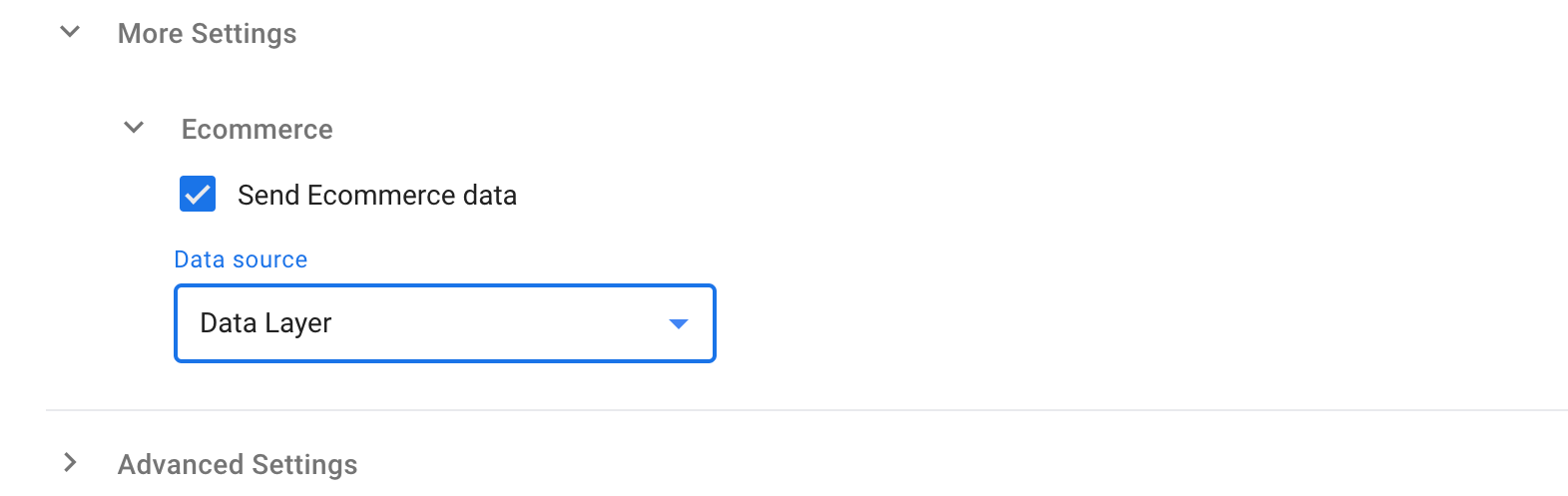
{{Event}}。這會使用透過 gtag.js API 傳送的 Google Analytics 電子商務事件名稱。在「更多設定」>「電子商務」下方,選取「傳送電子商務資料」。
在「資料來源」中選取「資料層」。
設定 GA4 事件的觸發條件,例如使用者點選結帳按鈕時。查看所有可用的觸發條件類型。
為代碼命名並儲存。
建議
- 啟用偵錯模式,即可即時查看事件並排解問題。
- 透過電子商務事件傳送自訂參數時,請查看自訂維度和指標限制。
- 傳送
value(收益) 資料時,請在事件層級設定currency。這是交易的主要貨幣,用於 Google Analytics 介面中的標準報表。 - 為每個有資料的電子商務參數設定值,無論該參數是否為選用。
- 為確保報表能正確填入資料,請按照本文中的格式操作。如需在電子商務陣列外設定項目陣列,請在傳送
value(收益) 資料時,於事件層級設定currency參數。
設定 Google Ads 動態再行銷
透過動態再行銷功能,您可以向查看過特定產品及服務的網站和應用程式使用者顯示相關廣告。其他好處包括:
- 輕鬆導入:您不需要手動對應網站和 Google Ads 之間的參數。
- 以事件為基礎的設定:如要啟用動態再行銷,請導入您業務類型的建議事件。進一步瞭解動態再行銷事件和參數。
導入作業
以電子商務來說,一般實務上會評估下列動作:
這些動作的核心就是你銷售的產品與服務。你可以將代表產品和服務的一系列項目加入電子商務事件。除了規定的參數外,您最多可以在 items 陣列中加入 27 個自訂參數。
items 陣列中的每個項目只需要 item_id 或 item_name,但建議同時提供兩者。您也可以加入選用參數,例如 price 和 quantity (如未設定,quantity 預設為 1):
const minimalItems = [
  {
    item_id: "SKU_12345",
    item_name: "Stan and Friends Tee",
    price: 10.01,
    quantity: 3
  }
];
以下完整範例會示範本指南中提及的所有規定項目參數。items 陣列最多可包含 200 個元素。
items: [
    {
      item_id: "SKU_12345",
      item_name: "Stan and Friends Tee",
      affiliation: "Google Merchandise Store",
      coupon: "SUMMER_FUN",
      discount: 2.22,
      index: 0,
      item_brand: "Google",
      item_category: "Apparel",
      item_category2: "Adult",
      item_category3: "Shirts",
      item_category4: "Crew",
      item_category5: "Short sleeve",
      item_list_id: "related_products",
      item_list_name: "Related Products",
      item_variant: "green",
      location_id: "ChIJIQBpAG2ahYAR_6128GcTUEo",
      price: 10.01,
      google_business_vertical: "retail",
      quantity: 3
    },
    {
      item_id: "SKU_12346",
      item_name: "Google Grey Women's Tee",
      affiliation: "Google Merchandise Store",
      coupon: "SUMMER_FUN",
      discount: 3.33,
      index: 1,
      item_brand: "Google",
      item_category: "Apparel",
      item_category2: "Adult",
      item_category3: "Shirts",
      item_category4: "Crew",
      item_category5: "Short sleeve",
      item_list_id: "related_products",
      item_list_name: "Related Products",
      item_variant: "gray",
      location_id: "ChIJIQBpAG2ahYAR_6128GcTUEo",
      price: 21.01,
      google_business_vertical: "retail",
      quantity: 2
    }
]
從清單中選取商品
向使用者顯示結果清單時,請傳送 view_item_list 事件,包括含有顯示項目的 items 陣列參數。如要瞭解要傳送的參數,請參閱事件參考資料。
顯示代碼設定
代碼設定:
- 代碼類型:Google Analytics:GA4 事件
- 事件名稱:
view_item_list - 資料層變數 (名稱 - 資料層變數名稱):
- 電子商務項目 -
ecommerce.items - 電子商務項目清單 ID -
ecommerce.item_list_id - 電子商務作品清單名稱 -
ecommerce.item_list_name - 事件參數 (參數名稱 - 值):
items-{{Ecommerce Items}}item_list_id-{{Ecommerce Item List ID}}item_list_name-{{Ecommerce Item List Name}}- 觸發條件:事件等於
view_item_list
觸發條件設定:
- 觸發條件類型:自訂事件
- 活動名稱:
view_item_list - 這個觸發條件會在「所有自訂事件」上啟動
dataLayer.push({ ecommerce: null });  // Clear the previous ecommerce object.
dataLayer.push({
  event: "view_item_list",
  ecommerce: {
    currency: "USD",
    item_list_id: "related_products",
    item_list_name: "Related products",
    items: [
     {
      item_id: "SKU_12345",
      item_name: "Stan and Friends Tee",
      affiliation: "Google Merchandise Store",
      coupon: "SUMMER_FUN",
      discount: 2.22,
      index: 0,
      item_brand: "Google",
      item_category: "Apparel",
      item_category2: "Adult",
      item_category3: "Shirts",
      item_category4: "Crew",
      item_category5: "Short sleeve",
      item_list_id: "related_products",
      item_list_name: "Related Products",
      item_variant: "green",
      location_id: "ChIJIQBpAG2ahYAR_6128GcTUEo",
      price: 10.03,
      google_business_vertical: "retail",
      quantity: 3
    },
    {
      item_id: "SKU_12346",
      item_name: "Google Grey Women's Tee",
      affiliation: "Google Merchandise Store",
      coupon: "SUMMER_FUN",
      discount: 3.33,
      index: 1,
      item_brand: "Google",
      item_category: "Apparel",
      item_category2: "Adult",
      item_category3: "Shirts",
      item_category4: "Crew",
      item_category5: "Short sleeve",
      item_list_id: "related_products",
      item_list_name: "Related Products",
      item_variant: "gray",
      location_id: "ChIJIQBpAG2ahYAR_6128GcTUEo",
      price: 21.01,
      promotion_id: "P_12345",
      promotion_name: "Summer Sale",
      google_business_vertical: "retail",
      quantity: 2
    }
  }
});
使用者從清單中選取商品後,請傳送 select_item 事件,並在 items 陣列參數中加入所選商品。如要進一步瞭解要傳送的參數,請參閱事件參考資料。
顯示代碼設定
代碼設定:
- 代碼類型:Google Analytics:GA4 事件
- 活動名稱:
select_item - 資料層變數 (名稱 - 資料層變數名稱):
- 電子商務項目 -
ecommerce.items - 電子商務項目清單 ID -
ecommerce.item_list_id - 電子商務作品清單名稱 -
ecommerce.item_list_name - 事件參數 (參數名稱 - 值):
items-{{Ecommerce Items}}item_list_id-{{Ecommerce Item List ID}}item_list_name-{{Ecommerce Item List Name}}- 觸發條件:事件等於
select_item
觸發條件設定:
- 觸發條件類型:自訂事件
- 活動名稱:
select_item - 這項觸發條件的啟動時機:所有自訂事件
dataLayer.push({ ecommerce: null });  // Clear the previous ecommerce object.
dataLayer.push({
  event: "select_item",
  ecommerce: {
    currency: "USD",
    item_list_id: "related_products",
    item_list_name: "Related products",
    items: [
    {
      item_id: "SKU_12345",
      item_name: "Stan and Friends Tee",
      affiliation: "Google Merchandise Store",
      coupon: "SUMMER_FUN",
      discount: 2.22,
      index: 0,
      item_brand: "Google",
      item_category: "Apparel",
      item_category2: "Adult",
      item_category3: "Shirts",
      item_category4: "Crew",
      item_category5: "Short sleeve",
      item_list_id: "related_products",
      item_list_name: "Related Products",
      item_variant: "green",
      location_id: "ChIJIQBpAG2ahYAR_6128GcTUEo",
      price: 10.01,
      google_business_vertical: "retail",
      quantity: 3
    }
    ]
  }
});
查看作品詳細資料
如要評估作品詳細資料的瀏覽次數,請在使用者每次查看作品詳細資料畫面時,傳送 view_item 事件。如要進一步瞭解要傳送的參數,請參閱事件參考資料。
顯示代碼設定
代碼設定:
- 代碼類型:Google Analytics:GA4 事件
- 活動名稱:
view_item - 資料層變數 (名稱 - 資料層變數名稱):
- 電子商務項目 -
ecommerce.items - 電子商務價值 -
ecommerce.value - 電子商務幣別 -
ecommerce.currency - 事件參數 (參數名稱 - 值):
items-{{Ecommerce Items}}value-{{Ecommerce Value}}currency-{{Ecommerce Currency}}- 觸發條件:事件等於
view_item
觸發條件設定:
- 觸發條件類型:自訂事件
- 事件名稱:
view_item - 這個觸發條件會在「所有自訂事件」上啟動
dataLayer.push({ ecommerce: null });  // Clear the previous ecommerce object.
dataLayer.push({
  event: "view_item",
  ecommerce: {
    currency: "USD",
    value: 30.03,
    items: [
    {
      item_id: "SKU_12345",
      item_name: "Stan and Friends Tee",
      affiliation: "Google Merchandise Store",
      coupon: "SUMMER_FUN",
      discount: 2.22,
      index: 0,
      item_brand: "Google",
      item_category: "Apparel",
      item_category2: "Adult",
      item_category3: "Shirts",
      item_category4: "Crew",
      item_category5: "Short sleeve",
      item_list_id: "related_products",
      item_list_name: "Related Products",
      item_variant: "green",
      location_id: "ChIJIQBpAG2ahYAR_6128GcTUEo",
      price: 10.01,
      google_business_vertical: "retail",
      quantity: 3
    }
    ]
  }
});
將商品加入/移出購物車
如要評估商品加入購物車的情況,請傳送 add_to_cart 事件,並在 items 陣列中加入相關商品。如要進一步瞭解要傳送的參數,請參閱事件參考資料。
顯示代碼設定
代碼設定:
- 代碼類型:Google Analytics:GA4 事件
- 事件名稱:
add_to_cart - 資料層變數 (名稱 - 資料層變數名稱):
- 電子商務項目 -
ecommerce.items - 電子商務價值 -
ecommerce.value - 電子商務幣別 -
ecommerce.currency - 事件參數 (參數名稱 - 值):
items-{{Ecommerce Items}}value-{{Ecommerce Value}}currency-{{Ecommerce Currency}}- 觸發條件:事件等於
add_to_cart
觸發條件設定:
- 觸發條件類型:自訂事件
- 活動名稱:
add_to_cart - 這個觸發條件會在「所有自訂事件」上啟動
dataLayer.push({ ecommerce: null });  // Clear the previous ecommerce object.
dataLayer.push({
  event: "add_to_cart",
  ecommerce: {
    currency: "USD",
    value: 30.03,
    items: [
    {
      item_id: "SKU_12345",
      item_name: "Stan and Friends Tee",
      affiliation: "Google Merchandise Store",
      coupon: "SUMMER_FUN",
      discount: 2.22,
      index: 0,
      item_brand: "Google",
      item_category: "Apparel",
      item_category2: "Adult",
      item_category3: "Shirts",
      item_category4: "Crew",
      item_category5: "Short sleeve",
      item_list_id: "related_products",
      item_list_name: "Related Products",
      item_variant: "green",
      location_id: "ChIJIQBpAG2ahYAR_6128GcTUEo",
      price: 10.01,
      google_business_vertical: "retail",
      quantity: 3
    }
    ]
  }
});
您也可以傳送 add_to_wishlist 事件,並在 items 陣列中加入相關項目,評估項目何時加入願望清單。如要瞭解要傳送的參數詳細資料,請參閱「事件參考資料」。
顯示代碼設定
代碼設定:
- 代碼類型:Google Analytics:GA4 事件
- 事件名稱:
add_to_wishlist - 資料層變數 (名稱 - 資料層變數名稱):
- 電子商務項目 -
ecommerce.items - 電子商務價值 -
ecommerce.value - 電子商務幣別 -
ecommerce.currency - 事件參數 (參數名稱 - 值):
items-{{Ecommerce Items}}value-{{Ecommerce Value}}currency-{{Ecommerce Currency}}- 觸發條件:事件等於
add_to_wishlist
觸發條件設定:
- 觸發條件類型:自訂事件
- 事件名稱:
add_to_wishlist - 這個觸發條件會在「所有自訂事件」上啟動
dataLayer.push({ ecommerce: null });  // Clear the previous ecommerce object.
dataLayer.push({
  event: "add_to_wishlist",
  ecommerce: {
    currency: "USD",
    value: 30.03,
    items: [
    {
      item_id: "SKU_12345",
      item_name: "Stan and Friends Tee",
      affiliation: "Google Merchandise Store",
      coupon: "SUMMER_FUN",
      discount: 2.22,
      index: 0,
      item_brand: "Google",
      item_category: "Apparel",
      item_category2: "Adult",
      item_category3: "Shirts",
      item_category4: "Crew",
      item_category5: "Short sleeve",
      item_list_id: "related_products",
      item_list_name: "Related Products",
      item_variant: "green",
      location_id: "ChIJIQBpAG2ahYAR_6128GcTUEo",
      price: 10.01,
      google_business_vertical: "retail",
      quantity: 3
    }
    ]
  }
});
當使用者隨後查看購物車時,請傳送 view_cart 事件,並附上購物車中的所有商品。如要進一步瞭解要傳送的參數,請參閱事件參考資料。
顯示代碼設定
代碼設定:
- 代碼類型:Google Analytics:GA4 事件
- 活動名稱:
view_cart - 資料層變數 (名稱 - 資料層變數名稱):
- 電子商務項目 -
ecommerce.items - 電子商務價值 -
ecommerce.value - 電子商務幣別 -
ecommerce.currency - 事件參數 (參數名稱 - 值):
items-{{Ecommerce Items}}value-{{Ecommerce Value}}currency-{{Ecommerce Currency}}- 觸發條件:事件等於
view_cart
觸發條件設定:
- 觸發條件類型:自訂事件
- 事件名稱:
view_cart - 這個觸發條件會在「所有自訂事件」上啟動
dataLayer.push({ ecommerce: null });  // Clear the previous ecommerce object.
dataLayer.push({
  event: "view_cart",
  ecommerce: {
    currency: "USD",
    value: 30.03,
    items: [
    {
      item_id: "SKU_12345",
      item_name: "Stan and Friends Tee",
      affiliation: "Google Merchandise Store",
      coupon: "SUMMER_FUN",
      discount: 2.22,
      index: 0,
      item_brand: "Google",
      item_category: "Apparel",
      item_category2: "Adult",
      item_category3: "Shirts",
      item_category4: "Crew",
      item_category5: "Short sleeve",
      item_list_id: "related_products",
      item_list_name: "Related Products",
      item_variant: "green",
      location_id: "ChIJIQBpAG2ahYAR_6128GcTUEo",
      price: 10.01,
      google_business_vertical: "retail",
      quantity: 3
    }
    ]
  }
});
如要評估使用者從購物車中移除商品的時間,請傳送 remove_from_cart 事件。如要瞭解要傳送的參數詳情,請參閱事件參考資料。
顯示代碼設定
代碼設定:
- 代碼類型:Google Analytics:GA4 事件
- 事件名稱:
remove_from_cart - 資料層變數 (名稱 - 資料層變數名稱):
- 電子商務項目 -
ecommerce.items - 電子商務價值 -
ecommerce.value - 電子商務幣別 -
ecommerce.currency - 事件參數 (參數名稱 - 值):
items-{{Ecommerce Items}}value-{{Ecommerce Value}}currency-{{Ecommerce Currency}}- 觸發條件:事件等於
remove_from_cart
觸發條件設定:
- 觸發條件類型:自訂事件
- 事件名稱:
remove_from_cart - 這項觸發條件的啟動時機:所有自訂事件
dataLayer.push({ ecommerce: null });  // Clear the previous ecommerce object.
dataLayer.push({
  event: "remove_from_cart",
  ecommerce: {
    currency: "USD",
    value: 30.03,
    items: [
    {
      item_id: "SKU_12345",
      item_name: "Stan and Friends Tee",
      affiliation: "Google Merchandise Store",
      coupon: "SUMMER_FUN",
      discount: 2.22,
      index: 0,
      item_brand: "Google",
      item_category: "Apparel",
      item_category2: "Adult",
      item_category3: "Shirts",
      item_category4: "Crew",
      item_category5: "Short sleeve",
      item_list_id: "related_products",
      item_list_name: "Related Products",
      item_variant: "green",
      location_id: "ChIJIQBpAG2ahYAR_6128GcTUEo",
      price: 10.01,
      google_business_vertical: "retail",
      quantity: 3
    }
    ]
  }
});
啟動結帳程序
如要評估結帳程序的第一個步驟,請傳送 begin_checkout 事件,並使用相關欄位定義一或多個項目。您也可以在這個階段將優待券加到整個訂單,方法是將優待券加到事件中,或是將優待券加到 items 陣列中的特定元素,藉此將優待券套用至特定商品。如要進一步瞭解要傳送的參數,請參閱事件參考資料。
顯示代碼設定
代碼設定:
- 代碼類型:Google Analytics:GA4 事件
- 事件名稱:
begin_checkout - 資料層變數 (名稱 - 資料層變數名稱):
- 電子商務項目 -
ecommerce.items - 電子商務價值 -
ecommerce.value - 電子商務貨幣 -
ecommerce.currency - 電子商務優待券 -
ecommerce.coupon - 事件參數 (參數名稱 - 值):
items-{{Ecommerce Items}}value-{{Ecommerce Value}}currency-{{Ecommerce Currency}}coupon-{{Ecommerce Coupon}}- 觸發條件:事件等於
begin_checkout
觸發條件設定:
- 觸發條件類型:自訂事件
- 事件名稱:
begin_checkout - 這個觸發條件會在「所有自訂事件」上啟動
dataLayer.push({ ecommerce: null });  // Clear the previous ecommerce object.
dataLayer.push({
  event: "begin_checkout",
  ecommerce: {
    currency: "USD",
    value: 30.03,
    coupon: "SUMMER_FUN",
    items: [
    {
      item_id: "SKU_12345",
      item_name: "Stan and Friends Tee",
      affiliation: "Google Merchandise Store",
      coupon: "SUMMER_FUN",
      discount: 2.22,
      index: 0,
      item_brand: "Google",
      item_category: "Apparel",
      item_category2: "Adult",
      item_category3: "Shirts",
      item_category4: "Crew",
      item_category5: "Short sleeve",
      item_list_id: "related_products",
      item_list_name: "Related Products",
      item_variant: "green",
      location_id: "ChIJIQBpAG2ahYAR_6128GcTUEo",
      price: 10.01,
      google_business_vertical: "retail",
      quantity: 3
    }
    ]
  }
});
當使用者在結帳流程中前往下一個步驟並新增運送資訊時,請傳送 add_shipping_info 事件。使用 shipping_tier 參數指定使用者的運送選項,例如「陸運」、「空運」或「次日」。如要進一步瞭解要傳送的參數,請參閱事件參考資料。
顯示代碼設定
代碼設定:
- 代碼類型:Google Analytics:GA4 事件
- 事件名稱:
add_shipping_info - 資料層變數 (名稱 - 資料層變數名稱):
- 電子商務項目 -
ecommerce.items - 電子商務價值 -
ecommerce.value - 電子商務貨幣 -
ecommerce.currency - 電子商務優待券 -
ecommerce.coupon ecommerce.shipping_tier電子商務運送等級- 事件參數 (參數名稱 - 值):
items-{{Ecommerce Items}}value-{{Ecommerce Value}}currency-{{Ecommerce Currency}}coupon-{{Ecommerce Coupon}}shipping_tier-{{Ecommerce Shipping Tier}}- 觸發條件:事件等於
add_shipping_info
觸發條件設定:
- 觸發條件類型:自訂事件
- 活動名稱:
add_shipping_info - 這個觸發條件會在「所有自訂事件」上啟動
dataLayer.push({ ecommerce: null });  // Clear the previous ecommerce object.
dataLayer.push({
  event: "add_shipping_info",
  ecommerce: {
    currency: "USD",
    value: 30.03,
    coupon: "SUMMER_FUN",
    shipping_tier: "Ground",
    items: [
    {
      item_id: "SKU_12345",
      item_name: "Stan and Friends Tee",
      affiliation: "Google Merchandise Store",
      coupon: "SUMMER_FUN",
      discount: 2.22,
      index: 0,
      item_brand: "Google",
      item_category: "Apparel",
      item_category2: "Adult",
      item_category3: "Shirts",
      item_category4: "Crew",
      item_category5: "Short sleeve",
      item_list_id: "related_products",
      item_list_name: "Related Products",
      item_variant: "green",
      location_id: "ChIJIQBpAG2ahYAR_6128GcTUEo",
      price: 10.01,
      google_business_vertical: "retail",
      quantity: 3
    }
    ]
  }
});
使用者提交付款資訊時,請傳送 add_payment_info 事件。
如果適用,請在活動中加入 payment_type,以便使用所選付款方式。如要進一步瞭解要傳送的參數,請參閱事件參考資料。
顯示代碼設定
代碼設定:
- 代碼類型:Google Analytics:GA4 事件
- 事件名稱:
add_payment_info - 資料層變數 (名稱 - 資料層變數名稱):
- 電子商務項目 -
ecommerce.items - 電子商務價值 -
ecommerce.value - 電子商務貨幣 -
ecommerce.currency - 電子商務優待券 -
ecommerce.coupon - 電子商務付款類型 -
ecommerce.payment_type - 事件參數 (參數名稱 - 值):
items-{{Ecommerce Items}}value-{{Ecommerce Value}}currency-{{Ecommerce Currency}}coupon-{{Ecommerce Coupon}}payment_type-{{Ecommerce Payment Type}}- 觸發條件:事件等於
add_payment_info
觸發條件設定:
- 觸發條件類型:自訂事件
- 事件名稱:
add_payment_info - 這個觸發條件會在「所有自訂事件」上啟動
dataLayer.push({ ecommerce: null });  // Clear the previous ecommerce object.
dataLayer.push({
  event: "add_payment_info",
  ecommerce: {
    currency: "USD",
    value: 30.03,
    coupon: "SUMMER_FUN",
    payment_type: "Credit Card",
    items: [
    {
      item_id: "SKU_12345",
      item_name: "Stan and Friends Tee",
      affiliation: "Google Merchandise Store",
      coupon: "SUMMER_FUN",
      discount: 2.22,
      index: 0,
      item_brand: "Google",
      item_category: "Apparel",
      item_category2: "Adult",
      item_category3: "Shirts",
      item_category4: "Crew",
      item_category5: "Short sleeve",
      item_list_id: "related_products",
      item_list_name: "Related Products",
      item_variant: "green",
      location_id: "ChIJIQBpAG2ahYAR_6128GcTUEo",
      price: 10.01,
      google_business_vertical: "retail",
      quantity: 3
    }
    ]
  }
});
購買或退款
如要評估購買,請傳送 purchase 事件,並使用相關欄位定義一或多個項目。如要進一步瞭解要傳送的參數,請參閱事件參考資料。
顯示代碼設定
代碼設定:
- 代碼類型:Google Analytics:GA4 事件
- 活動名稱:
purchase - 資料層變數 (名稱 - 資料層變數名稱):
- 電子商務項目 -
ecommerce.items - 電子商務交易 ID -
ecommerce.transaction_id - 電子商務價值 -
ecommerce.value - 電子商務稅金 -
ecommerce.tax - 電子商務運送 -
ecommerce.shipping - 電子商務貨幣 -
ecommerce.currency - 電子商務優待券 -
ecommerce.coupon - 事件參數 (參數名稱 - 值):
items-{{Ecommerce Items}}transaction_id-{{Ecommerce Transaction ID}}value-{{Ecommerce Value}}tax-{{Ecommerce Tax}}shipping-{{Ecommerce Shipping}}currency-{{Ecommerce Currency}}coupon-{{Ecommerce Coupon}}- 觸發條件:事件等於
purchase
觸發條件設定:
- 觸發條件類型:自訂事件
- 活動名稱:
purchase - 這個觸發條件會在「所有自訂事件」上啟動
dataLayer.push({ ecommerce: null });  // Clear the previous ecommerce object.
dataLayer.push({
  event: "purchase",
  ecommerce: {
    transaction_id: "T_12345",
    // Sum of (price * quantity) for all items.
    value: 72.05,
    tax: 3.60,
    shipping: 5.99,
    currency: "USD",
    coupon: "SUMMER_SALE",
    customer_type: "new",
    items: [
    {
      item_id: "SKU_12345",
      item_name: "Stan and Friends Tee",
      affiliation: "Google Merchandise Store",
      coupon: "SUMMER_FUN",
      discount: 2.22,
      index: 0,
      item_brand: "Google",
      item_category: "Apparel",
      item_category2: "Adult",
      item_category3: "Shirts",
      item_category4: "Crew",
      item_category5: "Short sleeve",
      item_list_id: "related_products",
      item_list_name: "Related Products",
      item_variant: "green",
      location_id: "ChIJIQBpAG2ahYAR_6128GcTUEo",
      price: 10.01,
      quantity: 3
    },
    {
      item_id: "SKU_12346",
      item_name: "Google Grey Women's Tee",
      affiliation: "Google Merchandise Store",
      coupon: "SUMMER_FUN",
      discount: 3.33,
      index: 1,
      item_brand: "Google",
      item_category: "Apparel",
      item_category2: "Adult",
      item_category3: "Shirts",
      item_category4: "Crew",
      item_category5: "Short sleeve",
      item_list_id: "related_products",
      item_list_name: "Related Products",
      item_variant: "gray",
      location_id: "ChIJIQBpAG2ahYAR_6128GcTUEo",
      price: 21.01,
      promotion_id: "P_12345",
      promotion_name: "Summer Sale",
      quantity: 2
    }]
  }
});
如要評估退款,請傳送 refund 事件,並指定相關的 transaction_id,以及使用 item_id 和 quantity 定義的一或多個項目。建議您在 refund 事件中加入商品資訊,以便在 Analytics 中查看商品層級退款指標。
如要瞭解要傳送的參數詳情,請參閱事件參考資料。
顯示代碼設定
代碼設定:
- 代碼類型:Google Analytics:GA4 事件
- 事件名稱:
refund - 資料層變數 (名稱 - 資料層變數名稱):
- 電子商務項目 -
ecommerce.items - 電子商務交易 ID -
ecommerce.transaction_id - 電子商務價值 -
ecommerce.value - 電子商務稅金 -
ecommerce.tax - 電子商務運送 -
ecommerce.shipping - 電子商務貨幣 -
ecommerce.currency - 電子商務優待券 -
ecommerce.coupon - 事件參數 (參數名稱 - 值):
items-{{Ecommerce Items}}transaction_id-{{Ecommerce Transaction ID}}value-{{Ecommerce Value}}tax-{{Ecommerce Tax}}shipping-{{Ecommerce Shipping}}currency-{{Ecommerce Currency}}coupon-{{Ecommerce Coupon}}- 觸發條件:事件等於
refund
觸發條件設定:
- 觸發條件類型:自訂事件
- 活動名稱:
refund - 這個觸發條件會在「所有自訂事件」上啟動
dataLayer.push({ ecommerce: null });  // Clear the previous ecommerce object.
dataLayer.push({
  event: "refund",
  ecommerce: {
    currency: "USD",
    transaction_id: "T_12345", // Transaction ID. Required for purchases and refunds.
    value: 30.03,
    coupon: "SUMMER_FUN",
    shipping: 3.33,
    tax: 1.11,
    items: [
    {
      item_id: "SKU_12345",
      item_name: "Stan and Friends Tee",
      affiliation: "Google Merchandise Store",
      coupon: "SUMMER_FUN",
      discount: 2.22,
      index: 0,
      item_brand: "Google",
      item_category: "Apparel",
      item_category2: "Adult",
      item_category3: "Shirts",
      item_category4: "Crew",
      item_category5: "Short sleeve",
      item_list_id: "related_products",
      item_list_name: "Related Products",
      item_variant: "green",
      location_id: "ChIJIQBpAG2ahYAR_6128GcTUEo",
      price: 10.01,
      google_business_vertical: "retail",
      quantity: 3
    }
    ]
  }
});
套用促銷活動
電子商務支援評估內部宣傳活動的曝光和點擊次數,例如宣傳特價活動的橫幅廣告。
宣傳活動曝光次數通常是透過初始畫面瀏覽來評估,方法是傳送 view_promotion 事件,並使用 items 參數指定宣傳商品。如要進一步瞭解要傳送的參數,請參閱事件參考資料。
顯示代碼設定
代碼設定:
- 代碼類型:Google Analytics:GA4 事件
- 活動名稱:
view_promotion - 資料層變數 (名稱 - 資料層變數名稱):
- 電子商務廣告素材名稱 -
ecommerce.creative_name - 電子商務廣告素材位置 -
ecommerce.creative_slot - 電子商務促銷 ID -
ecommerce.promotion_id - 電子商務促銷活動名稱 -
ecommerce.promotion_name - 電子商務項目 -
ecommerce.items - 事件參數 (參數名稱 - 值):
creative_name-{{Ecommerce Creative Name}}creative_slot-{{Ecommerce Creative Slot}}promotion_id-{{Ecommerce Promotion ID}}promotion_name-{{Ecommerce Promotion Name}}items-{{Ecommerce Items}}- 觸發條件:事件等於
view_promotion
觸發條件設定:
- 觸發條件類型:自訂事件
- 事件名稱:
view_promotion - 這項觸發條件的啟動時機:所有自訂事件
dataLayer.push({ ecommerce: null });  // Clear the previous ecommerce object.
dataLayer.push({
  event: "view_promotion",
  ecommerce: {
    currency: "USD",
    creative_name: "Summer Banner",
    creative_slot: "featured_app_1",
    promotion_id: "P_12345",
    promotion_name: "Summer Sale",
    items: [
    {
      item_id: "SKU_12345",
      item_name: "Stan and Friends Tee",
      affiliation: "Google Merchandise Store",
      coupon: "SUMMER_FUN",
      discount: 2.22,
      index: 0,
      item_brand: "Google",
      item_category: "Apparel",
      item_category2: "Adult",
      item_category3: "Shirts",
      item_category4: "Crew",
      item_category5: "Short sleeve",
      item_list_id: "related_products",
      item_list_name: "Related Products",
      item_variant: "green",
      location_id: "ChIJIQBpAG2ahYAR_6128GcTUEo",
      price: 10.01,
      google_business_vertical: "retail",
      quantity: 3
    }
    ]
  }
});
如要指出使用者點擊了促銷活動,請傳送 select_promotion 事件,並將該商品做為商品參數。如要瞭解要傳送的參數詳情,請參閱事件參考資料。
顯示代碼設定
代碼設定:
- 代碼類型:Google Analytics:GA4 事件
- 資料層變數 (名稱 - 資料層變數名稱):
- 電子商務廣告素材名稱 -
ecommerce.creative_name - 電子商務廣告素材位置 -
ecommerce.creative_slot - 電子商務促銷 ID -
ecommerce.promotion_id - 電子商務促銷活動名稱 -
ecommerce.promotion_name - 電子商務項目 -
ecommerce.items - 事件參數 (參數名稱 - 值):
creative_name-{{Ecommerce Creative Name}}creative_slot-{{Ecommerce Creative Slot}}promotion_id-{{Ecommerce Promotion ID}}promotion_name-{{Ecommerce Promotion Name}}items-{{Ecommerce Items}}- 變數類型:資料層變數 -「ecommerce.items」
- 觸發條件:事件等於
select_promotion
觸發條件設定:
- 觸發條件類型:自訂事件
- 活動名稱:
select_promotion - 這個觸發條件會在「所有自訂事件」上啟動
dataLayer.push({ ecommerce: null });  // Clear the previous ecommerce object.
dataLayer.push({
  event: "select_promotion",
  ecommerce: {
    currency: "USD",
    creative_name: "Summer Banner",
    creative_slot: "featured_app_1",
    promotion_id: "P_12345",
    promotion_name: "Summer Sale",
    items: [
    {
      item_id: "SKU_12345",
      item_name: "Stan and Friends Tee",
      affiliation: "Google Merchandise Store",
      coupon: "SUMMER_FUN",
      discount: 2.22,
      index: 0,
      item_brand: "Google",
      item_category: "Apparel",
      item_category2: "Adult",
      item_category3: "Shirts",
      item_category4: "Crew",
      item_category5: "Short sleeve",
      item_list_id: "related_products",
      item_list_name: "Related Products",
      item_variant: "green",
      location_id: "ChIJIQBpAG2ahYAR_6128GcTUEo",
      price: 10.01,
      google_business_vertical: "retail",
      quantity: 3
    }
    ]
  }
});
使用 JavaScript 自訂變數
如果網站不支援資料層,可以使用自訂 JavaScript 變數呼叫函式,傳回電子商務資料物件。這個物件應使用本指南稍早顯示的資料層語法,例如:
// A Custom JavaScript Variable that returns an ecommerceData object
// that follows the data layer syntax.
function getEcommerceData() {
  var ecommerceProductData = [
    {
      item_name: "Stan and Friends Tee",
      item_id: "SKU_12345",  // ID is required.
      // Rest of the product data should follow the data layer syntax.
    },
    // Multiple products may be included.
  ];
  return ecommerceProductData;
}
如果您選擇使用自訂 JavaScript 變數,則可像使用資料層一樣,在代碼設定中將 items 參數的值做為事件參數提供。
代碼設定:
- 代碼類型:GA4 事件
- 事件名稱:任何
- 讀取變數資料:
{{gaEcommerceData}} - 觸發條件:事件等於
gtm.dom
{{gaEcommerceData}} 變數設定:
- 變數類型:自訂 JavaScript
- 函式主體:使用上述範例