
Οι εκδότες χρησιμοποιούν κυρίως την ενσωμάτωση από την πλευρά του διακομιστή για τη διαχείριση των αναγνωστών και των δικαιωμάτων τους. Οι εκδότες χρησιμοποιούν UpdateReaderEntitlements για να ενημερώσουν την εγγραφή της Google σχετικά με ένα δικαίωμα Product ID για ένα PPID.
Ρύθμιση Google Cloud
Η ρύθμιση παραμέτρων σύνδεσης συνδρομής στο Google Cloud περιλαμβάνει δύο κύρια στοιχεία:
- Ενεργοποίηση του API για ένα δεδομένο έργο
- Δημιουργία λογαριασμού υπηρεσίας για πρόσβαση στο API
Ενεργοποίηση του API σύνδεσης συνδρομής
Για να χρησιμοποιήσετε έναν λογαριασμό υπηρεσίας και να διαχειριστείτε τα δικαιώματα ενός αναγνώστη, ένα έργο Google Cloud απαιτεί την ενεργοποίηση του Subscription Linking API και την σωστή διαμόρφωση ενός λογαριασμού υπηρεσίας OAuth. Για να ενεργοποιήσετε το Subscription Linking API για ένα έργο, μεταβείτε από το μενού -> API & Υπηρεσίες -> Βιβλιοθήκη και αναζητήστε Subscription Linking ή επισκεφθείτε απευθείας τη σελίδα:
https://console.cloud.google.com/apis/library?project=gcp_project_id
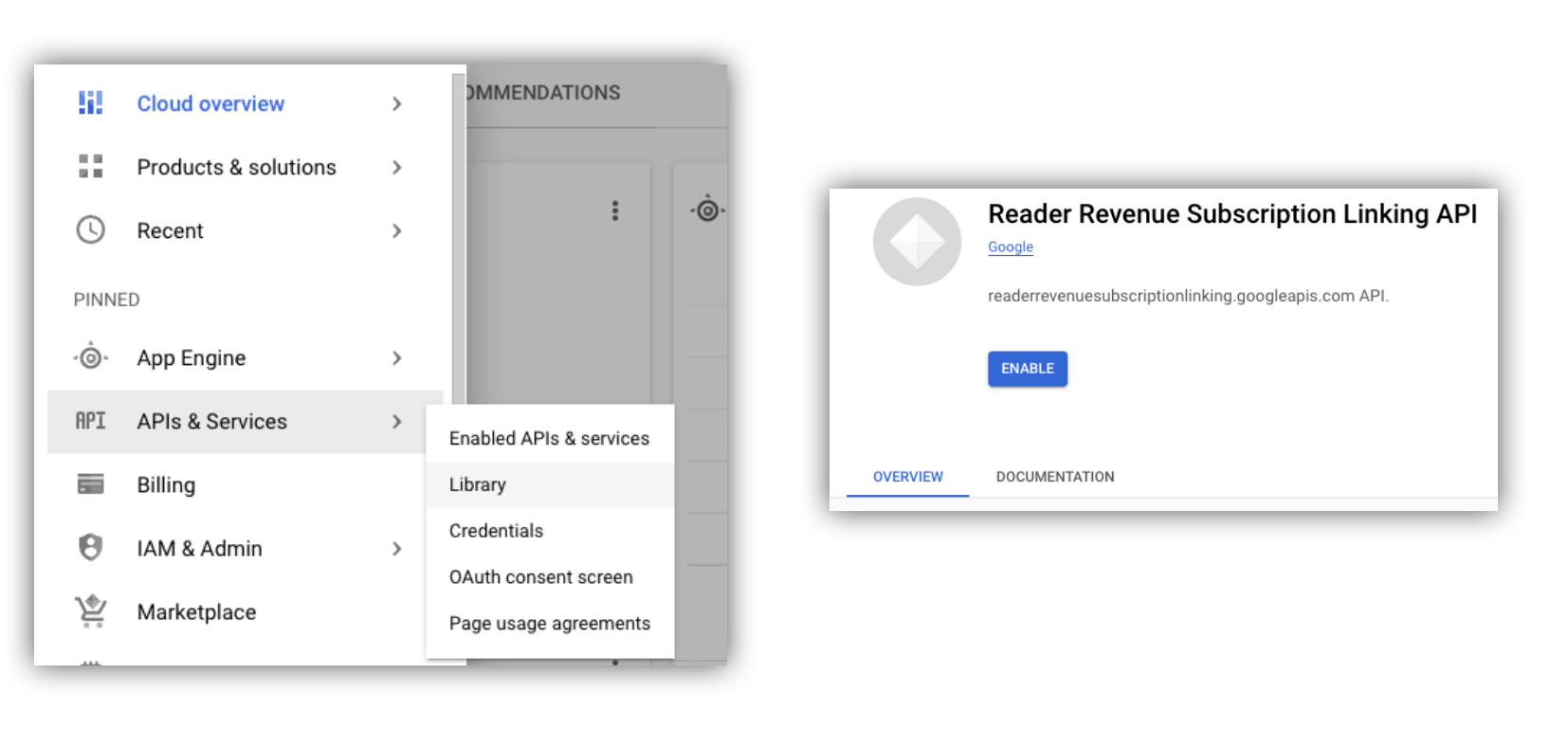
Σχήμα 1. Πλοήγηση στη Βιβλιοθήκη API και ενεργοποίηση του API για ένα έργο Google Cloud.
Δημιουργήστε έναν Λογαριασμό Υπηρεσίας
Οι λογαριασμοί υπηρεσίας χρησιμοποιούνται για να επιτρέπουν την πρόσβαση από την εφαρμογή σας στο API σύνδεσης συνδρομής.
- Δημιουργήστε έναν λογαριασμό υπηρεσίας στην κονσόλα του έργου σας.
- Δημιουργήστε διαπιστευτήρια για τον λογαριασμό υπηρεσίας και αποθηκεύστε το αρχείο
credentials.jsonσε ασφαλή τοποθεσία στην οποία έχει πρόσβαση η εφαρμογή σας. - Παραχωρήστε τον ρόλο IAM "Διαχειριστής σύνδεσης συνδρομής" στον λογαριασμό υπηρεσίας που δημιουργήσατε. Για λεπτομερή έλεγχο των δυνατοτήτων του λογαριασμού υπηρεσίας, μπορείτε να αντιστοιχίσετε τον κατάλληλο ρόλο από τον παρακάτω πίνακα.
| Ικανότητα / Ρόλος | Διαχειριστής σύνδεσης συνδρομών | Πρόγραμμα προβολής σύνδεσης συνδρομής | Πρόγραμμα προβολής δικαιωμάτων σύνδεσης συνδρομής |
|---|---|---|---|
| Αποκτήστε δικαιώματα αναγνώστη | |||
| Αποκτήστε αναγνώστες | |||
| Ενημέρωση δικαιωμάτων αναγνώστη | |||
| Διαγραφή αναγνωστών |
Χρήση Λογαριασμού Υπηρεσίας με το API Σύνδεσης Συνδρομών
Για να ελέγξετε την ταυτότητα κλήσεων στο Subscription Linking API με λογαριασμούς υπηρεσίας, χρησιμοποιήστε είτε τη βιβλιοθήκη-πελάτη googleapis (η οποία χειρίζεται αυτόματα τα αιτήματα access_token ) είτε υπογράψτε τα αιτήματα απευθείας με το REST API. Εάν χρησιμοποιείτε το REST API, πρέπει πρώτα να αποκτήσετε ένα access_token (μέσω της βιβλιοθήκης Google Auth ή χρησιμοποιώντας έναν λογαριασμό υπηρεσίας JWT ) και στη συνέχεια να το συμπεριλάβετε στην κεφαλίδα Authorization
Τόσο η ακόλουθη βιβλιοθήκη-πελάτης όσο και τα παραδείγματα REST API περιέχουν δείγμα κώδικα για τον τρόπο κλήσης getReader() , getReaderEntitlements() , updateReaderEntitlements() και deleteReader() .
Κλειδί λογαριασμού υπηρεσίας και προεπιλεγμένα διαπιστευτήρια εφαρμογής (ADC)
Για να καλέσετε το API σύνδεσης συνδρομής, πρέπει να διαθέτετε ένα κλειδί λογαριασμού υπηρεσίας . Εάν δεν μπορείτε να εξαγάγετε ένα κλειδί λογαριασμού υπηρεσίας λόγω της πολιτικής του οργανισμού σας, μπορείτε να χρησιμοποιήσετε τη μέθοδο Application Default Credentials (ADC) .
Ακολουθεί ένα δείγμα εντολής για τη ρύθμιση ενός ADC χρησιμοποιώντας την εντολή gcloud auth application-default login :
gcloud config set project [YOUR_PROJECT_ID]
gcloud auth application-default login --impersonate-service-account [YOUR_SERVICE_ACCOUNT_NAME@xxx.iam.gserviceaccount.com]
Αυτή η εντολή δημιουργεί ένα αρχείο JSON που περιέχει τα διαπιστευτήρια του λογαριασμού υπηρεσίας και το τοποθετεί σε μια γνωστή τοποθεσία στο σύστημα αρχείων σας. Η τοποθεσία εξαρτάται από το λειτουργικό σας σύστημα:
- Linux, macOS:
$HOME/.config/gcloud/application_default_credentials.json - Windows:
%APPDATA%\gcloud\application_default_credentials.json
Δεν χρειάζεται να δώσετε τη διαδρομή προς το αρχείο κλειδιού στον κώδικά σας, καθώς το ADC αναζητά αυτόματα τα διαπιστευτήρια μόνο του.
this.auth = new Auth.GoogleAuth({
   // keyFile: process.env.KEY_FILE, - You don't need to provide this field
    'https://www.googleapis.com/auth/readerrevenue.subscriptionlinking.manage'
  ],
  ...
});
Βιβλιοθήκη πελατών
Αυτή η ενότητα εξηγεί τον τρόπο χρήσης της βιβλιοθήκης-πελατών googleapis στο Node.js.
Δείγμα αιτήματος
import {readerrevenuesubscriptionlinking_v1, Auth} from 'googleapis';
const subscriptionLinking = readerrevenuesubscriptionlinking_v1.Readerrevenuesubscriptionlinking;

class SubscriptionLinking {
  constructor() {
    this.auth = new Auth.GoogleAuth({
      keyFile: process.env.KEY_FILE,
      scopes: [
        'https://www.googleapis.com/auth/readerrevenue.subscriptionlinking.manage'
      ],
    })
  }

  init() {
    return new subscriptionLinking(
        {version: 'v1', auth: this.auth})
  }
}

const subscriptionLinkingApi = new SubscriptionLinking();
const client = subscriptionLinkingApi.init();

/**
 * Retrieves details for a specific reader associated with the publication.
 * @async
 * @param {string} ppid - The Publisher Provided ID (ppid) for the reader.
 * @return {Promise<object>} A promise that resolves with the reader's details
 *  from the API.
 */
async function getReader(ppid) {
  const publicationId = process.env.PUBLICATION_ID;
  return await client.publications.readers.get({
    name: `publications/${publicationId}/readers/${ppid}`,
  });
}

/**
 * Updates the entitlements for a specific reader.
 * @async
 * @param {string} ppid - The Publisher Provided ID (ppid) for the reader whose
 *  entitlements are being updated.
 * @return {Promise<object>} A promise that resolves with the result of the
 *  updated entitlements object.
 */
async function updateReaderEntitlements(ppid) {
  const publicationId = process.env.PUBLICATION_ID;
  const requestBody = {
    /*
    Refer to
    https://developers.google.com/news/subscribe/subscription-linking/appendix/glossary#entitlements_object
    */
    entitlements : [{
      product_id: `${publicationId}:basic`,
      subscription_token: 'abc1234',
      detail: 'This is our basic plan',
      expire_time: '2025-10-21T03:05:08.200564Z'
    }]
  };
  return await client.publications.readers.updateEntitlements({
    name: `publications/${publicationId}/readers/${ppid}/entitlements`,
    requestBody
  });
}

/**
 * Retrieves the current entitlements for a specific reader.
 * @async
 * @param {string} ppid - The Publisher Provided ID (ppid) for the reader.
 * @return {Promise<object>} A promise that resolves with the reader's entitlements object.
 */
async function getReaderEntitlements(ppid) {
  const publicationId = process.env.PUBLICATION_ID;
  return await client.publications.readers.getEntitlements({
    name: `publications/${publicationId}/readers/${ppid}/entitlements`
  });
}

/**
 * Deletes a specific Subscription Linking reader record associated with the publication.
 * @async
 * @param {string} ppid - The Publisher Provided ID (ppid) for the reader to be deleted.
 * @param {boolean=} forceDelete - If true, delete the user even if their
 *  entitlements are not empty
 * @return {Promise<object>} A promise that resolves upon successful deletion
 *  with an empty object ({})
 */
async function deleteReader(ppid, forceDelete = false) {
  const publicationId = process.env.PUBLICATION_ID;
  return await client.publications.readers.delete({
    name: `publications/${publicationId}/readers/${ppid}`
    force: forceDelete
  });
}
API REST
Αν θέλετε να καλέσετε τα τελικά σημεία του REST API, μπορείτε να χρησιμοποιήσετε οποιαδήποτε από τις δύο μεθόδους για να λάβετε accessToken που θα οριστεί στην κεφαλίδα Authorization .
1. Χρησιμοποιήστε τη βιβλιοθήκη GoogleAuth
import { GoogleAuth } from 'google-auth-library';
import credentialJson from 'path_to_your_json_file' with { type: 'json' };

const auth = new GoogleAuth({
    credentials: credential_json,
    scopes: [
      'https://www.googleapis.com/auth/readerrevenue.subscriptionlinking.manage'
    ]
});

async function getAccessToken() {
    const accessToken = await auth.getAccessToken();
    return accessToken;
}
2. Δημιουργήστε ένα access_token χρησιμοποιώντας έναν Λογαριασμό Υπηρεσίας JWT
import fetch from 'node-fetch';
import jwt from 'jsonwebtoken';

function getSignedJwt() {
  /*
    Either store the service account credentials string in an environment variable
    Or implement logic to fetch it.
  */
  const key_file = process.env.CREDENTIALS_STRING

  const issueDate = new Date();
  const expireMinutes = 60;
  const offsetInSeconds = issueDate.getTimezoneOffset() * 60000;
  const expireDate = new Date(issueDate.getTime() + (expireMinutes * 60000));
  const iat = Math.floor((issueDate.getTime() + offsetInSeconds) / 1000);
  const exp = Math.floor((expireDate.getTime() + offsetInSeconds) / 1000);

  const token = {
    iss: key_file.client_email,
    iat,
    exp,
    aud: 'https://oauth2.googleapis.com/token',
    scope:'https://www.googleapis.com/auth/readerrevenue.subscriptionlinking.manage',
  }
  return jwt.sign(token, key_file.private_key, {
    algorithm: 'RS256',
    keyid: key_file.private_key_id,
  })
}

async function getAccessToken(signedJwt) {
  let body = new URLSearchParams();
  body.set('grant_type', 'urn:ietf:params:oauth:grant-type:jwt-bearer');
  body.set('assertion', signedJwt);
  const response = await fetch('https://oauth2.googleapis.com/token', {
    method: 'POST',
    headers: {'Content-Type': 'application/x-www-form-urlencoded'},
    body
  })
  const accessResponse = await response.json();
  return accessResponse.access_token;
}
Δείγμα κώδικα για κλήσεις REST API με τη βιβλιοθήκη Google Auth
import { GoogleAuth } from 'google-auth-library';
import fetch from 'node-fetch'
import credentialJson from 'path_to_your_json_file' with { type: 'json' };

const BASE_SUBSCRIPTION_LINKING_API_URL='https://readerrevenuesubscriptionlinking.googleapis.com/v1';
const publicationId = process.env.PUBLICATION_ID

const auth = new GoogleAuth({
    credentials: credentialJson,
    scopes: [
      'https://www.googleapis.com/auth/readerrevenue.subscriptionlinking.manage'
    ]
});

async function getAccessToken() {
    const accessToken = await auth.getAccessToken();
    return accessToken;
}

/**
 * Retrieves details for a specific reader associated with the publication.
 * @async
 * @param {string} ppid - The Publisher Provided ID (ppid) for the reader.
 * @return {object} reader json for the given ppid
 */
async function getReader(ppid) {
  const endpoint = `${BASE_SUBSCRIPTION_LINKING_API_URL}/publications/${publicationId}/readers/${ppid}`;
  const accessToken = await getAccessToken();
  const response = await fetch(endpoint, {
     method: 'GET',
     headers: {
       Authorization: `Bearer ${accessToken}`,
     },
   });
  const reader = await response.json();
  return reader;
}

/**
 * Updates the entitlements for a specific reader.
 * @async
 * @param {string} ppid - The Publisher Provided ID (ppid) for the reader.
 * @return {object} the updated entitlements object in json.
 */
async function updateReaderEntitlements(ppid) {
  const endpoint = `${BASE_SUBSCRIPTION_LINKING_API_URL}/publications/${publicationId}/readers/${ppid}/entitlements`;
  const requestBody = {
    /*
    Refer to
    https://developers.google.com/news/subscribe/subscription-linking/appendix/glossary#entitlements_object
    */
    entitlements : [{
      product_id: `${publicationId}:basic`,
      subscription_token: 'abc1234',
      detail: 'This is our basic plan',
      expire_time: '2025-10-21T03:05:08.200564Z'
    }]
  };
  const response = await fetch(endpoint, {
     method: 'PATCH',
     headers: {
       Authorization: `Bearer ${accessToken}`,
       'Content-Type': 'application/json',
     },
     body: JSON.stringify(requestBody)
   })
  const updatedEntitlements = await response.json();
  return updatedEntitlements;
}

/**
 * Retrieves the current entitlements for a specific reader.
 * @async
 * @param {string} ppid - The Publisher Provided ID (ppid) for the reader.
 * @return {object} the reader's entitlements object in json.
 */
async function getReaderEntitlements(ppid) {
  const endpoint = `${BASE_SUBSCRIPTION_LINKING_API_URL}/publications/${publicationId}/readers/${ppid}/entitlements`;
  const accessToken = await getAccessToken();
  const response = await fetch(endpoint, {
     method: 'GET',
     headers: {
       Authorization: `Bearer ${accessToken}`,
     },
   });
  const entitlements = await response.json();
  return entitlements;
}

/**
 * Deletes a specific Subscription Linkikng reader record associated with the publication.
 * @async
 * @param {string} ppid - The Publisher Provided ID (ppid) for the reader.
 * @param {boolean=} forceDelete - If true, delete the user even if their
 *  entitlements are not empty
 * @return {object} returns an empty object ({}) if the delete operation is successful
 */
async function deleteReader(ppid, forceDelete = false) {
  const endpoint = `${BASE_SUBSCRIPTION_LINKING_API_URL}/publications/${publicationId}/readers/${ppid}?force=${forceDelete}`;
  const response = await fetch(endpoint, {
     method: 'DELETE',
     headers: {
       Authorization: `Bearer ${accessToken}`,
     }
   });
  const result = await response.json();
  return result;
}