
ผู้เผยแพร่เนื้อหาใช้การผสานรวมฝั่งเซิร์ฟเวอร์เป็นหลักในการจัดการผู้อ่านและสิทธิ์ของผู้อ่าน
ผู้เผยแพร่โฆษณาใช้ UpdateReaderEntitlements เพื่ออัปเดต
บันทึกของ Google เกี่ยวกับการให้สิทธิ์รหัสผลิตภัณฑ์สำหรับ PPID
การตั้งค่า Google Cloud
การกำหนดค่าการลิงก์การสมัครใช้บริการใน Google Cloud มีองค์ประกอบหลัก 2 อย่าง ได้แก่
- การเปิดใช้ API สำหรับโปรเจ็กต์ที่ต้องการ
- การสร้างบัญชีบริการเพื่อเข้าถึง API
เปิดใช้ Subscription Linking API
หากต้องการใช้บัญชีบริการและจัดการสิทธิ์ของผู้อ่าน โปรเจ็กต์ Google Cloud
ต้องเปิดใช้ Subscription Linking API และกำหนดค่าบัญชีบริการ OAuth
อย่างถูกต้อง หากต้องการเปิดใช้ Subscription
Linking API สำหรับโปรเจ็กต์ ให้ไปที่เมนู -> API และบริการ ->
ไลบรารี แล้วค้นหา Subscription Linking หรือไปที่หน้าเว็บโดยตรง
https://console.cloud.google.com/apis/library?project=gcp_project_id
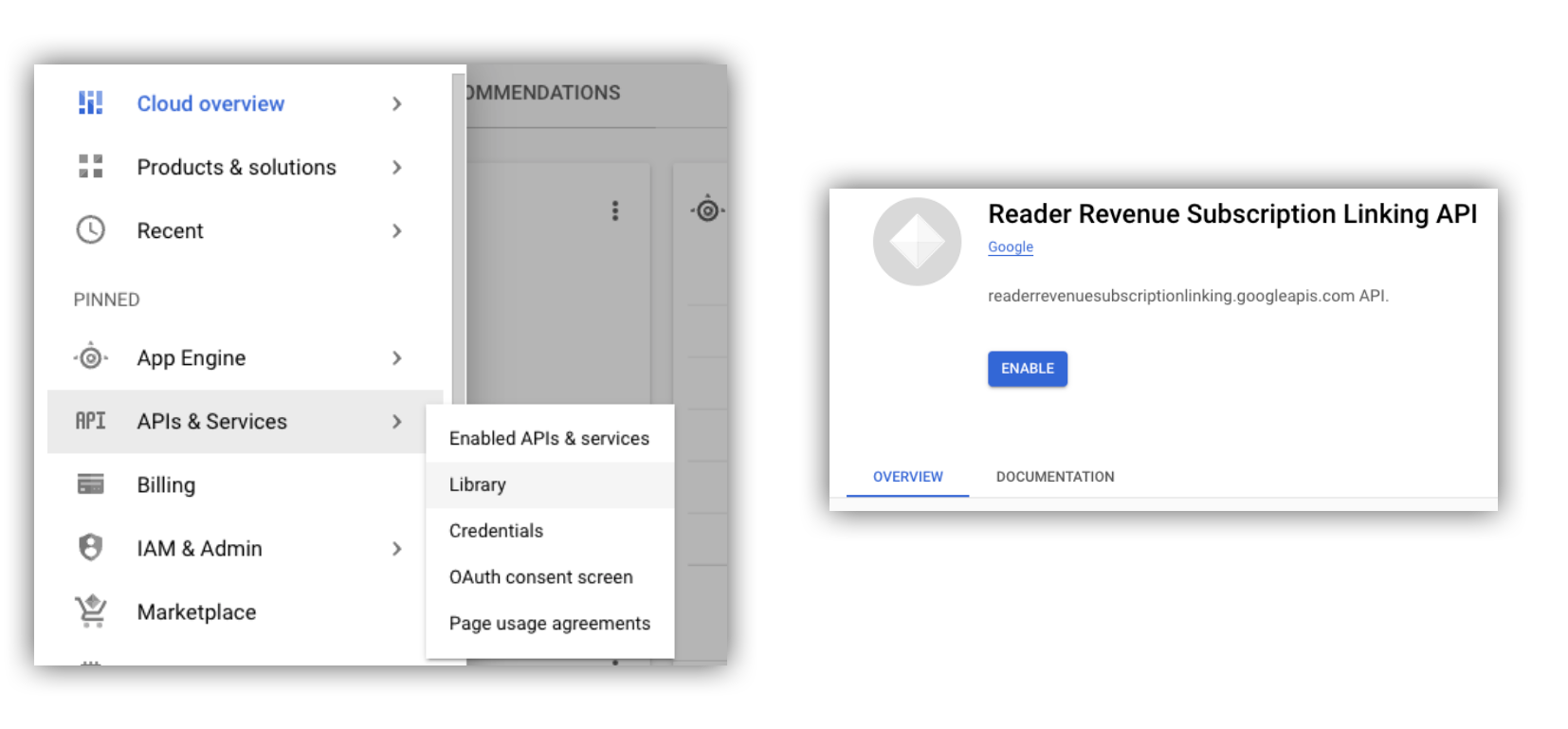
รูปที่ 1 การไปยังไลบรารี API และการเปิดใช้ API สำหรับโปรเจ็กต์ Google Cloud
สร้างบัญชีบริการ
บัญชีบริการใช้เพื่ออนุญาตการเข้าถึงจากแอปพลิเคชันของคุณไปยัง Subscription Linking API
- สร้างบัญชีบริการภายในคอนโซลของโปรเจ็กต์
- สร้างข้อมูลเข้าสู่ระบบสำหรับบัญชีบริการ และจัดเก็บไฟล์
credentials.jsonในตำแหน่งที่ปลอดภัยซึ่งแอปพลิเคชันของคุณเข้าถึงได้ - มอบบทบาท IAM "ผู้ดูแลการลิงก์การสมัครใช้บริการ" ให้กับ บัญชีบริการที่คุณสร้าง หากต้องการควบคุมความสามารถของ บัญชีบริการอย่างละเอียด คุณสามารถมอบหมายบทบาทที่เหมาะสมจากตารางต่อไปนี้
| ความสามารถ / บทบาท | ผู้ดูแลระบบการลิงก์การสมัครใช้บริการ | ผู้ดูการลิงก์การสมัครใช้บริการ | ผู้ดูการให้สิทธิ์ในการลิงก์การสมัครใช้บริการ |
|---|---|---|---|
| รับการให้สิทธิ์สำหรับผู้อ่าน | |||
| ดึงดูดผู้อ่าน | |||
| อัปเดตการให้สิทธิ์ผู้อ่าน | |||
| ลบผู้อ่าน |
ใช้บัญชีบริการกับ Subscription Linking API
หากต้องการตรวจสอบสิทธิ์การเรียกใช้ Subscription Linking API ด้วยบัญชีบริการ
ให้ใช้ไลบรารีของไคลเอ็นต์ googleapis
(ซึ่งจะจัดการคำขอ access_token โดยอัตโนมัติ)
หรือลงนามในคำขอโดยตรงด้วย REST API หากใช้ REST API
คุณต้องขอรับ access_token ก่อน (ผ่านไลบรารีการตรวจสอบสิทธิ์ของ Google
หรือใช้ JWT ของบัญชีบริการ)
แล้วจึงรวมไว้ในส่วนหัว Authorization
ทั้งไลบรารีของไคลเอ็นต์และREST API
ตัวอย่างต่อไปนี้มีโค้ดตัวอย่างสำหรับวิธีเรียกใช้ getReader(),
getReaderEntitlements(), updateReaderEntitlements() และ
deleteReader()
คีย์บัญชีบริการและข้อมูลเข้าสู่ระบบเริ่มต้นของแอปพลิเคชัน (ADC)
หากต้องการเรียกใช้ Subscription Linking API คุณต้องมีคีย์บัญชีบริการ หากส่งออกคีย์บัญชีบริการไม่ได้เนื่องจากนโยบายขององค์กร คุณสามารถใช้วิธีข้อมูลเข้าสู่ระบบเริ่มต้นของแอปพลิเคชัน (ADC) ได้
ต่อไปนี้คือตัวอย่างคำสั่งในการตั้งค่า ADC โดยใช้คำสั่ง gcloud auth application-default login
gcloud config set project [YOUR_PROJECT_ID]
gcloud auth application-default login --impersonate-service-account [YOUR_SERVICE_ACCOUNT_NAME@xxx.iam.gserviceaccount.com]
คำสั่งนี้จะสร้างไฟล์ JSON ที่มีข้อมูลเข้าสู่ระบบของบัญชีบริการ และวางไว้ในตำแหน่งที่รู้จักกันดีในระบบไฟล์ ตำแหน่งจะขึ้นอยู่กับระบบปฏิบัติการของคุณ ดังนี้
- Linux, macOS:
$HOME/.config/gcloud/application_default_credentials.json - Windows:
%APPDATA%\gcloud\application_default_credentials.json
คุณไม่จำเป็นต้องระบุเส้นทางไปยังไฟล์คีย์ในโค้ด เนื่องจาก ADC จะค้นหาข้อมูลเข้าสู่ระบบโดยอัตโนมัติด้วยตัวเอง
this.auth = new Auth.GoogleAuth({
   // keyFile: process.env.KEY_FILE, - You don't need to provide this field
    'https://www.googleapis.com/auth/readerrevenue.subscriptionlinking.manage'
  ],
  ...
});
ไลบรารีของไคลเอ็นต์
ส่วนนี้อธิบายวิธีใช้ไลบรารีของไคลเอ็นต์ googleapis ใน Node.js
ตัวอย่างคำขอ
import {readerrevenuesubscriptionlinking_v1, Auth} from 'googleapis';
const subscriptionLinking = readerrevenuesubscriptionlinking_v1.Readerrevenuesubscriptionlinking;

class SubscriptionLinking {
  constructor() {
    this.auth = new Auth.GoogleAuth({
      keyFile: process.env.KEY_FILE,
      scopes: [
        'https://www.googleapis.com/auth/readerrevenue.subscriptionlinking.manage'
      ],
    })
  }

  init() {
    return new subscriptionLinking(
        {version: 'v1', auth: this.auth})
  }
}

const subscriptionLinkingApi = new SubscriptionLinking();
const client = subscriptionLinkingApi.init();

/**
 * Retrieves details for a specific reader associated with the publication.
 * @async
 * @param {string} ppid - The Publisher Provided ID (ppid) for the reader.
 * @return {Promise<object>} A promise that resolves with the reader's details
 *  from the API.
 */
async function getReader(ppid) {
  const publicationId = process.env.PUBLICATION_ID;
  return await client.publications.readers.get({
    name: `publications/${publicationId}/readers/${ppid}`,
  });
}

/**
 * Updates the entitlements for a specific reader.
 * @async
 * @param {string} ppid - The Publisher Provided ID (ppid) for the reader whose
 *  entitlements are being updated.
 * @return {Promise<object>} A promise that resolves with the result of the
 *  updated entitlements object.
 */
async function updateReaderEntitlements(ppid) {
  const publicationId = process.env.PUBLICATION_ID;
  const requestBody = {
    /*
    Refer to
    https://developers.google.com/news/subscribe/subscription-linking/appendix/glossary#entitlements_object
    */
    entitlements : [{
      product_id: `${publicationId}:basic`,
      subscription_token: 'abc1234',
      detail: 'This is our basic plan',
      expire_time: '2025-10-21T03:05:08.200564Z'
    }]
  };
  return await client.publications.readers.updateEntitlements({
    name: `publications/${publicationId}/readers/${ppid}/entitlements`,
    requestBody
  });
}

/**
 * Retrieves the current entitlements for a specific reader.
 * @async
 * @param {string} ppid - The Publisher Provided ID (ppid) for the reader.
 * @return {Promise<object>} A promise that resolves with the reader's entitlements object.
 */
async function getReaderEntitlements(ppid) {
  const publicationId = process.env.PUBLICATION_ID;
  return await client.publications.readers.getEntitlements({
    name: `publications/${publicationId}/readers/${ppid}/entitlements`
  });
}

/**
 * Deletes a specific Subscription Linking reader record associated with the publication.
 * @async
 * @param {string} ppid - The Publisher Provided ID (ppid) for the reader to be deleted.
 * @param {boolean=} forceDelete - If true, delete the user even if their
 *  entitlements are not empty
 * @return {Promise<object>} A promise that resolves upon successful deletion
 *  with an empty object ({})
 */
async function deleteReader(ppid, forceDelete = false) {
  const publicationId = process.env.PUBLICATION_ID;
  return await client.publications.readers.delete({
    name: `publications/${publicationId}/readers/${ppid}`
    force: forceDelete
  });
}
REST API
หากต้องการเรียกใช้ปลายทาง REST API คุณสามารถใช้วิธีใดวิธีหนึ่งเพื่อ
รับ accessToken เพื่อตั้งค่าส่วนหัว Authorization
1. ใช้ไลบรารี GoogleAuth
import { GoogleAuth } from 'google-auth-library';
import credentialJson from 'path_to_your_json_file' with { type: 'json' };

const auth = new GoogleAuth({
    credentials: credential_json,
    scopes: [
      'https://www.googleapis.com/auth/readerrevenue.subscriptionlinking.manage'
    ]
});

async function getAccessToken() {
    const accessToken = await auth.getAccessToken();
    return accessToken;
}
2. สร้าง access_token โดยใช้ JWT ของบัญชีบริการ
import fetch from 'node-fetch';
import jwt from 'jsonwebtoken';

function getSignedJwt() {
  /*
    Either store the service account credentials string in an environment variable
    Or implement logic to fetch it.
  */
  const key_file = process.env.CREDENTIALS_STRING

  const issueDate = new Date();
  const expireMinutes = 60;
  const offsetInSeconds = issueDate.getTimezoneOffset() * 60000;
  const expireDate = new Date(issueDate.getTime() + (expireMinutes * 60000));
  const iat = Math.floor((issueDate.getTime() + offsetInSeconds) / 1000);
  const exp = Math.floor((expireDate.getTime() + offsetInSeconds) / 1000);

  const token = {
    iss: key_file.client_email,
    iat,
    exp,
    aud: 'https://oauth2.googleapis.com/token',
    scope:'https://www.googleapis.com/auth/readerrevenue.subscriptionlinking.manage',
  }
  return jwt.sign(token, key_file.private_key, {
    algorithm: 'RS256',
    keyid: key_file.private_key_id,
  })
}

async function getAccessToken(signedJwt) {
  let body = new URLSearchParams();
  body.set('grant_type', 'urn:ietf:params:oauth:grant-type:jwt-bearer');
  body.set('assertion', signedJwt);
  const response = await fetch('https://oauth2.googleapis.com/token', {
    method: 'POST',
    headers: {'Content-Type': 'application/x-www-form-urlencoded'},
    body
  })
  const accessResponse = await response.json();
  return accessResponse.access_token;
}
ตัวอย่างโค้ดสำหรับการเรียก REST API ด้วยไลบรารีการตรวจสอบสิทธิ์ของ Google
import { GoogleAuth } from 'google-auth-library';
import fetch from 'node-fetch'
import credentialJson from 'path_to_your_json_file' with { type: 'json' };

const BASE_SUBSCRIPTION_LINKING_API_URL='https://readerrevenuesubscriptionlinking.googleapis.com/v1';
const publicationId = process.env.PUBLICATION_ID

const auth = new GoogleAuth({
    credentials: credentialJson,
    scopes: [
      'https://www.googleapis.com/auth/readerrevenue.subscriptionlinking.manage'
    ]
});

async function getAccessToken() {
    const accessToken = await auth.getAccessToken();
    return accessToken;
}

/**
 * Retrieves details for a specific reader associated with the publication.
 * @async
 * @param {string} ppid - The Publisher Provided ID (ppid) for the reader.
 * @return {object} reader json for the given ppid
 */
async function getReader(ppid) {
  const endpoint = `${BASE_SUBSCRIPTION_LINKING_API_URL}/publications/${publicationId}/readers/${ppid}`;
  const accessToken = await getAccessToken();
  const response = await fetch(endpoint, {
     method: 'GET',
     headers: {
       Authorization: `Bearer ${accessToken}`,
     },
   });
  const reader = await response.json();
  return reader;
}

/**
 * Updates the entitlements for a specific reader.
 * @async
 * @param {string} ppid - The Publisher Provided ID (ppid) for the reader.
 * @return {object} the updated entitlements object in json.
 */
async function updateReaderEntitlements(ppid) {
  const endpoint = `${BASE_SUBSCRIPTION_LINKING_API_URL}/publications/${publicationId}/readers/${ppid}/entitlements`;
  const requestBody = {
    /*
    Refer to
    https://developers.google.com/news/subscribe/subscription-linking/appendix/glossary#entitlements_object
    */
    entitlements : [{
      product_id: `${publicationId}:basic`,
      subscription_token: 'abc1234',
      detail: 'This is our basic plan',
      expire_time: '2025-10-21T03:05:08.200564Z'
    }]
  };
  const response = await fetch(endpoint, {
     method: 'PATCH',
     headers: {
       Authorization: `Bearer ${accessToken}`,
       'Content-Type': 'application/json',
     },
     body: JSON.stringify(requestBody)
   })
  const updatedEntitlements = await response.json();
  return updatedEntitlements;
}

/**
 * Retrieves the current entitlements for a specific reader.
 * @async
 * @param {string} ppid - The Publisher Provided ID (ppid) for the reader.
 * @return {object} the reader's entitlements object in json.
 */
async function getReaderEntitlements(ppid) {
  const endpoint = `${BASE_SUBSCRIPTION_LINKING_API_URL}/publications/${publicationId}/readers/${ppid}/entitlements`;
  const accessToken = await getAccessToken();
  const response = await fetch(endpoint, {
     method: 'GET',
     headers: {
       Authorization: `Bearer ${accessToken}`,
     },
   });
  const entitlements = await response.json();
  return entitlements;
}

/**
 * Deletes a specific Subscription Linkikng reader record associated with the publication.
 * @async
 * @param {string} ppid - The Publisher Provided ID (ppid) for the reader.
 * @param {boolean=} forceDelete - If true, delete the user even if their
 *  entitlements are not empty
 * @return {object} returns an empty object ({}) if the delete operation is successful
 */
async function deleteReader(ppid, forceDelete = false) {
  const endpoint = `${BASE_SUBSCRIPTION_LINKING_API_URL}/publications/${publicationId}/readers/${ppid}?force=${forceDelete}`;
  const response = await fetch(endpoint, {
     method: 'DELETE',
     headers: {
       Authorization: `Bearer ${accessToken}`,
     }
   });
  const result = await response.json();
  return result;
}