
Gli editori usano principalmente l'integrazione lato server per gestire i lettori e i loro diritti. Gli editori utilizzano UpdateReaderEntitlements per aggiornare il record di Google del diritto di un ID prodotto relativo a un PPID.
Configurazione di Google Cloud
La configurazione di Subscription Linking in Google Cloud include due componenti principali:
- Attivazione dell'API per un progetto specifico
- Creazione di un service account per accedere all'API
Attivare l'API Subscription Linking
Per utilizzare un service account e gestire i diritti di un lettore, un progetto Google Cloud richiede l'attivazione dell'API Subscription Linking e la configurazione corretta di un service account OAuth. Per abilitare l'API Subscription
Linking per un progetto, vai al menu -> API e servizi ->
Libreria e cerca Subscription Linking oppure visita direttamente la pagina:
https://console.cloud.google.com/apis/library?project=gcp_project_id
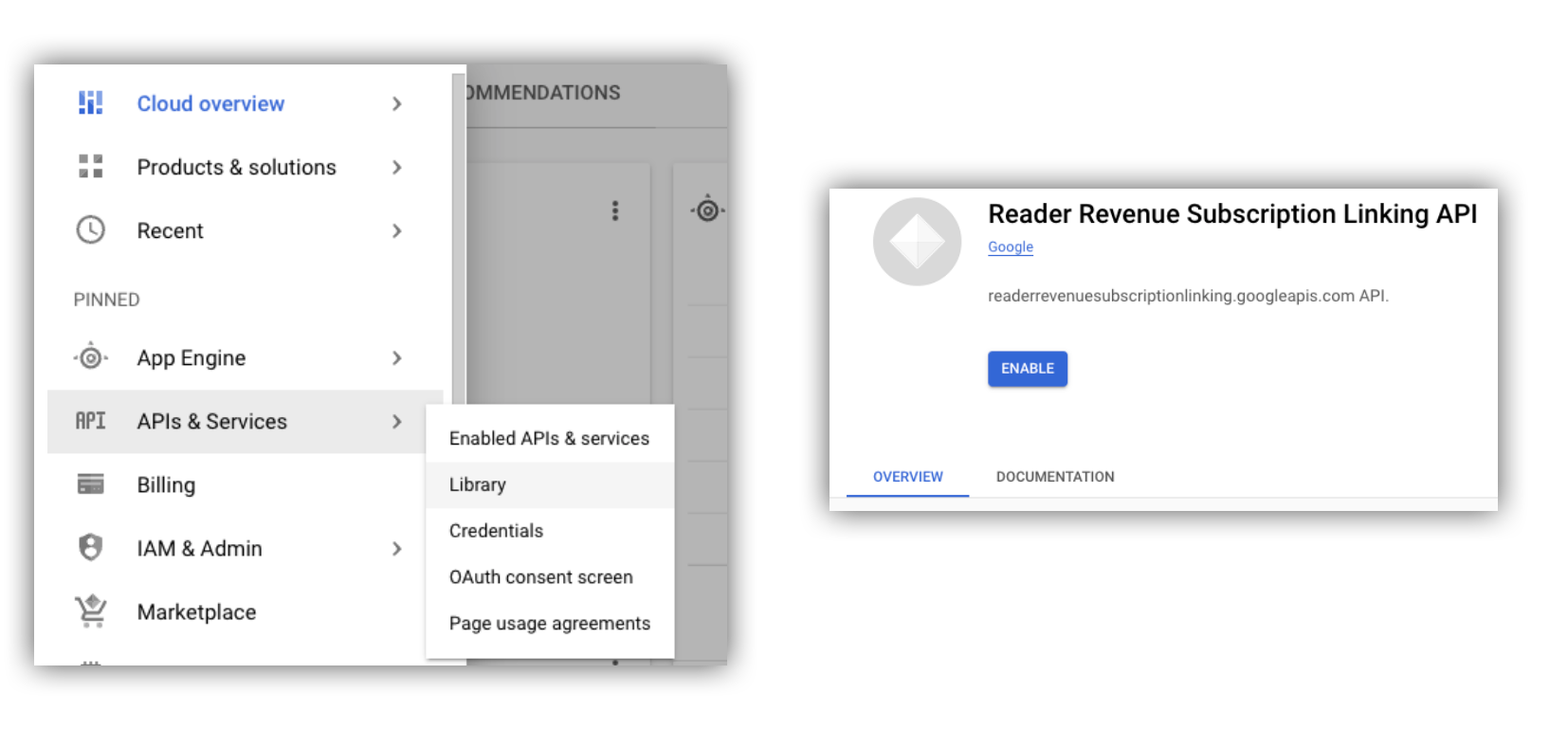
Figura 1. Accedi alla libreria API e abilita l'API per un progetto Google Cloud.
Creare un service account
Gli account di servizio vengono utilizzati per consentire l'accesso dalla tua applicazione all'API Subscription Linking.
- Crea un service account nella console del progetto.
- Crea le credenziali per l'account di servizio e salva il file
credentials.jsonin una posizione sicura accessibile alla tua applicazione. - Concedi il ruolo IAM "Amministratore collegamento abbonamenti" all'account di servizio che hai creato. Per un controllo granulare sulle capacità dell'account di servizio, puoi assegnare il ruolo appropriato dalla tabella seguente.
| Funzionalità / Ruolo | Subscription Linking Admin | Subscription Linking Viewer | Subscription Linking Entitlements Viewer |
|---|---|---|---|
| Ottieni diritti lettore | |||
| Ottenere lettori | |||
| Aggiorna diritti lettore | |||
| Elimina lettori |
Utilizzare un service account con l'API Subscription Linking
Per autenticare le chiamate all'API Subscription Linking con i service account, utilizza la libreria client googleapis (che gestisce automaticamente le richieste access_token) o firma le richieste direttamente con l'API REST. Se utilizzi l'API REST,
devi prima ottenere un access_token (tramite la libreria Google Auth
o utilizzando un JWT dell'account di servizio)
e poi includerlo nell'intestazione Authorization.
Entrambi i seguenti esempi di libreria client e API REST
contengono codice di esempio per chiamare getReader(),
getReaderEntitlements(), updateReaderEntitlements() e
deleteReader().
Chiave del service account e Credenziali predefinite dell'applicazione (ADC)
Per chiamare l'API Subscription Linking, devi disporre di una chiave del service account. Se non puoi esportare una chiave del service account a causa della policy dell'organizzazione, puoi utilizzare il metodo Credenziali predefinite dell'applicazione (ADC).
Di seguito è riportato un comando di esempio per configurare ADC utilizzando il comando gcloud auth application-default login:
gcloud config set project [YOUR_PROJECT_ID]
gcloud auth application-default login --impersonate-service-account [YOUR_SERVICE_ACCOUNT_NAME@xxx.iam.gserviceaccount.com]
Questo comando crea un file JSON contenente le credenziali dell'account di servizio e lo inserisce in una posizione nota del file system. La posizione dipende dal sistema operativo:
- Linux, macOS:
$HOME/.config/gcloud/application_default_credentials.json - Windows:
%APPDATA%\gcloud\application_default_credentials.json
Non è necessario fornire il percorso del file della chiave nel codice, poiché ADC cerca automaticamente le credenziali.
this.auth = new Auth.GoogleAuth({
   // keyFile: process.env.KEY_FILE, - You don't need to provide this field
    'https://www.googleapis.com/auth/readerrevenue.subscriptionlinking.manage'
  ],
  ...
});
Libreria client
Questa sezione spiega come utilizzare la libreria client googleapis in Node.js.
Richiesta di esempio
import {readerrevenuesubscriptionlinking_v1, Auth} from 'googleapis';
const subscriptionLinking = readerrevenuesubscriptionlinking_v1.Readerrevenuesubscriptionlinking;

class SubscriptionLinking {
  constructor() {
    this.auth = new Auth.GoogleAuth({
      keyFile: process.env.KEY_FILE,
      scopes: [
        'https://www.googleapis.com/auth/readerrevenue.subscriptionlinking.manage'
      ],
    })
  }

  init() {
    return new subscriptionLinking(
        {version: 'v1', auth: this.auth})
  }
}

const subscriptionLinkingApi = new SubscriptionLinking();
const client = subscriptionLinkingApi.init();

/**
 * Retrieves details for a specific reader associated with the publication.
 * @async
 * @param {string} ppid - The Publisher Provided ID (ppid) for the reader.
 * @return {Promise<object>} A promise that resolves with the reader's details
 *  from the API.
 */
async function getReader(ppid) {
  const publicationId = process.env.PUBLICATION_ID;
  return await client.publications.readers.get({
    name: `publications/${publicationId}/readers/${ppid}`,
  });
}

/**
 * Updates the entitlements for a specific reader.
 * @async
 * @param {string} ppid - The Publisher Provided ID (ppid) for the reader whose
 *  entitlements are being updated.
 * @return {Promise<object>} A promise that resolves with the result of the
 *  updated entitlements object.
 */
async function updateReaderEntitlements(ppid) {
  const publicationId = process.env.PUBLICATION_ID;
  const requestBody = {
    /*
    Refer to
    https://developers.google.com/news/subscribe/subscription-linking/appendix/glossary#entitlements_object
    */
    entitlements : [{
      product_id: `${publicationId}:basic`,
      subscription_token: 'abc1234',
      detail: 'This is our basic plan',
      expire_time: '2025-10-21T03:05:08.200564Z'
    }]
  };
  return await client.publications.readers.updateEntitlements({
    name: `publications/${publicationId}/readers/${ppid}/entitlements`,
    requestBody
  });
}

/**
 * Retrieves the current entitlements for a specific reader.
 * @async
 * @param {string} ppid - The Publisher Provided ID (ppid) for the reader.
 * @return {Promise<object>} A promise that resolves with the reader's entitlements object.
 */
async function getReaderEntitlements(ppid) {
  const publicationId = process.env.PUBLICATION_ID;
  return await client.publications.readers.getEntitlements({
    name: `publications/${publicationId}/readers/${ppid}/entitlements`
  });
}

/**
 * Deletes a specific Subscription Linking reader record associated with the publication.
 * @async
 * @param {string} ppid - The Publisher Provided ID (ppid) for the reader to be deleted.
 * @param {boolean=} forceDelete - If true, delete the user even if their
 *  entitlements are not empty
 * @return {Promise<object>} A promise that resolves upon successful deletion
 *  with an empty object ({})
 */
async function deleteReader(ppid, forceDelete = false) {
  const publicationId = process.env.PUBLICATION_ID;
  return await client.publications.readers.delete({
    name: `publications/${publicationId}/readers/${ppid}`
    force: forceDelete
  });
}
API REST
Se vuoi chiamare gli endpoint API REST, puoi utilizzare uno dei due metodi per ottenere accessToken da impostare nell'intestazione Authorization.
1. Utilizzare la libreria GoogleAuth
import { GoogleAuth } from 'google-auth-library';
import credentialJson from 'path_to_your_json_file' with { type: 'json' };

const auth = new GoogleAuth({
    credentials: credential_json,
    scopes: [
      'https://www.googleapis.com/auth/readerrevenue.subscriptionlinking.manage'
    ]
});

async function getAccessToken() {
    const accessToken = await auth.getAccessToken();
    return accessToken;
}
2. Genera un access_token utilizzando un JWT del service account
import fetch from 'node-fetch';
import jwt from 'jsonwebtoken';

function getSignedJwt() {
  /*
    Either store the service account credentials string in an environment variable
    Or implement logic to fetch it.
  */
  const key_file = process.env.CREDENTIALS_STRING

  const issueDate = new Date();
  const expireMinutes = 60;
  const offsetInSeconds = issueDate.getTimezoneOffset() * 60000;
  const expireDate = new Date(issueDate.getTime() + (expireMinutes * 60000));
  const iat = Math.floor((issueDate.getTime() + offsetInSeconds) / 1000);
  const exp = Math.floor((expireDate.getTime() + offsetInSeconds) / 1000);

  const token = {
    iss: key_file.client_email,
    iat,
    exp,
    aud: 'https://oauth2.googleapis.com/token',
    scope:'https://www.googleapis.com/auth/readerrevenue.subscriptionlinking.manage',
  }
  return jwt.sign(token, key_file.private_key, {
    algorithm: 'RS256',
    keyid: key_file.private_key_id,
  })
}

async function getAccessToken(signedJwt) {
  let body = new URLSearchParams();
  body.set('grant_type', 'urn:ietf:params:oauth:grant-type:jwt-bearer');
  body.set('assertion', signedJwt);
  const response = await fetch('https://oauth2.googleapis.com/token', {
    method: 'POST',
    headers: {'Content-Type': 'application/x-www-form-urlencoded'},
    body
  })
  const accessResponse = await response.json();
  return accessResponse.access_token;
}
Codice di esempio per le chiamate API REST con la libreria Google Auth
import { GoogleAuth } from 'google-auth-library';
import fetch from 'node-fetch'
import credentialJson from 'path_to_your_json_file' with { type: 'json' };

const BASE_SUBSCRIPTION_LINKING_API_URL='https://readerrevenuesubscriptionlinking.googleapis.com/v1';
const publicationId = process.env.PUBLICATION_ID

const auth = new GoogleAuth({
    credentials: credentialJson,
    scopes: [
      'https://www.googleapis.com/auth/readerrevenue.subscriptionlinking.manage'
    ]
});

async function getAccessToken() {
    const accessToken = await auth.getAccessToken();
    return accessToken;
}

/**
 * Retrieves details for a specific reader associated with the publication.
 * @async
 * @param {string} ppid - The Publisher Provided ID (ppid) for the reader.
 * @return {object} reader json for the given ppid
 */
async function getReader(ppid) {
  const endpoint = `${BASE_SUBSCRIPTION_LINKING_API_URL}/publications/${publicationId}/readers/${ppid}`;
  const accessToken = await getAccessToken();
  const response = await fetch(endpoint, {
     method: 'GET',
     headers: {
       Authorization: `Bearer ${accessToken}`,
     },
   });
  const reader = await response.json();
  return reader;
}

/**
 * Updates the entitlements for a specific reader.
 * @async
 * @param {string} ppid - The Publisher Provided ID (ppid) for the reader.
 * @return {object} the updated entitlements object in json.
 */
async function updateReaderEntitlements(ppid) {
  const endpoint = `${BASE_SUBSCRIPTION_LINKING_API_URL}/publications/${publicationId}/readers/${ppid}/entitlements`;
  const requestBody = {
    /*
    Refer to
    https://developers.google.com/news/subscribe/subscription-linking/appendix/glossary#entitlements_object
    */
    entitlements : [{
      product_id: `${publicationId}:basic`,
      subscription_token: 'abc1234',
      detail: 'This is our basic plan',
      expire_time: '2025-10-21T03:05:08.200564Z'
    }]
  };
  const response = await fetch(endpoint, {
     method: 'PATCH',
     headers: {
       Authorization: `Bearer ${accessToken}`,
       'Content-Type': 'application/json',
     },
     body: JSON.stringify(requestBody)
   })
  const updatedEntitlements = await response.json();
  return updatedEntitlements;
}

/**
 * Retrieves the current entitlements for a specific reader.
 * @async
 * @param {string} ppid - The Publisher Provided ID (ppid) for the reader.
 * @return {object} the reader's entitlements object in json.
 */
async function getReaderEntitlements(ppid) {
  const endpoint = `${BASE_SUBSCRIPTION_LINKING_API_URL}/publications/${publicationId}/readers/${ppid}/entitlements`;
  const accessToken = await getAccessToken();
  const response = await fetch(endpoint, {
     method: 'GET',
     headers: {
       Authorization: `Bearer ${accessToken}`,
     },
   });
  const entitlements = await response.json();
  return entitlements;
}

/**
 * Deletes a specific Subscription Linkikng reader record associated with the publication.
 * @async
 * @param {string} ppid - The Publisher Provided ID (ppid) for the reader.
 * @param {boolean=} forceDelete - If true, delete the user even if their
 *  entitlements are not empty
 * @return {object} returns an empty object ({}) if the delete operation is successful
 */
async function deleteReader(ppid, forceDelete = false) {
  const endpoint = `${BASE_SUBSCRIPTION_LINKING_API_URL}/publications/${publicationId}/readers/${ppid}?force=${forceDelete}`;
  const response = await fetch(endpoint, {
     method: 'DELETE',
     headers: {
       Authorization: `Bearer ${accessToken}`,
     }
   });
  const result = await response.json();
  return result;
}