게시자는 주로 서버 측 통합을 사용하여 독자와 권한을 관리합니다. 게시자는 UpdateReaderEntitlements를 사용하여 PPID의 제품 ID 권한에 관한 Google 기록을 업데이트합니다.
Google Cloud 설정
Google Cloud에서 구독 연결을 구성하는 데는 두 가지 주요 구성요소가 포함됩니다.
- 지정된 프로젝트에 API 사용 설정
- API 액세스를 위한 서비스 계정 만들기
Subscription Linking API 사용 설정
서비스 계정을 사용하고 독자의 권한을 관리하려면 Google Cloud 프로젝트에서 Subscription Linking API가 사용 설정되어 있고 OAuth 서비스 계정이 올바르게 구성되어 있어야 합니다. 프로젝트의 정기 결제 연결 API를 사용 설정하려면 메뉴 -> API 및 서비스 -> 라이브러리로 이동하여 Subscription Linking를 검색하거나 다음 페이지를 직접 방문하세요.
https://console.cloud.google.com/apis/library?project=gcp_project_id
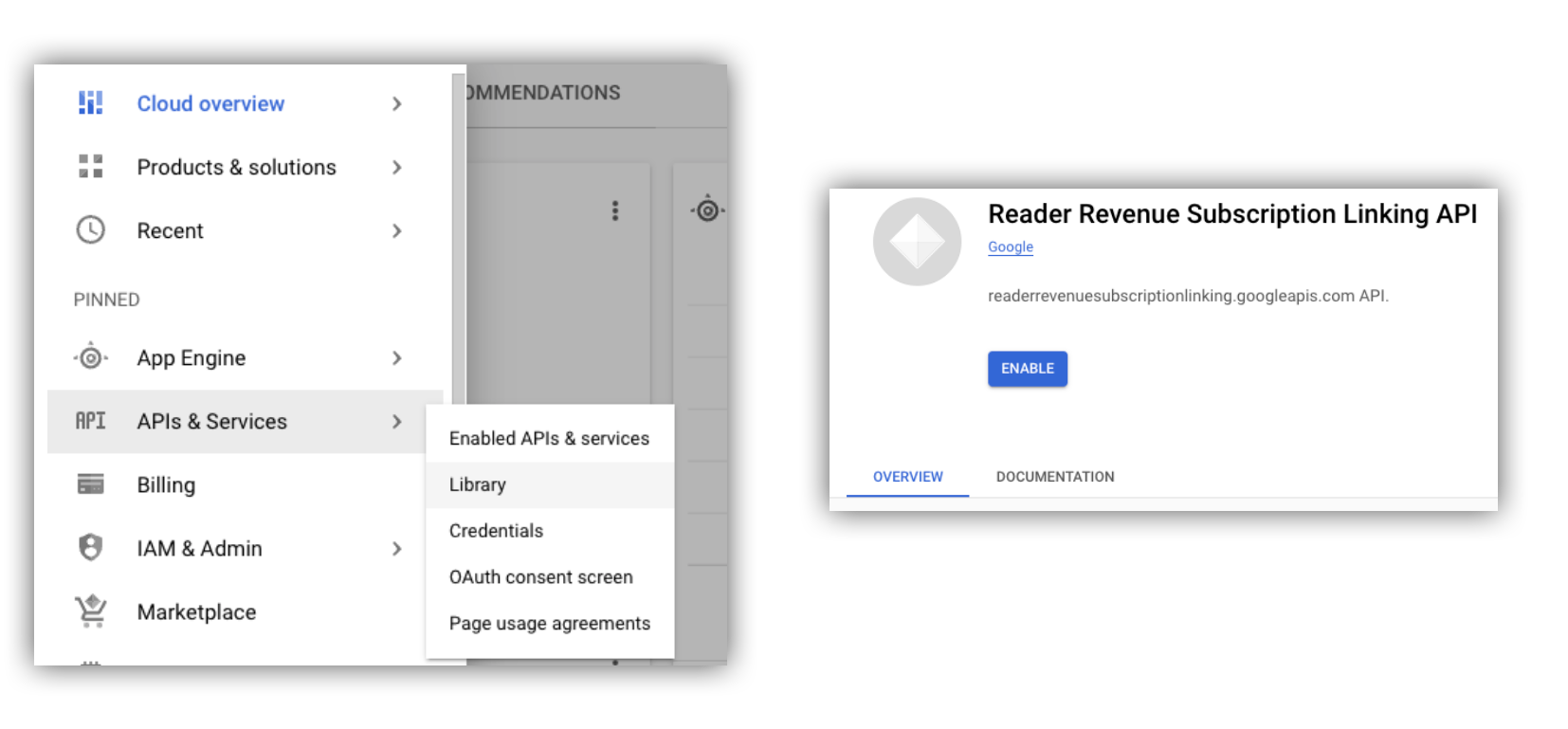
그림 1. API 라이브러리로 이동하여 Google Cloud 프로젝트의 API를 사용 설정합니다.
서비스 계정 만들기
서비스 계정은 애플리케이션에서 정기 결제 연결 API에 액세스할 수 있도록 하는 데 사용됩니다.
- 프로젝트의 콘솔에서 서비스 계정을 만듭니다.
- 서비스 계정의 사용자 인증 정보를 만들고
credentials.json파일을 애플리케이션에서 액세스할 수 있는 안전한 위치에 저장합니다. - 생성한 서비스 계정에 IAM 역할 '구독 연결 관리자'를 부여합니다. 서비스 계정의 기능을 세부적으로 제어하려면 다음 표에서 적절한 역할을 할당하면 됩니다.
| 기능 / 역할 | 구독 연결 관리자 | 구독 연결 뷰어 | 구독 연결 사용 권한 뷰어 |
|---|---|---|---|
| 리더 사용 권한 가져오기 | |||
| 독자 확보 | |||
| 독자 사용 권한 업데이트 | |||
| 읽기 권한 사용자 삭제 |
Subscription Linking API와 함께 서비스 계정 사용
서비스 계정으로 Subscription Linking API 호출을 인증하려면 googleapis 클라이언트 라이브러리(access_token 요청을 자동으로 처리함)를 사용하거나 REST API로 직접 요청에 서명하세요. REST API를 사용하는 경우 먼저 access_token를 획득한 후 (Google Auth 라이브러리를 통해 또는 서비스 계정 JWT 사용) Authorization 헤더에 포함해야 합니다.
다음 클라이언트 라이브러리와 REST API 예시에는 getReader(), getReaderEntitlements(), updateReaderEntitlements(), deleteReader()를 호출하는 방법이 나와 있습니다.
서비스 계정 키 및 애플리케이션 기본 사용자 인증 정보 (ADC)
Subscription Linking API를 호출하려면 서비스 계정 키가 있어야 합니다. 조직 정책으로 인해 서비스 계정 키를 내보낼 수 없는 경우 애플리케이션 기본 사용자 인증 정보 (ADC) 메서드를 사용할 수 있습니다.
다음은 gcloud auth application-default login 명령어를 사용하여 ADC를 설정하는 샘플 명령어입니다.
gcloud config set project [YOUR_PROJECT_ID]
gcloud auth application-default login --impersonate-service-account [YOUR_SERVICE_ACCOUNT_NAME@xxx.iam.gserviceaccount.com]
이 명령어는 서비스 계정 사용자 인증 정보가 포함된 JSON 파일을 만들고 이를 파일 시스템에서 잘 알려진 위치에 배치합니다. 위치는 운영체제에 따라 다릅니다.
- Linux, macOS:
$HOME/.config/gcloud/application_default_credentials.json - Windows:
%APPDATA%\gcloud\application_default_credentials.json
ADC가 자동으로 사용자 인증 정보를 검색하므로 코드에서 키 파일의 경로를 제공할 필요가 없습니다.
this.auth = new Auth.GoogleAuth({
   // keyFile: process.env.KEY_FILE, - You don't need to provide this field
    'https://www.googleapis.com/auth/readerrevenue.subscriptionlinking.manage'
  ],
  ...
});
클라이언트 라이브러리
이 섹션에서는 Node.js에서 googleapis 클라이언트 라이브러리를 사용하는 방법을 설명합니다.
샘플 요청
import {readerrevenuesubscriptionlinking_v1, Auth} from 'googleapis';
const subscriptionLinking = readerrevenuesubscriptionlinking_v1.Readerrevenuesubscriptionlinking;

class SubscriptionLinking {
  constructor() {
    this.auth = new Auth.GoogleAuth({
      keyFile: process.env.KEY_FILE,
      scopes: [
        'https://www.googleapis.com/auth/readerrevenue.subscriptionlinking.manage'
      ],
    })
  }

  init() {
    return new subscriptionLinking(
        {version: 'v1', auth: this.auth})
  }
}

const subscriptionLinkingApi = new SubscriptionLinking();
const client = subscriptionLinkingApi.init();

/**
 * Retrieves details for a specific reader associated with the publication.
 * @async
 * @param {string} ppid - The Publisher Provided ID (ppid) for the reader.
 * @return {Promise<object>} A promise that resolves with the reader's details
 *  from the API.
 */
async function getReader(ppid) {
  const publicationId = process.env.PUBLICATION_ID;
  return await client.publications.readers.get({
    name: `publications/${publicationId}/readers/${ppid}`,
  });
}

/**
 * Updates the entitlements for a specific reader.
 * @async
 * @param {string} ppid - The Publisher Provided ID (ppid) for the reader whose
 *  entitlements are being updated.
 * @return {Promise<object>} A promise that resolves with the result of the
 *  updated entitlements object.
 */
async function updateReaderEntitlements(ppid) {
  const publicationId = process.env.PUBLICATION_ID;
  const requestBody = {
    /*
    Refer to
    https://developers.google.com/news/subscribe/subscription-linking/appendix/glossary#entitlements_object
    */
    entitlements : [{
      product_id: `${publicationId}:basic`,
      subscription_token: 'abc1234',
      detail: 'This is our basic plan',
      expire_time: '2025-10-21T03:05:08.200564Z'
    }]
  };
  return await client.publications.readers.updateEntitlements({
    name: `publications/${publicationId}/readers/${ppid}/entitlements`,
    requestBody
  });
}

/**
 * Retrieves the current entitlements for a specific reader.
 * @async
 * @param {string} ppid - The Publisher Provided ID (ppid) for the reader.
 * @return {Promise<object>} A promise that resolves with the reader's entitlements object.
 */
async function getReaderEntitlements(ppid) {
  const publicationId = process.env.PUBLICATION_ID;
  return await client.publications.readers.getEntitlements({
    name: `publications/${publicationId}/readers/${ppid}/entitlements`
  });
}

/**
 * Deletes a specific Subscription Linking reader record associated with the publication.
 * @async
 * @param {string} ppid - The Publisher Provided ID (ppid) for the reader to be deleted.
 * @param {boolean=} forceDelete - If true, delete the user even if their
 *  entitlements are not empty
 * @return {Promise<object>} A promise that resolves upon successful deletion
 *  with an empty object ({})
 */
async function deleteReader(ppid, forceDelete = false) {
  const publicationId = process.env.PUBLICATION_ID;
  return await client.publications.readers.delete({
    name: `publications/${publicationId}/readers/${ppid}`
    force: forceDelete
  });
}
REST API
REST API 엔드포인트를 호출하려면 다음 방법 중 하나를 사용하여 accessToken를 획득하여 Authorization 헤더에 설정하면 됩니다.
1. GoogleAuth 라이브러리 사용
import { GoogleAuth } from 'google-auth-library';
import credentialJson from 'path_to_your_json_file' with { type: 'json' };

const auth = new GoogleAuth({
    credentials: credential_json,
    scopes: [
      'https://www.googleapis.com/auth/readerrevenue.subscriptionlinking.manage'
    ]
});

async function getAccessToken() {
    const accessToken = await auth.getAccessToken();
    return accessToken;
}
2. 서비스 계정 JWT를 사용하여 access_token 생성
import fetch from 'node-fetch';
import jwt from 'jsonwebtoken';

function getSignedJwt() {
  /*
    Either store the service account credentials string in an environment variable
    Or implement logic to fetch it.
  */
  const key_file = process.env.CREDENTIALS_STRING

  const issueDate = new Date();
  const expireMinutes = 60;
  const offsetInSeconds = issueDate.getTimezoneOffset() * 60000;
  const expireDate = new Date(issueDate.getTime() + (expireMinutes * 60000));
  const iat = Math.floor((issueDate.getTime() + offsetInSeconds) / 1000);
  const exp = Math.floor((expireDate.getTime() + offsetInSeconds) / 1000);

  const token = {
    iss: key_file.client_email,
    iat,
    exp,
    aud: 'https://oauth2.googleapis.com/token',
    scope:'https://www.googleapis.com/auth/readerrevenue.subscriptionlinking.manage',
  }
  return jwt.sign(token, key_file.private_key, {
    algorithm: 'RS256',
    keyid: key_file.private_key_id,
  })
}

async function getAccessToken(signedJwt) {
  let body = new URLSearchParams();
  body.set('grant_type', 'urn:ietf:params:oauth:grant-type:jwt-bearer');
  body.set('assertion', signedJwt);
  const response = await fetch('https://oauth2.googleapis.com/token', {
    method: 'POST',
    headers: {'Content-Type': 'application/x-www-form-urlencoded'},
    body
  })
  const accessResponse = await response.json();
  return accessResponse.access_token;
}
Google Auth 라이브러리를 사용한 REST API 호출 샘플 코드
import { GoogleAuth } from 'google-auth-library';
import fetch from 'node-fetch'
import credentialJson from 'path_to_your_json_file' with { type: 'json' };

const BASE_SUBSCRIPTION_LINKING_API_URL='https://readerrevenuesubscriptionlinking.googleapis.com/v1';
const publicationId = process.env.PUBLICATION_ID

const auth = new GoogleAuth({
    credentials: credentialJson,
    scopes: [
      'https://www.googleapis.com/auth/readerrevenue.subscriptionlinking.manage'
    ]
});

async function getAccessToken() {
    const accessToken = await auth.getAccessToken();
    return accessToken;
}

/**
 * Retrieves details for a specific reader associated with the publication.
 * @async
 * @param {string} ppid - The Publisher Provided ID (ppid) for the reader.
 * @return {object} reader json for the given ppid
 */
async function getReader(ppid) {
  const endpoint = `${BASE_SUBSCRIPTION_LINKING_API_URL}/publications/${publicationId}/readers/${ppid}`;
  const accessToken = await getAccessToken();
  const response = await fetch(endpoint, {
     method: 'GET',
     headers: {
       Authorization: `Bearer ${accessToken}`,
     },
   });
  const reader = await response.json();
  return reader;
}

/**
 * Updates the entitlements for a specific reader.
 * @async
 * @param {string} ppid - The Publisher Provided ID (ppid) for the reader.
 * @return {object} the updated entitlements object in json.
 */
async function updateReaderEntitlements(ppid) {
  const endpoint = `${BASE_SUBSCRIPTION_LINKING_API_URL}/publications/${publicationId}/readers/${ppid}/entitlements`;
  const requestBody = {
    /*
    Refer to
    https://developers.google.com/news/subscribe/subscription-linking/appendix/glossary#entitlements_object
    */
    entitlements : [{
      product_id: `${publicationId}:basic`,
      subscription_token: 'abc1234',
      detail: 'This is our basic plan',
      expire_time: '2025-10-21T03:05:08.200564Z'
    }]
  };
  const response = await fetch(endpoint, {
     method: 'PATCH',
     headers: {
       Authorization: `Bearer ${accessToken}`,
       'Content-Type': 'application/json',
     },
     body: JSON.stringify(requestBody)
   })
  const updatedEntitlements = await response.json();
  return updatedEntitlements;
}

/**
 * Retrieves the current entitlements for a specific reader.
 * @async
 * @param {string} ppid - The Publisher Provided ID (ppid) for the reader.
 * @return {object} the reader's entitlements object in json.
 */
async function getReaderEntitlements(ppid) {
  const endpoint = `${BASE_SUBSCRIPTION_LINKING_API_URL}/publications/${publicationId}/readers/${ppid}/entitlements`;
  const accessToken = await getAccessToken();
  const response = await fetch(endpoint, {
     method: 'GET',
     headers: {
       Authorization: `Bearer ${accessToken}`,
     },
   });
  const entitlements = await response.json();
  return entitlements;
}

/**
 * Deletes a specific Subscription Linkikng reader record associated with the publication.
 * @async
 * @param {string} ppid - The Publisher Provided ID (ppid) for the reader.
 * @param {boolean=} forceDelete - If true, delete the user even if their
 *  entitlements are not empty
 * @return {object} returns an empty object ({}) if the delete operation is successful
 */
async function deleteReader(ppid, forceDelete = false) {
  const endpoint = `${BASE_SUBSCRIPTION_LINKING_API_URL}/publications/${publicationId}/readers/${ppid}?force=${forceDelete}`;
  const response = await fetch(endpoint, {
     method: 'DELETE',
     headers: {
       Authorization: `Bearer ${accessToken}`,
     }
   });
  const result = await response.json();
  return result;
}