
Yayıncılar, okuyucuları ve haklarını yönetmek için öncelikle sunucu tarafı entegrasyonunu kullanır. Yayıncılar, UpdateReaderEntitlements kullanarak Google'ın bir PPID için ürün kimliği yetkilendirmesi kaydını günceller.
Google Cloud kurulumu
Google Cloud'da abonelik bağlantısını yapılandırma iki ana bileşenden oluşur:
- Belirli bir proje için API'yi etkinleştirme
- API'ye erişmek için hizmet hesabı oluşturma
Subscription Linking API'yi etkinleştirme
Hizmet hesabı kullanmak ve okuyucunun haklarını yönetmek için Google Cloud projesinde Subscription Linking API'nin etkinleştirilmesi ve OAuth hizmet hesabının doğru şekilde yapılandırılması gerekir. Bir proje için Subscription Linking API'yi etkinleştirmek üzere menüden -> API'ler ve Hizmetler -> Kitaplık'a gidin ve Subscription Linking araması yapın veya doğrudan sayfayı ziyaret edin:
https://console.cloud.google.com/apis/library?project=gcp_project_id
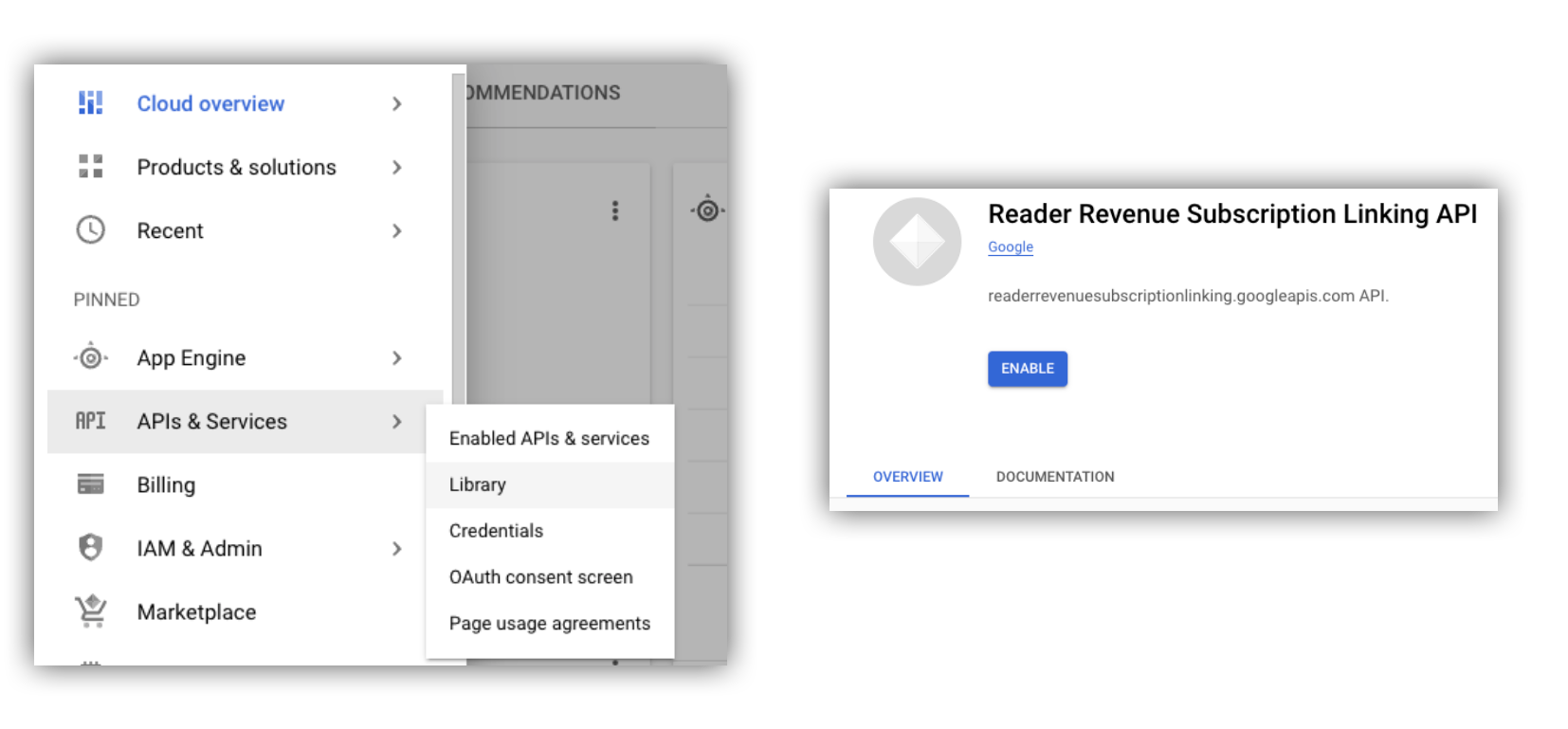
Şekil 1. API kitaplığına gidip Google Cloud projesi için API'yi etkinleştirme
Hizmet hesabı oluşturma
Hizmet hesapları, uygulamanızın Subscription Linking API'sine erişmesine izin vermek için kullanılır.
- Projenizin konsolunda hizmet hesabı oluşturun.
- Hizmet hesabı için kimlik bilgileri oluşturun ve
credentials.jsondosyasını uygulamanızın erişebileceği güvenli bir konumda saklayın. - Oluşturduğunuz hizmet hesabına "Abonelik Bağlantısı Yöneticisi" IAM rolünü verin. Hizmet hesabının özelliklerini ayrıntılı olarak kontrol etmek için aşağıdaki tablodan uygun rolü atayabilirsiniz.
| Yetenek / Rol | Abonelik Bağlama Yöneticisi | Abonelik Bağlama Görüntüleyicisi | Abonelik Bağlama Yetkileri Görüntüleyicisi |
|---|---|---|---|
| Okuyucu yetkileri alma | |||
| Okuyucu edinme | |||
| Okuyucu yetkilerini güncelleme | |||
| Okuyucuları silme |
Subscription Linking API ile hizmet hesabı kullanma
Hizmet hesaplarıyla Subscription Linking API'ye yapılan çağrıların kimliğini doğrulamak için googleapis istemci kitaplığını (access_token isteklerini otomatik olarak işler) kullanın veya istekleri doğrudan REST API ile imzalayın. REST API'yi kullanıyorsanız öncelikle bir access_token (Google Auth kitaplığı aracılığıyla veya bir hizmet hesabı JWT'si kullanarak) almanız ve ardından bunu Authorization üstbilgisine eklemeniz gerekir.
Aşağıdaki istemci kitaplığı ve REST API örneklerinde, getReader(), getReaderEntitlements(), updateReaderEntitlements() ve deleteReader() yöntemlerinin nasıl çağrılacağına dair örnek kodlar yer almaktadır.
Hizmet hesabı anahtarı ve uygulama varsayılan kimlik bilgileri (ADC)
Subscription Linking API'yi çağırmak için hizmet hesabı anahtarına sahip olmanız gerekir. Kuruluş politikanız nedeniyle hizmet hesabı anahtarını dışa aktaramıyorsanız Uygulama Varsayılan Kimlik Bilgileri (ADC) yöntemini kullanabilirsiniz.
gcloud auth application-default login komutunu kullanarak bir ADC ayarlamak için örnek bir komutu aşağıda bulabilirsiniz:
gcloud config set project [YOUR_PROJECT_ID]
gcloud auth application-default login --impersonate-service-account [YOUR_SERVICE_ACCOUNT_NAME@xxx.iam.gserviceaccount.com]
Bu komut, hizmet hesabı kimlik bilgilerini içeren bir JSON dosyası oluşturur ve bu dosyayı dosya sisteminizde iyi bilinen bir konuma yerleştirir. Konum, işletim sisteminize bağlıdır:
- Linux, macOS:
$HOME/.config/gcloud/application_default_credentials.json - Windows:
%APPDATA%\gcloud\application_default_credentials.json
ADC, kimlik bilgilerini otomatik olarak aradığı için kodunuzda anahtar dosyasının yolunu belirtmeniz gerekmez.
this.auth = new Auth.GoogleAuth({
   // keyFile: process.env.KEY_FILE, - You don't need to provide this field
    'https://www.googleapis.com/auth/readerrevenue.subscriptionlinking.manage'
  ],
  ...
});
İstemci kitaplığı
Bu bölümde, Node.js'de googleapis istemci kitaplığının nasıl kullanılacağı açıklanmaktadır.
Örnek istek
import {readerrevenuesubscriptionlinking_v1, Auth} from 'googleapis';
const subscriptionLinking = readerrevenuesubscriptionlinking_v1.Readerrevenuesubscriptionlinking;

class SubscriptionLinking {
  constructor() {
    this.auth = new Auth.GoogleAuth({
      keyFile: process.env.KEY_FILE,
      scopes: [
        'https://www.googleapis.com/auth/readerrevenue.subscriptionlinking.manage'
      ],
    })
  }

  init() {
    return new subscriptionLinking(
        {version: 'v1', auth: this.auth})
  }
}

const subscriptionLinkingApi = new SubscriptionLinking();
const client = subscriptionLinkingApi.init();

/**
 * Retrieves details for a specific reader associated with the publication.
 * @async
 * @param {string} ppid - The Publisher Provided ID (ppid) for the reader.
 * @return {Promise<object>} A promise that resolves with the reader's details
 *  from the API.
 */
async function getReader(ppid) {
  const publicationId = process.env.PUBLICATION_ID;
  return await client.publications.readers.get({
    name: `publications/${publicationId}/readers/${ppid}`,
  });
}

/**
 * Updates the entitlements for a specific reader.
 * @async
 * @param {string} ppid - The Publisher Provided ID (ppid) for the reader whose
 *  entitlements are being updated.
 * @return {Promise<object>} A promise that resolves with the result of the
 *  updated entitlements object.
 */
async function updateReaderEntitlements(ppid) {
  const publicationId = process.env.PUBLICATION_ID;
  const requestBody = {
    /*
    Refer to
    https://developers.google.com/news/subscribe/subscription-linking/appendix/glossary#entitlements_object
    */
    entitlements : [{
      product_id: `${publicationId}:basic`,
      subscription_token: 'abc1234',
      detail: 'This is our basic plan',
      expire_time: '2025-10-21T03:05:08.200564Z'
    }]
  };
  return await client.publications.readers.updateEntitlements({
    name: `publications/${publicationId}/readers/${ppid}/entitlements`,
    requestBody
  });
}

/**
 * Retrieves the current entitlements for a specific reader.
 * @async
 * @param {string} ppid - The Publisher Provided ID (ppid) for the reader.
 * @return {Promise<object>} A promise that resolves with the reader's entitlements object.
 */
async function getReaderEntitlements(ppid) {
  const publicationId = process.env.PUBLICATION_ID;
  return await client.publications.readers.getEntitlements({
    name: `publications/${publicationId}/readers/${ppid}/entitlements`
  });
}

/**
 * Deletes a specific Subscription Linking reader record associated with the publication.
 * @async
 * @param {string} ppid - The Publisher Provided ID (ppid) for the reader to be deleted.
 * @param {boolean=} forceDelete - If true, delete the user even if their
 *  entitlements are not empty
 * @return {Promise<object>} A promise that resolves upon successful deletion
 *  with an empty object ({})
 */
async function deleteReader(ppid, forceDelete = false) {
  const publicationId = process.env.PUBLICATION_ID;
  return await client.publications.readers.delete({
    name: `publications/${publicationId}/readers/${ppid}`
    force: forceDelete
  });
}
REST API
REST API uç noktalarını çağırmak istiyorsanız accessToken değerini elde etmek için iki yöntemden birini kullanabilirsiniz. Bu değer, Authorization üstbilgisine ayarlanır.
1. GoogleAuth kitaplığını kullanma
import { GoogleAuth } from 'google-auth-library';
import credentialJson from 'path_to_your_json_file' with { type: 'json' };

const auth = new GoogleAuth({
    credentials: credential_json,
    scopes: [
      'https://www.googleapis.com/auth/readerrevenue.subscriptionlinking.manage'
    ]
});

async function getAccessToken() {
    const accessToken = await auth.getAccessToken();
    return accessToken;
}
2. Hizmet hesabı JWT'si kullanarak access_token oluşturma
import fetch from 'node-fetch';
import jwt from 'jsonwebtoken';

function getSignedJwt() {
  /*
    Either store the service account credentials string in an environment variable
    Or implement logic to fetch it.
  */
  const key_file = process.env.CREDENTIALS_STRING

  const issueDate = new Date();
  const expireMinutes = 60;
  const offsetInSeconds = issueDate.getTimezoneOffset() * 60000;
  const expireDate = new Date(issueDate.getTime() + (expireMinutes * 60000));
  const iat = Math.floor((issueDate.getTime() + offsetInSeconds) / 1000);
  const exp = Math.floor((expireDate.getTime() + offsetInSeconds) / 1000);

  const token = {
    iss: key_file.client_email,
    iat,
    exp,
    aud: 'https://oauth2.googleapis.com/token',
    scope:'https://www.googleapis.com/auth/readerrevenue.subscriptionlinking.manage',
  }
  return jwt.sign(token, key_file.private_key, {
    algorithm: 'RS256',
    keyid: key_file.private_key_id,
  })
}

async function getAccessToken(signedJwt) {
  let body = new URLSearchParams();
  body.set('grant_type', 'urn:ietf:params:oauth:grant-type:jwt-bearer');
  body.set('assertion', signedJwt);
  const response = await fetch('https://oauth2.googleapis.com/token', {
    method: 'POST',
    headers: {'Content-Type': 'application/x-www-form-urlencoded'},
    body
  })
  const accessResponse = await response.json();
  return accessResponse.access_token;
}
Google Auth kitaplığıyla REST API çağrıları için örnek kod
import { GoogleAuth } from 'google-auth-library';
import fetch from 'node-fetch'
import credentialJson from 'path_to_your_json_file' with { type: 'json' };

const BASE_SUBSCRIPTION_LINKING_API_URL='https://readerrevenuesubscriptionlinking.googleapis.com/v1';
const publicationId = process.env.PUBLICATION_ID

const auth = new GoogleAuth({
    credentials: credentialJson,
    scopes: [
      'https://www.googleapis.com/auth/readerrevenue.subscriptionlinking.manage'
    ]
});

async function getAccessToken() {
    const accessToken = await auth.getAccessToken();
    return accessToken;
}

/**
 * Retrieves details for a specific reader associated with the publication.
 * @async
 * @param {string} ppid - The Publisher Provided ID (ppid) for the reader.
 * @return {object} reader json for the given ppid
 */
async function getReader(ppid) {
  const endpoint = `${BASE_SUBSCRIPTION_LINKING_API_URL}/publications/${publicationId}/readers/${ppid}`;
  const accessToken = await getAccessToken();
  const response = await fetch(endpoint, {
     method: 'GET',
     headers: {
       Authorization: `Bearer ${accessToken}`,
     },
   });
  const reader = await response.json();
  return reader;
}

/**
 * Updates the entitlements for a specific reader.
 * @async
 * @param {string} ppid - The Publisher Provided ID (ppid) for the reader.
 * @return {object} the updated entitlements object in json.
 */
async function updateReaderEntitlements(ppid) {
  const endpoint = `${BASE_SUBSCRIPTION_LINKING_API_URL}/publications/${publicationId}/readers/${ppid}/entitlements`;
  const requestBody = {
    /*
    Refer to
    https://developers.google.com/news/subscribe/subscription-linking/appendix/glossary#entitlements_object
    */
    entitlements : [{
      product_id: `${publicationId}:basic`,
      subscription_token: 'abc1234',
      detail: 'This is our basic plan',
      expire_time: '2025-10-21T03:05:08.200564Z'
    }]
  };
  const response = await fetch(endpoint, {
     method: 'PATCH',
     headers: {
       Authorization: `Bearer ${accessToken}`,
       'Content-Type': 'application/json',
     },
     body: JSON.stringify(requestBody)
   })
  const updatedEntitlements = await response.json();
  return updatedEntitlements;
}

/**
 * Retrieves the current entitlements for a specific reader.
 * @async
 * @param {string} ppid - The Publisher Provided ID (ppid) for the reader.
 * @return {object} the reader's entitlements object in json.
 */
async function getReaderEntitlements(ppid) {
  const endpoint = `${BASE_SUBSCRIPTION_LINKING_API_URL}/publications/${publicationId}/readers/${ppid}/entitlements`;
  const accessToken = await getAccessToken();
  const response = await fetch(endpoint, {
     method: 'GET',
     headers: {
       Authorization: `Bearer ${accessToken}`,
     },
   });
  const entitlements = await response.json();
  return entitlements;
}

/**
 * Deletes a specific Subscription Linkikng reader record associated with the publication.
 * @async
 * @param {string} ppid - The Publisher Provided ID (ppid) for the reader.
 * @param {boolean=} forceDelete - If true, delete the user even if their
 *  entitlements are not empty
 * @return {object} returns an empty object ({}) if the delete operation is successful
 */
async function deleteReader(ppid, forceDelete = false) {
  const endpoint = `${BASE_SUBSCRIPTION_LINKING_API_URL}/publications/${publicationId}/readers/${ppid}?force=${forceDelete}`;
  const response = await fetch(endpoint, {
     method: 'DELETE',
     headers: {
       Authorization: `Bearer ${accessToken}`,
     }
   });
  const result = await response.json();
  return result;
}