
בעלי תוכן דיגיטלי משתמשים בעיקר בשילוב בצד השרת כדי לנהל את הקוראים ואת זכויות הגישה שלהם. בעלי תוכן דיגיטלי משתמשים ב-UpdateReaderEntitlements כדי לעדכן את הרשומה של Google לגבי זכאות למזהה מוצר עבור PPID.
הגדרה של Google Cloud
הגדרת קישור מינויים ב-Google Cloud כוללת שני רכיבים עיקריים:
- הפעלת ה-API בפרויקט מסוים
- יצירת חשבון שירות לגישה ל-API
הפעלת Subscription Linking API
כדי להשתמש בחשבון שירות ולנהל את ההרשאות של קורא, צריך להפעיל את Subscription Linking API בפרויקט Google Cloud ולהגדיר חשבון שירות OAuth בצורה נכונה. כדי להפעיל את Subscription Linking API בפרויקט, עוברים מהתפריט אל APIs & Services > Library ומחפשים את Subscription Linking, או נכנסים ישירות לדף:
https://console.cloud.google.com/apis/library?project=gcp_project_id
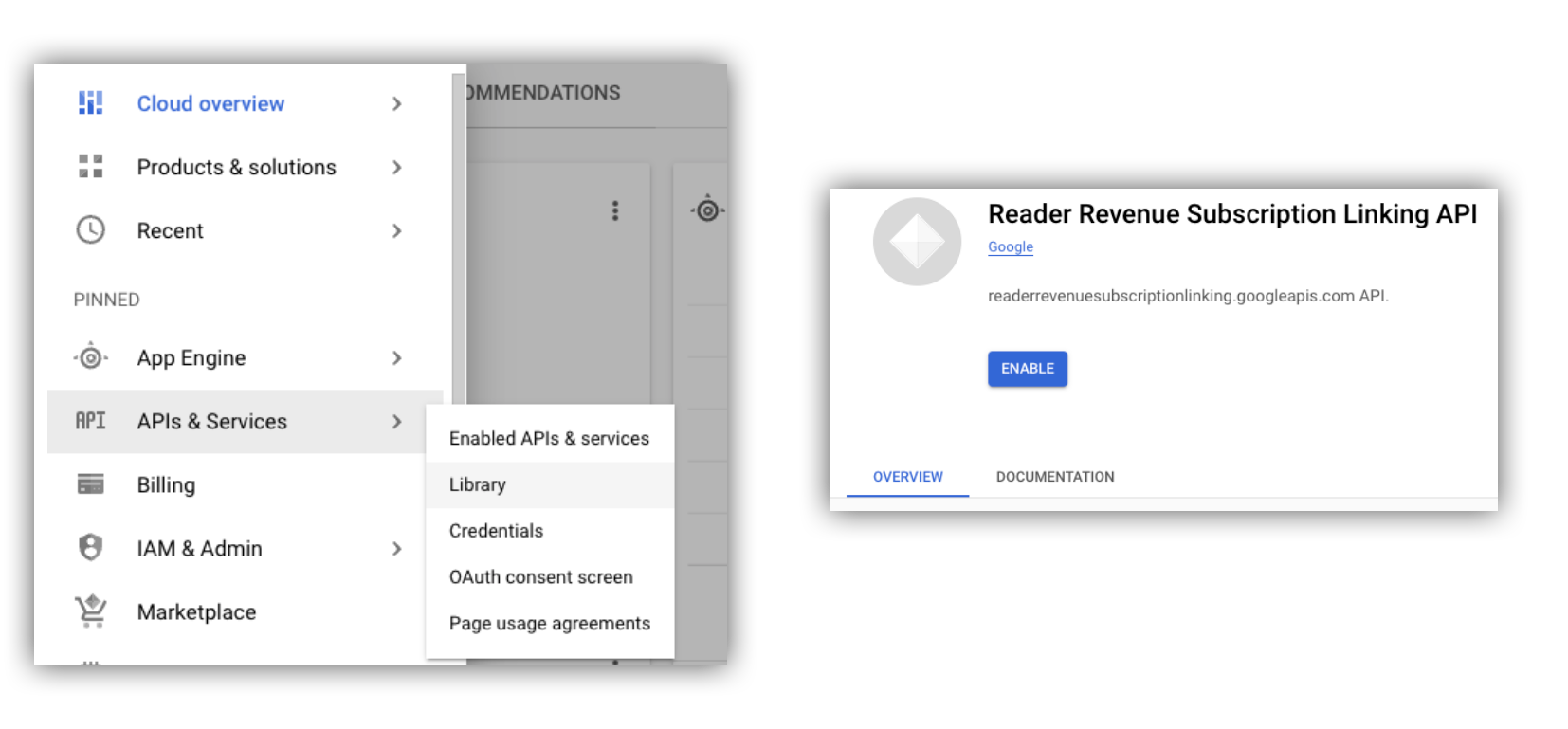
איור 1. ניגשים אל API Library ומפעילים את ה-API בפרויקט ב-Google Cloud.
יצירת חשבון שירות
חשבונות שירות משמשים כדי לאפשר גישה מהאפליקציה שלכם ל-Subscription Linking API.
- יוצרים חשבון שירות במסוף של הפרויקט.
- יוצרים פרטי כניסה לחשבון השירות ושומרים את קובץ
credentials.jsonבמיקום מאובטח שהאפליקציה יכולה לגשת אליו. - מקצים את תפקיד ה-IAM 'אדמין לקישור מינויים' לחשבון השירות שיצרתם. כדי לקבל שליטה מדויקת ביכולות של חשבון השירות, אפשר להקצות את התפקיד המתאים מהטבלה הבאה.
| יכולת / תפקיד | אדמין של קישור מינויים | כלי לצפייה בקישור מינויים | כלי לצפייה בהרשאות לקישור מינויים |
|---|---|---|---|
| קבלת הרשאות קריאה | |||
| איך מגדילים את קהל הקוראים | |||
| עדכון הרשאות הקוראים | |||
| מחיקת קוראים |
שימוש בחשבון שירות עם Subscription Linking API
כדי לאמת קריאות ל-Subscription Linking API באמצעות חשבונות שירות, אפשר להשתמש בספריית הלקוח googleapis (שמטפלת אוטומטית בבקשות access_token) או לחתום על בקשות ישירות באמצעות API בארכיטקטורת REST. אם משתמשים ב-API בארכיטקטורת REST, צריך קודם לקבל access_token (באמצעות ספריית Google Auth או באמצעות JWT של חשבון שירות) ואז לכלול אותו בכותרת Authorization.
בדוגמאות הבאות של ספריית הלקוח ושל API בארכיטקטורת REST יש קוד לדוגמה שמראה איך לבצע קריאה ל-getReader(), getReaderEntitlements(), updateReaderEntitlements() ו-deleteReader().
מפתח של חשבון שירות ו-Application Default Credentials (ADC)
כדי לבצע קריאה ל-Subscription Linking API, צריך מפתח של חשבון שירות. אם אין לכם אפשרות לייצא מפתח של חשבון שירות בגלל מדיניות הארגון, אתם יכולים להשתמש בשיטה של Application Default Credentials (ADC).
הנה דוגמה לפקודה להגדרת ADC באמצעות הפקודה gcloud auth application-default login:
gcloud config set project [YOUR_PROJECT_ID]
gcloud auth application-default login --impersonate-service-account [YOUR_SERVICE_ACCOUNT_NAME@xxx.iam.gserviceaccount.com]
הפקודה הזו יוצרת קובץ JSON שמכיל את פרטי הכניסה של חשבון השירות, ושומרת אותו במיקום ידוע במערכת הקבצים שלכם. המיקום תלוי במערכת ההפעלה:
- ב-Linux ו-macOS:
$HOME/.config/gcloud/application_default_credentials.json - ב-Windows:
%APPDATA%\gcloud\application_default_credentials.json
לא צריך לציין את הנתיב לקובץ המפתח בקוד, כי ADC מחפש פרטי כניסה באופן אוטומטי.
this.auth = new Auth.GoogleAuth({
   // keyFile: process.env.KEY_FILE, - You don't need to provide this field
    'https://www.googleapis.com/auth/readerrevenue.subscriptionlinking.manage'
  ],
  ...
});
ספריית לקוח
בקטע הזה מוסבר איך להשתמש בספריית הלקוח של googleapis ב-Node.js.
דוגמה לבקשה
import {readerrevenuesubscriptionlinking_v1, Auth} from 'googleapis';
const subscriptionLinking = readerrevenuesubscriptionlinking_v1.Readerrevenuesubscriptionlinking;

class SubscriptionLinking {
  constructor() {
    this.auth = new Auth.GoogleAuth({
      keyFile: process.env.KEY_FILE,
      scopes: [
        'https://www.googleapis.com/auth/readerrevenue.subscriptionlinking.manage'
      ],
    })
  }

  init() {
    return new subscriptionLinking(
        {version: 'v1', auth: this.auth})
  }
}

const subscriptionLinkingApi = new SubscriptionLinking();
const client = subscriptionLinkingApi.init();

/**
 * Retrieves details for a specific reader associated with the publication.
 * @async
 * @param {string} ppid - The Publisher Provided ID (ppid) for the reader.
 * @return {Promise<object>} A promise that resolves with the reader's details
 *  from the API.
 */
async function getReader(ppid) {
  const publicationId = process.env.PUBLICATION_ID;
  return await client.publications.readers.get({
    name: `publications/${publicationId}/readers/${ppid}`,
  });
}

/**
 * Updates the entitlements for a specific reader.
 * @async
 * @param {string} ppid - The Publisher Provided ID (ppid) for the reader whose
 *  entitlements are being updated.
 * @return {Promise<object>} A promise that resolves with the result of the
 *  updated entitlements object.
 */
async function updateReaderEntitlements(ppid) {
  const publicationId = process.env.PUBLICATION_ID;
  const requestBody = {
    /*
    Refer to
    https://developers.google.com/news/subscribe/subscription-linking/appendix/glossary#entitlements_object
    */
    entitlements : [{
      product_id: `${publicationId}:basic`,
      subscription_token: 'abc1234',
      detail: 'This is our basic plan',
      expire_time: '2025-10-21T03:05:08.200564Z'
    }]
  };
  return await client.publications.readers.updateEntitlements({
    name: `publications/${publicationId}/readers/${ppid}/entitlements`,
    requestBody
  });
}

/**
 * Retrieves the current entitlements for a specific reader.
 * @async
 * @param {string} ppid - The Publisher Provided ID (ppid) for the reader.
 * @return {Promise<object>} A promise that resolves with the reader's entitlements object.
 */
async function getReaderEntitlements(ppid) {
  const publicationId = process.env.PUBLICATION_ID;
  return await client.publications.readers.getEntitlements({
    name: `publications/${publicationId}/readers/${ppid}/entitlements`
  });
}

/**
 * Deletes a specific Subscription Linking reader record associated with the publication.
 * @async
 * @param {string} ppid - The Publisher Provided ID (ppid) for the reader to be deleted.
 * @param {boolean=} forceDelete - If true, delete the user even if their
 *  entitlements are not empty
 * @return {Promise<object>} A promise that resolves upon successful deletion
 *  with an empty object ({})
 */
async function deleteReader(ppid, forceDelete = false) {
  const publicationId = process.env.PUBLICATION_ID;
  return await client.publications.readers.delete({
    name: `publications/${publicationId}/readers/${ppid}`
    force: forceDelete
  });
}
API ל-REST
אם רוצים לקרוא לנקודות קצה ל-API בארכיטקטורת REST, אפשר להשתמש באחת מהשיטות כדי לקבל את accessToken ולהגדיר אותו בכותרת Authorization.
1. שימוש בספרייה GoogleAuth
import { GoogleAuth } from 'google-auth-library';
import credentialJson from 'path_to_your_json_file' with { type: 'json' };

const auth = new GoogleAuth({
    credentials: credential_json,
    scopes: [
      'https://www.googleapis.com/auth/readerrevenue.subscriptionlinking.manage'
    ]
});

async function getAccessToken() {
    const accessToken = await auth.getAccessToken();
    return accessToken;
}
2. יצירת access_token באמצעות JWT של חשבון שירות
import fetch from 'node-fetch';
import jwt from 'jsonwebtoken';

function getSignedJwt() {
  /*
    Either store the service account credentials string in an environment variable
    Or implement logic to fetch it.
  */
  const key_file = process.env.CREDENTIALS_STRING

  const issueDate = new Date();
  const expireMinutes = 60;
  const offsetInSeconds = issueDate.getTimezoneOffset() * 60000;
  const expireDate = new Date(issueDate.getTime() + (expireMinutes * 60000));
  const iat = Math.floor((issueDate.getTime() + offsetInSeconds) / 1000);
  const exp = Math.floor((expireDate.getTime() + offsetInSeconds) / 1000);

  const token = {
    iss: key_file.client_email,
    iat,
    exp,
    aud: 'https://oauth2.googleapis.com/token',
    scope:'https://www.googleapis.com/auth/readerrevenue.subscriptionlinking.manage',
  }
  return jwt.sign(token, key_file.private_key, {
    algorithm: 'RS256',
    keyid: key_file.private_key_id,
  })
}

async function getAccessToken(signedJwt) {
  let body = new URLSearchParams();
  body.set('grant_type', 'urn:ietf:params:oauth:grant-type:jwt-bearer');
  body.set('assertion', signedJwt);
  const response = await fetch('https://oauth2.googleapis.com/token', {
    method: 'POST',
    headers: {'Content-Type': 'application/x-www-form-urlencoded'},
    body
  })
  const accessResponse = await response.json();
  return accessResponse.access_token;
}
קוד לדוגמה לקריאות ל-API בארכיטקטורת REST עם ספריית Google Auth
import { GoogleAuth } from 'google-auth-library';
import fetch from 'node-fetch'
import credentialJson from 'path_to_your_json_file' with { type: 'json' };

const BASE_SUBSCRIPTION_LINKING_API_URL='https://readerrevenuesubscriptionlinking.googleapis.com/v1';
const publicationId = process.env.PUBLICATION_ID

const auth = new GoogleAuth({
    credentials: credentialJson,
    scopes: [
      'https://www.googleapis.com/auth/readerrevenue.subscriptionlinking.manage'
    ]
});

async function getAccessToken() {
    const accessToken = await auth.getAccessToken();
    return accessToken;
}

/**
 * Retrieves details for a specific reader associated with the publication.
 * @async
 * @param {string} ppid - The Publisher Provided ID (ppid) for the reader.
 * @return {object} reader json for the given ppid
 */
async function getReader(ppid) {
  const endpoint = `${BASE_SUBSCRIPTION_LINKING_API_URL}/publications/${publicationId}/readers/${ppid}`;
  const accessToken = await getAccessToken();
  const response = await fetch(endpoint, {
     method: 'GET',
     headers: {
       Authorization: `Bearer ${accessToken}`,
     },
   });
  const reader = await response.json();
  return reader;
}

/**
 * Updates the entitlements for a specific reader.
 * @async
 * @param {string} ppid - The Publisher Provided ID (ppid) for the reader.
 * @return {object} the updated entitlements object in json.
 */
async function updateReaderEntitlements(ppid) {
  const endpoint = `${BASE_SUBSCRIPTION_LINKING_API_URL}/publications/${publicationId}/readers/${ppid}/entitlements`;
  const requestBody = {
    /*
    Refer to
    https://developers.google.com/news/subscribe/subscription-linking/appendix/glossary#entitlements_object
    */
    entitlements : [{
      product_id: `${publicationId}:basic`,
      subscription_token: 'abc1234',
      detail: 'This is our basic plan',
      expire_time: '2025-10-21T03:05:08.200564Z'
    }]
  };
  const response = await fetch(endpoint, {
     method: 'PATCH',
     headers: {
       Authorization: `Bearer ${accessToken}`,
       'Content-Type': 'application/json',
     },
     body: JSON.stringify(requestBody)
   })
  const updatedEntitlements = await response.json();
  return updatedEntitlements;
}

/**
 * Retrieves the current entitlements for a specific reader.
 * @async
 * @param {string} ppid - The Publisher Provided ID (ppid) for the reader.
 * @return {object} the reader's entitlements object in json.
 */
async function getReaderEntitlements(ppid) {
  const endpoint = `${BASE_SUBSCRIPTION_LINKING_API_URL}/publications/${publicationId}/readers/${ppid}/entitlements`;
  const accessToken = await getAccessToken();
  const response = await fetch(endpoint, {
     method: 'GET',
     headers: {
       Authorization: `Bearer ${accessToken}`,
     },
   });
  const entitlements = await response.json();
  return entitlements;
}

/**
 * Deletes a specific Subscription Linkikng reader record associated with the publication.
 * @async
 * @param {string} ppid - The Publisher Provided ID (ppid) for the reader.
 * @param {boolean=} forceDelete - If true, delete the user even if their
 *  entitlements are not empty
 * @return {object} returns an empty object ({}) if the delete operation is successful
 */
async function deleteReader(ppid, forceDelete = false) {
  const endpoint = `${BASE_SUBSCRIPTION_LINKING_API_URL}/publications/${publicationId}/readers/${ppid}?force=${forceDelete}`;
  const response = await fetch(endpoint, {
     method: 'DELETE',
     headers: {
       Authorization: `Bearer ${accessToken}`,
     }
   });
  const result = await response.json();
  return result;
}