
يستخدم الناشرون بشكل أساسي عملية الدمج من جهة الخادم لإدارة القرّاء وأذوناتهم. يستخدم الناشرون UpdateReaderEntitlements لتعديل سجلّ Google الخاص بأهلية معرّف المنتج لمعرّف الناشر المقدَّم من المنصة.
إعداد Google Cloud
يتضمّن إعداد ميزة "ربط الاشتراكات" في Google Cloud مكوّنَين رئيسيَّين:
- تفعيل واجهة برمجة التطبيقات لمشروع معيّن
- إنشاء حساب خدمة للوصول إلى واجهة برمجة التطبيقات
تفعيل واجهة برمجة التطبيقات Subscription Linking API
لاستخدام حساب خدمة وإدارة أذونات القراءة، يجب تفعيل واجهة برمجة التطبيقات Subscription Linking API في مشروع على Google Cloud، كما يجب إعداد حساب خدمة OAuth بشكل صحيح. لتفعيل واجهة Subscription Linking API لأحد المشاريع، انتقِل من القائمة إلى "واجهات برمجة التطبيقات والخدمات" (APIs & Services) -> "المكتبة" (Library) وابحث عن Subscription Linking، أو انتقِل إلى الصفحة مباشرةً:
https://console.cloud.google.com/apis/library?project=gcp_project_id
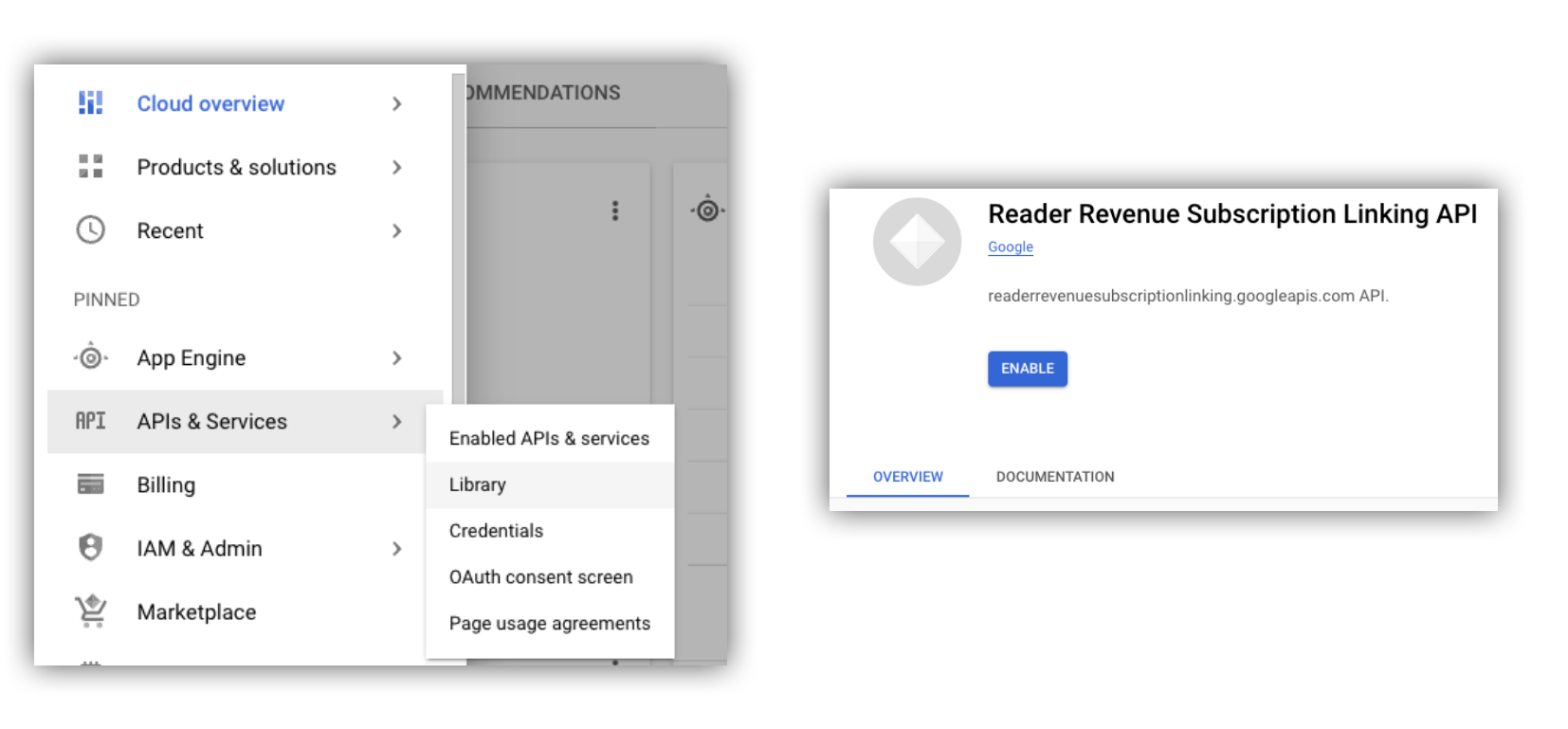
الشكل 1: الانتقال إلى "مكتبة واجهات برمجة التطبيقات" وتفعيل واجهة برمجة التطبيقات لمشروع على Google Cloud
إنشاء حساب خدمة
تُستخدَم حسابات الخدمة للسماح بالوصول من تطبيقك إلى واجهة Subscription Linking API.
- أنشئ حساب خدمة ضمن وحدة تحكّم مشروعك.
- أنشئ بيانات اعتماد لحساب الخدمة، وخزِّن ملف
credentials.jsonفي مكان آمن يمكن لتطبيقك الوصول إليه. - امنح دور IAM "مشرف ربط الاشتراكات" لحساب الخدمة الذي أنشأته. للحصول على تحكّم دقيق في إمكانات حساب الخدمة، يمكنك تعيين الدور المناسب من الجدول التالي.
| الإمكانية / الدور | مشرف ميزة "ربط الاشتراكات" | أداة "ربط الاشتراكات" | أداة عرض أذونات استخدام ميزة "ربط الاشتراكات" |
|---|---|---|---|
| الحصول على أذونات القراءة | |||
| جذب القرّاء | |||
| تعديل استحقاقات القراء | |||
| حذف القارئين |
استخدام حساب خدمة مع Subscription Linking API
للمصادقة على طلبات البيانات من واجهة برمجة التطبيقات Subscription Linking API باستخدام حسابات الخدمة، يمكنك إما استخدام مكتبة برامج googleapis (التي تعالج طلبات access_token تلقائيًا) أو توقيع الطلبات مباشرةً باستخدام REST API. في حال استخدام واجهة REST API،
عليك أولاً الحصول على access_token (من خلال مكتبة Google Auth
أو باستخدام رمز JWT لحساب الخدمة)
ثم تضمينه في العنوان Authorization.
يتضمّن كل من المثالَين التاليَين لمكتبة البرامج وREST API نموذجًا للرمز البرمجي يوضّح كيفية طلب getReader() وgetReaderEntitlements() وupdateReaderEntitlements() وdeleteReader().
مفتاح حساب الخدمة وبيانات الاعتماد التلقائية للتطبيق (ADC)
لاستدعاء Subscription Linking API، يجب أن يكون لديك مفتاح حساب خدمة. إذا تعذّر عليك تصدير مفتاح حساب خدمة بسبب سياسة مؤسستك، يمكنك استخدام طريقة بيانات الاعتماد التلقائية للتطبيقات (ADC).
إليك نموذج أمر لإعداد ADC باستخدام الأمر gcloud auth application-default login:
gcloud config set project [YOUR_PROJECT_ID]
gcloud auth application-default login --impersonate-service-account [YOUR_SERVICE_ACCOUNT_NAME@xxx.iam.gserviceaccount.com]
ينشئ هذا الأمر ملف JSON يحتوي على بيانات اعتماد حساب الخدمة ويضعه في موقع معروف على نظام الملفات. يعتمد الموقع الجغرافي على نظام التشغيل:
- Linux وmacOS:
$HOME/.config/gcloud/application_default_credentials.json - Windows:
%APPDATA%\gcloud\application_default_credentials.json
لست بحاجة إلى تقديم مسار ملف المفتاح في الرمز البرمجي، لأنّ ADC تبحث عن بيانات الاعتماد تلقائيًا.
this.auth = new Auth.GoogleAuth({
   // keyFile: process.env.KEY_FILE, - You don't need to provide this field
    'https://www.googleapis.com/auth/readerrevenue.subscriptionlinking.manage'
  ],
  ...
});
مكتبة العميل
يوضّح هذا القسم كيفية استخدام مكتبة برامج Google API في Node.js.
مثال على الطلب
import {readerrevenuesubscriptionlinking_v1, Auth} from 'googleapis';
const subscriptionLinking = readerrevenuesubscriptionlinking_v1.Readerrevenuesubscriptionlinking;

class SubscriptionLinking {
  constructor() {
    this.auth = new Auth.GoogleAuth({
      keyFile: process.env.KEY_FILE,
      scopes: [
        'https://www.googleapis.com/auth/readerrevenue.subscriptionlinking.manage'
      ],
    })
  }

  init() {
    return new subscriptionLinking(
        {version: 'v1', auth: this.auth})
  }
}

const subscriptionLinkingApi = new SubscriptionLinking();
const client = subscriptionLinkingApi.init();

/**
 * Retrieves details for a specific reader associated with the publication.
 * @async
 * @param {string} ppid - The Publisher Provided ID (ppid) for the reader.
 * @return {Promise<object>} A promise that resolves with the reader's details
 *  from the API.
 */
async function getReader(ppid) {
  const publicationId = process.env.PUBLICATION_ID;
  return await client.publications.readers.get({
    name: `publications/${publicationId}/readers/${ppid}`,
  });
}

/**
 * Updates the entitlements for a specific reader.
 * @async
 * @param {string} ppid - The Publisher Provided ID (ppid) for the reader whose
 *  entitlements are being updated.
 * @return {Promise<object>} A promise that resolves with the result of the
 *  updated entitlements object.
 */
async function updateReaderEntitlements(ppid) {
  const publicationId = process.env.PUBLICATION_ID;
  const requestBody = {
    /*
    Refer to
    https://developers.google.com/news/subscribe/subscription-linking/appendix/glossary#entitlements_object
    */
    entitlements : [{
      product_id: `${publicationId}:basic`,
      subscription_token: 'abc1234',
      detail: 'This is our basic plan',
      expire_time: '2025-10-21T03:05:08.200564Z'
    }]
  };
  return await client.publications.readers.updateEntitlements({
    name: `publications/${publicationId}/readers/${ppid}/entitlements`,
    requestBody
  });
}

/**
 * Retrieves the current entitlements for a specific reader.
 * @async
 * @param {string} ppid - The Publisher Provided ID (ppid) for the reader.
 * @return {Promise<object>} A promise that resolves with the reader's entitlements object.
 */
async function getReaderEntitlements(ppid) {
  const publicationId = process.env.PUBLICATION_ID;
  return await client.publications.readers.getEntitlements({
    name: `publications/${publicationId}/readers/${ppid}/entitlements`
  });
}

/**
 * Deletes a specific Subscription Linking reader record associated with the publication.
 * @async
 * @param {string} ppid - The Publisher Provided ID (ppid) for the reader to be deleted.
 * @param {boolean=} forceDelete - If true, delete the user even if their
 *  entitlements are not empty
 * @return {Promise<object>} A promise that resolves upon successful deletion
 *  with an empty object ({})
 */
async function deleteReader(ppid, forceDelete = false) {
  const publicationId = process.env.PUBLICATION_ID;
  return await client.publications.readers.delete({
    name: `publications/${publicationId}/readers/${ppid}`
    force: forceDelete
  });
}
واجهة برمجة تطبيقات REST
إذا أردت طلب بيانات من نقاط نهاية REST API، يمكنك استخدام أيّ من الطريقتَين للحصول على accessToken وضبطه في العنوان Authorization.
1. استخدام مكتبة GoogleAuth
import { GoogleAuth } from 'google-auth-library';
import credentialJson from 'path_to_your_json_file' with { type: 'json' };

const auth = new GoogleAuth({
    credentials: credential_json,
    scopes: [
      'https://www.googleapis.com/auth/readerrevenue.subscriptionlinking.manage'
    ]
});

async function getAccessToken() {
    const accessToken = await auth.getAccessToken();
    return accessToken;
}
2. إنشاء access_token باستخدام رمز JWT لحساب الخدمة
import fetch from 'node-fetch';
import jwt from 'jsonwebtoken';

function getSignedJwt() {
  /*
    Either store the service account credentials string in an environment variable
    Or implement logic to fetch it.
  */
  const key_file = process.env.CREDENTIALS_STRING

  const issueDate = new Date();
  const expireMinutes = 60;
  const offsetInSeconds = issueDate.getTimezoneOffset() * 60000;
  const expireDate = new Date(issueDate.getTime() + (expireMinutes * 60000));
  const iat = Math.floor((issueDate.getTime() + offsetInSeconds) / 1000);
  const exp = Math.floor((expireDate.getTime() + offsetInSeconds) / 1000);

  const token = {
    iss: key_file.client_email,
    iat,
    exp,
    aud: 'https://oauth2.googleapis.com/token',
    scope:'https://www.googleapis.com/auth/readerrevenue.subscriptionlinking.manage',
  }
  return jwt.sign(token, key_file.private_key, {
    algorithm: 'RS256',
    keyid: key_file.private_key_id,
  })
}

async function getAccessToken(signedJwt) {
  let body = new URLSearchParams();
  body.set('grant_type', 'urn:ietf:params:oauth:grant-type:jwt-bearer');
  body.set('assertion', signedJwt);
  const response = await fetch('https://oauth2.googleapis.com/token', {
    method: 'POST',
    headers: {'Content-Type': 'application/x-www-form-urlencoded'},
    body
  })
  const accessResponse = await response.json();
  return accessResponse.access_token;
}
رمز نموذجي لطلبات REST API باستخدام مكتبة Google Auth
import { GoogleAuth } from 'google-auth-library';
import fetch from 'node-fetch'
import credentialJson from 'path_to_your_json_file' with { type: 'json' };

const BASE_SUBSCRIPTION_LINKING_API_URL='https://readerrevenuesubscriptionlinking.googleapis.com/v1';
const publicationId = process.env.PUBLICATION_ID

const auth = new GoogleAuth({
    credentials: credentialJson,
    scopes: [
      'https://www.googleapis.com/auth/readerrevenue.subscriptionlinking.manage'
    ]
});

async function getAccessToken() {
    const accessToken = await auth.getAccessToken();
    return accessToken;
}

/**
 * Retrieves details for a specific reader associated with the publication.
 * @async
 * @param {string} ppid - The Publisher Provided ID (ppid) for the reader.
 * @return {object} reader json for the given ppid
 */
async function getReader(ppid) {
  const endpoint = `${BASE_SUBSCRIPTION_LINKING_API_URL}/publications/${publicationId}/readers/${ppid}`;
  const accessToken = await getAccessToken();
  const response = await fetch(endpoint, {
     method: 'GET',
     headers: {
       Authorization: `Bearer ${accessToken}`,
     },
   });
  const reader = await response.json();
  return reader;
}

/**
 * Updates the entitlements for a specific reader.
 * @async
 * @param {string} ppid - The Publisher Provided ID (ppid) for the reader.
 * @return {object} the updated entitlements object in json.
 */
async function updateReaderEntitlements(ppid) {
  const endpoint = `${BASE_SUBSCRIPTION_LINKING_API_URL}/publications/${publicationId}/readers/${ppid}/entitlements`;
  const requestBody = {
    /*
    Refer to
    https://developers.google.com/news/subscribe/subscription-linking/appendix/glossary#entitlements_object
    */
    entitlements : [{
      product_id: `${publicationId}:basic`,
      subscription_token: 'abc1234',
      detail: 'This is our basic plan',
      expire_time: '2025-10-21T03:05:08.200564Z'
    }]
  };
  const response = await fetch(endpoint, {
     method: 'PATCH',
     headers: {
       Authorization: `Bearer ${accessToken}`,
       'Content-Type': 'application/json',
     },
     body: JSON.stringify(requestBody)
   })
  const updatedEntitlements = await response.json();
  return updatedEntitlements;
}

/**
 * Retrieves the current entitlements for a specific reader.
 * @async
 * @param {string} ppid - The Publisher Provided ID (ppid) for the reader.
 * @return {object} the reader's entitlements object in json.
 */
async function getReaderEntitlements(ppid) {
  const endpoint = `${BASE_SUBSCRIPTION_LINKING_API_URL}/publications/${publicationId}/readers/${ppid}/entitlements`;
  const accessToken = await getAccessToken();
  const response = await fetch(endpoint, {
     method: 'GET',
     headers: {
       Authorization: `Bearer ${accessToken}`,
     },
   });
  const entitlements = await response.json();
  return entitlements;
}

/**
 * Deletes a specific Subscription Linkikng reader record associated with the publication.
 * @async
 * @param {string} ppid - The Publisher Provided ID (ppid) for the reader.
 * @param {boolean=} forceDelete - If true, delete the user even if their
 *  entitlements are not empty
 * @return {object} returns an empty object ({}) if the delete operation is successful
 */
async function deleteReader(ppid, forceDelete = false) {
  const endpoint = `${BASE_SUBSCRIPTION_LINKING_API_URL}/publications/${publicationId}/readers/${ppid}?force=${forceDelete}`;
  const response = await fetch(endpoint, {
     method: 'DELETE',
     headers: {
       Authorization: `Bearer ${accessToken}`,
     }
   });
  const result = await response.json();
  return result;
}