

“放置标记”组件
借助“地点标记”组件,您可以创建可自定义的地图注释,直接在地图上显示关键地点信息。您可以显示地点评分、地点类型、营业状态(营业或歇业)、价格范围或自定义文本(例如 AI 生成的标签或行程编号)等内容。这样一来,您的用户无需点按详细的地点卡片,即可获得信息更丰富的地图探索体验。
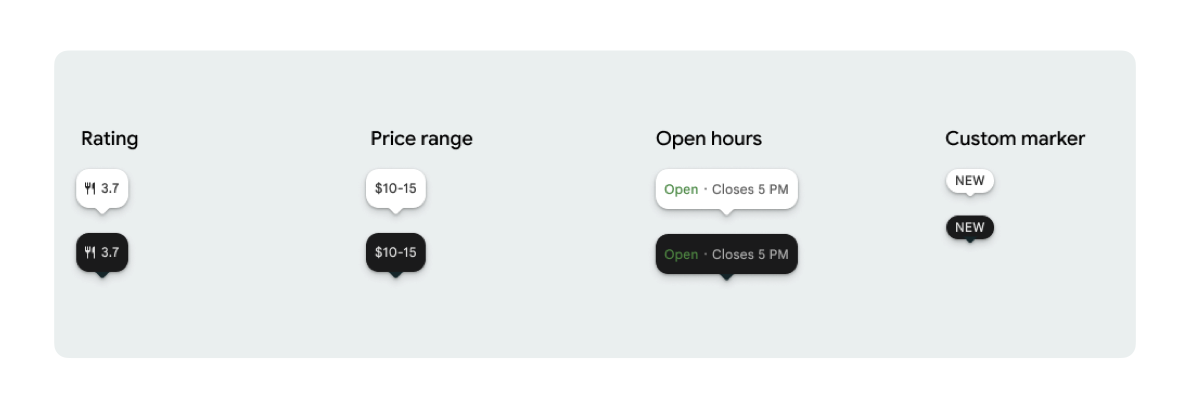
每个 PlaceMarker 可显示一个标记图标和可选的标记文本。
可用的图标包括:
Type:地点的类型。None:无图标。
Rating:评分。PriceRange:价格范围(例如 10-20 美元)。OpenStatus:商家是正常营业还是停业。Custom:自定义文本(例如“热门”)。
使用地点 ID (PlaceId)、资源名称 (ResourceName) 或地理坐标 (Coordinates) 引用相应地点。
显示和提供方信息标注要求
显示 Places UI Kit 地图标记时,标记不得单独显示。它们必须是可互动的,并且在点击或点按时打开关联的地点详情组件或 Lightbox,以提供所需的 Google 品牌宣传、贡献者署名和“举报问题”流程。
对于空间有限的情况,请参阅我们的照片和评价提供方信息要求。
放置标记示例
我们提供 Jetpack Compose @Composable 函数,以消除从 View 到 Compose 的封装容器开销,并避免主题不匹配问题。
自定义基本标记
以下代码示例演示了基本的地点标记自定义设置,包括隐藏默认标记的三角形对话气泡尖。
Kotlin
import androidx.compose.runtime.Composable
import com.google.android.libraries.places.compose.PlaceMarker
import com.google.android.libraries.places.compose.marker.MarkerIcon
import com.google.android.libraries.places.compose.marker.MarkerText
import com.google.android.libraries.places.compose.PlaceReference

@Composable
fun DefaultMarker() {
    PlaceMarker(
        reference = PlaceReference.PlaceId("PLACE_ID"),
        icon = MarkerIcon.None,
        beakPresence = false, // remove beak
    )
}

@Composable
fun RatingMarker() {
    PlaceMarker(
        reference = PlaceReference.PlaceId("PLACE_ID"),
        icon = MarkerIcon.None,
        text = MarkerText.Rating
    )
}

@Composable
fun TypeAndRatingMarker() {
    PlaceMarker(
        reference = PlaceReference.PlaceId("PLACE_ID"),
        icon = MarkerIcon.Type,
        text = MarkerText.Rating

    )
}

@Composable
fun PriceRangeMarker() {
    PlaceMarker(
        reference = PlaceReference.ResourceName("places/PLACE_RESOURCE_NAME"),
        icon = MarkerIcon.None,
        text = MarkerText.PriceRange
    )
}

@Composable
fun OpenStatusMarker() {
   PlaceMarker(
       reference = PlaceReference.Coordinates(latitude = 37.7749, longitude = -122.4194),
        icon = MarkerIcon.None,
        text = MarkerText.OpenStatus
   )
}

@Composable
fun CustomTextMarker() {
    PlaceMarker(
        reference = PlaceReference.PlaceId("PLACE_ID"),
        icon = MarkerIcon.None,
        // Custom text accepts a String to display a number (e.g. "3") or text (e.g. "NEW")
        text = MarkerText.Custom("NEW")
    )
}
创建点击监听器
您可以提供 onClick 回调,以便在点按独立标记时触发自定义操作。不过,当标记在地图上呈现时(例如在 MarkerComposable 内),点按事件会被地图拦截。在这种情况下,您必须使用 MarkerComposable 的 onClick 处理程序,而不是标记的。
以下代码示例展示了如何使用 MarkerComposable 的 onClick 处理程序。
Kotlin
import android.util.Log
import androidx.compose.runtime.Composable
import com.google.android.libraries.places.compose.PlaceMarker
import com.google.android.libraries.places.compose.marker.MarkerIcon
import com.google.android.libraries.places.compose.PlaceReference


/**
 * PlaceMarker used outside of a map (e.g. in a list, bottom sheet, or custom overlay).
 *
 * There is no host component that provides a default click behavior here, so PlaceMarker's own
 * `onClick` is the only way for a developer to react to a tap. This is why `onClick` must stay
 * on the PlaceMarker API.
 */
@Composable
fun ClickableMarkerWithCustomConfig() {
   PlaceMarker(
       reference = PlaceReference.PlaceId("PLACE_ID"),
       icon = MarkerIcon.Type,

       onClick = { place ->
           openPlaceCard(place.id) // developer might want to open the place card
           Log.i("PlacesMarker", "Marker was tapped by user!")
       }
   )
}

/**
 * PlaceMarker used as the content of a MarkerComposable on a GoogleMap.
 *
 * MarkerComposable does NOT add PlaceMarker to the touch-input hierarchy: it snapshots the
 * composable into a bitmap and hands that bitmap to the Maps renderer as the marker icon. The
 * rendered marker is a map object, not a Compose node, so:
 *
 *   - PlaceMarker's own `onClick` would never be invoked here (no touch events ever reach it).
 *   - The tap is delivered by the Maps SDK to MarkerComposable's `onClick`, which is the only
 *     click entry point on a map.
 *
 * Accordingly, the state-based `PlaceMarker(state = ...)` overload used below deliberately does
 * not expose an `onClick` parameter, so the correct handler is the only one available.
 */
@Composable
fun PlaceMarkerOnMap(markerState: PlaceMarkerState) {
  GoogleMap(
    modifier = Modifier.fillMaxSize(),
    cameraPositionState = rememberCameraPositionState(),
  ) {
    markerState.location?.let { position ->
      MarkerComposable(
        state = rememberUpdatedMarkerState(position = position),
        // this is the click handler for the map use case.
        onClick = {
          markerState.place?.let { place -> openPlaceCard(place.id) }
          true // consume the event
        },
      ) {
        PlaceMarker(state = markerState)
      }
    }
  }
}
处理加载状态和回调
以下代码示例演示了如何提供回调来处理渲染或数据缺失错误。
Kotlin
import android.util.Log
import androidx.compose.runtime.Composable
import com.google.android.libraries.places.compose.PlaceMarker
import com.google.android.libraries.places.compose.marker.MarkerIcon
import com.google.android.libraries.places.compose.PlaceReference

@Composable
fun StatusHandlingMarker() {
    PlaceMarker(
        reference = PlaceReference.PlaceId("PLACE_ID"),
        icon = MarkerIcon.Type,
        // Triggered when attribute data is successfully fetched and the marker is rendered.
        // Returns a minimal Place object with ID, location (LatLng), and viewport fields set.
        onMarkerLoaded = { place ->
            Log.i("PlacesMarker", "Marker successfully loaded for place ID: ${place.id}")
        },
        // Triggered when data fetching fails or required attribute data is missing for the place.
        // Returns an optional Place object and an Exception describing the root cause.
        onMarkerLoadFailed = { place, exception ->
            Log.e("PlacesMarker", "Failed to load marker for place ID: ${place?.id}", exception)
        }
    )
}
使用 PlaceMarkerState 在地图上添加标记
返回的 Place 对象包含位置和视口,可帮助您确定标记的放置位置。
Kotlin
// Step 1: Obtain configured handle in a single 1-line call (PlaceMarker mounted internally)
val markerState = rememberPlaceMarkerState(
  reference = PlaceReference.PlaceId(placeId),
  icon = MarkerIcon.Type
)

// Step 2: Pass PlaceMarkerState.location and PlaceMarker(state = PlaceMarkerState) directly to the map marker
GoogleMap(...) {
  markerState.location?.let { position ->
    MarkerComposable(
      state = rememberMarkerState(position = position),
      onClick = {
        markerState.place?.let { place ->
          // Handle marker click
        }
        true
      }
    ) {
      PlaceMarker(state = markerState) // Render marker UI content directly on map canvas
    }
  }
}
将标记缩放到自定义大小
Kotlin
// Off the map: scale with a one-line modifier.
// Modifier.scale is a draw-time transform, so the bubble, beak, icon and text all scale together.
@Composable
fun ScaledMarker() {
  PlaceMarker(
    reference = PlaceReference.PlaceId(placeId),
    icon = MarkerIcon.Type,
    text = MarkerText.Rating,
    modifier = Modifier.scale(2.1f),
  )
}

// On the map: scale by overriding LocalDensity.
// MarkerComposable snapshots its content into a marker bitmap sized to the measured layout bounds.
// Modifier.scale does not change those bounds, so the marker would be clipped and blurry. Scaling
// the density re-measures every dp and sp inside the marker, so the bitmap, the layout bounds and
// the map hit target all grow with it.
@Composable
fun ScaledMarkerOnMap(markerState: PlaceMarkerState) {
  val density = LocalDensity.current
  val scaledDensity = remember(density) {
    Density(density = density.density * 2.1f, fontScale = density.fontScale * 2.1f)
  }
  GoogleMap(...) {
    markerState.location?.let { position ->
      MarkerComposable(
        state = rememberUpdatedMarkerState(position = position),
        anchor = Offset(0.5f, 1.0f),
      ) {
        CompositionLocalProvider(LocalDensity provides scaledDensity) {
          PlaceMarker(state = markerState)
        }
      }
    }
  }
}