

고급 장소 검색 구성요소
장소 검색 구성요소의 고급 버전은 장소 검색 기본과 동일한 기능을 제공합니다. 또한 구성요소의 작업 버튼을 구성하고 표시되는 리뷰와 미디어에 검색 및 필터링 옵션을 적용할 수 있습니다.
고급 장소 검색 구성
AdvancedPlaceSearchFragment를 사용하여 고급 기능에 액세스합니다.
작업 버튼 구성
AdvancedPlaceSearchFragment의 PlaceActionProvider 인터페이스를 사용하여 작업 버튼을 정의하고 맞춤설정합니다.
시각적 저작자 표시 요구사항
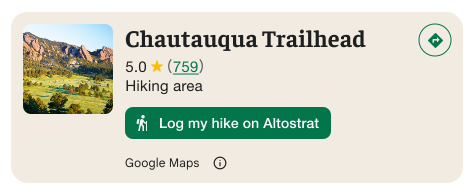
중요: 맞춤 작업 버튼이 Google 이외의 서드 파티와 사용자 정보를 공유하는 경우를 사용자에게 명확하게 알려야 합니다. 시각적 출처 표시 요구사항을 참고하세요.
이 예에서는 사용자 정보가 'Altostrat'으로 전송된다는 점을 명확하게 보여주는 맞춤 이미지를 보여줍니다.
검색 및 필터링 옵션 적용
AdvancedPlaceSearchFragment의 SearchMediaOptions 및 SearchReviewsOptions 인터페이스를 사용하여 미디어나 리뷰의 검색 및 필터링을 사용 설정합니다.
고급 장소 검색 예시
AdvancedPlaceSearch 프래그먼트 만들기
Kotlin
// Initialize Places first
Places.initializeWithNewPlacesApiEnabled(context, API_KEY)

// How the fragment is created
AdvancedPlaceSearchFragment.newInstance(
          selectedContent,
          orientation,
          R.style.BrandedPlaceDetailsTheme,
        )

// Fragment supports the same configs that PlaceSearchFragment supported
fragment.preferTruncation = false
fragment.attributionPosition = AttributionPosition.BOTTOM
fragment.selectable = true
검색하기
Kotlin
// Performing a search works the same as with a regular placeSearchFragment.

advancedPlaceSearchFragment.configureFromSearchByTextRequest(searchByTextRequest)

advancedPlaceSearchFragment.configureFromSearchNearbyRequest(searchNearbyRequest)
결과 듣기
Kotlin
// attach the existing PlaceSearchFragmentListener to get notified about when places load or are selected from the results list.
override fun onAttachFragment(fragment: Fragment) {
    super.onAttachFragment(fragment)
    when (fragment) {
      // Reuse the placeSearchFragmetnListener from the Essentials version
      is AdvancedPlaceSearchFragment -> fragment.registerListener(placeSearchFragmentListener)
      // use placeListFragmentListener, its functionally identical but with a new name.
      is AdvancedPlaceListFragment -> fragment.registerListener(advancedPlaceListFragmentListener)
    }
}