

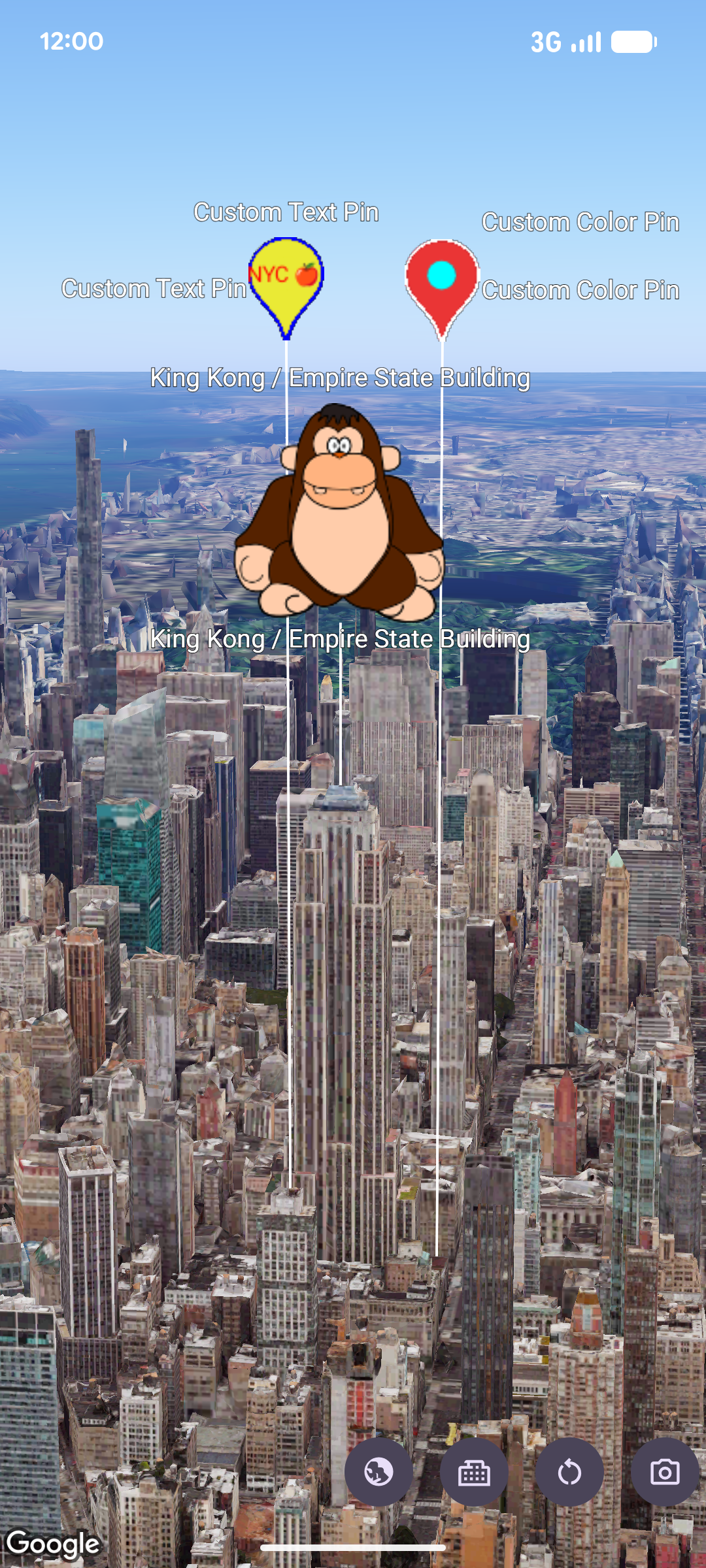
您可以使用 MarkerView,在 3D 地圖上將自訂 Android View 階層算繪為標記。自訂檢視區塊標記可讓您顯示豐富的 UI 版面配置、互動式小工具,以及錨定至地理座標的檢視區塊動畫。
新增自訂檢視區塊標記
如要在地圖中加入自訂檢視區塊標記,請建立 MarkerViewOptions 例項,使用 LatLngAltitude 物件透過 setPosition 設定位置,然後使用 setContent 提供自訂 Android View。然後將選項傳遞至 GoogleMap3D 執行個體上的 addMarkerView。
如未提供檢視區塊給 setContent,SDK 會建立並算繪預設的 PinView。
// Add imports
import android.widget.TextView
import com.google.android.gms.maps3d.model.MarkerViewOptions
import com.google.android.gms.maps3d.model.latLngAltitude

// Create a custom Android View
val badgeView = TextView(context).apply {
    text = "Empire State Building"
    contentDescription = "Marker for Empire State Building"
    setPadding(24, 12, 24, 12)
}

// Configure MarkerViewOptions and add the marker view to the map
val options = MarkerViewOptions().apply {
    position = latLngAltitude {
        latitude = 40.7484
        longitude = -73.9857
        altitude = 100.0
    }
    content = badgeView
}

val markerView = googleMap3D.addMarkerView(options)
自訂預設 PinView
您不必建構完全自訂的 Android View,只要建立含有自訂 PinConfiguration 的 PinView (或使用 setPinConfiguration 更新現有例項),並將其傳遞至 setContent,即可算繪自訂圖釘。
// Add imports
import android.graphics.Color
import com.google.android.gms.maps3d.model.MarkerViewOptions
import com.google.android.gms.maps3d.model.PinView
import com.google.android.gms.maps3d.model.latLngAltitude
import com.google.android.gms.maps3d.model.pinConfiguration

// Create a customized PinView
val customPinView = PinView(context, pinConfiguration {
    backgroundColor = Color.BLUE
    borderColor = Color.WHITE
})

// Configure MarkerViewOptions and add the marker view to the map
val options = MarkerViewOptions().apply {
    position = latLngAltitude {
        latitude = 40.7484
        longitude = -73.9857
        altitude = 100.0
    }
    content = customPinView
}

val markerView = googleMap3D.addMarkerView(options)
處理互動和動畫
由於 MarkerView 會包裝 Android View,因此您可以直接將標準點擊事件監聽器和檢視畫面動畫附加至 getContent 傳回的檢視畫面。
此外,MarkerView 會實作 Anchorable,可讓您使用 addPopover 將 Popover 錨定至標記檢視畫面:
markerView?.content?.setOnClickListener { view ->
    // Animate the view when clicked
    view.animate().rotationBy(90f).setDuration(300).start()
}
設定高度和衝突行為
您可以自訂 MarkerView 的垂直位置,以及與重疊地圖標籤或標記的互動方式:
- 高度模式:在
setAltitudeMode上呼叫MarkerViewOptions時,使用AltitudeMode常數。根據預設,MarkerViewOptions會使用AltitudeMode.CLAMP_TO_GROUND。 - 衝突行為:使用
CollisionBehavior常數 (預設為CollisionBehavior.REQUIRED) 呼叫setCollisionBehavior,並使用setCollisionPriority指定標記衝突時的顯示優先順序。
存取權和移除
您必須負責在提供給 setContent 的自訂 Android View 上設定無障礙屬性,例如 contentDescription。
如要從地圖中移除 MarkerView,請呼叫 remove:
markerView?.remove()