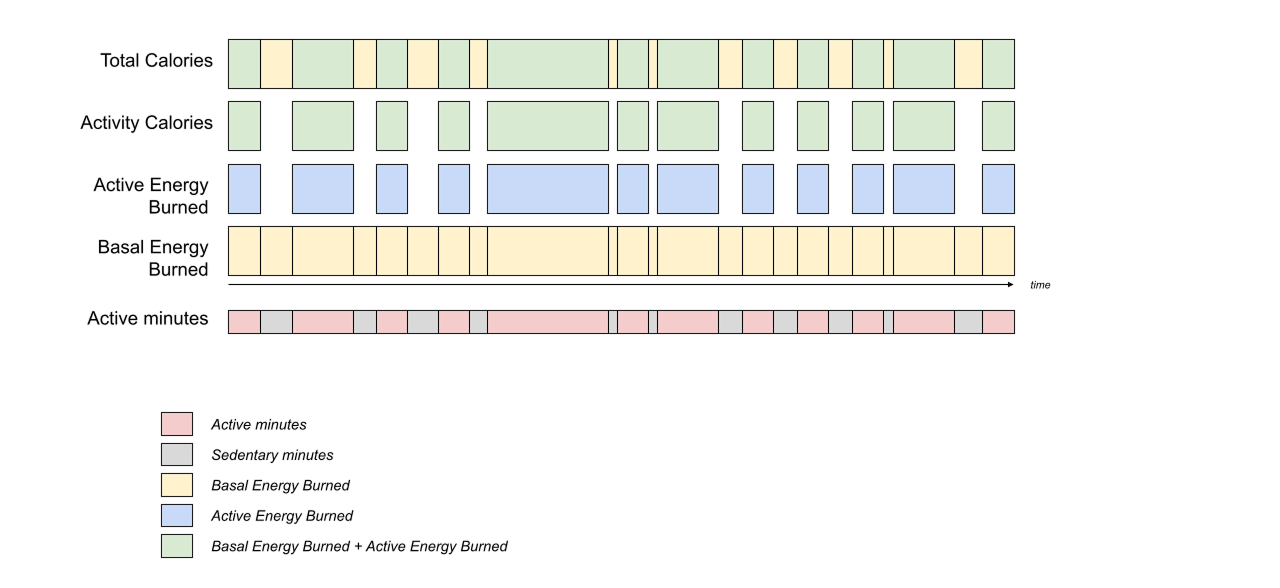
The Google Health API provides data types that track a user's calories and energy expenditure. These types measure different aspects of energy burn, including total expenditure, active burn, and resting (basal) metabolic rates.
Understand the differences between these data types to determine which metrics suit your application.
Supported data types
The API supports the following data types for measuring calories and energy expenditure:
| Data type | Available operations |
Scope |
|---|---|---|
|
Active Energy Burned
dataType:
active-energy-burnedfilter parameter: active_energy_burned
Record type: Interval
Storage resolution: 1 minute
|
list, reconcile, rollup, dailyRollup | .activity_and_fitness.readonly.activity_and_fitness.writeonly |
|
Total Calories
dataType:
total-caloriesfilter parameter: total_calories
Record type: Interval
Storage resolution: 1 minute
Compatible devices
|
rollup, dailyRollup | .activity_and_fitness.readonly.activity_and_fitness.writeonly |
The following sections provide technical details for each data type, including REST representation examples and specific integration constraints.
Total Calories
Total Calories is a read-only derived data type that tracks all energy
expended by a user, including basal metabolism and active energy, measured in
kilocalories (kcal). The value is calculated from active energy expenditure
and the user's basal metabolic rate.
Active Energy Burned
Active Energy Burned represents the energy burned by the user during periods
of activity, excluding their basal energy expenditure, measured in kilocalories
(kcal).
REST representation example
{
  "startTime": "2026-04-20T08:00:00Z",
  "startUtcOffset": "0s",
  "endTime": "2026-04-20T08:30:00Z",
  "endUtcOffset": "0s",
  "dataSource": { ... },
  "kcal": 150.0
}
Basal Metabolic Rate
Basal Metabolic Rate measures the energy expended by a body at a normal,
resting state, measured in kilocalories per day (kcal/day). Because this rate
fluctuates with physical updates (such as weight) over time, the API records BMR
as a time series of rate samples.
Developers can treat the rateKcalPerDay field in a basal-metabolic-rate
sample as the daily counterpart to a daily rollup of basal energy burned.
REST representation example
{
  "date": {
    "year": 2026,
    "month": 4,
    "day": 20
  },
  "dataSource": { ... },
  "rateKcalPerDay": 1650.0
}
Guidelines
When integrating calories and energy metrics in your app, use these guidelines:
- Daily overview: To show the overall daily calorie expenditure, request
the daily rollup of the
total-caloriesdata type. - Activity-only expenditure: To track calories burned during a specific
workout or throughout the day exclusive of resting metabolic rate, query
active-energy-burned. - Legacy mappings: If you are migrating from the Fitbit Web API, see the
Fitbit Web API to Google Health API data type mappings
section in the migration guide for details on how legacy fields (like
activityCalories,caloriesBMR, andcaloriesOut) map to the new data types. - Basal metrics: To track resting metabolic rate or basal metabolic
trends, query
basal-metabolic-ratefor BMR values. Treat BMR samples as a daily baseline for the user's resting energy consumption.
Calculate non-sedentary calories burned
To calculate the total calories burned when a user is active (non-sedentary), you must first identify the periods when the user's activity level exceeds sedentary.
Follow these steps to calculate non-sedentary calories:
- Identify active minutes: Query the
activity-leveldata type to find intervals where theactivityLevelTypeisLIGHTLY_ACTIVE,MODERATELY_ACTIVE, orVERY_ACTIVE. - Sum energy metrics: For each identified active interval, sum the
following energy values:
- Basal Energy Burned: The resting energy expenditure during the interval. Because the API does not provide this data type, see the Basal Metabolic Rate (BMR) guide for instructions on calculating it client-side.
- Active Energy Burned: The additional energy burned due to physical
activity during the interval, retrieved from the
active-energy-burneddata type.
The sum of these two values across all active minutes provides the total non-sedentary calories burned for the specified period.