
The Google Health API provides dedicated aggregation endpoints that group and summarize health records into time windows. Instead of retrieving and summing individual raw records on the client, use the aggregation endpoints to compute metrics (such as totals, averages, minimums, and maximums) over a reconciled data stream:
- The
rollUpendpoint aggregates data points over physical time intervals in UTC using a configurable window duration in seconds (windowSize). - The
dailyRollUpendpoint aggregates data points across one or more calendar days (windowSizeDays) using civil time relative to the user's local clock.
Both endpoints automatically reconcile overlapping data points across connected devices and exclude off-wrist periods for wearable data types that support on-wrist detection.
Compare aggregation endpoints
Choose the aggregation endpoint that matches how your application groups and displays time-series health metrics:
| Feature | rollUp endpoint |
dailyRollUp endpoint |
|---|---|---|
| HTTP request | POST https://health.googleapis.com/v4/users/me/dataTypes/data-type/dataPoints:rollUp |
POST https://health.googleapis.com/v4/users/me/dataTypes/data-type/dataPoints:dailyRollUp |
| Time representation | Physical time in UTC (startTime and endTime in RFC 3339 format). |
Civil time (start and end as CivilDateTime objects). |
| Window parameter | windowSize (required string duration in seconds, minimum "1s"). |
windowSizeDays (optional integer number of days, defaults to 1). |
| Response object | RollupDataPoint |
DailyRollupDataPoint |
| Response ordering | Reverse-chronological order (newest window first). | Reverse-chronological order (newest window first). |
| Best for | Intraday charts, hourly or minute-level histograms, and fixed-duration UTC analysis. | Daily dashboards, multi-day trends, and summaries that account for time zone travel or Daylight Saving Time. |
Both endpoints enforce maximum query range limits based on the data type:
- A maximum query range of 14 days applies to
calories-in-heart-rate-zone,heart-rate,active-minutes, andtotal-calories. - A maximum query range of 90 days applies to all other supported data types.
To check which data types support rollup and dailyRollup, see the
Google Health API data types reference.
Aggregate over physical time intervals
Use the rollUp
endpoint to aggregate
data points over a physical time range (in UTC) grouped by a window duration
in seconds (windowSize).
When calling the rollUp endpoint, provide a JSON request body containing the
closed-open range (startTime inclusive, endTime exclusive) and
windowSize. Keep the following windowSize requirements in mind:
- The
windowSizeduration must be at least 1 second ("1s"). The API rejects sub-second durations, zero, or negative durations with a400 Bad Request(INVALID_ROLLUP_WINDOW) error. - To avoid uneven distribution of aggregated data across sub-buckets, choose
a
windowSizethat is equal to or larger than the underlying storage resolution of the data type (such as"60s"for 1-minute step intervals). For details, see Rollup window and storage resolution.
For example, the following request rolls up step counts in 1-minute intervals
(60s):
Request
POST https://health.googleapis.com/v4/users/me/dataTypes/steps/dataPoints:rollUp
Authorization: Bearer access-token
Accept: application/json

{
  "range": {
    "startTime": "2026-02-17T17:00:00Z",
    "endTime": "2026-02-17T17:59:59Z"
  },
  "windowSize": "60s"
}
Response
{
  "rollupDataPoints": [
    {
      "startTime": "2026-02-17T17:55:00Z",
      "endTime": "2026-02-17T17:56:00Z",
      "steps": {
        "countSum": "72"
      }
    },
    {
      "startTime": "2026-02-17T17:54:00Z",
      "endTime": "2026-02-17T17:55:00Z",
      "steps": {
        "countSum": "85"
      }
    },
...
  ]
}
Aggregate across calendar days
Use the dailyRollUp
endpoint to
aggregate data across a single calendar day or multiple days (windowSizeDays).
Provide the closed-open civil time range (start and end) in the request
body. Depending on the data type, the endpoint returns aggregated values such
as the sum or average over each civil window.
Because dailyRollUp operates on civil time using the UTC offsets recorded with
each data point, it automatically reconciles variable day lengths caused by
Daylight Saving Time transitions or travel across time zones.
For example, the following request aggregates step counts over a single civil
day (windowSizeDays: 1):
Request
POST https://health.googleapis.com/v4/users/me/dataTypes/steps/dataPoints:dailyRollUp
Authorization: Bearer access-token
Accept: application/json

{
  "range": {
    "start": {
      "date": {
        "year": 2026,
        "month": 2,
        "day": 26
      },
      "time": {
        "hours": 0,
        "minutes": 0,
        "seconds": 0,
        "nanos": 0
      }
    },
    "end": {
      "date": {
        "year": 2026,
        "month": 2,
        "day": 26
      },
      "time": {
        "hours": 23,
        "minutes": 59,
        "seconds": 59,
        "nanos": 0
      }
    }
  },
  "windowSizeDays": 1
}
Response
{
  "rollupDataPoints": [
    {
      "civilStartTime": {
        "date": {
          "year": 2026,
          "month": 2,
          "day": 26
        },
        "time": {}
      },
      "civilEndTime": {
        "date": {
          "year": 2026,
          "month": 2,
          "day": 26
        },
        "time": {
          "hours": 23,
          "minutes": 59,
          "seconds": 59
        }
      },
      "steps": {
        "countSum": "3822"
      }
    }
  ]
}
Aggregate by data source family
Both rollUp and dailyRollUp accept an optional dataSourceFamily field in
the JSON request body to restrict aggregation to specific source groups:
- The
users/me/dataSourceFamilies/all-sourcesoption (default) aggregates data reconciled across all registered first-party and third-party sources. - The
users/me/dataSourceFamilies/google-wearablesoption aggregates data recorded by Google and Fitbit wearable tracker devices, excluding manually logged and phone-estimated data. - The
users/me/dataSourceFamilies/google-sourcesoption aggregates data from first-party Google and Fitbit sources, including wearable trackers, Health Connect, and manual entries in first-party apps.
For full parameter requirements and request and response examples, see Filter by data source family in the Filter data guide.
Rollup window and storage resolution
Although the rollUp endpoint accepts any windowSize of 1 second ("1s") or
larger, different data types record and persist measurements at different
sampling rates or interval durations in underlying storage. For example,
wearable physical activity metrics such as steps, distance,
active-minutes, and active-energy-burned are typically recorded in 1-minute
(60s) intervals.
The following table lists the underlying storage resolutions and minimum
recommended windowSize values for common data types:
| Storage resolution | Minimum recommended windowSize |
Data types |
|---|---|---|
1 second (1s) |
"1s" |
heart-rate |
1 minute (60s) |
"60s" |
active-energy-burned, active-minutes, active-zone-minutes, altitude, calories-in-heart-rate-zone, distance, floors, steps, time-in-heart-rate-zone, total-calories |
When aggregating interval data types, the rollUp endpoint places each recorded
data point into the bucket containing the data point's startTime. The API
does not slice, interpolate, or distribute interval data across sub-interval
buckets.
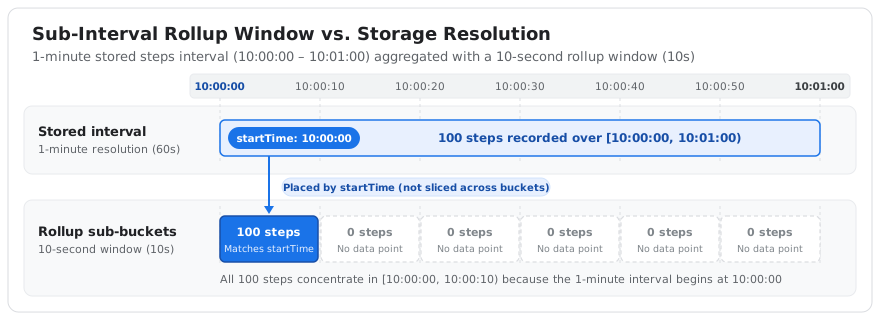
If you specify a windowSize that is smaller than the underlying data storage
interval (for example, requesting a 10-second window for steps stored at
1-minute intervals):
- The first sub-bucket matching the interval's
startTime(for example,10:00:00to10:00:10) receives the entire minute's accumulated count (for example, all 100 steps recorded for that minute). - The remaining sub-buckets within that same minute (
10:00:10to10:00:20,10:00:20to10:00:30, and so on) receive no data points, because no interval begins within those windows.
This produces spiky data where the entire interval's value is concentrated in the first sub-window, as shown in Figure 1.
To obtain evenly distributed and meaningful aggregates, always set windowSize
to a duration equal to or greater than the underlying storage resolution of the
target data type (for example, "60s" or larger for steps). For the storage
resolution and minimum recommended rollup window of each data type, see the
Google Health API data types reference.
Bucketing when range is not a multiple of window size
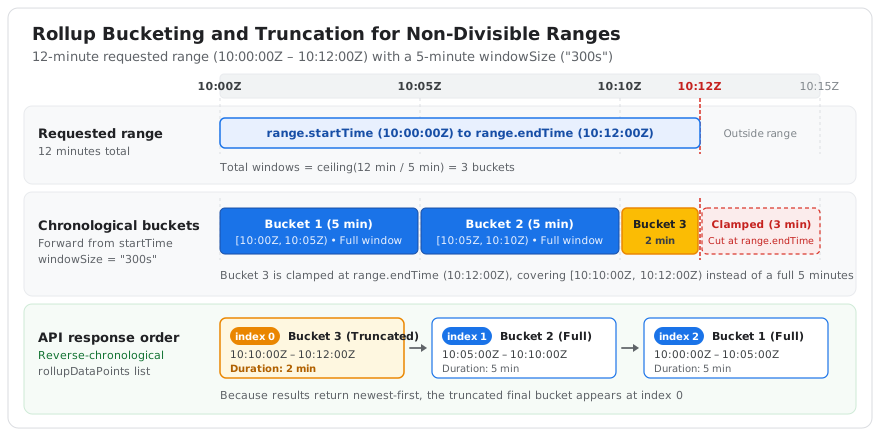
If the requested range is not an exact multiple of windowSize (or
windowSizeDays), the final chronological bucket is truncated at the upper
endpoint of the range and covers a duration shorter than the window size. The
API accepts your request without modification and does not perform rounding,
time shifts, or data interpolation.
To cover the entire requested range, the API uses ceiling division to compute the total number of aggregation windows:
Number of windows = ceiling(Range duration / Window size)
Every bucket starts sequentially from the beginning of your range. If adding another full-sized window extends beyond your requested end time, the final window is truncated (clamped) at the range end time.
How bucketing works
When you request rollups with non-divisible ranges, the API applies the following rules:
- Bucketing starts at the beginning of your requested range
(
range.startTimeorrange.start) and progresses forward by the window size (windowSizeorwindowSizeDays). - The final chronological bucket is clamped at the end of your requested
range (
range.endTimeorrange.end), covering a shorter duration than the requested window size. - The returned
RollupDataPointorDailyRollupDataPointobjects include their own explicit start and end timestamps, which you can use to inspect the actual duration of the truncated bucket. - Because the API returns rollup data in reverse-chronological order (newest
first), the final chronological bucket (the truncated bucket) appears as
the first element (
index 0) in the returned list.
Figure 2 illustrates how the API buckets a non-divisible range forward from
range.startTime, clamps the final bucket at range.endTime, and returns the
resulting buckets in reverse-chronological order.
Example 12-minute range with a 5-minute window
Suppose a client requests a rollup over a 12-minute range with a 5-minute
windowSize ("300s"):
- The
range.startTimevalue is10:00:00Z. - The
range.endTimevalue is10:12:00Z, for a total duration of 12 minutes. - The
windowSizevalue is"300s"(5 minutes).
Because 12 minutes is not an exact multiple of 5 minutes (12 = 5 * 2 + 2),
the API computes the number of windows as ceiling(12 / 5) = 3. This produces
three chronological buckets:
| Bucket | Interval | Duration | Window status |
|---|---|---|---|
| Bucket 1 | [10:00:00Z, 10:05:00Z) |
5 minutes | Full window |
| Bucket 2 | [10:05:00Z, 10:10:00Z) |
5 minutes | Full window |
| Bucket 3 | [10:10:00Z, 10:12:00Z) |
2 minutes | Truncated at range.endTime |
Impact on aggregated values
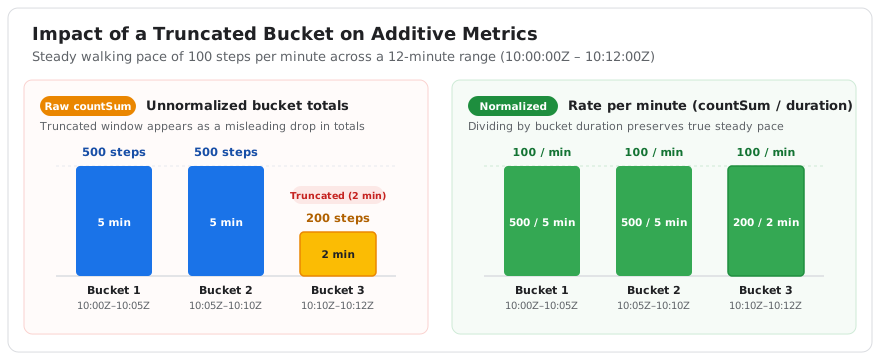
Because the final chronological window has a shorter duration, additive metrics (such as the sum or count of steps) are lower in the truncated bucket due to the shorter time span.
If a user walks at a steady pace of 100 steps per minute during this entire 12-minute range, the buckets contain the following totals:
- Bucket 1 (
10:00:00Zto10:05:00Z) records 500 steps (5 minutes at 100 steps per minute). - Bucket 2 (
10:05:00Zto10:10:00Z) records 500 steps (5 minutes at 100 steps per minute). - Bucket 3 (
10:10:00Zto10:12:00Z) records 200 steps (2 minutes at 100 steps per minute).
The lower step count of 200 steps in Bucket 3 is due to the 2-minute duration of the truncated window, not a drop in the user's activity. When plotting or analyzing this data, normalize the counts using each bucket's explicit duration to avoid presenting a misleading drop in user activity.
Figure 3 compares raw additive step totals (countSum) against
duration-normalized rates across the three buckets.
Example API response showing ordering
Because the API returns results in reverse-chronological order, the truncated bucket appears as the first element in the returned list:
{
  "rollupDataPoints": [
    {
      "startTime": "2026-08-20T10:10:00Z",
      "endTime": "2026-08-20T10:12:00Z",
      "steps": {
        "countSum": "200"
      }
    },
    {
      "startTime": "2026-08-20T10:05:00Z",
      "endTime": "2026-08-20T10:10:00Z",
      "steps": {
        "countSum": "500"
      }
    },
    {
      "startTime": "2026-08-20T10:00:00Z",
      "endTime": "2026-08-20T10:05:00Z",
      "steps": {
        "countSum": "500"
      }
    }
  ]
}