

Interfejs CM360 Offline Conversion API obsługuje ulepszanie konwersji offline opartych na tagach witryny za pomocą identyfikatorów użytkowników.
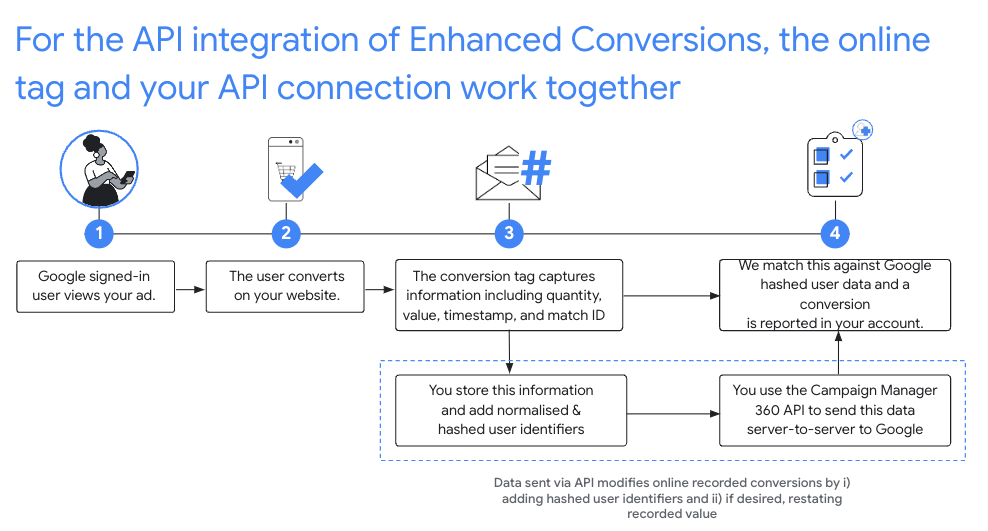
Zalecana konfiguracja
- Zaakceptuj Warunki korzystania z usługi dotyczące konwersji rozszerzonych w przypadku konfiguracji Floodlight w CM360.
- Zaimplementuj w swoich witrynach zgodny identyfikator.
- rejestrować konwersje Floodlight, które mają miejsce w Twojej witrynie; Zapisz wszystkie te informacje, ponieważ są to pola wymagane w kolejnych wywołaniach interfejsu API:
matchIdordinaltimestampMicrosfloodlightActivityIdfloodlightConfigurationIdquantityvalue
- Po upływie 90 minut od zarejestrowania konwersji przez tag online wywołaj metodę
conversions.batchupdate, aby wzbogacić te konwersje o identyfikatory użytkowników.- Identyfikatory użytkowników powinny być sformatowane i zaszyfrowane oraz dodane do pola
userIdentifiersw obiektach konwersji. - Należy podać ilość i wartość.
Możesz też dostosować liczbę i wartość konwersji w tym samym wywołaniu
conversions.batchupdatelub podać pierwotną liczbę i wartość. - Każda partia wstawień i aktualizacji może zawierać zarówno udane, jak i nieudane operacje. W przypadku błędów
NOT_FOUNDiINTERNALnależy ponowić próbę, jeśli opóźnienie w przetwarzaniu konwersji jest dłuższe niż zwykle (do 6 godzin). - Konwersje muszą zostać wzbogacone o identyfikatory użytkowników w ciągu 24 godzin od ich zarejestrowania przez tagi online.
- Identyfikatory użytkowników powinny być sformatowane i zaszyfrowane oraz dodane do pola
Normalizacja i szyfrowanie
Ze względu na ochronę prywatności adresy e-mail, numery telefonów, imiona, nazwiska i adresy pocztowe muszą być przed przesłaniem zaszyfrowane za pomocą algorytmu SHA-256. Aby ustandaryzować wyniki szyfrowania, przed zaszyfrowaniem tych wartości musisz:
- usunąć spacje na początku i na końcu ciągu,
- zmienić pisownię tekstu na małe litery,
- Sformatuj numery telefonów zgodnie ze standardem E.164.
Dołącz znak plusa (
+) i kod kraju. Na przykład numer telefonu w USA(800)555-0200powinien być sformatowany i znormalizowany do postaci+18005550200. Usuń wszystkie kropki (.) poprzedzające nazwę domeny w adresach e-mail w
gmail.comigooglemail.com.
C#
/// <summary>
/// Normalizes the email address and hashes it. For this use case, Campaign Manager 360
/// requires removal of any '.' characters preceding <code>gmail.com</code> or
/// <code>googlemail.com</code>.
/// </summary>
/// <param name="emailAddress">The email address.</param>
/// <returns>The hash code.</returns>
private string NormalizeAndHashEmailAddress(string emailAddress)
{
    string normalizedEmail = emailAddress.ToLower();
    string[] emailParts = normalizedEmail.Split('@');
    if (emailParts.Length > 1 && (emailParts[1] == "gmail.com" ||
        emailParts[1] == "googlemail.com"))
    {
        // Removes any '.' characters from the portion of the email address before
        // the domain if the domain is gmail.com or googlemail.com.
        emailParts[0] = emailParts[0].Replace(".", "");
        normalizedEmail = $"{emailParts[0]}@{emailParts[1]}";
    }
    return NormalizeAndHash(normalizedEmail);
}

/// <summary>
/// Normalizes and hashes a string value.
/// </summary>
/// <param name="value">The value to normalize and hash.</param>
/// <returns>The normalized and hashed value.</returns>
private static string NormalizeAndHash(string value)
{
    return ToSha256String(digest, ToNormalizedValue(value));
}

/// <summary>
/// Hash a string value using SHA-256 hashing algorithm.
/// </summary>
/// <param name="digest">Provides the algorithm for SHA-256.</param>
/// <param name="value">The string value (e.g. an email address) to hash.</param>
/// <returns>The hashed value.</returns>
private static string ToSha256String(SHA256 digest, string value)
{
    byte[] digestBytes = digest.ComputeHash(Encoding.UTF8.GetBytes(value));
    // Convert the byte array into an unhyphenated hexadecimal string.
    return BitConverter.ToString(digestBytes).Replace("-", string.Empty);
}

/// <summary>
/// Removes leading and trailing whitespace and converts all characters to
/// lower case.
/// </summary>
/// <param name="value">The value to normalize.</param>
/// <returns>The normalized value.</returns>
private static string ToNormalizedValue(string value)
{
    return value.Trim().ToLower();
}
Java
private String normalizeAndHash(MessageDigest digest, String s)
    throws UnsupportedEncodingException {
  // Normalizes by removing leading and trailing whitespace and converting all characters to
  // lower case.
  String normalized = s.trim().toLowerCase();
  // Hashes the normalized string using the hashing algorithm.
  byte[] hash = digest.digest(normalized.getBytes("UTF-8"));
  StringBuilder result = new StringBuilder();
  for (byte b : hash) {
    result.append(String.format("%02x", b));
  }

  return result.toString();
}

/**
 * Returns the result of normalizing and hashing an email address. For this use case, Campaign Manager 360
 * requires removal of any '.' characters preceding {@code gmail.com} or {@code googlemail.com}.
 *
 * @param digest the digest to use to hash the normalized string.
 * @param emailAddress the email address to normalize and hash.
 */
private String normalizeAndHashEmailAddress(MessageDigest digest, String emailAddress)
    throws UnsupportedEncodingException {
  String normalizedEmail = emailAddress.toLowerCase();
  String[] emailParts = normalizedEmail.split("@");
  if (emailParts.length > 1 && emailParts[1].matches("^(gmail|googlemail)\\.com\\s*")) {
    // Removes any '.' characters from the portion of the email address before the domain if the
    // domain is gmail.com or googlemail.com.
    emailParts[0] = emailParts[0].replaceAll("\\.", "");
    normalizedEmail = String.format("%s@%s", emailParts[0], emailParts[1]);
  }
  return normalizeAndHash(digest, normalizedEmail);
}
PHP
private static function normalizeAndHash(string $hashAlgorithm, string $value): string
{
    return hash($hashAlgorithm, strtolower(trim($value)));
}

/**
  * Returns the result of normalizing and hashing an email address. For this use case, Campaign
  * Manager 360 requires removal of any '.' characters preceding "gmail.com" or "googlemail.com".
  *
  * @param string $hashAlgorithm the hash algorithm to use
  * @param string $emailAddress the email address to normalize and hash
  * @return string the normalized and hashed email address
  */
private static function normalizeAndHashEmailAddress(
    string $hashAlgorithm,
    string $emailAddress
): string {
    $normalizedEmail = strtolower($emailAddress);
    $emailParts = explode("@", $normalizedEmail);
    if (
        count($emailParts) > 1
        && preg_match('/^(gmail|googlemail)\.com\s*/', $emailParts[1])
    ) {
        // Removes any '.' characters from the portion of the email address before the domain
        // if the domain is gmail.com or googlemail.com.
        $emailParts[0] = str_replace(".", "", $emailParts[0]);
        $normalizedEmail = sprintf('%s@%s', $emailParts[0], $emailParts[1]);
    }
    return self::normalizeAndHash($hashAlgorithm, $normalizedEmail);
}
Python
def normalize_and_hash_email_address(email_address):
    """Returns the result of normalizing and hashing an email address.

    For this use case, Campaign Manager 360 requires removal of any '.'
    characters preceding "gmail.com" or "googlemail.com"

    Args:
        email_address: An email address to normalize.

    Returns:
        A normalized (lowercase, removed whitespace) and SHA-265 hashed string.
    """
    normalized_email = email_address.lower()
    email_parts = normalized_email.split("@")
    # Checks whether the domain of the email address is either "gmail.com"
    # or "googlemail.com". If this regex does not match then this statement
    # will evaluate to None.
    is_gmail = re.match(r"^(gmail|googlemail)\.com$", email_parts[1])

    # Check that there are at least two segments and the second segment
    # matches the above regex expression validating the email domain name.
    if len(email_parts) > 1 and is_gmail:
        # Removes any '.' characters from the portion of the email address
        # before the domain if the domain is gmail.com or googlemail.com.
        email_parts[0] = email_parts[0].replace(".", "")
        normalized_email = "@".join(email_parts)

    return normalize_and_hash(normalized_email)

def normalize_and_hash(s):
    """Normalizes and hashes a string with SHA-256.

    Private customer data must be hashed during upload, as described at:
    https://support.google.com/google-ads/answer/7474263

    Args:
        s: The string to perform this operation on.

    Returns:
        A normalized (lowercase, removed whitespace) and SHA-256 hashed string.
    """
    return hashlib.sha256(s.strip().lower().encode()).hexdigest()
Ruby
# Returns the result of normalizing and then hashing the string using the
# provided digest.  Private customer data must be hashed during upload, as
# described at https://support.google.com/google-ads/answer/7474263.
def normalize_and_hash(str)
  # Remove leading and trailing whitespace and ensure all letters are lowercase
  # before hasing.
  Digest::SHA256.hexdigest(str.strip.downcase)
end

# Returns the result of normalizing and hashing an email address. For this use
# case, Campaign Manager 360 requires removal of any '.' characters preceding
# 'gmail.com' or 'googlemail.com'.
def normalize_and_hash_email(email)
  email_parts = email.downcase.split("@")
  # Removes any '.' characters from the portion of the email address before the
  # domain if the domain is gmail.com or googlemail.com.
  if email_parts.last =~ /^(gmail|googlemail)\.com\s*/
    email_parts[0] = email_parts[0].gsub('.', '')
  end
  normalize_and_hash(email_parts.join('@'))
end
Dodawanie identyfikatorów użytkowników do konwersji
Najpierw przygotuj obiekt Conversion do przesłania lub edycji w zwykły sposób, a potem dołącz identyfikator użytkownika w ten sposób:
{
  "matchId": "my-match-id-846513278",
  "ordinal": "my-ordinal-12345678512",
  "quantity": 1,
  "value": 104.23,
  "timestampMicros": 1656950400000000,
  "floodlightConfigurationId": 99999,
  "floodlightActivityId": 8888,
  "userIdentifiers": [
    { "hashedEmail": "0c7e6a405862e402eb76a70f8a26fc732d07c32931e9fae9ab1582911d2e8a3b" },
    { "hashedPhoneNumber": "1fb1f420856780a29719b994c8764b81770d79f97e2e1861ba938a7a5a15dfb9" },
    {
      "addressInfo": {
        "hashedFirstName": "81f8f6dde88365f3928796ec7aa53f72820b06db8664f5fe76a7eb13e24546a2",
        "hashedLastName": "799ef92a11af918e3fb741df42934f3b568ed2d93ac1df74f1b8d41a27932a6f",
        "hashedStreetAddress": "22b7e2d69b91e0ef4a88e81a73d897b92fd9c93ccfbe0a860f77db16c26f662e",
        "city": "seattle",
        "state": "washington",
        "countryCode": "US",
        "postalCode": "98101"
      }
    }
  ]
}
Odpowiedź informująca o powodzeniu powinna wyglądać tak:
{
  "hasFailures": false,
  "status": [
    {
      "conversion": {
        "floodlightConfigurationId": 99999,
        "floodlightActivityId": 8888,
        "timestampMicros": 1656950400000000,
        "value": 104.23,
        "quantity": 1,
        "ordinal": "my-ordinal-12345678512",
        "matchId": "my-match-id-846513278",
        "userIdentifiers": [
          { "hashedEmail": "0c7e6a405862e402eb76a70f8a26fc732d07c32931e9fae9ab1582911d2e8a3b" },
          { "hashedPhoneNumber": "1fb1f420856780a29719b994c8764b81770d79f97e2e1861ba938a7a5a15dfb9" },
          {
            "addressInfo": {
              "hashedFirstName": "81f8f6dde88365f3928796ec7aa53f72820b06db8664f5fe76a7eb13e24546a2",
              "hashedLastName": "799ef92a11af918e3fb741df42934f3b568ed2d93ac1df74f1b8d41a27932a6f",
              "hashedStreetAddress": "22b7e2d69b91e0ef4a88e81a73d897b92fd9c93ccfbe0a860f77db16c26f662e",
              "city": "seattle",
              "state": "washington",
              "countryCode": "US",
              "postalCode": "98101"
            }
          }
        ],
        "kind": "dfareporting#conversion"
      },
      "kind": "dfareporting#conversionStatus"
    }
  ]
}
Typowe błędy
Oto kilka błędów, które mogą się pojawić podczas ulepszania konwersji za pomocą identyfikatorów użytkowników:
- Pole hashed_X nie jest prawidłowym hashem SHA-256
- Wszystkie pola z prefiksem „hashed” akceptują tylko wartości zaszyfrowane za pomocą algorytmu SHA-256 i zakodowane w systemie szesnastkowym.
- Pole country_code ma nieprawidłową długość
country_codemusi składać się z dokładnie 2 liter.- W konfiguracji Floodlight nie podpisano warunków korzystania z usługi konwersji rozszerzonych
- Warunki korzystania z usługi dotyczące konwersji rozszerzonych nie zostały zaakceptowane w przypadku identyfikatora konfiguracji Floodlight podanego w żądaniu.
- Podano więcej niż 5 identyfikatorów user_identifiers
- Konwersja może mieć maksymalnie 5 identyfikatorów użytkownika.
Najczęstsze pytania
- Dlaczego zalecany jest zgodny identyfikator?
- Zmiany na podstawie identyfikatora kliknięcia wykluczają konwersje, które nie zostały poprzedzone kliknięciem, i ograniczają wartość integracji konwersji rozszerzonych.
- Dlaczego należy rejestrować ilość i wartość?
- Interfejs CM360 Offline Conversions API wymaga podania ilości i wartości.
- Czy aby edytować konwersję online opartą na tagach, muszę uzyskać dokładną sygnaturę czasową w mikrosekundach zarejestrowaną przez Google?
- W przypadku zmian opartych na identyfikatorze dopasowania interfejs API akceptuje teraz zmianę, o ile sygnatura czasowa podana w żądaniu mieści się w zakresie 1 minuty od sygnatury czasowej zarejestrowanej przez Google.
- Dlaczego po zarejestrowaniu konwersji przez tag online muszę odczekać 90 minut, zanim będę mógł ją ulepszyć?
- Zanim konwersja online zostanie zindeksowana przez interfejs API i będzie dostępna do edycji, może minąć do 90 minut.
- Na co należy zwrócić uwagę w odpowiedzi interfejsu API?
- Nawet jeśli interfejs CM360 Conversion API zwróci odpowiedź o powodzeniu, niektóre konwersje mogły nie zostać przesłane lub zaktualizowane. Sprawdź poszczególne pola
ConversionStatuspod kątem błędów:- W przypadku błędów
NOT_FOUNDiINTERNALmożna i należy ponawiać próby przez maksymalnie 6 godzin, jeśli opóźnienie w przetwarzaniu konwersji jest dłuższe niż zwykle. - Błędy
INVALID_ARGUMENTiPERMISSION_DENIEDnie powinny być ponawiane. - Więcej informacji znajdziesz w najczęstszych pytaniach.
- W przypadku błędów