

เซิร์ฟเวอร์ Model Context Protocol (MCP) ของ Google Workspace ใช้การอนุมัติแบบมีมนุษย์ร่วมที่ขับเคลื่อนโดยเซิร์ฟเวอร์เพื่อปกป้องข้อมูลผู้ใช้ก่อนที่ AI Agent จะดำเนินการต่างๆ เช่น การส่งอีเมล การแก้ไขกิจกรรมในปฏิทิน การอัปเดตหรือทิ้งไฟล์ หรือการอ่านข้อมูลและข้อมูลเมตา การดำเนินการเหล่านี้ยังอยู่ภายใต้นโยบายผู้ใช้และผู้ดูแลระบบด้วย เซิร์ฟเวอร์จะขอการอนุมัติเหล่านี้โดยใช้การดึงข้อมูลโหมดแบบฟอร์ม MCP
ตัวอย่างเช่น กล่องโต้ตอบการอนุมัติสำหรับการส่งข้อความ Gmail อาจมีลักษณะดังนี้
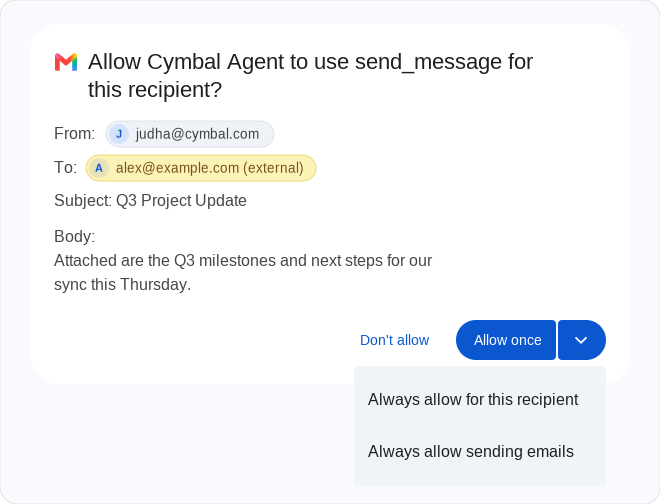
คู่มือนี้อธิบายวิธีเชื่อมต่อกับปลายทาง /mcp/v1, ออกแบบกล่องโต้ตอบการอนุมัติเพื่อประสบการณ์ของผู้ใช้ที่ดีที่สุด และใช้โปรโตคอลการดึงข้อมูลแบบฟอร์มแบบไม่เก็บสถานะในโฮสต์ MCP, ไคลเอ็นต์ MCP หรือระบบควบคุมการทำงานของ Agent
ก่อนเริ่มต้น
ก่อนติดตั้งใช้งานหรือกำหนดค่าการดึงข้อมูลแบบฟอร์ม MCP โปรดดำเนินการตามข้อกำหนดเบื้องต้นให้เสร็จสมบูรณ์ พิจารณาว่าโฮสต์หรือไคลเอ็นต์ MCP ของคุณต้องการการสนับสนุนการดึงข้อมูลที่กำหนดเองหรือไม่ และตรวจสอบปลายทางของเซิร์ฟเวอร์
ข้อกำหนดเบื้องต้น
ก่อนที่จะใช้การดึงข้อมูลแบบฟอร์มในโฮสต์หรือไคลเอ็นต์ MCP ที่กำหนดเอง ให้ทำตามข้อกำหนดในการตั้งค่าต่อไปนี้ให้เสร็จสมบูรณ์
- เปิดใช้ API และเซิร์ฟเวอร์ MCP ในโปรเจ็กต์ Google Cloud เดียวกัน: สร้างรหัสไคลเอ็นต์ OAuth 2.0 ในโปรเจ็กต์ Google Cloud เดียวกันกับที่คุณเปิดใช้ปลายทาง API และเซิร์ฟเวอร์ MCP ของ Google Workspace เป้าหมาย เลือกใช้ไคลเอ็นต์นี้สำหรับ Agent ที่ทำงานด้วยระบบ AI เมื่อสร้างไคลเอ็นต์ OAuth โปรดดูวิธีการทั้งหมดที่หัวข้อกำหนดค่าเซิร์ฟเวอร์ MCP ของ Google Workspace
- ขอขอบเขต OAuth 2.0 ที่จำเป็นสำหรับเครื่องมือเป้าหมาย: การเรียกใช้เครื่องมือด้วย
tools/callต้องใช้โทเค็นเพื่อการเข้าถึง OAuth 2.0Bearerที่มีขอบเขตที่จำเป็นสำหรับเครื่องมือนั้น แม้ว่าtools/listจะแสดงผลเครื่องมือที่ใช้ได้โดยไม่ขึ้นอยู่กับขอบเขตโทเค็นก็ตาม ตรวจสอบหน้าภาพรวมข้อมูลอ้างอิง MCP ของเซิร์ฟเวอร์เพื่อดูขอบเขต OAuth ที่จำเป็นสำหรับเครื่องมือแต่ละรายการ
ตรวจสอบว่าคุณต้องใช้การดึงข้อมูลแบบฟอร์มหรือไม่
เราขอแนะนำให้เชื่อมต่อกับปลายทาง /mcp/v1 ด้วยการดึงข้อมูลแบบฟอร์ม MCP เพื่อให้ตัวแทนเข้าถึงชุดเครื่องมือและผลลัพธ์ของ Google Workspace ได้อย่างเต็มรูปแบบ คุณจะต้องเขียนโค้ดหรือไม่นั้นขึ้นอยู่กับวิธีสร้างโฮสต์ MCP และไคลเอ็นต์ MCP ดังนี้
- การกำหนดค่าโฮสต์ MCP ที่สร้างไว้ล่วงหน้า: หากคุณกำลังเชื่อมต่อแอปพลิเคชันแบบโฮสต์ MCP ที่สร้างไว้ล่วงหน้า เช่น Google Antigravity หรือ Claude Desktop ที่รองรับการดึงข้อมูลแบบฟอร์ม MCP คุณไม่จำเป็นต้องเขียนโค้ดการดึงข้อมูลแบบฟอร์ม
- เชื่อมต่อกับปลายทาง
/mcp/v1โปรดดูขั้นตอนการตั้งค่าที่หัวข้อกำหนดค่าเซิร์ฟเวอร์ MCP ของ Google Workspace - ตั้งค่าการยืนยันเครื่องมือภายในตัวของโฮสต์เป็นอนุญาตเสมอสำหรับเซิร์ฟเวอร์ MCP ของ Google Workspace ใน
/mcp/v1เพื่อไม่ให้ระบบแจ้งผู้ใช้ 2 ครั้งสำหรับการดำเนินการเดียวกัน - หากโฮสต์ MCP ที่สร้างไว้ล่วงหน้ายังไม่รองรับการดึงข้อมูลแบบฟอร์ม คุณสามารถเชื่อมต่อกับปลายทางสำรอง
/mcp/v1selfที่จำกัด ซึ่งจะแสดงเครื่องมือที่มีประโยชน์โดยไม่ต้องดึงข้อมูลแบบฟอร์ม แม้ว่าการเรียกใช้บางอย่างอาจยังต้องได้รับอนุมัติก็ตาม
- เชื่อมต่อกับปลายทาง
- การผสานรวม SDK ของไคลเอ็นต์ MCP หรือเฟรมเวิร์ก Agent เข้ากับโฮสต์ MCP: หากคุณใช้ไลบรารีของไคลเอ็นต์ MCP หรือเฟรมเวิร์ก Agent เช่น Agent Development Kit (ADK) ที่จัดการการดึงข้อมูลแบบฟอร์มที่เลเยอร์โปรโตคอลอยู่แล้ว คุณยังคงต้องเชื่อมต่อตัวแฮนเดิลการดึงข้อมูลเข้ากับ UI หรือแพลตฟอร์ม CLI ของโฮสต์ MCP ใช้คำแนะนำเกี่ยวกับ UI การอนุมัติในคู่มือนี้เพื่อให้ผู้ใช้ได้รับประสบการณ์การใช้งานที่ดีที่สุดใน
/mcp/v1 - การสร้างไคลเอ็นต์และโฮสต์ MCP ที่กำหนดเอง: หากคุณกำลังสร้างการผสานรวมไคลเอ็นต์และโฮสต์ MCP ของคุณเอง ให้ใช้ทั้งโปรโตคอลการดึงข้อมูลแบบฟอร์มแบบไม่เก็บสถานะและคำแนะนำเกี่ยวกับ UI การอนุมัติในคู่มือนี้เพื่อเชื่อมต่อกับ
/mcp/v1
ปลายทางของเซิร์ฟเวอร์
เซิร์ฟเวอร์ MCP ของ Google Workspace เวอร์ชันสำหรับผู้ใช้ทั่วไปและเซิร์ฟเวอร์ MCP ของ Universal Search มีปลายทาง /mcp/v1 หลักและปลายทางสำรอง /mcp/v1self แบบจำกัด ดังนี้
| ปลายทาง | URL ของเซิร์ฟเวอร์ | ข้อกำหนดในการกระตุ้นให้กรอกแบบฟอร์ม | เครื่องมือที่พร้อมใช้งาน |
|---|---|---|---|
/mcp/v1 |
|
ปลายทางหลักที่แนะนำ ใช้กับการกระตุ้น mode: "form"
|
แสดงเครื่องมือทั้งหมดและชุดผลลัพธ์ทั้งหมดสำหรับเซิร์ฟเวอร์ รวมถึงเครื่องมือที่ต้องได้รับการอนุมัติจากผู้ใช้เสมอภายใต้นโยบายเริ่มต้น |
/mcp/v1self |
|
ปลายทางสำรอง การเรียกบางรายการอาจยังต้องมีการดึงข้อมูลจากแบบฟอร์ม ทั้งนี้ขึ้นอยู่กับนโยบายและทรัพยากรเป้าหมาย |
ละเว้นเครื่องมือที่ต้องได้รับอนุมัติเสมอภายใต้นโยบายเริ่มต้น และแสดงเฉพาะเครื่องมือที่มีประโยชน์โดยไม่ต้องมีการกระตุ้นให้กรอกแบบฟอร์ม เช่น update_doc วิธีการแสดงรายการและค้นหา เช่น list_threads จะแสดงเฉพาะชุดย่อยของผลลัพธ์ที่เข้าถึงได้โดยไม่ต้องขออนุมัติ แทนที่จะแจ้งขอสิทธิ์เข้าถึงแบบเต็ม
|
ใช้ /mcp/v1 กับการดึงข้อมูลแบบฟอร์มทุกครั้งที่ทำได้ และสงวน /mcp/v1self ไว้สำหรับโฮสต์ MCP ที่คุณไม่สามารถเพิ่มการรองรับการดึงข้อมูลแบบฟอร์มได้ หากไคลเอ็นต์เรียกใช้เครื่องมือในลักษณะที่ต้องได้รับอนุมัติจากผู้ใช้ในปลายทางใดปลายทางหนึ่งโดยไม่ประกาศการรองรับการดึงข้อมูลผ่านแบบฟอร์ม เซิร์ฟเวอร์จะบล็อกการเรียกใช้และแสดงข้อผิดพลาด MissingRequiredClientCapability
หากต้องการดูว่าเครื่องมือใดบ้างที่พร้อมใช้งานใน /mcp/v1 และ /mcp/v1self สำหรับแต่ละ
บริการ โปรดดูหน้าภาพรวมข้อมูลอ้างอิงเครื่องมือของเซิร์ฟเวอร์
- ข้อมูลอ้างอิง MCP ของ Gmail
- ข้อมูลอ้างอิง MCP ของไดรฟ์
- ข้อมูลอ้างอิง MCP ของเอกสาร
- ข้อมูลอ้างอิง MCP ของชีต
- ข้อมูลอ้างอิง MCP ของสไลด์
- ข้อมูลอ้างอิง MCP ของปฏิทิน
- ข้อมูลอ้างอิง MCP ของ Chat
- ข้อมูลอ้างอิง MCP ของ Universal Search
วิธีการทำงานของการดึงข้อมูลจากแบบฟอร์ม
เซิร์ฟเวอร์ MCP ของ Google Workspace ใช้โฟลว์คำขอและการลองใหม่แบบไร้สถานะและการเชื่อมต่อเดียวตามข้อกำหนดการดึงข้อมูล MCP วันที่ 28-07-2026
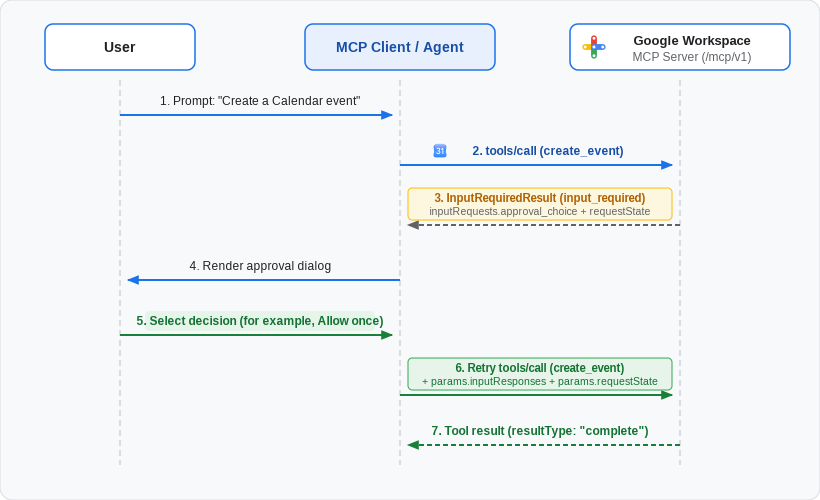
วงจรการกระตุ้นแบบฟอร์มจะเป็นไปตามขั้นตอนต่อไปนี้
- พรอมต์ของผู้ใช้: ผู้ใช้ขอให้ Agent ดำเนินการ เช่น สร้างกิจกรรมในปฏิทิน
- คำขอ
tools/callเริ่มต้น: ไคลเอ็นต์ MCP ส่งคำขอtools/callไปยังปลายทาง/mcp/v1สำหรับเครื่องมือ เช่นcreate_eventและประกาศความสามารถelicitationในparams._meta - ขอให้ดำเนินการ
InputRequiredResult: เมื่อการดำเนินการที่ขอต้องได้รับอนุมัติจากผู้ใช้ เซิร์ฟเวอร์จะหยุดการดำเนินการชั่วคราวก่อนเรียกใช้เครื่องมือ เซิร์ฟเวอร์จะแสดงผลออบเจ็กต์resultที่มีresultType: "input_required", แผนที่inputRequestsที่มีคีย์เป็น"approval_choice"ซึ่งมีคำขอelicitation/createที่มีmode: "form"และสตริงrequestStateที่ไม่ชัดเจน - กล่องโต้ตอบการอนุมัติ: ไคลเอ็นต์ MCP จะแสดงกล่องโต้ตอบการอนุมัติที่แสดงผลิตภัณฑ์และเครื่องมือ Google Workspace เป้าหมาย, ข้อความยืนยัน Markdown, คำถามเพื่อการตัดสินใจ และตัวเลือกที่อนุญาตจาก
enumและenumNames - การตัดสินใจของผู้ใช้: ผู้ใช้เลือกตัวเลือกการอนุมัติ เช่น อนุญาตครั้งเดียวหรือไม่อนุญาต
- ลอง
tools/callอีกครั้งด้วยinputResponsesและrequestState: ไคลเอ็นต์ MCP จะส่งคำขอtools/callครั้งที่ 2 ด้วยเครื่องมือnameและargumentsที่เหมือนกัน พร้อมช่องparams.requestStateและparams.inputResponsesระดับบนสุดที่มีตัวเลือกที่ผู้ใช้เลือกสำหรับ"approval_choice" - ผลการเรียกใช้เครื่องมือ: เซิร์ฟเวอร์จะยืนยันว่า
requestStateเชื่อมโยงกับอาร์กิวเมนต์เครื่องมือที่แน่นอนจากการเรียกใช้ครั้งแรก ประเมินการตัดสินใจของผู้ใช้ เรียกใช้หรือสิ้นสุดการเรียกใช้เครื่องมือ และแสดงผลresultสุดท้ายพร้อมresultType: "complete"
เมื่อมีการขออนุมัติ
เซิร์ฟเวอร์ MCP ของ Google Workspace จะพิจารณาว่าการเรียกใช้เครื่องมือจะทริกเกอร์การตรวจสอบ elicitation/create หรือไม่โดยอิงตามนโยบายการกำกับดูแลระบบ ผู้ใช้ และผู้ดูแลระบบ การประเมินนโยบายอาจพิจารณาปัจจัยต่อไปนี้
- ประเภทการดำเนินการ: การดำเนินการเขียนที่แชร์ข้อมูลกับกลุ่มเป้าหมายหรือแก้ไขทรัพยากรที่แชร์ต้องได้รับการยืนยันจากผู้ใช้โดยค่าเริ่มต้น เว้นแต่จะได้รับอนุญาตจากนโยบายของผู้ใช้หรือผู้ดูแลระบบ ส่วนการเขียนด้วยตนเอง เช่น การสร้างไฟล์ส่วนตัวจะดำเนินการโดยไม่ต้องยืนยันโดยค่าเริ่มต้น การดำเนินการย้ายไปที่ถังขยะต้องได้รับการยืนยันต่อการโทรเสมอโดยไม่มีการอนุมัติแบบถาวร และการดำเนินการอ่านหรือข้อมูลเมตาอาจต้องได้รับการยืนยันด้วย ทั้งนี้ขึ้นอยู่กับนโยบายของผู้ใช้หรือผู้ดูแลระบบ
- การเป็นเจ้าของเนื้อหาและการมองเห็น: การเข้าถึงหรือแก้ไขไฟล์ที่ผู้ใช้รายอื่นเป็นเจ้าของหรือแชร์ภายนอกองค์กรของผู้ใช้อาจต้องได้รับอนุมัติ
- ผู้รับภายนอก: การส่งข้อความ การแชร์ไฟล์ หรือการเชิญผู้เข้าร่วมภายนอกโดเมนของผู้ใช้มักจะต้องมีการยืนยันอย่างชัดเจน
- ค่ากำหนดของผู้ใช้และผู้ดูแลระบบ: ค่ากำหนดการอนุมัติที่บันทึกไว้จากธุรกรรมก่อนหน้าหรือกฎของผู้ดูแลระบบทั่วทั้งโดเมนอาจกำหนดให้ต้องมีการยืนยันหรือข้ามการยืนยันสำหรับเครื่องมือบางอย่างได้
เนื่องจากการประเมินนโยบายเกิดขึ้นฝั่งเซิร์ฟเวอร์ในการเรียกใช้ทุกครั้ง ไคลเอ็นต์ของคุณจึงต้องเตรียมพร้อมที่จะจัดการกับการตอบกลับ InputRequiredResult ในการเรียกใช้ tools/call ใดๆ อย่าฮาร์ดโค้ดกฎความละเอียดอ่อนของเครื่องมือหรือแคชการตัดสินใจอนุมัติในฝั่งไคลเอ็นต์
ข้อมูลอ้างอิงตัวเลือกการอนุมัติ
ใน requestedSchema.properties.approval_choice เซิร์ฟเวอร์จะแสดงผลอาร์เรย์ enum และ enumNames แบบขนานซึ่งแสดงตัวเลือกที่ใช้ได้สำหรับคำขอปัจจุบัน เซิร์ฟเวอร์ MCP ของ Google Workspace รองรับค่า enum ต่อไปนี้
ค่า enum |
ป้ายกำกับ enumNames เริ่มต้นเป็นภาษาอังกฤษ |
อนุญาตการดำเนินการ | เวลาที่เสนอและลักษณะการทำงาน |
|---|---|---|---|
ALLOW_ONCE |
อนุญาตครั้งเดียว | ใช่ | มีให้เลือกในข้อความแจ้งการอนุมัติทุกรายการ เรียกใช้การเรียกใช้เครื่องมือปัจจุบัน 1 ครั้งโดยไม่บันทึกกฎแบบถาวร |
DENY_ONCE |
ไม่อนุญาต | ไม่ |
มีให้เลือกในข้อความแจ้งการอนุมัติทุกรายการ สิ้นสุดการเรียกใช้เครื่องมือปัจจุบันโดยมีข้อผิดพลาด UserDeniedAction โดยไม่บันทึกกฎถาวร
|
ALLOW_TOOL_ALWAYS |
อนุญาตเครื่องมือนี้เสมอ | ใช่ | ตัวเลือกนี้จะแสดงเมื่อนโยบายของผู้ใช้และผู้ดูแลระบบอนุญาตให้มีการอนุมัติแบบถาวรทั่วทั้งเครื่องมือ เรียกใช้การเรียกปัจจุบันและอนุมัติล่วงหน้าสำหรับการเรียกในอนาคตไปยังเครื่องมือเดียวกันจาก Agent เดียวกัน |
ALLOW_RESOURCE_ALWAYS |
อนุญาตสำหรับไฟล์ / โฟลเดอร์ / ไดรฟ์ / อีเมล / กิจกรรม / พื้นที่ทำงาน / แชท / แชทเป็นกลุ่ม / งาน / รายการนี้เสมอ | ใช่ | มีให้เมื่อแก้ไขหรือเข้าถึงทรัพยากรประเภทเดียวกันได้สูงสุด 100 รายการ ใช้ถ้อยคำที่เป็นพหูพจน์ เช่น อนุญาตสำหรับไฟล์เหล่านี้เสมอ เมื่อการเรียกใช้กำหนดเป้าหมายเป็นทรัพยากรหลายรายการ เรียกใช้การเรียกปัจจุบันและอนุมัติล่วงหน้าสำหรับการเรียกในอนาคตจากตัวแทนเดียวกันในรหัสทรัพยากรเดียวกัน |
ALLOW_AUDIENCE_ALWAYS |
อนุญาตสำหรับผู้รับรายนี้/ผู้รับเหล่านี้เสมอ | ใช่ | ใช้ได้กับการดำเนินการส่ง แชร์ และเชิญที่กำหนดเป้าหมายผู้รับสูงสุด 100 ราย เรียกใช้การโทรปัจจุบันและอนุมัติการโทรในอนาคตล่วงหน้าจากตัวแทนคนเดียวกันไปยังชุดผู้รับเดียวกัน |
ALLOW_OWNER_ALWAYS |
อนุญาตสำหรับเจ้าของรายนี้/เจ้าของเหล่านี้เสมอ | ใช่ | มีให้บริการในพรอมต์การอ่านหรือการอ้างอิงข้อมูลที่แตะรายการจากเจ้าของที่แตกต่างกันสูงสุด 3 ราย เรียกใช้การเรียกปัจจุบันและอนุมัติล่วงหน้าสำหรับการเรียกในอนาคตจากตัวแทนเดียวกันสำหรับรายการที่ผู้ใช้เหล่านั้นเป็นเจ้าของ |
InputRequiredResult แต่ละรายการจะมีเฉพาะชุดย่อยของตัวเลือกที่ใช้กับการเรียกใช้เครื่องมือนั้นๆ เท่านั้น
- การดำเนินการทำลายและทิ้งขยะ: การดำเนินการที่ลบหรือทิ้งทรัพยากรอย่างถาวร หรือการดำเนินการที่อยู่ในบังคับของนโยบายของผู้ดูแลระบบที่ต้องมีการยืนยันทุกครั้งที่เรียกใช้ จะมีเฉพาะ
ALLOW_ONCEและDENY_ONCEเท่านั้น - การดำเนินการที่กำหนดขอบเขต: เมื่ออนุญาตให้มีการอนุมัติแบบถาวร เซิร์ฟเวอร์จะแสดงผล
ALLOW_ONCE, ขอบเขตที่แคบที่เกี่ยวข้อง เช่นALLOW_AUDIENCE_ALWAYSหรือALLOW_RESOURCE_ALWAYS,ALLOW_TOOL_ALWAYSและDENY_ONCE
แสดงตัวเลือกที่แน่นอนซึ่งแสดงผลใน enum และ enumNames สำหรับคำขอปัจจุบันเสมอ แทนที่จะฮาร์ดโค้ดค่าปุ่ม
แนวทางปฏิบัติที่แนะนำเพื่อประสบการณ์ของผู้ใช้ที่ดีที่สุด
ไคลเอ็นต์ MCP มาตรฐานที่รองรับการดึงข้อมูลผ่านแบบฟอร์มจะทำงานร่วมกับ /mcp/v1 ได้ทันที อย่างไรก็ตาม ตัวแสดงผลแบบฟอร์มทั่วไปมักจะแสดงการตัดสินใจแบบเลือกรายการเดียวเป็นกลุ่มปุ่มตัวเลือกหรือเมนูแบบเลื่อนลงที่จับคู่กับปุ่มส่งแยกต่างหาก ซึ่งต้องคลิกเพิ่มเติมและซ่อนบริบทของแอป Google Workspace เป้าหมาย
โปรดทำตามคำแนะนำ 5 ข้อต่อไปนี้ในไคลเอ็นต์ MCP เพื่อให้ผู้ใช้ได้รับประสบการณ์การใช้งานที่ดีที่สุดในการดึงข้อมูลแบบฟอร์ม คำแนะนำที่ 1 ถึง 3 สอดคล้องกับข้อความไฮไลต์ที่มีหมายเลขกำกับในภาพประกอบกล่องโต้ตอบการอนุมัติต่อไปนี้
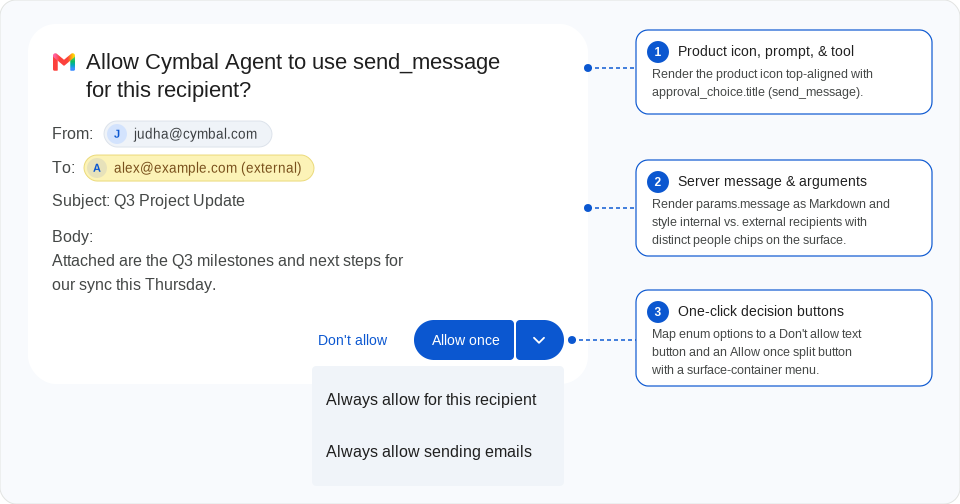
1. แสดงชื่อสินค้า ไอคอน และเครื่องมือ
ผู้ใช้ควรเห็นทันทีว่าเอเจนต์ต้องการเรียกใช้ผลิตภัณฑ์และเครื่องมือใดของ Google Workspace
- แมปข้อมูลเมตา
serverInfoของเซิร์ฟเวอร์ MCP จากการเริ่มต้นหรือserver/discoverหรือชื่อโฮสต์คำขอ เช่นcalendarmcp.googleapis.comกับชื่อและไอคอนผลิตภัณฑ์ Google Workspace - ถือว่าคำแนะนำการนำเสนอ
_metaในInputRequiredResultเช่นtitle,iconsและisConfirmationเป็นการเพิ่มประสิทธิภาพที่ไม่บังคับ เวอร์ชันที่ใช้งานจริง เซิร์ฟเวอร์ MCP ของ Google Workspace ยังไม่แสดงช่อง_metaเหล่านี้ ดังนั้น UI ของคุณจึงไม่ควรขึ้นอยู่กับช่องดังกล่าว - แสดงชื่อเครื่องมือเป้าหมายจาก
params.nameเพื่อให้ผู้ใช้แยกความแตกต่างระหว่างการดำเนินการต่างๆ เช่นcreate_draftและcreate_eventได้
2. แสดงผลข้อความของเซิร์ฟเวอร์และ enumNames
ทำให้เลเยอร์การนำเสนอของไคลเอ็นต์เรียบง่ายและแสดงผลเนื้อหาการอนุมัติที่เซิร์ฟเวอร์ระบุโดยตรง โดยทำดังนี้
- แสดงผล
params.messageเป็น Markdown และแสดงapproval_choice.title: เซิร์ฟเวอร์ MCP ของ Google Workspace จัดรูปแบบรายละเอียดการดำเนินการเป็น Markdown ในinputRequests.approval_choice.params.messageอยู่แล้ว และแสดงคำถามเพื่อยืนยันที่แปลแล้วในrequestedSchema.properties.approval_choice.titleแสดงผลmessageโดยตรงด้วยโปรแกรมแสดงผล Markdown ที่ปลอดภัย แทนที่จะแสดงสัญลักษณ์ Markdown ดิบหรือเขียนตรรกะการจัดรูปแบบอาร์กิวเมนต์ที่กำหนดเองต่อเครื่องมือ และแสดงtitleอย่างชัดเจนเหนือปุ่มดำเนินการ - จับคู่ค่า
enumกับป้ายกำกับenumNames: ตรวจสอบrequestedSchema.properties.approval_choiceแบบไดนามิก จับคู่ตัวระบุแต่ละตัวในenumกับป้ายกำกับที่มนุษย์อ่านได้ที่ดัชนีเดียวกันในenumNamesและกลับไปใช้รายการ JSON SchemaoneOfหากโต้ตอบกับเซิร์ฟเวอร์ MCP อื่นๆ ที่ใช้oneOf
3. ลดความซับซ้อนในการตัดสินใจด้วยปุ่มที่คลิกเพียงครั้งเดียว
เมื่อ requestedSchema มีพร็อพเพอร์ตี้ enum รายการเดียว ให้หลีกเลี่ยงการแสดงผลรายการปุ่มตัวเลือกหรือเมนูแบบเลื่อนลงที่ต้องคลิกส่งแยกต่างหาก
- 2 ตัวเลือก เช่น
Allow onceและDon't allow: แสดงปุ่ม 2 ปุ่มเคียงข้างกัน การคลิกปุ่มใดปุ่มหนึ่งจะเป็นการส่งคำขอลองอีกครั้งทันที - ตัวเลือกการอนุญาตหลายรายการ: เมื่อเซิร์ฟเวอร์แสดงผล
ALLOW_ONCE, ขอบเขตการอนุญาตแบบถาวรอย่างน้อย 1 รายการ เช่นALLOW_AUDIENCE_ALWAYSหรือALLOW_TOOL_ALWAYSและDENY_ONCEให้แสดงผลปุ่มแยกหลักที่ค่าเริ่มต้นเป็นอนุญาตครั้งเดียวพร้อมเมนูคาเร็ตสำหรับตัวเลือกการอนุญาตเพิ่มเติม โดยจับคู่กับปุ่มไม่อนุญาตแยกต่างหาก
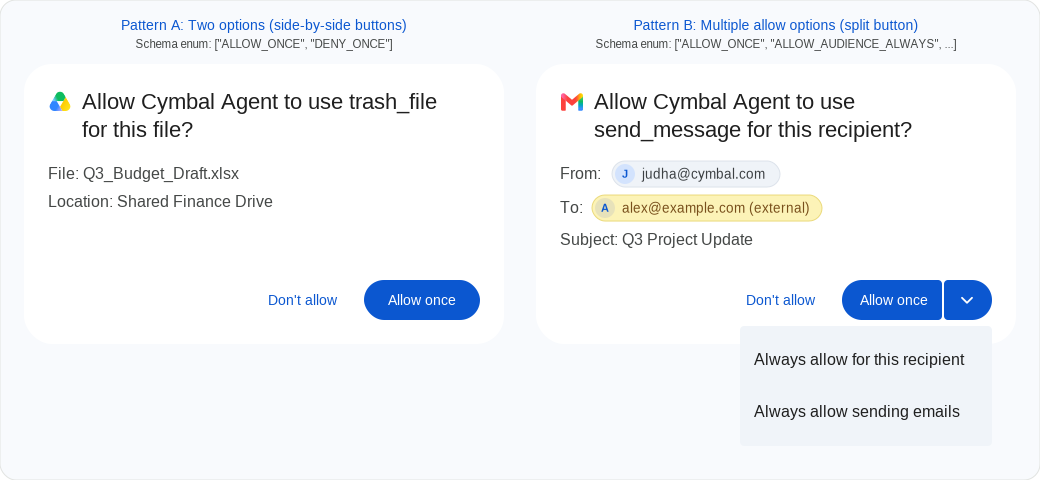
ในรูปแบบ A การดำเนินการในไดรฟ์ที่ทำลายล้างจะแสดงผลเฉพาะ ALLOW_ONCE และ DENY_ONCE ซึ่งไคลเอ็นต์จะแสดงผลเป็นปุ่ม 2 ปุ่มที่อยู่เคียงข้างกันสำหรับไม่อนุญาตและอนุญาตครั้งเดียว ในรูปแบบ B การดำเนินการของ Gmail จะแสดงผล ALLOW_ONCE, ALLOW_AUDIENCE_ALWAYS, ALLOW_TOOL_ALWAYS และ DENY_ONCE ซึ่งไคลเอ็นต์จะแสดงผลเป็นปุ่มไม่อนุญาตควบคู่ไปกับปุ่มแยกอนุญาตครั้งเดียวซึ่งมีเมนูแสดงตัวเลือกการอนุญาตแบบถาวร
4. หลีกเลี่ยงข้อความแจ้งที่ซ้ำกันใน /mcp/v1
โฮสต์ MCP จำนวนมากมีข้อความแจ้งการยืนยันในเครื่องในตัวก่อนที่จะเรียกใช้เครื่องมือภายนอก เมื่อเรียกใช้เซิร์ฟเวอร์ MCP ของ Google Workspace โดยเปิดใช้การดึงข้อมูลแบบฟอร์ม พรอมต์ก่อนการดำเนินการในเครื่องจะสร้างประสบการณ์การใช้พรอมต์ซ้ำซ้อน 2 ครั้ง เนื่องจากเซิร์ฟเวอร์บังคับใช้คำถามการดึงข้อมูลที่คำนึงถึงนโยบายของตนเอง
- หากคุณกำลังกำหนดค่าโฮสต์ MCP ที่สร้างไว้ล่วงหน้าด้วยการดึงข้อมูลแบบฟอร์ม: ให้ตั้งค่าการยืนยันเครื่องมือในเครื่องของโฮสต์สำหรับเซิร์ฟเวอร์ MCP ของ Google Workspace ใน
/mcp/v1เป็นอนุญาตเสมอ และใช้กล่องโต้ตอบการดึงข้อมูลที่เซิร์ฟเวอร์เริ่มต้น หากโฮสต์ไม่รองรับการดึงข้อมูลแบบฟอร์มและเชื่อมต่อกับ/mcp/v1selfให้เปิดใช้การยืนยันเครื่องมือในเครื่องไว้หากต้องการให้พรอมต์ฝั่งไคลเอ็นต์สำหรับการโทรที่ไม่ทริกเกอร์การอนุมัติฝั่งเซิร์ฟเวอร์ - หากคุณกำลังสร้างโฮสต์ MCP: ให้ระงับกล่องโต้ตอบการยืนยันก่อนการโทรทั่วไปของโฮสต์เมื่อเปิดใช้การดึงข้อมูลแบบฟอร์มสำหรับ
*mcp.googleapis.comและpeople.googleapis.comเช่นgmailmcp.googleapis.com,calendarmcp.googleapis.com,drivemcp.googleapis.comและworkspacemcp.googleapis.comแจ้งผู้ใช้เฉพาะเมื่อเซิร์ฟเวอร์แสดงผลInputRequiredResultพร้อมresultType: "input_required"
5. กำหนดลักษณะการทำงานของ Agent สำหรับเครื่องมือและการปฏิเสธ
โมเดลการให้เหตุผลอาจตีความขั้นตอนการอนุมัติแบบมีมนุษย์ร่วมผิดพลาดได้ 2 วิธีดังนี้
- การหลีกเลี่ยงเครื่องมือเขียนไว้ล่วงหน้า: หากโมเดลถือว่าการเรียกใช้เครื่องมือเขียน เช่น
send_messageจะดำเนินการทันทีโดยไม่มีการตรวจสอบจากผู้ใช้ โมเดลอาจเปลี่ยนไปใช้เครื่องมือร่าง เช่นcreate_draftแม้ว่าผู้ใช้จะขอให้ส่งอีเมลก็ตาม - การลองอีกครั้งด้วยเครื่องมือเขียนอื่นหลังจากถูกปฏิเสธ: หากผู้ใช้คลิกไม่อนุญาตในกล่องโต้ตอบการอนุมัติ และเซิร์ฟเวอร์แสดงผลลัพธ์ข้อผิดพลาด
UserDeniedActionโมเดลอาจถือว่าการปฏิเสธเป็นความล้มเหลวชั่วคราวของเครื่องมือ และพยายามบรรลุเป้าหมายเดียวกันโดยใช้เครื่องมือเขียนอื่น ซึ่งจะทริกเกอร์ข้อความแจ้งการอนุมัติครั้งที่ 2 ที่ไม่พึงประสงค์
หากต้องการป้องกันปัญหาทั้ง 2 อย่าง ให้ใส่คำสั่งต่อไปนี้ในพรอมต์ของระบบของ Agent
พรอมต์
When calling Google Workspace MCP tools:
1. Select the tool that directly matches the user's intent (for example,
   use send_message when asked to send an email). Sensitive tools
   automatically pause for user confirmation through MCP form elicitation
   before executing.
2. If a tool call fails because the user denied, declined, or canceled the
   approval request, stop immediately and acknowledge the user's decision.
   Do not retry the same action or call an alternative write tool unless
   the user explicitly asks you to do so in a new message.
ข้อกำหนดด้านการรับส่งข้อมูลและโปรโตคอลแบบไม่เก็บสถานะ
เซิร์ฟเวอร์ MCP ของ Google Workspace ทำงานผ่าน Streamable HTTP แบบไม่เก็บสถานะ เมื่อสร้างไคลเอ็นต์ MCP ที่กำหนดเอง ให้ทำตามข้อกำหนดการเชื่อมต่อต่อไปนี้ในทุกคำขอ
- ส่วนหัว HTTP: รวมส่วนหัวต่อไปนี้ในคำขอ
POSTทั้งหมดไปยัง/mcp/v1Authorization: Bearer ACCESS_TOKENContent-Type: application/jsonAccept: application/json, text/event-streamMCP-Protocol-Version: 2026-07-28Accept-Language: BCP_47_LANGUAGE_TAGเพื่อแปลข้อความยืนยัน คำถาม และป้ายกำกับenumNamesเป็นภาษาที่ผู้ใช้ต้องการ เช่นes-419, es;q=0.9, en;q=0.8หากไม่ระบุ ข้อความจะใช้ค่าเริ่มต้นเป็นen-US
- ประเภทเนื้อหาการตอบกลับ: เนื้อหาการตอบกลับ HTTP สามารถจัดรูปแบบเป็น JSON มาตรฐานที่มี
Content-Type: application/jsonหรือเป็นเหตุการณ์ที่เซิร์ฟเวอร์ส่ง (SSE) ที่มีContent-Type: text/event-streamโดยเพย์โหลด JSON-RPC จะปรากฏในบรรทัดdata: {...}ทั้งนี้ขึ้นอยู่กับเซิร์ฟเวอร์และประเภทคำขอ โปรแกรมแยกวิเคราะห์การส่ง HTTP ต้องยอมรับทั้ง 2 รูปแบบ - การค้นพบแบบไม่เก็บสถานะ: เซิร์ฟเวอร์ MCP ของ Google Workspace จะไม่เก็บเซสชัน
initializeแบบเก็บสถานะ หากต้องการดึงข้อมูลเมตาและความสามารถของเซิร์ฟเวอร์เมื่อเริ่มต้น ให้ส่งคำขอ JSON-RPC พร้อม"method": "server/discover"และ"params": {}ซึ่งจะแสดงข้อมูลเมตาของเซิร์ฟเวอร์ในresult._meta["io.modelcontextprotocol/serverInfo"]ระบบยังไม่แสดงคำแนะนำ_metaการยืนยันที่กำหนดเอง เช่นisConfirmation,titleและiconsในการตอบกลับInputRequiredResultเวอร์ชันที่ใช้งานจริง ดังนั้นโปรดถือว่าช่องการนำเสนอ_metaเป็นช่องที่ไม่บังคับและใช้serverInfoหรือชื่อโฮสต์ของเซิร์ฟเวอร์เป็นทางเลือกสำรองเสมอ - ความสามารถของ
_metaต่อคำขอ: เนื่องจาก Transport ไม่มีสถานะ ให้รวม_metaไว้ในparamsในคำขอtools/listและtools/callทุกรายการที่มีคีย์ต่อไปนี้"io.modelcontextprotocol/protocolVersion": "2026-07-28""io.modelcontextprotocol/clientInfo":{"name": "YOUR_APP_NAME","version": "VERSION"}"io.modelcontextprotocol/clientCapabilities":{"elicitation": {"form": {}}}
การจัดการข้อผิดพลาดและการเชื่อมโยงพารามิเตอร์
เมื่อการเรียกใช้เครื่องมือถูกบล็อกหรือการลองใหม่ไม่ผ่านการตรวจสอบ เซิร์ฟเวอร์จะแสดงผลลัพธ์ข้อผิดพลาดระดับเครื่องมือหรือออบเจ็กต์ข้อผิดพลาด JSON-RPC ระดับบนสุด โดยขึ้นอยู่กับหมวดหมู่ความล้มเหลว ดังนี้
UserDeniedActionและAdminPolicyBlock: เมื่อผู้ใช้ปฏิเสธข้อความแจ้งการอนุมัติหรือนโยบายของผู้ดูแลระบบบล็อกการดำเนินการ เซิร์ฟเวอร์จะแสดงผล JSON-RPCresultพร้อม"resultType": "complete","isError": trueและข้อความแสดงข้อผิดพลาดที่แปลแล้วในresult.contentเมื่อเปิดใช้สำหรับบริการและสภาพแวดล้อม เซิร์ฟเวอร์จะรวมข้อมูลเมตาข้อผิดพลาดที่มีโครงสร้างในresult._meta["google.com/error"]ด้วย เนื่องจากresult._meta["google.com/error"]มีการควบคุมตามบริการและสภาพแวดล้อม ไคลเอ็นต์ของคุณจึงต้องกลับไปอ่านข้อความแสดงข้อผิดพลาดจากresult.contentเมื่อไม่มีresult._meta["google.com/error"]ดังนี้UserDeniedAction: แสดงขึ้นเมื่อผู้ใช้เลือกDENY_ONCEปฏิเสธ หรือยกเลิกแบบฟอร์มการอนุมัติ ข้อความภาษาอังกฤษเริ่มต้นคือ"Action canceled. The user declined the confirmation request."AdminPolicyBlock: แสดงผลเมื่อนโยบายของผู้ดูแลระบบองค์กรห้ามไม่ให้ Agent ดำเนินการ ข้อความภาษาอังกฤษเริ่มต้นคือ"Action could not be completed. Your administrator has blocked third-party agents from performing this action."
JSON
{ "jsonrpc": "2.0", "id": 3, "result": { "resultType": "complete", "isError": true, "content": [ { "type": "text", "text": "Action canceled. The user declined the confirmation request." } ], "_meta": { "google.com/error": { "code": 400, "message": "Action canceled. The user declined the confirmation request.", "status": "FAILED_PRECONDITION", "details": [ { "@type": "type.googleapis.com/google.rpc.ErrorInfo", "reason": "UserDeniedAction", "domain": "mcp.googleapis.com" } ] } } } }MissingRequiredClientCapability: แสดงผลเมื่อไคลเอ็นต์เรียกใช้เครื่องมือในลักษณะที่ต้องได้รับการยืนยันจากผู้ใช้ใน/mcp/v1หรือ/mcp/v1selfโดยไม่ได้ประกาศการรองรับการดึงข้อมูลผ่านแบบฟอร์มใน_meta["io.modelcontextprotocol/clientCapabilities"]เซิร์ฟเวอร์จะแปลข้อผิดพลาดนี้เป็นออบเจ็กต์ JSON-RPCerrorระดับบนสุดที่มีรหัส-32021และออบเจ็กต์ความสามารถที่จำเป็นในerror.data.requiredCapabilitiesJSON
{ "jsonrpc": "2.0", "id": 2, "error": { "code": -32021, "message": "Action could not be completed. This action requires user confirmation, which this client does not support. Use a client that supports form elicitation to perform this action.", "data": { "requiredCapabilities": { "elicitation": { "form": {} } } } } }การบังคับใช้การเชื่อมโยงพารามิเตอร์: โทเค็น
requestBindingภายในrequestStateจะเชื่อมโยงคำถามเพื่อการอนุมัติเริ่มต้นกับการเรียกใช้เครื่องมือargumentsที่แน่นอนซึ่งส่งในการเรียกใช้ครั้งแรกด้วยการเข้ารหัส หากไคลเอ็นต์แก้ไขช่องใดๆ ในparams.argumentsในการเรียกใช้ซ้ำ หรือส่งparams.requestStateที่ผิดรูปแบบหรือไม่เชื่อมโยง เซิร์ฟเวอร์จะละเว้นการอนุมัติที่ไม่ถูกต้องและแสดงคำถามInputRequiredResultใหม่ หรือแสดงข้อผิดพลาด invalid-parameter หรือ failed-precondition ที่แนะนำให้ไคลเอ็นต์ลองอีกครั้งโดยไม่มีinputResponses
ตัวอย่างการใช้งาน
คำแนะนำแบบครอบคลุมตั้งแต่ต้นจนจบต่อไปนี้แสดงวิธีที่ไคลเอ็นต์ MCP เรียกใช้เครื่องมือ Calendar create_event แสดงข้อความแจ้งการอนุมัติของเซิร์ฟเวอร์ใน UI ของเบราว์เซอร์หรือ CLI ของเทอร์มินัล และส่งการตัดสินใจของผู้ใช้ใน TypeScript และ Python ตามด้วยทักษะของ Agent ที่นำกลับมาใช้ซ้ำได้สำหรับ Agent การเขียนโค้ด
แพลตฟอร์มการอนุมัติของลูกค้า
ในไคลเอ็นต์ MCP ที่ทำงานบนเบราว์เซอร์ การติดตั้งใช้งาน TypeScript จะแสดงการ์ดการอนุมัติแบบภาพซึ่งแสดงไอคอนปฏิทิน ชื่อโฮสต์ของเซิร์ฟเวอร์ ชื่อเครื่องมือ ตัวอย่าง Markdown message ที่แสดงผลจากเซิร์ฟเวอร์ คำถามเพื่อยืนยัน ปุ่มไม่อนุญาต และปุ่มแยกอนุญาตครั้งเดียว ดังนี้
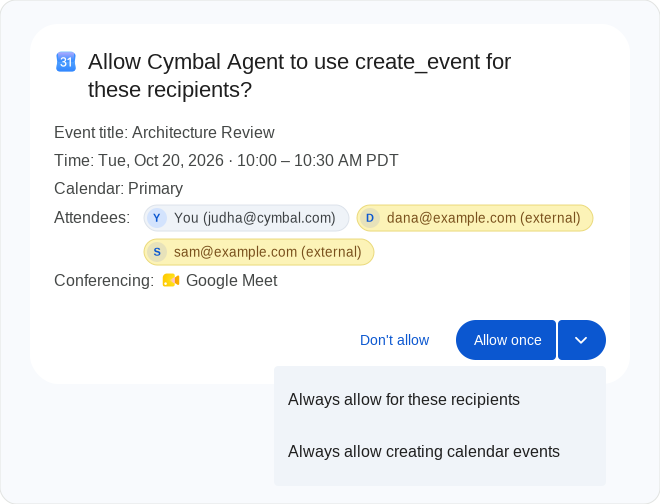
ในไคลเอ็นต์ MCP ที่ใช้เทอร์มินัล การติดตั้งใช้งาน CLI ของ Python จะแสดงผลเพย์โหลด InputRequiredResult เดียวกันเป็นพรอมต์แบบตัวเลขที่โต้ตอบได้ ดังนี้
CLI
=== Google Calendar (create_event) ===
Architecture Review
Tue, Oct 20 · 10:00 - 10:30 AM PDT · 🟢 No calendar conflicts
You, dana@example.com, sam@example.com
Conferencing: Google Meet

Allow Cymbal Agent to use create_event for these recipients?
  [1] Allow once (ALLOW_ONCE)
  [2] Always allow for these recipients (ALLOW_AUDIENCE_ALWAYS)
  [3] Always allow this tool (ALLOW_TOOL_ALWAYS)
  [4] Don't allow (DENY_ONCE)
Enter choice (1-4, or c to cancel):
การโทรครั้งแรกและการตอบกลับเพื่อขอข้อมูล
ไคลเอ็นต์จะเริ่มต้นด้วยการส่งคำขอ tools/call เพื่อสร้างกิจกรรมในปฏิทินโดยใช้เครื่องมือ create_event ดังนี้
JSON
{
  "jsonrpc": "2.0",
  "id": 2,
  "method": "tools/call",
  "params": {
    "name": "create_event",
    "arguments": {
      "calendarId": "primary",
      "summary": "Architecture Review",
      "startTime": "2026-10-20T10:00:00",
      "endTime": "2026-10-20T10:30:00",
      "timeZone": "America/Los_Angeles",
      "attendees": [
        {
          "email": "dana@example.com"
        },
        {
          "email": "sam@example.com"
        }
      ],
      "addGoogleMeetUrl": true
    },
    "_meta": {
      "io.modelcontextprotocol/protocolVersion": "2026-07-28",
      "io.modelcontextprotocol/clientInfo": {
        "name": "Cymbal Agent",
        "version": "1.0.0"
      },
      "io.modelcontextprotocol/clientCapabilities": {
        "elicitation": {
          "form": {}
        }
      }
    }
  }
}
เมื่อต้องมีการอนุมัติ เซิร์ฟเวอร์จะตอบกลับด้วย InputRequiredResult:
JSON
{
  "jsonrpc": "2.0",
  "id": 2,
  "result": {
    "resultType": "input_required",
    "inputRequests": {
      "approval_choice": {
        "method": "elicitation/create",
        "params": {
          "mode": "form",
          "message": "**Architecture Review**  \nTue, Oct 20 · 10:00 - 10:30 AM PDT · 🟢 No calendar conflicts  \nYou, dana@example.com, sam@example.com  \n**Conferencing:** Google Meet",
          "requestedSchema": {
            "type": "object",
            "required": ["approval_choice"],
            "properties": {
              "approval_choice": {
                "type": "string",
                "title": "Allow Cymbal Agent to use create_event for these recipients?",
                "enum": [
                  "ALLOW_ONCE",
                  "ALLOW_AUDIENCE_ALWAYS",
                  "ALLOW_TOOL_ALWAYS",
                  "DENY_ONCE"
                ],
                "enumNames": [
                  "Allow once",
                  "Always allow for these recipients",
                  "Always allow this tool",
                  "Don't allow"
                ]
              }
            }
          }
        }
      }
    },
    "requestState": "{\"elicitationId\":\"...\",\"requestBinding\":\"...\"}"
  }
}
การตอบกลับ InputRequiredResult จะมีช่องสำคัญต่อไปนี้
result.resultType: ตั้งค่าเป็น"input_required"เมื่อเซิร์ฟเวอร์หยุดการดำเนินการชั่วคราวเพื่อรอข้อมูลจากผู้ใช้ และตั้งค่าเป็น"complete"เมื่อเครื่องมือดำเนินการเสร็จสิ้นresult.inputRequests: แผนที่ที่คีย์โดยตัวระบุคำขอ"approval_choice"แต่ละรายการจะมี"method": "elicitation/create"และออบเจ็กต์paramsที่มี"mode": "form"- คำแนะนำการนำเสนอ
_meta: ฟิลด์ตัวเลือก เช่นisConfirmation,titleและiconsยังไม่แสดงในการตอบกลับInputRequiredResultเวอร์ชันที่ใช้งานจริง ถือว่าช่อง_metaเป็นช่องที่ไม่บังคับเสมอ และแก้ไขชื่อสินค้าและไอคอนผลิตภัณฑ์จากserverInfoหรือชื่อโฮสต์ของเซิร์ฟเวอร์เมื่อไม่มี inputRequests.approval_choice.params.message: ตัวอย่างการดำเนินการที่จัดรูปแบบ Markdown ซึ่งสร้างโดยเซิร์ฟเวอร์ หรือคำถามเพื่อยืนยันหากเครื่องมือไม่ได้สร้างการ์ดตัวอย่างแยกต่างหากinputRequests.approval_choice.params.requestedSchema: ออบเจ็กต์สคีมา JSON ที่คำจำกัดความproperties.approval_choiceมีช่องต่อไปนี้title: คำถามเพื่อยืนยันที่แปลแล้ว เช่น"Allow Cymbal Agent to use create_event for these recipients?"เมื่อคุณระบุ_meta["io.modelcontextprotocol/clientInfo"].nameในคำขอ เซิร์ฟเวอร์จะรวมชื่อแอปพลิเคชันของคุณไว้ในคำถามนี้enum: อาร์เรย์ที่เรียงลำดับของตัวระบุApprovalChoiceเช่นALLOW_ONCE,ALLOW_AUDIENCE_ALWAYS,ALLOW_TOOL_ALWAYSและDENY_ONCEenumNames: อาร์เรย์คู่ขนานของป้ายกำกับที่แปลแล้วซึ่งมนุษย์อ่านได้และสอดคล้องกับแต่ละรายการในenumเช่นAllow once,Always allow for these recipients,Always allow this toolและDon't allow
result.requestState: สตริงที่เข้ารหัส JSON แบบทึบแสงซึ่งมีelicitationIdของเซิร์ฟเวอร์และโทเค็นrequestBindingแบบเข้ารหัส คุณต้องแสดงสตริงนี้โดยไม่มีการเปลี่ยนแปลงในparams.requestStateในการเรียกใช้การลองใหม่
เพย์โหลดการลองใหม่ การปฏิเสธ และการยกเลิก
หลังจากที่ผู้ใช้เลือกตัวเลือกอนุญาต ให้ส่งคำขอ tools/call รายการที่ 2 ที่มี name และ arguments เหมือนกันทุกประการ และส่ง requestState และ inputResponses เป็นช่องระดับบนสุดภายใน params ดังนี้
JSON
{
  "jsonrpc": "2.0",
  "id": 3,
  "method": "tools/call",
  "params": {
    "name": "create_event",
    "arguments": {
      "calendarId": "primary",
      "summary": "Architecture Review",
      "startTime": "2026-10-20T10:00:00",
      "endTime": "2026-10-20T10:30:00",
      "timeZone": "America/Los_Angeles",
      "attendees": [
        {
          "email": "dana@example.com"
        },
        {
          "email": "sam@example.com"
        }
      ],
      "addGoogleMeetUrl": true
    },
    "requestState": "{\"elicitationId\":\"...\",\"requestBinding\":\"...\"}",
    "inputResponses": {
      "approval_choice": {
        "action": "accept",
        "content": {
          "approval_choice": "ALLOW_ONCE"
        }
      }
    },
    "_meta": {
      "io.modelcontextprotocol/protocolVersion": "2026-07-28",
      "io.modelcontextprotocol/clientInfo": {
        "name": "Cymbal Agent",
        "version": "1.0.0"
      },
      "io.modelcontextprotocol/clientCapabilities": {
        "elicitation": {
          "form": {}
        }
      }
    }
  }
}
ข้อกำหนดเฉพาะของการกระตุ้น MCP จะแยกความแตกต่างระหว่างการส่งค่าแบบฟอร์มและการปิดกล่องโต้ตอบ คุณแสดงการตัดสินใจเชิงลบของผู้ใช้ใน params.inputResponses ได้ 2 วิธี ดังนี้
การส่งตัวเลือก
DENY_ONCE: เมื่อผู้ใช้คลิกปุ่มไม่อนุญาตที่สอดคล้องกับDENY_ONCEให้ส่ง"action": "accept"พร้อมกับ"content": {"approval_choice": "DENY_ONCE"}ดังนี้JSON
{ "jsonrpc": "2.0", "id": 3, "method": "tools/call", "params": { "name": "create_event", "arguments": { "calendarId": "primary", "summary": "Architecture Review", "startTime": "2026-10-20T10:00:00", "endTime": "2026-10-20T10:30:00", "timeZone": "America/Los_Angeles", "attendees": [ { "email": "dana@example.com" }, { "email": "sam@example.com" } ], "addGoogleMeetUrl": true }, "requestState": "{\"elicitationId\":\"...\",\"requestBinding\":\"...\"}", "inputResponses": { "approval_choice": { "action": "accept", "content": { "approval_choice": "DENY_ONCE" } } }, "_meta": { "io.modelcontextprotocol/protocolVersion": "2026-07-28", "io.modelcontextprotocol/clientInfo": { "name": "Cymbal Agent", "version": "1.0.0" }, "io.modelcontextprotocol/clientCapabilities": { "elicitation": { "form": {} } } } } }การปฏิเสธหรือยกเลิกกล่องโต้ตอบ: หากผู้ใช้ปิดหรือยกเลิกกล่องโต้ตอบโดยไม่เลือกตัวเลือกอนุญาต ให้ส่ง
"action": "decline"หรือ"action": "cancel"และละเว้นช่องcontentดังนี้JSON
"inputResponses": {
  "approval_choice": {
    "action": "cancel"
  }
}
ในทั้ง 2 กรณี เซิร์ฟเวอร์จะถือว่าการตอบกลับเป็น DENY_ONCE สิ้นสุดการดำเนินการของเครื่องมือ และแสดงผลลัพธ์ข้อผิดพลาดของเครื่องมือ
เว็บไคลเอ็นต์ TypeScript
ตัวอย่าง TypeScript ต่อไปนี้จะดึงข้อมูล Markdown message, คำถามเพื่อยืนยัน และตัวเลือกที่อนุญาตจากเพย์โหลด InputRequiredResult โดยตรง, แก้ไขชื่อผลิตภัณฑ์จากคำแนะนำ _meta ที่ไม่บังคับหรือชื่อโฮสต์ของเซิร์ฟเวอร์ และเล่น tools/call ซ้ำด้วยการตัดสินใจของผู้ใช้
TypeScript
const PROTOCOL_VERSION = "2026-07-28";
const CLIENT_INFO = { name: "Cymbal Agent", version: "1.0.0" };
const MAX_ELICITATION_ROUNDS = 3;

const HOST_TITLES: Record<string, string> = {
  "gmailmcp.googleapis.com": "Gmail",
  "calendarmcp.googleapis.com": "Google Calendar",
  "drivemcp.googleapis.com": "Google Drive",
  "docsmcp.googleapis.com": "Google Docs",
  "sheetsmcp.googleapis.com": "Google Sheets",
  "slidesmcp.googleapis.com": "Google Slides",
  "chatmcp.googleapis.com": "Google Chat",
  "people.googleapis.com": "Google Contacts",
  "tasksmcp.googleapis.com": "Google Tasks",
  "workspacemcp.googleapis.com": "Google Workspace",
};

interface ElicitationOption {
  value: string;
  label: string;
}

export interface ElicitationCardModel {
  requestKey: string;
  serverTitle: string;
  serverIconUrl?: string;
  toolName: string;
  markdownMessage: string;
  questionTitle: string;
  decisionFieldKey: string;
  denyOption?: ElicitationOption;
  primaryAllowOption?: ElicitationOption;
  secondaryAllowOptions: ElicitationOption[];
}

function buildBaseMeta(): Record<string, unknown> {
  return {
    "io.modelcontextprotocol/protocolVersion": PROTOCOL_VERSION,
    "io.modelcontextprotocol/clientInfo": CLIENT_INFO,
    "io.modelcontextprotocol/clientCapabilities": {
      elicitation: { form: {} },
    },
  };
}

/**
 * Extracts a UI view model directly from an InputRequiredResult response.
 * Render card.markdownMessage with a safe Markdown renderer in your UI.
 */
export function extractCardModel(
  rpcResult: Record<string, any>,
  toolName: string,
  serverHost = "workspacemcp.googleapis.com",
): ElicitationCardModel | null {
  const inputRequests: Record<string, any> = rpcResult.inputRequests ?? {};
  const requestEntry = Object.entries(inputRequests).find(
    ([, req]: [string, any]) =>
      req?.method === "elicitation/create" && req?.params?.mode === "form",
  );
  if (!requestEntry) {
    return null;
  }
  const [requestKey, elicitationReq] = requestEntry;

  const reqMeta = elicitationReq.params?._meta ?? {};
  const resultMeta = rpcResult._meta ?? {};
  const serverInfo = resultMeta["io.modelcontextprotocol/serverInfo"] ?? {};
  const icons: Array<{ src: string; mimeType?: string }> =
    reqMeta.icons ?? resultMeta.icons ?? serverInfo.icons ?? [];
  const preferredIcon =
    icons.find((icon) => icon.mimeType === "image/svg+xml") ?? icons[0];

  const properties: Record<string, any> =
    elicitationReq.params?.requestedSchema?.properties ?? {};
  const firstProperty = Object.entries(properties)[0];
  if (!firstProperty) {
    return null;
  }
  const [decisionFieldKey, fieldSchema] = firstProperty as [
    string,
    Record<string, any>,
  ];

  let options: ElicitationOption[] = [];
  if (Array.isArray(fieldSchema.enum)) {
    const enumNames: string[] = Array.isArray(fieldSchema.enumNames)
      ? fieldSchema.enumNames
      : [];
    options = fieldSchema.enum.map((val: string, idx: number) => ({
      value: val,
      label: enumNames[idx] ?? val,
    }));
  } else if (Array.isArray(fieldSchema.oneOf)) {
    options = fieldSchema.oneOf.map((opt: any) => ({
      value: opt.const,
      label: opt.title ?? opt.const,
    }));
  }

  const denyOption = options.find((opt) => opt.value.startsWith("DENY"));
  const allowOptions = options.filter(
    (opt) => !opt.value.startsWith("DENY"),
  );

  return {
    requestKey,
    serverTitle:
      reqMeta.title ??
      resultMeta.title ??
      serverInfo.title ??
      serverInfo.name ??
      HOST_TITLES[serverHost] ??
      "Google Workspace",
    serverIconUrl: preferredIcon?.src,
    toolName,
    markdownMessage:
      elicitationReq.params?.message ?? "Confirm this action.",
    questionTitle: fieldSchema.title ?? "Confirm this action?",
    decisionFieldKey,
    denyOption,
    primaryAllowOption: allowOptions[0],
    secondaryAllowOptions: allowOptions.slice(1),
  };
}

/**
 * Executes tools/call and replays with requestState and inputResponses
 * when the server returns an InputRequiredResult.
 */
export async function handleToolCallWithElicitation(
  sendRpc: (payload: Record<string, unknown>) => Promise<Record<string, any>>,
  promptUserInUi: (card: ElicitationCardModel) => Promise<string | null>,
  toolName: string,
  toolArgs: Record<string, unknown>,
  serverHost = "calendarmcp.googleapis.com",
): Promise<Record<string, any>> {
  let requestId = 1;
  let response = await sendRpc({
    jsonrpc: "2.0",
    id: requestId,
    method: "tools/call",
    params: {
      name: toolName,
      arguments: structuredClone(toolArgs),
      _meta: buildBaseMeta(),
    },
  });

  for (let round = 0; round < MAX_ELICITATION_ROUNDS; round++) {
    const result = response.result ?? {};
    if (result.resultType !== "input_required") {
      return response;
    }

    const card = extractCardModel(result, toolName, serverHost);
    if (!card) {
      return response;
    }

    const selectedValue = await promptUserInUi(card);
    const userResponse = selectedValue
      ? {
          action: "accept",
          content: { [card.decisionFieldKey]: selectedValue },
        }
      : { action: "cancel" };

    requestId += 1;
    response = await sendRpc({
      jsonrpc: "2.0",
      id: requestId,
      method: "tools/call",
      params: {
        name: toolName,
        arguments: structuredClone(toolArgs),
        ...(result.requestState !== undefined
          ? { requestState: result.requestState }
          : {}),
        inputResponses: {
          [card.requestKey]: userResponse,
        },
        _meta: buildBaseMeta(),
      },
    });
  }

  return response;
}
ไคลเอ็นต์ CLI ของ Python
Python
import copy
import re
from typing import Any

PROTOCOL_VERSION = "2026-07-28"
CLIENT_INFO = {"name": "Cymbal CLI Agent", "version": "1.0.0"}
MAX_ELICITATION_ROUNDS = 3
HOST_TITLES = {
    "gmailmcp.googleapis.com": "Gmail",
    "calendarmcp.googleapis.com": "Google Calendar",
    "drivemcp.googleapis.com": "Google Drive",
    "docsmcp.googleapis.com": "Google Docs",
    "sheetsmcp.googleapis.com": "Google Sheets",
    "slidesmcp.googleapis.com": "Google Slides",
    "chatmcp.googleapis.com": "Google Chat",
    "people.googleapis.com": "Google Contacts",
    "tasksmcp.googleapis.com": "Google Tasks",
    "workspacemcp.googleapis.com": "Google Workspace",
}

def build_base_meta() -> dict[str, Any]:
  """Returns the required per-request _meta block for /mcp/v1 calls."""
  return {
      "io.modelcontextprotocol/protocolVersion": PROTOCOL_VERSION,
      "io.modelcontextprotocol/clientInfo": CLIENT_INFO,
      "io.modelcontextprotocol/clientCapabilities": {
          "elicitation": {"form": {}}
      },
  }

def strip_markdown(text: str) -> str:
  """Minimal example that strips basic Markdown for terminal display."""
  text = re.sub(r"\[([^\]]+)\]\(([^)]+)\)", r"\1 (\2)", text)
  text = re.sub(r"\*\*(.*?)\*\*", r"\1", text)
  return re.sub(r"`([^`]+)`", r"\1", text)

def extract_decision_options(
    requested_schema: dict[str, Any],
) -> tuple[str | None, str, list[dict[str, str]]]:
  """Extracts the property key, question title, and options from schema."""
  properties = requested_schema.get("properties", {})
  first_entry = next(iter(properties.items()), None)
  if first_entry is None:
    return None, "Confirm this action?", []

  field_key, field_schema = first_entry
  question_title = field_schema.get("title", "Confirm this action?")

  if "enum" in field_schema:
    enum_values = field_schema.get("enum", [])
    enum_names = field_schema.get("enumNames", [])
    options = [
        {
            "value": val,
            "label": enum_names[idx] if idx < len(enum_names) else val,
        }
        for idx, val in enumerate(enum_values)
    ]
  elif "oneOf" in field_schema:
    options = [
        {
            "value": item["const"],
            "label": item.get("title", item["const"]),
        }
        for item in field_schema["oneOf"]
    ]
  else:
    options = []
  return field_key, question_title, options

def prompt_user_in_cli(
    elicitation_req: dict[str, Any],
    result_meta: dict[str, Any],
    tool_name: str,
    server_host: str = "calendarmcp.googleapis.com",
) -> dict[str, Any]:
  """Renders a CLI approval prompt and returns the inputResponses entry."""
  params = elicitation_req.get("params", {})
  req_meta = params.get("_meta", {})
  server_info = result_meta.get(
      "io.modelcontextprotocol/serverInfo", {}
  )
  server_title = (
      req_meta.get("title")
      or result_meta.get("title")
      or server_info.get("title")
      or server_info.get("name")
      or HOST_TITLES.get(server_host, "Google Workspace MCP")
  )
  message = strip_markdown(params.get("message", "Confirm this action."))
  field_key, question_title, options = extract_decision_options(
      params.get("requestedSchema", {})
  )
  if not field_key or not options:
    return {"action": "cancel"}

  print(f"\n=== {server_title} ({tool_name}) ===")
  print(message)
  print(f"\n{strip_markdown(question_title)}")
  for idx, opt in enumerate(options, start=1):
    print(f"  [{idx}] {opt['label']} ({opt['value']})")

  choice = input(
      f"Enter choice (1-{len(options)}, or c to cancel): "
  ).strip()
  try:
    selected_idx = int(choice) - 1
    if 0 <= selected_idx < len(options):
      selected_value = options[selected_idx]["value"]
      return {
          "action": "accept",
          "content": {field_key: selected_value},
      }
  except ValueError:
    pass

  return {"action": "cancel"}

def handle_tool_call_with_elicitation(
    send_rpc_fn: Any, tool_name: str, tool_args: dict[str, Any]
) -> dict[str, Any]:
  """Executes tools/call and retries with inputResponses when elicited."""
  base_params = {
      "name": tool_name,
      "arguments": copy.deepcopy(tool_args),
      "_meta": build_base_meta(),
  }
  request_id = 1
  response = send_rpc_fn(
      {
          "jsonrpc": "2.0",
          "id": request_id,
          "method": "tools/call",
          "params": copy.deepcopy(base_params),
      }
  )

  for _ in range(MAX_ELICITATION_ROUNDS):
    result = response.get("result", {})
    if result.get("resultType") != "input_required":
      return response

    input_requests = result.get("inputRequests", {})
    if not isinstance(input_requests, dict) or not input_requests:
      return response

    result_meta = result.get("_meta", {})
    input_responses: dict[str, Any] = {}
    for req_key, req in input_requests.items():
      if (
          isinstance(req, dict)
          and req.get("method") == "elicitation/create"
          and req.get("params", {}).get("mode") == "form"
      ):
        input_responses[req_key] = prompt_user_in_cli(
            req, result_meta, tool_name
        )

    if not input_responses:
      return response

    request_id += 1
    retry_params = copy.deepcopy(base_params)
    request_state = result.get("requestState")
    if request_state is not None:
      retry_params["requestState"] = request_state
    retry_params["inputResponses"] = input_responses
    response = send_rpc_fn(
        {
            "jsonrpc": "2.0",
            "id": request_id,
            "method": "tools/call",
            "params": retry_params,
        }
    )

  return response
ทักษะของ Agent
ใช้ข้อมูลต่อไปนี้เป็นทักษะหรือพรอมต์สำหรับ Agent การเขียนโค้ดเพื่อใช้การดึงข้อมูลแบบฟอร์มสำหรับระบบควบคุมการทำงานของ Agent
พรอมต์
---
name: google-workspace-mcp-elicitation
metadata:
  version: "1.0.0"
  category: GoogleWorkspace
description: >-
  Implements Model Context Protocol (MCP) form elicitation
  (`elicitation/create`) for Human-in-the-Loop (HITL) approvals with Google
  Workspace MCP servers (Gmail, Calendar, Drive, Docs, Sheets, Slides, Chat,
  Contacts). Use when adding HITL confirmation prompts to an agent, handling
  Stateless HTTP (`2026-07-28`) Multi Round-Trip Requests
  (`resultType: "input_required"`), mapping elicitation schemas or `_meta`
  hints to UI controls, or troubleshooting Workspace MCP `401`/`403`/`405`
  and capability errors. Don't use for general OAuth 2.0 app setup unrelated
  to MCP or for authoring custom MCP servers.
---

# Implementing Google Workspace MCP Form Elicitation (HITL)

Use this guide to support **Model Context Protocol (MCP) Form Elicitation**
for Human-in-the-Loop (HITL) confirmations when integrating **Google
Workspace MCP servers** into an AI agent.

Rather than duplicating the MCP specification, this guide references the
canonical specs and focuses on **Google Workspace server nuances**, **mapping
protocol message fields to UI**, **upcoming Google Workspace `_meta`
extensions**, and **practical integration boundaries**:

- [MCP Elicitation Specification][mcp-elicitation]
- [MCP Multi Round-Trip Requests (MRTR) Specification][mcp-mrtr]
- [MCP Lifecycle & Initialization][mcp-life]
- [MCP Icons Utility Specification][mcp-icon]

---

## 1. Prerequisites, Nuances & Architectural Boundaries

### Prerequisites (Assumed Configured)

This skill focuses on **handling elicitation requests and mapping them to
UI**. It assumes the host application already has Google Workspace MCP
connectivity and OAuth 2.0 configured. If not yet set up, follow the
[Google Workspace MCP Server Configuration Guide][ws-mcp-setup] to configure:

1. **Google Cloud Project & Service Enablement**: A Google Cloud project with
   the target Google Workspace APIs and MCP endpoints enabled.
2. **OAuth 2.0 Bearer Authentication**: An OAuth 2.0 flow issuing user access
   tokens with the required service scopes, passed as
   `Authorization: Bearer {access_token}` on MCP HTTP `POST` requests. When
   using standard 3-legged OAuth 2.0, the OAuth client configuration must
   have the **"Used by an agent"** checkbox enabled.

Canonical MCP server URLs and default OAuth 2.0 scopes by service:

- **Gmail** (`https://gmailmcp.googleapis.com/mcp/v1`):
  - `https://www.googleapis.com/auth/gmail.modify`
  - `https://www.googleapis.com/auth/gmail.settings.basic`
- **Google Calendar** (`https://calendarmcp.googleapis.com/mcp/v1`):
  - `https://www.googleapis.com/auth/calendar.events`
  - `https://www.googleapis.com/auth/calendar.readonly`
- **Google Drive** (`https://drivemcp.googleapis.com/mcp/v1`):
  - `https://www.googleapis.com/auth/drive`
- **Google Docs** (`https://docsmcp.googleapis.com/mcp/v1`):
  - `https://www.googleapis.com/auth/documents`
- **Google Sheets** (`https://sheetsmcp.googleapis.com/mcp/v1`):
  - `https://www.googleapis.com/auth/spreadsheets`
- **Google Slides** (`https://slidesmcp.googleapis.com/mcp/v1`):
  - `https://www.googleapis.com/auth/presentations`
- **Google Chat** (`https://chatmcp.googleapis.com/mcp/v1`):
  - `https://www.googleapis.com/auth/chat.messages`
- **Google Contacts (preview)** (`https://people.googleapis.com/mcp/v1`):
  - `https://www.googleapis.com/auth/contacts`
- **Google Tasks** (`https://tasksmcp.googleapis.com/mcp/v1`):
  - `https://www.googleapis.com/auth/tasks`
- **Universal Search** (`https://workspacemcp.googleapis.com/mcp/v1`):
  - `https://www.googleapis.com/auth/gmail.readonly`
  - `https://www.googleapis.com/auth/drive.readonly`
  - `https://www.googleapis.com/auth/calendar.readonly`
  - `https://www.googleapis.com/auth/chat.messages.readonly`
  - `https://www.googleapis.com/auth/chat.spaces.readonly`
  - `https://www.googleapis.com/auth/chat.memberships.readonly`

### Key Nuances for Google Workspace MCP Servers

- **Markdown Messages**: Google Workspace MCP servers format `params.message`
  as **GitHub-Flavored Markdown** (headings, bold labels, bulleted lists of
  parameters, links). Render `params.message` with a Markdown renderer rather
  than plain text.
- **Selective Server-Side Gate (Writes & Sensitive/Shared Reads)**: Workspace
  form elicitation selectively gates sensitive operations on the server, such
  as **high-impact write operations** (for example, sending an email,
  scheduling a meeting with external attendees, modifying a shared document)
  as well as **reads of sensitive or externally shared data**, rather than
  triggering on every tool call or validating general agent intent. Because
  these sensitive actions already trigger a server-side `elicitation/create`
  prompt, enabling unconditional client-side pre-tool approvals (such as
  `needsApproval: true` on all tools) can double-prompt the user. Factor this
  server-side gate into your risk assessment when deciding whether to
  auto-approve tool calls, gate specific tools, or require pre-execution
  approval across the board.

### Architectural Boundaries: Do Not Fight the Framework

Pausing an in-flight tool call, presenting a prompt to a user, and resuming
execution cuts across the host application's language, agent framework, MCP
SDK, and UI surface. **Do not fight the host framework or re-implement MCP
from scratch**. Reuse what the framework and SDK already provide to the
fullest extent possible:

- **Reuse Built-In Framework & MCP SDK Elicitation Support First**: Before
  writing protocol or transport code, inspect the host application's agent
  framework and MCP client library for existing MCP tool adapters, capability
  negotiation, elicitation callbacks, and HITL interrupt/checkpoint
  mechanisms. Wire elicitation through those built-in extension points rather
  than replacing the SDK with a hand-rolled JSON-RPC client or custom
  tool-calling loop.
- **Stateless HTTP (`2026-07-28`) MRTR & Adapting Stateful Implementations**:
  Google Workspace MCP servers use Stateless HTTP (`2026-07-28`)
  [Multi Round-Trip Requests (MRTR)][mcp-mrtr] (`POST`-only, where `GET`
  returns `405`) to deliver `elicitation/create` prompts inside `tools/call`
  responses via `result.resultType === "input_required"`
  (`result.requestState`, `result.inputRequests`) and resume when
  `tools/call` is replayed with `params.requestState` and
  `params.inputResponses`. Supporting older stateful transports is not
  required for Google Workspace, but existing elicitation support in an SDK
  or host application might assume stateful server-initiated streams
  (`2025-11-25`). Verify how the existing client handles elicitation: if it
  already implements Stateless HTTP MRTR, use it directly. If it only listens
  for stateful server-to-client stream requests (or strips MRTR fields during
  typed deserialization), adapt the transport layer so `input_required`
  responses route through the SDK's registered elicitation handler and replay
  `tools/call` with `requestState` and `inputResponses`.
- **Elicitation Rendering Is a Presentation-Layer Concern**: Keep protocol
  and transport handling decoupled from UI rendering. Pass the structured
  elicitation request (`message`, `requestedSchema`, and `_meta`) to the host
  application's presentation layer rather than embedding UI markup inside
  agent or transport code, and render it using the application's native UI
  paradigm rather than assuming HTML.
- **Suspension & Resumption Principles**: Regardless of how the host
  application is deployed, suspending and resuming an elicitation must
  satisfy three behaviors:
  1. *Yield Cleanly Waiting for User Input*: Pause the in-flight tool
     execution while waiting for the user's decision, using the host
     runtime's native mechanism (such as awaiting an async callback/channel
     in-memory or yielding via the framework's checkpoint/interrupt
     primitive).
  2. *Preserve Correlation & Continuation Context*: Retain the correlation ID
     (`requestId`), opaque server `requestState`, and original tool call
     context (`name`, `arguments`, and any prior `inputResponses`) across the
     pause, in memory if the session stays alive or in durable storage if the
     process or turn can terminate before the user responds.
  3. *Accumulate Multi-Round-Trip Responses*: When replaying `tools/call`
     with `requestState` and `inputResponses`, keep accumulating responses
     across rounds if the server returns subsequent `input_required` stages
     until the tool returns a final `CallToolResult`.

---

## 2. Phase 1: Core Form Elicitation Support (Priority)

Start by supporting standard [MCP Form Elicitation][mcp-elicitation]
end-to-end using your framework's and MCP SDK's built-in primitives so any
schema renders and resolves cleanly on the host UI surface.

### Step 1: Enable Elicitation & Register Handler

1. Register an `elicitation/create` handler through your agent framework or
   MCP client SDK, and ensure the client advertises the `elicitation`
   capability during initialization (and in per-request capability metadata
   when using Stateless HTTP discovery):

   ```json
 {
   "capabilities": {
     "elicitation": {}
   }
 }
 ```

2. Verify that your client handles Stateless HTTP (`2026-07-28`)
   [MRTR][mcp-mrtr] (`result.resultType === "input_required"`). If the SDK
   does not yet handle `input_required` natively, adapt the transport so each
   entry in `result.inputRequests` (preserving `_meta` hints) is passed to
   your registered elicitation handler and `tools/call` is replayed with
   `params.requestState` and `params.inputResponses`.

### Step 2: Render Prompt on the Host UI Surface & Collect User Input

1. **Map Protocol Fields to the Host UI Surface**:
   - Render `params.message` using a **Markdown renderer appropriate for the
     host surface** (for example, GFM component in a web UI, formatted text
     widgets in a chat card, or terminal Markdown in a CLI/TUI).
   - Present input controls for `params.requestedSchema.properties` covering
     all [MCP Elicitation supported schema types][mcp-schema-types]
     (`string`, `number`, `integer`, `boolean`, and `enum` / `oneOf`).
2. **Collect the User's Decision**: Format the user's response per the
   [MCP Elicitation response specification][mcp-elicitation]:
   - **Submit Form / Select Option**:
     `{ "action": "accept", "content": { ... } }` *(Note: When the schema
     presents explicit `ALLOW_*` and `DENY_*` enum options, selecting a
     `DENY_*` option is still submitted with `action: "accept"` and the
     selected enum value in `content`.)*
   - **Decline**: `{ "action": "decline" }`
   - **Cancel / Dismiss**: `{ "action": "cancel" }`

### Step 3: Return the Elicitation Result

Return the `{ action, content }` result from your elicitation handler (or
pass it to your framework's resume mechanism) so the MCP client completes the
tool call and returns the final `CallToolResult` to the agent.

---

## 3. Phase 2: Optional UX Enhancements & Custom `_meta` Extensions

Once generic form elicitation works, you can optionally enhance the UX for
single-enum prompts and Google Workspace `_meta` extensions on your target UI
surface. Always treat `_meta` fields as optional (`undefined`-safe) so the UI
degrades cleanly to the Phase 1 form.

> [!NOTE]
> Google Workspace MCP servers define custom `_meta` presentation attributes
> (`isConfirmation`, `title`, `icons`, `learn_more_url`), but do not yet emit
> them in production responses. **Enhancement A** works today for `<= 4` enum
 options using standard schema fields, whereas **Enhancements B and C** rely
> on upcoming `_meta` attributes. **Only implement Enhancements B and C if
> explicitly directed to by the user.**

### Enhancement A: Single-Enum Auto-Submitting Action Buttons / Quick Choices

Most HITL confirmations ask a single multiple-choice question (where
`requestedSchema.properties` has **1 property** defining `enum` or `oneOf`).

- **When to Apply**: Present a single-enum schema as direct auto-submitting
  action buttons (or single-step quick choices in a TUI/CLI) **if and only
  if**:
  1. The single enum has **`<= 4` options**, **or**
  2. The prompt is explicitly flagged as a HITL confirmation
     (`params._meta?.isConfirmation === true`). Otherwise (for example, a
     generic single-enum prompt with `> 4` options), fall back to the
     standard Phase 1 selection form/menu.
- **Option Labels, Hierarchy & Submission**: Use `enumNames[i]` or
  `oneOf[i].title` (falling back to a human-readable format of the enum
  value) as the option label, assign visual emphasis in enum order
  (`1st option -> primary`, `2nd option -> secondary`,
  `3rd+ option -> tertiary`), and immediately submit
  `{ "action": "accept", "content": { "{field_name}": "{selected_value}" } }`
  when chosen, even when the user selects a `DENY_*` option.
- **Hide or De-Emphasize Redundant Decline/Cancel Controls**: Because HITL
  schemas already include explicit `DENY_*` enum options (which are
  functionally equivalent to declining/canceling on the server), presenting
  separate generic `Decline` and `Cancel` buttons alongside `Allow` and
  `Deny` enum choices is redundant. In this single-enum action view, omit a
  separate `Decline` control and map `{ "action": "cancel" }` only to a
  de-emphasized dismiss affordance appropriate to the surface (such as a
  corner close `x` icon / `Escape` key in a GUI, or a `[c] Cancel` key in a
  TUI).

### Enhancement B: Dynamic Button Stacking (Only If Explicitly Requested)

- **When to Apply**: On surfaces that support grouped/split buttons (or
  grouped action menus), stack related options **if and only if**
  `params._meta?.isConfirmation === true`. Never stack options based on enum
  names alone when `isConfirmation` is not `true`.
- **Do Not Assume a Fixed Enum Set (`ALLOW_*` / `DENY_*` Convention)**: The
  exact approval enum values are not a fixed list and might change over time
  (for example, `ALLOW_ONCE`, `ALLOW_SESSION`, `ALWAYS_ALLOW`, `DENY_ONCE`),
  following the `ALLOW_*` and `DENY_*` convention.
  1. **Group by Action Prefix (`ALLOW` vs. `DENY`)**: Group options
     dynamically by their action token/prefix, normalizing leading modifiers
     like `ALWAYS_` or `ONCE_` so all `ALLOW` variants (such as `ALLOW_ONCE`,
     `ALLOW_SESSION`, `ALWAYS_ALLOW`) stack into one group and `DENY`
     variants (such as `DENY_ONCE`) group into another.
  2. **Intra-Group Order**: Within each group, use the **first option in the
     schema's enum order** as the primary action, and place remaining options
     in that group (if any) into its secondary/split menu in enum order
     (rendering a standalone button/action when a group has only one option).
  3. **Inter-Group Hierarchy**: Order groups by their first appearance in the
     enum and assign visual emphasis accordingly (`1st group -> primary`,
     `2nd group -> secondary`, `3rd+ group -> tertiary`).

### Enhancement C: Custom `_meta` & `serverInfo` Hints (Only If Requested)

When present in the elicitation request's `params._meta` or the MCP server's
`Implementation` metadata (`serverInfo` from [MCP initialization][mcp-life]
or discovery), map these optional presentation fields to the confirmation
prompt (adapting to what the host UI surface supports):

- **Title (`params._meta?.title`)**: Use `params._meta.title` if non-empty.
  Otherwise fall back to `"{server_name} confirmation"`.
- **Service Icon (`params._meta?.icons` / `serverInfo?.icons`)**: Check
  `params._meta?.icons?.[0]?.src` first, then fall back to
  `serverInfo?.icons?.[0]?.src` (per the [MCP Icons specification][mcp-icon]).
  On graphical/card surfaces, render the icon only when a URL is present and
  hide it on load error.
- **Learn More Link (`params._meta?.learn_more_url`)**: If present, display a
  subtle "Learn more" link or URL reference in the prompt footer pointing to
  `learn_more_url`.

---

## 4. Verification & Troubleshooting

### Verification: Triggering Conditions & Expected Behavior

Because Google Workspace MCP servers apply **context-aware server-side
policies**, **not every tool call or write operation triggers an
elicitation**:

- **Absence of an Elicitation Is Often Expected**: Operations confined to the
  user's own private resources (for example, creating a Calendar event with
  no attendees, or editing a private unshared Google Doc) might execute
  immediately without an elicitation prompt. Do **not** treat a tool call
  succeeding without an elicitation as a bug in your client implementation.
- **Scenarios That Reliably Trigger Elicitation**: To test your elicitation
  flow end-to-end, use prompts that cross external or shared-resource
  boundaries, such as:
  - **Google Calendar**: Creating or updating an event **with an external
    participant** (such as `dana@example.com`), or deleting an event with
    attendees.
  - **Gmail**: Sending an email to a recipient, deleting a draft, or creating
    a mail filter.
  - **Google Docs / Drive**: Updating **a shared document** or reading
    sensitive/externally shared content.
- **End-to-End Validation Checklist**: Run a test prompt against one of the
  scenarios above, verify each item below, and if any step fails, diagnose
  the failure using the troubleshooting list below, apply the fix, and re-run
  the check until all items pass:
  - [ ] `params.message` renders as formatted Markdown on the target UI
    surface.
  - [ ] Approving (`accept`) replays `tools/call` with `requestState` and
    `inputResponses` and returns the completed tool output.
  - [ ] Declining (`decline`) or canceling (`cancel`) resolves cleanly
    without hanging the agent turn.

### Troubleshooting Definitive Errors (`40x` & Protocol Failures)

- **Server refuses to execute `tools/call` stating elicitation is not
  supported**:
  - *Root cause*: Definitive signal that the client did not advertise
    `elicitation` capability correctly.
  - *Resolution*: Ensure `capabilities: { elicitation: {} }` is sent during
    initialization (and in per-request client capability metadata if using
    Stateless HTTP discovery), and verify that your 3-legged OAuth 2.0 client
    has **"Used by an agent"** enabled.
- **`tools/call` returns `resultType: "input_required"` as raw tool output
  (no prompt shown)**:
  - *Root cause*: Definitive signal that the server triggered an elicitation,
    but the MCP client did not handle the Stateless HTTP (`2026-07-28`)
    [MRTR][mcp-mrtr] response (or stripped MRTR fields during typed
    deserialization).
  - *Resolution*: Verify your MCP client library supports Stateless HTTP MRTR
    (`2026-07-28`) and preserves `resultType`, `requestState`,
    `inputRequests`, and `_meta`, or handle `input_required` and replay
    `tools/call` with `requestState` and `inputResponses`.
- **`401 Unauthorized`**:
  - *Root cause*: Missing, expired, or invalid OAuth 2.0 access token.
  - *Resolution*: Verify `Authorization: Bearer {access_token}` is attached
    to every MCP HTTP `POST` request and refresh expired tokens.
- **`403 Forbidden` (Standard JSON error body)**:
  - *Root cause*: OAuth token is missing required Google Workspace scopes for
    the target server/tool, or the user lacks resource permission.
  - *Resolution*: Compare granted token scopes against the default OAuth 2.0
    scopes in Section 1 and re-consent.
- **`403 Forbidden` (Response body contains `{"result":{"tools":[...]}}`
  schema dump)**:
  - *Root cause*: Google Cloud project has not enabled the target Workspace
    MCP service (or is not allowlisted). Because unauthenticated `tools/list`
    discovery is permitted on the endpoint, the server returns the full
    `tools/list` schema payload in the HTTP `403` error body while keeping
    the `403` status code.
  - *Resolution*: Enable the corresponding MCP service on the OAuth client's
    Google Cloud project per the [Workspace MCP setup guide][ws-mcp-setup].
    Summarize this error in logs to avoid dumping 50KB+ of tool schemas.
- **`405 Method Not Allowed`**:
  - *Root cause*: MCP client or SDK sent an HTTP `GET` request (probing for
    legacy SSE) instead of `POST`.
  - *Resolution*: Google Workspace MCP endpoints are Stateless HTTP
    `POST`-only. Configure the transport for `POST`-only or short-circuit
    `GET` probes locally with `405`.

[mcp-elicitation]:
  https://modelcontextprotocol.io/specification/latest/client/elicitation
[mcp-mrtr]:
  https://modelcontextprotocol.io/specification/latest/basic/patterns/mrtr
[mcp-life]:
  https://modelcontextprotocol.io/specification/latest/basic/lifecycle
[mcp-icon]:
  https://modelcontextprotocol.io/specification/latest/basic/utilities/icons
[mcp-schema-types]:
  https://modelcontextprotocol.io/specification/latest/client/elicitation#supported-schema-types
[ws-mcp-setup]:
  https://developers.google.com/workspace/guides/configure-mcp-servers