

Google Workspace 모델 컨텍스트 프로토콜(MCP) 서버는 서버 기반 휴먼인더루프 승인을 사용하여 AI 에이전트가 이메일 전송, 캘린더 일정 수정, 파일 업데이트 또는 휴지통으로 이동, 데이터 및 메타데이터 읽기 등의 작업을 수행하기 전에 사용자 데이터를 보호합니다. 이러한 작업은 사용자 및 관리자 정책에 의거하여 적용됩니다. 서버는 MCP 양식 모드 유도를 사용하여 이러한 승인을 요청합니다.
예를 들어 Gmail 메시지 전송을 위한 승인 대화상자는 다음과 같습니다.
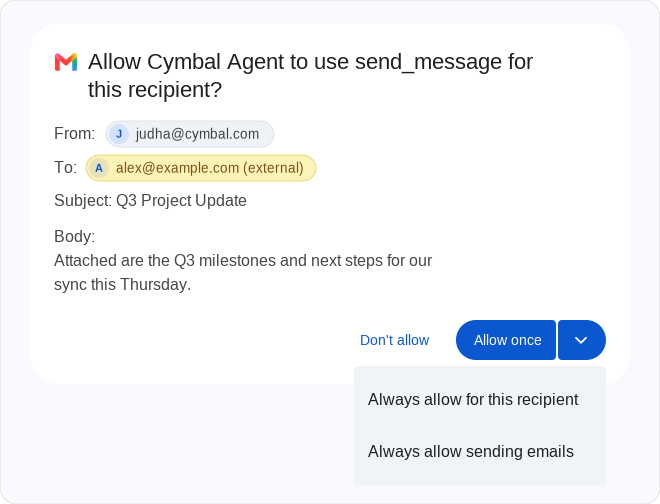
이 가이드에서는 /mcp/v1 엔드포인트에 연결하고, 최상의 사용자 환경을 위한 승인 대화상자를 설계하고, MCP 호스트, MCP 클라이언트 또는 에이전트 하네스에서 스테이트리스(Stateless) 양식 유도 프로토콜을 구현하는 방법을 설명합니다.
시작하기 전에
MCP 양식 유도를 구현하거나 구성하기 전에 기본 요건을 완료하고, MCP 호스트 또는 클라이언트에 커스텀 유도 지원이 필요한지 확인하고, 서버 엔드포인트를 검토하세요.
기본 요건
커스텀 MCP 호스트 또는 클라이언트에서 양식 유도를 구현하기 전에 다음 설정 요구사항을 완료하세요.
- 동일한 Google Cloud 프로젝트에서 API 및 MCP 서버 사용 설정: 대상 Google Workspace API 및 MCP 서버 엔드포인트를 사용 설정하는 동일한 Google Cloud 프로젝트에서 OAuth 2.0 클라이언트 ID를 만듭니다. OAuth 클라이언트를 만들 때 AI 기반 에이전트에 이 클라이언트 사용을 선택합니다. 자세한 안내는 Google Workspace MCP 서버 구성하기를 참고하세요.
- 대상 도구에 필요한 OAuth 2.0 범위 요청:
tools/call로 도구를 호출하려면 해당 도구에 필요한 범위가 포함된 OAuth 2.0Bearer액세스 토큰이 필요합니다. 단,tools/list는 토큰 범위와 관계없이 사용 가능한 도구를 반환합니다. 각 도구에 필요한 OAuth 범위는 서버의 MCP 참조 개요 페이지를 확인하세요.
양식 유도를 구현해야 하는지 확인
에이전트가 전체 Google Workspace 도구 및 결과에 액세스할 수 있도록 MCP 양식 유도를 사용하여 /mcp/v1 엔드포인트에 연결하는 것이 좋습니다. 코드를 작성해야 하는지 여부는 MCP 호스트와 MCP 클라이언트가 빌드되는 방식에 따라 다릅니다.
- 사전 빌드된 MCP 호스트 구성: MCP 양식 유도를 지원하는 Google Antigravity 또는 Claude Desktop과 같은 사전 빌드된 MCP 호스트 애플리케이션을 연결하는 경우 양식 유도 코드를 작성할 필요가 없습니다.
/mcp/v1엔드포인트에 연결합니다. 설정 단계는 Google Workspace MCP 서버 구성을 참고하세요.- 사용자에게 동일한 작업에 대해 두 번 메시지가 표시되지 않도록
/mcp/v1의 Google Workspace MCP 서버에 대해 호스트의 기본 제공 로컬 도구 확인 설정을 항상 허용으로 설정합니다. - 사전 빌드된 MCP 호스트가 아직 양식 유도를 지원하지 않는 경우 제한된
/mcp/v1self대체 엔드포인트에 연결할 수 있습니다. 이 엔드포인트는 양식 유도 없이도 유용한 도구를 노출하지만 특정 호출에는 여전히 승인이 필요할 수 있습니다.
- MCP 호스트에 MCP 클라이언트 SDK 또는 에이전트 프레임워크 통합: 프로토콜 레이어에서 이미 양식 유도를 처리하는 에이전트 개발 키트(ADK)와 같은 MCP 클라이언트 라이브러리 또는 에이전트 프레임워크를 사용하는 경우에도 유도 핸들러를 MCP 호스트의 UI 또는 CLI 표면에 연결해야 합니다.
/mcp/v1에서 최상의 사용자 환경을 제공하려면 이 가이드의 승인 UI 권장사항을 구현하세요. - 커스텀 MCP 클라이언트 및 호스트 빌드: 자체 MCP 클라이언트 및 호스트 통합을 빌드하는 경우 이 가이드의 스테이트리스(Stateless) 양식 유도 프로토콜과 승인 UI 권장사항을 모두 구현하여
/mcp/v1에 연결합니다.
서버 엔드포인트
정식 버전 Google Workspace MCP 서버와 범용 검색 MCP 서버는 기본 /mcp/v1 엔드포인트와 제한된 /mcp/v1self 대체 엔드포인트를 제공합니다.
| 엔드포인트 | 서버 URL | 양식 유도 요구사항 | 사용 가능한 도구 |
|---|---|---|---|
/mcp/v1 |
|
권장 기본 엔드포인트입니다. mode: "form" 유도와 함께 사용합니다.
|
기본 정책에 따라 항상 사용자 승인이 필요한 도구를 포함하여 서버의 모든 도구와 전체 결과 집합을 노출합니다. |
/mcp/v1self |
|
대체 엔드포인트 정책 및 대상 리소스에 따라 특정 호출에는 여전히 양식 유도가 필요할 수 있습니다. |
기본 정책에 따라 항상 승인이 필요한 도구를 생략하고 update_doc와 같이 양식 유도 없이 유용한 도구만 노출합니다. list_threads와 같은 목록 및 검색 메서드는 전체 액세스 권한을 요청하는 대신 승인 없이 액세스할 수 있는 결과의 하위 집합만 반환합니다.
|
가능하면 양식 유도와 함께 /mcp/v1를 사용하고, 양식 유도 지원을 추가할 수 없는 MCP 호스트에는 /mcp/v1self를 예약하세요. 클라이언트가 양식 유도 지원을 선언하지 않고 엔드포인트에서 사용자 승인이 필요한 방식으로 도구를 호출하면 서버는 호출을 차단하고 MissingRequiredClientCapability 오류를 반환합니다.
각 서비스의 /mcp/v1 및 /mcp/v1self에서 사용할 수 있는 도구를 확인하려면 서버의 도구 참조 개요 페이지를 확인하세요.
- Gmail MCP 참조
- Drive MCP 참조
- Docs MCP 참조
- Sheets MCP 참조
- Slides MCP 참조
- Calendar MCP 참조
- Chat MCP 참조
- 유니버설 검색 MCP 참조
양식 유도 작동 방식
Google Workspace MCP 서버는 2026-07-28 MCP 유도 사양을 기반으로 스테이트리스(Stateless) 단일 연결 요청 및 재시도 흐름을 사용합니다.
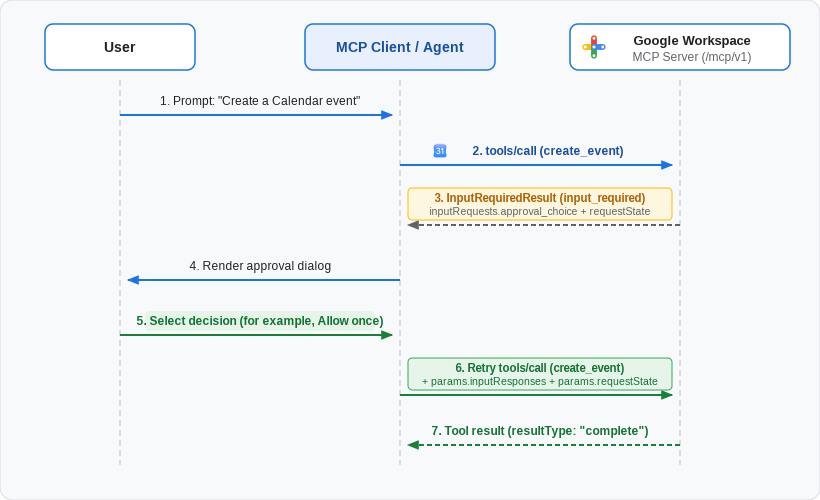
양식 유도 수명 주기는 다음 단계를 따릅니다.
- 사용자 프롬프트: 사용자가 에이전트에 캘린더 일정 만들기 등의 작업을 수행하도록 요청합니다.
- 초기
tools/call요청: MCP 클라이언트는create_event와 같은 도구의/mcp/v1엔드포인트에tools/call요청을 전송하고params._meta에서elicitation기능을 선언합니다. InputRequiredResult조치 필요: 요청된 작업에 사용자 승인이 필요한 경우 서버는 도구를 실행하기 전에 실행을 일시중지합니다. 서버는resultType: "input_required",mode: "form"가 있는elicitation/create요청을 포함하는"approval_choice"로 키가 지정된inputRequests맵, 불투명한requestState문자열이 있는result객체를 반환합니다.- 승인 대화상자: MCP 클라이언트는 대상 Google Workspace 제품 및 도구, 마크다운 확인 메시지, 결정 질문,
enum및enumNames에서 허용되는 선택사항을 보여주는 승인 대화상자를 렌더링합니다. - 사용자 결정: 사용자가 이번만 허용 또는 허용 안함과 같은 승인 옵션을 선택합니다.
inputResponses및requestState를 사용하여tools/call재시도: MCP 클라이언트는 동일한 도구name및arguments와 함께 사용자가 선택한"approval_choice"가 포함된 최상위params.requestState및params.inputResponses필드를 사용하여 두 번째tools/call요청을 전송합니다.- 도구 실행 결과: 서버는
requestState가 초기 호출의 정확한 도구 인수에 바인딩되어 있는지 확인하고, 사용자의 결정을 평가하고, 도구 호출을 실행하거나 종료하고,resultType: "complete"가 포함된 최종result를 반환합니다.
승인이 요청된 경우
도구 호출이 elicitation/create 확인을 트리거하는지 여부는 시스템, 사용자, 관리자 거버넌스 정책에 따라 Google Workspace MCP 서버에서 동적으로 결정됩니다. 정책 평가에서는 다음 요소를 고려할 수 있습니다.
- 작업 유형: 잠재고객과 데이터를 공유하거나 공유 리소스를 수정하는 쓰기 작업은 사용자 또는 관리자 정책에서 허용하지 않는 한 기본적으로 사용자 확인이 필요하지만, 비공개 파일 생성과 같은 자체 쓰기는 기본적으로 확인 없이 실행됩니다. 휴지통 작업에는 항상 영구 승인 없이 호출별 확인이 필요하며 읽기 또는 메타데이터 작업에도 사용자 또는 관리자 정책에 따라 확인이 필요할 수 있습니다.
- 콘텐츠 소유권 및 공개 상태: 다른 사용자가 소유하거나 사용자의 조직 외부에 공유된 파일에 액세스하거나 수정하려면 승인이 필요할 수 있습니다.
- 외부 수신자: 사용자의 도메인 외부로 메시지를 보내거나 파일을 공유하거나 참석자를 초대하려면 일반적으로 명시적인 확인이 필요합니다.
- 사용자 및 관리자 환경설정: 이전 거래에서 저장된 승인 환경설정 또는 도메인 전체 관리자 규칙에 따라 특정 도구에 대한 확인이 필요하거나 우회될 수 있습니다.
정책 평가는 모든 호출에서 서버 측에서 발생하므로 클라이언트는 모든 tools/call 호출에서 InputRequiredResult 응답을 처리할 준비가 되어 있어야 합니다. 클라이언트에서 도구 민감도 규칙을 하드 코딩하거나 승인 결정을 캐시하지 마세요.
승인 선택 참조
requestedSchema.properties.approval_choice에서 서버는 현재 요청에 사용할 수 있는 선택사항을 나타내는 병렬 enum 및 enumNames 배열을 반환합니다. Google Workspace MCP 서버 전반에서 다음 enum 값이 지원됩니다.
enum 값 |
기본 enumNames 라벨(영어) |
실행 허용 | 제공 시기 및 동작 |
|---|---|---|---|
ALLOW_ONCE |
한 번 허용 | 예 | 모든 승인 프롬프트에서 제공됩니다. 영구 규칙을 기록하지 않고 현재 도구 호출을 한 번 실행합니다. |
DENY_ONCE |
허용 안함 | 아니요 |
모든 승인 프롬프트에 표시됩니다. 영구 규칙을 기록하지 않고 UserDeniedAction 오류로 현재 도구 호출을 종료합니다.
|
ALLOW_TOOL_ALWAYS |
이 도구 항상 허용 | 예 | 사용자 및 관리자 정책에서 도구 전체의 영구 승인을 허용하는 경우에 제공됩니다. 현재 호출을 실행하고 동일한 에이전트에서 동일한 도구에 대한 향후 호출을 사전 승인합니다. |
ALLOW_RESOURCE_ALWAYS |
이 파일/폴더/드라이브/이메일/일정/스페이스/채팅/그룹 채팅/할 일/항목 항상 허용 | 예 | 동일한 유형의 리소스를 최대 100개까지 수정하거나 액세스할 때 제공됩니다. 호출이 여러 리소스를 타겟팅하는 경우 이 파일 항상 허용과 같은 복수형 문구를 사용합니다. 현재 호출을 실행하고 동일한 리소스 ID에서 동일한 에이전트의 향후 호출을 사전 승인합니다. |
ALLOW_AUDIENCE_ALWAYS |
이 수신자/해당 수신자에 대해 항상 허용 | 예 | 최대 100명의 수신자를 대상으로 하는 전송, 공유, 초대 작업에 제공됩니다. 현재 통화를 실행하고 동일한 상담사가 동일한 수신자 집합에 거는 향후 통화를 사전 승인합니다. |
ALLOW_OWNER_ALWAYS |
이 소유자/해당 소유자에 대해 항상 허용 | 예 | 최대 3명의 소유자가 소유한 항목을 다루는 읽기 또는 그라운딩 프롬프트에 제공됩니다. 현재 호출을 실행하고 해당 사용자가 소유한 항목에 대해 동일한 에이전트의 향후 호출을 사전 승인합니다. |
개별 InputRequiredResult에는 특정 도구 호출에 적용되는 선택사항의 하위 집합만 포함됩니다.
- 파괴 및 휴지통 작업: 리소스를 영구적으로 삭제하거나 휴지통으로 이동하는 작업 또는 모든 호출에 대한 확인이 관리자 정책에 의거하여 필요한 작업은
ALLOW_ONCE및DENY_ONCE만 제공합니다. - 범위가 지정된 작업: 영구 승인이 허용되면 서버는
ALLOW_ONCE,ALLOW_AUDIENCE_ALWAYS또는ALLOW_RESOURCE_ALWAYS,ALLOW_TOOL_ALWAYS,DENY_ONCE와 같은 관련 좁은 범위를 반환합니다.
버튼 값을 하드코딩하는 대신 현재 요청에 대해 enum 및 enumNames에서 반환된 정확한 옵션을 항상 렌더링합니다.
최적의 사용자 환경을 위한 권장사항
양식 도출을 지원하는 표준 MCP 클라이언트는 /mcp/v1에서 바로 사용할 수 있습니다. 그러나 일반 양식 렌더러는 단일 선택 결정을 별도의 제출 버튼과 쌍을 이루는 라디오 그룹 또는 드롭다운 메뉴로 표시하는 경우가 많습니다. 이 경우 추가 클릭이 필요하고 대상 Google Workspace 앱 컨텍스트가 숨겨집니다.
최상의 양식 유도 사용자 환경을 위해 MCP 클라이언트에 다음 5가지 권장사항을 구현하세요. 권장사항 1~3은 다음 승인 대화상자 그림의 번호가 지정된 콜아웃에 해당합니다.
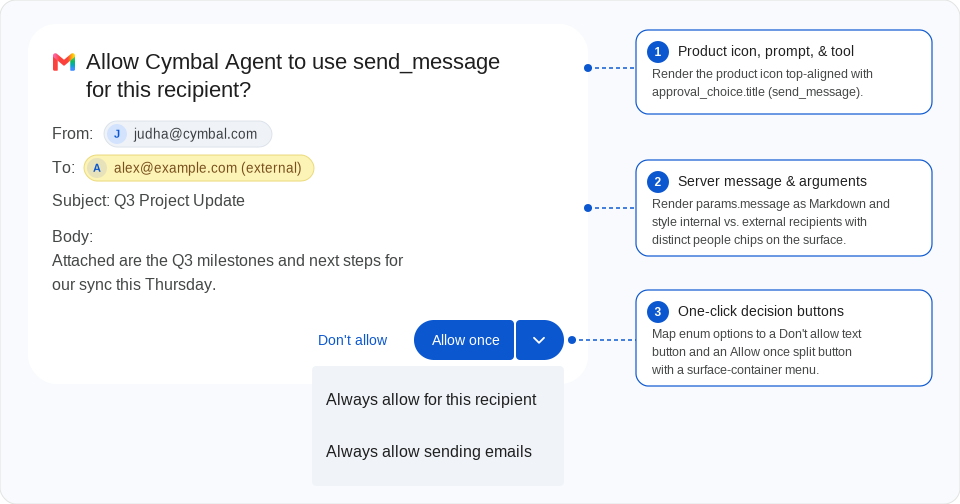
1. 제품 이름, 아이콘, 도구 표시
사용자는 에이전트가 호출하려는 Google Workspace 제품과 도구를 즉시 확인할 수 있어야 합니다.
- 초기화 또는
server/discover의 MCP 서버serverInfo메타데이터 또는calendarmcp.googleapis.com와 같은 요청 호스트 이름을 Google Workspace 제품 이름 및 아이콘에 매핑합니다. title,icons,isConfirmation와 같은InputRequiredResult의_meta표시 힌트를 선택적 개선사항으로 취급합니다. 프로덕션 Google Workspace MCP 서버는 아직 이러한_meta필드를 내보내지 않으므로 UI가 이러한 필드에 의존해서는 안 됩니다.- 사용자가
create_draft및create_event와 같은 작업을 구분할 수 있도록params.name에서 타겟 도구 이름을 표시합니다.
2. 서버 메시지 및 enumNames 렌더링
클라이언트 프레젠테이션 레이어를 단순하게 유지하고 서버에서 제공하는 승인 콘텐츠를 직접 렌더링합니다.
params.message를 마크다운으로 렌더링하고approval_choice.title를 표시: Google Workspace MCP 서버는 이미inputRequests.approval_choice.params.message에서 작업 세부정보를 마크다운으로 형식 지정하고requestedSchema.properties.approval_choice.title에서 현지화된 확인 질문을 제공합니다. 원시 마크다운 기호를 표시하거나 도구별 맞춤 인수 형식 지정 로직을 작성하는 대신 안전한 마크다운 렌더러를 사용하여message를 직접 렌더링하고 작업 버튼 위에title를 명확하게 표시합니다.enum값을enumNames라벨과 페어링:requestedSchema.properties.approval_choice를 동적으로 검사합니다.enum의 각 식별자를enumNames의 동일한 색인에 있는 사람이 읽을 수 있는 라벨과 페어링하고,oneOf를 사용하는 다른 MCP 서버와 상호작용하는 경우 JSON 스키마oneOf항목으로 대체합니다.
3. 원클릭 버튼으로 의사 결정 간소화
requestedSchema에 단일 enum 속성이 포함된 경우 별도의 제출 클릭이 필요한 라디오 버튼 목록이나 드롭다운 메뉴를 렌더링하지 마세요.
Allow once및Don't allow와 같은 두 가지 옵션: 두 개의 버튼을 나란히 렌더링합니다. 두 버튼 중 하나를 클릭하면 재시도 요청이 즉시 제출됩니다.- 여러 허용 옵션: 서버가
ALLOW_ONCE, 하나 이상의 영구 허용 범위(예:ALLOW_AUDIENCE_ALWAYS또는ALLOW_TOOL_ALWAYS),DENY_ONCE를 반환하면 기본 분할 버튼이 렌더링됩니다. 이 버튼은 기본적으로 한 번 허용으로 설정되며, 추가 허용 옵션을 위한 캐럿 메뉴와 별도의 허용 안함 버튼이 함께 제공됩니다.
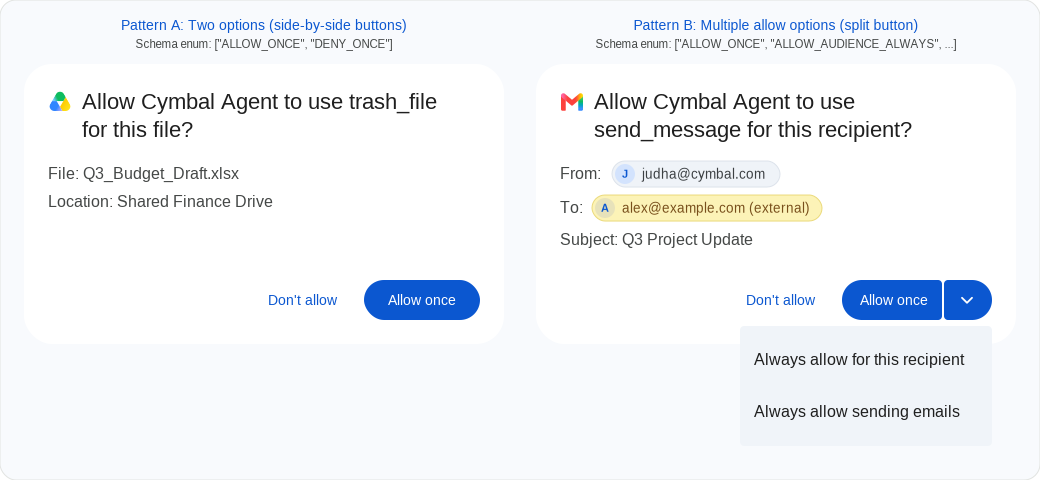
패턴 A에서 파괴적인 Drive 작업은 ALLOW_ONCE 및 DENY_ONCE만 반환하며, 클라이언트는 이를 허용 안함 및 한 번 허용을 위한 두 개의 나란히 있는 버튼으로 렌더링합니다. 패턴 B에서 Gmail 작업은 ALLOW_ONCE, ALLOW_AUDIENCE_ALWAYS, ALLOW_TOOL_ALWAYS, DENY_ONCE를 반환하며, 클라이언트는 이를 허용 안함 버튼과 함께 한 번 허용 분할 버튼으로 렌더링합니다. 이 분할 버튼의 메뉴에는 영구 허용 선택지가 표시됩니다.
4. /mcp/v1에서 중복 프롬프트 방지
많은 MCP 호스트에는 외부 도구를 실행하기 전에 기본 제공되는 로컬 확인 프롬프트가 포함되어 있습니다. 양식 유도가 사용 설정된 상태에서 Google Workspace MCP 서버를 호출하면 서버가 자체 정책 인식 유도 질문을 적용하므로 로컬 사전 실행 프롬프트가 중복된 이중 프롬프트 환경을 만듭니다.
- 양식 유도가 있는 사전 빌드된 MCP 호스트를 구성하는 경우:
/mcp/v1에서 Google Workspace MCP 서버에 대한 호스트의 로컬 도구 확인 설정을 항상 허용으로 설정하고 서버에서 시작된 유도 대화상자를 사용합니다. 호스트가 양식 유도를 지원하지 않고/mcp/v1self에 연결하는 경우, 서버 측 승인을 트리거하지 않는 호출에 대해 클라이언트 측 프롬프트를 사용하려면 로컬 도구 확인을 사용 설정된 상태로 유지하세요. - MCP 호스트를 빌드하는 경우:
*mcp.googleapis.com및people.googleapis.com(예:gmailmcp.googleapis.com,calendarmcp.googleapis.com,drivemcp.googleapis.com,workspacemcp.googleapis.com)에 양식 유도가 사용 설정된 경우 호스트의 일반적인 사전 호출 확인 대화상자를 표시하지 않습니다. 서버가resultType: "input_required"와 함께InputRequiredResult를 반환하는 경우에만 사용자에게 메시지를 표시합니다.
5. 도구 및 거부에 대한 에이전트 동작 안내
추론 모델은 휴먼인더루프 승인 흐름을 두 가지 방식으로 잘못 해석할 수 있습니다.
- 사전 예방적으로 쓰기 도구 방지: 모델이
send_message와 같은 쓰기 도구를 호출하면 사용자 검토 없이 즉시 실행된다고 가정하는 경우 사용자가 이메일 전송을 요청하더라도 모델이create_draft와 같은 초안 도구로 대체될 수 있습니다. - 거부 후 대체 쓰기 도구로 재시도: 사용자가 승인 대화상자에서 허용 안함을 클릭하고 서버가
UserDeniedAction오류 결과를 반환하면 모델은 거부를 일시적인 도구 실패로 처리하고 다른 쓰기 도구를 사용하여 동일한 목표를 달성하려고 시도하여 원치 않는 두 번째 승인 프롬프트를 트리거할 수 있습니다.
두 문제를 모두 방지하려면 에이전트의 시스템 프롬프트에 다음 안내를 포함하세요.
프롬프트
When calling Google Workspace MCP tools:
1. Select the tool that directly matches the user's intent (for example,
   use send_message when asked to send an email). Sensitive tools
   automatically pause for user confirmation through MCP form elicitation
   before executing.
2. If a tool call fails because the user denied, declined, or canceled the
   approval request, stop immediately and acknowledge the user's decision.
   Do not retry the same action or call an alternative write tool unless
   the user explicitly asks you to do so in a new message.
전송 및 스테이트리스(Stateless) 프로토콜 요구사항
Google Workspace MCP 서버는 스테이트리스(Stateless) 스트리밍 가능한 HTTP를 통해 작동합니다. 커스텀 MCP 클라이언트를 빌드할 때는 모든 요청에서 다음 유선 요구사항을 따르세요.
- HTTP 헤더:
/mcp/v1에 대한 모든POST요청에 다음 헤더를 포함합니다.Authorization: Bearer ACCESS_TOKENContent-Type: application/jsonAccept: application/json, text/event-streamMCP-Protocol-Version: 2026-07-28Accept-Language: BCP_47_LANGUAGE_TAG를 사용하여 확인 메시지, 질문,enumNames라벨을 사용자가 선호하는 언어(예:es-419, es;q=0.9, en;q=0.8)로 현지화합니다. 생략하면 텍스트 기본값은en-US입니다.
- 응답 콘텐츠 유형: 서버 및 요청 유형에 따라 HTTP 응답 본문은
Content-Type: application/json를 사용하는 표준 JSON 또는Content-Type: text/event-stream를 사용하는 서버 전송 이벤트(SSE)로 형식이 지정될 수 있습니다. 여기서 JSON-RPC 페이로드는data: {...}줄에 표시됩니다. HTTP 전송 파서는 두 형식을 모두 허용해야 합니다. - 스테이트리스(Stateless) 탐색: Google Workspace MCP 서버는 스테이트풀(Stateful)
initialize세션을 유지하지 않습니다. 시작 시 서버 메타데이터와 기능을 가져오려면"method": "server/discover"및"params": {}를 사용하여 JSON-RPC 요청을 전송합니다. 그러면result._meta["io.modelcontextprotocol/serverInfo"]에서 서버 메타데이터가 반환됩니다.isConfirmation,title,icons와 같은 맞춤 확인_meta힌트는 아직 프로덕션InputRequiredResult응답에서 내보내지 않으므로 항상_meta프레젠테이션 필드를 선택사항으로 처리하고serverInfo또는 서버 호스트 이름으로 대체합니다. - 요청별
_meta기능: 전송은 스테이트리스(Stateless)이므로 다음 키를 사용하여 모든tools/list및tools/call요청의params내에_meta를 포함합니다."io.modelcontextprotocol/protocolVersion": "2026-07-28""io.modelcontextprotocol/clientInfo":{"name": "YOUR_APP_NAME","version": "VERSION"}"io.modelcontextprotocol/clientCapabilities":{"elicitation": {"form": {}}}
오류 처리 및 파라미터 결합
도구 호출이 차단되거나 재시도 검증이 실패하면 서버는 실패 카테고리에 따라 도구 수준 오류 결과 또는 최상위 JSON-RPC 오류 객체를 반환합니다.
UserDeniedAction및AdminPolicyBlock: 사용자가 승인 프롬프트를 거부하거나 관리자 정책이 작업을 차단하면 서버는"resultType": "complete","isError": true,result.content의 현지화된 오류 메시지와 함께 JSON-RPCresult를 반환합니다. 서비스 및 환경에 사용 설정된 경우 서버는result._meta["google.com/error"]에 구조화된 오류 메타데이터도 포함합니다.result._meta["google.com/error"]는 서비스 및 환경별로 제어되므로result._meta["google.com/error"]가 없으면 클라이언트가result.content에서 오류 메시지를 읽는 것으로 대체해야 합니다.UserDeniedAction: 사용자가DENY_ONCE를 선택하거나 승인 양식을 거부 또는 취소할 때 반환됩니다. 기본 영어 메시지는"Action canceled. The user declined the confirmation request."입니다.AdminPolicyBlock: 조직 관리자 정책에서 에이전트가 작업을 수행하지 못하도록 금지하는 경우 반환됩니다. 기본 영어 메시지는"Action could not be completed. Your administrator has blocked third-party agents from performing this action."입니다.
JSON
{ "jsonrpc": "2.0", "id": 3, "result": { "resultType": "complete", "isError": true, "content": [ { "type": "text", "text": "Action canceled. The user declined the confirmation request." } ], "_meta": { "google.com/error": { "code": 400, "message": "Action canceled. The user declined the confirmation request.", "status": "FAILED_PRECONDITION", "details": [ { "@type": "type.googleapis.com/google.rpc.ErrorInfo", "reason": "UserDeniedAction", "domain": "mcp.googleapis.com" } ] } } } }MissingRequiredClientCapability: 클라이언트가_meta["io.modelcontextprotocol/clientCapabilities"]에서 양식 유도 지원을 선언하지 않고/mcp/v1또는/mcp/v1self에서 사용자 확인이 필요한 방식으로 도구를 호출할 때 반환됩니다. 서버는 이 오류를 코드-32021가 있는 최상위 JSON-RPCerror객체와error.data.requiredCapabilities의 필수 기능 객체로 변환합니다.JSON
{
  "jsonrpc": "2.0",
  "id": 2,
  "error": {
    "code": -32021,
    "message": "Action could not be completed. This action requires user confirmation, which this client does not support. Use a client that supports form elicitation to perform this action.",
    "data": {
      "requiredCapabilities": {
        "elicitation": {
          "form": {}
        }
      }
    }
  }
}
파라미터 결합 시행:
requestState내의requestBinding토큰은 초기 승인 챌린지를 첫 번째 호출에서 전송된 정확한 도구arguments에 암호화 방식으로 결합합니다. 클라이언트가 재시도 호출에서params.arguments의 필드를 수정하거나 형식이 잘못되었거나 바인딩되지 않은params.requestState를 전달하는 경우 서버는 잘못된 승인을 무시하고 새InputRequiredResult질문을 반환하거나 클라이언트에게inputResponses없이 재시도하도록 지시하는 잘못된 매개변수 또는 실패한 전제조건 오류를 반환합니다.
구현 예시
다음 엔드 투 엔드 둘러보기에서는 MCP 클라이언트가 Calendar create_event 도구를 호출하고, 브라우저 UI 또는 터미널 CLI에서 서버의 승인 프롬프트를 렌더링하고, TypeScript 및 Python으로 사용자의 결정을 제출하는 방법을 보여줍니다. 그런 다음 코딩 에이전트를 위한 재사용 가능한 에이전트 기술을 보여줍니다.
고객 승인 표시 영역
브라우저 기반 MCP 클라이언트에서 TypeScript 구현은 Calendar 아이콘, 서버 호스트 이름, 도구 이름, 서버에서 렌더링된 마크다운 message 미리보기, 확인 질문, 허용 안함 버튼, 한 번 허용 분할 버튼을 보여주는 시각적 승인 카드를 렌더링합니다.
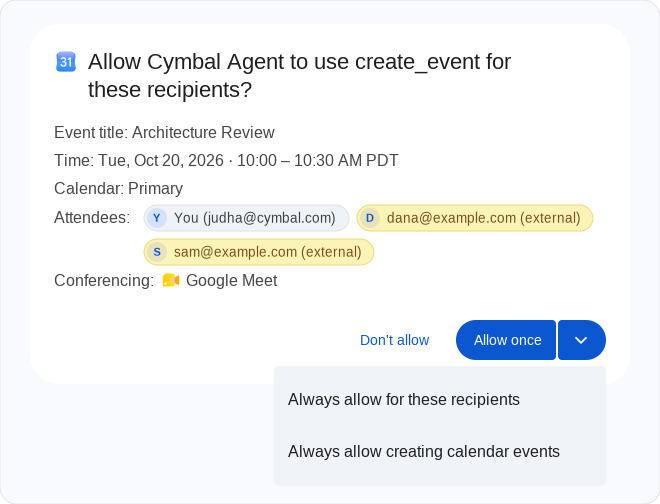
터미널 기반 MCP 클라이언트에서 Python CLI 구현은 동일한 InputRequiredResult 페이로드를 대화형 번호가 매겨진 프롬프트로 렌더링합니다.
CLI
=== Google Calendar (create_event) ===
Architecture Review
Tue, Oct 20 · 10:00 - 10:30 AM PDT · 🟢 No calendar conflicts
You, dana@example.com, sam@example.com
Conferencing: Google Meet

Allow Cymbal Agent to use create_event for these recipients?
  [1] Allow once (ALLOW_ONCE)
  [2] Always allow for these recipients (ALLOW_AUDIENCE_ALWAYS)
  [3] Always allow this tool (ALLOW_TOOL_ALWAYS)
  [4] Don't allow (DENY_ONCE)
Enter choice (1-4, or c to cancel):
초기 통화 및 정보 수집 응답
클라이언트는 create_event 도구를 사용하여 캘린더 일정을 만드는 tools/call 요청을 전송하여 시작합니다.
JSON
{
  "jsonrpc": "2.0",
  "id": 2,
  "method": "tools/call",
  "params": {
    "name": "create_event",
    "arguments": {
      "calendarId": "primary",
      "summary": "Architecture Review",
      "startTime": "2026-10-20T10:00:00",
      "endTime": "2026-10-20T10:30:00",
      "timeZone": "America/Los_Angeles",
      "attendees": [
        {
          "email": "dana@example.com"
        },
        {
          "email": "sam@example.com"
        }
      ],
      "addGoogleMeetUrl": true
    },
    "_meta": {
      "io.modelcontextprotocol/protocolVersion": "2026-07-28",
      "io.modelcontextprotocol/clientInfo": {
        "name": "Cymbal Agent",
        "version": "1.0.0"
      },
      "io.modelcontextprotocol/clientCapabilities": {
        "elicitation": {
          "form": {}
        }
      }
    }
  }
}
승인이 필요한 경우 서버는 InputRequiredResult로 응답합니다.
JSON
{
  "jsonrpc": "2.0",
  "id": 2,
  "result": {
    "resultType": "input_required",
    "inputRequests": {
      "approval_choice": {
        "method": "elicitation/create",
        "params": {
          "mode": "form",
          "message": "**Architecture Review**  \nTue, Oct 20 · 10:00 - 10:30 AM PDT · 🟢 No calendar conflicts  \nYou, dana@example.com, sam@example.com  \n**Conferencing:** Google Meet",
          "requestedSchema": {
            "type": "object",
            "required": ["approval_choice"],
            "properties": {
              "approval_choice": {
                "type": "string",
                "title": "Allow Cymbal Agent to use create_event for these recipients?",
                "enum": [
                  "ALLOW_ONCE",
                  "ALLOW_AUDIENCE_ALWAYS",
                  "ALLOW_TOOL_ALWAYS",
                  "DENY_ONCE"
                ],
                "enumNames": [
                  "Allow once",
                  "Always allow for these recipients",
                  "Always allow this tool",
                  "Don't allow"
                ]
              }
            }
          }
        }
      }
    },
    "requestState": "{\"elicitationId\":\"...\",\"requestBinding\":\"...\"}"
  }
}
InputRequiredResult 응답에는 다음 주요 필드가 포함됩니다.
result.resultType: 서버가 사용자 입력을 위해 실행을 일시중지하면"input_required"로 설정되고 도구 실행이 완료되면"complete"로 설정됩니다.result.inputRequests: 요청 식별자"approval_choice"로 키가 지정된 맵입니다. 각 항목에는"method": "elicitation/create"및"mode": "form"가 있는params객체가 있습니다._meta프레젠테이션 힌트:isConfirmation,title,icons와 같은 선택적 필드는 아직 프로덕션InputRequiredResult응답에서 내보내지 않습니다. 항상_meta필드를 선택사항으로 처리하고, 없는 경우serverInfo또는 서버 호스트 이름에서 제품 이름과 아이콘을 확인합니다.inputRequests.approval_choice.params.message: 서버에서 생성된 작업의 마크다운 형식 미리보기 또는 도구가 별도의 미리보기 카드를 생성하지 않는 경우 확인 질문입니다.inputRequests.approval_choice.params.requestedSchema:properties.approval_choice정의에 다음 필드가 포함된 JSON 스키마 객체입니다.title: 현지화된 확인 질문입니다(예:"Allow Cymbal Agent to use create_event for these recipients?"). 요청에_meta["io.modelcontextprotocol/clientInfo"].name를 제공하면 서버가 이 질문에 애플리케이션 이름을 통합합니다.enum:ApprovalChoice식별자의 정렬된 배열입니다(예:ALLOW_ONCE,ALLOW_AUDIENCE_ALWAYS,ALLOW_TOOL_ALWAYS,DENY_ONCE).enumNames:enum의 각 항목에 해당하는 현지화된 사람이 읽을 수 있는 라벨의 병렬 배열입니다(예:Allow once,Always allow for these recipients,Always allow this tool,Don't allow).
result.requestState: 서버의elicitationId및 암호화requestBinding토큰이 포함된 불투명한 JSON 인코딩 문자열입니다. 재시도 호출 시params.requestState에서 이 문자열을 변경하지 않고 에코해야 합니다.
재시도, 거부, 취소 페이로드
사용자가 허용 옵션을 선택한 후 정확히 동일한 name 및 arguments를 사용하여 두 번째 tools/call 요청을 전송하고 requestState 및 inputResponses를 params 내의 최상위 필드로 전달합니다.
JSON
{
  "jsonrpc": "2.0",
  "id": 3,
  "method": "tools/call",
  "params": {
    "name": "create_event",
    "arguments": {
      "calendarId": "primary",
      "summary": "Architecture Review",
      "startTime": "2026-10-20T10:00:00",
      "endTime": "2026-10-20T10:30:00",
      "timeZone": "America/Los_Angeles",
      "attendees": [
        {
          "email": "dana@example.com"
        },
        {
          "email": "sam@example.com"
        }
      ],
      "addGoogleMeetUrl": true
    },
    "requestState": "{\"elicitationId\":\"...\",\"requestBinding\":\"...\"}",
    "inputResponses": {
      "approval_choice": {
        "action": "accept",
        "content": {
          "approval_choice": "ALLOW_ONCE"
        }
      }
    },
    "_meta": {
      "io.modelcontextprotocol/protocolVersion": "2026-07-28",
      "io.modelcontextprotocol/clientInfo": {
        "name": "Cymbal Agent",
        "version": "1.0.0"
      },
      "io.modelcontextprotocol/clientCapabilities": {
        "elicitation": {
          "form": {}
        }
      }
    }
  }
}
MCP Elicitation 사양은 양식 값 제출과 대화상자 닫기를 구분합니다. params.inputResponses에서 부정적인 사용자 결정을 두 가지 방법으로 나타낼 수 있습니다.
DENY_ONCE선택 제출: 사용자가DENY_ONCE에 해당하는 허용 안함 버튼을 클릭하면"content": {"approval_choice": "DENY_ONCE"}를 사용하여"action": "accept"를 전송합니다.JSON
{
  "jsonrpc": "2.0",
  "id": 3,
  "method": "tools/call",
  "params": {
    "name": "create_event",
    "arguments": {
      "calendarId": "primary",
      "summary": "Architecture Review",
      "startTime": "2026-10-20T10:00:00",
      "endTime": "2026-10-20T10:30:00",
      "timeZone": "America/Los_Angeles",
      "attendees": [
        {
          "email": "dana@example.com"
        },
        {
          "email": "sam@example.com"
        }
      ],
      "addGoogleMeetUrl": true
    },
    "requestState": "{\"elicitationId\":\"...\",\"requestBinding\":\"...\"}",
    "inputResponses": {
      "approval_choice": {
        "action": "accept",
        "content": {
          "approval_choice": "DENY_ONCE"
        }
      }
    },
    "_meta": {
      "io.modelcontextprotocol/protocolVersion": "2026-07-28",
      "io.modelcontextprotocol/clientInfo": {
        "name": "Cymbal Agent",
        "version": "1.0.0"
      },
      "io.modelcontextprotocol/clientCapabilities": {
        "elicitation": {
          "form": {}
        }
      }
    }
  }
}
대화상자 거부 또는 취소: 사용자가 허용 옵션을 선택하지 않고 대화상자를 닫거나 취소하는 경우
"action": "decline"또는"action": "cancel"를 전송하고content필드를 생략합니다.JSON
"inputResponses": {
  "approval_choice": {
    "action": "cancel"
  }
}
두 경우 모두 서버는 응답을 DENY_ONCE로 처리하고 도구 실행을 종료하며 도구 오류 결과를 반환합니다.
TypeScript 웹 클라이언트
다음 TypeScript 예시에서는 InputRequiredResult 페이로드에서 직접 마크다운 message, 확인 질문, 허용된 옵션을 추출하고, 선택적 _meta 힌트 또는 서버 호스트 이름에서 제품 제목을 확인하고, 사용자의 결정에 따라 tools/call를 재생합니다.
TypeScript
const PROTOCOL_VERSION = "2026-07-28";
const CLIENT_INFO = { name: "Cymbal Agent", version: "1.0.0" };
const MAX_ELICITATION_ROUNDS = 3;

const HOST_TITLES: Record<string, string> = {
  "gmailmcp.googleapis.com": "Gmail",
  "calendarmcp.googleapis.com": "Google Calendar",
  "drivemcp.googleapis.com": "Google Drive",
  "docsmcp.googleapis.com": "Google Docs",
  "sheetsmcp.googleapis.com": "Google Sheets",
  "slidesmcp.googleapis.com": "Google Slides",
  "chatmcp.googleapis.com": "Google Chat",
  "people.googleapis.com": "Google Contacts",
  "tasksmcp.googleapis.com": "Google Tasks",
  "workspacemcp.googleapis.com": "Google Workspace",
};

interface ElicitationOption {
  value: string;
  label: string;
}

export interface ElicitationCardModel {
  requestKey: string;
  serverTitle: string;
  serverIconUrl?: string;
  toolName: string;
  markdownMessage: string;
  questionTitle: string;
  decisionFieldKey: string;
  denyOption?: ElicitationOption;
  primaryAllowOption?: ElicitationOption;
  secondaryAllowOptions: ElicitationOption[];
}

function buildBaseMeta(): Record<string, unknown> {
  return {
    "io.modelcontextprotocol/protocolVersion": PROTOCOL_VERSION,
    "io.modelcontextprotocol/clientInfo": CLIENT_INFO,
    "io.modelcontextprotocol/clientCapabilities": {
      elicitation: { form: {} },
    },
  };
}

/**
 * Extracts a UI view model directly from an InputRequiredResult response.
 * Render card.markdownMessage with a safe Markdown renderer in your UI.
 */
export function extractCardModel(
  rpcResult: Record<string, any>,
  toolName: string,
  serverHost = "workspacemcp.googleapis.com",
): ElicitationCardModel | null {
  const inputRequests: Record<string, any> = rpcResult.inputRequests ?? {};
  const requestEntry = Object.entries(inputRequests).find(
    ([, req]: [string, any]) =>
      req?.method === "elicitation/create" && req?.params?.mode === "form",
  );
  if (!requestEntry) {
    return null;
  }
  const [requestKey, elicitationReq] = requestEntry;

  const reqMeta = elicitationReq.params?._meta ?? {};
  const resultMeta = rpcResult._meta ?? {};
  const serverInfo = resultMeta["io.modelcontextprotocol/serverInfo"] ?? {};
  const icons: Array<{ src: string; mimeType?: string }> =
    reqMeta.icons ?? resultMeta.icons ?? serverInfo.icons ?? [];
  const preferredIcon =
    icons.find((icon) => icon.mimeType === "image/svg+xml") ?? icons[0];

  const properties: Record<string, any> =
    elicitationReq.params?.requestedSchema?.properties ?? {};
  const firstProperty = Object.entries(properties)[0];
  if (!firstProperty) {
    return null;
  }
  const [decisionFieldKey, fieldSchema] = firstProperty as [
    string,
    Record<string, any>,
  ];

  let options: ElicitationOption[] = [];
  if (Array.isArray(fieldSchema.enum)) {
    const enumNames: string[] = Array.isArray(fieldSchema.enumNames)
      ? fieldSchema.enumNames
      : [];
    options = fieldSchema.enum.map((val: string, idx: number) => ({
      value: val,
      label: enumNames[idx] ?? val,
    }));
  } else if (Array.isArray(fieldSchema.oneOf)) {
    options = fieldSchema.oneOf.map((opt: any) => ({
      value: opt.const,
      label: opt.title ?? opt.const,
    }));
  }

  const denyOption = options.find((opt) => opt.value.startsWith("DENY"));
  const allowOptions = options.filter(
    (opt) => !opt.value.startsWith("DENY"),
  );

  return {
    requestKey,
    serverTitle:
      reqMeta.title ??
      resultMeta.title ??
      serverInfo.title ??
      serverInfo.name ??
      HOST_TITLES[serverHost] ??
      "Google Workspace",
    serverIconUrl: preferredIcon?.src,
    toolName,
    markdownMessage:
      elicitationReq.params?.message ?? "Confirm this action.",
    questionTitle: fieldSchema.title ?? "Confirm this action?",
    decisionFieldKey,
    denyOption,
    primaryAllowOption: allowOptions[0],
    secondaryAllowOptions: allowOptions.slice(1),
  };
}

/**
 * Executes tools/call and replays with requestState and inputResponses
 * when the server returns an InputRequiredResult.
 */
export async function handleToolCallWithElicitation(
  sendRpc: (payload: Record<string, unknown>) => Promise<Record<string, any>>,
  promptUserInUi: (card: ElicitationCardModel) => Promise<string | null>,
  toolName: string,
  toolArgs: Record<string, unknown>,
  serverHost = "calendarmcp.googleapis.com",
): Promise<Record<string, any>> {
  let requestId = 1;
  let response = await sendRpc({
    jsonrpc: "2.0",
    id: requestId,
    method: "tools/call",
    params: {
      name: toolName,
      arguments: structuredClone(toolArgs),
      _meta: buildBaseMeta(),
    },
  });

  for (let round = 0; round < MAX_ELICITATION_ROUNDS; round++) {
    const result = response.result ?? {};
    if (result.resultType !== "input_required") {
      return response;
    }

    const card = extractCardModel(result, toolName, serverHost);
    if (!card) {
      return response;
    }

    const selectedValue = await promptUserInUi(card);
    const userResponse = selectedValue
      ? {
          action: "accept",
          content: { [card.decisionFieldKey]: selectedValue },
        }
      : { action: "cancel" };

    requestId += 1;
    response = await sendRpc({
      jsonrpc: "2.0",
      id: requestId,
      method: "tools/call",
      params: {
        name: toolName,
        arguments: structuredClone(toolArgs),
        ...(result.requestState !== undefined
          ? { requestState: result.requestState }
          : {}),
        inputResponses: {
          [card.requestKey]: userResponse,
        },
        _meta: buildBaseMeta(),
      },
    });
  }

  return response;
}
Python CLI 클라이언트
Python
import copy
import re
from typing import Any

PROTOCOL_VERSION = "2026-07-28"
CLIENT_INFO = {"name": "Cymbal CLI Agent", "version": "1.0.0"}
MAX_ELICITATION_ROUNDS = 3
HOST_TITLES = {
    "gmailmcp.googleapis.com": "Gmail",
    "calendarmcp.googleapis.com": "Google Calendar",
    "drivemcp.googleapis.com": "Google Drive",
    "docsmcp.googleapis.com": "Google Docs",
    "sheetsmcp.googleapis.com": "Google Sheets",
    "slidesmcp.googleapis.com": "Google Slides",
    "chatmcp.googleapis.com": "Google Chat",
    "people.googleapis.com": "Google Contacts",
    "tasksmcp.googleapis.com": "Google Tasks",
    "workspacemcp.googleapis.com": "Google Workspace",
}

def build_base_meta() -> dict[str, Any]:
  """Returns the required per-request _meta block for /mcp/v1 calls."""
  return {
      "io.modelcontextprotocol/protocolVersion": PROTOCOL_VERSION,
      "io.modelcontextprotocol/clientInfo": CLIENT_INFO,
      "io.modelcontextprotocol/clientCapabilities": {
          "elicitation": {"form": {}}
      },
  }

def strip_markdown(text: str) -> str:
  """Minimal example that strips basic Markdown for terminal display."""
  text = re.sub(r"\[([^\]]+)\]\(([^)]+)\)", r"\1 (\2)", text)
  text = re.sub(r"\*\*(.*?)\*\*", r"\1", text)
  return re.sub(r"`([^`]+)`", r"\1", text)

def extract_decision_options(
    requested_schema: dict[str, Any],
) -> tuple[str | None, str, list[dict[str, str]]]:
  """Extracts the property key, question title, and options from schema."""
  properties = requested_schema.get("properties", {})
  first_entry = next(iter(properties.items()), None)
  if first_entry is None:
    return None, "Confirm this action?", []

  field_key, field_schema = first_entry
  question_title = field_schema.get("title", "Confirm this action?")

  if "enum" in field_schema:
    enum_values = field_schema.get("enum", [])
    enum_names = field_schema.get("enumNames", [])
    options = [
        {
            "value": val,
            "label": enum_names[idx] if idx < len(enum_names) else val,
        }
        for idx, val in enumerate(enum_values)
    ]
  elif "oneOf" in field_schema:
    options = [
        {
            "value": item["const"],
            "label": item.get("title", item["const"]),
        }
        for item in field_schema["oneOf"]
    ]
  else:
    options = []
  return field_key, question_title, options

def prompt_user_in_cli(
    elicitation_req: dict[str, Any],
    result_meta: dict[str, Any],
    tool_name: str,
    server_host: str = "calendarmcp.googleapis.com",
) -> dict[str, Any]:
  """Renders a CLI approval prompt and returns the inputResponses entry."""
  params = elicitation_req.get("params", {})
  req_meta = params.get("_meta", {})
  server_info = result_meta.get(
      "io.modelcontextprotocol/serverInfo", {}
  )
  server_title = (
      req_meta.get("title")
      or result_meta.get("title")
      or server_info.get("title")
      or server_info.get("name")
      or HOST_TITLES.get(server_host, "Google Workspace MCP")
  )
  message = strip_markdown(params.get("message", "Confirm this action."))
  field_key, question_title, options = extract_decision_options(
      params.get("requestedSchema", {})
  )
  if not field_key or not options:
    return {"action": "cancel"}

  print(f"\n=== {server_title} ({tool_name}) ===")
  print(message)
  print(f"\n{strip_markdown(question_title)}")
  for idx, opt in enumerate(options, start=1):
    print(f"  [{idx}] {opt['label']} ({opt['value']})")

  choice = input(
      f"Enter choice (1-{len(options)}, or c to cancel): "
  ).strip()
  try:
    selected_idx = int(choice) - 1
    if 0 <= selected_idx < len(options):
      selected_value = options[selected_idx]["value"]
      return {
          "action": "accept",
          "content": {field_key: selected_value},
      }
  except ValueError:
    pass

  return {"action": "cancel"}

def handle_tool_call_with_elicitation(
    send_rpc_fn: Any, tool_name: str, tool_args: dict[str, Any]
) -> dict[str, Any]:
  """Executes tools/call and retries with inputResponses when elicited."""
  base_params = {
      "name": tool_name,
      "arguments": copy.deepcopy(tool_args),
      "_meta": build_base_meta(),
  }
  request_id = 1
  response = send_rpc_fn(
      {
          "jsonrpc": "2.0",
          "id": request_id,
          "method": "tools/call",
          "params": copy.deepcopy(base_params),
      }
  )

  for _ in range(MAX_ELICITATION_ROUNDS):
    result = response.get("result", {})
    if result.get("resultType") != "input_required":
      return response

    input_requests = result.get("inputRequests", {})
    if not isinstance(input_requests, dict) or not input_requests:
      return response

    result_meta = result.get("_meta", {})
    input_responses: dict[str, Any] = {}
    for req_key, req in input_requests.items():
      if (
          isinstance(req, dict)
          and req.get("method") == "elicitation/create"
          and req.get("params", {}).get("mode") == "form"
      ):
        input_responses[req_key] = prompt_user_in_cli(
            req, result_meta, tool_name
        )

    if not input_responses:
      return response

    request_id += 1
    retry_params = copy.deepcopy(base_params)
    request_state = result.get("requestState")
    if request_state is not None:
      retry_params["requestState"] = request_state
    retry_params["inputResponses"] = input_responses
    response = send_rpc_fn(
        {
            "jsonrpc": "2.0",
            "id": request_id,
            "method": "tools/call",
            "params": retry_params,
        }
    )

  return response
에이전트 스킬
다음 코드를 코딩 에이전트의 기술 또는 프롬프트로 사용하여 에이전트 하네스에 대한 양식 유도를 구현합니다.
프롬프트
---
name: google-workspace-mcp-elicitation
metadata:
  version: "1.0.0"
  category: GoogleWorkspace
description: >-
  Implements Model Context Protocol (MCP) form elicitation
  (`elicitation/create`) for Human-in-the-Loop (HITL) approvals with Google
  Workspace MCP servers (Gmail, Calendar, Drive, Docs, Sheets, Slides, Chat,
  Contacts). Use when adding HITL confirmation prompts to an agent, handling
  Stateless HTTP (`2026-07-28`) Multi Round-Trip Requests
  (`resultType: "input_required"`), mapping elicitation schemas or `_meta`
  hints to UI controls, or troubleshooting Workspace MCP `401`/`403`/`405`
  and capability errors. Don't use for general OAuth 2.0 app setup unrelated
  to MCP or for authoring custom MCP servers.
---

# Implementing Google Workspace MCP Form Elicitation (HITL)

Use this guide to support **Model Context Protocol (MCP) Form Elicitation**
for Human-in-the-Loop (HITL) confirmations when integrating **Google
Workspace MCP servers** into an AI agent.

Rather than duplicating the MCP specification, this guide references the
canonical specs and focuses on **Google Workspace server nuances**, **mapping
protocol message fields to UI**, **upcoming Google Workspace `_meta`
extensions**, and **practical integration boundaries**:

- [MCP Elicitation Specification][mcp-elicitation]
- [MCP Multi Round-Trip Requests (MRTR) Specification][mcp-mrtr]
- [MCP Lifecycle & Initialization][mcp-life]
- [MCP Icons Utility Specification][mcp-icon]

---

## 1. Prerequisites, Nuances & Architectural Boundaries

### Prerequisites (Assumed Configured)

This skill focuses on **handling elicitation requests and mapping them to
UI**. It assumes the host application already has Google Workspace MCP
connectivity and OAuth 2.0 configured. If not yet set up, follow the
[Google Workspace MCP Server Configuration Guide][ws-mcp-setup] to configure:

1. **Google Cloud Project & Service Enablement**: A Google Cloud project with
   the target Google Workspace APIs and MCP endpoints enabled.
2. **OAuth 2.0 Bearer Authentication**: An OAuth 2.0 flow issuing user access
   tokens with the required service scopes, passed as
   `Authorization: Bearer {access_token}` on MCP HTTP `POST` requests. When
   using standard 3-legged OAuth 2.0, the OAuth client configuration must
   have the **"Used by an agent"** checkbox enabled.

Canonical MCP server URLs and default OAuth 2.0 scopes by service:

- **Gmail** (`https://gmailmcp.googleapis.com/mcp/v1`):
  - `https://www.googleapis.com/auth/gmail.modify`
  - `https://www.googleapis.com/auth/gmail.settings.basic`
- **Google Calendar** (`https://calendarmcp.googleapis.com/mcp/v1`):
  - `https://www.googleapis.com/auth/calendar.events`
  - `https://www.googleapis.com/auth/calendar.readonly`
- **Google Drive** (`https://drivemcp.googleapis.com/mcp/v1`):
  - `https://www.googleapis.com/auth/drive`
- **Google Docs** (`https://docsmcp.googleapis.com/mcp/v1`):
  - `https://www.googleapis.com/auth/documents`
- **Google Sheets** (`https://sheetsmcp.googleapis.com/mcp/v1`):
  - `https://www.googleapis.com/auth/spreadsheets`
- **Google Slides** (`https://slidesmcp.googleapis.com/mcp/v1`):
  - `https://www.googleapis.com/auth/presentations`
- **Google Chat** (`https://chatmcp.googleapis.com/mcp/v1`):
  - `https://www.googleapis.com/auth/chat.messages`
- **Google Contacts (preview)** (`https://people.googleapis.com/mcp/v1`):
  - `https://www.googleapis.com/auth/contacts`
- **Google Tasks** (`https://tasksmcp.googleapis.com/mcp/v1`):
  - `https://www.googleapis.com/auth/tasks`
- **Universal Search** (`https://workspacemcp.googleapis.com/mcp/v1`):
  - `https://www.googleapis.com/auth/gmail.readonly`
  - `https://www.googleapis.com/auth/drive.readonly`
  - `https://www.googleapis.com/auth/calendar.readonly`
  - `https://www.googleapis.com/auth/chat.messages.readonly`
  - `https://www.googleapis.com/auth/chat.spaces.readonly`
  - `https://www.googleapis.com/auth/chat.memberships.readonly`

### Key Nuances for Google Workspace MCP Servers

- **Markdown Messages**: Google Workspace MCP servers format `params.message`
  as **GitHub-Flavored Markdown** (headings, bold labels, bulleted lists of
  parameters, links). Render `params.message` with a Markdown renderer rather
  than plain text.
- **Selective Server-Side Gate (Writes & Sensitive/Shared Reads)**: Workspace
  form elicitation selectively gates sensitive operations on the server, such
  as **high-impact write operations** (for example, sending an email,
  scheduling a meeting with external attendees, modifying a shared document)
  as well as **reads of sensitive or externally shared data**, rather than
  triggering on every tool call or validating general agent intent. Because
  these sensitive actions already trigger a server-side `elicitation/create`
  prompt, enabling unconditional client-side pre-tool approvals (such as
  `needsApproval: true` on all tools) can double-prompt the user. Factor this
  server-side gate into your risk assessment when deciding whether to
  auto-approve tool calls, gate specific tools, or require pre-execution
  approval across the board.

### Architectural Boundaries: Do Not Fight the Framework

Pausing an in-flight tool call, presenting a prompt to a user, and resuming
execution cuts across the host application's language, agent framework, MCP
SDK, and UI surface. **Do not fight the host framework or re-implement MCP
from scratch**. Reuse what the framework and SDK already provide to the
fullest extent possible:

- **Reuse Built-In Framework & MCP SDK Elicitation Support First**: Before
  writing protocol or transport code, inspect the host application's agent
  framework and MCP client library for existing MCP tool adapters, capability
  negotiation, elicitation callbacks, and HITL interrupt/checkpoint
  mechanisms. Wire elicitation through those built-in extension points rather
  than replacing the SDK with a hand-rolled JSON-RPC client or custom
  tool-calling loop.
- **Stateless HTTP (`2026-07-28`) MRTR & Adapting Stateful Implementations**:
  Google Workspace MCP servers use Stateless HTTP (`2026-07-28`)
  [Multi Round-Trip Requests (MRTR)][mcp-mrtr] (`POST`-only, where `GET`
  returns `405`) to deliver `elicitation/create` prompts inside `tools/call`
  responses via `result.resultType === "input_required"`
  (`result.requestState`, `result.inputRequests`) and resume when
  `tools/call` is replayed with `params.requestState` and
  `params.inputResponses`. Supporting older stateful transports is not
  required for Google Workspace, but existing elicitation support in an SDK
  or host application might assume stateful server-initiated streams
  (`2025-11-25`). Verify how the existing client handles elicitation: if it
  already implements Stateless HTTP MRTR, use it directly. If it only listens
  for stateful server-to-client stream requests (or strips MRTR fields during
  typed deserialization), adapt the transport layer so `input_required`
  responses route through the SDK's registered elicitation handler and replay
  `tools/call` with `requestState` and `inputResponses`.
- **Elicitation Rendering Is a Presentation-Layer Concern**: Keep protocol
  and transport handling decoupled from UI rendering. Pass the structured
  elicitation request (`message`, `requestedSchema`, and `_meta`) to the host
  application's presentation layer rather than embedding UI markup inside
  agent or transport code, and render it using the application's native UI
  paradigm rather than assuming HTML.
- **Suspension & Resumption Principles**: Regardless of how the host
  application is deployed, suspending and resuming an elicitation must
  satisfy three behaviors:
  1. *Yield Cleanly Waiting for User Input*: Pause the in-flight tool
     execution while waiting for the user's decision, using the host
     runtime's native mechanism (such as awaiting an async callback/channel
     in-memory or yielding via the framework's checkpoint/interrupt
     primitive).
  2. *Preserve Correlation & Continuation Context*: Retain the correlation ID
     (`requestId`), opaque server `requestState`, and original tool call
     context (`name`, `arguments`, and any prior `inputResponses`) across the
     pause, in memory if the session stays alive or in durable storage if the
     process or turn can terminate before the user responds.
  3. *Accumulate Multi-Round-Trip Responses*: When replaying `tools/call`
     with `requestState` and `inputResponses`, keep accumulating responses
     across rounds if the server returns subsequent `input_required` stages
     until the tool returns a final `CallToolResult`.

---

## 2. Phase 1: Core Form Elicitation Support (Priority)

Start by supporting standard [MCP Form Elicitation][mcp-elicitation]
end-to-end using your framework's and MCP SDK's built-in primitives so any
schema renders and resolves cleanly on the host UI surface.

### Step 1: Enable Elicitation & Register Handler

1. Register an `elicitation/create` handler through your agent framework or
   MCP client SDK, and ensure the client advertises the `elicitation`
   capability during initialization (and in per-request capability metadata
   when using Stateless HTTP discovery):

   ```json
 {
   "capabilities": {
     "elicitation": {}
   }
 }
 ```

2. Verify that your client handles Stateless HTTP (`2026-07-28`)
   [MRTR][mcp-mrtr] (`result.resultType === "input_required"`). If the SDK
   does not yet handle `input_required` natively, adapt the transport so each
   entry in `result.inputRequests` (preserving `_meta` hints) is passed to
   your registered elicitation handler and `tools/call` is replayed with
   `params.requestState` and `params.inputResponses`.

### Step 2: Render Prompt on the Host UI Surface & Collect User Input

1. **Map Protocol Fields to the Host UI Surface**:
   - Render `params.message` using a **Markdown renderer appropriate for the
     host surface** (for example, GFM component in a web UI, formatted text
     widgets in a chat card, or terminal Markdown in a CLI/TUI).
   - Present input controls for `params.requestedSchema.properties` covering
     all [MCP Elicitation supported schema types][mcp-schema-types]
     (`string`, `number`, `integer`, `boolean`, and `enum` / `oneOf`).
2. **Collect the User's Decision**: Format the user's response per the
   [MCP Elicitation response specification][mcp-elicitation]:
   - **Submit Form / Select Option**:
     `{ "action": "accept", "content": { ... } }` *(Note: When the schema
     presents explicit `ALLOW_*` and `DENY_*` enum options, selecting a
     `DENY_*` option is still submitted with `action: "accept"` and the
     selected enum value in `content`.)*
   - **Decline**: `{ "action": "decline" }`
   - **Cancel / Dismiss**: `{ "action": "cancel" }`

### Step 3: Return the Elicitation Result

Return the `{ action, content }` result from your elicitation handler (or
pass it to your framework's resume mechanism) so the MCP client completes the
tool call and returns the final `CallToolResult` to the agent.

---

## 3. Phase 2: Optional UX Enhancements & Custom `_meta` Extensions

Once generic form elicitation works, you can optionally enhance the UX for
single-enum prompts and Google Workspace `_meta` extensions on your target UI
surface. Always treat `_meta` fields as optional (`undefined`-safe) so the UI
degrades cleanly to the Phase 1 form.

> [!NOTE]
> Google Workspace MCP servers define custom `_meta` presentation attributes
> (`isConfirmation`, `title`, `icons`, `learn_more_url`), but do not yet emit
> them in production responses. **Enhancement A** works today for `<= 4` enum
 options using standard schema fields, whereas **Enhancements B and C** rely
> on upcoming `_meta` attributes. **Only implement Enhancements B and C if
> explicitly directed to by the user.**

### Enhancement A: Single-Enum Auto-Submitting Action Buttons / Quick Choices

Most HITL confirmations ask a single multiple-choice question (where
`requestedSchema.properties` has **1 property** defining `enum` or `oneOf`).

- **When to Apply**: Present a single-enum schema as direct auto-submitting
  action buttons (or single-step quick choices in a TUI/CLI) **if and only
  if**:
  1. The single enum has **`<= 4` options**, **or**
  2. The prompt is explicitly flagged as a HITL confirmation
     (`params._meta?.isConfirmation === true`). Otherwise (for example, a
     generic single-enum prompt with `> 4` options), fall back to the
     standard Phase 1 selection form/menu.
- **Option Labels, Hierarchy & Submission**: Use `enumNames[i]` or
  `oneOf[i].title` (falling back to a human-readable format of the enum
  value) as the option label, assign visual emphasis in enum order
  (`1st option -> primary`, `2nd option -> secondary`,
  `3rd+ option -> tertiary`), and immediately submit
  `{ "action": "accept", "content": { "{field_name}": "{selected_value}" } }`
  when chosen, even when the user selects a `DENY_*` option.
- **Hide or De-Emphasize Redundant Decline/Cancel Controls**: Because HITL
  schemas already include explicit `DENY_*` enum options (which are
  functionally equivalent to declining/canceling on the server), presenting
  separate generic `Decline` and `Cancel` buttons alongside `Allow` and
  `Deny` enum choices is redundant. In this single-enum action view, omit a
  separate `Decline` control and map `{ "action": "cancel" }` only to a
  de-emphasized dismiss affordance appropriate to the surface (such as a
  corner close `x` icon / `Escape` key in a GUI, or a `[c] Cancel` key in a
  TUI).

### Enhancement B: Dynamic Button Stacking (Only If Explicitly Requested)

- **When to Apply**: On surfaces that support grouped/split buttons (or
  grouped action menus), stack related options **if and only if**
  `params._meta?.isConfirmation === true`. Never stack options based on enum
  names alone when `isConfirmation` is not `true`.
- **Do Not Assume a Fixed Enum Set (`ALLOW_*` / `DENY_*` Convention)**: The
  exact approval enum values are not a fixed list and might change over time
  (for example, `ALLOW_ONCE`, `ALLOW_SESSION`, `ALWAYS_ALLOW`, `DENY_ONCE`),
  following the `ALLOW_*` and `DENY_*` convention.
  1. **Group by Action Prefix (`ALLOW` vs. `DENY`)**: Group options
     dynamically by their action token/prefix, normalizing leading modifiers
     like `ALWAYS_` or `ONCE_` so all `ALLOW` variants (such as `ALLOW_ONCE`,
     `ALLOW_SESSION`, `ALWAYS_ALLOW`) stack into one group and `DENY`
     variants (such as `DENY_ONCE`) group into another.
  2. **Intra-Group Order**: Within each group, use the **first option in the
     schema's enum order** as the primary action, and place remaining options
     in that group (if any) into its secondary/split menu in enum order
     (rendering a standalone button/action when a group has only one option).
  3. **Inter-Group Hierarchy**: Order groups by their first appearance in the
     enum and assign visual emphasis accordingly (`1st group -> primary`,
     `2nd group -> secondary`, `3rd+ group -> tertiary`).

### Enhancement C: Custom `_meta` & `serverInfo` Hints (Only If Requested)

When present in the elicitation request's `params._meta` or the MCP server's
`Implementation` metadata (`serverInfo` from [MCP initialization][mcp-life]
or discovery), map these optional presentation fields to the confirmation
prompt (adapting to what the host UI surface supports):

- **Title (`params._meta?.title`)**: Use `params._meta.title` if non-empty.
  Otherwise fall back to `"{server_name} confirmation"`.
- **Service Icon (`params._meta?.icons` / `serverInfo?.icons`)**: Check
  `params._meta?.icons?.[0]?.src` first, then fall back to
  `serverInfo?.icons?.[0]?.src` (per the [MCP Icons specification][mcp-icon]).
  On graphical/card surfaces, render the icon only when a URL is present and
  hide it on load error.
- **Learn More Link (`params._meta?.learn_more_url`)**: If present, display a
  subtle "Learn more" link or URL reference in the prompt footer pointing to
  `learn_more_url`.

---

## 4. Verification & Troubleshooting

### Verification: Triggering Conditions & Expected Behavior

Because Google Workspace MCP servers apply **context-aware server-side
policies**, **not every tool call or write operation triggers an
elicitation**:

- **Absence of an Elicitation Is Often Expected**: Operations confined to the
  user's own private resources (for example, creating a Calendar event with
  no attendees, or editing a private unshared Google Doc) might execute
  immediately without an elicitation prompt. Do **not** treat a tool call
  succeeding without an elicitation as a bug in your client implementation.
- **Scenarios That Reliably Trigger Elicitation**: To test your elicitation
  flow end-to-end, use prompts that cross external or shared-resource
  boundaries, such as:
  - **Google Calendar**: Creating or updating an event **with an external
    participant** (such as `dana@example.com`), or deleting an event with
    attendees.
  - **Gmail**: Sending an email to a recipient, deleting a draft, or creating
    a mail filter.
  - **Google Docs / Drive**: Updating **a shared document** or reading
    sensitive/externally shared content.
- **End-to-End Validation Checklist**: Run a test prompt against one of the
  scenarios above, verify each item below, and if any step fails, diagnose
  the failure using the troubleshooting list below, apply the fix, and re-run
  the check until all items pass:
  - [ ] `params.message` renders as formatted Markdown on the target UI
    surface.
  - [ ] Approving (`accept`) replays `tools/call` with `requestState` and
    `inputResponses` and returns the completed tool output.
  - [ ] Declining (`decline`) or canceling (`cancel`) resolves cleanly
    without hanging the agent turn.

### Troubleshooting Definitive Errors (`40x` & Protocol Failures)

- **Server refuses to execute `tools/call` stating elicitation is not
  supported**:
  - *Root cause*: Definitive signal that the client did not advertise
    `elicitation` capability correctly.
  - *Resolution*: Ensure `capabilities: { elicitation: {} }` is sent during
    initialization (and in per-request client capability metadata if using
    Stateless HTTP discovery), and verify that your 3-legged OAuth 2.0 client
    has **"Used by an agent"** enabled.
- **`tools/call` returns `resultType: "input_required"` as raw tool output
  (no prompt shown)**:
  - *Root cause*: Definitive signal that the server triggered an elicitation,
    but the MCP client did not handle the Stateless HTTP (`2026-07-28`)
    [MRTR][mcp-mrtr] response (or stripped MRTR fields during typed
    deserialization).
  - *Resolution*: Verify your MCP client library supports Stateless HTTP MRTR
    (`2026-07-28`) and preserves `resultType`, `requestState`,
    `inputRequests`, and `_meta`, or handle `input_required` and replay
    `tools/call` with `requestState` and `inputResponses`.
- **`401 Unauthorized`**:
  - *Root cause*: Missing, expired, or invalid OAuth 2.0 access token.
  - *Resolution*: Verify `Authorization: Bearer {access_token}` is attached
    to every MCP HTTP `POST` request and refresh expired tokens.
- **`403 Forbidden` (Standard JSON error body)**:
  - *Root cause*: OAuth token is missing required Google Workspace scopes for
    the target server/tool, or the user lacks resource permission.
  - *Resolution*: Compare granted token scopes against the default OAuth 2.0
    scopes in Section 1 and re-consent.
- **`403 Forbidden` (Response body contains `{"result":{"tools":[...]}}`
  schema dump)**:
  - *Root cause*: Google Cloud project has not enabled the target Workspace
    MCP service (or is not allowlisted). Because unauthenticated `tools/list`
    discovery is permitted on the endpoint, the server returns the full
    `tools/list` schema payload in the HTTP `403` error body while keeping
    the `403` status code.
  - *Resolution*: Enable the corresponding MCP service on the OAuth client's
    Google Cloud project per the [Workspace MCP setup guide][ws-mcp-setup].
    Summarize this error in logs to avoid dumping 50KB+ of tool schemas.
- **`405 Method Not Allowed`**:
  - *Root cause*: MCP client or SDK sent an HTTP `GET` request (probing for
    legacy SSE) instead of `POST`.
  - *Resolution*: Google Workspace MCP endpoints are Stateless HTTP
    `POST`-only. Configure the transport for `POST`-only or short-circuit
    `GET` probes locally with `405`.

[mcp-elicitation]:
  https://modelcontextprotocol.io/specification/latest/client/elicitation
[mcp-mrtr]:
  https://modelcontextprotocol.io/specification/latest/basic/patterns/mrtr
[mcp-life]:
  https://modelcontextprotocol.io/specification/latest/basic/lifecycle
[mcp-icon]:
  https://modelcontextprotocol.io/specification/latest/basic/utilities/icons
[mcp-schema-types]:
  https://modelcontextprotocol.io/specification/latest/client/elicitation#supported-schema-types
[ws-mcp-setup]:
  https://developers.google.com/workspace/guides/configure-mcp-servers