

Google Workspace の Model Context Protocol(MCP)サーバーは、サーバー主導の人間参加型承認を使用して、AI エージェントがメールの送信、カレンダーの予定の変更、ファイルの更新やゴミ箱への移動、データやメタデータの読み取りなどのアクションを実行する前に、ユーザーデータを保護します。これらの操作は、ユーザー ポリシーと管理者ポリシーに則っても管理されます。サーバーは、MCP フォームモードの引き出しを使用して、これらの承認をリクエストします。
たとえば、Gmail メッセージを送信するための承認ダイアログは次のようになります。
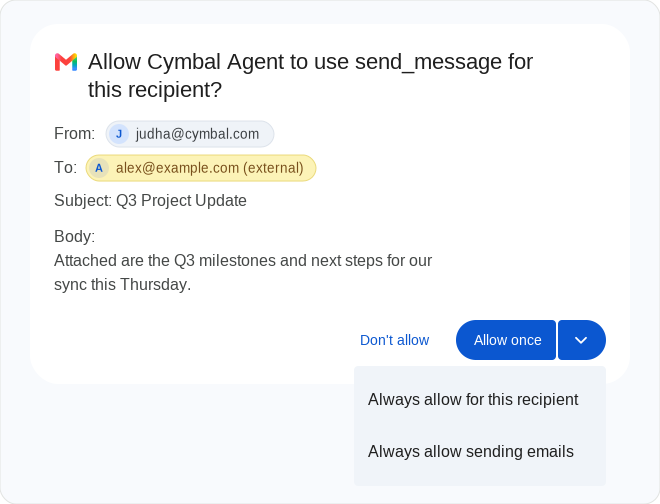
このガイドでは、/mcp/v1 エンドポイントに接続する方法、最適なユーザー エクスペリエンスを実現する承認ダイアログを設計する方法、MCP ホスト、MCP クライアント、エージェント ハーネスにステートレス フォーム抽出プロトコルを実装する方法について説明します。
始める前に
MCP フォームの引き出しを実装または構成する前に、前提条件を完了し、MCP ホストまたはクライアントにカスタムの引き出しサポートが必要かどうかを判断して、サーバー エンドポイントを確認します。
前提条件
カスタム MCP ホストまたはクライアントにフォームの引き出しを実装する前に、次の設定要件を完了してください。
- 同じ Google Cloud プロジェクトで API と MCP サーバーを有効にする: ターゲットの Google Workspace API と MCP サーバー エンドポイントを有効にする同じ Google Cloud プロジェクトで OAuth 2.0 クライアント ID を作成します。OAuth クライアントを作成するときに、[このクライアントを AI 搭載エージェントに使用する] を選択します。詳しい手順については、Google Workspace MCP サーバーを構成するをご覧ください。
- ターゲット ツールに必要な OAuth 2.0 スコープをリクエストする:
tools/callでツールを呼び出すには、そのツールに必要なスコープを含む OAuth 2.0Bearerアクセス トークンが必要です。ただし、tools/listはトークン スコープとは無関係に使用可能なツールを返します。各ツールの必要な OAuth スコープについては、サーバーの MCP リファレンスの概要ページをご覧ください。
フォームの引き出しを実装する必要があるかどうかを確認する
MCP フォームの引き出しを使用して /mcp/v1 エンドポイントに接続することをおすすめします。これにより、エージェントは Google Workspace ツールと結果の完全なセットにアクセスできます。コードを記述する必要があるかどうかは、MCP ホストと MCP クライアントの構築方法によって異なります。
- ビルド済みの MCP ホストを構成する: MCP フォーム エリシテーションをサポートする Google Antigravity や Claude Desktop などのビルド済みの MCP ホスト アプリケーションを接続する場合は、フォーム エリシテーション コードを記述する必要はありません。
/mcp/v1エンドポイントに接続します。設定手順については、Google Workspace MCP サーバーを構成するをご覧ください。/mcp/v1の Google Workspace MCP サーバーに対して、ホストの組み込みローカルツールの確認設定を [常に許可] に設定します。これにより、ユーザーが同じ操作に対して 2 回プロンプトが表示されることがなくなります。- 事前構築済みの MCP ホストがフォームの引き出しをまだサポートしていない場合は、制限付きの
/mcp/v1selfフォールバック エンドポイントに接続できます。このエンドポイントは、フォームの引き出しなしで役立つツールを公開しますが、特定の呼び出しには承認が必要になる場合があります。
- MCP クライアント SDK またはエージェント フレームワークを MCP ホストに統合する: プロトコル レイヤでフォームの引き出しをすでに処理している Agent Development Kit(ADK)などの MCP クライアント ライブラリまたはエージェント フレームワークを使用する場合でも、その引き出しハンドラを MCP ホストの UI または CLI サーフェスに接続する必要があります。
/mcp/v1で最適なユーザー エクスペリエンスを実現するには、このガイドの承認 UI の推奨事項を実装してください。 - カスタム MCP クライアントとホストの構築: 独自の MCP クライアントとホストの統合を構築する場合は、このガイドのステートレス フォーム エリシテーション プロトコルと承認 UI の推奨事項の両方を実装して、
/mcp/v1に接続します。
サーバー エンドポイント
一般提供の Google Workspace MCP サーバーとユニバーサル検索 MCP サーバーは、プライマリ /mcp/v1 エンドポイントと、制限付きの /mcp/v1self フォールバック エンドポイントを提供します。
| エンドポイント | サーバー URL | フォームの引き出し要件 | 使用可能なツール |
|---|---|---|---|
/mcp/v1 |
|
推奨されるプライマリ エンドポイント。mode: "form" の引き出しとともに使用します。 |
サーバーのすべてのツールと完全な結果セットを公開します。これには、デフォルト ポリシーで常にユーザーの承認が必要なツールも含まれます。 |
/mcp/v1self |
|
フォールバック エンドポイント。ポリシーとターゲット リソースによっては、特定の呼び出しでフォームの引き出しが必要になる場合があります。 |
デフォルトのポリシーで常に承認が必要なツールを省略し、フォームの引き出しなしで有用なツール(update_doc など)のみを公開します。list_threads などのリストメソッドと検索メソッドは、完全なアクセス権を求めるのではなく、承認なしでアクセスできる結果のサブセットのみを返します。 |
可能な限り、フォームの引き出しで /mcp/v1 を使用し、フォームの引き出しサポートを追加できない MCP ホスト用に /mcp/v1self を予約します。クライアントが、フォームの引き出しのサポートを宣言せずに、いずれかのエンドポイントでユーザーの承認を必要とする方法でツールを呼び出すと、サーバーは呼び出しをブロックし、MissingRequiredClientCapability エラーを返します。
各サービスで /mcp/v1 と /mcp/v1self で使用できるツールを確認するには、サーバーのツール リファレンスの概要ページをご覧ください。
- Gmail MCP リファレンス
- ドライブ MCP リファレンス
- ドキュメント MCP リファレンス
- スプレッドシート MCP リファレンス
- スライド MCP リファレンス
- カレンダー MCP リファレンス
- Chat MCP リファレンス
- ユニバーサル検索 MCP リファレンス
フォームの引き出しの仕組み
Google Workspace MCP サーバーは、2026 年 7 月 28 日の MCP 抽出仕様に基づいて、ステートレスな単一接続のリクエストと再試行フローを使用します。
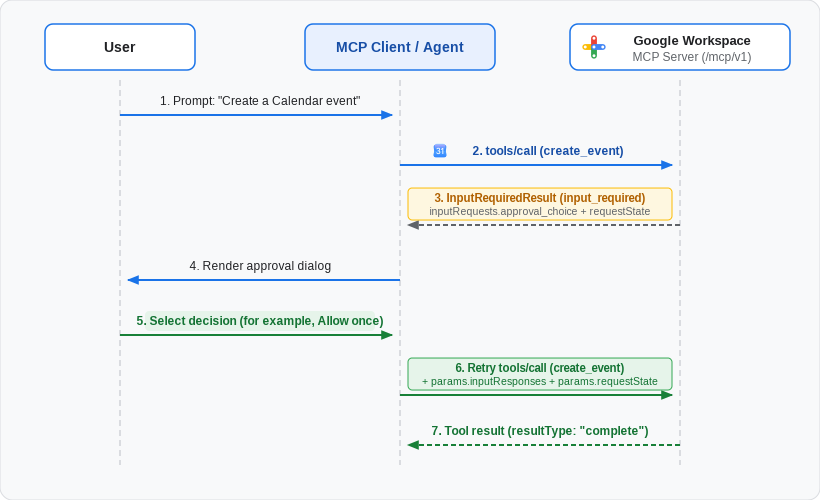
フォームの引き出しのライフサイクルは次の手順で行われます。
- ユーザー プロンプト: ユーザーがエージェントに、カレンダーの予定の作成などのアクションを実行するようリクエストします。
- 最初の
tools/callリクエスト: MCP クライアントは、create_eventなどのツールの/mcp/v1エンドポイントにtools/callリクエストを送信し、params._metaでelicitation機能を宣言します。 InputRequiredResult要対応: リクエストされたアクションにユーザーの承認が必要な場合、サーバーはツールを実行する前に実行を一時停止します。サーバーは、resultType: "input_required"を含むresultオブジェクト、mode: "form"を含むelicitation/createリクエストを含む"approval_choice"をキーとするinputRequestsマップ、不透明なrequestState文字列を返します。- 承認ダイアログ: MCP クライアントは、ターゲットの Google Workspace サービスとツール、Markdown の確認メッセージ、決定に関する質問、
enumとenumNamesからの許可された選択肢を示す承認ダイアログをレンダリングします。 - ユーザーの決定: ユーザーが承認オプション([今回のみ許可]、[許可しない] など)を選択します。
inputResponsesとrequestStateを使用してtools/callを再試行する: MCP クライアントは、同じツールnameとargumentsに加えて、ユーザーが選択した"approval_choice"の選択肢を含む最上位のparams.requestStateフィールドとparams.inputResponsesフィールドを含む 2 番目のtools/callリクエストを送信します。- ツールの実行結果: サーバーは、
requestStateが最初の呼び出しの正確なツール引数にバインドされていることを確認し、ユーザーの決定を評価して、ツール呼び出しを実行または終了し、resultType: "complete"を含む最終的なresultを返します。
承認がリクエストされた場合
ツール呼び出しが elicitation/create チャレンジをトリガーするかどうかは、システム、ユーザー、管理者のガバナンス ポリシーに基づいて、Google Workspace MCP サーバーによって動的に決定されます。ポリシーの評価では、次の要素を考慮できます。
- アクション タイプ: ユーザーまたは管理者のポリシーで許可されていない限り、オーディエンスと共有データを共有する書き込みアクションや、共有リソースを変更する書き込みアクションでは、デフォルトでユーザーの確認が必要です。一方、非公開ファイルの作成などの自己書き込みは、デフォルトで確認なしで実行されます。ゴミ箱への移動操作では、永続的な承認なしで、呼び出しごとに確認が常に必要になります。読み取り操作やメタデータ操作でも、ユーザーまたは管理者のポリシーに応じて確認が必要になる場合があります。
- コンテンツの所有権と公開設定: 他のユーザーが所有するファイルや、ユーザーの組織外で共有されているファイルにアクセスしたり、変更したりするには、承認が必要になる場合があります。
- 外部の宛先: ユーザーのドメイン外にメッセージを送信したり、ファイルを共有したり、参加者を招待したりするには、通常、明示的な確認が必要です。
- ユーザーと管理者の設定: 以前のトランザクションで保存された承認設定やドメイン全体の管理者ルールにより、特定のツールで確認が必要になる場合や、確認が省略される場合があります。
ポリシー評価は呼び出しごとにサーバーサイドで行われるため、クライアントは tools/call 呼び出しで InputRequiredResult レスポンスを処理できるように準備する必要があります。ツールの機密性ルールをハードコードしたり、承認の決定をクライアントにキャッシュしたりしないでください。
承認の選択肢のリファレンス
requestedSchema.properties.approval_choice では、サーバーは、現在のリクエストで使用可能な選択肢を表す並列の enum 配列と enumNames 配列を返します。Google Workspace MCP サーバーでは、次の enum 値がサポートされています。
enum 値 |
デフォルトの enumNames ラベル(英語) |
実行を許可 | 提供されるタイミングと動作 |
|---|---|---|---|
ALLOW_ONCE |
今回だけ許可 | はい | すべての承認プロンプトに表示されます。永続的なルールを記録せずに、現在のツール呼び出しを 1 回実行します。 |
DENY_ONCE |
許可しない | いいえ |
すべての承認プロンプトに表示されます。永続ルールを記録せずに、UserDeniedAction エラーで現在のツール呼び出しを終了します。 |
ALLOW_TOOL_ALWAYS |
このツールを常に許可 | はい | ユーザー ポリシーと管理者ポリシーでツール全体の永続的な承認が許可されている場合に提供されます。現在の呼び出しを実行し、同じエージェントから同じツールへの今後の呼び出しを事前に承認します。 |
ALLOW_RESOURCE_ALWAYS |
このファイル / フォルダ / ドライブ / メール / 予定 / スペース / チャット / グループ チャット / タスク / アイテムでは常に許可 | はい | 同じタイプの最大 100 個のリソースを変更またはアクセスするときに提供されます。呼び出しが複数のリソースを対象とする場合は、これらのファイルでは常に許可などの複数形の表現を使用します。現在の呼び出しを実行し、同じリソース ID で同じエージェントからの将来の呼び出しを事前に承認します。 |
ALLOW_AUDIENCE_ALWAYS |
この受信者に対しては常に許可 / これらの受信者に対しては常に許可 | はい | 最大 100 人の受信者を対象とする送信、共有、招待のアクションに対して提供されます。現在の呼び出しを実行し、同じエージェントから同じ受信者セットへの今後の呼び出しを事前に承認します。 |
ALLOW_OWNER_ALWAYS |
このオーナー / これらのオーナーに対しては常に許可 | はい | 最大 3 つの異なるオーナーのアイテムにアクセスする読み取りプロンプトまたはグラウンディング プロンプトで提供されます。現在の呼び出しを実行し、同じエージェントからの今後の呼び出しを、それらのユーザーが所有するアイテムに対して事前承認します。 |
個々の InputRequiredResult には、その特定のツール呼び出しに適用される選択肢のサブセットのみが含まれます。
- 破壊的なアクションとゴミ箱への移動アクション: リソースを完全に削除またはゴミ箱に移動するアクション、または呼び出しごとに確認を必要とする管理者ポリシーに則って管理されるアクションでは、
ALLOW_ONCEとDENY_ONCEのみが提供されます。 - スコープ付きアクション: 永続的な承認が許可されている場合、サーバーは
ALLOW_ONCE、該当する狭いスコープ(ALLOW_AUDIENCE_ALWAYSやALLOW_RESOURCE_ALWAYSなど)、ALLOW_TOOL_ALWAYS、DENY_ONCEを返します。
ボタンの値をハードコードするのではなく、現在のリクエストに対して enum と enumNames で返された正確なオプションを常にレンダリングします。
ユーザー エクスペリエンスを最適化するための推奨事項
フォームの引き出しをサポートする標準の MCP クライアントは、/mcp/v1 でそのまま動作します。しかし、一般的なフォーム レンダラでは、単一選択の決定がラジオボタン グループまたはプルダウン メニューとして表示され、別の [送信] ボタンと組み合わされていることが多く、追加のクリックが必要になり、ターゲットの Google Workspace アプリのコンテキストが非表示になります。
フォームの引き出しで最適なユーザー エクスペリエンスを実現するには、MCP クライアントに次の 5 つの推奨事項を実装します。推奨事項 1 ~ 3 は、次の承認ダイアログの図の番号付きコールアウトに対応しています。
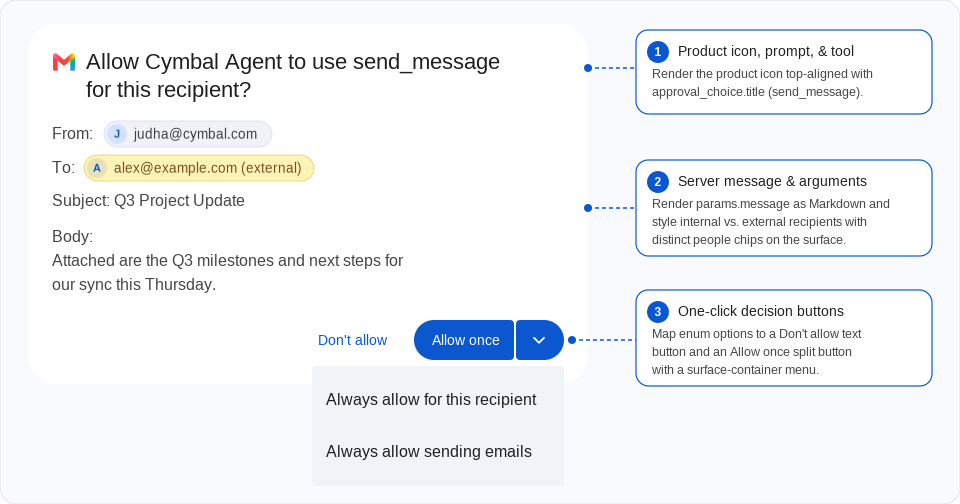
1. 商品名、アイコン、ツールを表示する
ユーザーは、エージェントが呼び出そうとしている Google Workspace のプロダクトとツールをすぐに確認できます。
- 初期化または
server/discoverからの MCP サーバーのserverInfoメタデータ、またはcalendarmcp.googleapis.comなどのリクエスト ホスト名を、Google Workspace のプロダクト名とアイコンにマッピングします。 InputRequiredResultの_metaプレゼンテーション ヒント(title、icons、isConfirmationなど)は、オプションの拡張機能として扱います。本番環境の Google Workspace MCP サーバーは、これらの_metaフィールドをまだ出力しないため、UI はこれらのフィールドに依存しないようにする必要があります。params.nameからターゲット ツール名を表示して、ユーザーがcreate_draftやcreate_eventなどのオペレーションを区別できるようにします。
2. サーバー メッセージと enumNames をレンダリングする
クライアントのプレゼンテーション レイヤをシンプルに保ち、サーバーから提供された承認コンテンツを直接レンダリングします。
params.messageを Markdown としてレンダリングし、approval_choice.titleを表示する: Google Workspace MCP サーバーは、inputRequests.approval_choice.params.messageでアクションの詳細を Markdown としてフォーマットし、requestedSchema.properties.approval_choice.titleでローカライズされた確認質問を提供します。未加工の Markdown 記号を表示したり、ツールごとにカスタムの引数フォーマット ロジックを記述したりするのではなく、安全な Markdown レンダラを使用してmessageを直接レンダリングし、操作ボタンの上にtitleを明確に表示します。enum値とenumNamesラベルをペアにする:requestedSchema.properties.approval_choiceを動的に検査します。enumの各識別子をenumNamesの同じインデックスにある対人可読ラベルとペアにし、oneOfを使用する他の MCP サーバーとやり取りする場合は JSON スキーマのoneOfエントリにフォールバックします。
3. ワンクリック ボタンで意思決定を簡素化
requestedSchema に単一の列挙型プロパティが含まれている場合は、[送信] を別途クリックする必要があるラジオボタン リストやプルダウン メニューをレンダリングしないでください。
Allow onceやDon't allowなどの 2 つのオプション: 2 つのボタンを並べて表示します。どちらかのボタンをクリックすると、再試行リクエストがすぐに送信されます。- 複数の許可オプション: サーバーが
ALLOW_ONCE、1 つ以上の永続的な許可スコープ(ALLOW_AUDIENCE_ALWAYS、ALLOW_TOOL_ALWAYS、DENY_ONCEなど)を返すと、デフォルトで [1 回のみ許可] に設定されたプライマリ スプリット ボタンがレンダリングされます。このボタンには、追加の許可オプション用のキャレット メニューと、別の [許可しない] ボタンがペアになっています。
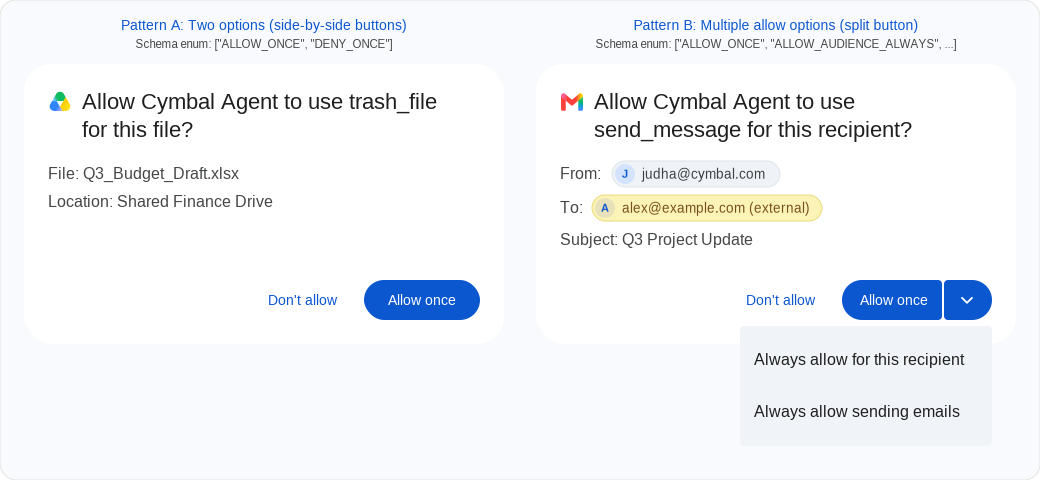
パターン A では、破壊的なドライブ アクションは ALLOW_ONCE と DENY_ONCE のみを返します。クライアントは、これらを [許可しない] と [1 回のみ許可] の 2 つのボタンとして並べてレンダリングします。パターン B では、Gmail アクションが ALLOW_ONCE、ALLOW_AUDIENCE_ALWAYS、ALLOW_TOOL_ALWAYS、DENY_ONCE を返します。クライアントは、これらを [許可しない] ボタンと、[今回のみ許可] スプリット ボタンとしてレンダリングします。スプリット ボタンのメニューには、永続的な許可の選択肢が表示されます。
4. /mcp/v1 でのプロンプトの重複を回避
多くの MCP ホストには、外部ツールを実行する前にローカル確認プロンプトが組み込まれています。フォームの引き出しが有効になっている Google Workspace MCP サーバーを呼び出す場合、サーバーが独自のポリシーを認識した引き出しチャレンジを適用するため、ローカルの事前実行プロンプトによって冗長な二重プロンプト エクスペリエンスが作成されます。
- フォームの引き出しを使用して事前構築済みの MCP ホストを構成する場合:
/mcp/v1の Google Workspace MCP サーバーのホストのローカルツール確認設定を [常に許可] に設定し、サーバーが開始する引き出しダイアログを使用します。ホストがフォームの引き出しをサポートしておらず、/mcp/v1selfに接続している場合、サーバーサイドの承認をトリガーしない呼び出しに対してクライアントサイドのプロンプトを表示するには、ローカルツールの確認を有効にしておきます。 - MCP ホストを構築する場合:
*mcp.googleapis.comとpeople.googleapis.com(gmailmcp.googleapis.com、calendarmcp.googleapis.com、drivemcp.googleapis.com、workspacemcp.googleapis.comなど)でフォームの引き出しが有効になっている場合は、ホストの一般的な呼び出し前の確認ダイアログを抑制します。サーバーがresultType: "input_required"を含むInputRequiredResultを返した場合にのみ、ユーザーにプロンプトを表示します。
5. ツールと拒否に関するエージェントの動作をガイドする
推論モデルは、人間参加型の承認フローを次の 2 つの方法で誤って解釈する可能性があります。
- 書き込みツールの使用を事前に回避する:
send_messageなどの書き込みツールの呼び出しがユーザーの確認なしにすぐに実行されるとモデルが想定している場合、ユーザーがメールの送信をリクエストしても、モデルはcreate_draftなどのドラフト ツールにフォールバックすることがあります。 - 拒否後に代替書き込みツールで再試行する: ユーザーが承認ダイアログで [許可しない] をクリックし、サーバーが
UserDeniedActionエラー結果を返した場合、モデルは拒否を一時的なツールの失敗として扱い、別の書き込みツールを使用して同じ目標を達成しようとする可能性があります。これにより、不要な 2 回目の承認プロンプトがトリガーされます。
両方の問題を回避するには、エージェントのシステム プロンプトに次の指示を含めます。
プロンプト
When calling Google Workspace MCP tools:
1. Select the tool that directly matches the user's intent (for example,
   use send_message when asked to send an email). Sensitive tools
   automatically pause for user confirmation through MCP form elicitation
   before executing.
2. If a tool call fails because the user denied, declined, or canceled the
   approval request, stop immediately and acknowledge the user's decision.
   Do not retry the same action or call an alternative write tool unless
   the user explicitly asks you to do so in a new message.
トランスポートとステートレス プロトコルの要件
Google Workspace MCP サーバーは、ステートレスな Streamable HTTP を介して動作します。カスタム MCP クライアントを構築する場合は、すべてのリクエストで次のワイヤ要件に従ってください。
- HTTP ヘッダー:
/mcp/v1へのすべてのPOSTリクエストに次のヘッダーを含めます。Authorization: Bearer ACCESS_TOKENContent-Type: application/jsonAccept: application/json, text/event-streamMCP-Protocol-Version: 2026-07-28Accept-Language: BCP_47_LANGUAGE_TAG。確認メッセージ、質問、enumNamesラベルをユーザーの好みの言語(es-419, es;q=0.9, en;q=0.8など)にローカライズします。省略した場合、テキストのデフォルトはen-USです。
- レスポンスのコンテンツ タイプ: サーバーとリクエスト タイプに応じて、HTTP レスポンスの本文は、
Content-Type: application/jsonを使用する標準 JSON 形式、またはContent-Type: text/event-streamを使用するサーバー送信イベント(SSE)形式に設定できます。SSE 形式では、JSON-RPC ペイロードがdata: {...}行に表示されます。HTTP トランスポート パーサーは、両方の形式を受け入れる必要があります。 - ステートレスな検出: Google Workspace MCP サーバーは、ステートフルな
initializeセッションを維持しません。起動時にサーバーのメタデータと機能を取得するには、"method": "server/discover"と"params": {}を含む JSON-RPC リクエストを送信します。これにより、result._meta["io.modelcontextprotocol/serverInfo"]でサーバーのメタデータが返されます。isConfirmation、title、iconsなどのカスタム確認_metaヒントは、本番環境のInputRequiredResultレスポンスではまだ出力されないため、_metaプレゼンテーション フィールドは常にオプションとして扱い、serverInfoまたはサーバーのホスト名にフォールバックします。 - リクエストごとの
_meta機能: トランスポートはステートレスであるため、すべてのtools/listリクエストとtools/callリクエストのparams内に、次のキーを含む_metaを含めます。"io.modelcontextprotocol/protocolVersion": "2026-07-28""io.modelcontextprotocol/clientInfo":{"name": "YOUR_APP_NAME","version": "VERSION"}"io.modelcontextprotocol/clientCapabilities":{"elicitation": {"form": {}}}
エラー処理とパラメータ バインディング
ツール呼び出しがブロックされた場合、または再試行が検証に失敗した場合、サーバーは、失敗のカテゴリに応じて、ツールレベルのエラー結果またはトップレベルの JSON-RPC エラー オブジェクトを返します。
UserDeniedActionとAdminPolicyBlock: ユーザーが承認プロンプトを拒否した場合、または管理者ポリシーによってアクションがブロックされた場合、サーバーは"resultType": "complete"、"isError": true、result.contentのローカライズされたエラー メッセージを含む JSON-RPCresultを返します。サービスと環境で有効にすると、サーバーはresult._meta["google.com/error"]に構造化されたエラー メタデータも追加します。result._meta["google.com/error"]はサービスと環境ごとに制限されているため、result._meta["google.com/error"]が存在しない場合、クライアントはresult.contentからエラー メッセージを読み取るようにフォールバックする必要があります。UserDeniedAction: ユーザーがDENY_ONCEを選択するか、承認フォームを拒否またはキャンセルした場合に返されます。デフォルトの英語メッセージは"Action canceled. The user declined the confirmation request."です。AdminPolicyBlock: 組織管理者ポリシーによってエージェントがオペレーションを実行できない場合に返されます。デフォルトの英語メッセージは"Action could not be completed. Your administrator has blocked third-party agents from performing this action."です。
JSON
{ "jsonrpc": "2.0", "id": 3, "result": { "resultType": "complete", "isError": true, "content": [ { "type": "text", "text": "Action canceled. The user declined the confirmation request." } ], "_meta": { "google.com/error": { "code": 400, "message": "Action canceled. The user declined the confirmation request.", "status": "FAILED_PRECONDITION", "details": [ { "@type": "type.googleapis.com/google.rpc.ErrorInfo", "reason": "UserDeniedAction", "domain": "mcp.googleapis.com" } ] } } } }MissingRequiredClientCapability: クライアントが、_meta["io.modelcontextprotocol/clientCapabilities"]でフォームの引き出しサポートを宣言せずに、/mcp/v1または/mcp/v1selfでユーザーの確認を必要とする方法でツールを呼び出した場合に返されます。サーバーは、このエラーを、コード-32021とerror.data.requiredCapabilitiesの必要な機能オブジェクトを含む最上位の JSON-RPCerrorオブジェクトに変換します。JSON
{
  "jsonrpc": "2.0",
  "id": 2,
  "error": {
    "code": -32021,
    "message": "Action could not be completed. This action requires user confirmation, which this client does not support. Use a client that supports form elicitation to perform this action.",
    "data": {
      "requiredCapabilities": {
        "elicitation": {
          "form": {}
        }
      }
    }
  }
}
パラメータ バインディングの適用:
requestState内のrequestBindingトークンは、最初の承認チャレンジを、最初の呼び出しで送信された正確なツールargumentsに暗号的にバインドします。クライアントが再試行呼び出しでparams.argumentsのフィールドを変更するか、形式が正しくないかバインドされていないparams.requestStateを渡すと、サーバーは無効な承認を無視して新しいInputRequiredResultチャレンジを返すか、無効なパラメータまたは失敗した前提条件エラーを返して、inputResponsesなしで再試行するようクライアントに指示します。
実装例
次のエンドツーエンドのチュートリアルでは、MCP クライアントがカレンダー create_event ツールを呼び出し、サーバーの承認プロンプトをブラウザ UI またはターミナル CLI にレンダリングし、TypeScript と Python でユーザーの決定を送信する方法を示します。その後、コーディング エージェント用の再利用可能なエージェント スキルを示します。
クライアントの承認サーフェス
ブラウザベースの MCP クライアントでは、TypeScript 実装によって、カレンダー アイコン、サーバーのホスト名、ツール名、サーバーからレンダリングされた Markdown message プレビュー、確認の質問、[許可しない] ボタン、[1 回許可] 分割ボタンを含む視覚的な承認カードがレンダリングされます。
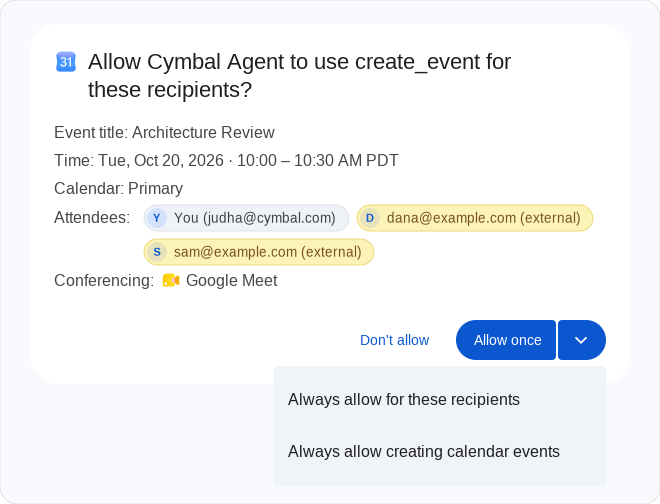
ターミナルベースの MCP クライアントでは、Python CLI 実装は同じ InputRequiredResult ペイロードをインタラクティブな番号付きプロンプトとしてレンダリングします。
CLI
=== Google Calendar (create_event) ===
Architecture Review
Tue, Oct 20 · 10:00 - 10:30 AM PDT · 🟢 No calendar conflicts
You, dana@example.com, sam@example.com
Conferencing: Google Meet

Allow Cymbal Agent to use create_event for these recipients?
  [1] Allow once (ALLOW_ONCE)
  [2] Always allow for these recipients (ALLOW_AUDIENCE_ALWAYS)
  [3] Always allow this tool (ALLOW_TOOL_ALWAYS)
  [4] Don't allow (DENY_ONCE)
Enter choice (1-4, or c to cancel):
最初の呼び出しと引き出しレスポンス
クライアントは、まず create_event ツールを使用してカレンダーの予定を作成する tools/call リクエストを送信します。
JSON
{
  "jsonrpc": "2.0",
  "id": 2,
  "method": "tools/call",
  "params": {
    "name": "create_event",
    "arguments": {
      "calendarId": "primary",
      "summary": "Architecture Review",
      "startTime": "2026-10-20T10:00:00",
      "endTime": "2026-10-20T10:30:00",
      "timeZone": "America/Los_Angeles",
      "attendees": [
        {
          "email": "dana@example.com"
        },
        {
          "email": "sam@example.com"
        }
      ],
      "addGoogleMeetUrl": true
    },
    "_meta": {
      "io.modelcontextprotocol/protocolVersion": "2026-07-28",
      "io.modelcontextprotocol/clientInfo": {
        "name": "Cymbal Agent",
        "version": "1.0.0"
      },
      "io.modelcontextprotocol/clientCapabilities": {
        "elicitation": {
          "form": {}
        }
      }
    }
  }
}
承認が必要な場合、サーバーは InputRequiredResult を返します。
JSON
{
  "jsonrpc": "2.0",
  "id": 2,
  "result": {
    "resultType": "input_required",
    "inputRequests": {
      "approval_choice": {
        "method": "elicitation/create",
        "params": {
          "mode": "form",
          "message": "**Architecture Review**  \nTue, Oct 20 · 10:00 - 10:30 AM PDT · 🟢 No calendar conflicts  \nYou, dana@example.com, sam@example.com  \n**Conferencing:** Google Meet",
          "requestedSchema": {
            "type": "object",
            "required": ["approval_choice"],
            "properties": {
              "approval_choice": {
                "type": "string",
                "title": "Allow Cymbal Agent to use create_event for these recipients?",
                "enum": [
                  "ALLOW_ONCE",
                  "ALLOW_AUDIENCE_ALWAYS",
                  "ALLOW_TOOL_ALWAYS",
                  "DENY_ONCE"
                ],
                "enumNames": [
                  "Allow once",
                  "Always allow for these recipients",
                  "Always allow this tool",
                  "Don't allow"
                ]
              }
            }
          }
        }
      }
    },
    "requestState": "{\"elicitationId\":\"...\",\"requestBinding\":\"...\"}"
  }
}
InputRequiredResult レスポンスには、次の主要なフィールドが含まれています。
result.resultType: サーバーがユーザー入力のために実行を一時停止した場合は"input_required"に設定し、ツールの実行が完了した場合は"complete"に設定します。result.inputRequests: リクエスト ID"approval_choice"をキーとするマップ。各エントリには"method": "elicitation/create"と"mode": "form"を含むparamsオブジェクトがあります。_metaプレゼンテーション ヒント:isConfirmation、title、iconsなどのオプション フィールドは、本番環境のInputRequiredResultレスポンスではまだ出力されません。_metaフィールドは常にオプションとして扱い、存在しない場合はserverInfoまたはサーバーのホスト名から商品名とアイコンを解決します。inputRequests.approval_choice.params.message: サーバーによって生成されたアクションの Markdown 形式のプレビュー。ツールが個別のプレビュー カードを生成しない場合は、確認の質問。inputRequests.approval_choice.params.requestedSchema:properties.approval_choice定義に次のフィールドを含む JSON スキーマ オブジェクト。title: ローカライズされた確認の質問("Allow Cymbal Agent to use create_event for these recipients?"など)。リクエストで_meta["io.modelcontextprotocol/clientInfo"].nameを指定すると、サーバーはアプリケーションの名前をこの質問に組み込みます。enum:ApprovalChoice識別子の順序付き配列(ALLOW_ONCE、ALLOW_AUDIENCE_ALWAYS、ALLOW_TOOL_ALWAYS、DENY_ONCEなど)。enumNames:enumの各エントリに対応する、ローカライズされた対人可読ラベルの並列配列(Allow once、Always allow for these recipients、Always allow this tool、Don't allowなど)。
result.requestState: サーバーのelicitationIdと暗号化されたrequestBindingトークンを含む、不透明な JSON エンコード文字列。再試行呼び出しのparams.requestStateで、この文字列を変更せずにエコーする必要があります。
再試行、拒否、キャンセルのペイロード
ユーザーが許可オプションを選択したら、まったく同じ name と arguments を含む 2 つ目の tools/call リクエストを送信し、params 内の最上位フィールドとして requestState と inputResponses を渡します。
JSON
{
  "jsonrpc": "2.0",
  "id": 3,
  "method": "tools/call",
  "params": {
    "name": "create_event",
    "arguments": {
      "calendarId": "primary",
      "summary": "Architecture Review",
      "startTime": "2026-10-20T10:00:00",
      "endTime": "2026-10-20T10:30:00",
      "timeZone": "America/Los_Angeles",
      "attendees": [
        {
          "email": "dana@example.com"
        },
        {
          "email": "sam@example.com"
        }
      ],
      "addGoogleMeetUrl": true
    },
    "requestState": "{\"elicitationId\":\"...\",\"requestBinding\":\"...\"}",
    "inputResponses": {
      "approval_choice": {
        "action": "accept",
        "content": {
          "approval_choice": "ALLOW_ONCE"
        }
      }
    },
    "_meta": {
      "io.modelcontextprotocol/protocolVersion": "2026-07-28",
      "io.modelcontextprotocol/clientInfo": {
        "name": "Cymbal Agent",
        "version": "1.0.0"
      },
      "io.modelcontextprotocol/clientCapabilities": {
        "elicitation": {
          "form": {}
        }
      }
    }
  }
}
MCP Elicitation 仕様では、フォーム値の送信とダイアログの閉じが区別されます。params.inputResponses でユーザーの否定的な決定を表すには、次の 2 つの方法があります。
DENY_ONCEの選択を送信する: ユーザーがDENY_ONCEに対応する [許可しない] ボタンをクリックしたときに、"content": {"approval_choice": "DENY_ONCE"}を指定して"action": "accept"を送信します。JSON
{ "jsonrpc": "2.0", "id": 3, "method": "tools/call", "params": { "name": "create_event", "arguments": { "calendarId": "primary", "summary": "Architecture Review", "startTime": "2026-10-20T10:00:00", "endTime": "2026-10-20T10:30:00", "timeZone": "America/Los_Angeles", "attendees": [ { "email": "dana@example.com" }, { "email": "sam@example.com" } ], "addGoogleMeetUrl": true }, "requestState": "{\"elicitationId\":\"...\",\"requestBinding\":\"...\"}", "inputResponses": { "approval_choice": { "action": "accept", "content": { "approval_choice": "DENY_ONCE" } } }, "_meta": { "io.modelcontextprotocol/protocolVersion": "2026-07-28", "io.modelcontextprotocol/clientInfo": { "name": "Cymbal Agent", "version": "1.0.0" }, "io.modelcontextprotocol/clientCapabilities": { "elicitation": { "form": {} } } } } }ダイアログを拒否またはキャンセルする: ユーザーが許可オプションを選択せずにダイアログを閉じるかキャンセルした場合は、
"action": "decline"または"action": "cancel"を送信し、contentフィールドを省略します。JSON
"inputResponses": {
  "approval_choice": {
    "action": "cancel"
  }
}
どちらの場合も、サーバーはレスポンスを DENY_ONCE として扱い、ツールの実行を終了して、ツールエラーの結果を返します。
TypeScript ウェブ クライアント
次の TypeScript の例では、Markdown message、確認の質問、許可されたオプションを InputRequiredResult ペイロードから直接抽出し、オプションの _meta ヒントまたはサーバーのホスト名から商品タイトルを解決し、ユーザーの決定とともに tools/call を再生します。
TypeScript
const PROTOCOL_VERSION = "2026-07-28";
const CLIENT_INFO = { name: "Cymbal Agent", version: "1.0.0" };
const MAX_ELICITATION_ROUNDS = 3;

const HOST_TITLES: Record<string, string> = {
  "gmailmcp.googleapis.com": "Gmail",
  "calendarmcp.googleapis.com": "Google Calendar",
  "drivemcp.googleapis.com": "Google Drive",
  "docsmcp.googleapis.com": "Google Docs",
  "sheetsmcp.googleapis.com": "Google Sheets",
  "slidesmcp.googleapis.com": "Google Slides",
  "chatmcp.googleapis.com": "Google Chat",
  "people.googleapis.com": "Google Contacts",
  "tasksmcp.googleapis.com": "Google Tasks",
  "workspacemcp.googleapis.com": "Google Workspace",
};

interface ElicitationOption {
  value: string;
  label: string;
}

export interface ElicitationCardModel {
  requestKey: string;
  serverTitle: string;
  serverIconUrl?: string;
  toolName: string;
  markdownMessage: string;
  questionTitle: string;
  decisionFieldKey: string;
  denyOption?: ElicitationOption;
  primaryAllowOption?: ElicitationOption;
  secondaryAllowOptions: ElicitationOption[];
}

function buildBaseMeta(): Record<string, unknown> {
  return {
    "io.modelcontextprotocol/protocolVersion": PROTOCOL_VERSION,
    "io.modelcontextprotocol/clientInfo": CLIENT_INFO,
    "io.modelcontextprotocol/clientCapabilities": {
      elicitation: { form: {} },
    },
  };
}

/**
 * Extracts a UI view model directly from an InputRequiredResult response.
 * Render card.markdownMessage with a safe Markdown renderer in your UI.
 */
export function extractCardModel(
  rpcResult: Record<string, any>,
  toolName: string,
  serverHost = "workspacemcp.googleapis.com",
): ElicitationCardModel | null {
  const inputRequests: Record<string, any> = rpcResult.inputRequests ?? {};
  const requestEntry = Object.entries(inputRequests).find(
    ([, req]: [string, any]) =>
      req?.method === "elicitation/create" && req?.params?.mode === "form",
  );
  if (!requestEntry) {
    return null;
  }
  const [requestKey, elicitationReq] = requestEntry;

  const reqMeta = elicitationReq.params?._meta ?? {};
  const resultMeta = rpcResult._meta ?? {};
  const serverInfo = resultMeta["io.modelcontextprotocol/serverInfo"] ?? {};
  const icons: Array<{ src: string; mimeType?: string }> =
    reqMeta.icons ?? resultMeta.icons ?? serverInfo.icons ?? [];
  const preferredIcon =
    icons.find((icon) => icon.mimeType === "image/svg+xml") ?? icons[0];

  const properties: Record<string, any> =
    elicitationReq.params?.requestedSchema?.properties ?? {};
  const firstProperty = Object.entries(properties)[0];
  if (!firstProperty) {
    return null;
  }
  const [decisionFieldKey, fieldSchema] = firstProperty as [
    string,
    Record<string, any>,
  ];

  let options: ElicitationOption[] = [];
  if (Array.isArray(fieldSchema.enum)) {
    const enumNames: string[] = Array.isArray(fieldSchema.enumNames)
      ? fieldSchema.enumNames
      : [];
    options = fieldSchema.enum.map((val: string, idx: number) => ({
      value: val,
      label: enumNames[idx] ?? val,
    }));
  } else if (Array.isArray(fieldSchema.oneOf)) {
    options = fieldSchema.oneOf.map((opt: any) => ({
      value: opt.const,
      label: opt.title ?? opt.const,
    }));
  }

  const denyOption = options.find((opt) => opt.value.startsWith("DENY"));
  const allowOptions = options.filter(
    (opt) => !opt.value.startsWith("DENY"),
  );

  return {
    requestKey,
    serverTitle:
      reqMeta.title ??
      resultMeta.title ??
      serverInfo.title ??
      serverInfo.name ??
      HOST_TITLES[serverHost] ??
      "Google Workspace",
    serverIconUrl: preferredIcon?.src,
    toolName,
    markdownMessage:
      elicitationReq.params?.message ?? "Confirm this action.",
    questionTitle: fieldSchema.title ?? "Confirm this action?",
    decisionFieldKey,
    denyOption,
    primaryAllowOption: allowOptions[0],
    secondaryAllowOptions: allowOptions.slice(1),
  };
}

/**
 * Executes tools/call and replays with requestState and inputResponses
 * when the server returns an InputRequiredResult.
 */
export async function handleToolCallWithElicitation(
  sendRpc: (payload: Record<string, unknown>) => Promise<Record<string, any>>,
  promptUserInUi: (card: ElicitationCardModel) => Promise<string | null>,
  toolName: string,
  toolArgs: Record<string, unknown>,
  serverHost = "calendarmcp.googleapis.com",
): Promise<Record<string, any>> {
  let requestId = 1;
  let response = await sendRpc({
    jsonrpc: "2.0",
    id: requestId,
    method: "tools/call",
    params: {
      name: toolName,
      arguments: structuredClone(toolArgs),
      _meta: buildBaseMeta(),
    },
  });

  for (let round = 0; round < MAX_ELICITATION_ROUNDS; round++) {
    const result = response.result ?? {};
    if (result.resultType !== "input_required") {
      return response;
    }

    const card = extractCardModel(result, toolName, serverHost);
    if (!card) {
      return response;
    }

    const selectedValue = await promptUserInUi(card);
    const userResponse = selectedValue
      ? {
          action: "accept",
          content: { [card.decisionFieldKey]: selectedValue },
        }
      : { action: "cancel" };

    requestId += 1;
    response = await sendRpc({
      jsonrpc: "2.0",
      id: requestId,
      method: "tools/call",
      params: {
        name: toolName,
        arguments: structuredClone(toolArgs),
        ...(result.requestState !== undefined
          ? { requestState: result.requestState }
          : {}),
        inputResponses: {
          [card.requestKey]: userResponse,
        },
        _meta: buildBaseMeta(),
      },
    });
  }

  return response;
}
Python CLI クライアント
Python
import copy
import re
from typing import Any

PROTOCOL_VERSION = "2026-07-28"
CLIENT_INFO = {"name": "Cymbal CLI Agent", "version": "1.0.0"}
MAX_ELICITATION_ROUNDS = 3
HOST_TITLES = {
    "gmailmcp.googleapis.com": "Gmail",
    "calendarmcp.googleapis.com": "Google Calendar",
    "drivemcp.googleapis.com": "Google Drive",
    "docsmcp.googleapis.com": "Google Docs",
    "sheetsmcp.googleapis.com": "Google Sheets",
    "slidesmcp.googleapis.com": "Google Slides",
    "chatmcp.googleapis.com": "Google Chat",
    "people.googleapis.com": "Google Contacts",
    "tasksmcp.googleapis.com": "Google Tasks",
    "workspacemcp.googleapis.com": "Google Workspace",
}

def build_base_meta() -> dict[str, Any]:
  """Returns the required per-request _meta block for /mcp/v1 calls."""
  return {
      "io.modelcontextprotocol/protocolVersion": PROTOCOL_VERSION,
      "io.modelcontextprotocol/clientInfo": CLIENT_INFO,
      "io.modelcontextprotocol/clientCapabilities": {
          "elicitation": {"form": {}}
      },
  }

def strip_markdown(text: str) -> str:
  """Minimal example that strips basic Markdown for terminal display."""
  text = re.sub(r"\[([^\]]+)\]\(([^)]+)\)", r"\1 (\2)", text)
  text = re.sub(r"\*\*(.*?)\*\*", r"\1", text)
  return re.sub(r"`([^`]+)`", r"\1", text)

def extract_decision_options(
    requested_schema: dict[str, Any],
) -> tuple[str | None, str, list[dict[str, str]]]:
  """Extracts the property key, question title, and options from schema."""
  properties = requested_schema.get("properties", {})
  first_entry = next(iter(properties.items()), None)
  if first_entry is None:
    return None, "Confirm this action?", []

  field_key, field_schema = first_entry
  question_title = field_schema.get("title", "Confirm this action?")

  if "enum" in field_schema:
    enum_values = field_schema.get("enum", [])
    enum_names = field_schema.get("enumNames", [])
    options = [
        {
            "value": val,
            "label": enum_names[idx] if idx < len(enum_names) else val,
        }
        for idx, val in enumerate(enum_values)
    ]
  elif "oneOf" in field_schema:
    options = [
        {
            "value": item["const"],
            "label": item.get("title", item["const"]),
        }
        for item in field_schema["oneOf"]
    ]
  else:
    options = []
  return field_key, question_title, options

def prompt_user_in_cli(
    elicitation_req: dict[str, Any],
    result_meta: dict[str, Any],
    tool_name: str,
    server_host: str = "calendarmcp.googleapis.com",
) -> dict[str, Any]:
  """Renders a CLI approval prompt and returns the inputResponses entry."""
  params = elicitation_req.get("params", {})
  req_meta = params.get("_meta", {})
  server_info = result_meta.get(
      "io.modelcontextprotocol/serverInfo", {}
  )
  server_title = (
      req_meta.get("title")
      or result_meta.get("title")
      or server_info.get("title")
      or server_info.get("name")
      or HOST_TITLES.get(server_host, "Google Workspace MCP")
  )
  message = strip_markdown(params.get("message", "Confirm this action."))
  field_key, question_title, options = extract_decision_options(
      params.get("requestedSchema", {})
  )
  if not field_key or not options:
    return {"action": "cancel"}

  print(f"\n=== {server_title} ({tool_name}) ===")
  print(message)
  print(f"\n{strip_markdown(question_title)}")
  for idx, opt in enumerate(options, start=1):
    print(f"  [{idx}] {opt['label']} ({opt['value']})")

  choice = input(
      f"Enter choice (1-{len(options)}, or c to cancel): "
  ).strip()
  try:
    selected_idx = int(choice) - 1
    if 0 <= selected_idx < len(options):
      selected_value = options[selected_idx]["value"]
      return {
          "action": "accept",
          "content": {field_key: selected_value},
      }
  except ValueError:
    pass

  return {"action": "cancel"}

def handle_tool_call_with_elicitation(
    send_rpc_fn: Any, tool_name: str, tool_args: dict[str, Any]
) -> dict[str, Any]:
  """Executes tools/call and retries with inputResponses when elicited."""
  base_params = {
      "name": tool_name,
      "arguments": copy.deepcopy(tool_args),
      "_meta": build_base_meta(),
  }
  request_id = 1
  response = send_rpc_fn(
      {
          "jsonrpc": "2.0",
          "id": request_id,
          "method": "tools/call",
          "params": copy.deepcopy(base_params),
      }
  )

  for _ in range(MAX_ELICITATION_ROUNDS):
    result = response.get("result", {})
    if result.get("resultType") != "input_required":
      return response

    input_requests = result.get("inputRequests", {})
    if not isinstance(input_requests, dict) or not input_requests:
      return response

    result_meta = result.get("_meta", {})
    input_responses: dict[str, Any] = {}
    for req_key, req in input_requests.items():
      if (
          isinstance(req, dict)
          and req.get("method") == "elicitation/create"
          and req.get("params", {}).get("mode") == "form"
      ):
        input_responses[req_key] = prompt_user_in_cli(
            req, result_meta, tool_name
        )

    if not input_responses:
      return response

    request_id += 1
    retry_params = copy.deepcopy(base_params)
    request_state = result.get("requestState")
    if request_state is not None:
      retry_params["requestState"] = request_state
    retry_params["inputResponses"] = input_responses
    response = send_rpc_fn(
        {
            "jsonrpc": "2.0",
            "id": request_id,
            "method": "tools/call",
            "params": retry_params,
        }
    )

  return response
エージェント スキル
コーディング エージェントのスキルまたはプロンプトとして、次のコードを使用して、エージェント ハーネスのフォーム誘導を実装します。
プロンプト
---
name: google-workspace-mcp-elicitation
metadata:
  version: "1.0.0"
  category: GoogleWorkspace
description: >-
  Implements Model Context Protocol (MCP) form elicitation
  (`elicitation/create`) for Human-in-the-Loop (HITL) approvals with Google
  Workspace MCP servers (Gmail, Calendar, Drive, Docs, Sheets, Slides, Chat,
  Contacts). Use when adding HITL confirmation prompts to an agent, handling
  Stateless HTTP (`2026-07-28`) Multi Round-Trip Requests
  (`resultType: "input_required"`), mapping elicitation schemas or `_meta`
  hints to UI controls, or troubleshooting Workspace MCP `401`/`403`/`405`
  and capability errors. Don't use for general OAuth 2.0 app setup unrelated
  to MCP or for authoring custom MCP servers.
---

# Implementing Google Workspace MCP Form Elicitation (HITL)

Use this guide to support **Model Context Protocol (MCP) Form Elicitation**
for Human-in-the-Loop (HITL) confirmations when integrating **Google
Workspace MCP servers** into an AI agent.

Rather than duplicating the MCP specification, this guide references the
canonical specs and focuses on **Google Workspace server nuances**, **mapping
protocol message fields to UI**, **upcoming Google Workspace `_meta`
extensions**, and **practical integration boundaries**:

- [MCP Elicitation Specification][mcp-elicitation]
- [MCP Multi Round-Trip Requests (MRTR) Specification][mcp-mrtr]
- [MCP Lifecycle & Initialization][mcp-life]
- [MCP Icons Utility Specification][mcp-icon]

---

## 1. Prerequisites, Nuances & Architectural Boundaries

### Prerequisites (Assumed Configured)

This skill focuses on **handling elicitation requests and mapping them to
UI**. It assumes the host application already has Google Workspace MCP
connectivity and OAuth 2.0 configured. If not yet set up, follow the
[Google Workspace MCP Server Configuration Guide][ws-mcp-setup] to configure:

1. **Google Cloud Project & Service Enablement**: A Google Cloud project with
   the target Google Workspace APIs and MCP endpoints enabled.
2. **OAuth 2.0 Bearer Authentication**: An OAuth 2.0 flow issuing user access
   tokens with the required service scopes, passed as
   `Authorization: Bearer {access_token}` on MCP HTTP `POST` requests. When
   using standard 3-legged OAuth 2.0, the OAuth client configuration must
   have the **"Used by an agent"** checkbox enabled.

Canonical MCP server URLs and default OAuth 2.0 scopes by service:

- **Gmail** (`https://gmailmcp.googleapis.com/mcp/v1`):
  - `https://www.googleapis.com/auth/gmail.modify`
  - `https://www.googleapis.com/auth/gmail.settings.basic`
- **Google Calendar** (`https://calendarmcp.googleapis.com/mcp/v1`):
  - `https://www.googleapis.com/auth/calendar.events`
  - `https://www.googleapis.com/auth/calendar.readonly`
- **Google Drive** (`https://drivemcp.googleapis.com/mcp/v1`):
  - `https://www.googleapis.com/auth/drive`
- **Google Docs** (`https://docsmcp.googleapis.com/mcp/v1`):
  - `https://www.googleapis.com/auth/documents`
- **Google Sheets** (`https://sheetsmcp.googleapis.com/mcp/v1`):
  - `https://www.googleapis.com/auth/spreadsheets`
- **Google Slides** (`https://slidesmcp.googleapis.com/mcp/v1`):
  - `https://www.googleapis.com/auth/presentations`
- **Google Chat** (`https://chatmcp.googleapis.com/mcp/v1`):
  - `https://www.googleapis.com/auth/chat.messages`
- **Google Contacts (preview)** (`https://people.googleapis.com/mcp/v1`):
  - `https://www.googleapis.com/auth/contacts`
- **Google Tasks** (`https://tasksmcp.googleapis.com/mcp/v1`):
  - `https://www.googleapis.com/auth/tasks`
- **Universal Search** (`https://workspacemcp.googleapis.com/mcp/v1`):
  - `https://www.googleapis.com/auth/gmail.readonly`
  - `https://www.googleapis.com/auth/drive.readonly`
  - `https://www.googleapis.com/auth/calendar.readonly`
  - `https://www.googleapis.com/auth/chat.messages.readonly`
  - `https://www.googleapis.com/auth/chat.spaces.readonly`
  - `https://www.googleapis.com/auth/chat.memberships.readonly`

### Key Nuances for Google Workspace MCP Servers

- **Markdown Messages**: Google Workspace MCP servers format `params.message`
  as **GitHub-Flavored Markdown** (headings, bold labels, bulleted lists of
  parameters, links). Render `params.message` with a Markdown renderer rather
  than plain text.
- **Selective Server-Side Gate (Writes & Sensitive/Shared Reads)**: Workspace
  form elicitation selectively gates sensitive operations on the server, such
  as **high-impact write operations** (for example, sending an email,
  scheduling a meeting with external attendees, modifying a shared document)
  as well as **reads of sensitive or externally shared data**, rather than
  triggering on every tool call or validating general agent intent. Because
  these sensitive actions already trigger a server-side `elicitation/create`
  prompt, enabling unconditional client-side pre-tool approvals (such as
  `needsApproval: true` on all tools) can double-prompt the user. Factor this
  server-side gate into your risk assessment when deciding whether to
  auto-approve tool calls, gate specific tools, or require pre-execution
  approval across the board.

### Architectural Boundaries: Do Not Fight the Framework

Pausing an in-flight tool call, presenting a prompt to a user, and resuming
execution cuts across the host application's language, agent framework, MCP
SDK, and UI surface. **Do not fight the host framework or re-implement MCP
from scratch**. Reuse what the framework and SDK already provide to the
fullest extent possible:

- **Reuse Built-In Framework & MCP SDK Elicitation Support First**: Before
  writing protocol or transport code, inspect the host application's agent
  framework and MCP client library for existing MCP tool adapters, capability
  negotiation, elicitation callbacks, and HITL interrupt/checkpoint
  mechanisms. Wire elicitation through those built-in extension points rather
  than replacing the SDK with a hand-rolled JSON-RPC client or custom
  tool-calling loop.
- **Stateless HTTP (`2026-07-28`) MRTR & Adapting Stateful Implementations**:
  Google Workspace MCP servers use Stateless HTTP (`2026-07-28`)
  [Multi Round-Trip Requests (MRTR)][mcp-mrtr] (`POST`-only, where `GET`
  returns `405`) to deliver `elicitation/create` prompts inside `tools/call`
  responses via `result.resultType === "input_required"`
  (`result.requestState`, `result.inputRequests`) and resume when
  `tools/call` is replayed with `params.requestState` and
  `params.inputResponses`. Supporting older stateful transports is not
  required for Google Workspace, but existing elicitation support in an SDK
  or host application might assume stateful server-initiated streams
  (`2025-11-25`). Verify how the existing client handles elicitation: if it
  already implements Stateless HTTP MRTR, use it directly. If it only listens
  for stateful server-to-client stream requests (or strips MRTR fields during
  typed deserialization), adapt the transport layer so `input_required`
  responses route through the SDK's registered elicitation handler and replay
  `tools/call` with `requestState` and `inputResponses`.
- **Elicitation Rendering Is a Presentation-Layer Concern**: Keep protocol
  and transport handling decoupled from UI rendering. Pass the structured
  elicitation request (`message`, `requestedSchema`, and `_meta`) to the host
  application's presentation layer rather than embedding UI markup inside
  agent or transport code, and render it using the application's native UI
  paradigm rather than assuming HTML.
- **Suspension & Resumption Principles**: Regardless of how the host
  application is deployed, suspending and resuming an elicitation must
  satisfy three behaviors:
  1. *Yield Cleanly Waiting for User Input*: Pause the in-flight tool
     execution while waiting for the user's decision, using the host
     runtime's native mechanism (such as awaiting an async callback/channel
     in-memory or yielding via the framework's checkpoint/interrupt
     primitive).
  2. *Preserve Correlation & Continuation Context*: Retain the correlation ID
     (`requestId`), opaque server `requestState`, and original tool call
     context (`name`, `arguments`, and any prior `inputResponses`) across the
     pause, in memory if the session stays alive or in durable storage if the
     process or turn can terminate before the user responds.
  3. *Accumulate Multi-Round-Trip Responses*: When replaying `tools/call`
     with `requestState` and `inputResponses`, keep accumulating responses
     across rounds if the server returns subsequent `input_required` stages
     until the tool returns a final `CallToolResult`.

---

## 2. Phase 1: Core Form Elicitation Support (Priority)

Start by supporting standard [MCP Form Elicitation][mcp-elicitation]
end-to-end using your framework's and MCP SDK's built-in primitives so any
schema renders and resolves cleanly on the host UI surface.

### Step 1: Enable Elicitation & Register Handler

1. Register an `elicitation/create` handler through your agent framework or
   MCP client SDK, and ensure the client advertises the `elicitation`
   capability during initialization (and in per-request capability metadata
   when using Stateless HTTP discovery):

   ```json
 {
   "capabilities": {
     "elicitation": {}
   }
 }
 ```

2. Verify that your client handles Stateless HTTP (`2026-07-28`)
   [MRTR][mcp-mrtr] (`result.resultType === "input_required"`). If the SDK
   does not yet handle `input_required` natively, adapt the transport so each
   entry in `result.inputRequests` (preserving `_meta` hints) is passed to
   your registered elicitation handler and `tools/call` is replayed with
   `params.requestState` and `params.inputResponses`.

### Step 2: Render Prompt on the Host UI Surface & Collect User Input

1. **Map Protocol Fields to the Host UI Surface**:
   - Render `params.message` using a **Markdown renderer appropriate for the
     host surface** (for example, GFM component in a web UI, formatted text
     widgets in a chat card, or terminal Markdown in a CLI/TUI).
   - Present input controls for `params.requestedSchema.properties` covering
     all [MCP Elicitation supported schema types][mcp-schema-types]
     (`string`, `number`, `integer`, `boolean`, and `enum` / `oneOf`).
2. **Collect the User's Decision**: Format the user's response per the
   [MCP Elicitation response specification][mcp-elicitation]:
   - **Submit Form / Select Option**:
     `{ "action": "accept", "content": { ... } }` *(Note: When the schema
     presents explicit `ALLOW_*` and `DENY_*` enum options, selecting a
     `DENY_*` option is still submitted with `action: "accept"` and the
     selected enum value in `content`.)*
   - **Decline**: `{ "action": "decline" }`
   - **Cancel / Dismiss**: `{ "action": "cancel" }`

### Step 3: Return the Elicitation Result

Return the `{ action, content }` result from your elicitation handler (or
pass it to your framework's resume mechanism) so the MCP client completes the
tool call and returns the final `CallToolResult` to the agent.

---

## 3. Phase 2: Optional UX Enhancements & Custom `_meta` Extensions

Once generic form elicitation works, you can optionally enhance the UX for
single-enum prompts and Google Workspace `_meta` extensions on your target UI
surface. Always treat `_meta` fields as optional (`undefined`-safe) so the UI
degrades cleanly to the Phase 1 form.

> [!NOTE]
> Google Workspace MCP servers define custom `_meta` presentation attributes
> (`isConfirmation`, `title`, `icons`, `learn_more_url`), but do not yet emit
> them in production responses. **Enhancement A** works today for `<= 4` enum
 options using standard schema fields, whereas **Enhancements B and C** rely
> on upcoming `_meta` attributes. **Only implement Enhancements B and C if
> explicitly directed to by the user.**

### Enhancement A: Single-Enum Auto-Submitting Action Buttons / Quick Choices

Most HITL confirmations ask a single multiple-choice question (where
`requestedSchema.properties` has **1 property** defining `enum` or `oneOf`).

- **When to Apply**: Present a single-enum schema as direct auto-submitting
  action buttons (or single-step quick choices in a TUI/CLI) **if and only
  if**:
  1. The single enum has **`<= 4` options**, **or**
  2. The prompt is explicitly flagged as a HITL confirmation
     (`params._meta?.isConfirmation === true`). Otherwise (for example, a
     generic single-enum prompt with `> 4` options), fall back to the
     standard Phase 1 selection form/menu.
- **Option Labels, Hierarchy & Submission**: Use `enumNames[i]` or
  `oneOf[i].title` (falling back to a human-readable format of the enum
  value) as the option label, assign visual emphasis in enum order
  (`1st option -> primary`, `2nd option -> secondary`,
  `3rd+ option -> tertiary`), and immediately submit
  `{ "action": "accept", "content": { "{field_name}": "{selected_value}" } }`
  when chosen, even when the user selects a `DENY_*` option.
- **Hide or De-Emphasize Redundant Decline/Cancel Controls**: Because HITL
  schemas already include explicit `DENY_*` enum options (which are
  functionally equivalent to declining/canceling on the server), presenting
  separate generic `Decline` and `Cancel` buttons alongside `Allow` and
  `Deny` enum choices is redundant. In this single-enum action view, omit a
  separate `Decline` control and map `{ "action": "cancel" }` only to a
  de-emphasized dismiss affordance appropriate to the surface (such as a
  corner close `x` icon / `Escape` key in a GUI, or a `[c] Cancel` key in a
  TUI).

### Enhancement B: Dynamic Button Stacking (Only If Explicitly Requested)

- **When to Apply**: On surfaces that support grouped/split buttons (or
  grouped action menus), stack related options **if and only if**
  `params._meta?.isConfirmation === true`. Never stack options based on enum
  names alone when `isConfirmation` is not `true`.
- **Do Not Assume a Fixed Enum Set (`ALLOW_*` / `DENY_*` Convention)**: The
  exact approval enum values are not a fixed list and might change over time
  (for example, `ALLOW_ONCE`, `ALLOW_SESSION`, `ALWAYS_ALLOW`, `DENY_ONCE`),
  following the `ALLOW_*` and `DENY_*` convention.
  1. **Group by Action Prefix (`ALLOW` vs. `DENY`)**: Group options
     dynamically by their action token/prefix, normalizing leading modifiers
     like `ALWAYS_` or `ONCE_` so all `ALLOW` variants (such as `ALLOW_ONCE`,
     `ALLOW_SESSION`, `ALWAYS_ALLOW`) stack into one group and `DENY`
     variants (such as `DENY_ONCE`) group into another.
  2. **Intra-Group Order**: Within each group, use the **first option in the
     schema's enum order** as the primary action, and place remaining options
     in that group (if any) into its secondary/split menu in enum order
     (rendering a standalone button/action when a group has only one option).
  3. **Inter-Group Hierarchy**: Order groups by their first appearance in the
     enum and assign visual emphasis accordingly (`1st group -> primary`,
     `2nd group -> secondary`, `3rd+ group -> tertiary`).

### Enhancement C: Custom `_meta` & `serverInfo` Hints (Only If Requested)

When present in the elicitation request's `params._meta` or the MCP server's
`Implementation` metadata (`serverInfo` from [MCP initialization][mcp-life]
or discovery), map these optional presentation fields to the confirmation
prompt (adapting to what the host UI surface supports):

- **Title (`params._meta?.title`)**: Use `params._meta.title` if non-empty.
  Otherwise fall back to `"{server_name} confirmation"`.
- **Service Icon (`params._meta?.icons` / `serverInfo?.icons`)**: Check
  `params._meta?.icons?.[0]?.src` first, then fall back to
  `serverInfo?.icons?.[0]?.src` (per the [MCP Icons specification][mcp-icon]).
  On graphical/card surfaces, render the icon only when a URL is present and
  hide it on load error.
- **Learn More Link (`params._meta?.learn_more_url`)**: If present, display a
  subtle "Learn more" link or URL reference in the prompt footer pointing to
  `learn_more_url`.

---

## 4. Verification & Troubleshooting

### Verification: Triggering Conditions & Expected Behavior

Because Google Workspace MCP servers apply **context-aware server-side
policies**, **not every tool call or write operation triggers an
elicitation**:

- **Absence of an Elicitation Is Often Expected**: Operations confined to the
  user's own private resources (for example, creating a Calendar event with
  no attendees, or editing a private unshared Google Doc) might execute
  immediately without an elicitation prompt. Do **not** treat a tool call
  succeeding without an elicitation as a bug in your client implementation.
- **Scenarios That Reliably Trigger Elicitation**: To test your elicitation
  flow end-to-end, use prompts that cross external or shared-resource
  boundaries, such as:
  - **Google Calendar**: Creating or updating an event **with an external
    participant** (such as `dana@example.com`), or deleting an event with
    attendees.
  - **Gmail**: Sending an email to a recipient, deleting a draft, or creating
    a mail filter.
  - **Google Docs / Drive**: Updating **a shared document** or reading
    sensitive/externally shared content.
- **End-to-End Validation Checklist**: Run a test prompt against one of the
  scenarios above, verify each item below, and if any step fails, diagnose
  the failure using the troubleshooting list below, apply the fix, and re-run
  the check until all items pass:
  - [ ] `params.message` renders as formatted Markdown on the target UI
    surface.
  - [ ] Approving (`accept`) replays `tools/call` with `requestState` and
    `inputResponses` and returns the completed tool output.
  - [ ] Declining (`decline`) or canceling (`cancel`) resolves cleanly
    without hanging the agent turn.

### Troubleshooting Definitive Errors (`40x` & Protocol Failures)

- **Server refuses to execute `tools/call` stating elicitation is not
  supported**:
  - *Root cause*: Definitive signal that the client did not advertise
    `elicitation` capability correctly.
  - *Resolution*: Ensure `capabilities: { elicitation: {} }` is sent during
    initialization (and in per-request client capability metadata if using
    Stateless HTTP discovery), and verify that your 3-legged OAuth 2.0 client
    has **"Used by an agent"** enabled.
- **`tools/call` returns `resultType: "input_required"` as raw tool output
  (no prompt shown)**:
  - *Root cause*: Definitive signal that the server triggered an elicitation,
    but the MCP client did not handle the Stateless HTTP (`2026-07-28`)
    [MRTR][mcp-mrtr] response (or stripped MRTR fields during typed
    deserialization).
  - *Resolution*: Verify your MCP client library supports Stateless HTTP MRTR
    (`2026-07-28`) and preserves `resultType`, `requestState`,
    `inputRequests`, and `_meta`, or handle `input_required` and replay
    `tools/call` with `requestState` and `inputResponses`.
- **`401 Unauthorized`**:
  - *Root cause*: Missing, expired, or invalid OAuth 2.0 access token.
  - *Resolution*: Verify `Authorization: Bearer {access_token}` is attached
    to every MCP HTTP `POST` request and refresh expired tokens.
- **`403 Forbidden` (Standard JSON error body)**:
  - *Root cause*: OAuth token is missing required Google Workspace scopes for
    the target server/tool, or the user lacks resource permission.
  - *Resolution*: Compare granted token scopes against the default OAuth 2.0
    scopes in Section 1 and re-consent.
- **`403 Forbidden` (Response body contains `{"result":{"tools":[...]}}`
  schema dump)**:
  - *Root cause*: Google Cloud project has not enabled the target Workspace
    MCP service (or is not allowlisted). Because unauthenticated `tools/list`
    discovery is permitted on the endpoint, the server returns the full
    `tools/list` schema payload in the HTTP `403` error body while keeping
    the `403` status code.
  - *Resolution*: Enable the corresponding MCP service on the OAuth client's
    Google Cloud project per the [Workspace MCP setup guide][ws-mcp-setup].
    Summarize this error in logs to avoid dumping 50KB+ of tool schemas.
- **`405 Method Not Allowed`**:
  - *Root cause*: MCP client or SDK sent an HTTP `GET` request (probing for
    legacy SSE) instead of `POST`.
  - *Resolution*: Google Workspace MCP endpoints are Stateless HTTP
    `POST`-only. Configure the transport for `POST`-only or short-circuit
    `GET` probes locally with `405`.

[mcp-elicitation]:
  https://modelcontextprotocol.io/specification/latest/client/elicitation
[mcp-mrtr]:
  https://modelcontextprotocol.io/specification/latest/basic/patterns/mrtr
[mcp-life]:
  https://modelcontextprotocol.io/specification/latest/basic/lifecycle
[mcp-icon]:
  https://modelcontextprotocol.io/specification/latest/basic/utilities/icons
[mcp-schema-types]:
  https://modelcontextprotocol.io/specification/latest/client/elicitation#supported-schema-types
[ws-mcp-setup]:
  https://developers.google.com/workspace/guides/configure-mcp-servers