

Google Workspace के मॉडल कॉन्टेक्स्ट प्रोटोकॉल (एमसीपी) सर्वर, उपयोगकर्ता के डेटा की सुरक्षा के लिए, सर्वर से मिलने वाली मंज़ूरी का इस्तेमाल करते हैं. यह मंज़ूरी, निगरानी में काम करने वाले एआई मॉडल से मिलती है. यह मंज़ूरी, एआई एजेंट की ओर से कोई कार्रवाई करने से पहले मिलती है. जैसे, ईमेल भेजना, कैलेंडर इवेंट में बदलाव करना, किसी फ़ाइल को अपडेट करना या ट्रैश में भेजना या डेटा और मेटाडेटा पढ़ना. ये कार्रवाइयां, उपयोगकर्ता और एडमिन की नीतियों से नियंत्रित होती हैं. सर्वर, एमसीपी फ़ॉर्म मोड एलिसिटेशन का इस्तेमाल करके, इन अनुमतियों का अनुरोध करते हैं.
उदाहरण के लिए, Gmail मैसेज भेजने के लिए अनुमति वाला डायलॉग बॉक्स कुछ ऐसा दिख सकता है:
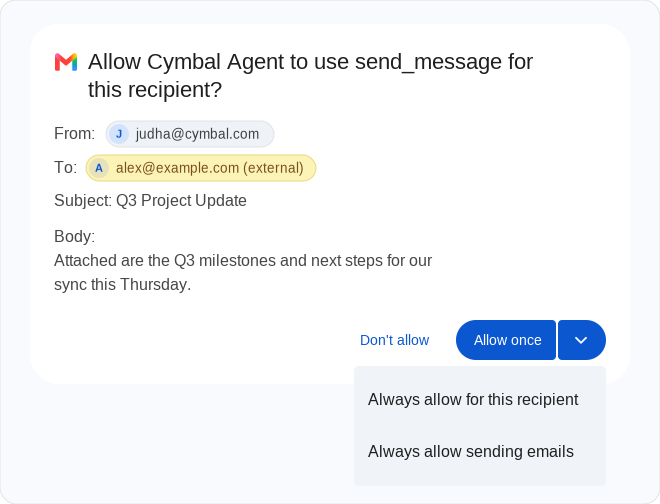
इस गाइड में, /mcp/v1 एंडपॉइंट से कनेक्ट करने का तरीका बताया गया है. साथ ही, उपयोगकर्ता को बेहतर अनुभव देने के लिए, अनुमति वाले डायलॉग डिज़ाइन करने और एमसीपी होस्ट, एमसीपी क्लाइंट या एआई मॉडल के लिए फ़्रेमवर्क में, स्टेटलेस फ़ॉर्म एलिसिटेशन प्रोटोकॉल लागू करने का तरीका बताया गया है.
शुरू करने से पहले
एमसीपी फ़ॉर्म एलिसिटेशन को लागू या कॉन्फ़िगर करने से पहले, ज़रूरी शर्तें पूरी करें. साथ ही, यह तय करें कि आपके एमसीपी होस्ट या क्लाइंट को कस्टम एलिसिटेशन की ज़रूरत है या नहीं. इसके अलावा, सर्वर के एंडपॉइंट की समीक्षा करें.
ज़रूरी शर्तें
पसंद के मुताबिक़ बनाए गए एमसीपी होस्ट या क्लाइंट में, फ़ॉर्म की जानकारी पाने की सुविधा लागू करने से पहले, सेटअप से जुड़ी ये ज़रूरी शर्तें पूरी करें:
- एक ही Google Cloud प्रोजेक्ट में एपीआई और एमसीपी सर्वर चालू करें: अपना OAuth 2.0 क्लाइंट आईडी उसी Google Cloud प्रोजेक्ट में बनाएं जिसमें आपने टारगेट किए गए Google Workspace API और एमसीपी सर्वर एंडपॉइंट चालू किए हैं. OAuth क्लाइंट बनाते समय, इस क्लाइंट का इस्तेमाल एआई की मदद से काम करने वाले एजेंट के लिए करें को चुनें. ज़्यादा जानकारी के लिए, Google Workspace के एमसीपी सर्वर कॉन्फ़िगर करना लेख पढ़ें.
- अपने टारगेट टूल के लिए ज़रूरी OAuth 2.0 स्कोप का अनुरोध करें:
tools/callकी मदद से किसी टूल को कॉल करने के लिए, OAuth 2.0Bearerऐक्सेस टोकन की ज़रूरत होती है. इसमें उस टूल के लिए ज़रूरी स्कोप शामिल होता है. भले ही,tools/listटोकन स्कोप से अलग उपलब्ध टूल दिखाता हो. हर टूल के लिए ज़रूरी OAuth स्कोप के बारे में जानने के लिए, सर्वर के एमसीपी रेफ़रंस की खास जानकारी वाला पेज देखें.
यह देखना कि आपको फ़ॉर्म एलिसिटेशन लागू करने की ज़रूरत है या नहीं
हमारा सुझाव है कि आप एमसीपी फ़ॉर्म एलिसिटेशन की मदद से, /mcp/v1 एंडपॉइंट से कनेक्ट करें. इससे आपका एजेंट, Google Workspace के सभी टूल और नतीजों को ऐक्सेस कर पाएगा. आपको कोड लिखने की ज़रूरत है या नहीं, यह इस बात पर निर्भर करता है कि आपका एमसीपी होस्ट और एमसीपी क्लाइंट कैसे बनाया गया है:
- पहले से बने एमसीपी होस्ट को कॉन्फ़िगर करना: अगर आपको पहले से बने किसी एमसीपी होस्ट ऐप्लिकेशन को कनेक्ट करना है, तो आपको फ़ॉर्म एलिसिटेशन कोड लिखने की ज़रूरत नहीं है. जैसे, Google Antigravity या Claude Desktop, जो एमसीपी फ़ॉर्म एलिसिटेशन के साथ काम करता है:
/mcp/v1एंडपॉइंट से कनेक्ट करें. सेटअप करने का तरीका जानने के लिए, Google Workspace के एमसीपी सर्वर कॉन्फ़िगर करना लेख पढ़ें.- होस्ट के बिल्ट-इन लोकल टूल की पुष्टि करने की सेटिंग को
/mcp/v1पर Google Workspace एमसीपी सर्वर के लिए, हमेशा अनुमति दें पर सेट करें. इससे उपयोगकर्ताओं को एक ही कार्रवाई के लिए दो बार प्रॉम्प्ट नहीं किया जाएगा. - अगर पहले से बने आपके एमसीपी होस्ट में, फ़ॉर्म भरने के लिए ज़रूरी जानकारी इकट्ठा करने की सुविधा अब तक उपलब्ध नहीं है, तो सीमित सुविधाओं वाले
/mcp/v1selfफ़ॉलबैक एंडपॉइंट से कनेक्ट करें. इससे ऐसे टूल उपलब्ध होते हैं जो फ़ॉर्म भरने के लिए ज़रूरी जानकारी इकट्ठा किए बिना भी काम के होते हैं. हालांकि, कुछ खास कॉल के लिए अब भी अनुमति की ज़रूरत पड़ सकती है.
- अपने एमसीपी होस्ट में एमसीपी क्लाइंट एसडीके या एजेंट फ़्रेमवर्क को इंटिग्रेट करना: अगर एमसीपी क्लाइंट लाइब्रेरी या एजेंट फ़्रेमवर्क, जैसे कि एजेंट डेवलपमेंट किट (एडीके) का इस्तेमाल किया जाता है, जो प्रोटोकॉल लेयर पर फ़ॉर्म की जानकारी को पहले से ही हैंडल करता है, तो आपको अब भी इसके हैंडलर को अपने एमसीपी होस्ट के यूज़र इंटरफ़ेस (यूआई) या सीएलआई प्लैटफ़ॉर्म से कनेक्ट करना होगा.
/mcp/v1पर उपयोगकर्ताओं को बेहतर अनुभव देने के लिए, इस गाइड में दिए गए अनुमति देने वाले यूज़र इंटरफ़ेस (यूआई) से जुड़े सुझाव लागू करें. - कस्टम एमसीपी क्लाइंट और होस्ट बनाना: अगर आपको अपना एमसीपी क्लाइंट और होस्ट इंटिग्रेशन बनाना है, तो
/mcp/v1से कनेक्ट करने के लिए, इस गाइड में दिए गए स्टेटलेस फ़ॉर्म एलिसिटेशन प्रोटोकॉल और अनुमति वाले यूज़र इंटरफ़ेस (यूआई) के सुझावों, दोनों को लागू करें.
सर्वर एंडपॉइंट
सामान्य रूप से उपलब्ध Google Workspace के एमसीपी सर्वर और Universal Search के एमसीपी सर्वर, मुख्य /mcp/v1 एंडपॉइंट और सीमित /mcp/v1self फ़ॉलबैक एंडपॉइंट उपलब्ध कराते हैं:
| एंडपॉइंट | सर्वर के यूआरएल | फ़ॉर्म भरने की शर्त | उपलब्ध टूल |
|---|---|---|---|
/mcp/v1 |
|
सुझाया गया प्राइमरी एंडपॉइंट. mode: "form"
के साथ इस्तेमाल करें.
|
यह सर्वर के लिए सभी टूल और नतीजों के पूरे सेट दिखाता है. इसमें वे टूल भी शामिल हैं जिनके लिए डिफ़ॉल्ट नीति के तहत, उपयोगकर्ता की अनुमति हमेशा ज़रूरी होती है. |
/mcp/v1self |
|
फ़ॉलबैक एंडपॉइंट. नीति और टारगेट रिसॉर्स के आधार पर, कुछ कॉल के लिए अब भी फ़ॉर्म की ज़रूरत पड़ सकती है. |
यह उन टूल को हटा देता है जिनके लिए डिफ़ॉल्ट नीति के तहत हमेशा अनुमति की ज़रूरत होती है. साथ ही, यह सिर्फ़ उन टूल को दिखाता है जो फ़ॉर्म भरने के लिए ज़रूरी जानकारी मांगे बिना काम के होते हैं. जैसे, update_doc. सूची और खोज के तरीके, जैसे कि list_threads, नतीजों का सिर्फ़ वह सबसेट दिखाते हैं जिसे अनुमति के बिना ऐक्सेस किया जा सकता है. ये तरीके, पूरा ऐक्सेस देने के लिए नहीं कहते.
|
जब भी संभव हो, फ़ॉर्म एलिसिटेशन के साथ /mcp/v1 का इस्तेमाल करें. साथ ही, /mcp/v1self को उन एमसीपी होस्ट के लिए रिज़र्व करें जिनमें फ़ॉर्म एलिसिटेशन की सुविधा नहीं जोड़ी जा सकती. अगर कोई क्लाइंट किसी टूल को इस तरह से कॉल करता है कि किसी भी एंडपॉइंट पर उपयोगकर्ता की अनुमति की ज़रूरत पड़े, लेकिन फ़ॉर्म भरने की सुविधा के साथ काम करने का एलान न किया गया हो, तो सर्वर कॉल को ब्लॉक कर देता है और MissingRequiredClientCapability गड़बड़ी दिखाता है.
हर सेवा के लिए /mcp/v1 और /mcp/v1self पर कौनसे टूल उपलब्ध हैं, यह देखने के लिए सर्वर के टूल रेफ़रंस की खास जानकारी देने वाला पेज देखें:
- Gmail MCP reference
- Drive के एमसीपी का रेफ़रंस
- Docs MCP reference
- Sheets एमसीपी रेफ़रंस
- Slides के लिए एमसीपी रेफ़रंस
- Calendar MCP reference
- Chat में एमसीपी के बारे में जानकारी
- Universal Search के लिए एमसीपी रेफ़रंस
फ़ॉर्म भरने की सुविधा कैसे काम करती है
Google Workspace के एमसीपी सर्वर, स्टेटलेस और सिंगल-कनेक्शन वाले अनुरोध और फिर से कोशिश करने के फ़्लो का इस्तेमाल करते हैं. यह फ़्लो, 2026-07-28 एमसीपी एलिसिटेशन स्पेसिफ़िकेशन पर आधारित होता है.
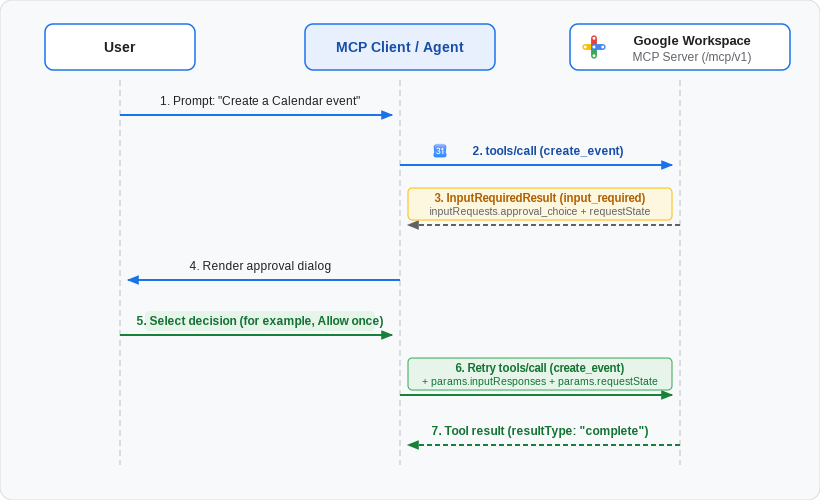
फ़ॉर्म से जानकारी इकट्ठा करने की लाइफ़साइकल में ये चरण शामिल होते हैं:
- उपयोगकर्ता का प्रॉम्प्ट: उपयोगकर्ता, एजेंट से कोई कार्रवाई करने के लिए कहता है. जैसे, Calendar में कोई कैलेंडर इवेंट बनाना.
- शुरुआती
tools/callअनुरोध: एमसीपी क्लाइंट,create_eventजैसे टूल के लिए/mcp/v1एंडपॉइंट परtools/callअनुरोध भेजता है. साथ ही,params._metaमेंelicitationक्षमता का एलान करता है. InputRequiredResultरिस्पॉन्स: जब अनुरोध की गई कार्रवाई के लिए उपयोगकर्ता की अनुमति ज़रूरी होती है, तो सर्वर टूल को चलाने से पहले कार्रवाई को रोक देता है. सर्वर,resultType: "input_required"के साथresultऑब्जेक्ट दिखाता है. यह"approval_choice"से की गईinputRequestsमैप की गई वैल्यू होती है. इसमेंmode: "form"के साथelicitation/createअनुरोध और ओपेकrequestStateस्ट्रिंग शामिल होती है.- अनुमति वाला डायलॉग बॉक्स: एमसीपी क्लाइंट, अनुमति वाला डायलॉग बॉक्स रेंडर करता है. इसमें टारगेट किया गया Google Workspace प्रॉडक्ट और टूल, Markdown की पुष्टि करने वाला मैसेज, फ़ैसले से जुड़ा सवाल, और
enumऔरenumNamesसे अनुमति वाले विकल्प दिखते हैं. - उपयोगकर्ता का फ़ैसला: उपयोगकर्ता, अनुमति देने का कोई विकल्प चुनता है. जैसे, एक बार अनुमति दें या अनुमति न दें.
inputResponsesऔरrequestStateके साथtools/callको फिर से आज़माएं: एमसीपी क्लाइंट, एक जैसे टूलnameऔरargumentsके साथ दूसराtools/callअनुरोध भेजता है. साथ ही, टॉप-लेवलparams.requestStateऔरparams.inputResponsesफ़ील्ड भेजता है. इनमें"approval_choice"के लिए उपयोगकर्ता का चुना गया विकल्प शामिल होता है.- टूल के एक्ज़ीक्यूशन का नतीजा: सर्वर पुष्टि करता है कि
requestState, शुरुआती कॉल के टूल आर्ग्युमेंट से जुड़ा है. इसके बाद, वह उपयोगकर्ता के फ़ैसले का आकलन करता है, टूल कॉल को एक्ज़ीक्यूट करता है या उसे खत्म करता है. साथ ही,resultType: "complete"के साथ फ़ाइनलresultदिखाता है.
जब मंज़ूरी के अनुरोध किए जाते हैं
टूल कॉल से elicitation/create चैलेंज ट्रिगर होगा या नहीं, यह Google Workspace का एमसीपी सर्वर डाइनैमिक तौर पर तय करता है. यह सिस्टम, उपयोगकर्ता, और एडमिन की गवर्नेंस नीतियों के आधार पर तय किया जाता है. नीति के उल्लंघन का आकलन करते समय, इन बातों का ध्यान रखा जा सकता है:
- कार्रवाई का टाइप: डेटा को किसी ऑडियंस के साथ शेयर करने या शेयर किए गए संसाधनों में बदलाव करने वाली कार्रवाइयों के लिए, डिफ़ॉल्ट रूप से उपयोगकर्ता की पुष्टि ज़रूरी होती है. हालांकि, अगर उपयोगकर्ता या एडमिन की नीति के तहत अनुमति दी गई है, तो पुष्टि की ज़रूरत नहीं होती. वहीं, निजी फ़ाइल बनाने जैसी कार्रवाइयां, डिफ़ॉल्ट रूप से बिना पुष्टि के पूरी हो जाती हैं. ट्रैश करने की कार्रवाइयों के लिए, हर कॉल पर पुष्टि करना ज़रूरी होता है. इसके लिए, स्थायी अनुमति नहीं दी जा सकती. साथ ही, उपयोगकर्ता या एडमिन की नीति के आधार पर, पढ़ने या मेटाडेटा से जुड़ी कार्रवाइयों के लिए भी पुष्टि की ज़रूरत पड़ सकती है.
- कॉन्टेंट का मालिकाना हक और उसे देखने की अनुमति: अन्य उपयोगकर्ताओं के मालिकाना हक वाली या उपयोगकर्ता के संगठन से बाहर शेयर की गई फ़ाइलों को ऐक्सेस करने या उनमें बदलाव करने के लिए, अनुमति की ज़रूरत पड़ सकती है.
- ईमेल पाने वाले बाहरी लोग: उपयोगकर्ता के डोमेन से बाहर के लोगों को मैसेज भेजने, उनके साथ फ़ाइलें शेयर करने या उन्हें न्योता भेजने के लिए, आम तौर पर साफ़ तौर पर पुष्टि करने की ज़रूरत होती है.
- उपयोगकर्ता और एडमिन की प्राथमिकताएं: पिछले लेन-देन से सेव की गई मंज़ूरी की प्राथमिकताएं या पूरे डोमेन पर लागू होने वाले एडमिन के नियम, कुछ टूल के लिए पुष्टि की ज़रूरत को लागू कर सकते हैं या उसे बायपास कर सकते हैं.
नीति का आकलन हर कॉल पर सर्वर-साइड पर होता है. इसलिए, आपके क्लाइंट को किसी भी tools/call को शुरू करने पर, InputRequiredResult रिस्पॉन्स को मैनेज करने के लिए तैयार रहना चाहिए. क्लाइंट पर, टूल की संवेदनशीलता के नियमों को कभी भी हार्डकोड न करें या अनुमति से जुड़े फ़ैसलों को कैश मेमोरी में सेव न करें.
अनुमति के विकल्पों के बारे में जानकारी
requestedSchema.properties.approval_choice में, सर्वर मौजूदा अनुरोध के लिए उपलब्ध विकल्पों को दिखाने वाले, पैरलल enum और enumNames कलेक्शन दिखाता है. Google Workspace के सभी एमसीपी सर्वर पर, enum की ये वैल्यू इस्तेमाल की जा सकती हैं:
enum की कीमत का |
अंग्रेज़ी में डिफ़ॉल्ट enumNames लेबल |
एक्ज़ीक्यूट करने की अनुमति देता है | ऑफ़र कब उपलब्ध कराया जाता है और इसका व्यवहार कैसा होता है |
|---|---|---|---|
ALLOW_ONCE |
एक बार ऐक्सेस करने की अनुमति दें | हां | यह विकल्प, अनुमति के लिए मिलने वाले हर प्रॉम्प्ट पर दिखता है. मौजूदा टूल कॉल को एक बार चलाता है. यह किसी स्थायी नियम को रिकॉर्ड नहीं करता. |
DENY_ONCE |
अनुमति न दें | नहीं |
यह विकल्प, अनुमति के लिए मिलने वाले हर प्रॉम्प्ट पर दिखता है. यह टूल के मौजूदा कॉल को UserDeniedAction गड़बड़ी के साथ खत्म करता है. साथ ही, किसी स्थायी नियम को रिकॉर्ड नहीं करता.
|
ALLOW_TOOL_ALWAYS |
इस टूल के लिए हमेशा अनुमति दें | हां | यह विकल्प तब उपलब्ध होता है, जब उपयोगकर्ता और एडमिन की नीतियां, टूल के लिए हमेशा के लिए अनुमति देने की सुविधा देती हैं. यह मौजूदा कॉल को चलाता है और उसी एजेंट से उसी टूल पर आने वाले कॉल को पहले से मंज़ूरी देता है. |
ALLOW_RESOURCE_ALWAYS |
इस फ़ाइल / फ़ोल्डर / ड्राइव / ईमेल / इवेंट / स्पेस / चैट / ग्रुप चैट / टास्क / आइटम के लिए हमेशा इस्तेमाल की अनुमति दें | हां | यह तब ऑफ़र किया जाता है, जब एक ही तरह के ज़्यादा से ज़्यादा 100 संसाधनों में बदलाव किया जाता है या उन्हें ऐक्सेस किया जाता है. जब कॉल कई संसाधनों को टारगेट करता है, तब बहुवचन शब्दों का इस्तेमाल करता है. जैसे, इन फ़ाइलों के लिए हमेशा इस्तेमाल की अनुमति दें. मौजूदा कॉल को चलाता है और उसी एजेंट से आने वाले कॉल को पहले से अनुमति देता है. इसके लिए, एजेंट को उसी रिसॉर्स आईडी का इस्तेमाल करना होगा. |
ALLOW_AUDIENCE_ALWAYS |
इस व्यक्ति / इन लोगों के लिए हमेशा अनुमति दें | हां | यह सुविधा, भेजने, शेयर करने, और न्योता देने की कार्रवाइयों के लिए उपलब्ध है. इसमें ज़्यादा से ज़्यादा 100 लोगों को टारगेट किया जा सकता है. मौजूदा कॉल को चलाता है और उसी एजेंट से उसी पाने वाले को आने वाले समय में किए जाने वाले कॉल को पहले से मंज़ूरी देता है. |
ALLOW_OWNER_ALWAYS |
इस मालिक / इन मालिकों के लिए हमेशा अनुमति दें | हां | यह सुविधा, ज़्यादा से ज़्यादा तीन अलग-अलग मालिकों के आइटम से जुड़े, पढ़ने या ग्राउंडिंग प्रॉम्प्ट पर उपलब्ध है. यह मौजूदा कॉल को चलाता है और उन उपयोगकर्ताओं के मालिकाना हक वाले आइटम के लिए, उसी एजेंट से आने वाले कॉल को पहले से मंज़ूरी देता है. |
किसी भी InputRequiredResult में सिर्फ़ उन विकल्पों का सबसेट शामिल होता है जो उस टूल कॉल पर लागू होते हैं:
- नुकसान पहुंचाने वाली और ट्रैश करने वाली कार्रवाइयां: ऐसी कार्रवाइयां जो संसाधनों को हमेशा के लिए मिटा देती हैं या ट्रैश में भेज देती हैं. इसके अलावा, ऐसी कार्रवाइयां जो एडमिन की नीति से नियंत्रित होती हैं और जिनके लिए हर कॉल पर पुष्टि की ज़रूरत होती है. इनमें सिर्फ़
ALLOW_ONCEऔरDENY_ONCEकी सुविधा मिलती है. - स्कोप की गई कार्रवाइयां: जब स्थायी अनुमतियों की अनुमति होती है, तो सर्वर
ALLOW_ONCE, लागू होने वाला सीमित दायरा, जैसे किALLOW_AUDIENCE_ALWAYSयाALLOW_RESOURCE_ALWAYS,ALLOW_TOOL_ALWAYS, औरDENY_ONCEदिखाता है.
मौजूदा अनुरोध के लिए, enum और enumNames में दिखाए गए सटीक विकल्पों को हमेशा रेंडर करें. इसके लिए, बटन की वैल्यू को हार्डकोड न करें.
उपयोगकर्ता को बेहतरीन अनुभव देने के लिए सुझाए गए तरीके
फ़ॉर्म भरने की सुविधा के साथ काम करने वाले स्टैंडर्ड एमसीपी क्लाइंट, /mcp/v1 के साथ आसानी से काम करते हैं. हालांकि, सामान्य फ़ॉर्म रेंडरर अक्सर एक विकल्प चुनने वाले फ़ैसलों को रेडियो ग्रुप या ड्रॉप-डाउन मेन्यू के तौर पर दिखाते हैं. साथ ही, इनमें एक अलग सबमिट करें बटन होता है. इस बटन पर क्लिक करने के लिए, ज़्यादा क्लिक करने पड़ते हैं. साथ ही, इससे टारगेट Google Workspace ऐप्लिकेशन का कॉन्टेक्स्ट छिप जाता है.
फ़ॉर्म भरने के लिए उपयोगकर्ता को सबसे अच्छा अनुभव देने के लिए, अपने एमसीपी क्लाइंट में ये पांच सुझाव लागू करें. सुझाव 1 से 3, अनुमति वाले डायलॉग बॉक्स की इस इमेज में नंबर वाले कॉलआउट से जुड़े हैं:
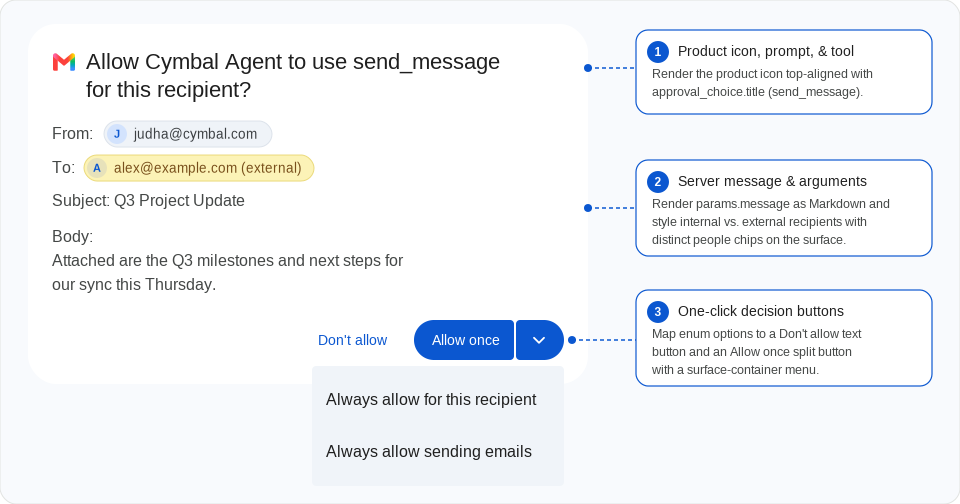
1. प्रॉडक्ट के नाम, आइकॉन, और टूल दिखाना
उपयोगकर्ताओं को तुरंत दिखना चाहिए कि एजेंट, Google Workspace के किस प्रॉडक्ट और टूल को कॉल करना चाहता है:
- एमसीपी सर्वर के
serverInfoमेटाडेटा को, शुरू करने याserver/discoverसे मैप करें. इसके अलावा, अनुरोध के होस्टनेम, जैसे किcalendarmcp.googleapis.comको Google Workspace प्रॉडक्ट के नाम और आइकॉन से मैप करें. InputRequiredResultपर_metaप्रज़ेंटेशन के हिंट, जैसे किtitle,icons, औरisConfirmationको वैकल्पिक सुधार के तौर पर इस्तेमाल करें. Production Google Workspace के एमसीपी सर्वर, फ़िलहाल ये_metaफ़ील्ड नहीं दिखाते हैं. इसलिए, आपका यूज़र इंटरफ़ेस (यूआई) इन पर निर्भर नहीं होना चाहिए.params.nameसे टारगेट टूल का नाम दिखाएं, ताकि उपयोगकर्ताcreate_draftऔरcreate_eventजैसी कार्रवाइयों के बीच अंतर कर सकें.
2. सर्वर के मैसेज और enumNames रेंडर करें
अपने क्लाइंट प्रज़ेंटेशन लेयर को आसान रखें और सर्वर से मिले अनुमति वाले कॉन्टेंट को सीधे रेंडर करें:
params.messageको Markdown के तौर पर रेंडर करें औरapproval_choice.titleदिखाएं: Google Workspace के एमसीपी सर्वर, कार्रवाई की जानकारी को पहले से हीinputRequests.approval_choice.params.messageमें Markdown के तौर पर फ़ॉर्मैट करते हैं. साथ ही,requestedSchema.properties.approval_choice.titleमें स्थानीय भाषा में पुष्टि करने के लिए सवाल उपलब्ध कराते हैं. रॉ मार्कडाउन सिंबल दिखाने या हर टूल के लिए आर्ग्युमेंट फ़ॉर्मैटिंग लॉजिक लिखने के बजाय,messageको सीधे सुरक्षित मार्कडाउन रेंडरर से रेंडर करें. साथ ही, ऐक्शन बटन के ऊपरtitleको साफ़ तौर पर दिखाएं.enumवैल्यू कोenumNamesलेबल के साथ जोड़ें:requestedSchema.properties.approval_choiceको डाइनैमिक तौर पर जांचें.enumमें मौजूद हर आइडेंटिफ़ायर कोenumNamesमें मौजूद उसी इंडेक्स पर, किसी व्यक्ति के लिए आसानी से पढ़े जा सकने वाले लेबल के साथ जोड़ें. अगरoneOfका इस्तेमाल करने वाले अन्य एमसीपी सर्वर के साथ इंटरैक्ट किया जा रहा है, तो JSON स्कीमाoneOfएंट्री पर वापस जाएं.
3. एक क्लिक वाले बटन की मदद से फ़ैसला लेना आसान बनाएं
जब requestedSchema में सिर्फ़ एक enum प्रॉपर्टी हो, तो रेडियो बटन की सूची या ड्रॉप-डाउन मेन्यू रेंडर करने से बचें. ऐसा इसलिए, क्योंकि इसके लिए अलग से सबमिट करें पर क्लिक करना पड़ता है:
- दो विकल्प, जैसे कि
Allow onceऔरDon't allow: दो बटन रेंडर करें. इनमें से किसी भी बटन पर क्लिक करने से, फिर से कोशिश करने का अनुरोध तुरंत सबमिट हो जाता है. - अनुमति देने के कई विकल्प: जब सर्वर
ALLOW_ONCE, एक या उससे ज़्यादा स्थायी अनुमति वाले स्कोप दिखाता है, जैसे किALLOW_AUDIENCE_ALWAYSयाALLOW_TOOL_ALWAYS, औरDENY_ONCE, तो यह डिफ़ॉल्ट रूप से एक बार अनुमति दें पर सेट किया गया प्राइमरी स्प्लिट बटन रेंडर करता है. इसमें अनुमति देने के अन्य विकल्पों के लिए, कैरेट मेन्यू होता है. साथ ही, इसमें अनुमति न दें बटन भी होता है.
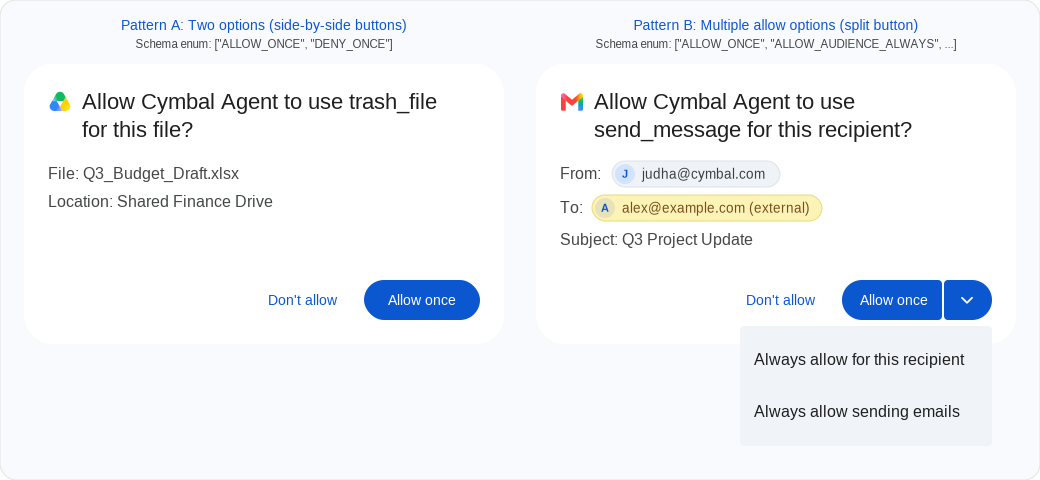
पैटर्न A में, Drive पर की गई ऐसी कार्रवाई जिससे डेटा मिट सकता है, सिर्फ़ ALLOW_ONCE और DENY_ONCE दिखाती है. क्लाइंट इन्हें अनुमति न दें और एक बार अनुमति दें के लिए, अगल-बगल मौजूद दो बटन के तौर पर रेंडर करता है. पैटर्न B में, Gmail की कार्रवाई ALLOW_ONCE, ALLOW_AUDIENCE_ALWAYS, ALLOW_TOOL_ALWAYS, और DENY_ONCE दिखाती है. क्लाइंट इसे अनुमति न दें बटन के तौर पर रेंडर करता है. साथ ही, एक बार अनुमति दें स्प्लिट बटन के तौर पर रेंडर करता है. इसके मेन्यू में, अनुमति देने के स्थायी विकल्प दिखते हैं.
4. /mcp/v1 पर डुप्लीकेट प्रॉम्प्ट से बचें
कई एमसीपी होस्ट में, किसी बाहरी टूल को चलाने से पहले, पुष्टि करने के लिए पहले से मौजूद लोकल प्रॉम्प्ट शामिल होता है. Google Workspace के एमसीपी सर्वर को कॉल करते समय, अगर फ़ॉर्म भरने की सुविधा चालू है, तो लोकल प्री-एग्ज़ीक्यूशन प्रॉम्प्ट की वजह से, उपयोगकर्ता को दो बार प्रॉम्प्ट देने पड़ते हैं. ऐसा इसलिए होता है, क्योंकि सर्वर अपनी नीति के मुताबिक, फ़ॉर्म भरने की ज़रूरी शर्त लागू करता है.
- अगर आपने पहले से बने किसी एमसीपी होस्ट को फ़ॉर्म की जानकारी पाने की सुविधा के साथ कॉन्फ़िगर किया है: Google Workspace के एमसीपी सर्वर के लिए, होस्ट की लोकल टूल की पुष्टि करने की सेटिंग को
/mcp/v1पर हमेशा इस्तेमाल की अनुमति पर सेट करें. साथ ही, सर्वर से शुरू किए गए जानकारी पाने वाले डायलॉग पर भरोसा करें. अगर आपका होस्ट, फ़ॉर्म भरने की सुविधा के साथ काम नहीं करता है और/mcp/v1selfसे कनेक्ट होता है, तो लोकल टूल की पुष्टि करने की सुविधा चालू रखें. इससे आपको उन कॉल के लिए क्लाइंट-साइड प्रॉम्प्ट मिलेंगे जो सर्वर-साइड की अनुमति को ट्रिगर नहीं करते. - अगर आपको एमसीपी होस्ट बनाना है: जब
*mcp.googleapis.comऔरpeople.googleapis.comके लिए, फ़ॉर्म भरने की सुविधा चालू हो, तब अपने होस्ट के सामान्य प्री-कॉल कन्फ़र्मेशन डायलॉग को दबाएं. जैसे,gmailmcp.googleapis.com,calendarmcp.googleapis.com,drivemcp.googleapis.com, औरworkspacemcp.googleapis.com. उपयोगकर्ता को सिर्फ़ तब प्रॉम्प्ट करें, जब सर्वरresultType: "input_required"के साथInputRequiredResultदिखाता है.
5. टूल और अस्वीकार करने की सुविधा के लिए, एजेंट के व्यवहार को गाइड करें
रीज़निंग मॉडल, निगरानी में काम करने वाले एआई मॉडल के अनुमति देने वाले फ़्लो को दो तरीकों से गलत समझ सकते हैं:
- लिखने वाले टूल का इस्तेमाल करने से बचना: अगर कोई मॉडल यह मान लेता है कि
send_messageजैसे लिखने वाले टूल को कॉल करने पर, वह उपयोगकर्ता की समीक्षा के बिना तुरंत लागू हो जाता है, तो हो सकता है कि मॉडलcreate_draftजैसे ड्राफ़्ट टूल का इस्तेमाल करे. भले ही, उपयोगकर्ता ने ईमेल भेजने के लिए कहा हो. - अनुमति न मिलने के बाद, डेटा में बदलाव करने वाले अन्य टूल का इस्तेमाल करके फिर से कोशिश करना: अगर उपयोगकर्ता, अनुमति देने वाले डायलॉग बॉक्स में अनुमति न दें पर क्लिक करता है और सर्वर
UserDeniedActionगड़बड़ी का नतीजा दिखाता है, तो हो सकता है कि मॉडल, अनुमति न मिलने को टूल की अस्थायी गड़बड़ी के तौर पर देखे. साथ ही, डेटा में बदलाव करने वाले किसी अन्य टूल का इस्तेमाल करके, उसी लक्ष्य को पूरा करने की कोशिश करे. इससे, अनुमति देने के लिए अनचाहा दूसरा प्रॉम्प्ट ट्रिगर हो सकता है.
इन दोनों समस्याओं से बचने के लिए, अपने एजेंट के सिस्टम प्रॉम्प्ट में ये निर्देश शामिल करें:
प्रॉम्प्ट
When calling Google Workspace MCP tools:
1. Select the tool that directly matches the user's intent (for example,
   use send_message when asked to send an email). Sensitive tools
   automatically pause for user confirmation through MCP form elicitation
   before executing.
2. If a tool call fails because the user denied, declined, or canceled the
   approval request, stop immediately and acknowledge the user's decision.
   Do not retry the same action or call an alternative write tool unless
   the user explicitly asks you to do so in a new message.
ट्रांसपोर्ट और स्टेटलेस प्रोटोकॉल से जुड़ी ज़रूरी शर्तें
Google Workspace के एमसीपी सर्वर, स्टेटलेस स्ट्रीम किए जा सकने वाले एचटीटीपी पर काम करते हैं. कस्टम एमसीपी क्लाइंट बनाते समय, हर अनुरोध पर वायर से जुड़ी इन ज़रूरी शर्तों का पालन करें:
- एचटीटीपी हेडर:
/mcp/v1को किए जाने वाले सभीPOSTअनुरोधों में ये हेडर शामिल करें:Authorization: Bearer ACCESS_TOKENContent-Type: application/jsonAccept: application/json, text/event-streamMCP-Protocol-Version: 2026-07-28Accept-Language: BCP_47_LANGUAGE_TAGका इस्तेमाल करें, ताकि पुष्टि करने वाले मैसेज, सवालों, औरenumNamesलेबल को उपयोगकर्ता की पसंदीदा भाषा में स्थानीय भाषा में अनुवाद किया जा सके. जैसे,es-419, es;q=0.9, en;q=0.8. अगर इसे शामिल नहीं किया जाता है, तो टेक्स्ट डिफ़ॉल्ट रूप सेen-USपर सेट हो जाता है.
- रिस्पॉन्स के कॉन्टेंट टाइप: सर्वर और अनुरोध के टाइप के आधार पर, एचटीटीपी रिस्पॉन्स बॉडी को
Content-Type: application/jsonके साथ स्टैंडर्ड JSON के तौर पर याContent-Type: text/event-streamके साथ सर्वर-सेंट इवेंट (एसएसई) के तौर पर फ़ॉर्मैट किया जा सकता है. इसमें JSON-RPC पेलोड,data: {...}लाइनों पर दिखते हैं. आपके एचटीटीपी ट्रांसपोर्ट पार्सर को दोनों फ़ॉर्मैट स्वीकार करने चाहिए. - स्टेटलेस डिस्कवरी: Google Workspace के एमसीपी सर्वर, स्टेटफ़ुल
initializeसेशन को सेव नहीं करते. स्टार्टअप के समय सर्वर का मेटाडेटा और सुविधाएं फ़ेच करने के लिए,"method": "server/discover"और"params": {}के साथ JSON-RPC अनुरोध भेजें. इससेresult._meta["io.modelcontextprotocol/serverInfo"]में सर्वर का मेटाडेटा मिलता है. कस्टम पुष्टि करने के लिए_metaहिंट, जैसे किisConfirmation,title, औरiconsको अब तक प्रोडक्शनInputRequiredResultरिस्पॉन्स में शामिल नहीं किया गया है. इसलिए, हमेशा_metaप्रज़ेंटेशन फ़ील्ड को वैकल्पिक के तौर पर इस्तेमाल करें औरserverInfoया सर्वर होस्टनेम पर वापस जाएं. - हर अनुरोध के लिए
_metaकी सुविधाएं: ट्रांसपोर्ट स्टेटलेस होता है. इसलिए, हरtools/listऔरtools/callअनुरोध में,paramsके अंदर_metaको शामिल करें. इसके लिए, इन कुंजियों का इस्तेमाल करें:"io.modelcontextprotocol/protocolVersion": "2026-07-28""io.modelcontextprotocol/clientInfo":{"name": "YOUR_APP_NAME","version": "VERSION"}"io.modelcontextprotocol/clientCapabilities":{"elicitation": {"form": {}}}
गड़बड़ी ठीक करना और पैरामीटर बाइंडिंग
जब किसी टूल कॉल को ब्लॉक किया जाता है या फिर से कोशिश करने पर पुष्टि नहीं हो पाती है, तो सर्वर गड़बड़ी की कैटगरी के आधार पर, टूल-लेवल पर गड़बड़ी का नतीजा या टॉप-लेवल का JSON-RPC गड़बड़ी ऑब्जेक्ट दिखाता है:
UserDeniedActionऔरAdminPolicyBlock: जब कोई उपयोगकर्ता अनुमति देने के अनुरोध को अस्वीकार करता है या एडमिन की नीति की वजह से कार्रवाई को ब्लॉक कर दिया जाता है, तो सर्वर"resultType": "complete","isError": true, औरresult.contentमें स्थानीय भाषा में गड़बड़ी के मैसेज के साथ JSON-RPCresultदिखाता है. सेवा और एनवायरमेंट के लिए चालू होने पर, सर्वरresult._meta["google.com/error"]में गड़बड़ी का स्ट्रक्चर्ड मेटाडेटा भी शामिल करता है.result._meta["google.com/error"]को हर सेवा और एनवायरमेंट के हिसाब से गेट किया जाता है. इसलिए,result._meta["google.com/error"]मौजूद न होने पर, आपके क्लाइंट कोresult.contentसे गड़बड़ी का मैसेज पढ़ना होगा:UserDeniedAction: यह तब दिखता है, जब उपयोगकर्ताDENY_ONCEको चुनता है, अनुमति देने से मना करता है या अनुमति देने वाले फ़ॉर्म को रद्द करता है. अंग्रेज़ी में डिफ़ॉल्ट मैसेज यह है"Action canceled. The user declined the confirmation request."AdminPolicyBlock: यह गड़बड़ी तब दिखती है, जब संगठन के एडमिन की नीति, एजेंट को कार्रवाई करने से रोकती है. अंग्रेज़ी में डिफ़ॉल्ट मैसेज"Action could not be completed. Your administrator has blocked third-party agents from performing this action."है
JSON
{ "jsonrpc": "2.0", "id": 3, "result": { "resultType": "complete", "isError": true, "content": [ { "type": "text", "text": "Action canceled. The user declined the confirmation request." } ], "_meta": { "google.com/error": { "code": 400, "message": "Action canceled. The user declined the confirmation request.", "status": "FAILED_PRECONDITION", "details": [ { "@type": "type.googleapis.com/google.rpc.ErrorInfo", "reason": "UserDeniedAction", "domain": "mcp.googleapis.com" } ] } } } }MissingRequiredClientCapability: यह गड़बड़ी तब दिखती है, जब कोई क्लाइंट किसी टूल को इस तरह से कॉल करता है कि/mcp/v1या/mcp/v1selfपर उपयोगकर्ता की पुष्टि ज़रूरी हो. हालांकि,_meta["io.modelcontextprotocol/clientCapabilities"]में फ़ॉर्म भरने की सुविधा के बारे में नहीं बताया गया हो. सर्वर इस गड़बड़ी को टॉप-लेवल JSON-RPCerrorऑब्जेक्ट में बदल देता है. इसमें कोड-32021औरerror.data.requiredCapabilitiesमें ज़रूरी क्षमता वाला ऑब्जेक्ट शामिल होता है:JSON
{
  "jsonrpc": "2.0",
  "id": 2,
  "error": {
    "code": -32021,
    "message": "Action could not be completed. This action requires user confirmation, which this client does not support. Use a client that supports form elicitation to perform this action.",
    "data": {
      "requiredCapabilities": {
        "elicitation": {
          "form": {}
        }
      }
    }
  }
}
पैरामीटर-बाइंडिंग लागू करना:
requestStateके अंदर मौजूदrequestBindingटोकन, अनुमति के शुरुआती चैलेंज को क्रिप्टोग्राफ़िक तरीके से उस टूलargumentsसे बाइंड करता है जिसे पहले कॉल पर भेजा गया था. अगर क्लाइंट, फिर से कॉल करने परparams.argumentsके किसी फ़ील्ड में बदलाव करता है या गलत फ़ॉर्मैट वाला या अनबाउंडparams.requestStateपास करता है, तो सर्वर अमान्य अनुमति को अनदेखा कर देता है और एक नयाInputRequiredResultचैलेंज दिखाता है. इसके अलावा, वह अमान्य पैरामीटर या पूरी न होने वाली शर्त की गड़बड़ी दिखाता है. इससे क्लाइंट कोinputResponsesके बिना फिर से कोशिश करने का निर्देश मिलता है.
लागू करने का उदाहरण
यहां दिए गए सिलसिलेवार तरीके से बताया गया है कि एमसीपी क्लाइंट, Calendar create_event टूल को कैसे कॉल करता है, ब्राउज़र यूज़र इंटरफ़ेस (यूआई) या टर्मिनल सीएलआई में सर्वर की अनुमति का प्रॉम्प्ट कैसे रेंडर करता है, और TypeScript और Python में उपयोगकर्ता का फ़ैसला कैसे सबमिट करता है. इसके बाद, कोडिंग एजेंट के लिए, फिर से इस्तेमाल की जा सकने वाली एजेंट स्किल के बारे में बताया गया है.
क्लाइंट से अनुमति लेने के लिए उपलब्ध प्लैटफ़ॉर्म
ब्राउज़र पर आधारित एमसीपी क्लाइंट में, TypeScript का इस्तेमाल करके रेंडर किया गया कार्ड दिखता है. इसमें Calendar का आइकॉन, सर्वर का होस्टनेम, टूल का नाम, सर्वर से रेंडर किए गए Markdown message की झलक, पुष्टि करने के लिए सवाल, अनुमति न दें बटन, और एक बार अनुमति दें स्प्लिट बटन दिखता है:
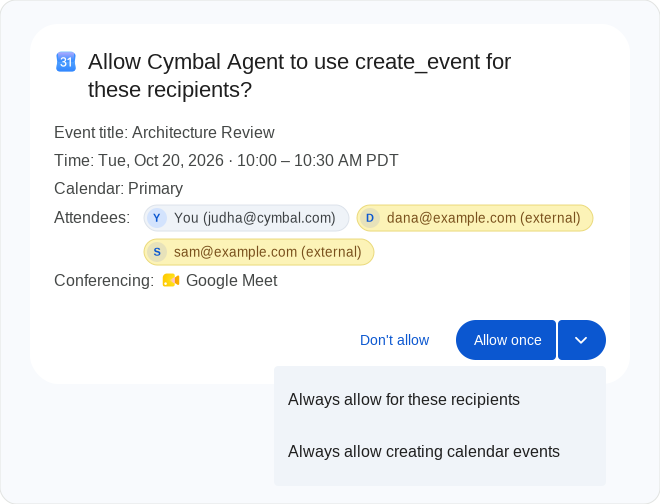
टर्मिनल पर आधारित एमसीपी क्लाइंट में, Python सीएलआई का लागू किया गया वर्शन, InputRequiredResult पेलोड को इंटरैक्टिव नंबर वाले प्रॉम्प्ट के तौर पर रेंडर करता है:
सीएलआई
=== Google Calendar (create_event) ===
Architecture Review
Tue, Oct 20 · 10:00 - 10:30 AM PDT · 🟢 No calendar conflicts
You, dana@example.com, sam@example.com
Conferencing: Google Meet

Allow Cymbal Agent to use create_event for these recipients?
  [1] Allow once (ALLOW_ONCE)
  [2] Always allow for these recipients (ALLOW_AUDIENCE_ALWAYS)
  [3] Always allow this tool (ALLOW_TOOL_ALWAYS)
  [4] Don't allow (DENY_ONCE)
Enter choice (1-4, or c to cancel):
शुरुआती कॉल और जानकारी इकट्ठा करने के लिए रिस्पॉन्स
क्लाइंट, create_event टूल का इस्तेमाल करके कैलेंडर इवेंट बनाने के लिए, tools/call अनुरोध भेजता है:
JSON
{
  "jsonrpc": "2.0",
  "id": 2,
  "method": "tools/call",
  "params": {
    "name": "create_event",
    "arguments": {
      "calendarId": "primary",
      "summary": "Architecture Review",
      "startTime": "2026-10-20T10:00:00",
      "endTime": "2026-10-20T10:30:00",
      "timeZone": "America/Los_Angeles",
      "attendees": [
        {
          "email": "dana@example.com"
        },
        {
          "email": "sam@example.com"
        }
      ],
      "addGoogleMeetUrl": true
    },
    "_meta": {
      "io.modelcontextprotocol/protocolVersion": "2026-07-28",
      "io.modelcontextprotocol/clientInfo": {
        "name": "Cymbal Agent",
        "version": "1.0.0"
      },
      "io.modelcontextprotocol/clientCapabilities": {
        "elicitation": {
          "form": {}
        }
      }
    }
  }
}
जब मंज़ूरी ज़रूरी होती है, तो सर्वर InputRequiredResult के साथ जवाब देता है:
JSON
{
  "jsonrpc": "2.0",
  "id": 2,
  "result": {
    "resultType": "input_required",
    "inputRequests": {
      "approval_choice": {
        "method": "elicitation/create",
        "params": {
          "mode": "form",
          "message": "**Architecture Review**  \nTue, Oct 20 · 10:00 - 10:30 AM PDT · 🟢 No calendar conflicts  \nYou, dana@example.com, sam@example.com  \n**Conferencing:** Google Meet",
          "requestedSchema": {
            "type": "object",
            "required": ["approval_choice"],
            "properties": {
              "approval_choice": {
                "type": "string",
                "title": "Allow Cymbal Agent to use create_event for these recipients?",
                "enum": [
                  "ALLOW_ONCE",
                  "ALLOW_AUDIENCE_ALWAYS",
                  "ALLOW_TOOL_ALWAYS",
                  "DENY_ONCE"
                ],
                "enumNames": [
                  "Allow once",
                  "Always allow for these recipients",
                  "Always allow this tool",
                  "Don't allow"
                ]
              }
            }
          }
        }
      }
    },
    "requestState": "{\"elicitationId\":\"...\",\"requestBinding\":\"...\"}"
  }
}
InputRequiredResult के रिस्पॉन्स में ये मुख्य फ़ील्ड शामिल होते हैं:
result.resultType: जब सर्वर उपयोगकर्ता के इनपुट के लिए एक्ज़ीक्यूशन को रोकता है, तब इसे"input_required"पर सेट करें. साथ ही, जब टूल एक्ज़ीक्यूशन पूरा कर लेता है, तब इसे"complete"पर सेट करें.result.inputRequests: अनुरोध के आइडेंटिफ़ायर"approval_choice"के हिसाब से मैप किया गया. हर एंट्री में"method": "elicitation/create"और"mode": "form"के साथ एकparamsऑब्जेक्ट होता है._metaप्रज़ेंटेशन हिंट:isConfirmation,title, औरiconsजैसे वैकल्पिक फ़ील्ड, प्रोडक्शनInputRequiredResultरिस्पॉन्स में अब तक शामिल नहीं किए गए हैं._metaफ़ील्ड को हमेशा वैकल्पिक मानें. साथ ही, प्रॉडक्ट का नाम और आइकॉनserverInfoसे या सर्वर के होस्टनेम से रिज़ॉल्व करें.inputRequests.approval_choice.params.message: सर्वर से जनरेट की गई कार्रवाई की झलक, जो Markdown फ़ॉर्मैट में होती है. इसके अलावा, अगर टूल कोई अलग झलक कार्ड जनरेट नहीं करता है, तो पुष्टि करने के लिए सवाल.inputRequests.approval_choice.params.requestedSchema: JSON स्कीमा ऑब्जेक्ट, जिसकीproperties.approval_choiceपरिभाषा में ये फ़ील्ड शामिल हैं:title: स्थानीय भाषा में पुष्टि करने के लिए पूछा गया सवाल, जैसे कि"Allow Cymbal Agent to use create_event for these recipients?". अनुरोध में_meta["io.modelcontextprotocol/clientInfo"].nameदेने पर, सर्वर आपके ऐप्लिकेशन का नाम इस सवाल में शामिल कर देता है.enum:ApprovalChoiceआइडेंटिफ़ायर का क्रम से लगाया गया कलेक्शन. जैसे,ALLOW_ONCE,ALLOW_AUDIENCE_ALWAYS,ALLOW_TOOL_ALWAYS, औरDENY_ONCE.enumNames:enumमें मौजूद हर एंट्री के हिसाब से, स्थानीय भाषा में लिखे गए लेबल का कलेक्शन. जैसे,Allow once,Always allow for these recipients,Always allow this tool, औरDon't allow.
result.requestState: JSON कोड में बदली गई एक ऐसी स्ट्रिंग जिसमें सर्वर काelicitationIdऔर क्रिप्टोग्राफ़िकrequestBindingटोकन शामिल होता है. आपको फिर से कॉल करने पर, इस स्ट्रिंग कोparams.requestStateमें बिना किसी बदलाव के दोहराना होगा.
फिर से कोशिश करने, अस्वीकार करने, और रद्द करने के पेलोड
जब उपयोगकर्ता अनुमति देने का विकल्प चुन ले, तब बिलकुल एक जैसे name और arguments के साथ दूसरा tools/call अनुरोध भेजें. साथ ही, params में टॉप-लेवल फ़ील्ड के तौर पर requestState और inputResponses को पास करें:
JSON
{
  "jsonrpc": "2.0",
  "id": 3,
  "method": "tools/call",
  "params": {
    "name": "create_event",
    "arguments": {
      "calendarId": "primary",
      "summary": "Architecture Review",
      "startTime": "2026-10-20T10:00:00",
      "endTime": "2026-10-20T10:30:00",
      "timeZone": "America/Los_Angeles",
      "attendees": [
        {
          "email": "dana@example.com"
        },
        {
          "email": "sam@example.com"
        }
      ],
      "addGoogleMeetUrl": true
    },
    "requestState": "{\"elicitationId\":\"...\",\"requestBinding\":\"...\"}",
    "inputResponses": {
      "approval_choice": {
        "action": "accept",
        "content": {
          "approval_choice": "ALLOW_ONCE"
        }
      }
    },
    "_meta": {
      "io.modelcontextprotocol/protocolVersion": "2026-07-28",
      "io.modelcontextprotocol/clientInfo": {
        "name": "Cymbal Agent",
        "version": "1.0.0"
      },
      "io.modelcontextprotocol/clientCapabilities": {
        "elicitation": {
          "form": {}
        }
      }
    }
  }
}
एमसीपी एलिसिटेशन स्पेसिफ़िकेशन, फ़ॉर्म की वैल्यू सबमिट करने और डायलॉग को खारिज करने के बीच अंतर करता है. params.inputResponses में, उपयोगकर्ता के नकारात्मक फ़ैसले को दो तरीकों से दिखाया जा सकता है:
DENY_ONCEविकल्प सबमिट करना: जब उपयोगकर्ताDENY_ONCEके लिए, अनुमति न दें बटन पर क्लिक करे, तो"content": {"approval_choice": "DENY_ONCE"}के साथ"action": "accept"भेजें:JSON
{
  "jsonrpc": "2.0",
  "id": 3,
  "method": "tools/call",
  "params": {
    "name": "create_event",
    "arguments": {
      "calendarId": "primary",
      "summary": "Architecture Review",
      "startTime": "2026-10-20T10:00:00",
      "endTime": "2026-10-20T10:30:00",
      "timeZone": "America/Los_Angeles",
      "attendees": [
        {
          "email": "dana@example.com"
        },
        {
          "email": "sam@example.com"
        }
      ],
      "addGoogleMeetUrl": true
    },
    "requestState": "{\"elicitationId\":\"...\",\"requestBinding\":\"...\"}",
    "inputResponses": {
      "approval_choice": {
        "action": "accept",
        "content": {
          "approval_choice": "DENY_ONCE"
        }
      }
    },
    "_meta": {
      "io.modelcontextprotocol/protocolVersion": "2026-07-28",
      "io.modelcontextprotocol/clientInfo": {
        "name": "Cymbal Agent",
        "version": "1.0.0"
      },
      "io.modelcontextprotocol/clientCapabilities": {
        "elicitation": {
          "form": {}
        }
      }
    }
  }
}
डायलॉग बॉक्स को अस्वीकार करना या रद्द करना: अगर उपयोगकर्ता, अनुमति देने का विकल्प चुने बिना डायलॉग बॉक्स को बंद या रद्द कर देता है, तो
"action": "decline"या"action": "cancel"भेजें औरcontentफ़ील्ड को छोड़ दें:JSON
"inputResponses": {
  "approval_choice": {
    "action": "cancel"
  }
}
दोनों ही मामलों में, सर्वर रिस्पॉन्स को DENY_ONCE के तौर पर ट्रीट करता है, टूल का एक्ज़ीक्यूशन बंद कर देता है, और टूल की गड़बड़ी का नतीजा दिखाता है.
TypeScript वेब क्लाइंट
TypeScript के इस उदाहरण में, Markdown message, पुष्टि करने के लिए सवाल, और अनुमति वाले विकल्पों को सीधे InputRequiredResult पेलोड से निकाला जाता है. साथ ही, प्रॉडक्ट के टाइटल को वैकल्पिक _meta हिंट या सर्वर के होस्टनेम से रिज़ॉल्व किया जाता है. इसके बाद, उपयोगकर्ता के फ़ैसले के साथ tools/call को फिर से चलाया जाता है:
TypeScript
const PROTOCOL_VERSION = "2026-07-28";
const CLIENT_INFO = { name: "Cymbal Agent", version: "1.0.0" };
const MAX_ELICITATION_ROUNDS = 3;

const HOST_TITLES: Record<string, string> = {
  "gmailmcp.googleapis.com": "Gmail",
  "calendarmcp.googleapis.com": "Google Calendar",
  "drivemcp.googleapis.com": "Google Drive",
  "docsmcp.googleapis.com": "Google Docs",
  "sheetsmcp.googleapis.com": "Google Sheets",
  "slidesmcp.googleapis.com": "Google Slides",
  "chatmcp.googleapis.com": "Google Chat",
  "people.googleapis.com": "Google Contacts",
  "tasksmcp.googleapis.com": "Google Tasks",
  "workspacemcp.googleapis.com": "Google Workspace",
};

interface ElicitationOption {
  value: string;
  label: string;
}

export interface ElicitationCardModel {
  requestKey: string;
  serverTitle: string;
  serverIconUrl?: string;
  toolName: string;
  markdownMessage: string;
  questionTitle: string;
  decisionFieldKey: string;
  denyOption?: ElicitationOption;
  primaryAllowOption?: ElicitationOption;
  secondaryAllowOptions: ElicitationOption[];
}

function buildBaseMeta(): Record<string, unknown> {
  return {
    "io.modelcontextprotocol/protocolVersion": PROTOCOL_VERSION,
    "io.modelcontextprotocol/clientInfo": CLIENT_INFO,
    "io.modelcontextprotocol/clientCapabilities": {
      elicitation: { form: {} },
    },
  };
}

/**
 * Extracts a UI view model directly from an InputRequiredResult response.
 * Render card.markdownMessage with a safe Markdown renderer in your UI.
 */
export function extractCardModel(
  rpcResult: Record<string, any>,
  toolName: string,
  serverHost = "workspacemcp.googleapis.com",
): ElicitationCardModel | null {
  const inputRequests: Record<string, any> = rpcResult.inputRequests ?? {};
  const requestEntry = Object.entries(inputRequests).find(
    ([, req]: [string, any]) =>
      req?.method === "elicitation/create" && req?.params?.mode === "form",
  );
  if (!requestEntry) {
    return null;
  }
  const [requestKey, elicitationReq] = requestEntry;

  const reqMeta = elicitationReq.params?._meta ?? {};
  const resultMeta = rpcResult._meta ?? {};
  const serverInfo = resultMeta["io.modelcontextprotocol/serverInfo"] ?? {};
  const icons: Array<{ src: string; mimeType?: string }> =
    reqMeta.icons ?? resultMeta.icons ?? serverInfo.icons ?? [];
  const preferredIcon =
    icons.find((icon) => icon.mimeType === "image/svg+xml") ?? icons[0];

  const properties: Record<string, any> =
    elicitationReq.params?.requestedSchema?.properties ?? {};
  const firstProperty = Object.entries(properties)[0];
  if (!firstProperty) {
    return null;
  }
  const [decisionFieldKey, fieldSchema] = firstProperty as [
    string,
    Record<string, any>,
  ];

  let options: ElicitationOption[] = [];
  if (Array.isArray(fieldSchema.enum)) {
    const enumNames: string[] = Array.isArray(fieldSchema.enumNames)
      ? fieldSchema.enumNames
      : [];
    options = fieldSchema.enum.map((val: string, idx: number) => ({
      value: val,
      label: enumNames[idx] ?? val,
    }));
  } else if (Array.isArray(fieldSchema.oneOf)) {
    options = fieldSchema.oneOf.map((opt: any) => ({
      value: opt.const,
      label: opt.title ?? opt.const,
    }));
  }

  const denyOption = options.find((opt) => opt.value.startsWith("DENY"));
  const allowOptions = options.filter(
    (opt) => !opt.value.startsWith("DENY"),
  );

  return {
    requestKey,
    serverTitle:
      reqMeta.title ??
      resultMeta.title ??
      serverInfo.title ??
      serverInfo.name ??
      HOST_TITLES[serverHost] ??
      "Google Workspace",
    serverIconUrl: preferredIcon?.src,
    toolName,
    markdownMessage:
      elicitationReq.params?.message ?? "Confirm this action.",
    questionTitle: fieldSchema.title ?? "Confirm this action?",
    decisionFieldKey,
    denyOption,
    primaryAllowOption: allowOptions[0],
    secondaryAllowOptions: allowOptions.slice(1),
  };
}

/**
 * Executes tools/call and replays with requestState and inputResponses
 * when the server returns an InputRequiredResult.
 */
export async function handleToolCallWithElicitation(
  sendRpc: (payload: Record<string, unknown>) => Promise<Record<string, any>>,
  promptUserInUi: (card: ElicitationCardModel) => Promise<string | null>,
  toolName: string,
  toolArgs: Record<string, unknown>,
  serverHost = "calendarmcp.googleapis.com",
): Promise<Record<string, any>> {
  let requestId = 1;
  let response = await sendRpc({
    jsonrpc: "2.0",
    id: requestId,
    method: "tools/call",
    params: {
      name: toolName,
      arguments: structuredClone(toolArgs),
      _meta: buildBaseMeta(),
    },
  });

  for (let round = 0; round < MAX_ELICITATION_ROUNDS; round++) {
    const result = response.result ?? {};
    if (result.resultType !== "input_required") {
      return response;
    }

    const card = extractCardModel(result, toolName, serverHost);
    if (!card) {
      return response;
    }

    const selectedValue = await promptUserInUi(card);
    const userResponse = selectedValue
      ? {
          action: "accept",
          content: { [card.decisionFieldKey]: selectedValue },
        }
      : { action: "cancel" };

    requestId += 1;
    response = await sendRpc({
      jsonrpc: "2.0",
      id: requestId,
      method: "tools/call",
      params: {
        name: toolName,
        arguments: structuredClone(toolArgs),
        ...(result.requestState !== undefined
          ? { requestState: result.requestState }
          : {}),
        inputResponses: {
          [card.requestKey]: userResponse,
        },
        _meta: buildBaseMeta(),
      },
    });
  }

  return response;
}
Python CLI क्लाइंट
Python
import copy
import re
from typing import Any

PROTOCOL_VERSION = "2026-07-28"
CLIENT_INFO = {"name": "Cymbal CLI Agent", "version": "1.0.0"}
MAX_ELICITATION_ROUNDS = 3
HOST_TITLES = {
    "gmailmcp.googleapis.com": "Gmail",
    "calendarmcp.googleapis.com": "Google Calendar",
    "drivemcp.googleapis.com": "Google Drive",
    "docsmcp.googleapis.com": "Google Docs",
    "sheetsmcp.googleapis.com": "Google Sheets",
    "slidesmcp.googleapis.com": "Google Slides",
    "chatmcp.googleapis.com": "Google Chat",
    "people.googleapis.com": "Google Contacts",
    "tasksmcp.googleapis.com": "Google Tasks",
    "workspacemcp.googleapis.com": "Google Workspace",
}

def build_base_meta() -> dict[str, Any]:
  """Returns the required per-request _meta block for /mcp/v1 calls."""
  return {
      "io.modelcontextprotocol/protocolVersion": PROTOCOL_VERSION,
      "io.modelcontextprotocol/clientInfo": CLIENT_INFO,
      "io.modelcontextprotocol/clientCapabilities": {
          "elicitation": {"form": {}}
      },
  }

def strip_markdown(text: str) -> str:
  """Minimal example that strips basic Markdown for terminal display."""
  text = re.sub(r"\[([^\]]+)\]\(([^)]+)\)", r"\1 (\2)", text)
  text = re.sub(r"\*\*(.*?)\*\*", r"\1", text)
  return re.sub(r"`([^`]+)`", r"\1", text)

def extract_decision_options(
    requested_schema: dict[str, Any],
) -> tuple[str | None, str, list[dict[str, str]]]:
  """Extracts the property key, question title, and options from schema."""
  properties = requested_schema.get("properties", {})
  first_entry = next(iter(properties.items()), None)
  if first_entry is None:
    return None, "Confirm this action?", []

  field_key, field_schema = first_entry
  question_title = field_schema.get("title", "Confirm this action?")

  if "enum" in field_schema:
    enum_values = field_schema.get("enum", [])
    enum_names = field_schema.get("enumNames", [])
    options = [
        {
            "value": val,
            "label": enum_names[idx] if idx < len(enum_names) else val,
        }
        for idx, val in enumerate(enum_values)
    ]
  elif "oneOf" in field_schema:
    options = [
        {
            "value": item["const"],
            "label": item.get("title", item["const"]),
        }
        for item in field_schema["oneOf"]
    ]
  else:
    options = []
  return field_key, question_title, options

def prompt_user_in_cli(
    elicitation_req: dict[str, Any],
    result_meta: dict[str, Any],
    tool_name: str,
    server_host: str = "calendarmcp.googleapis.com",
) -> dict[str, Any]:
  """Renders a CLI approval prompt and returns the inputResponses entry."""
  params = elicitation_req.get("params", {})
  req_meta = params.get("_meta", {})
  server_info = result_meta.get(
      "io.modelcontextprotocol/serverInfo", {}
  )
  server_title = (
      req_meta.get("title")
      or result_meta.get("title")
      or server_info.get("title")
      or server_info.get("name")
      or HOST_TITLES.get(server_host, "Google Workspace MCP")
  )
  message = strip_markdown(params.get("message", "Confirm this action."))
  field_key, question_title, options = extract_decision_options(
      params.get("requestedSchema", {})
  )
  if not field_key or not options:
    return {"action": "cancel"}

  print(f"\n=== {server_title} ({tool_name}) ===")
  print(message)
  print(f"\n{strip_markdown(question_title)}")
  for idx, opt in enumerate(options, start=1):
    print(f"  [{idx}] {opt['label']} ({opt['value']})")

  choice = input(
      f"Enter choice (1-{len(options)}, or c to cancel): "
  ).strip()
  try:
    selected_idx = int(choice) - 1
    if 0 <= selected_idx < len(options):
      selected_value = options[selected_idx]["value"]
      return {
          "action": "accept",
          "content": {field_key: selected_value},
      }
  except ValueError:
    pass

  return {"action": "cancel"}

def handle_tool_call_with_elicitation(
    send_rpc_fn: Any, tool_name: str, tool_args: dict[str, Any]
) -> dict[str, Any]:
  """Executes tools/call and retries with inputResponses when elicited."""
  base_params = {
      "name": tool_name,
      "arguments": copy.deepcopy(tool_args),
      "_meta": build_base_meta(),
  }
  request_id = 1
  response = send_rpc_fn(
      {
          "jsonrpc": "2.0",
          "id": request_id,
          "method": "tools/call",
          "params": copy.deepcopy(base_params),
      }
  )

  for _ in range(MAX_ELICITATION_ROUNDS):
    result = response.get("result", {})
    if result.get("resultType") != "input_required":
      return response

    input_requests = result.get("inputRequests", {})
    if not isinstance(input_requests, dict) or not input_requests:
      return response

    result_meta = result.get("_meta", {})
    input_responses: dict[str, Any] = {}
    for req_key, req in input_requests.items():
      if (
          isinstance(req, dict)
          and req.get("method") == "elicitation/create"
          and req.get("params", {}).get("mode") == "form"
      ):
        input_responses[req_key] = prompt_user_in_cli(
            req, result_meta, tool_name
        )

    if not input_responses:
      return response

    request_id += 1
    retry_params = copy.deepcopy(base_params)
    request_state = result.get("requestState")
    if request_state is not None:
      retry_params["requestState"] = request_state
    retry_params["inputResponses"] = input_responses
    response = send_rpc_fn(
        {
            "jsonrpc": "2.0",
            "id": request_id,
            "method": "tools/call",
            "params": retry_params,
        }
    )

  return response
एजेंट स्किल
अपने कोडिंग एजेंट के लिए, स्किल या प्रॉम्प्ट के तौर पर इनका इस्तेमाल करें, ताकि वह आपके एआई मॉडल के लिए फ़्रेमवर्क में फ़ॉर्म एलिसिटेशन लागू कर सके:
प्रॉम्प्ट
---
name: google-workspace-mcp-elicitation
metadata:
  version: "1.0.0"
  category: GoogleWorkspace
description: >-
  Implements Model Context Protocol (MCP) form elicitation
  (`elicitation/create`) for Human-in-the-Loop (HITL) approvals with Google
  Workspace MCP servers (Gmail, Calendar, Drive, Docs, Sheets, Slides, Chat,
  Contacts). Use when adding HITL confirmation prompts to an agent, handling
  Stateless HTTP (`2026-07-28`) Multi Round-Trip Requests
  (`resultType: "input_required"`), mapping elicitation schemas or `_meta`
  hints to UI controls, or troubleshooting Workspace MCP `401`/`403`/`405`
  and capability errors. Don't use for general OAuth 2.0 app setup unrelated
  to MCP or for authoring custom MCP servers.
---

# Implementing Google Workspace MCP Form Elicitation (HITL)

Use this guide to support **Model Context Protocol (MCP) Form Elicitation**
for Human-in-the-Loop (HITL) confirmations when integrating **Google
Workspace MCP servers** into an AI agent.

Rather than duplicating the MCP specification, this guide references the
canonical specs and focuses on **Google Workspace server nuances**, **mapping
protocol message fields to UI**, **upcoming Google Workspace `_meta`
extensions**, and **practical integration boundaries**:

- [MCP Elicitation Specification][mcp-elicitation]
- [MCP Multi Round-Trip Requests (MRTR) Specification][mcp-mrtr]
- [MCP Lifecycle & Initialization][mcp-life]
- [MCP Icons Utility Specification][mcp-icon]

---

## 1. Prerequisites, Nuances & Architectural Boundaries

### Prerequisites (Assumed Configured)

This skill focuses on **handling elicitation requests and mapping them to
UI**. It assumes the host application already has Google Workspace MCP
connectivity and OAuth 2.0 configured. If not yet set up, follow the
[Google Workspace MCP Server Configuration Guide][ws-mcp-setup] to configure:

1. **Google Cloud Project & Service Enablement**: A Google Cloud project with
   the target Google Workspace APIs and MCP endpoints enabled.
2. **OAuth 2.0 Bearer Authentication**: An OAuth 2.0 flow issuing user access
   tokens with the required service scopes, passed as
   `Authorization: Bearer {access_token}` on MCP HTTP `POST` requests. When
   using standard 3-legged OAuth 2.0, the OAuth client configuration must
   have the **"Used by an agent"** checkbox enabled.

Canonical MCP server URLs and default OAuth 2.0 scopes by service:

- **Gmail** (`https://gmailmcp.googleapis.com/mcp/v1`):
  - `https://www.googleapis.com/auth/gmail.modify`
  - `https://www.googleapis.com/auth/gmail.settings.basic`
- **Google Calendar** (`https://calendarmcp.googleapis.com/mcp/v1`):
  - `https://www.googleapis.com/auth/calendar.events`
  - `https://www.googleapis.com/auth/calendar.readonly`
- **Google Drive** (`https://drivemcp.googleapis.com/mcp/v1`):
  - `https://www.googleapis.com/auth/drive`
- **Google Docs** (`https://docsmcp.googleapis.com/mcp/v1`):
  - `https://www.googleapis.com/auth/documents`
- **Google Sheets** (`https://sheetsmcp.googleapis.com/mcp/v1`):
  - `https://www.googleapis.com/auth/spreadsheets`
- **Google Slides** (`https://slidesmcp.googleapis.com/mcp/v1`):
  - `https://www.googleapis.com/auth/presentations`
- **Google Chat** (`https://chatmcp.googleapis.com/mcp/v1`):
  - `https://www.googleapis.com/auth/chat.messages`
- **Google Contacts (preview)** (`https://people.googleapis.com/mcp/v1`):
  - `https://www.googleapis.com/auth/contacts`
- **Google Tasks** (`https://tasksmcp.googleapis.com/mcp/v1`):
  - `https://www.googleapis.com/auth/tasks`
- **Universal Search** (`https://workspacemcp.googleapis.com/mcp/v1`):
  - `https://www.googleapis.com/auth/gmail.readonly`
  - `https://www.googleapis.com/auth/drive.readonly`
  - `https://www.googleapis.com/auth/calendar.readonly`
  - `https://www.googleapis.com/auth/chat.messages.readonly`
  - `https://www.googleapis.com/auth/chat.spaces.readonly`
  - `https://www.googleapis.com/auth/chat.memberships.readonly`

### Key Nuances for Google Workspace MCP Servers

- **Markdown Messages**: Google Workspace MCP servers format `params.message`
  as **GitHub-Flavored Markdown** (headings, bold labels, bulleted lists of
  parameters, links). Render `params.message` with a Markdown renderer rather
  than plain text.
- **Selective Server-Side Gate (Writes & Sensitive/Shared Reads)**: Workspace
  form elicitation selectively gates sensitive operations on the server, such
  as **high-impact write operations** (for example, sending an email,
  scheduling a meeting with external attendees, modifying a shared document)
  as well as **reads of sensitive or externally shared data**, rather than
  triggering on every tool call or validating general agent intent. Because
  these sensitive actions already trigger a server-side `elicitation/create`
  prompt, enabling unconditional client-side pre-tool approvals (such as
  `needsApproval: true` on all tools) can double-prompt the user. Factor this
  server-side gate into your risk assessment when deciding whether to
  auto-approve tool calls, gate specific tools, or require pre-execution
  approval across the board.

### Architectural Boundaries: Do Not Fight the Framework

Pausing an in-flight tool call, presenting a prompt to a user, and resuming
execution cuts across the host application's language, agent framework, MCP
SDK, and UI surface. **Do not fight the host framework or re-implement MCP
from scratch**. Reuse what the framework and SDK already provide to the
fullest extent possible:

- **Reuse Built-In Framework & MCP SDK Elicitation Support First**: Before
  writing protocol or transport code, inspect the host application's agent
  framework and MCP client library for existing MCP tool adapters, capability
  negotiation, elicitation callbacks, and HITL interrupt/checkpoint
  mechanisms. Wire elicitation through those built-in extension points rather
  than replacing the SDK with a hand-rolled JSON-RPC client or custom
  tool-calling loop.
- **Stateless HTTP (`2026-07-28`) MRTR & Adapting Stateful Implementations**:
  Google Workspace MCP servers use Stateless HTTP (`2026-07-28`)
  [Multi Round-Trip Requests (MRTR)][mcp-mrtr] (`POST`-only, where `GET`
  returns `405`) to deliver `elicitation/create` prompts inside `tools/call`
  responses via `result.resultType === "input_required"`
  (`result.requestState`, `result.inputRequests`) and resume when
  `tools/call` is replayed with `params.requestState` and
  `params.inputResponses`. Supporting older stateful transports is not
  required for Google Workspace, but existing elicitation support in an SDK
  or host application might assume stateful server-initiated streams
  (`2025-11-25`). Verify how the existing client handles elicitation: if it
  already implements Stateless HTTP MRTR, use it directly. If it only listens
  for stateful server-to-client stream requests (or strips MRTR fields during
  typed deserialization), adapt the transport layer so `input_required`
  responses route through the SDK's registered elicitation handler and replay
  `tools/call` with `requestState` and `inputResponses`.
- **Elicitation Rendering Is a Presentation-Layer Concern**: Keep protocol
  and transport handling decoupled from UI rendering. Pass the structured
  elicitation request (`message`, `requestedSchema`, and `_meta`) to the host
  application's presentation layer rather than embedding UI markup inside
  agent or transport code, and render it using the application's native UI
  paradigm rather than assuming HTML.
- **Suspension & Resumption Principles**: Regardless of how the host
  application is deployed, suspending and resuming an elicitation must
  satisfy three behaviors:
  1. *Yield Cleanly Waiting for User Input*: Pause the in-flight tool
     execution while waiting for the user's decision, using the host
     runtime's native mechanism (such as awaiting an async callback/channel
     in-memory or yielding via the framework's checkpoint/interrupt
     primitive).
  2. *Preserve Correlation & Continuation Context*: Retain the correlation ID
     (`requestId`), opaque server `requestState`, and original tool call
     context (`name`, `arguments`, and any prior `inputResponses`) across the
     pause, in memory if the session stays alive or in durable storage if the
     process or turn can terminate before the user responds.
  3. *Accumulate Multi-Round-Trip Responses*: When replaying `tools/call`
     with `requestState` and `inputResponses`, keep accumulating responses
     across rounds if the server returns subsequent `input_required` stages
     until the tool returns a final `CallToolResult`.

---

## 2. Phase 1: Core Form Elicitation Support (Priority)

Start by supporting standard [MCP Form Elicitation][mcp-elicitation]
end-to-end using your framework's and MCP SDK's built-in primitives so any
schema renders and resolves cleanly on the host UI surface.

### Step 1: Enable Elicitation & Register Handler

1. Register an `elicitation/create` handler through your agent framework or
   MCP client SDK, and ensure the client advertises the `elicitation`
   capability during initialization (and in per-request capability metadata
   when using Stateless HTTP discovery):

   ```json
 {
   "capabilities": {
     "elicitation": {}
   }
 }
 ```

2. Verify that your client handles Stateless HTTP (`2026-07-28`)
   [MRTR][mcp-mrtr] (`result.resultType === "input_required"`). If the SDK
   does not yet handle `input_required` natively, adapt the transport so each
   entry in `result.inputRequests` (preserving `_meta` hints) is passed to
   your registered elicitation handler and `tools/call` is replayed with
   `params.requestState` and `params.inputResponses`.

### Step 2: Render Prompt on the Host UI Surface & Collect User Input

1. **Map Protocol Fields to the Host UI Surface**:
   - Render `params.message` using a **Markdown renderer appropriate for the
     host surface** (for example, GFM component in a web UI, formatted text
     widgets in a chat card, or terminal Markdown in a CLI/TUI).
   - Present input controls for `params.requestedSchema.properties` covering
     all [MCP Elicitation supported schema types][mcp-schema-types]
     (`string`, `number`, `integer`, `boolean`, and `enum` / `oneOf`).
2. **Collect the User's Decision**: Format the user's response per the
   [MCP Elicitation response specification][mcp-elicitation]:
   - **Submit Form / Select Option**:
     `{ "action": "accept", "content": { ... } }` *(Note: When the schema
     presents explicit `ALLOW_*` and `DENY_*` enum options, selecting a
     `DENY_*` option is still submitted with `action: "accept"` and the
     selected enum value in `content`.)*
   - **Decline**: `{ "action": "decline" }`
   - **Cancel / Dismiss**: `{ "action": "cancel" }`

### Step 3: Return the Elicitation Result

Return the `{ action, content }` result from your elicitation handler (or
pass it to your framework's resume mechanism) so the MCP client completes the
tool call and returns the final `CallToolResult` to the agent.

---

## 3. Phase 2: Optional UX Enhancements & Custom `_meta` Extensions

Once generic form elicitation works, you can optionally enhance the UX for
single-enum prompts and Google Workspace `_meta` extensions on your target UI
surface. Always treat `_meta` fields as optional (`undefined`-safe) so the UI
degrades cleanly to the Phase 1 form.

> [!NOTE]
> Google Workspace MCP servers define custom `_meta` presentation attributes
> (`isConfirmation`, `title`, `icons`, `learn_more_url`), but do not yet emit
> them in production responses. **Enhancement A** works today for `<= 4` enum
 options using standard schema fields, whereas **Enhancements B and C** rely
> on upcoming `_meta` attributes. **Only implement Enhancements B and C if
> explicitly directed to by the user.**

### Enhancement A: Single-Enum Auto-Submitting Action Buttons / Quick Choices

Most HITL confirmations ask a single multiple-choice question (where
`requestedSchema.properties` has **1 property** defining `enum` or `oneOf`).

- **When to Apply**: Present a single-enum schema as direct auto-submitting
  action buttons (or single-step quick choices in a TUI/CLI) **if and only
  if**:
  1. The single enum has **`<= 4` options**, **or**
  2. The prompt is explicitly flagged as a HITL confirmation
     (`params._meta?.isConfirmation === true`). Otherwise (for example, a
     generic single-enum prompt with `> 4` options), fall back to the
     standard Phase 1 selection form/menu.
- **Option Labels, Hierarchy & Submission**: Use `enumNames[i]` or
  `oneOf[i].title` (falling back to a human-readable format of the enum
  value) as the option label, assign visual emphasis in enum order
  (`1st option -> primary`, `2nd option -> secondary`,
  `3rd+ option -> tertiary`), and immediately submit
  `{ "action": "accept", "content": { "{field_name}": "{selected_value}" } }`
  when chosen, even when the user selects a `DENY_*` option.
- **Hide or De-Emphasize Redundant Decline/Cancel Controls**: Because HITL
  schemas already include explicit `DENY_*` enum options (which are
  functionally equivalent to declining/canceling on the server), presenting
  separate generic `Decline` and `Cancel` buttons alongside `Allow` and
  `Deny` enum choices is redundant. In this single-enum action view, omit a
  separate `Decline` control and map `{ "action": "cancel" }` only to a
  de-emphasized dismiss affordance appropriate to the surface (such as a
  corner close `x` icon / `Escape` key in a GUI, or a `[c] Cancel` key in a
  TUI).

### Enhancement B: Dynamic Button Stacking (Only If Explicitly Requested)

- **When to Apply**: On surfaces that support grouped/split buttons (or
  grouped action menus), stack related options **if and only if**
  `params._meta?.isConfirmation === true`. Never stack options based on enum
  names alone when `isConfirmation` is not `true`.
- **Do Not Assume a Fixed Enum Set (`ALLOW_*` / `DENY_*` Convention)**: The
  exact approval enum values are not a fixed list and might change over time
  (for example, `ALLOW_ONCE`, `ALLOW_SESSION`, `ALWAYS_ALLOW`, `DENY_ONCE`),
  following the `ALLOW_*` and `DENY_*` convention.
  1. **Group by Action Prefix (`ALLOW` vs. `DENY`)**: Group options
     dynamically by their action token/prefix, normalizing leading modifiers
     like `ALWAYS_` or `ONCE_` so all `ALLOW` variants (such as `ALLOW_ONCE`,
     `ALLOW_SESSION`, `ALWAYS_ALLOW`) stack into one group and `DENY`
     variants (such as `DENY_ONCE`) group into another.
  2. **Intra-Group Order**: Within each group, use the **first option in the
     schema's enum order** as the primary action, and place remaining options
     in that group (if any) into its secondary/split menu in enum order
     (rendering a standalone button/action when a group has only one option).
  3. **Inter-Group Hierarchy**: Order groups by their first appearance in the
     enum and assign visual emphasis accordingly (`1st group -> primary`,
     `2nd group -> secondary`, `3rd+ group -> tertiary`).

### Enhancement C: Custom `_meta` & `serverInfo` Hints (Only If Requested)

When present in the elicitation request's `params._meta` or the MCP server's
`Implementation` metadata (`serverInfo` from [MCP initialization][mcp-life]
or discovery), map these optional presentation fields to the confirmation
prompt (adapting to what the host UI surface supports):

- **Title (`params._meta?.title`)**: Use `params._meta.title` if non-empty.
  Otherwise fall back to `"{server_name} confirmation"`.
- **Service Icon (`params._meta?.icons` / `serverInfo?.icons`)**: Check
  `params._meta?.icons?.[0]?.src` first, then fall back to
  `serverInfo?.icons?.[0]?.src` (per the [MCP Icons specification][mcp-icon]).
  On graphical/card surfaces, render the icon only when a URL is present and
  hide it on load error.
- **Learn More Link (`params._meta?.learn_more_url`)**: If present, display a
  subtle "Learn more" link or URL reference in the prompt footer pointing to
  `learn_more_url`.

---

## 4. Verification & Troubleshooting

### Verification: Triggering Conditions & Expected Behavior

Because Google Workspace MCP servers apply **context-aware server-side
policies**, **not every tool call or write operation triggers an
elicitation**:

- **Absence of an Elicitation Is Often Expected**: Operations confined to the
  user's own private resources (for example, creating a Calendar event with
  no attendees, or editing a private unshared Google Doc) might execute
  immediately without an elicitation prompt. Do **not** treat a tool call
  succeeding without an elicitation as a bug in your client implementation.
- **Scenarios That Reliably Trigger Elicitation**: To test your elicitation
  flow end-to-end, use prompts that cross external or shared-resource
  boundaries, such as:
  - **Google Calendar**: Creating or updating an event **with an external
    participant** (such as `dana@example.com`), or deleting an event with
    attendees.
  - **Gmail**: Sending an email to a recipient, deleting a draft, or creating
    a mail filter.
  - **Google Docs / Drive**: Updating **a shared document** or reading
    sensitive/externally shared content.
- **End-to-End Validation Checklist**: Run a test prompt against one of the
  scenarios above, verify each item below, and if any step fails, diagnose
  the failure using the troubleshooting list below, apply the fix, and re-run
  the check until all items pass:
  - [ ] `params.message` renders as formatted Markdown on the target UI
    surface.
  - [ ] Approving (`accept`) replays `tools/call` with `requestState` and
    `inputResponses` and returns the completed tool output.
  - [ ] Declining (`decline`) or canceling (`cancel`) resolves cleanly
    without hanging the agent turn.

### Troubleshooting Definitive Errors (`40x` & Protocol Failures)

- **Server refuses to execute `tools/call` stating elicitation is not
  supported**:
  - *Root cause*: Definitive signal that the client did not advertise
    `elicitation` capability correctly.
  - *Resolution*: Ensure `capabilities: { elicitation: {} }` is sent during
    initialization (and in per-request client capability metadata if using
    Stateless HTTP discovery), and verify that your 3-legged OAuth 2.0 client
    has **"Used by an agent"** enabled.
- **`tools/call` returns `resultType: "input_required"` as raw tool output
  (no prompt shown)**:
  - *Root cause*: Definitive signal that the server triggered an elicitation,
    but the MCP client did not handle the Stateless HTTP (`2026-07-28`)
    [MRTR][mcp-mrtr] response (or stripped MRTR fields during typed
    deserialization).
  - *Resolution*: Verify your MCP client library supports Stateless HTTP MRTR
    (`2026-07-28`) and preserves `resultType`, `requestState`,
    `inputRequests`, and `_meta`, or handle `input_required` and replay
    `tools/call` with `requestState` and `inputResponses`.
- **`401 Unauthorized`**:
  - *Root cause*: Missing, expired, or invalid OAuth 2.0 access token.
  - *Resolution*: Verify `Authorization: Bearer {access_token}` is attached
    to every MCP HTTP `POST` request and refresh expired tokens.
- **`403 Forbidden` (Standard JSON error body)**:
  - *Root cause*: OAuth token is missing required Google Workspace scopes for
    the target server/tool, or the user lacks resource permission.
  - *Resolution*: Compare granted token scopes against the default OAuth 2.0
    scopes in Section 1 and re-consent.
- **`403 Forbidden` (Response body contains `{"result":{"tools":[...]}}`
  schema dump)**:
  - *Root cause*: Google Cloud project has not enabled the target Workspace
    MCP service (or is not allowlisted). Because unauthenticated `tools/list`
    discovery is permitted on the endpoint, the server returns the full
    `tools/list` schema payload in the HTTP `403` error body while keeping
    the `403` status code.
  - *Resolution*: Enable the corresponding MCP service on the OAuth client's
    Google Cloud project per the [Workspace MCP setup guide][ws-mcp-setup].
    Summarize this error in logs to avoid dumping 50KB+ of tool schemas.
- **`405 Method Not Allowed`**:
  - *Root cause*: MCP client or SDK sent an HTTP `GET` request (probing for
    legacy SSE) instead of `POST`.
  - *Resolution*: Google Workspace MCP endpoints are Stateless HTTP
    `POST`-only. Configure the transport for `POST`-only or short-circuit
    `GET` probes locally with `405`.

[mcp-elicitation]:
  https://modelcontextprotocol.io/specification/latest/client/elicitation
[mcp-mrtr]:
  https://modelcontextprotocol.io/specification/latest/basic/patterns/mrtr
[mcp-life]:
  https://modelcontextprotocol.io/specification/latest/basic/lifecycle
[mcp-icon]:
  https://modelcontextprotocol.io/specification/latest/basic/utilities/icons
[mcp-schema-types]:
  https://modelcontextprotocol.io/specification/latest/client/elicitation#supported-schema-types
[ws-mcp-setup]:
  https://developers.google.com/workspace/guides/configure-mcp-servers