

שרתי Model Context Protocol (MCP) של Google Workspace משתמשים באישורים מבוססי-שרת שנדרשת בהם התערבות אנושית (HITL) כדי להגן על נתוני המשתמשים לפני שסוכן AI מבצע פעולות, כמו שליחת אימייל, שינוי אירוע ביומן, עדכון קובץ או העברה שלו לאשפה, או קריאת נתונים ומטא-נתונים. הפעולות האלה כפופות גם למדיניות המשתמשים והאדמינים. השרתים מבקשים את האישורים האלה באמצעות מצב טופס MCP.
לדוגמה, תיבת דו-שיח לאישור שליחת הודעה ב-Gmail עשויה להיראות כך:
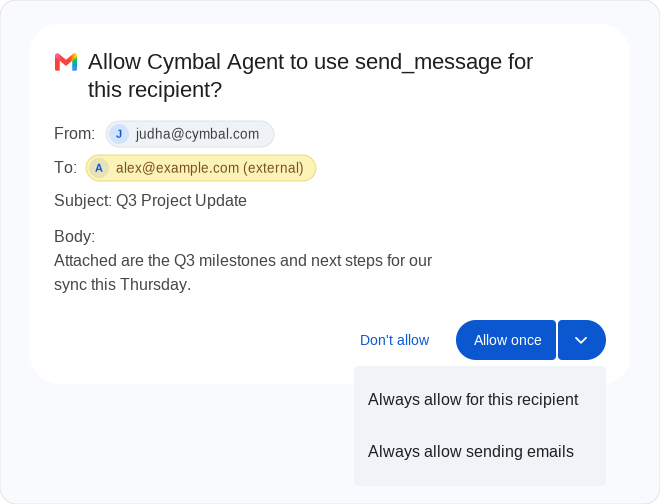
במדריך הזה מוסבר איך להתחבר לנקודת הקצה /mcp/v1, לעצב תיבות דו-שיח לאישורים כדי לספק את חוויית השימוש הטובה ביותר, ולהטמיע את פרוטוקול בקשת הטופס בלי שמירת מצב במארח MCP, בלקוח MCP או במעטפת אג'נטית.
לפני שמתחילים
לפני שמטמיעים או מגדירים את שליפת הטפסים ב-MCP, צריך להשלים את הדרישות המוקדמות, לקבוע אם המארח או הלקוח של ה-MCP צריכים תמיכה בשליפה בהתאמה אישית, ולבדוק את נקודות הקצה של השרת.
דרישות מוקדמות
לפני שמטמיעים את שליפת הטפסים במארח או בלקוח של MCP בהתאמה אישית, צריך להשלים את דרישות ההגדרה הבאות:
- הפעלת ממשקי API ושרתי MCP באותו פרויקט ב-Google Cloud: יוצרים את מזהה הלקוח ב-OAuth 2.0 באותו פרויקט ב-Google Cloud שבו מפעילים את ממשקי ה-API של Google Workspace ואת נקודות הקצה של שרת ה-MCP. כשיוצרים את לקוח OAuth, בוחרים באפשרות Use this client for an AI-powered agent. הוראות מלאות מופיעות במאמר הגדרת שרתי MCP של Google Workspace.
- בקשת היקפי ההרשאות הנדרשים של OAuth 2.0 לכלים שלכם: כדי להפעיל כלי באמצעות
tools/call, נדרש אסימון גישהBearerשל OAuth 2.0 שכולל את היקף ההרשאות הנדרש לכלי הזה, למרות ש-tools/listמחזיר את הכלים הזמינים בלי קשר להיקפי ההרשאות של האסימון. בדקו בדף הסקירה הכללית של ה-MCP של השרת מהם היקפי ההרשאות של OAuth שנדרשים לכל כלי.
איך בודקים אם צריך להטמיע שליפת טפסים
אנחנו ממליצים להתחבר לנקודת הקצה /mcp/v1 באמצעות בקשת טופס MCP, כדי שהסוכן יוכל לגשת לכל הכלים והתוצאות של Google Workspace. הצורך בכתיבת קוד תלוי באופן שבו מארח ה-MCP ולקוח ה-MCP בנויים:
- הגדרת מארח MCP מובנה: אם אתם מחברים אפליקציה מארחת של MCP מובנה, כמו Google Antigravity או Claude Desktop, שתומכת בהפקת טפסים של MCP, אתם לא צריכים לכתוב קוד להפקת טפסים:
- מתחברים לנקודת הקצה (endpoint) של
/mcp/v1. שלבי ההגדרה מפורטים במאמר הגדרת שרתי MCP של Google Workspace. - מגדירים את הגדרת האישור של הכלי המקומי המובנה של המארח לערך Always allow לשרתי MCP של Google Workspace ב-
/mcp/v1, כדי שהמשתמשים לא יתבקשו לאשר פעמיים את אותה פעולה. - אם מארח ה-MCP שנוצר מראש לא תומך עדיין בהפקת טפסים, אתם יכולים להתחבר לנקודת הקצה המוגבלת של
/mcp/v1selfכחלופה. נקודת הקצה הזו חושפת כלים שימושיים בלי הפקת טפסים, אבל יכול להיות שעדיין תצטרכו אישור לקריאות ספציפיות.
- מתחברים לנקודת הקצה (endpoint) של
- שילוב של SDK של לקוח MCP או של מסגרת סוכנים במארח ה-MCP: אם אתם משתמשים בספריית לקוח של MCP או במסגרת סוכנים כמו Agent Development Kit (ADK) שכבר מטפלת בהפקת טפסים בשכבת הפרוטוקול, עדיין תצטרכו לחבר את ה-handler של ההפקה לממשק המשתמש או לממשק ה-CLI של מארח ה-MCP. כדי לספק את חוויית המשתמש הטובה ביותר ב-
/mcp/v1, כדאי ליישם את ההמלצות לממשק המשתמש לאישור שמופיעות במדריך הזה. - פיתוח לקוח ומארח MCP בהתאמה אישית: אם אתם מפתחים שילוב משלכם של לקוח ומארח MCP, אתם צריכים להטמיע גם את פרוטוקול בקשת הטופס ללא שמירת מצב וגם את ההמלצות לממשק המשתמש לאישור במדריך הזה כדי להתחבר אל
/mcp/v1.
נקודות קצה של שרתים
שרתי Google Workspace MCP שזמינים לכלל המשתמשים ושרת Universal Search MCP מציעים את נקודת הקצה הראשית /mcp/v1 ונקודת קצה חלופית מוגבלת /mcp/v1self:
| נקודת קצה | כתובות URL של שרתים | הדרישה לגבי בקשת פרטים בטופס | באילו כלים אפשר להשתמש |
|---|---|---|---|
/mcp/v1 |
|
נקודת הקצה הראשית המומלצת. משתמשים ב-mode: "form" כדי להוציא מידע.
|
האפשרות הזו חושפת את כל הכלים ואת כל קבוצות התוצאות של השרת, כולל כלים שתמיד דורשים אישור מהמשתמש לפי מדיניות ברירת המחדל. |
/mcp/v1self |
|
נקודת קצה חלופית. יכול להיות שעדיין יהיה צורך להציג טופס בקריאות ספציפיות, בהתאם למדיניות ולמשאבי המטרה. |
השמטת כלים שתמיד דורשים אישור במסגרת מדיניות ברירת המחדל, וחשיפת כלים ששימושיים בלי צורך בהצגת טופס, כמו update_doc. שיטות של רשימה וחיפוש כמו list_threads מחזירות רק את קבוצת המשנה של התוצאות שאפשר לגשת אליהן בלי אישור, במקום לבקש גישה מלאה.
|
השתמשו ב-/mcp/v1 עם בקשת טופס כשאפשר, והשתמשו ב-/mcp/v1self למארחי MCP שבהם אי אפשר להוסיף תמיכה בבקשת טופס. אם לקוח קורא לכלי באופן שדורש אישור משתמש באחת מנקודות הקצה בלי להצהיר על תמיכה בהפקת טפסים, השרת חוסם את הקריאה ומחזיר שגיאת MissingRequiredClientCapability.
כדי לראות אילו כלים זמינים ב-/mcp/v1 וב-/mcp/v1self לכל שירות, אפשר לעיין בדף הסקירה הכללית של הכלים בשרת:
- חומר עזר בנושא Gmail MCP
- חומר עזר בנושא MCP ב-Drive
- חומר עזר בנושא MCP ב-Docs
- חומר עזר בנושא MCP ב-Sheets
- הסבר על MCP ב-Slides
- הפניה ל-MCP של יומן Google
- הסבר על MCP ב-Chat
- הפניית MCP לחיפוש אוניברסלי
איך פועל איסוף המידע בטופס
שרתי MCP של Google Workspace משתמשים בתהליך בקשה וניסיון חוזר ללא שמירת מצב (stateless) ובחיבור יחיד, שמבוסס על מפרט ה-MCP Elicitation מ-28 ביולי 2026.
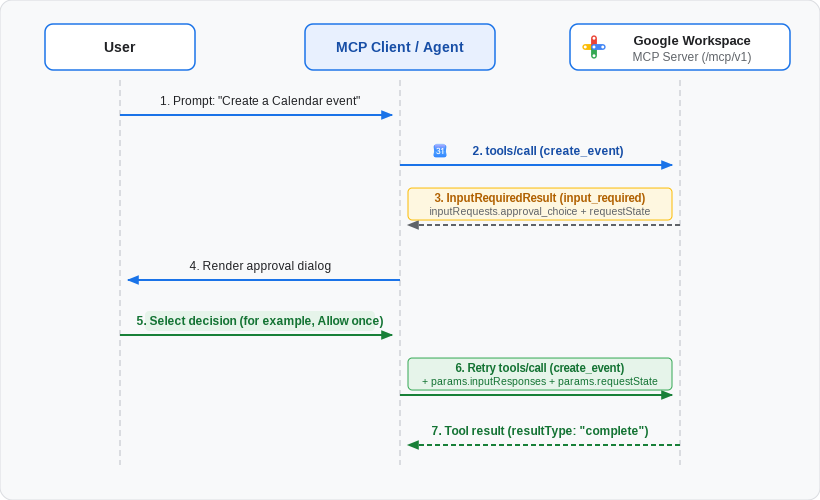
מחזור החיים של שליפת הטופס כולל את השלבים הבאים:
- הנחיה מהמשתמש: המשתמש מבקש מהסוכן לבצע פעולה, כמו יצירת אירוע ביומן.
- בקשת
tools/callראשונית: לקוח ה-MCP שולח בקשתtools/callלנקודת הקצה (endpoint) של/mcp/v1בשביל כלי כמוcreate_event, ומצהיר על יכולתelicitationב-params._meta. - תגובה מסוג
InputRequiredResultנדרשת פעולה: כשהפעולה המבוקשת דורשת אישור של המשתמש, השרת משהה את הביצוע לפני הפעלת הכלי. השרת מחזיר אובייקטresultעםresultType: "input_required", מפהinputRequestsעם מפתח"approval_choice"שמכילה בקשתelicitation/createעםmode: "form", ומחרוזתrequestStateאטומה. - תיבת דו-שיח לאישור: לקוח ה-MCP מציג תיבת דו-שיח לאישור שכוללת את המוצר והכלי של Google Workspace, את הודעת האישור ב-Markdown, את שאלת ההחלטה ואת האפשרויות המותרות מ-
enumומ-enumNames. - החלטת המשתמש: המשתמש בוחר אפשרות אישור, כמו אישור חד-פעמי או אין אישור.
- ניסיון חוזר של
tools/callעםinputResponsesו-requestState: לקוח ה-MCP שולח בקשתtools/callשנייה עםnameו-argumentsזהים, וגם שדותparams.requestStateו-params.inputResponsesברמה העליונה שמכילים את הבחירה של המשתמש לגבי"approval_choice". - תוצאת הפעלת הכלי: השרת מוודא ש-
requestStateמקושר לארגומנטים המדויקים של קריאת ה-API לכלי מהקריאה הראשונית, מעריך את החלטת המשתמש, מפעיל או מסיים את קריאת ה-API לכלי ומחזירresultסופי עםresultType: "complete".
כשמתקבלות בקשות אישור
ההחלטה אם קריאת API לכלי תפעיל אתגר elicitation/create נקבעת באופן דינמי על ידי שרת ה-MCP של Google Workspace, בהתאם למדיניות הפיקוח של המערכת, המשתמש והאדמין. הערכת המדיניות יכולה להתבסס על הגורמים הבאים:
- סוג הפעולה: פעולות כתיבה שמשתפות נתונים משותפים עם קהל או משנות משאבים משותפים דורשות אישור של המשתמש כברירת מחדל, אלא אם הן מותרות על ידי מדיניות המשתמש או האדמין. לעומת זאת, פעולות כתיבה עצמית, כמו יצירת קובץ פרטי, מתבצעות ללא אישור כברירת מחדל. פעולות העברה לאשפה תמיד דורשות אישור לכל קריאה, ללא אישור קבוע, ופעולות קריאה או מטא-נתונים יכולות גם לדרוש אישור בהתאם למדיניות המשתמש או האדמין.
- בעלות על תוכן ורמת החשיפה שלו: יכול להיות שתידרש הרשאה כדי לגשת לקבצים שבבעלות משתמשים אחרים או ששותפו מחוץ לארגון של המשתמש, או כדי לשנות אותם.
- נמענים חיצוניים: בדרך כלל, כדי לשלוח הודעות, לשתף קבצים או להזמין משתתפים מחוץ לדומיין של המשתמש, נדרש אישור מפורש.
- העדפות של משתמשים ואדמינים: העדפות אישור שנשמרו מעסקאות קודמות או כללים של אדמינים ברמת הדומיין יכולים לדרוש אישור או לעקוף אותו בכלים ספציפיים.
מכיוון שהערכת המדיניות מתבצעת בצד השרת בכל קריאה, הלקוח צריך להיות מוכן לטפל בתגובה של InputRequiredResult בכל הפעלה של tools/call. אף פעם אל תטמיעו בקוד כללים לגבי רגישות של כלים ואל תשמרו במטמון החלטות לגבי אישורים בצד הלקוח.
הסבר על אפשרויות האישור
ב-requestedSchema.properties.approval_choice, השרת מחזיר מערכים מקבילים של enum ו-enumNames שמייצגים את האפשרויות הזמינות לבקשה הנוכחית. בשרתי MCP של Google Workspace, יש תמיכה בערכים הבאים של enum:
ערך של enum |
תווית enumNames שמוגדרת כברירת מחדל באנגלית |
מאפשרת הרצה | מתי מוצגת ההצעה ואיך היא פועלת |
|---|---|---|---|
ALLOW_ONCE |
פעם אחת | כן | האפשרות הזו מוצגת בכל בקשת אישור. מפעיל את קריאת ה-API הנוכחית לכלי פעם אחת בלי לתעד כלל קבוע. |
DENY_ONCE |
אין אישור | לא |
האפשרות הזו מוצגת בכל בקשת אישור. מסיים את קריאת ה-API הנוכחית לכלי עם שגיאת UserDeniedAction בלי לתעד כלל קבוע.
|
ALLOW_TOOL_ALWAYS |
בלי הגבלת שימוש לכלי הזה | כן | האפשרות הזו מוצעת כשהמדיניות של המשתמש והאדמין מאפשרת אישור קבוע לכל הכלי. מפעילה את הקריאה הנוכחית ומאשרת מראש קריאות עתידיות לאותו כלי מאותו סוכן. |
ALLOW_RESOURCE_ALWAYS |
בלי הגבלת שימוש בקובץ / בתיקייה / ב-Drive / באימייל / באירוע / במרחב / בצ'אט / בצ'אט הקבוצתי / במשימה / בפריט | כן | מוצע כשמשנים או ניגשים לעד 100 משאבים מאותו סוג. משתמש בניסוח ברבים, כמו בלי הגבלת שימוש בקבצים האלה, כשהקריאה מטרגטת כמה משאבים. מפעילה את השיחה הנוכחית ומאשרת מראש שיחות עתידיות מאותו נציג באותם מזהי משאבים. |
ALLOW_AUDIENCE_ALWAYS |
בלי הגבלת שימוש לנמען הזה / הנמענים האלה | כן | האפשרות הזו מוצעת לפעולות של שליחה, שיתוף והזמנה שמטרגטות עד 100 נמענים. השיחה הנוכחית תתבצע, ושיחות עתידיות מאותו נציג לאותה קבוצת נמענים יאושרו מראש. |
ALLOW_OWNER_ALWAYS |
בלי הגבלת שימוש לבעלים הזה / לבעלים האלה | כן | ההצעה מוצגת בהנחיות קריאה או עיגון שנוגעות לפריטים של עד 3 בעלים שונים. מפעילה את הקריאה הנוכחית ומאשרת מראש קריאות עתידיות מאותו נציג לפריטים שבבעלות המשתמשים האלה. |
כל InputRequiredResult בודד כולל רק את קבוצת המשנה של האפשרויות שרלוונטיות לקריאת ה-API הספציפית לכלי:
- פעולות הרסניות ופעולות העברה לאשפה: פעולות שמוחקות משאבים באופן סופי או מעבירות אותם לאשפה, או פעולות שכפופות למדיניות אדמין שדורשת אישור בכל קריאה, מציעות רק את
ALLOW_ONCEו-DENY_ONCE. - פעולות בהיקף מוגדר: כשהשרת מאפשר אישורים קבועים, הוא מחזיר את
ALLOW_ONCE, את ההיקף המצומצם הרלוונטי כמוALLOW_AUDIENCE_ALWAYSאוALLOW_RESOURCE_ALWAYS, אתALLOW_TOOL_ALWAYSואתDENY_ONCE.
תמיד צריך להציג את האפשרויות המדויקות שמוחזרות ב-enum וב-enumNames לבקשה הנוכחית, במקום להגדיר ערכי לחצנים בתוך הקוד.
שיטות מומלצות לחוויית המשתמש הטובה ביותר
לקוחות MCP רגילים שתומכים בהפקת טפסים פועלים באופן מיידי עם /mcp/v1. עם זאת, מנועי רינדור של טפסים גנריים בדרך כלל מציגים החלטות עם בחירה אחת כקבוצת כפתורי בחירה או כתפריט נפתח בשילוב עם כפתור שליחה נפרד, מה שדורש קליקים נוספים ומסתיר את ההקשר של אפליקציית היעד ב-Google Workspace.
כדי לספק את חוויית המשתמש הטובה ביותר בהפקת טפסים, כדאי ליישם את חמש ההמלצות הבאות בלקוח ה-MCP. ההמלצות 1 עד 3 תואמות להסברים הממוספרים באיור הבא של תיבת הדו-שיח לאישור:
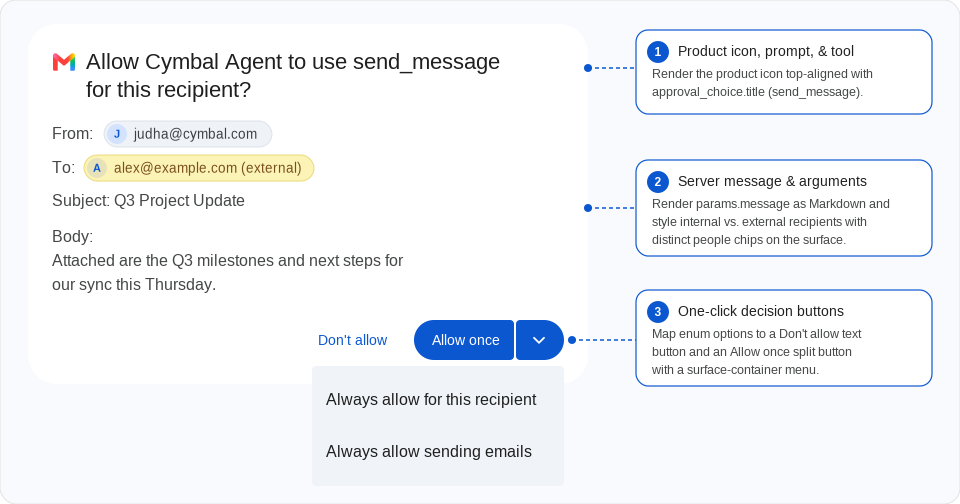
1. הצגת שמות, סמלים וכלים של מוצרים
המשתמשים צריכים לראות מיד לאיזה מוצר וכלי של Google Workspace הסוכן רוצה לקרוא:
- ממפים את המטא-נתונים של שרת ה-MCP
serverInfoמההפעלה או מ-server/discover, או את שם המארח של הבקשה, כמוcalendarmcp.googleapis.com, לשם המוצר והסמל של Google Workspace. - התייחסו לרמזים להצגת
_metaב-InputRequiredResult, כמוtitle,iconsו-isConfirmation, כשיפורים אופציונליים. ייצור שרתי MCP של Google Workspace עדיין לא פולטים את השדות האלה של_meta, כך שממשק המשתמש שלך לא אמור להיות תלוי בהם. - הצגת שם הכלי המטורגט מ-
params.nameכדי שהמשתמשים יוכלו להבחין בין פעולות כמוcreate_draftו-create_event.
2. עיבוד של הודעות מהשרת ושל enumNames
שכבת ההצגה של הלקוח צריכה להיות פשוטה, וצריך לעבד את תוכן האישור שסופק על ידי השרת באופן ישיר:
- עיבוד של
params.messageכ-Markdown והצגה שלapproval_choice.title: שרתי MCP של Google Workspace כבר מעצבים את פרטי הפעולה כ-Markdown ב-inputRequests.approval_choice.params.messageומספקים שאלת אישור מותאמת לשפה ב-requestedSchema.properties.approval_choice.title. מציגים אתmessageישירות באמצעות כלי עיבוד בטוח של Markdown, במקום להציג סמלי Markdown גולמיים או לכתוב לוגיקה מותאמת אישית לעיצוב ארגומנטים לכל כלי, ומציגים אתtitleבאופן ברור מעל כפתורי הפעולה. - התאמת ערכים של
enumלתוויות שלenumNames: בדיקה דינמית שלrequestedSchema.properties.approval_choice. צריך להתאים כל מזהה ב-enumלתווית הקריאה לאנשים באותו אינדקס ב-enumNames, ולחזור לרשומות של סכימת JSON ב-oneOfאם יש אינטראקציה עם שרתי MCP אחרים שמשתמשים ב-oneOf.
3. לקבל החלטות בקלות בעזרת לחצנים שצריך ללחוץ עליהם פעם אחת
אם requestedSchema מכיל מאפיין enum יחיד, אל תציגו רשימה של כפתורי בחירה או תפריט נפתח שמחייבים לחיצה נפרדת על שליחה:
- שתי אפשרויות כמו
Allow onceו-Don't allow: מוצגים שני כפתורים זה לצד זה. לחיצה על אחד מהלחצנים שולחת מיד את הבקשה לניסיון חוזר. - כמה אפשרויות לאישור: כשהשרת מחזיר את
ALLOW_ONCE, היקף הרשאות קבוע אחד או יותר כמוALLOW_AUDIENCE_ALWAYSאוALLOW_TOOL_ALWAYS, ו-DENY_ONCE, מוצג כפתור מפוצל ראשי שמוגדר כברירת מחדל לאישור חד-פעמי עם תפריט חץ לאפשרויות האישור הנוספות, בשילוב עם כפתור אין אישור נפרד.
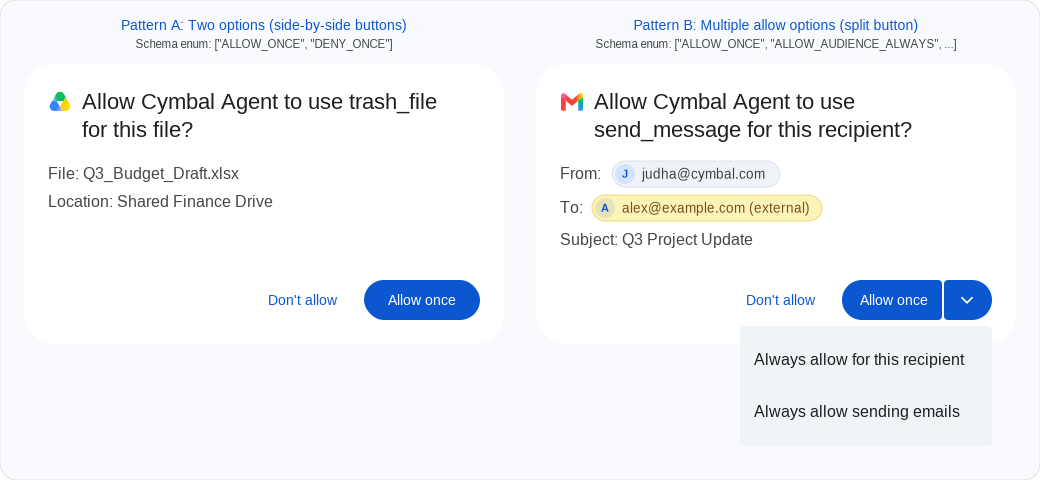
בתבנית א', פעולה הרסנית ב-Drive מחזירה רק את ALLOW_ONCE ו-DENY_ONCE, והלקוח מציג אותן כשני לחצנים זה לצד זה: לא לאפשר ולאפשר פעם אחת. בתבנית ב', פעולה ב-Gmail מחזירה את הערכים ALLOW_ONCE, ALLOW_AUDIENCE_ALWAYS, ALLOW_TOOL_ALWAYS ו-DENY_ONCE, והלקוח מציג אותם בתור לחצן Don't allow לצד לחצן מפוצל של Allow once, שהתפריט שלו חושף את אפשרויות האישור הקבועות.
4. הימנעות מהנחיות כפולות ב-/mcp/v1
הרבה מארחי MCP כוללים בקשת אישור מקומית מובנית לפני הפעלה של כלי חיצוני. כשמפעילים שרתי MCP של Google Workspace עם בקשת מידע באמצעות טופס, הנחיות מקומיות לפני ההפעלה יוצרות חוויה מיותרת של הנחיה כפולה, כי השרת אוכף אתגר בקשת מידע משלו שתואם למדיניות.
- אם אתם מגדירים מארח MCP מובנה עם בקשת אישור בטופס: הגדירו את הכלי המקומי של המארח לאישור שרתי MCP של Google Workspace ב-
/mcp/v1לערך בלי הגבלת שימוש, והסתמכו על תיבת הדו-שיח של בקשת האישור שהשרת יוזם. אם המארח לא תומך בהפקת טפסים ומתחבר אל/mcp/v1self, צריך להשאיר את האישורים של הכלים המקומיים מופעלים אם רוצים הנחיות בצד הלקוח לקריאות שלא מפעילות אישור בצד השרת. - אם אתם מפתחים מארח MCP: צריך להסתיר את תיבת הדו-שיח הגנרית לאישור לפני שיחה של המארח כשמופעלת בקשת טופס ל-
*mcp.googleapis.comול-people.googleapis.com, כמוgmailmcp.googleapis.com,calendarmcp.googleapis.com,drivemcp.googleapis.comו-workspacemcp.googleapis.com. למשתמש תוצג בקשה רק כשהשרת יחזירInputRequiredResultעםresultType: "input_required".
5. הנחיית הסוכן לגבי כלים וסירובים
מודלים של חשיבה רציונלית עלולים לפרש באופן שגוי תהליכי אישור שנדרשת בהם התערבות אנושית (HITL) בשתי דרכים:
- הימנעות מראש משימוש בכלים לכתיבה: אם המודל מניח שקריאה לכלי כתיבה כמו
send_messageמתבצעת באופן מיידי בלי בדיקה של המשתמש, המודל עשוי לחזור לכלי טיוטה כמוcreate_draftגם כשהמשתמש ביקש לשלוח אימייל. - ניסיון חוזר עם כלי כתיבה חלופיים אחרי דחייה: אם המשתמש לוחץ על Don't allow בתיבת דו-שיח לאישור והשרת מחזיר תוצאת שגיאה מסוג
UserDeniedAction, יכול להיות שהמודל יתייחס לדחייה כאל כשל זמני בכלי וינסה להשיג את אותה מטרה באמצעות כלי כתיבה אחר, מה שיגרום להצגת בקשה שנייה לא רצויה לאישור.
כדי למנוע את שתי הבעיות, צריך לכלול את ההוראות הבאות בהנחיית המערכת של הנציג:
פרומפט
When calling Google Workspace MCP tools:
1. Select the tool that directly matches the user's intent (for example,
   use send_message when asked to send an email). Sensitive tools
   automatically pause for user confirmation through MCP form elicitation
   before executing.
2. If a tool call fails because the user denied, declined, or canceled the
   approval request, stop immediately and acknowledge the user's decision.
   Do not retry the same action or call an alternative write tool unless
   the user explicitly asks you to do so in a new message.
דרישות לגבי פרוטוקול תעבורה ופרוטוקול ללא שמירת מצב (stateless)
שרתי MCP של Google Workspace פועלים באמצעות Streamable HTTP ללא שמירת מצב (stateless). כשאתם יוצרים לקוח MCP בהתאמה אישית, אתם צריכים לפעול לפי הדרישות הבאות בכל בקשה:
- כותרות HTTP: צריך לכלול את הכותרות הבאות בכל הבקשות של
POSTאל/mcp/v1:Authorization: Bearer ACCESS_TOKENContent-Type: application/jsonAccept: application/json, text/event-streamMCP-Protocol-Version: 2026-07-28Accept-Language: BCP_47_LANGUAGE_TAGכדי להתאים את הודעות האישור, השאלות והתוויות שלenumNamesלשפה המועדפת על המשתמש, למשלes-419, es;q=0.9, en;q=0.8. אם לא מציינים ערך, ברירת המחדל היאen-US.
- סוגי תוכן של תגובות: בהתאם לשרת ולסוג הבקשה, גוף תגובת ה-HTTP יכול להיות בפורמט JSON רגיל עם
Content-Type: application/jsonאו כאירועים שנשלחים מהשרת (SSE) עםContent-Type: text/event-stream, שבהם מטענים ייעודיים (payloads) של JSON-RPC מופיעים בשורותdata: {...}. מנתח התחבורה של HTTP צריך לקבל את שני הפורמטים. - גילוי ללא שמירת מצב: שרתי Google Workspace MCP לא שומרים את המצב של סשנים ב-
initialize. כדי לאחזר את המטא-נתונים והיכולות של השרת בזמן ההפעלה, שולחים בקשת JSON-RPC עם"method": "server/discover"ו-"params": {}, שמחזירה את המטא-נתונים של השרת ב-result._meta["io.modelcontextprotocol/serverInfo"]. רמזים מותאמים אישית לאישור_metaכמוisConfirmation,titleו-iconsעדיין לא מופקים בתגובותInputRequiredResultבסביבת הייצור, לכן תמיד צריך להתייחס לשדות של הצגת_metaכאופציונליים ולחזור ל-serverInfoאו לשם המארח של השרת. - יכולות
_metaלכל בקשה: מכיוון שהתעבורה היא ללא שמירת מצב, צריך לכלול את_metaבתוךparamsבכל בקשתtools/listו-tools/callעם המפתחות הבאים:"io.modelcontextprotocol/protocolVersion": "2026-07-28""io.modelcontextprotocol/clientInfo":{"name": "YOUR_APP_NAME","version": "VERSION"}"io.modelcontextprotocol/clientCapabilities":{"elicitation": {"form": {}}}
טיפול בשגיאות וקישור פרמטרים
אם קריאת API לכלי נחסמת או אם ניסיון חוזר נכשל באימות, השרת מחזיר תוצאת שגיאה ברמת הכלי או אובייקט שגיאה של JSON-RPC ברמה העליונה, בהתאם לקטגוריית הכשל:
UserDeniedActionו-AdminPolicyBlock: כשמשתמש דוחה בקשת אישור או כשמדיניות אדמין חוסמת את הפעולה, השרת מחזיר JSON-RPCresultעם"resultType": "complete","isError": trueוהודעת שגיאה מקומית ב-result.content. כשהאפשרות מופעלת בשירות ובסביבה, השרת כולל גם מטא-נתונים מובְנים של שגיאות ב-result._meta["google.com/error"]. מכיוון שהשדהresult._meta["google.com/error"]מוגבל לכל שירות וסביבה, הלקוח צריך לחזור לקריאת הודעת השגיאה מ-result.contentכש-result._meta["google.com/error"]לא קיים:-
UserDeniedAction: מוחזר כשהמשתמש בוחר באפשרותDENY_ONCE, דוחה או מבטל את טופס האישור. הודעת ברירת המחדל באנגלית היא"Action canceled. The user declined the confirmation request."
AdminPolicyBlock: מוחזר כשמדיניות של מנהל חשבון ארגוני אוסרת על הנציג לבצע את הפעולה. ההודעה שמוגדרת כברירת מחדל באנגלית היא"Action could not be completed. Your administrator has blocked third-party agents from performing this action."
JSON
{ "jsonrpc": "2.0", "id": 3, "result": { "resultType": "complete", "isError": true, "content": [ { "type": "text", "text": "Action canceled. The user declined the confirmation request." } ], "_meta": { "google.com/error": { "code": 400, "message": "Action canceled. The user declined the confirmation request.", "status": "FAILED_PRECONDITION", "details": [ { "@type": "type.googleapis.com/google.rpc.ErrorInfo", "reason": "UserDeniedAction", "domain": "mcp.googleapis.com" } ] } } } }-
MissingRequiredClientCapability: מוחזר כשלקוח קורא לכלי באופן שמחייב אישור משתמש ב-/mcp/v1או ב-/mcp/v1selfבלי להצהיר על תמיכה בהצגת טפסים ב-_meta["io.modelcontextprotocol/clientCapabilities"]. השרת מתרגם את השגיאה הזו לאובייקט JSON-RPCerrorברמה העליונה עם הקוד-32021ואובייקט היכולת הנדרש ב-error.data.requiredCapabilities:JSON
{
  "jsonrpc": "2.0",
  "id": 2,
  "error": {
    "code": -32021,
    "message": "Action could not be completed. This action requires user confirmation, which this client does not support. Use a client that supports form elicitation to perform this action.",
    "data": {
      "requiredCapabilities": {
        "elicitation": {
          "form": {}
        }
      }
    }
  }
}
אכיפת קישור פרמטרים: האסימון
requestBindingבתוךrequestStateמקשר באופן קריפטוגרפי את אתגר האישור הראשוני לכלי המדויקargumentsשנשלח בקריאה הראשונה. אם הלקוח משנה שדה כלשהו ב-params.argumentsבקריאה החוזרת, או מעבירparams.requestStateלא תקין או לא קשור, השרת מתעלם מהאישור הלא תקין ומחזיר אתגרInputRequiredResultחדש, או מחזיר שגיאת פרמטר לא תקין או שגיאת תנאי מוקדם שנכשל, שמורה ללקוח לנסות שוב בליinputResponses.
דוגמה להטמעה
ההדרכה המפורטת הבאה מדגימה איך לקוח MCP קורא לכלי create_event של יומן Google, מעבד את בקשת האישור של השרת בממשק משתמש של דפדפן או ב-CLI של מסוף, ושולח את החלטת המשתמש ב-TypeScript וב-Python, ואחריו מיומנות סוכן שניתן לעשות בה שימוש חוזר לסוכני תכנות.
פלטפורמות לאישור לקוחות
בלקוח MCP מבוסס-דפדפן, הטמעת TypeScript יוצרת כרטיס אישור חזותי שכולל את סמל היומן, שם המארח של השרת, שם הכלי, תצוגה מקדימה של Markdown message שנוצרה מהשרת, שאלת אישור, כפתור Don't allow (לא לאשר) וכפתור מפוצל Allow once (אישור חד-פעמי):
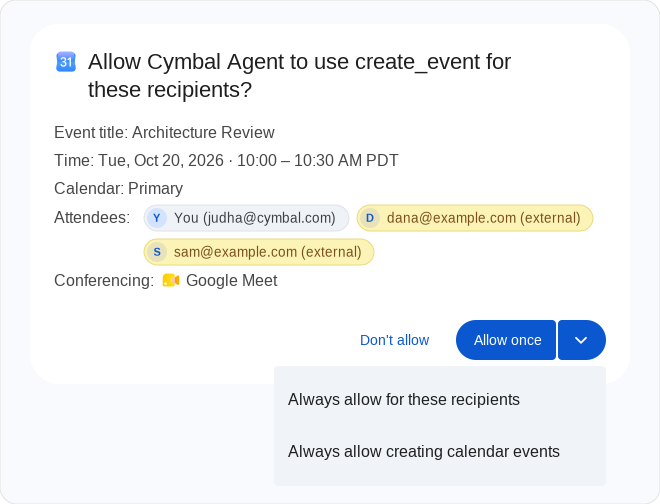
בלקוח MCP שמבוסס על מסוף, ההטמעה של Python CLI מעבדת את אותו מטען ייעודי (payload) של InputRequiredResult כהנחיה ממוספרת אינטראקטיבית:
CLI
=== Google Calendar (create_event) ===
Architecture Review
Tue, Oct 20 · 10:00 - 10:30 AM PDT · 🟢 No calendar conflicts
You, dana@example.com, sam@example.com
Conferencing: Google Meet

Allow Cymbal Agent to use create_event for these recipients?
  [1] Allow once (ALLOW_ONCE)
  [2] Always allow for these recipients (ALLOW_AUDIENCE_ALWAYS)
  [3] Always allow this tool (ALLOW_TOOL_ALWAYS)
  [4] Don't allow (DENY_ONCE)
Enter choice (1-4, or c to cancel):
שיחה ראשונית ותגובה לניסיון להשגת מידע
הלקוח מתחיל בשליחת בקשת tools/call כדי ליצור את האירוע ביומן באמצעות הכלי create_event:
JSON
{
  "jsonrpc": "2.0",
  "id": 2,
  "method": "tools/call",
  "params": {
    "name": "create_event",
    "arguments": {
      "calendarId": "primary",
      "summary": "Architecture Review",
      "startTime": "2026-10-20T10:00:00",
      "endTime": "2026-10-20T10:30:00",
      "timeZone": "America/Los_Angeles",
      "attendees": [
        {
          "email": "dana@example.com"
        },
        {
          "email": "sam@example.com"
        }
      ],
      "addGoogleMeetUrl": true
    },
    "_meta": {
      "io.modelcontextprotocol/protocolVersion": "2026-07-28",
      "io.modelcontextprotocol/clientInfo": {
        "name": "Cymbal Agent",
        "version": "1.0.0"
      },
      "io.modelcontextprotocol/clientCapabilities": {
        "elicitation": {
          "form": {}
        }
      }
    }
  }
}
כשהאישור נדרש, השרת מגיב עם InputRequiredResult:
JSON
{
  "jsonrpc": "2.0",
  "id": 2,
  "result": {
    "resultType": "input_required",
    "inputRequests": {
      "approval_choice": {
        "method": "elicitation/create",
        "params": {
          "mode": "form",
          "message": "**Architecture Review**  \nTue, Oct 20 · 10:00 - 10:30 AM PDT · 🟢 No calendar conflicts  \nYou, dana@example.com, sam@example.com  \n**Conferencing:** Google Meet",
          "requestedSchema": {
            "type": "object",
            "required": ["approval_choice"],
            "properties": {
              "approval_choice": {
                "type": "string",
                "title": "Allow Cymbal Agent to use create_event for these recipients?",
                "enum": [
                  "ALLOW_ONCE",
                  "ALLOW_AUDIENCE_ALWAYS",
                  "ALLOW_TOOL_ALWAYS",
                  "DENY_ONCE"
                ],
                "enumNames": [
                  "Allow once",
                  "Always allow for these recipients",
                  "Always allow this tool",
                  "Don't allow"
                ]
              }
            }
          }
        }
      }
    },
    "requestState": "{\"elicitationId\":\"...\",\"requestBinding\":\"...\"}"
  }
}
התגובה של InputRequiredResult כוללת את שדות המפתח הבאים:
-
result.resultType: מוגדר כ-"input_required"כשהשרת משהה את ההפעלה כדי לקבל קלט מהמשתמש, וכ-"complete"כשהכלי מסיים לפעול. -
result.inputRequests: מפה עם מפתח לפי מזהה הבקשה"approval_choice". כל רשומה מכילה"method": "elicitation/create"ואובייקטparamsעם"mode": "form". - רמזים להצגת
_meta: שדות אופציונליים כמוisConfirmation,titleו-iconsעדיין לא נשלחים בתגובות שלInputRequiredResultבסביבת הייצור. תמיד להתייחס לשדות_metaכאופציונליים ולפתור את שם המוצר והסמל מ-serverInfoאו משם המארח של השרת כשהם חסרים. -
inputRequests.approval_choice.params.message: תצוגה מקדימה בפורמט Markdown של הפעולה שנוצרה על ידי השרת, או שאלת האישור אם הכלי לא יוצר כרטיס תצוגה מקדימה נפרד. -
inputRequests.approval_choice.params.requestedSchema: אובייקט של סכימת JSON שההגדרה שלproperties.approval_choiceשלו מכילה את השדות הבאים:-
title: שאלת האישור המותאמת לשוק המקומי, למשל"Allow Cymbal Agent to use create_event for these recipients?". כשמציינים את_meta["io.modelcontextprotocol/clientInfo"].nameבבקשה, השרת משלב את שם האפליקציה בשאלה הזו. -
enum: מערך מסודר של מזהיApprovalChoice, כמוALLOW_ONCE,ALLOW_AUDIENCE_ALWAYS,ALLOW_TOOL_ALWAYSו-DENY_ONCE. -
enumNames: מערך מקביל של תוויות מותאמות לשוק המקומי וקריאות לאנשים, שתואמות לכל רשומה ב-enum, כמוAllow once,Always allow for these recipients,Always allow this toolו-Don't allow.
-
-
result.requestState: מחרוזת אטומה בקידוד JSON שמכילה את ה-elicitationIdשל השרת ואת האסימון הקריפטוגרפיrequestBinding. צריך להחזיר את המחרוזת הזו ללא שינוי ב-params.requestStateבקריאה החוזרת.
מטענים ייעודיים (payloads) של ניסיון חוזר, דחייה וביטול
אחרי שהמשתמש בוחר באפשרות אישור, שולחים בקשת tools/call שנייה עם אותם ערכים בדיוק של name ו-arguments, ומעבירים את requestState ו-inputResponses כשדות ברמה העליונה בתוך params:
JSON
{
  "jsonrpc": "2.0",
  "id": 3,
  "method": "tools/call",
  "params": {
    "name": "create_event",
    "arguments": {
      "calendarId": "primary",
      "summary": "Architecture Review",
      "startTime": "2026-10-20T10:00:00",
      "endTime": "2026-10-20T10:30:00",
      "timeZone": "America/Los_Angeles",
      "attendees": [
        {
          "email": "dana@example.com"
        },
        {
          "email": "sam@example.com"
        }
      ],
      "addGoogleMeetUrl": true
    },
    "requestState": "{\"elicitationId\":\"...\",\"requestBinding\":\"...\"}",
    "inputResponses": {
      "approval_choice": {
        "action": "accept",
        "content": {
          "approval_choice": "ALLOW_ONCE"
        }
      }
    },
    "_meta": {
      "io.modelcontextprotocol/protocolVersion": "2026-07-28",
      "io.modelcontextprotocol/clientInfo": {
        "name": "Cymbal Agent",
        "version": "1.0.0"
      },
      "io.modelcontextprotocol/clientCapabilities": {
        "elicitation": {
          "form": {}
        }
      }
    }
  }
}
במפרט של MCP Elicitation יש הבחנה בין שליחת ערך בטופס לבין סגירת תיבת הדו-שיח. אפשר לייצג החלטה שלילית של משתמש ב-params.inputResponses בשתי דרכים:
שליחת הבחירה
DENY_ONCE: כשהמשתמש לוחץ על הכפתור לא מסכים/ה שמתאים ל-DENY_ONCE, שולחים את"action": "accept"עם"content": {"approval_choice": "DENY_ONCE"}:JSON
{
  "jsonrpc": "2.0",
  "id": 3,
  "method": "tools/call",
  "params": {
    "name": "create_event",
    "arguments": {
      "calendarId": "primary",
      "summary": "Architecture Review",
      "startTime": "2026-10-20T10:00:00",
      "endTime": "2026-10-20T10:30:00",
      "timeZone": "America/Los_Angeles",
      "attendees": [
        {
          "email": "dana@example.com"
        },
        {
          "email": "sam@example.com"
        }
      ],
      "addGoogleMeetUrl": true
    },
    "requestState": "{\"elicitationId\":\"...\",\"requestBinding\":\"...\"}",
    "inputResponses": {
      "approval_choice": {
        "action": "accept",
        "content": {
          "approval_choice": "DENY_ONCE"
        }
      }
    },
    "_meta": {
      "io.modelcontextprotocol/protocolVersion": "2026-07-28",
      "io.modelcontextprotocol/clientInfo": {
        "name": "Cymbal Agent",
        "version": "1.0.0"
      },
      "io.modelcontextprotocol/clientCapabilities": {
        "elicitation": {
          "form": {}
        }
      }
    }
  }
}
דחייה או ביטול של תיבת הדו-שיח: אם המשתמש סוגר או מבטל את תיבת הדו-שיח בלי לבחור באפשרות אישור, שולחים את הערך
"action": "decline"או"action": "cancel"ומשמיטים את השדהcontent:JSON
"inputResponses": {
  "approval_choice": {
    "action": "cancel"
  }
}
בשני המקרים, השרת מתייחס לתשובה כ-DENY_ONCE, מסיים את הפעלת הכלי ומחזיר תוצאת שגיאה של הכלי.
אפליקציית לקוח בדפדפן ב-TypeScript
בדוגמה הבאה ב-TypeScript, הקוד מחלץ את ה-Markdown message, את שאלת האישור ואת האפשרויות המותרות ישירות מהמטען הייעודי (payload) של InputRequiredResult, פותר את שם המוצר מהרמזים האופציונליים של _meta או משם המארח של השרת, ומפעיל מחדש את tools/call עם ההחלטה של המשתמש:
TypeScript
const PROTOCOL_VERSION = "2026-07-28";
const CLIENT_INFO = { name: "Cymbal Agent", version: "1.0.0" };
const MAX_ELICITATION_ROUNDS = 3;

const HOST_TITLES: Record<string, string> = {
  "gmailmcp.googleapis.com": "Gmail",
  "calendarmcp.googleapis.com": "Google Calendar",
  "drivemcp.googleapis.com": "Google Drive",
  "docsmcp.googleapis.com": "Google Docs",
  "sheetsmcp.googleapis.com": "Google Sheets",
  "slidesmcp.googleapis.com": "Google Slides",
  "chatmcp.googleapis.com": "Google Chat",
  "people.googleapis.com": "Google Contacts",
  "tasksmcp.googleapis.com": "Google Tasks",
  "workspacemcp.googleapis.com": "Google Workspace",
};

interface ElicitationOption {
  value: string;
  label: string;
}

export interface ElicitationCardModel {
  requestKey: string;
  serverTitle: string;
  serverIconUrl?: string;
  toolName: string;
  markdownMessage: string;
  questionTitle: string;
  decisionFieldKey: string;
  denyOption?: ElicitationOption;
  primaryAllowOption?: ElicitationOption;
  secondaryAllowOptions: ElicitationOption[];
}

function buildBaseMeta(): Record<string, unknown> {
  return {
    "io.modelcontextprotocol/protocolVersion": PROTOCOL_VERSION,
    "io.modelcontextprotocol/clientInfo": CLIENT_INFO,
    "io.modelcontextprotocol/clientCapabilities": {
      elicitation: { form: {} },
    },
  };
}

/**
 * Extracts a UI view model directly from an InputRequiredResult response.
 * Render card.markdownMessage with a safe Markdown renderer in your UI.
 */
export function extractCardModel(
  rpcResult: Record<string, any>,
  toolName: string,
  serverHost = "workspacemcp.googleapis.com",
): ElicitationCardModel | null {
  const inputRequests: Record<string, any> = rpcResult.inputRequests ?? {};
  const requestEntry = Object.entries(inputRequests).find(
    ([, req]: [string, any]) =>
      req?.method === "elicitation/create" && req?.params?.mode === "form",
  );
  if (!requestEntry) {
    return null;
  }
  const [requestKey, elicitationReq] = requestEntry;

  const reqMeta = elicitationReq.params?._meta ?? {};
  const resultMeta = rpcResult._meta ?? {};
  const serverInfo = resultMeta["io.modelcontextprotocol/serverInfo"] ?? {};
  const icons: Array<{ src: string; mimeType?: string }> =
    reqMeta.icons ?? resultMeta.icons ?? serverInfo.icons ?? [];
  const preferredIcon =
    icons.find((icon) => icon.mimeType === "image/svg+xml") ?? icons[0];

  const properties: Record<string, any> =
    elicitationReq.params?.requestedSchema?.properties ?? {};
  const firstProperty = Object.entries(properties)[0];
  if (!firstProperty) {
    return null;
  }
  const [decisionFieldKey, fieldSchema] = firstProperty as [
    string,
    Record<string, any>,
  ];

  let options: ElicitationOption[] = [];
  if (Array.isArray(fieldSchema.enum)) {
    const enumNames: string[] = Array.isArray(fieldSchema.enumNames)
      ? fieldSchema.enumNames
      : [];
    options = fieldSchema.enum.map((val: string, idx: number) => ({
      value: val,
      label: enumNames[idx] ?? val,
    }));
  } else if (Array.isArray(fieldSchema.oneOf)) {
    options = fieldSchema.oneOf.map((opt: any) => ({
      value: opt.const,
      label: opt.title ?? opt.const,
    }));
  }

  const denyOption = options.find((opt) => opt.value.startsWith("DENY"));
  const allowOptions = options.filter(
    (opt) => !opt.value.startsWith("DENY"),
  );

  return {
    requestKey,
    serverTitle:
      reqMeta.title ??
      resultMeta.title ??
      serverInfo.title ??
      serverInfo.name ??
      HOST_TITLES[serverHost] ??
      "Google Workspace",
    serverIconUrl: preferredIcon?.src,
    toolName,
    markdownMessage:
      elicitationReq.params?.message ?? "Confirm this action.",
    questionTitle: fieldSchema.title ?? "Confirm this action?",
    decisionFieldKey,
    denyOption,
    primaryAllowOption: allowOptions[0],
    secondaryAllowOptions: allowOptions.slice(1),
  };
}

/**
 * Executes tools/call and replays with requestState and inputResponses
 * when the server returns an InputRequiredResult.
 */
export async function handleToolCallWithElicitation(
  sendRpc: (payload: Record<string, unknown>) => Promise<Record<string, any>>,
  promptUserInUi: (card: ElicitationCardModel) => Promise<string | null>,
  toolName: string,
  toolArgs: Record<string, unknown>,
  serverHost = "calendarmcp.googleapis.com",
): Promise<Record<string, any>> {
  let requestId = 1;
  let response = await sendRpc({
    jsonrpc: "2.0",
    id: requestId,
    method: "tools/call",
    params: {
      name: toolName,
      arguments: structuredClone(toolArgs),
      _meta: buildBaseMeta(),
    },
  });

  for (let round = 0; round < MAX_ELICITATION_ROUNDS; round++) {
    const result = response.result ?? {};
    if (result.resultType !== "input_required") {
      return response;
    }

    const card = extractCardModel(result, toolName, serverHost);
    if (!card) {
      return response;
    }

    const selectedValue = await promptUserInUi(card);
    const userResponse = selectedValue
      ? {
          action: "accept",
          content: { [card.decisionFieldKey]: selectedValue },
        }
      : { action: "cancel" };

    requestId += 1;
    response = await sendRpc({
      jsonrpc: "2.0",
      id: requestId,
      method: "tools/call",
      params: {
        name: toolName,
        arguments: structuredClone(toolArgs),
        ...(result.requestState !== undefined
          ? { requestState: result.requestState }
          : {}),
        inputResponses: {
          [card.requestKey]: userResponse,
        },
        _meta: buildBaseMeta(),
      },
    });
  }

  return response;
}
לקוח CLI של Python
Python
import copy
import re
from typing import Any

PROTOCOL_VERSION = "2026-07-28"
CLIENT_INFO = {"name": "Cymbal CLI Agent", "version": "1.0.0"}
MAX_ELICITATION_ROUNDS = 3
HOST_TITLES = {
    "gmailmcp.googleapis.com": "Gmail",
    "calendarmcp.googleapis.com": "Google Calendar",
    "drivemcp.googleapis.com": "Google Drive",
    "docsmcp.googleapis.com": "Google Docs",
    "sheetsmcp.googleapis.com": "Google Sheets",
    "slidesmcp.googleapis.com": "Google Slides",
    "chatmcp.googleapis.com": "Google Chat",
    "people.googleapis.com": "Google Contacts",
    "tasksmcp.googleapis.com": "Google Tasks",
    "workspacemcp.googleapis.com": "Google Workspace",
}

def build_base_meta() -> dict[str, Any]:
  """Returns the required per-request _meta block for /mcp/v1 calls."""
  return {
      "io.modelcontextprotocol/protocolVersion": PROTOCOL_VERSION,
      "io.modelcontextprotocol/clientInfo": CLIENT_INFO,
      "io.modelcontextprotocol/clientCapabilities": {
          "elicitation": {"form": {}}
      },
  }

def strip_markdown(text: str) -> str:
  """Minimal example that strips basic Markdown for terminal display."""
  text = re.sub(r"\[([^\]]+)\]\(([^)]+)\)", r"\1 (\2)", text)
  text = re.sub(r"\*\*(.*?)\*\*", r"\1", text)
  return re.sub(r"`([^`]+)`", r"\1", text)

def extract_decision_options(
    requested_schema: dict[str, Any],
) -> tuple[str | None, str, list[dict[str, str]]]:
  """Extracts the property key, question title, and options from schema."""
  properties = requested_schema.get("properties", {})
  first_entry = next(iter(properties.items()), None)
  if first_entry is None:
    return None, "Confirm this action?", []

  field_key, field_schema = first_entry
  question_title = field_schema.get("title", "Confirm this action?")

  if "enum" in field_schema:
    enum_values = field_schema.get("enum", [])
    enum_names = field_schema.get("enumNames", [])
    options = [
        {
            "value": val,
            "label": enum_names[idx] if idx < len(enum_names) else val,
        }
        for idx, val in enumerate(enum_values)
    ]
  elif "oneOf" in field_schema:
    options = [
        {
            "value": item["const"],
            "label": item.get("title", item["const"]),
        }
        for item in field_schema["oneOf"]
    ]
  else:
    options = []
  return field_key, question_title, options

def prompt_user_in_cli(
    elicitation_req: dict[str, Any],
    result_meta: dict[str, Any],
    tool_name: str,
    server_host: str = "calendarmcp.googleapis.com",
) -> dict[str, Any]:
  """Renders a CLI approval prompt and returns the inputResponses entry."""
  params = elicitation_req.get("params", {})
  req_meta = params.get("_meta", {})
  server_info = result_meta.get(
      "io.modelcontextprotocol/serverInfo", {}
  )
  server_title = (
      req_meta.get("title")
      or result_meta.get("title")
      or server_info.get("title")
      or server_info.get("name")
      or HOST_TITLES.get(server_host, "Google Workspace MCP")
  )
  message = strip_markdown(params.get("message", "Confirm this action."))
  field_key, question_title, options = extract_decision_options(
      params.get("requestedSchema", {})
  )
  if not field_key or not options:
    return {"action": "cancel"}

  print(f"\n=== {server_title} ({tool_name}) ===")
  print(message)
  print(f"\n{strip_markdown(question_title)}")
  for idx, opt in enumerate(options, start=1):
    print(f"  [{idx}] {opt['label']} ({opt['value']})")

  choice = input(
      f"Enter choice (1-{len(options)}, or c to cancel): "
  ).strip()
  try:
    selected_idx = int(choice) - 1
    if 0 <= selected_idx < len(options):
      selected_value = options[selected_idx]["value"]
      return {
          "action": "accept",
          "content": {field_key: selected_value},
      }
  except ValueError:
    pass

  return {"action": "cancel"}

def handle_tool_call_with_elicitation(
    send_rpc_fn: Any, tool_name: str, tool_args: dict[str, Any]
) -> dict[str, Any]:
  """Executes tools/call and retries with inputResponses when elicited."""
  base_params = {
      "name": tool_name,
      "arguments": copy.deepcopy(tool_args),
      "_meta": build_base_meta(),
  }
  request_id = 1
  response = send_rpc_fn(
      {
          "jsonrpc": "2.0",
          "id": request_id,
          "method": "tools/call",
          "params": copy.deepcopy(base_params),
      }
  )

  for _ in range(MAX_ELICITATION_ROUNDS):
    result = response.get("result", {})
    if result.get("resultType") != "input_required":
      return response

    input_requests = result.get("inputRequests", {})
    if not isinstance(input_requests, dict) or not input_requests:
      return response

    result_meta = result.get("_meta", {})
    input_responses: dict[str, Any] = {}
    for req_key, req in input_requests.items():
      if (
          isinstance(req, dict)
          and req.get("method") == "elicitation/create"
          and req.get("params", {}).get("mode") == "form"
      ):
        input_responses[req_key] = prompt_user_in_cli(
            req, result_meta, tool_name
        )

    if not input_responses:
      return response

    request_id += 1
    retry_params = copy.deepcopy(base_params)
    request_state = result.get("requestState")
    if request_state is not None:
      retry_params["requestState"] = request_state
    retry_params["inputResponses"] = input_responses
    response = send_rpc_fn(
        {
            "jsonrpc": "2.0",
            "id": request_id,
            "method": "tools/call",
            "params": retry_params,
        }
    )

  return response
סקיל אג'נטי
כדי להטמיע את איסוף המידע בטופס במעטפת האג'נטית, אתם יכולים להשתמש במיומנות או בהנחיה הבאות לסוכן התכנות:
פרומפט
---
name: google-workspace-mcp-elicitation
metadata:
  version: "1.0.0"
  category: GoogleWorkspace
description: >-
  Implements Model Context Protocol (MCP) form elicitation
  (`elicitation/create`) for Human-in-the-Loop (HITL) approvals with Google
  Workspace MCP servers (Gmail, Calendar, Drive, Docs, Sheets, Slides, Chat,
  Contacts). Use when adding HITL confirmation prompts to an agent, handling
  Stateless HTTP (`2026-07-28`) Multi Round-Trip Requests
  (`resultType: "input_required"`), mapping elicitation schemas or `_meta`
  hints to UI controls, or troubleshooting Workspace MCP `401`/`403`/`405`
  and capability errors. Don't use for general OAuth 2.0 app setup unrelated
  to MCP or for authoring custom MCP servers.
---

# Implementing Google Workspace MCP Form Elicitation (HITL)

Use this guide to support **Model Context Protocol (MCP) Form Elicitation**
for Human-in-the-Loop (HITL) confirmations when integrating **Google
Workspace MCP servers** into an AI agent.

Rather than duplicating the MCP specification, this guide references the
canonical specs and focuses on **Google Workspace server nuances**, **mapping
protocol message fields to UI**, **upcoming Google Workspace `_meta`
extensions**, and **practical integration boundaries**:

- [MCP Elicitation Specification][mcp-elicitation]
- [MCP Multi Round-Trip Requests (MRTR) Specification][mcp-mrtr]
- [MCP Lifecycle & Initialization][mcp-life]
- [MCP Icons Utility Specification][mcp-icon]

---

## 1. Prerequisites, Nuances & Architectural Boundaries

### Prerequisites (Assumed Configured)

This skill focuses on **handling elicitation requests and mapping them to
UI**. It assumes the host application already has Google Workspace MCP
connectivity and OAuth 2.0 configured. If not yet set up, follow the
[Google Workspace MCP Server Configuration Guide][ws-mcp-setup] to configure:

1. **Google Cloud Project & Service Enablement**: A Google Cloud project with
   the target Google Workspace APIs and MCP endpoints enabled.
2. **OAuth 2.0 Bearer Authentication**: An OAuth 2.0 flow issuing user access
   tokens with the required service scopes, passed as
   `Authorization: Bearer {access_token}` on MCP HTTP `POST` requests. When
   using standard 3-legged OAuth 2.0, the OAuth client configuration must
   have the **"Used by an agent"** checkbox enabled.

Canonical MCP server URLs and default OAuth 2.0 scopes by service:

- **Gmail** (`https://gmailmcp.googleapis.com/mcp/v1`):
  - `https://www.googleapis.com/auth/gmail.modify`
  - `https://www.googleapis.com/auth/gmail.settings.basic`
- **Google Calendar** (`https://calendarmcp.googleapis.com/mcp/v1`):
  - `https://www.googleapis.com/auth/calendar.events`
  - `https://www.googleapis.com/auth/calendar.readonly`
- **Google Drive** (`https://drivemcp.googleapis.com/mcp/v1`):
  - `https://www.googleapis.com/auth/drive`
- **Google Docs** (`https://docsmcp.googleapis.com/mcp/v1`):
  - `https://www.googleapis.com/auth/documents`
- **Google Sheets** (`https://sheetsmcp.googleapis.com/mcp/v1`):
  - `https://www.googleapis.com/auth/spreadsheets`
- **Google Slides** (`https://slidesmcp.googleapis.com/mcp/v1`):
  - `https://www.googleapis.com/auth/presentations`
- **Google Chat** (`https://chatmcp.googleapis.com/mcp/v1`):
  - `https://www.googleapis.com/auth/chat.messages`
- **Google Contacts (preview)** (`https://people.googleapis.com/mcp/v1`):
  - `https://www.googleapis.com/auth/contacts`
- **Google Tasks** (`https://tasksmcp.googleapis.com/mcp/v1`):
  - `https://www.googleapis.com/auth/tasks`
- **Universal Search** (`https://workspacemcp.googleapis.com/mcp/v1`):
  - `https://www.googleapis.com/auth/gmail.readonly`
  - `https://www.googleapis.com/auth/drive.readonly`
  - `https://www.googleapis.com/auth/calendar.readonly`
  - `https://www.googleapis.com/auth/chat.messages.readonly`
  - `https://www.googleapis.com/auth/chat.spaces.readonly`
  - `https://www.googleapis.com/auth/chat.memberships.readonly`

### Key Nuances for Google Workspace MCP Servers

- **Markdown Messages**: Google Workspace MCP servers format `params.message`
  as **GitHub-Flavored Markdown** (headings, bold labels, bulleted lists of
  parameters, links). Render `params.message` with a Markdown renderer rather
  than plain text.
- **Selective Server-Side Gate (Writes & Sensitive/Shared Reads)**: Workspace
  form elicitation selectively gates sensitive operations on the server, such
  as **high-impact write operations** (for example, sending an email,
  scheduling a meeting with external attendees, modifying a shared document)
  as well as **reads of sensitive or externally shared data**, rather than
  triggering on every tool call or validating general agent intent. Because
  these sensitive actions already trigger a server-side `elicitation/create`
  prompt, enabling unconditional client-side pre-tool approvals (such as
  `needsApproval: true` on all tools) can double-prompt the user. Factor this
  server-side gate into your risk assessment when deciding whether to
  auto-approve tool calls, gate specific tools, or require pre-execution
  approval across the board.

### Architectural Boundaries: Do Not Fight the Framework

Pausing an in-flight tool call, presenting a prompt to a user, and resuming
execution cuts across the host application's language, agent framework, MCP
SDK, and UI surface. **Do not fight the host framework or re-implement MCP
from scratch**. Reuse what the framework and SDK already provide to the
fullest extent possible:

- **Reuse Built-In Framework & MCP SDK Elicitation Support First**: Before
  writing protocol or transport code, inspect the host application's agent
  framework and MCP client library for existing MCP tool adapters, capability
  negotiation, elicitation callbacks, and HITL interrupt/checkpoint
  mechanisms. Wire elicitation through those built-in extension points rather
  than replacing the SDK with a hand-rolled JSON-RPC client or custom
  tool-calling loop.
- **Stateless HTTP (`2026-07-28`) MRTR & Adapting Stateful Implementations**:
  Google Workspace MCP servers use Stateless HTTP (`2026-07-28`)
  [Multi Round-Trip Requests (MRTR)][mcp-mrtr] (`POST`-only, where `GET`
  returns `405`) to deliver `elicitation/create` prompts inside `tools/call`
  responses via `result.resultType === "input_required"`
  (`result.requestState`, `result.inputRequests`) and resume when
  `tools/call` is replayed with `params.requestState` and
  `params.inputResponses`. Supporting older stateful transports is not
  required for Google Workspace, but existing elicitation support in an SDK
  or host application might assume stateful server-initiated streams
  (`2025-11-25`). Verify how the existing client handles elicitation: if it
  already implements Stateless HTTP MRTR, use it directly. If it only listens
  for stateful server-to-client stream requests (or strips MRTR fields during
  typed deserialization), adapt the transport layer so `input_required`
  responses route through the SDK's registered elicitation handler and replay
  `tools/call` with `requestState` and `inputResponses`.
- **Elicitation Rendering Is a Presentation-Layer Concern**: Keep protocol
  and transport handling decoupled from UI rendering. Pass the structured
  elicitation request (`message`, `requestedSchema`, and `_meta`) to the host
  application's presentation layer rather than embedding UI markup inside
  agent or transport code, and render it using the application's native UI
  paradigm rather than assuming HTML.
- **Suspension & Resumption Principles**: Regardless of how the host
  application is deployed, suspending and resuming an elicitation must
  satisfy three behaviors:
  1. *Yield Cleanly Waiting for User Input*: Pause the in-flight tool
     execution while waiting for the user's decision, using the host
     runtime's native mechanism (such as awaiting an async callback/channel
     in-memory or yielding via the framework's checkpoint/interrupt
     primitive).
  2. *Preserve Correlation & Continuation Context*: Retain the correlation ID
     (`requestId`), opaque server `requestState`, and original tool call
     context (`name`, `arguments`, and any prior `inputResponses`) across the
     pause, in memory if the session stays alive or in durable storage if the
     process or turn can terminate before the user responds.
  3. *Accumulate Multi-Round-Trip Responses*: When replaying `tools/call`
     with `requestState` and `inputResponses`, keep accumulating responses
     across rounds if the server returns subsequent `input_required` stages
     until the tool returns a final `CallToolResult`.

---

## 2. Phase 1: Core Form Elicitation Support (Priority)

Start by supporting standard [MCP Form Elicitation][mcp-elicitation]
end-to-end using your framework's and MCP SDK's built-in primitives so any
schema renders and resolves cleanly on the host UI surface.

### Step 1: Enable Elicitation & Register Handler

1. Register an `elicitation/create` handler through your agent framework or
   MCP client SDK, and ensure the client advertises the `elicitation`
   capability during initialization (and in per-request capability metadata
   when using Stateless HTTP discovery):

   ```json
 {
   "capabilities": {
     "elicitation": {}
   }
 }
 ```

2. Verify that your client handles Stateless HTTP (`2026-07-28`)
   [MRTR][mcp-mrtr] (`result.resultType === "input_required"`). If the SDK
   does not yet handle `input_required` natively, adapt the transport so each
   entry in `result.inputRequests` (preserving `_meta` hints) is passed to
   your registered elicitation handler and `tools/call` is replayed with
   `params.requestState` and `params.inputResponses`.

### Step 2: Render Prompt on the Host UI Surface & Collect User Input

1. **Map Protocol Fields to the Host UI Surface**:
   - Render `params.message` using a **Markdown renderer appropriate for the
     host surface** (for example, GFM component in a web UI, formatted text
     widgets in a chat card, or terminal Markdown in a CLI/TUI).
   - Present input controls for `params.requestedSchema.properties` covering
     all [MCP Elicitation supported schema types][mcp-schema-types]
     (`string`, `number`, `integer`, `boolean`, and `enum` / `oneOf`).
2. **Collect the User's Decision**: Format the user's response per the
   [MCP Elicitation response specification][mcp-elicitation]:
   - **Submit Form / Select Option**:
     `{ "action": "accept", "content": { ... } }` *(Note: When the schema
     presents explicit `ALLOW_*` and `DENY_*` enum options, selecting a
     `DENY_*` option is still submitted with `action: "accept"` and the
     selected enum value in `content`.)*
   - **Decline**: `{ "action": "decline" }`
   - **Cancel / Dismiss**: `{ "action": "cancel" }`

### Step 3: Return the Elicitation Result

Return the `{ action, content }` result from your elicitation handler (or
pass it to your framework's resume mechanism) so the MCP client completes the
tool call and returns the final `CallToolResult` to the agent.

---

## 3. Phase 2: Optional UX Enhancements & Custom `_meta` Extensions

Once generic form elicitation works, you can optionally enhance the UX for
single-enum prompts and Google Workspace `_meta` extensions on your target UI
surface. Always treat `_meta` fields as optional (`undefined`-safe) so the UI
degrades cleanly to the Phase 1 form.

> [!NOTE]
> Google Workspace MCP servers define custom `_meta` presentation attributes
> (`isConfirmation`, `title`, `icons`, `learn_more_url`), but do not yet emit
> them in production responses. **Enhancement A** works today for `<= 4` enum
 options using standard schema fields, whereas **Enhancements B and C** rely
> on upcoming `_meta` attributes. **Only implement Enhancements B and C if
> explicitly directed to by the user.**

### Enhancement A: Single-Enum Auto-Submitting Action Buttons / Quick Choices

Most HITL confirmations ask a single multiple-choice question (where
`requestedSchema.properties` has **1 property** defining `enum` or `oneOf`).

- **When to Apply**: Present a single-enum schema as direct auto-submitting
  action buttons (or single-step quick choices in a TUI/CLI) **if and only
  if**:
  1. The single enum has **`<= 4` options**, **or**
  2. The prompt is explicitly flagged as a HITL confirmation
     (`params._meta?.isConfirmation === true`). Otherwise (for example, a
     generic single-enum prompt with `> 4` options), fall back to the
     standard Phase 1 selection form/menu.
- **Option Labels, Hierarchy & Submission**: Use `enumNames[i]` or
  `oneOf[i].title` (falling back to a human-readable format of the enum
  value) as the option label, assign visual emphasis in enum order
  (`1st option -> primary`, `2nd option -> secondary`,
  `3rd+ option -> tertiary`), and immediately submit
  `{ "action": "accept", "content": { "{field_name}": "{selected_value}" } }`
  when chosen, even when the user selects a `DENY_*` option.
- **Hide or De-Emphasize Redundant Decline/Cancel Controls**: Because HITL
  schemas already include explicit `DENY_*` enum options (which are
  functionally equivalent to declining/canceling on the server), presenting
  separate generic `Decline` and `Cancel` buttons alongside `Allow` and
  `Deny` enum choices is redundant. In this single-enum action view, omit a
  separate `Decline` control and map `{ "action": "cancel" }` only to a
  de-emphasized dismiss affordance appropriate to the surface (such as a
  corner close `x` icon / `Escape` key in a GUI, or a `[c] Cancel` key in a
  TUI).

### Enhancement B: Dynamic Button Stacking (Only If Explicitly Requested)

- **When to Apply**: On surfaces that support grouped/split buttons (or
  grouped action menus), stack related options **if and only if**
  `params._meta?.isConfirmation === true`. Never stack options based on enum
  names alone when `isConfirmation` is not `true`.
- **Do Not Assume a Fixed Enum Set (`ALLOW_*` / `DENY_*` Convention)**: The
  exact approval enum values are not a fixed list and might change over time
  (for example, `ALLOW_ONCE`, `ALLOW_SESSION`, `ALWAYS_ALLOW`, `DENY_ONCE`),
  following the `ALLOW_*` and `DENY_*` convention.
  1. **Group by Action Prefix (`ALLOW` vs. `DENY`)**: Group options
     dynamically by their action token/prefix, normalizing leading modifiers
     like `ALWAYS_` or `ONCE_` so all `ALLOW` variants (such as `ALLOW_ONCE`,
     `ALLOW_SESSION`, `ALWAYS_ALLOW`) stack into one group and `DENY`
     variants (such as `DENY_ONCE`) group into another.
  2. **Intra-Group Order**: Within each group, use the **first option in the
     schema's enum order** as the primary action, and place remaining options
     in that group (if any) into its secondary/split menu in enum order
     (rendering a standalone button/action when a group has only one option).
  3. **Inter-Group Hierarchy**: Order groups by their first appearance in the
     enum and assign visual emphasis accordingly (`1st group -> primary`,
     `2nd group -> secondary`, `3rd+ group -> tertiary`).

### Enhancement C: Custom `_meta` & `serverInfo` Hints (Only If Requested)

When present in the elicitation request's `params._meta` or the MCP server's
`Implementation` metadata (`serverInfo` from [MCP initialization][mcp-life]
or discovery), map these optional presentation fields to the confirmation
prompt (adapting to what the host UI surface supports):

- **Title (`params._meta?.title`)**: Use `params._meta.title` if non-empty.
  Otherwise fall back to `"{server_name} confirmation"`.
- **Service Icon (`params._meta?.icons` / `serverInfo?.icons`)**: Check
  `params._meta?.icons?.[0]?.src` first, then fall back to
  `serverInfo?.icons?.[0]?.src` (per the [MCP Icons specification][mcp-icon]).
  On graphical/card surfaces, render the icon only when a URL is present and
  hide it on load error.
- **Learn More Link (`params._meta?.learn_more_url`)**: If present, display a
  subtle "Learn more" link or URL reference in the prompt footer pointing to
  `learn_more_url`.

---

## 4. Verification & Troubleshooting

### Verification: Triggering Conditions & Expected Behavior

Because Google Workspace MCP servers apply **context-aware server-side
policies**, **not every tool call or write operation triggers an
elicitation**:

- **Absence of an Elicitation Is Often Expected**: Operations confined to the
  user's own private resources (for example, creating a Calendar event with
  no attendees, or editing a private unshared Google Doc) might execute
  immediately without an elicitation prompt. Do **not** treat a tool call
  succeeding without an elicitation as a bug in your client implementation.
- **Scenarios That Reliably Trigger Elicitation**: To test your elicitation
  flow end-to-end, use prompts that cross external or shared-resource
  boundaries, such as:
  - **Google Calendar**: Creating or updating an event **with an external
    participant** (such as `dana@example.com`), or deleting an event with
    attendees.
  - **Gmail**: Sending an email to a recipient, deleting a draft, or creating
    a mail filter.
  - **Google Docs / Drive**: Updating **a shared document** or reading
    sensitive/externally shared content.
- **End-to-End Validation Checklist**: Run a test prompt against one of the
  scenarios above, verify each item below, and if any step fails, diagnose
  the failure using the troubleshooting list below, apply the fix, and re-run
  the check until all items pass:
  - [ ] `params.message` renders as formatted Markdown on the target UI
    surface.
  - [ ] Approving (`accept`) replays `tools/call` with `requestState` and
    `inputResponses` and returns the completed tool output.
  - [ ] Declining (`decline`) or canceling (`cancel`) resolves cleanly
    without hanging the agent turn.

### Troubleshooting Definitive Errors (`40x` & Protocol Failures)

- **Server refuses to execute `tools/call` stating elicitation is not
  supported**:
  - *Root cause*: Definitive signal that the client did not advertise
    `elicitation` capability correctly.
  - *Resolution*: Ensure `capabilities: { elicitation: {} }` is sent during
    initialization (and in per-request client capability metadata if using
    Stateless HTTP discovery), and verify that your 3-legged OAuth 2.0 client
    has **"Used by an agent"** enabled.
- **`tools/call` returns `resultType: "input_required"` as raw tool output
  (no prompt shown)**:
  - *Root cause*: Definitive signal that the server triggered an elicitation,
    but the MCP client did not handle the Stateless HTTP (`2026-07-28`)
    [MRTR][mcp-mrtr] response (or stripped MRTR fields during typed
    deserialization).
  - *Resolution*: Verify your MCP client library supports Stateless HTTP MRTR
    (`2026-07-28`) and preserves `resultType`, `requestState`,
    `inputRequests`, and `_meta`, or handle `input_required` and replay
    `tools/call` with `requestState` and `inputResponses`.
- **`401 Unauthorized`**:
  - *Root cause*: Missing, expired, or invalid OAuth 2.0 access token.
  - *Resolution*: Verify `Authorization: Bearer {access_token}` is attached
    to every MCP HTTP `POST` request and refresh expired tokens.
- **`403 Forbidden` (Standard JSON error body)**:
  - *Root cause*: OAuth token is missing required Google Workspace scopes for
    the target server/tool, or the user lacks resource permission.
  - *Resolution*: Compare granted token scopes against the default OAuth 2.0
    scopes in Section 1 and re-consent.
- **`403 Forbidden` (Response body contains `{"result":{"tools":[...]}}`
  schema dump)**:
  - *Root cause*: Google Cloud project has not enabled the target Workspace
    MCP service (or is not allowlisted). Because unauthenticated `tools/list`
    discovery is permitted on the endpoint, the server returns the full
    `tools/list` schema payload in the HTTP `403` error body while keeping
    the `403` status code.
  - *Resolution*: Enable the corresponding MCP service on the OAuth client's
    Google Cloud project per the [Workspace MCP setup guide][ws-mcp-setup].
    Summarize this error in logs to avoid dumping 50KB+ of tool schemas.
- **`405 Method Not Allowed`**:
  - *Root cause*: MCP client or SDK sent an HTTP `GET` request (probing for
    legacy SSE) instead of `POST`.
  - *Resolution*: Google Workspace MCP endpoints are Stateless HTTP
    `POST`-only. Configure the transport for `POST`-only or short-circuit
    `GET` probes locally with `405`.

[mcp-elicitation]:
  https://modelcontextprotocol.io/specification/latest/client/elicitation
[mcp-mrtr]:
  https://modelcontextprotocol.io/specification/latest/basic/patterns/mrtr
[mcp-life]:
  https://modelcontextprotocol.io/specification/latest/basic/lifecycle
[mcp-icon]:
  https://modelcontextprotocol.io/specification/latest/basic/utilities/icons
[mcp-schema-types]:
  https://modelcontextprotocol.io/specification/latest/client/elicitation#supported-schema-types
[ws-mcp-setup]:
  https://developers.google.com/workspace/guides/configure-mcp-servers