

Trang này giải thích cách tạo một ứng dụng Chat nhận các sự kiện từ Chat bằng Cloud Pub/Sub. Cấu trúc này rất hữu ích nếu ứng dụng Chat của bạn nằm sau tường lửa hoặc nếu bạn muốn gửi hoặc nhận sự kiện về một không gian hoặc người dùng trong Chat bằng Google Workspace Events API.
Sơ đồ sau đây cho thấy cấu trúc của một ứng dụng trò chuyện được xây dựng bằng Pub/Sub:
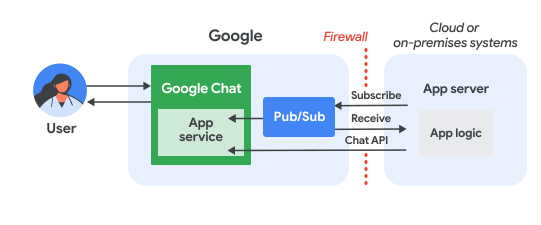
Trong sơ đồ trước đó, một người dùng tương tác với ứng dụng Pub/Sub Chat sẽ có luồng thông tin như sau:
Người dùng tương tác với ứng dụng Chat bằng cách gửi tin nhắn, đưa ra lệnh hoặc thêm/xoá ứng dụng khỏi một không gian trong Chat.
Chat gửi tin nhắn đến một chủ đề Pub/Sub.
Một máy chủ ứng dụng (là hệ thống trên đám mây hoặc tại chỗ có chứa logic của ứng dụng Chat) sẽ đăng ký chủ đề Pub/Sub để nhận thông báo thông qua tường lửa.
Ngoài ra, ứng dụng Chat có thể gọi Chat API để đăng tin nhắn không đồng bộ hoặc thực hiện các thao tác khác.
Điều kiện tiên quyết
Node.js
- Tài khoản Google Workspace Business hoặc Enterprise có quyền truy cập vào Google Chat.
- Một dự án trên Google Cloud đã bật tính năng thanh toán. Để kiểm tra xem một dự án hiện có đã bật tính năng thanh toán hay chưa, hãy xem phần Xác minh trạng thái thanh toán của dự án. Để tạo dự án và thiết lập thông tin thanh toán, hãy xem phần Tạo dự án trên Google Cloud.
- Node.js 14 trở lên
- Công cụ quản lý gói npm
- Một dự án Node.js đã được khởi chạy. Để khởi động một dự án mới, hãy tạo và chuyển sang một thư mục mới, sau đó chạy lệnh sau trong giao diện dòng lệnh:
npm init
Python
- Tài khoản Google Workspace Business hoặc Enterprise có quyền truy cập vào Google Chat.
- Một dự án trên Google Cloud đã bật tính năng thanh toán. Để kiểm tra xem một dự án hiện có đã bật tính năng thanh toán hay chưa, hãy xem phần Xác minh trạng thái thanh toán của dự án. Để tạo dự án và thiết lập thông tin thanh toán, hãy xem phần Tạo dự án trên Google Cloud.
- Python 3.6 trở lên
- Công cụ quản lý gói pip
Java
- Tài khoản Google Workspace Business hoặc Enterprise có quyền truy cập vào Google Chat.
- Một dự án trên Google Cloud đã bật tính năng thanh toán. Để kiểm tra xem một dự án hiện có đã bật tính năng thanh toán hay chưa, hãy xem phần Xác minh trạng thái thanh toán của dự án. Để tạo dự án và thiết lập thông tin thanh toán, hãy xem phần Tạo dự án trên Google Cloud.
- Java 11 trở lên
- Công cụ quản lý gói Maven
Bật các API
Trước khi sử dụng API của Google, bạn cần bật các API đó trong một dự án trên Google Cloud. Bạn có thể bật một hoặc nhiều API trong một dự án trên Google Cloud.Trong Cloud Console, hãy bật Google Chat API và Pub/Sub API.
Thiết lập Pub/Sub
Tạo một chủ đề Pub/Sub mà API Chat có thể gửi tin nhắn đến. Bạn nên sử dụng một chủ đề cho mỗi ứng dụng Chat.
Tạo tài khoản dịch vụ cho ứng dụng Chat để uỷ quyền bằng Pub/Sub và Chat, đồng thời lưu tệp khoá riêng tư vào thư mục làm việc của bạn.
Tạo một gói thuê bao kéo cho chủ đề.
Chỉ định Vai trò người đăng ký Pub/Sub cho gói thuê bao đối với tài khoản dịch vụ mà bạn đã tạo trước đó.
Viết kịch bản
Trong phần này, bạn sẽ xác định logic ứng dụng cho ứng dụng Chat. Bạn sẽ viết một tập lệnh xác thực bằng Google Cloud và đăng ký chủ đề Pub/Sub để nhận các sự kiện từ Chat, chẳng hạn như khi người dùng gửi tin nhắn đến ứng dụng Chat của bạn.
Khi nhận được một thông báo, tập lệnh sẽ xử lý dữ liệu sự kiện và sử dụng Google Chat API để đăng phản hồi cho người dùng hoặc không gian. Chế độ thiết lập này cho phép ứng dụng Chat của bạn hoạt động sau tường lửa mà vẫn tương tác với người dùng Chat.
Node.js
Trong CLI, hãy cung cấp thông tin đăng nhập của tài khoản dịch vụ:
export GOOGLE_APPLICATION_CREDENTIALS=SERVICE_ACCOUNT_FILE_PATHTrong giao diện dòng lệnh, hãy cung cấp mã dự án trên đám mây của Google Cloud:
export PROJECT_ID=PROJECT_IDTrong một CLI, hãy cung cấp mã nhận dạng gói thuê bao cho gói thuê bao Pub/Sub mà bạn đã tạo trước đó:
export SUBSCRIPTION_ID=SUBSCRIPTION_IDTrong thư mục làm việc, hãy tạo một tệp có tên là
package.json.Trong tệp
package.json, hãy dán mã sau:{ "name": "pub-sub-app", "version": "1.0.0", "description": "Google Chat App that listens for messages via Cloud Pub/Sub", "main": "index.js", "scripts": { "start": "node index.js", "test": "echo \"Error: no test specified\" && exit 1" }, "dependencies": { "@google-apps/chat": "^0.4.0", "@google-cloud/pubsub": "^4.5.0" }, "license": "Apache-2.0" }Trong thư mục làm việc, hãy tạo một tệp có tên là
index.js.Trong
index.js, hãy dán mã sau:const {ChatServiceClient} = require('@google-apps/chat'); const {MessageReplyOption} = require('@google-apps/chat').protos.google.chat.v1.CreateMessageRequest; const {PubSub} = require('@google-cloud/pubsub'); const {SubscriberClient} = require('@google-cloud/pubsub/build/src/v1'); // Receives messages from a pull subscription. function receiveMessages() { const chat = new ChatServiceClient({ keyFile: process.env.GOOGLE_APPLICATION_CREDENTIALS, scopes: ['https://www.googleapis.com/auth/chat.bot'], }); const subscriptionPath = new SubscriberClient() .subscriptionPath(process.env.PROJECT_ID, process.env.SUBSCRIPTION_ID) const subscription = new PubSub() .subscription(subscriptionPath); // Handle incoming message, then acknowledge the received message const messageHandler = message => { console.log(`Id : ${message.id}`); const event = JSON.parse(message.data); console.log(`Data : ${JSON.stringify(event)}`); // Post the response to Google Chat. const request = formatRequest(event); if (request != null) { chat.createMessage(request); } // Acknowledge the message. message.ack(); } subscription.on('message', messageHandler); console.log(`Listening for messages on ${subscriptionPath}`); // Keep main thread from exiting while waiting for messages setTimeout(() => { subscription.removeListener('message', messageHandler); console.log(`Stopped listening for messages.`); }, 60 * 1000); } // Send message to Google Chat based on the type of event function formatRequest(event) { const chatEvent = event.chat || {}; // If the app was removed, we don't respond. if (chatEvent.removedFromSpacePayload) { console.log(`App removed from space.`); return null; } const payload = chatEvent.messagePayload || chatEvent.addedToSpacePayload; const spaceName = payload?.space?.name; if (!spaceName) { console.log('No space name in event.'); return null; } if (chatEvent.addedToSpacePayload) { // An app can also be added to a space by @mentioning it in a // message. In that case, we fall through to the message case // and let the app respond. If the app was added using the // invite flow, we just post a thank you message in the space. return { parent: spaceName, message: { text: 'Thank you for adding me!' }, }; } else if (chatEvent.messagePayload) { // In case of message, post the response in the same thread. const message = chatEvent.messagePayload.message; return { parent: spaceName, messageReplyOption: MessageReplyOption.REPLY_MESSAGE_FALLBACK_TO_NEW_THREAD, message: { text: 'You said: `' + message.text + '`', thread: { name: message.thread.name }, }, }; } } if (!process.env.PROJECT_ID) { console.log('Missing PROJECT_ID env var.'); process.exit(1); } if (!process.env.SUBSCRIPTION_ID) { console.log('Missing SUBSCRIPTION_ID env var.'); process.exit(1); } if (!process.env.GOOGLE_APPLICATION_CREDENTIALS) { console.log('Missing GOOGLE_APPLICATION_CREDENTIALS env var.'); process.exit(1); } receiveMessages();
Python
Trong CLI, hãy cung cấp thông tin đăng nhập của tài khoản dịch vụ:
export GOOGLE_APPLICATION_CREDENTIALS=SERVICE_ACCOUNT_FILE_PATHTrong giao diện dòng lệnh, hãy cung cấp mã dự án trên đám mây của Google Cloud:
export PROJECT_ID=PROJECT_IDTrong một CLI, hãy cung cấp mã nhận dạng gói thuê bao cho gói thuê bao Pub/Sub mà bạn đã tạo trước đó:
export SUBSCRIPTION_ID=SUBSCRIPTION_IDTrong thư mục làm việc, hãy tạo một tệp có tên là
requirements.txt.Trong tệp
requirements.txt, hãy dán mã sau:google-cloud-pubsub>=2.23.0 google-apps-chat==0.1.9Trong thư mục làm việc, hãy tạo một tệp có tên là
app.py.Trong
app.py, hãy dán mã sau:import json import logging import os import sys import time from google.apps import chat_v1 as google_chat from google.cloud import pubsub_v1 from google.oauth2.service_account import Credentials def receive_messages(): """Receives messages from a pull subscription.""" scopes = ['https://www.googleapis.com/auth/chat.bot'] service_account_key_path = os.environ.get('GOOGLE_APPLICATION_CREDENTIALS') creds = Credentials.from_service_account_file(service_account_key_path) chat = google_chat.ChatServiceClient( credentials=creds, client_options={'scopes': scopes} ) project_id = os.environ.get('PROJECT_ID') subscription_id = os.environ.get('SUBSCRIPTION_ID') subscriber = pubsub_v1.SubscriberClient() subscription_path = subscriber.subscription_path(project_id, subscription_id) # Handle incoming message, then acknowledge the received message def callback(message): event = json.loads(message.data) logging.info('Data : %s', event) # Post the response to Google Chat. request = format_request(event) if request is not None: chat.create_message(request) # Acknowledge the message. message.ack() subscriber.subscribe(subscription_path, callback = callback) logging.info('Listening for messages on %s', subscription_path) # Keep main thread from exiting while waiting for messages while True: time.sleep(60) def format_request(event): """Send message to Google Chat based on the type of event. Args: event: A dictionary with the event data. """ chat_event = event.get('chat', {}) # If the app was removed, we don't respond. if 'removedFromSpacePayload' in chat_event: logging.info('App removed from space.') return payload = chat_event.get('messagePayload') or chat_event.get( 'addedToSpacePayload' ) space_name = payload.get('space', {}).get('name') if payload else None if not space_name: logging.warning('No space name in event.') return if 'addedToSpacePayload' in chat_event: # An app can also be added to a space by @mentioning it in a # message. In that case, we fall through to the message case # and let the app respond. If the app was added using the # invite flow, we just post a thank you message in the space. return google_chat.CreateMessageRequest( parent = space_name, message = { 'text': 'Thank you for adding me!' } ) elif 'messagePayload' in chat_event: # In case of message, post the response in the same thread. message = chat_event['messagePayload']['message'] return google_chat.CreateMessageRequest( parent = space_name, message_reply_option = google_chat.CreateMessageRequest.MessageReplyOption.REPLY_MESSAGE_FALLBACK_TO_NEW_THREAD, message = { 'text': 'You said: `' + message['text'] + '`', 'thread': { 'name': message['thread']['name'] } } ) if __name__ == '__main__': if 'PROJECT_ID' not in os.environ: logging.error('Missing PROJECT_ID env var.') sys.exit(1) if 'SUBSCRIPTION_ID' not in os.environ: logging.error('Missing SUBSCRIPTION_ID env var.') sys.exit(1) if 'GOOGLE_APPLICATION_CREDENTIALS' not in os.environ: logging.error('Missing GOOGLE_APPLICATION_CREDENTIALS env var.') sys.exit(1) logging.basicConfig( level=logging.INFO, style='{', format='{levelname:.1}{asctime} {filename}:{lineno}] {message}') receive_messages()
Java
Trong CLI, hãy cung cấp thông tin đăng nhập của tài khoản dịch vụ:
export GOOGLE_APPLICATION_CREDENTIALS=SERVICE_ACCOUNT_FILE_PATHTrong giao diện dòng lệnh, hãy cung cấp mã dự án trên đám mây của Google Cloud:
export PROJECT_ID=PROJECT_IDTrong một CLI, hãy cung cấp mã nhận dạng gói thuê bao cho gói thuê bao Pub/Sub mà bạn đã tạo trước đó:
export SUBSCRIPTION_ID=SUBSCRIPTION_IDTrong thư mục làm việc, hãy tạo một tệp có tên là
pom.xml.Trong tệp
pom.xml, hãy dán mã sau:<project xmlns="http://maven.apache.org/POM/4.0.0" xmlns:xsi="http://www.w3.org/2001/XMLSchema-instance" xsi:schemaLocation="http://maven.apache.org/POM/4.0.0 http://maven.apache.org/xsd/maven-4.0.0.xsd"> <modelVersion>4.0.0</modelVersion> <groupId>com.google.chat.addon</groupId> <artifactId>pubsub-addon-chat-app</artifactId> <version>0.1.0</version> <name>pubsub-addon-chat-app-java</name> <properties> <maven.compiler.release>11</maven.compiler.release> <project.build.sourceEncoding>UTF-8</project.build.sourceEncoding> </properties> <dependencyManagement> <dependencies> <dependency> <groupId>com.google.cloud</groupId> <artifactId>libraries-bom</artifactId> <version>26.41.0</version> <!-- Use a recent BOM version --> <type>pom</type> <scope>import</scope> </dependency> </dependencies> </dependencyManagement> <dependencies> <!-- Google Chat GAPIC library --> <dependency> <groupId>com.google.cloud</groupId> <artifactId>google-cloud-chat</artifactId> </dependency> <!-- Google Cloud Pub/Sub library --> <dependency> <groupId>com.google.cloud</groupId> <artifactId>google-cloud-pubsub</artifactId> </dependency> <!-- Google Apps Add-ons Event Object --> <dependency> <groupId>com.google.apps.addons.v1</groupId> <artifactId>google-apps-addons-v1-java</artifactId> <version>0.2.0</version> <!-- Check for latest version --> </dependency> <!-- Protobuf JSON utility --> <dependency> <groupId>com.google.protobuf</groupId> <artifactId>protobuf-java-util</artifactId> </dependency> <!-- Google Auth Library --> <dependency> <groupId>com.google.auth</groupId> <artifactId>google-auth-library-oauth2-http</artifactId> </dependency> <dependency> <groupId>com.google.api</groupId> <artifactId>gax</artifactId> </dependency> <!-- JSON utilities for PubSub message (if needed, though protobuf-java-util is primary for EventObject) --> <dependency> <groupId>com.fasterxml.jackson.core</groupId> <artifactId>jackson-databind</artifactId> <version>2.14.2</version> </dependency> <dependency> <groupId>org.slf4j</groupId> <artifactId>slf4j-jdk14</artifactId> <version>1.7.36</version> <scope>runtime</scope> </dependency> </dependencies> <build> <plugins> <plugin> <groupId>org.apache.maven.plugins</groupId> <artifactId>maven-compiler-plugin</artifactId> <version>3.13.0</version> <configuration> <source>11</source> <target>11</target> </configuration> </plugin> <plugin> <groupId>org.codehaus.mojo</groupId> <artifactId>exec-maven-plugin</artifactId> <version>3.3.0</version> <configuration> <mainClass>Main</mainClass> </configuration> </plugin> </plugins> </build> </project>Trong thư mục làm việc, hãy tạo cấu trúc thư mục
src/main/java.Trong thư mục
src/main/java, hãy tạo một tệp có tên làMain.java.Trong
Main.java, hãy dán mã sau:import com.fasterxml.jackson.databind.JsonNode; import com.fasterxml.jackson.databind.ObjectMapper; import com.google.api.gax.core.FixedCredentialsProvider; import com.google.auth.oauth2.GoogleCredentials; import com.google.chat.v1.ChatServiceClient; import com.google.chat.v1.ChatServiceSettings; import com.google.chat.v1.CreateMessageRequest; import com.google.chat.v1.CreateMessageRequest.MessageReplyOption; import com.google.chat.v1.Message; import com.google.chat.v1.Thread; import com.google.cloud.pubsub.v1.AckReplyConsumer; import com.google.cloud.pubsub.v1.MessageReceiver; import com.google.cloud.pubsub.v1.Subscriber; import com.google.pubsub.v1.ProjectSubscriptionName; import com.google.pubsub.v1.PubsubMessage; import java.io.FileInputStream; import java.util.Collections; public class Main { public static final String PROJECT_ID_ENV_PROPERTY = "PROJECT_ID"; public static final String SUBSCRIPTION_ID_ENV_PROPERTY = "SUBSCRIPTION_ID"; public static final String CREDENTIALS_PATH_ENV_PROPERTY = "GOOGLE_APPLICATION_CREDENTIALS"; public static void main(String[] args) throws Exception { ProjectSubscriptionName subscriptionName = ProjectSubscriptionName.of( System.getenv(Main.PROJECT_ID_ENV_PROPERTY), System.getenv(Main.SUBSCRIPTION_ID_ENV_PROPERTY)); // Instantiate app, which implements an asynchronous message receiver. EchoApp echoApp = new EchoApp(); // Create a subscriber for <var>SUBSCRIPTION_ID</var> bound to the message receiver final Subscriber subscriber = Subscriber.newBuilder(subscriptionName, echoApp).build(); System.out.println("Subscriber is listening to events..."); subscriber.startAsync(); // Wait for termination subscriber.awaitTerminated(); } } /** * A demo app which implements {@link MessageReceiver} to receive messages. * It echoes incoming messages. */ class EchoApp implements MessageReceiver { // Path to the private key JSON file of the service account to be used for posting response // messages to Google Chat. // In this demo, we are using the same service account for authorizing with Cloud Pub/Sub to // receive messages and authorizing with Google Chat to post messages. If you are using // different service accounts, set the path to the private key JSON file of the service // account used to post messages to Google Chat here. private static final String SERVICE_ACCOUNT_KEY_PATH = System.getenv(Main.CREDENTIALS_PATH_ENV_PROPERTY); // Developer code for Google Chat API scope. private static final String GOOGLE_CHAT_API_SCOPE = "https://www.googleapis.com/auth/chat.bot"; private static final String ADDED_RESPONSE = "Thank you for adding me!"; ChatServiceClient chatServiceClient; EchoApp() throws Exception { GoogleCredentials credential = GoogleCredentials.fromStream(new FileInputStream(SERVICE_ACCOUNT_KEY_PATH)) .createScoped(Collections.singleton(GOOGLE_CHAT_API_SCOPE)); // Create the ChatServiceSettings with the app credentials ChatServiceSettings chatServiceSettings = ChatServiceSettings.newBuilder() .setCredentialsProvider(FixedCredentialsProvider.create(credential)) .build(); // Set the Chat service client chatServiceClient = ChatServiceClient.create(chatServiceSettings); } // Called when a message is received by the subscriber. @Override public void receiveMessage(PubsubMessage pubsubMessage, AckReplyConsumer consumer) { System.out.println("Id : " + pubsubMessage.getMessageId()); // Handle incoming message, then acknowledge the received message try { ObjectMapper mapper = new ObjectMapper(); JsonNode dataJson = mapper.readTree(pubsubMessage.getData().toStringUtf8()); System.out.println("Data : " + dataJson.toString()); handle(dataJson); consumer.ack(); } catch (Exception e) { System.out.println(e); // Negative acknowledgement makes Pub/Sub redeliver the message. consumer.nack(); } } // Send message to Google Chat based on the type of event. public void handle(JsonNode eventJson) throws Exception { // Google Chat events for add-ons are wrapped in a 'chat' object. if (!eventJson.has("chat")) { System.out.println("Ignored: Not a Chat event (missing 'chat' field)."); return; } JsonNode chatNode = eventJson.get("chat"); CreateMessageRequest createMessageRequest = null; if (chatNode.has("messagePayload")) { // HANDLE MESSAGE JsonNode messagePayload = chatNode.get("messagePayload"); JsonNode message = messagePayload.get("message"); JsonNode space = messagePayload.get("space"); String spaceName = space.get("name").asText(); String userText = message.has("text") ? message.get("text").asText() : ""; String threadName = message.has("thread") ? message.get("thread").get("name").asText() : ""; System.out.println("Received message in " + spaceName + ": " + userText); createMessageRequest = CreateMessageRequest.newBuilder() .setParent(spaceName) .setMessageReplyOption(MessageReplyOption.REPLY_MESSAGE_FALLBACK_TO_NEW_THREAD) .setMessage( Message.newBuilder() .setText("You said: `" + userText + "`") .setThread(Thread.newBuilder().setName(threadName).build()) .build()) .build(); } else if (chatNode.has("addedToSpacePayload")) { // HANDLE ADDED TO SPACE JsonNode addedPayload = chatNode.get("addedToSpacePayload"); JsonNode space = addedPayload.get("space"); String spaceName = space.get("name").asText(); System.out.println("Added to space: " + spaceName); createMessageRequest = CreateMessageRequest.newBuilder() .setParent(spaceName) .setMessage(Message.newBuilder().setText(ADDED_RESPONSE).build()) .build(); } else if (chatNode.has("removedFromSpacePayload")) { System.out.println("Removed from space."); return; } else { System.out.println("Ignored: Unhandled Chat event type."); return; } if (createMessageRequest != null) { // Post the response to Google Chat. chatServiceClient.createMessage(createMessageRequest); System.out.println("Sent reply."); } } }
Định cấu hình ứng dụng Chat
Định cấu hình ứng dụng Chat trong Cloud Console để cung cấp thông tin chi tiết như tên và hình đại diện của ứng dụng, đồng thời thiết lập kết nối với chủ đề Pub/Sub.
Bằng cách kết nối với chủ đề Pub/Sub, bạn cho phép Chat gửi các sự kiện đến ứng dụng của mình. Tập lệnh của bạn (đăng ký chủ đề) sau đó có thể nhận các sự kiện này và phản hồi người dùng.
Trong Google Cloud Console, hãy chuyển đến Trình đơn > API và dịch vụ > API và dịch vụ đã bật > Google Chat API > Cấu hình.
Định cấu hình ứng dụng Chat cho Pub/Sub:
- Trong Tên ứng dụng, hãy nhập
Add-on Chat App. - Trong URL hình đại diện, hãy nhập
https://developers.google.com/workspace/add-ons/images/quickstart-app-avatar.png. - Trong phần Nội dung mô tả, hãy nhập
Quickstart app. - Trong phần Chức năng, hãy chọn Tham gia không gian và cuộc trò chuyện nhóm.
- Trong phần Cài đặt kết nối, hãy chọn Cloud Pub/Sub rồi dán tên của chủ đề Pub/Sub mà bạn đã tạo trước đó.
- Trong phần Chế độ hiển thị, hãy chọn Cho phép một số người và nhóm cụ thể sử dụng ứng dụng Google Chat này trong miền của bạn rồi nhập địa chỉ email của bạn.
- Trong mục Nhật ký, hãy chọn Ghi lỗi vào Nhật ký.
- Trong Tên ứng dụng, hãy nhập
Nhấp vào Lưu.
Bây giờ, sau khi định cấu hình ứng dụng Chat, bạn phải cập nhật cấu hình Pub/Sub.
- Trên trang cấu hình Chat API, trong mục Connection settings (Chế độ cài đặt kết nối), hãy sao chép Service account email (Email tài khoản dịch vụ). Đây là một email duy nhất được tạo cho dự án Google Cloud của bạn.
Cấp cho Chat quyền xuất bản vào chủ đề bằng cách chỉ định vai trò Nhà xuất bản Pub/Sub cho email tài khoản dịch vụ mà bạn đã sao chép trước đó.
Ứng dụng đã sẵn sàng nhận và trả lời tin nhắn trên Chat.
Chạy tập lệnh
Trong CLI, hãy chuyển sang thư mục làm việc của bạn và chạy tập lệnh:
Node.js
npm install
npm start
Python
python -m venv env
source env/bin/activate
pip install -r requirements.txt -U
python app.py
Java
mvn compile exec:java -Dexec.mainClass=Main
Khi bạn chạy mã, ứng dụng sẽ bắt đầu lắng nghe các thông báo được xuất bản cho chủ đề Pub/Sub.
Kiểm thử ứng dụng Chat
Để kiểm thử ứng dụng Chat, hãy mở một không gian nhắn tin trực tiếp có ứng dụng Chat rồi gửi một tin nhắn:
Mở Google Chat bằng tài khoản Google Workspace mà bạn đã cung cấp khi thêm chính mình làm người kiểm thử đáng tin cậy.
- Nhấp vào biểu tượng Cuộc trò chuyện mới.
- Trong trường Thêm 1 hoặc nhiều người, hãy nhập tên của ứng dụng Chat.
Chọn ứng dụng Chat trong kết quả. Một tin nhắn trực tiếp sẽ mở ra.
- Trong tin nhắn trực tiếp mới với ứng dụng, hãy nhập
Hellorồi nhấnenter.
Để thêm người kiểm thử đáng tin cậy và tìm hiểu thêm về việc kiểm thử các tính năng tương tác, hãy xem bài viết Kiểm thử các tính năng tương tác cho ứng dụng Google Chat.
Khắc phục sự cố
Khi một ứng dụng Google Chat hoặc thẻ trả về lỗi, giao diện Chat sẽ hiển thị thông báo "Đã xảy ra lỗi". hoặc "Không thể xử lý yêu cầu của bạn". Đôi khi, giao diện người dùng Chat không hiển thị bất kỳ thông báo lỗi nào, nhưng ứng dụng hoặc thẻ Chat lại tạo ra kết quả không mong muốn; ví dụ: thông báo thẻ có thể không xuất hiện.
Mặc dù thông báo lỗi có thể không xuất hiện trong giao diện người dùng Chat, nhưng bạn có thể sử dụng thông báo lỗi mô tả và dữ liệu nhật ký để khắc phục lỗi khi bật tính năng ghi nhật ký lỗi cho ứng dụng Chat. Để được trợ giúp xem, gỡ lỗi và khắc phục lỗi, hãy xem bài viết Khắc phục lỗi trong Google Chat.
Dọn dẹp
Để tránh phát sinh phí cho tài khoản Google Cloud của bạn đối với các tài nguyên được dùng trong hướng dẫn này, bạn nên xoá dự án trên đám mây.
- Trong Google Cloud Console, hãy chuyển đến trang Quản lý tài nguyên. Nhấp vào Trình đơn > IAM và Quản trị > Quản lý tài nguyên.
- Trong danh sách dự án, hãy chọn dự án bạn muốn xoá rồi nhấp vào biểu tượng Xoá .
- Trong hộp thoại, hãy nhập mã dự án rồi nhấp vào Tắt để xoá dự án.
Chủ đề có liên quan
Để thêm các tính năng khác vào ứng dụng Chat, hãy xem những thông tin sau: