
To validate your integration with Merchant Center as a service provider, create the following accounts for testing:
- A test Merchant Center service provider account
- A test Merchant Center merchant account
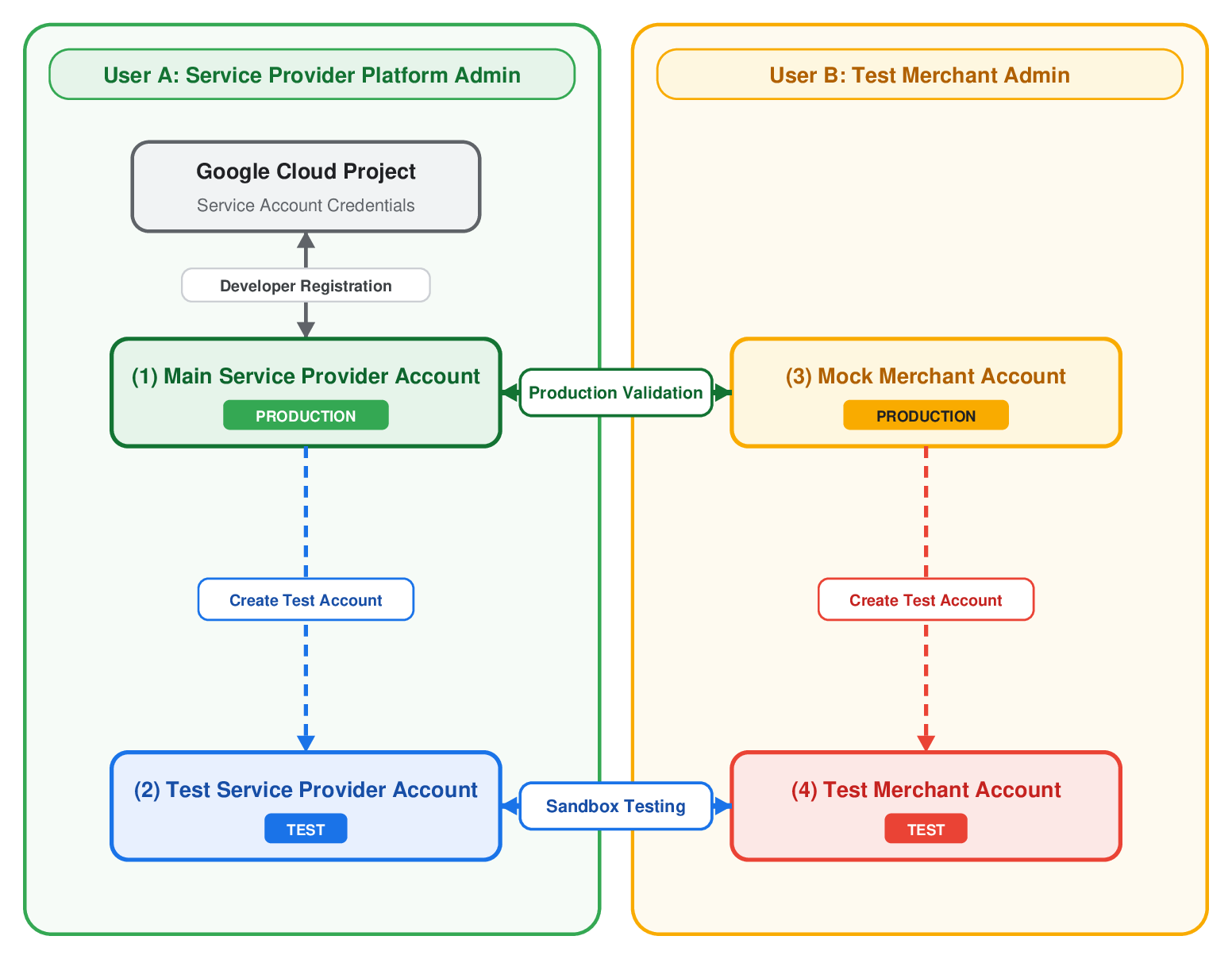
After the following steps are complete, your account structure should look like this:
Create a test service provider account
The first step to enabling your test suite is creating a test service provider account linked to your main production service provider account. This account will be used to test your integration in a sandbox environment.
- Using the
accounts.createTestAccountmethod in the Merchant API, create a new test Merchant Center account linked to your primary Merchant Center service provider account. For more information about how to create a test account, see Create test accounts. - Record the new test Merchant Center service provider account ID. You will need to provide this ID to Google to enable the UCP checkout service for sandbox testing.
- This is account (2) in the earlier diagram.
Create a new mock merchant account
Next, you will need to create a new mock Merchant Center account separate from your service provider account. This account will be used to validate the services you offer in production. We recommend creating this account as a user that is not a user of your service provider account to enable accurate testing.
- Register a separate, dedicated Google Merchant Center test account at merchants.google.com.
- Record the new mock Merchant Center account ID. You will need to provide this ID to Google to enable the UCP checkout service for final validation.
- This is account (3) in the earlier diagram.
Create a test merchant account
Finally, you will need to create a new test Merchant Center account that is linked to your mock Merchant Center account, and is separate from your production and test service provider accounts. This account will be used to validate the services you offer in a sandbox environment. We recommend creating this account as a user that is not a user of your test service provider account to enable accurate testing.
- Using the
accounts.createTestAccountmethod in the Merchant API, create a new test Merchant Center account linked to the mock Merchant Center account you created in the previous step. For more information about how to create a test account, see Create test accounts. - Record the new test Merchant Center account ID. You will need to provide this ID to Google to enable the UCP checkout service for sandbox testing.
- This is account (4) in the earlier diagram.
Next steps
After configuring your test accounts, proceed to UCP checkout service setup.