

Yer İşaretleri bileşeni
Yer İşaretleri bileşeni, önemli yer bilgilerini doğrudan haritada gösteren özelleştirilebilir harita açıklamaları oluşturmanıza olanak tanır. Bir yerin puanı, yer türü, açık veya kapalı durumu, fiyat aralığı ya da özel metin (ör. yapay zekayla üretilmiş bir etiket veya seyahat planı numarası) gibi içerikleri gösterebilirsiniz. Bu sayede kullanıcılarınız, ayrıntılı bir yer kartına dokunmalarına gerek kalmadan daha bilgilendirici bir harita keşfi deneyimi yaşar.
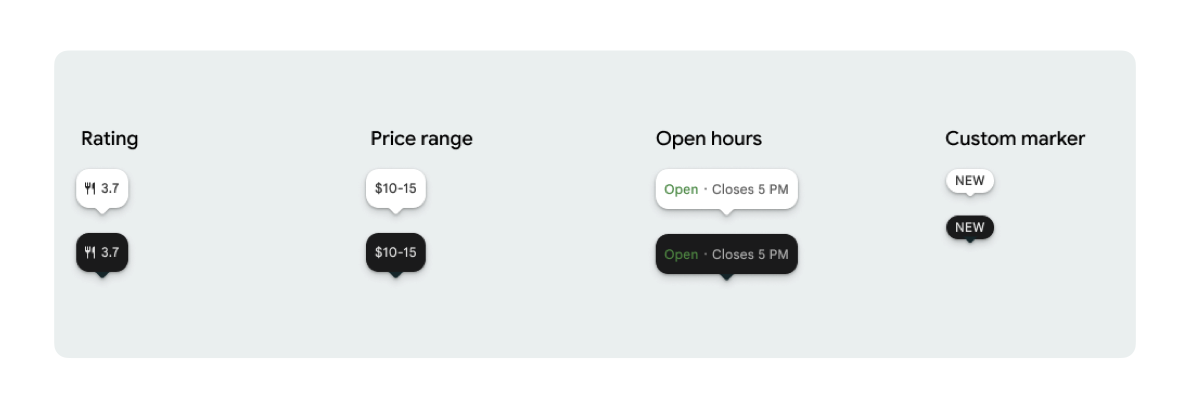
Her PlaceMarker için bir işaretçi simgesi ve isteğe bağlı işaretçi metni gösterebilirsiniz.
Kullanılabilir simgeler şunlardır:
Type: Yer türü.None: Simge yok.
Rating: Puan.PriceRange: Fiyat aralığı (örneğin, 10-20 TL).OpenStatus: İşletmenin açık veya kapalı olması.Custom: Özel metin (örneğin, "POPÜLER").
Yer kimliği (PlaceId), kaynak adı (ResourceName) veya coğrafi koordinatları (Coordinates) kullanarak yere referans verin.
Görüntüleme ve ilişkilendirme koşulları
Places UI Kit harita işaretçileri gösterildiğinde işaretçiler tek başına görünmemelidir. Gerekli Google markalaması, katkıda bulunan kişiye atıf ve Sorun Bildir akışlarını sağlamak için tıklama veya dokunma üzerine etkileşimli olmalı ve ilişkili bir yer ayrıntıları bileşeni ya da lightbox açmalıdır.
Alan sınırlı olduğunda fotoğraf ve yorum ilişkilendirme şartlarımızı inceleyin.
Yer işaretçisi örnekleri
View-to-Compose sarmalayıcı ek yükünü ortadan kaldırmak ve tema uyuşmazlığı sorunlarını önlemek için Jetpack Compose @Composable işlevleri sunuyoruz.
Temel işaretçi özelleştirmeleri
Aşağıdaki kod örneğinde, varsayılan işaretçi için üçgen şeklindeki konuşma balonu ağzını gizleme de dahil olmak üzere temel yer işaretçisi özelleştirmeleri gösterilmektedir.
Kotlin
import androidx.compose.runtime.Composable
import com.google.android.libraries.places.compose.PlaceMarker
import com.google.android.libraries.places.compose.marker.MarkerIcon
import com.google.android.libraries.places.compose.marker.MarkerText
import com.google.android.libraries.places.compose.PlaceReference

@Composable
fun DefaultMarker() {
    PlaceMarker(
        reference = PlaceReference.PlaceId("PLACE_ID"),
        icon = MarkerIcon.None,
        beakPresence = false, // remove beak
    )
}

@Composable
fun RatingMarker() {
    PlaceMarker(
        reference = PlaceReference.PlaceId("PLACE_ID"),
        icon = MarkerIcon.None,
        text = MarkerText.Rating
    )
}

@Composable
fun TypeAndRatingMarker() {
    PlaceMarker(
        reference = PlaceReference.PlaceId("PLACE_ID"),
        icon = MarkerIcon.Type,
        text = MarkerText.Rating

    )
}

@Composable
fun PriceRangeMarker() {
    PlaceMarker(
        reference = PlaceReference.ResourceName("places/PLACE_RESOURCE_NAME"),
        icon = MarkerIcon.None,
        text = MarkerText.PriceRange
    )
}

@Composable
fun OpenStatusMarker() {
   PlaceMarker(
       reference = PlaceReference.Coordinates(latitude = 37.7749, longitude = -122.4194),
        icon = MarkerIcon.None,
        text = MarkerText.OpenStatus
   )
}

@Composable
fun CustomTextMarker() {
    PlaceMarker(
        reference = PlaceReference.PlaceId("PLACE_ID"),
        icon = MarkerIcon.None,
        // Custom text accepts a String to display a number (e.g. "3") or text (e.g. "NEW")
        text = MarkerText.Custom("NEW")
    )
}
Tıklama işleyicisi oluşturma
Bağımsız bir işaretçiye dokunulduğunda özel işlemleri tetiklemek için onClick geri çağırma işlevi sağlayabilirsiniz. Ancak işaretçi bir haritada oluşturulduğunda (örneğin, MarkerComposable içinde) dokunma etkinlikleri harita tarafından engellenir. Bu durumda, işaretçinin işleyicisi yerine MarkerComposable öğesinin onClick işleyicisini kullanmanız gerekir.
Aşağıdaki kod örneğinde, MarkerComposable öğesinin onClick işleyicisinin nasıl kullanılacağı gösterilmektedir.
Kotlin
import android.util.Log
import androidx.compose.runtime.Composable
import com.google.android.libraries.places.compose.PlaceMarker
import com.google.android.libraries.places.compose.marker.MarkerIcon
import com.google.android.libraries.places.compose.PlaceReference


/**
 * PlaceMarker used outside of a map (e.g. in a list, bottom sheet, or custom overlay).
 *
 * There is no host component that provides a default click behavior here, so PlaceMarker's own
 * `onClick` is the only way for a developer to react to a tap. This is why `onClick` must stay
 * on the PlaceMarker API.
 */
@Composable
fun ClickableMarkerWithCustomConfig() {
   PlaceMarker(
       reference = PlaceReference.PlaceId("PLACE_ID"),
       icon = MarkerIcon.Type,

       onClick = { place ->
           openPlaceCard(place.id) // developer might want to open the place card
           Log.i("PlacesMarker", "Marker was tapped by user!")
       }
   )
}

/**
 * PlaceMarker used as the content of a MarkerComposable on a GoogleMap.
 *
 * MarkerComposable does NOT add PlaceMarker to the touch-input hierarchy: it snapshots the
 * composable into a bitmap and hands that bitmap to the Maps renderer as the marker icon. The
 * rendered marker is a map object, not a Compose node, so:
 *
 *   - PlaceMarker's own `onClick` would never be invoked here (no touch events ever reach it).
 *   - The tap is delivered by the Maps SDK to MarkerComposable's `onClick`, which is the only
 *     click entry point on a map.
 *
 * Accordingly, the state-based `PlaceMarker(state = ...)` overload used below deliberately does
 * not expose an `onClick` parameter, so the correct handler is the only one available.
 */
@Composable
fun PlaceMarkerOnMap(markerState: PlaceMarkerState) {
  GoogleMap(
    modifier = Modifier.fillMaxSize(),
    cameraPositionState = rememberCameraPositionState(),
  ) {
    markerState.location?.let { position ->
      MarkerComposable(
        state = rememberUpdatedMarkerState(position = position),
        // this is the click handler for the map use case.
        onClick = {
          markerState.place?.let { place -> openPlaceCard(place.id) }
          true // consume the event
        },
      ) {
        PlaceMarker(state = markerState)
      }
    }
  }
}
Yükleme durumunu ve geri çağırmaları yönetme
Aşağıdaki kod örneğinde, oluşturma veya eksik veri hatalarını işlemek için geri çağırma işlevlerinin nasıl sağlanacağı gösterilmektedir.
Kotlin
import android.util.Log
import androidx.compose.runtime.Composable
import com.google.android.libraries.places.compose.PlaceMarker
import com.google.android.libraries.places.compose.marker.MarkerIcon
import com.google.android.libraries.places.compose.PlaceReference

@Composable
fun StatusHandlingMarker() {
    PlaceMarker(
        reference = PlaceReference.PlaceId("PLACE_ID"),
        icon = MarkerIcon.Type,
        // Triggered when attribute data is successfully fetched and the marker is rendered.
        // Returns a minimal Place object with ID, location (LatLng), and viewport fields set.
        onMarkerLoaded = { place ->
            Log.i("PlacesMarker", "Marker successfully loaded for place ID: ${place.id}")
        },
        // Triggered when data fetching fails or required attribute data is missing for the place.
        // Returns an optional Place object and an Exception describing the root cause.
        onMarkerLoadFailed = { place, exception ->
            Log.e("PlacesMarker", "Failed to load marker for place ID: ${place?.id}", exception)
        }
    )
}
Haritaya işaretçi yerleştirmek için PlaceMarkerState simgesini kullanın.
Yer nesnesi, işaretçiyi nereye yerleştireceğinize karar vermenize yardımcı olmak için konum ve görünüm penceresiyle birlikte döndürülür.
Kotlin
// Step 1: Obtain configured handle in a single 1-line call (PlaceMarker mounted internally)
val markerState = rememberPlaceMarkerState(
  reference = PlaceReference.PlaceId(placeId),
  icon = MarkerIcon.Type
)

// Step 2: Pass PlaceMarkerState.location and PlaceMarker(state = PlaceMarkerState) directly to the map marker
GoogleMap(...) {
  markerState.location?.let { position ->
    MarkerComposable(
      state = rememberMarkerState(position = position),
      onClick = {
        markerState.place?.let { place ->
          // Handle marker click
        }
        true
      }
    ) {
      PlaceMarker(state = markerState) // Render marker UI content directly on map canvas
    }
  }
}
İşaretçiyi özel bir boyuta ölçeklendirme
Kotlin
// Off the map: scale with a one-line modifier.
// Modifier.scale is a draw-time transform, so the bubble, beak, icon and text all scale together.
@Composable
fun ScaledMarker() {
  PlaceMarker(
    reference = PlaceReference.PlaceId(placeId),
    icon = MarkerIcon.Type,
    text = MarkerText.Rating,
    modifier = Modifier.scale(2.1f),
  )
}

// On the map: scale by overriding LocalDensity.
// MarkerComposable snapshots its content into a marker bitmap sized to the measured layout bounds.
// Modifier.scale does not change those bounds, so the marker would be clipped and blurry. Scaling
// the density re-measures every dp and sp inside the marker, so the bitmap, the layout bounds and
// the map hit target all grow with it.
@Composable
fun ScaledMarkerOnMap(markerState: PlaceMarkerState) {
  val density = LocalDensity.current
  val scaledDensity = remember(density) {
    Density(density = density.density * 2.1f, fontScale = density.fontScale * 2.1f)
  }
  GoogleMap(...) {
    markerState.location?.let { position ->
      MarkerComposable(
        state = rememberUpdatedMarkerState(position = position),
        anchor = Offset(0.5f, 1.0f),
      ) {
        CompositionLocalProvider(LocalDensity provides scaledDensity) {
          PlaceMarker(state = markerState)
        }
      }
    }
  }
}