

高度な Place Search コンポーネント
Place Search コンポーネントの Advanced バージョンは、Place Search 検索の基本事項 と同じ機能を提供します。また、コンポーネントのアクション ボタンを設定したり、表示されるレビューやメディアに検索やフィルタリングのオプションを適用したりすることもできます。
高度な場所検索の設定
AdvancedPlaceSearchFragment を使用して、高度な機能にアクセスします。
アクション ボタンを設定する
AdvancedPlaceSearchFragment の PlaceActionProvider インターフェースを使用して、アクション ボタンを定義してカスタマイズします。
視覚的な表示ルールの要件
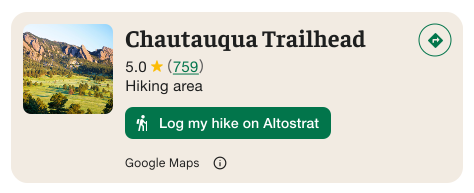
重要: カスタム 操作ボタンが Google 以外の第三者とユーザー情報を共有する場合、ユーザーにその旨を明確に伝える必要があります。ビジュアル アトリビューションの要件をご覧ください。
この例では、ユーザー情報が「Altostrat」に送信されることを明確に示すカスタム画像が表示されています。
検索とフィルタのオプションを適用する
AdvancedPlaceSearchFragment の SearchMediaOptions インターフェースと SearchReviewsOptions インターフェースを使用して、メディアやレビューの検索とフィルタリングを有効にします。
高度なプレイス検索の例
AdvancedPlaceSearch フラグメントを作成する
Kotlin
// Initialize Places first
Places.initializeWithNewPlacesApiEnabled(context, API_KEY)

// How the fragment is created
AdvancedPlaceSearchFragment.newInstance(
          selectedContent,
          orientation,
          R.style.BrandedPlaceDetailsTheme,
        )

// Fragment supports the same configs that PlaceSearchFragment supported
fragment.preferTruncation = false
fragment.attributionPosition = AttributionPosition.BOTTOM
fragment.selectable = true
検索を実行する
Kotlin
// Performing a search works the same as with a regular placeSearchFragment.

advancedPlaceSearchFragment.configureFromSearchByTextRequest(searchByTextRequest)

advancedPlaceSearchFragment.configureFromSearchNearbyRequest(searchNearbyRequest)
結果を聞く
Kotlin
// attach the existing PlaceSearchFragmentListener to get notified about when places load or are selected from the results list.
override fun onAttachFragment(fragment: Fragment) {
    super.onAttachFragment(fragment)
    when (fragment) {
      // Reuse the placeSearchFragmetnListener from the Essentials version
      is AdvancedPlaceSearchFragment -> fragment.registerListener(placeSearchFragmentListener)
      // use placeListFragmentListener, its functionally identical but with a new name.
      is AdvancedPlaceListFragment -> fragment.registerListener(advancedPlaceListFragmentListener)
    }
}