

Komponen Place Details tingkat lanjut
Komponen Place Details versi Advanced menawarkan fitur yang sama dengan Place Details Essentials. Anda juga dapat mengonfigurasi tombol tindakan komponen dan menerapkan opsi penelusuran dan pemfilteran ke ulasan dan media yang ditampilkan.
Dukungan Jetpack Compose bawaan
Places UI Kit menyediakan fungsi Jetpack Compose @Composable untuk AdvancedPlaceDetailsCompact. Composable ini menggunakan status yang diangkat, dukungan pengubah bawaan, dan DSL slot native Compose.
Contoh kode berikut menunjukkan cara menggunakan fungsi composable untuk tata letak vertikal.
Kotlin
import android.util.Log
import androidx.compose.foundation.layout.fillMaxWidth
import androidx.compose.foundation.layout.padding
import androidx.compose.material3.MaterialTheme
import androidx.compose.material3.Text
import androidx.compose.runtime.Composable
import androidx.compose.ui.Modifier
import androidx.compose.ui.graphics.painter.Painter
import androidx.compose.ui.unit.dp
import com.google.android.libraries.places.api.model.Place
import com.google.android.libraries.places.compose.AdvancedPlaceDetailsCompact
import com.google.android.libraries.places.compose.PlaceReference
import com.google.android.libraries.places.compose.action.CornerAction
import com.google.android.libraries.places.compose.action.MainAction
import com.google.android.libraries.places.compose.Orientation

@Composable
fun SampleAdvancedPlaceDetailsCompactCard(
    placeId: String,
    bookmarkIcon: Painter,
    onSavePlaceClicked: (Place) -> Unit
) {
    AdvancedPlaceDetailsCompact(
        // defines the place to be displayed
        reference = PlaceReference.PlaceId(placeId),
        // defines the orientation
        orientation = Orientation.VERTICAL,
        // defines custom styling
        modifier = Modifier
            .fillMaxWidth()
            .padding(16.dp),
        preferTruncation = true,
        enableLightbox = true,
        mainActions = { place ->
            listOf(
                MainAction.OpenDirections(),
                MainAction.OpenWebsite(),
                MainAction.Call()
            )
        },
        // action button configuration
        cornerActions = { place ->
            listOf(
                CornerAction.Custom(
                    icon = bookmarkIcon,
                    text = "Save Place",
                    onClick = { onSavePlaceClicked(place) }
                )
            )
        },
        onPlaceLoaded = { place ->
            Log.d("Places", "Successfully loaded place: ${place.id}")
        },
        onPlaceLoadFailed = { exception ->
            Log.e("Places", "Failed to load place", exception)
        }
    ) {
        // --- Slot: Injected directly above the place name ---
        basicSectionTop {
            Text(
                text = "Featured in 'Top 10 Coffee Shops in SF'",
                style = MaterialTheme.typography.labelSmall,
                color = MaterialTheme.colorScheme.secondary,
                modifier = Modifier.padding(top = 4.dp, bottom = 2.dp)
            )
        }

        // --- Slot: Injected directly below the action buttons ---
        basicSectionBottom {
            Text(
                text = "Notes: Great quiet atmosphere for meetings.",
                style = MaterialTheme.typography.bodySmall,
                color = MaterialTheme.colorScheme.onSurfaceVariant
            )
        }
    }
}
Konfigurasi Place Details lanjutan
Gunakan AdvancedPlaceDetailsFragment atau AdvancedPlaceDetailsCompactFragment untuk mengakses fitur lanjutan.
Mengonfigurasi tombol tindakan
Gunakan antarmuka PlaceActionProvider dari AdvancedPlaceDetailsFragment atau AdvancedPlaceDetailsCompactFragment untuk menentukan dan menyesuaikan tombol tindakan.
Jika Anda menggunakan fungsi @composable, gunakan lambda mainActions dan cornerActions untuk mengonfigurasi tombol tindakan.
Persyaratan atribusi visual
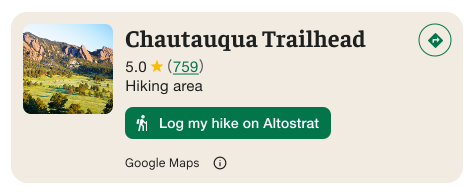
Penting: Anda harus menjelaskan kepada pengguna akhir kapan tombol tindakan kustom akan membagikan informasi pengguna kepada pihak ketiga selain Google. Lihat persyaratan atribusi visual.
Contoh di sebelah kanan menampilkan gambar kustom yang memperjelas bahwa informasi pengguna akan dikirim ke "Altostrat".
Menerapkan opsi penelusuran dan pemfilteran
Gunakan class SearchMediaOptions dan SearchReviewsOptions dari AdvancedPlaceDetailsFragment atau AdvancedPlaceDetailsCompactFragment untuk mengaktifkan penelusuran dan pemfilteran untuk media atau ulasan.
Jika Anda menggunakan fungsi @composable, gunakan com.google.android.libraries.places.compose.search.SearchMediaOptions untuk mengaktifkan penelusuran dan pemfilteran untuk media atau ulasan.
Membuat slot konten kustom
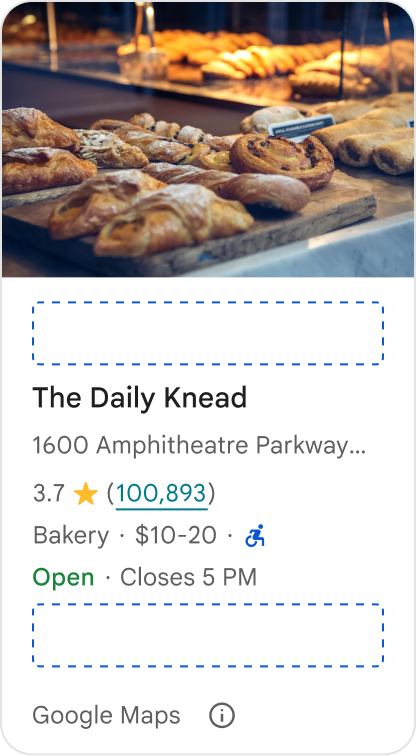
Slot konten kustom memungkinkan Anda menambahkan konten sendiri (seperti ringkasan buatan AI, stempel waktu itinerari, atau badge kustom) langsung ke dalam zona tata letak yang telah ditentukan.
Persyaratan atribusi dan saran konten untuk slot konten
Saat slot konten kustom dipasang, pengungkapan akan otomatis diperbarui untuk mengklarifikasi konten mana yang disediakan oleh Google dan bahwa beberapa konten disediakan oleh pihak ketiga.
Anjuran
Pertahankan hierarki visual yang jelas antara detail Tempat Google dan konten kustom untuk mencegah ambiguitas tentang sumber informasi.
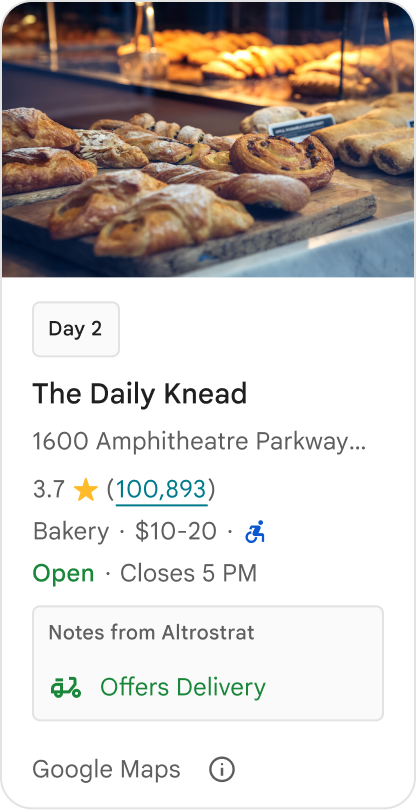
Anjuran
Pertimbangkan insight bernilai tinggi yang dilokalkan dan disesuaikan dengan tujuan langsung pengguna Anda. Konten yang disesuaikan seperti jendela pemesanan real-time atau ketersediaan saat ini membantu pengguna membuat keputusan yang lebih cepat dan tepat.
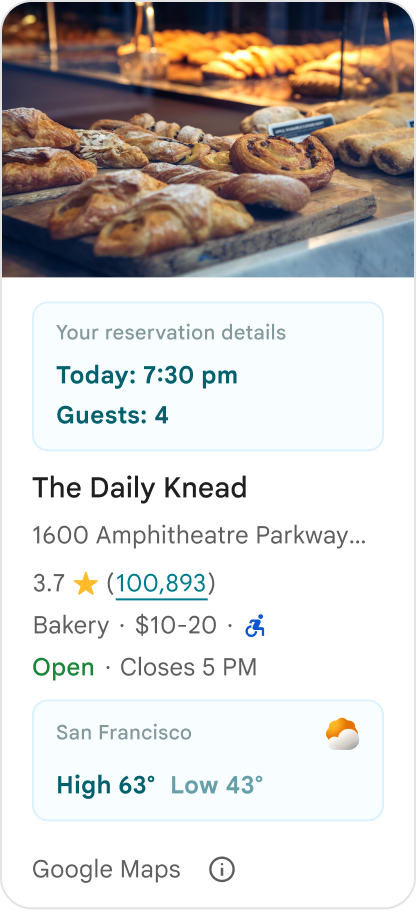
Larangan
Jangan menduplikasi detail Tempat Google yang sudah ada, seperti rating, ulasan, atau jam buka, meskipun Anda telah menyembunyikan konten yang disediakan Google. Tindakan ini dapat membingungkan pengguna tentang sumber konten dan apakah konten tersebut berasal dari Google atau pihak ketiga.
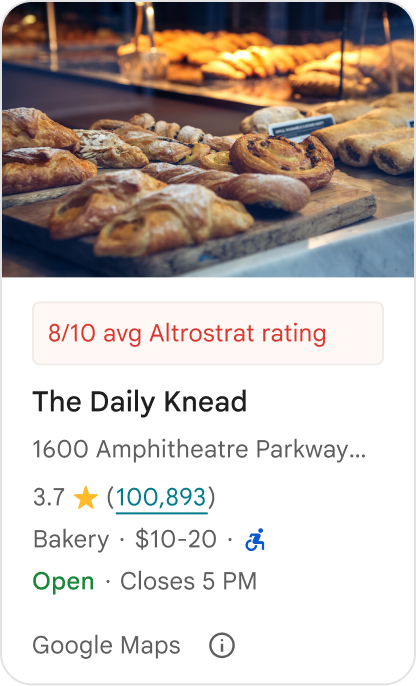
Larangan
Jangan menampilkan klaim atau badge tanpa atribusi (misalnya, "Rekomendasi terbaik!") yang dapat disalahartikan sebagai dukungan resmi dari Google. Konten kustom harus secara eksplisit mengatribusikan sumbernya.
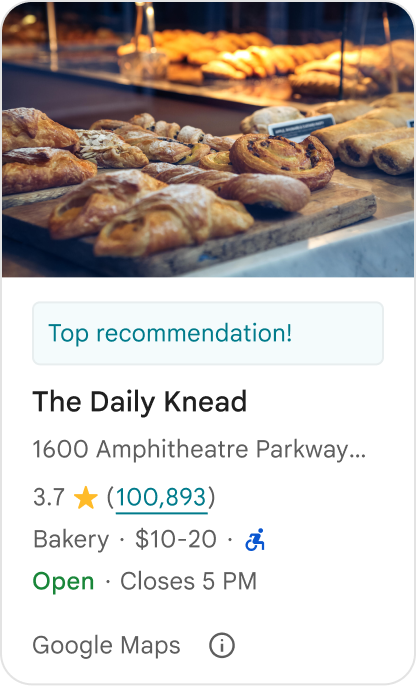
Larangan
Jangan sertakan iklan, teks pemasaran, diskon promosi, atau perintah berlangganan dalam penampung tempat kustom.
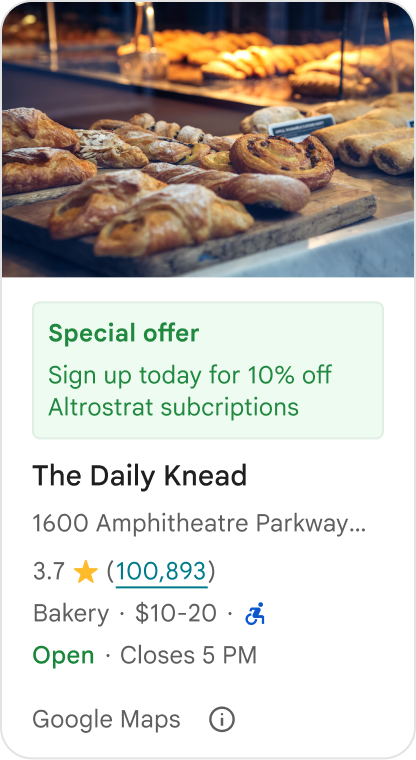
Untuk menambahkan konten kustom, gunakan composable AdvancedPlaceDetailsCompact. Gunakan basicSectionTop atau basicSectionBottom untuk menentukan posisi konten.
Contoh Place Details lanjutan
Menyesuaikan tombol tindakan
Gunakan antarmuka PlaceActionProvider untuk mengontrol tindakan yang tersedia untuk setiap tempat.
Kotlin
class PlaceDetailsWidgetTestActivity : BaseActivity() {

// simplified example of starting the fragment
fun setupPPDFragment() {
   fullWidgetSelectedContent = AdvancedPlaceDetailsFragment.ALL_CONTENT.toMutableList()
   AdvancedPlaceDetailsFragment.newInstance(fullWidgetSelectedContent, Orientation.VERTICAL)
   supportFragmentManager
      .beginTransaction()
      .replace(R.id.fragment_container, fragment!!)
      .commitNow()
}

// you can set the callback elsewhere, but this is the ideal callback spot
override fun onAttachFragment(fragment: Fragment) {
    super.onAttachFragment(fragment)
    when (fragment) {
      is PlaceActionController -> setPlaceActionProvider(fragment)
    }
}

// have this callback return an empty list to hide all buttons
// if this callback isn't set, default buttons appear
 private fun setPlaceActionProvider(fragment: PlaceActionController) {
    fragment.setPlaceActionProvider(
        object : PlaceActionProvider {
        override fun getMainPlaceActions(place: Place): List<PlaceAction> = buildList {
            // predefined actions can be mixed in with custom ones
            add(PlaceAction.OPEN_IN_MAPS)

            // example of button with both text label and icon
            add(
              PlaceAction.builder()
                .setLabelTextResId(R.string.custom_action)
                .setIconResId(R.drawable.gs_custom_action_icon)
                .setContentDescriptionResId(R.string.custom_action_description)
                .setOnClickListener { /* todo perform action */ }
                .build()
            )

            // icon only button
            add(
              PlaceAction.builder()
                .setIconResId(R.drawable.custom_action_icon_2)
                .setContentDescriptionResId(R.string.custom_action_description_2)
                .setOnClickListener { /* todo perform action */}
                .build()
            )

            // text label only button
            add(
              PlaceAction.builder()
                .setLabelTextResId(R.string.custom_action_3)
                .setContentDescriptionResId(R.string.custom_action_description_2)
                .setOnClickListener {/* todo perform action */ }
                .build()
            )
          }

         /**
         You can also specify whether corner buttons should appear.
         For either callback, returning an empty list results in no buttons appearing
         */
         override fun getCornerPlaceActions(place: Place): List<PlaceAction> {
           return emptyList()
         }

        override fun addPlaceActionsChangedListener(
          listener: PlaceActionProvider.OnChangedListener
        ) {
          // in this example, just one listener and widget
          this@HostAppActivity.listener = listener
        }

        override fun removePlaceActionsChangedListener(
          listener: PlaceActionProvider.OnChangedListener
        ) {
          // if there are multiple listeners, remove only the provided listener
          this@HostAppActivity.listener = null
        }
      })
  }
}
Menambahkan tindakan kustom dan standar
Contoh ini menambahkan tombol ganti untuk pengguna agar dapat menandai atau membatalkan tanda tempat sebagai favorit.
Kotlin
private var listener: PlaceActionProvider.OnChangedListener? = null

private fun setPlaceActionProvider(fragment: PlaceActionController) {
    fragment.setPlaceActionProvider(
      object : PlaceActionProvider {
        private var placeFavorited = false

        override fun getMainPlaceActions(place: Place): List<PlaceAction> {
          val buttonList = mutableListOf<PlaceAction>()

          if (placeFavorited) {
            buttonList.add(
              PlaceAction.builder()
                .setLabelTextResId(R.string.place_details_button_config_favorite)
                .setIconResId(R.drawable.gs_web_vd_theme_24)
                .setOnClickListener {
                  placeFavorited = !placeFavorited
                  refreshButtonConfigs()
                }
                .build()
            )
          } else {
            buttonList.add(
              PlaceAction.builder()
                .setLabelTextResId(R.string.place_details_button_config_unfavorite)
                .setIconResId(R.drawable.gs_web_vd_theme_24)
                .setOnClickListener {
                  placeFavorited = !placeFavorited
                  refreshButtonConfigs()
                }
                .build()
            )
          }

          return buttonList
        }

        override fun addPlaceActionsChangedListener(
          listener: PlaceActionProvider.OnChangedListener
        ) {
          this@PlaceDetailsWidgetTestActivity.listener = listener
        }

        override fun removePlaceActionsChangedListener(
          listener: PlaceActionProvider.OnChangedListener
        ) {
          // if there are multiple listeners, remove only the provided listener
          this@PlaceDetailsWidgetTestActivity.listener = null
        }
      }
    )
  }

private fun refreshButtonConfigs() {
    listener?.onPlaceActionsChanged()
}
Menggunakan tombol standar yang telah ditentukan sebelumnya
Buat tombol tindakan yang melakukan tindakan standar yang ditentukan Google.
Kotlin
  override fun getMainPlaceActions(place: Place): List<PlaceAction> {
    val buttonList = mutableListOf<PlaceAction>()
// these buttons will have different background and text color than user-created buttons.
    // Text and icon button
    buttonList.add(PlaceAction.OPEN_IN_MAPS)
    // Icon-only buttons not enabled for main action buttons
    // Use of kotlin extension to do the same.  see
    PlaceAction.OPEN_IN_MAPS {
       setIconResId(0)
     }

    return buttonList
  }
Memfilter ulasan dan media
Contoh kode ini hanya menampilkan media dan ulasan yang menyebutkan "spageti" dan "lezat".
Kotlin
    import com.google.android.libraries.places.widget.AdvancedPlaceDetailsFragment
    import com.google.android.libraries.places.widget.model.SearchMediaOptions
    import com.google.android.libraries.places.widget.model.SearchReviewsOptions
    import com.google.android.libraries.places.widget.model.Orientation
    import com.google.android.libraries.places.R

     // 1. Create options using the Java builders (called from Kotlin)
    val mediaOptions = SearchMediaOptions.builder()
        .setQuery("spaghetti")
        .setRankPreference(SearchMediaOptions.RankPreference.MOST_RELEVANT)
        .build()

    val reviewOptions = SearchReviewsOptions.builder()
        .setQuery("tasty")
        .setRankPreference(SearchReviewsOptions.RankPreference.NEWEST)
        .build()

    // 2. Create the fragment
    val fragment = AdvancedPlaceDetailsFragment.newInstance(
        AdvancedPlaceDetailsFragment.STANDARD_CONTENT,
        Orientation.VERTICAL,
        R.style.PlacesMaterialTheme
    )

    // 3. Apply options to the fragment
    fragment.applySearchMediaOptions(mediaOptions)
    fragment.applySearchReviewsOptions(reviewOptions)
Membuat slot konten
Kotlin
import androidx.compose.material3.MaterialTheme
import androidx.compose.material3.Text
import androidx.compose.runtime.Composable
import com.google.android.libraries.places.compose.AdvancedPlaceDetailsCompact
import com.google.android.libraries.places.compose.PlaceReference

@Composable
fun ItineraryPlaceCard(placeId: String) {
    AdvancedPlaceDetailsCompact(
        reference = PlaceReference.PlaceId(placeId)
    ) {
        // Slot: Injected directly above the place name
        basicSectionTop {
            Text(
                text = "Day 2 • 2:30 PM",
                style = MaterialTheme.typography.labelSmall,
                color = MaterialTheme.colorScheme.primary
            )
        }

        // Slot: Injected directly below the main action buttons
        basicSectionBottom {
            NotesCard(
                notes = "Great quiet atmosphere for morning meetings. Famous for house-roasted pour-overs."
            )
        }
    }
}