

适用于 iOS 的 Navigation SDK 提供了增强的方式来指定途经点或导航点,从而提供更准确的路线规划和更好的到达体验,尤其对于有多个入口或特定导航点的目的地。您可以使用 navigationPointToken(一种对位置和额外路线情境进行编码的字符串)规划到精确位置的路线。您还可以将纬度和经度坐标与地点 ID 结合使用,以添加更多情境。
背景
在 v10.10 之前,您可以使用位置坐标或地点 ID 定义 Waypoint。虽然有时有效,但仅根据纬度和经度进行路线规划有时会导致下车点或上车点欠佳,尤其是在大型场所、公园或有多个入口的建筑物中。结果可能会贴靠到最近的路段,但该路段可能不是最方便或最正确的入口点。
增强型途经点选项允许您提供更多背景信息,从而解决此问题。
使用导航点令牌
如需获得前往特定接入点(例如入口、装货平台或指定上车区)的最精确路线,您可以使用 navigationPointToken。
此令牌通过调用 Geocoding API 的 Destinations 方法获得。它表示与某个地点关联的特定可导航点。
如需指定导航点令牌,请执行以下操作:
从 Geocoding API 的 Destinations 方法响应中获取
navigationPointToken。创建
GMSNavigationWaypoint时,请指定navigationPointToken。
注意:您无法同时指定导航点令牌以及位置和 PlaceID。
Swift
// Create a waypoint using a navigation endpoint token
let waypointTwo = GMSNavigationWaypoint(
  navigationPointToken: "ChIJALijSXPhQkARHmIozCCbXsASEgkFVjYHGH6PgBFrbM7wl3.."
  title: "Sydney Opera House")

// Route to the waypoint
navigator.setDestinations([waypointTwo]) { [weak self] routeStatus in
   self?.handleRouteCallback(status: routeStatus)
}
Objective-C
GMSNavigationWaypoint *waypointTwo = [[GMSNavigationWaypoint alloc] initWithNavigationPointToek:@"sampleNavigationPointToken"
使用导航点令牌和路线令牌
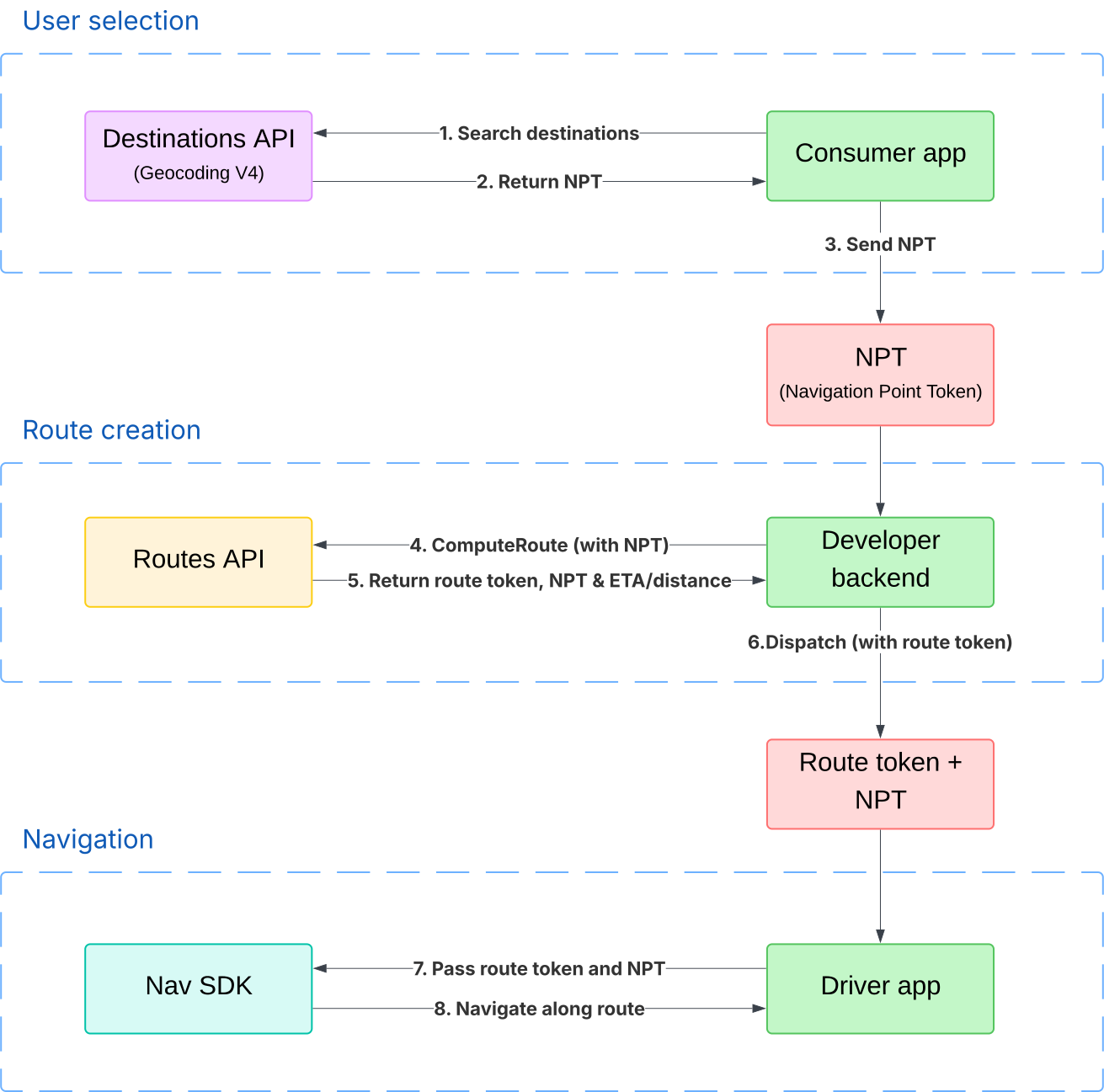
您可以通过 Geocoding API 检索导航点令牌,从 Routes API 检索路线令牌,然后将导航点令牌和路线令牌都传递给 Navigation SDK。这在网约车或送货等场景中非常有用,因为在这些场景中,您可以使用 Routes API 计算行程价格,并且需要导航点令牌的精确度。
路线令牌会使 Navigation SDK 选择的路线偏向用于定价的路线。这样可以降低行程使用较长或较短路线的风险,从而避免出现“价格冲击”。
如需详细了解如何使用导航点令牌指定位置和创建路线令牌,请参阅 Routes API 文档。如需了解如何使用路线令牌规划路线,请参阅“规划路线”。
下图展示了网约车或外卖应用如何同时使用导航点令牌和路线令牌:
结合使用地点 ID 和位置信息
从 v10.10 开始,您可以在创建途经点时同时提供地点 ID 和位置坐标。如果您想指定一个精确的点(位置),同时仍提供整个地点的上下文(地点 ID),此方法会很有用。这样,Navigation SDK 就能通过突出显示目的地建筑物或显示与地点 ID 相关的附近兴趣点,提供更丰富的到达体验。
Swift
// Create a waypoint using both the latlng and placeID
let waypoint = GMSNavigationWaypoint(
  location: CLLocationCoordinate2DMake(-33.85657945261524, 151.21535034203333),
  placeID: "ChIJ3S-JXmauEmsRUcIaWtf4MzE",
  title: "Sydney Opera House")

// Route to the waypoint
navigator.setDestinations([waypoint]) { [weak self] routeStatus in
   self?.handleRouteCallback(status: routeStatus)
}
Objective-C
CLLocationCoordinate2D location = CLLocationCoordinate2DMake(47.67, -122.20);
GMSNavigationWaypoint *waypoint = [[GMSNavigationWaypoint alloc] initWithLocation:placeID:coordinate title:@"waypoint from location and placeiD"];
注意事项:
如果您同时提供 placeID 和 location:
- 相应路线主要面向指定的
location。 placeId用作上下文,以提升到达体验。- 回退:如果 SDK 确定所提供的
placeId对应的功能与给定的location相距太远,则会忽略placeId。在这种情况下,系统只会前往location,并且无法使用特定于地点的到达体验增强功能。
有效航点配置摘要
| 规范 | location |
placeID |
navigationPointToken |
路由行为 | 突出显示目的地 |
|---|---|---|---|---|---|
| 仅限位置坐标 | set | 缺席 | 缺席 | 前往距离指定坐标最近的路段的路线 | 如果系统能以较高置信度推断出目的地,则会显示此字段 |
| 仅限地点 ID | 缺席 | set | 缺席 | 前往相应地点 ID 的默认导航点的路线 | 出发地地点 ID |
| 仅限导航点令牌 | 缺席 | 缺席 | set | 前往令牌所代表的精确导航点的路线 | 来自 Geocoding API 的 destinations 方法请求中定义的目的地 |
| 位置坐标和地点 ID 组合 | se | set | 缺席 | 前往距离指定坐标最近的路段的路线 | 来自地点 ID,但如果地点 ID 与纬度/经度坐标相距太远,则不会显示 |