
To generate an isochrone, provide the API with an origin, a travel mode such as driving, two-wheeler, cycling, or walking, and a time limit. You can also adjust the routing preferences and the visual appearance of the resulting polygon.
Time horizon
The primary constraint you provide to the service is the travel_duration. This
defines the time horizon for the calculation.
- Maximum duration: The API supports a maximum travel time of 3600
seconds (1 hour) for the
DRIVEandTWO_WHEELERmodes, and 7200 seconds (2 hours) for theWALKandBICYCLEmodes. - Performance: Calculation time scales with the duration requested and the travel mode selected. A one-hour driving isochrone covers a significantly larger geographic area and road network than a one-hour walking isochrone, which results in higher latency for the driving request.
- Formatting: Because the API uses
google.protobuf.Duration, the duration must be formatted as a string ending in an "s" (for example,"3600s"), rather than an integer.
Origin points and road snapping
You can specify the starting point for the isochrone in two ways:
- Coordinates: A latitude and longitude pair (
location). - Place IDs: A unique identifier for a specific place on Google Maps
(
place). When you provide a place ID, the service uses the centroid of that place as the origin point. Note that the API expects the resource name format, such asplaces/ChIJ.... For more information on place IDs, see Place IDs.
Regardless of the input method, the API does not calculate travel times from the exact physical point if that point is not on a road, such as inside a park or a building. To handle this situation, the service uses road snapping. Road snapping has the following features:
- Smart snapping: The service attempts to snap your origin point to the nearest traversable road segment.
- Mode awareness: The snapping logic considers your
travel_mode. If you requestDRIVEorTWO_WHEELER, the API ignores pedestrian-only pathways and looks for the nearest drivable street. If you requestWALK, the API prioritizes walkable paths and sidewalks. - Failure cases: If the API cannot find a suitable road segment within
the maximum snapping distance of your origin point (approximately
150-200 meters, depending on the travel mode: 200 meters for
DRIVEandTWO_WHEELER, 180 meters forBICYCLE, and 150 meters forWALK), the API returns a404 NOT_FOUNDerror. This usually indicates that the point is too far from the road network or in an area where the map data doesn't support the requested travel mode.
Travel direction (Inbound versus Outbound)
You can calculate both inbound and outbound reachability using the
travelDirection parameter:
FROM(Outbound): Calculates the area reachable from the origin point within the specified time limit. This is suitable for use cases like delivery zones or service coverage.TO(Inbound): Calculates the area from which you can travel to the origin point within the specified time limit. This is suitable for determining catchment zones, like where employees can commute from to reach a central office.
Traffic awareness
Control how traffic data influences the generated polygon with the
routing_preference parameter:
TRAFFIC_UNAWARE(Default): Uses speed limits and road hierarchy to generate the isochrone polygon. This produces a deterministic shape that does not fluctuate based on the time of day. This parameter is ideal for general analysis or baseline scenario planning.TRAFFIC_AWARE: Calculates isochrones using live or predictive traffic conditions at the time of the request, causing the reachable area to shrink during congestion and expand during off-peak hours. Note: Traffic-aware routing is only supported whentravel_modeis set toDRIVEorTWO_WHEELER.
Smoothing and fidelity
You can customize the appearance and precision of the output polygons using the
polygon_fidelity and enable_smoothing parameters. While these options are
independent, they work together to determine the final shape.
polygon_fidelity: Controls the size of the underlying grid cells used to calculate the reachable area.LOW: Uses larger grid cells. Best for covering large areas without gaps, resulting in a generalized shape.MEDIUM: Balanced precision.HIGH: Uses smaller grid cells. Results in a tighter fit to the road network, but can produce empty areas or holes if the road network is sparse.POLYGON_FIDELITY_UNSPECIFIED: If unspecified, the service dynamically selects the fidelity based on the requested travel duration.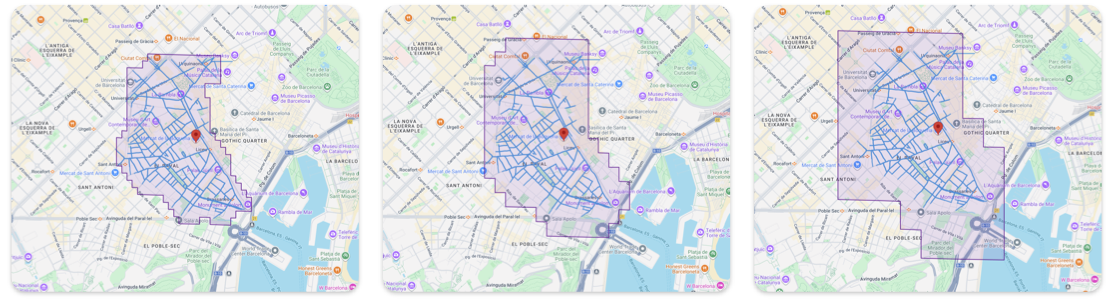
High, medium, and low polygon fidelity
enable_smoothing: Controls whether the sharp edges of the grid cells defined by the fidelity are rounded off.false(Raw): The default. Returns the exact geometric calculation. Edges appear jagged or stepped. Best for analytical accuracy, such as strict point-in-polygon tests. Lower latency than smoothed.true(Smoothed): Applies a post-processing algorithm to round off the corners. Best for visual display on maps.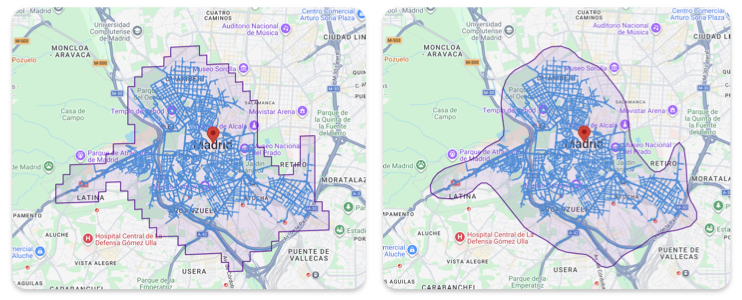
Isochrone with smoothing and without