- Dataset Availability
- 2007-01-01T00:00:00Z–2009-11-26T23:59:59Z
- Dataset Producer
- Google/CNES
- Tags
Description
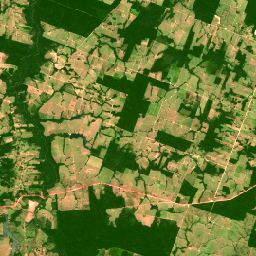
This collection contains 2008-era "pseudo natural color" RGB images derived from the native multispectral bands of SPOT 2, 4, and 5 for Brazil. Because the HRV and HRG sensors did not include a native blue band, this product synthesizes an RGB representation to approximate a natural appearance for visual land use/land cover assessment. The spatial resolution remains at the native multispectral scale (10m for SPOT 5; 20m for SPOT 2/4). See also Brazil Forest Imagery Dataset 2008: Visual Basemap.
Google modifications
Addition of a cloud mask band. Google manually delineated polygons around clouds, wisps, and shadows for each image in this collection, converting the polygons into a mask image added as an additional band to the image.
Data access
To access this dataset, please fill out the request form.
Bands
Bands
Pixel size: 20 meters (all bands)
| Name | Units | Min | Max | Pixel Size | Description |
|---|---|---|---|---|---|
R |
dn | 0* | 255* | 20 meters | Red reflectance |
G |
dn | 0* | 255* | 20 meters | Green reflectance |
B |
dn | 0* | 255* | 20 meters | Blue reflectance, representing the synthetic blue channel of the pseudo-natural color product for SPOT 2, 4, and 5 |
cloud_mask |
0 | 1 | 20 meters | Cloud mask: 0 = cloud/shadow, 1 = clear |
Image Properties
Image Properties
| Name | Type | Description |
|---|---|---|
| cloud_cover | DOUBLE | Scene-wide cloud cover estimate |
| grid_reference | STRING | The K-J grid reference identifies the nominal scene center, where K is the column and J is the row of the SPOT Grid Reference System (GRS). |
| high_quality | STRING | Set to TRUE for all images. |
| incidence_angle | DOUBLE | Incidence angle |
| instrument | STRING | Imaging instrument |
| job_id | STRING | Provider-set field denoting unique identifier for processing job. |
| nadir_lat | DOUBLE | Nadir latitude |
| nadir_lon | DOUBLE | Nadir longitude |
| pixel_size_meters | DOUBLE | Nominal scale |
| processing_level | STRING | Indicates the level of radiometric and geometric correction applied. Possible values: 1A (radiometric only) |
| product_id | STRING | Scene identifier |
| production_date | STRING | Date of processing. |
| satellite | STRING | Source satellite: "SPOT2", "SPOT4", or "SPOT5" |
| satellite_altitude | DOUBLE | Satellite orbit altitude |
| sensor_gain_number | DOUBLE | Calibration coefficient for converting DNs to radiance for sensor |
| sensor_gain_value | DOUBLE | Calibration coefficient for converting DNs to radiance for sensor |
| software | STRING | Processing software |
| source_id | STRING | Dataset_Sources/Source_Information/SOURCE_ID |
| sun_azimuth | DOUBLE | Sun azimuth |
| sun_elevation | DOUBLE | Sun elevation |
| viewing_angle | DOUBLE | Viewing angle |
| google_cloud_mask_qa | STRING | Google-added field denoting status of manual cloud masking QA. Possible values: "accept", "reject_for_cloud", "reject_for_other", "not_evaluated", or absent if QA has not been performed. |
| percent_valid_pixels | DOUBLE | Google-added property denoting the percent of viable pixels after cloud and cloud shadow removal |
Terms of Use
Terms of Use
Use of this dataset is subject to the Brazil Forest Imagery Dataset 2008 license agreement and requires the following attribution:
“Google LLC, Brazil Forest Imagery Dataset 2008 created from circa 2008 SPOT images acquired by CNES's Spot World Heritage Programme.”
Contains modified imagery from SPOT satellites made available by the CNES SPOT World Heritage Programme (https://regards.cnes.fr/html/swh/Home-swh3.html).
Explore with Earth Engine
Code Editor (JavaScript)
// To access this dataset, fill out the form: https://forms.gle/jQmCbWgarjENQBYz6

var collection = ee.ImageCollection('AIRBUS/SPOT_2_4_5/BRAZIL/2007_2009/MS_NC/V1')
  .filterBounds(ee.Geometry.Point(-45.2, -19.5));

var image = collection.first();
// Apply Google cloud mask band to image.
image = image.updateMask(image.select('cloud_mask'));

Map.centerObject(image, 12);
Map.addLayer(image, {bands: ['R', 'G', 'B'], min: 0, max: 255}, 'RGB');