

หลังจากได้รับข้อความจากผู้ใช้แล้ว คุณจะส่งคำตอบเพื่อสนทนาต่อได้ คุณส่งข้อความถึงผู้ใช้ได้ภายใน 30 วันหลังจาก ข้อความสุดท้ายของผู้ใช้
เอเจนต์จะสื่อสารกับผู้ใช้ด้วยการส่งและรับข้อความ หากต้องการส่งข้อความถึงผู้ใช้ ตัวแทนจะส่งคำขอข้อความไปยัง Business Messages
หากต้องการส่งข้อความ คุณต้องส่งคำขอ HTTP POST ไปยัง Business Messages API ซึ่งมีข้อมูลต่อไปนี้
- รหัสข้อความที่ไม่ซ้ำกัน
- รหัสการสนทนา
- เนื้อหาของข้อความ
เมื่อ Business Messages API ส่งข้อความถึงผู้ใช้ ระบบจะแสดงผล200 OK
หากข้อความไม่มีค่าที่จำเป็น API จะแสดงข้อผิดพลาด 400 หากข้อความใช้ข้อมูลเข้าสู่ระบบที่ไม่ถูกต้อง API จะแสดงข้อผิดพลาด 401
ใช้บันทึกของคอนโซลของนักพัฒนาซอฟต์แวร์ Business Communications หน้า เพื่อแก้ไขข้อบกพร่องเกี่ยวกับปัญหาการนำส่งข้อความ
กลยุทธ์สำรอง
หากอุปกรณ์ของผู้ใช้ไม่รองรับข้อความที่คุณพยายามส่ง เช่น หากผู้ใช้ไม่รองรับการตอบกลับที่แนะนำ API จะแสดงข้อผิดพลาด 400 (FAILED
PRECONDITION) อย่างไรก็ตาม คุณสามารถหลีกเลี่ยงข้อความประเภทที่ไม่รองรับได้โดย
ระบุfallbackข้อความสำหรับแต่ละข้อความที่คุณส่ง หากคุณระบุ fallback
ข้อความ API จะแสดงผลการตอบกลับ 200 OK แม้ว่าอุปกรณ์ของผู้ใช้จะไม่รองรับ
ประเภทข้อความก็ตาม
หากผู้ใช้ได้รับข้อความที่ระบุว่าอุปกรณ์ไม่รองรับแต่มีข้อความ fallback อุปกรณ์จะแสดงข้อความ fallback แทน ลักษณะการทำงานนี้ช่วยให้คุณสนทนาต่อได้อย่างรวดเร็วโดยไม่ขัดจังหวะการสนทนาหรือเสียเวลาเพิ่มเติมในการประมวลผลข้อผิดพลาด 400
(FAILED PRECONDITION) และระบุข้อความสำรอง
fallback ของข้อความใดก็ตามควรสะท้อนฟังก์ชันของข้อความนั้น
ตัวอย่างเช่น
- สำหรับข้อความที่มีคำตอบหรือการดำเนินการที่แนะนำ ให้ใส่ข้อความใน
fallbackข้อความ และใส่คำแนะนำเกี่ยวกับตัวเลือกที่ผู้ใช้มีเพื่อสนทนาต่อ - สำหรับการ์ดหรือภาพสไลด์แบบริช ให้ใส่ชื่อและคำอธิบายใน
fallbackข้อความ และใส่ลิงก์ไปยังรูปภาพหรือเว็บไซต์
หากต้องการแทรกการขึ้นบรรทัดใหม่ในข้อความ fallback ให้ใช้ \n หรือ \r\n
ทดสอบข้อความสำรอง
ก่อนเปิดตัวเอเจนต์ คุณสามารถทดสอบว่าข้อความสำรองปรากฏในการสนทนาอย่างไรได้โดยการส่งข้อความที่มีพารามิเตอร์ URL forceFallback ตั้งค่าเป็น
true เมื่อบังคับให้ใช้ข้อความสำรอง การสนทนาจะไม่สนใจเนื้อหาข้อความหลัก (ข้อความและคำแนะนำให้เปิด URL ในตัวอย่างต่อไปนี้) และจะแสดงข้อความสำรองแทน
cURL
# Copyright 2021 Google LLC # # Licensed under the Apache License, Version 2.0 (the "License"); # you may not use this file except in compliance with the License. # You may obtain a copy of the License at # https://www.apache.org/licenses/LICENSE-2.0 # Unless required by applicable law or agreed to in writing, software # distributed under the License is distributed on an "AS IS" BASIS, # WITHOUT WARRANTIES OR CONDITIONS OF ANY KIND, either express or implied. # See the License for the specific language governing permissions and # limitations under the License. # This code sends a text message to the user with a fallback text. # Read more: https://developers.google.com/business-communications/business-messages/guides/how-to/message/send?hl=en#fallback_strategy # Replace the __CONVERSATION_ID__ with a conversation id that you can send messages to # Make sure a service account key file exists at ./service_account_key.json curl -X POST \ "https://businessmessages.googleapis.com/v1/conversations/__CONVERSATION_ID__/messages?forceFallback=true" \ -H "Content-Type: application/json" \ -H "User-Agent: curl/business-messages" \ -H "$(oauth2l header --json ./service_account_key.json businessmessages)" \ -d "{ 'messageId': '$(uuidgen)', 'text': 'Hello world!', 'fallback': 'Hello, world!\n\nSay \"Hello\" at https://www.growingtreebank.com', 'suggestions': [ { 'action': { 'text': 'Hello', 'postbackData': 'hello-formal', 'openUrlAction': { 'url': 'https://www.growingtreebank.com', } }, }, ], 'representative': { 'avatarImage': 'https://developers.google.com/identity/images/g-logo.png', 'displayName': 'Chatbot', 'representativeType': 'BOT' } }"
Node.js
/** * This code sends a text message to the user with a fallback text. * Read more: https://developers.google.com/business-communications/business-messages/guides/how-to/message/send?hl=en#fallback_strategy * * This code is based on the https://github.com/google-business-communications/nodejs-businessmessages Node.js * Business Messages client library. */ /** * Edit the values below: */ const PATH_TO_SERVICE_ACCOUNT_KEY = './service_account_key.json'; const CONVERSATION_ID = 'EDIT_HERE'; const businessmessages = require('businessmessages'); const uuidv4 = require('uuid').v4; const {google} = require('googleapis'); // Initialize the Business Messages API const bmApi = new businessmessages.businessmessages_v1.Businessmessages({}); // Set the scope that we need for the Business Messages API const scopes = [ 'https://www.googleapis.com/auth/businessmessages', ]; // Set the private key to the service account file const privatekey = require(PATH_TO_SERVICE_ACCOUNT_KEY); /** * Posts a message to the Business Messages API defaulting to the fallback text. * * @param {string} conversationId The unique id for this user and agent. * @param {string} message The message text to send the user. * @param {string} representativeType A value of BOT or HUMAN. */ async function sendMessage(conversationId, message, representativeType) { const authClient = await initCredentials(); // Create the payload for sending a message const apiParams = { auth: authClient, parent: 'conversations/' + conversationId, forceFallback: true, // Force usage of the fallback text resource: { messageId: uuidv4(), representative: { representativeType: representativeType, }, text: message, fallback: 'This is the fallback text' }, }; // Call the message create function using the // Business Messages client library bmApi.conversations.messages.create(apiParams, {auth: authClient}, (err, response) => { console.log(err); console.log(response); }); } /** * Initializes the Google credentials for calling the * Business Messages API. */ async function initCredentials() { // configure a JWT auth client const authClient = new google.auth.JWT( privatekey.client_email, null, privatekey.private_key, scopes, ); return new Promise(function(resolve, reject) { // authenticate request authClient.authorize(function(err, tokens) { if (err) { reject(false); } else { resolve(authClient); } }); }); } sendMessage(CONVERSATION_ID, 'BOT');
Java
import com.google.api.client.googleapis.services.AbstractGoogleClientRequest; import com.google.api.client.http.HttpBackOffUnsuccessfulResponseHandler; import com.google.api.client.http.HttpRequest; import com.google.api.client.googleapis.auth.oauth2.GoogleCredential; import com.google.api.client.googleapis.javanet.GoogleNetHttpTransport; import com.google.api.client.http.HttpTransport; import com.google.api.client.json.jackson2.JacksonFactory; import com.google.api.client.util.ExponentialBackOff; import com.google.api.services.businessmessages.v1.Businessmessages; import com.google.api.services.businessmessages.v1.model.*; import java.io.FileInputStream; import java.util.Arrays; import java.util.UUID; class TestFallbackTestSnippet { /** * Initializes credentials used by the Business Messages API. */ private static Businessmessages.Builder getBusinessMessagesBuilder() { Businessmessages.Builder builder = null; try { GoogleCredential credential = GoogleCredential .fromStream(new FileInputStream("PATH_TO_SERVICE_ACCOUNT_KEY")); credential = credential.createScoped(Arrays.asList( "https://www.googleapis.com/auth/businessmessages")); credential.refreshToken(); HttpTransport httpTransport = GoogleNetHttpTransport.newTrustedTransport(); JacksonFactory jsonFactory = JacksonFactory.getDefaultInstance(); // Create instance of the Business Messages API builder = new Businessmessages .Builder(httpTransport, jsonFactory, null) .setApplicationName("Sample Application"); // Set the API credentials and endpoint builder.setHttpRequestInitializer(credential); } catch (Exception e) { e.printStackTrace(); } return builder; } public static void main(String args[]) { try { String conversationId = "CONVERSATION_ID"; // Create client library reference Businessmessages.Builder builder = getBusinessMessagesBuilder(); // Create a basic text message with fallback text BusinessMessagesMessage message = new BusinessMessagesMessage() .setMessageId(UUID.randomUUID().toString()) .setFallback("This is the fallback text") .setText("MESSAGE_TEXT") .setRepresentative(new BusinessMessagesRepresentative() .setRepresentativeType("TYPE")); // Create message request Businessmessages.Conversations.Messages.Create messageRequest = builder.build().conversations().messages() .create("conversations/" + conversationId, message); // Force usage of the fallback text messageRequest.setForceFallback(true); // Setup retries with exponential backoff HttpRequest httpRequest = ((AbstractGoogleClientRequest) messageRequest).buildHttpRequest(); httpRequest.setUnsuccessfulResponseHandler(new HttpBackOffUnsuccessfulResponseHandler( new ExponentialBackOff())); // Execute request httpRequest.execute(); } catch (Exception e) { e.printStackTrace(); } } }
Python
"""This code sends a text message to the user with a fallback text. Read more: https://developers.google.com/business-communications/business-messages/guides/how-to/message/send?hl=en#fallback_strategy This code is based on the https://github.com/google-business-communications/python-businessmessages Python Business Messages client library. """ import uuid from businessmessages import businessmessages_v1_client as bm_client from businessmessages.businessmessages_v1_messages import BusinessmessagesConversationsMessagesCreateRequest from businessmessages.businessmessages_v1_messages import BusinessMessagesMessage from businessmessages.businessmessages_v1_messages import BusinessMessagesRepresentative from oauth2client.service_account import ServiceAccountCredentials # Edit the values below: path_to_service_account_key = './service_account_key.json' conversation_id = 'EDIT_HERE' credentials = ServiceAccountCredentials.from_json_keyfile_name( path_to_service_account_key, scopes=['https://www.googleapis.com/auth/businessmessages']) client = bm_client.BusinessmessagesV1(credentials=credentials) representative_type_as_string = 'BOT' if representative_type_as_string == 'BOT': representative_type = BusinessMessagesRepresentative.RepresentativeTypeValueValuesEnum.BOT else: representative_type = BusinessMessagesRepresentative.RepresentativeTypeValueValuesEnum.HUMAN # Create message with fallback text message = BusinessMessagesMessage( messageId=str(uuid.uuid4().int), fallback='This is the fallback text', representative=BusinessMessagesRepresentative( representativeType=representative_type ), text='This is a sample text') # Create the message request, force usage of the fallback text create_request = BusinessmessagesConversationsMessagesCreateRequest( businessMessagesMessage=message, forceFallback=True, parent='conversations/' + conversation_id) # Send the message bm_client.BusinessmessagesV1.ConversationsMessagesService( client=client).Create(request=create_request)
ดูรายละเอียดได้ที่
Message
ผู้แทนราษฎร
เมื่อตัวแทนส่งข้อความ คุณจะต้องระบุตัวแทน ซึ่งก็คือบุคคลหรือระบบอัตโนมัติที่เขียนข้อความ Business Messages รองรับตัวแทน HUMAN และ
BOT
ระบุBOTตัวแทนเมื่อระบบอัตโนมัติประเภทใดก็ตามเขียนข้อความ
ไม่ว่าจะเป็นการตอบกลับอัตโนมัติที่บอกผู้ใช้ถึงลำดับในคิว
เอเจนต์การทำความเข้าใจภาษาที่เป็นธรรมชาติที่ซับซ้อนซึ่งมีสิทธิ์เข้าถึงรายละเอียดของผู้ใช้แบบไดนามิก
หรืออะไรก็ตามที่อยู่ระหว่างนั้น ข้อความที่มีBOTตัวแทนจะปรากฏพร้อมไอคอนขนาดเล็ก
 ซึ่งช่วยกำหนดความคาดหวังของผู้ใช้เกี่ยวกับประเภทการโต้ตอบที่อาจเกิดขึ้น
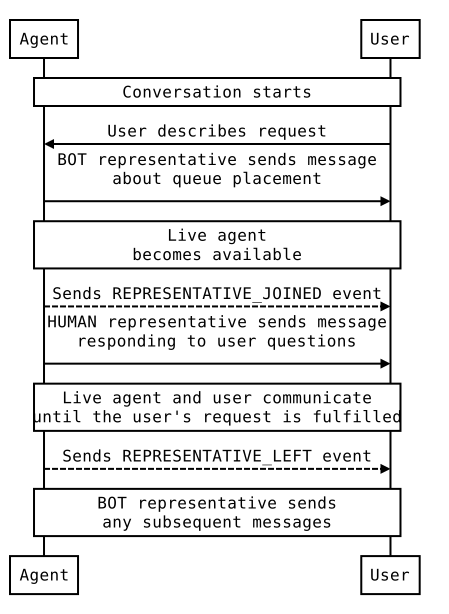
ระบุHUMANตัวแทนเฉพาะเมื่อตัวแทนแบบเรียลไทม์เขียนข้อความ
ก่อนส่งข้อความจากHUMANตัวแทน ให้ส่งREPRESENTATIVE_JOINED
เหตุการณ์เพื่อแจ้งให้ผู้ใช้ทราบว่าสามารถส่งข้อความแบบอิสระหรือข้อความที่ซับซ้อนเพิ่มเติมได้ หลังจากส่งข้อความสุดท้ายจากHUMANตัวแทนแล้ว ให้ส่งREPRESENTATIVE_LEFTเหตุการณ์
เพื่อกำหนดความคาดหวังของผู้ใช้อีกครั้ง
เช่น หากผู้ใช้เริ่มการสนทนากับตัวแทนของคุณ และคุณ
ส่งข้อความอัตโนมัติที่ระบุว่าผู้ใช้ควรคาดหวังที่จะได้คุยกับตัวแทนแบบเรียลไทม์ภายใน 2
นาที ข้อความนั้นควรส่งจากBOTตัวแทน ก่อนที่เจ้าหน้าที่แบบเรียลไทม์จะเข้าร่วม ให้ส่งเหตุการณ์ REPRESENTATIVE_JOINED ข้อความทั้งหมดจากตัวแทนแบบเรียลไทม์ควรมีป้ายกำกับว่ามาจากHUMANตัวแทน เมื่อตัวแทนแบบเรียลไทม์ออกจากการสนทนา ให้ส่งเหตุการณ์ REPRESENTATIVE_LEFT ข้อความทั้งหมดหลังจากนี้ควรมาจากBOTตัวแทน เว้นแต่จะมีตัวแทนแชทสดอีกคนเข้าร่วมการสนทนา
ดูการส่งต่อจากบ็อตไปยังตัวแทนที่เป็นมนุษย์
เพื่อดูตัวอย่างการสนทนาและโค้ดสำหรับการเปลี่ยนตัวแทนระหว่าง BOT กับ HUMAN
ไม่ว่าตัวแทนจะเป็นBOTหรือHUMAN คุณก็ระบุชื่อที่แสดงและรูปโปรไฟล์ของตัวแทนได้
ทั้งชื่อที่แสดงและรูปโปรไฟล์จะปรากฏต่อผู้ใช้
รูปโปรไฟล์ต้องมีขนาด 1024x1024 พิกเซลและมีขนาดไม่เกิน 50 KB และต้องระบุเป็น URL ที่เปิดเผยต่อสาธารณะ หากคุณไม่ได้ระบุรูปโปรไฟล์ ระบบจะใช้โลโก้ของตัวแทนเป็นรูปโปรไฟล์ของตัวแทน
ข้อความ
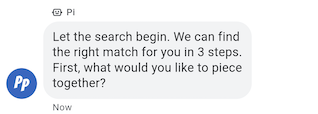
ข้อความที่เรียบง่ายที่สุดประกอบด้วยข้อความ ข้อความเหมาะที่สุดสำหรับการสื่อสารข้อมูลโดยไม่จำเป็นต้องมีภาพ การโต้ตอบที่ซับซ้อน หรือการตอบกลับ
ตัวอย่าง
โค้ดต่อไปนี้จะส่ง SMS แบบง่าย ดูข้อมูลอ้างอิงได้ที่
conversations.messages.create
cURL
# Copyright 2021 Google LLC # # Licensed under the Apache License, Version 2.0 (the "License"); # you may not use this file except in compliance with the License. # You may obtain a copy of the License at # https://www.apache.org/licenses/LICENSE-2.0 # Unless required by applicable law or agreed to in writing, software # distributed under the License is distributed on an "AS IS" BASIS, # WITHOUT WARRANTIES OR CONDITIONS OF ANY KIND, either express or implied. # See the License for the specific language governing permissions and # limitations under the License. # This code sends a text message to the user. # Read more: https://developers.google.com/business-communications/business-messages/guides/how-to/message/send?hl=en#text # Replace the __CONVERSATION_ID__ with a conversation id that you can send messages to # Make sure a service account key file exists at ./service_account_key.json curl -X POST "https://businessmessages.googleapis.com/v1/conversations/__CONVERSATION_ID__/messages" \ -H "Content-Type: application/json" \ -H "User-Agent: curl/business-messages" \ -H "$(oauth2l header --json ./service_account_key.json businessmessages)" \ -d "{ 'messageId': '$(uuidgen)', 'text': 'Hello world!', 'representative': { 'avatarImage': 'https://developers.google.com/identity/images/g-logo.png', 'displayName': 'Chatbot', 'representativeType': 'BOT' } }"
Node.js
/** * This code sends a text message to the user. * Read more: https://developers.google.com/business-communications/business-messages/guides/how-to/message/send?hl=en#text * * This code is based on the https://github.com/google-business-communications/nodejs-businessmessages Node.js * Business Messages client library. */ /** * Edit the values below: */ const PATH_TO_SERVICE_ACCOUNT_KEY = './service_account_key.json'; const CONVERSATION_ID = 'EDIT_HERE'; const businessmessages = require('businessmessages'); const uuidv4 = require('uuid').v4; const {google} = require('googleapis'); // Initialize the Business Messages API const bmApi = new businessmessages.businessmessages_v1.Businessmessages({}); // Set the scope that we need for the Business Messages API const scopes = [ 'https://www.googleapis.com/auth/businessmessages', ]; // Set the private key to the service account file const privatekey = require(PATH_TO_SERVICE_ACCOUNT_KEY); /** * Posts a text message to the Business Messages API. * * @param {string} conversationId The unique id for this user and agent. * @param {string} message The message text to send the user. * @param {string} representativeType A value of BOT or HUMAN. */ async function sendMessage(conversationId, message, representativeType) { const authClient = await initCredentials(); // Create the payload for sending a message const apiParams = { auth: authClient, parent: 'conversations/' + conversationId, resource: { messageId: uuidv4(), representative: { representativeType: representativeType, }, text: message, }, }; // Call the message create function using the // Business Messages client library bmApi.conversations.messages.create(apiParams, {auth: authClient}, (err, response) => { console.log(err); console.log(response); }); } /** * Initializes the Google credentials for calling the * Business Messages API. */ async function initCredentials() { // configure a JWT auth client const authClient = new google.auth.JWT( privatekey.client_email, null, privatekey.private_key, scopes, ); return new Promise(function(resolve, reject) { // authenticate request authClient.authorize(function(err, tokens) { if (err) { reject(false); } else { resolve(authClient); } }); }); } sendMessage(CONVERSATION_ID, 'This is a test message', 'BOT');
Java
import com.google.api.client.googleapis.services.AbstractGoogleClientRequest; import com.google.api.client.http.HttpBackOffUnsuccessfulResponseHandler; import com.google.api.client.http.HttpRequest; import com.google.api.client.googleapis.auth.oauth2.GoogleCredential; import com.google.api.client.googleapis.javanet.GoogleNetHttpTransport; import com.google.api.client.http.HttpTransport; import com.google.api.client.json.jackson2.JacksonFactory; import com.google.api.client.util.ExponentialBackOff; import com.google.api.services.businessmessages.v1.Businessmessages; import com.google.api.services.businessmessages.v1.model.*; import java.io.FileInputStream; import java.util.Arrays; import java.util.UUID; class SendTextMessageSnippet { /** * Initializes credentials used by the Business Messages API. */ private static Businessmessages.Builder getBusinessMessagesBuilder() { Businessmessages.Builder builder = null; try { GoogleCredential credential = GoogleCredential .fromStream(new FileInputStream("PATH_TO_SERVICE_ACCOUNT_KEY")); credential = credential.createScoped(Arrays.asList( "https://www.googleapis.com/auth/businessmessages")); credential.refreshToken(); HttpTransport httpTransport = GoogleNetHttpTransport.newTrustedTransport(); JacksonFactory jsonFactory = JacksonFactory.getDefaultInstance(); // Create instance of the Business Messages API builder = new Businessmessages .Builder(httpTransport, jsonFactory, null) .setApplicationName("Sample Application"); // Set the API credentials and endpoint builder.setHttpRequestInitializer(credential); } catch (Exception e) { e.printStackTrace(); } return builder; } public static void main(String args[]) { try { String conversationId = "CONVERSATION_ID"; // Create client library reference Businessmessages.Builder builder = getBusinessMessagesBuilder(); // Create a basic text message BusinessMessagesMessage message = new BusinessMessagesMessage() .setMessageId(UUID.randomUUID().toString()) .setText("MESSAGE_TEXT") .setRepresentative(new BusinessMessagesRepresentative() .setRepresentativeType("TYPE")); // Create message request Businessmessages.Conversations.Messages.Create messageRequest = builder.build().conversations().messages() .create("conversations/" + conversationId, message); // Setup retries with exponential backoff HttpRequest httpRequest = ((AbstractGoogleClientRequest) messageRequest).buildHttpRequest(); httpRequest.setUnsuccessfulResponseHandler(new HttpBackOffUnsuccessfulResponseHandler( new ExponentialBackOff())); // Execute request httpRequest.execute(); } catch (Exception e) { e.printStackTrace(); } } }
Python
"""This code sends a text message to the user. Read more: https://developers.google.com/business-communications/business-messages/guides/how-to/message/send?hl=en#text This code is based on the https://github.com/google-business-communications/python-businessmessages Python Business Messages client library. """ import uuid from businessmessages import businessmessages_v1_client as bm_client from businessmessages.businessmessages_v1_messages import BusinessmessagesConversationsMessagesCreateRequest from businessmessages.businessmessages_v1_messages import BusinessMessagesMessage from businessmessages.businessmessages_v1_messages import BusinessMessagesRepresentative from oauth2client.service_account import ServiceAccountCredentials # Edit the values below: path_to_service_account_key = './service_account_key.json' conversation_id = 'EDIT_HERE' credentials = ServiceAccountCredentials.from_json_keyfile_name( path_to_service_account_key, scopes=['https://www.googleapis.com/auth/businessmessages']) client = bm_client.BusinessmessagesV1(credentials=credentials) representative_type_as_string = 'BOT' if representative_type_as_string == 'BOT': representative_type = BusinessMessagesRepresentative.RepresentativeTypeValueValuesEnum.BOT else: representative_type = BusinessMessagesRepresentative.RepresentativeTypeValueValuesEnum.HUMAN # Create a text message message = BusinessMessagesMessage( messageId=str(uuid.uuid4().int), representative=BusinessMessagesRepresentative( representativeType=representative_type ), text='This is a sample text') # Create the message request create_request = BusinessmessagesConversationsMessagesCreateRequest( businessMessagesMessage=message, parent='conversations/' + conversation_id) # Send the message bm_client.BusinessmessagesV1.ConversationsMessagesService( client=client).Create(request=create_request)
Rich Text
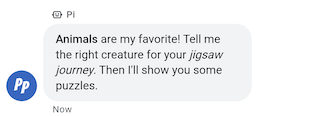
ข้อความที่มีcontainsRichTextตั้งค่าเป็น true อาจมีการจัดรูปแบบ Markdown พื้นฐาน
คุณสามารถใส่ไฮเปอร์ลิงก์หรือทำข้อความเป็นตัวหนาหรือ
ตัวเอียงได้ ตารางแสดงตัวอย่างที่ถูกต้องบางส่วน
| การจัดรูปแบบ | อักขระ | ข้อความธรรมดา | ข้อความที่แสดง |
|---|---|---|---|
| ตัวหนา | ** |
**Some text** |
ข้อความบางส่วน |
| ตัวเอียง | * |
*Some text* |
ข้อความบางส่วน |
| ไฮเปอร์ลิงก์ | []() |
[Click here](https://www.example.com) |
คลิกที่นี่ |
| ขึ้นบรรทัดใหม่ | \n
|
Line one\nLine two
|
บรรทัดที่ 1 บรรทัดที่ 2 |
การจัดรูปแบบต้องเป็นไปตามกฎเพิ่มเติมบางอย่าง ดังนี้
- ลิงก์ทั้งหมดต้องขึ้นต้นด้วย
https://หรือhttp:// - การจัดรูปแบบประเภทต่างๆ อาจซ้อนกันได้ แต่จะซ้อนทับกันไม่ได้
- คุณใช้การขึ้นบรรทัดใหม่ด้วย
\nได้ทุกที่ในข้อความ แต่การขึ้นบรรทัดใหม่ที่ ท้ายข้อความจะไม่แสดง - หากต้องการแสดงอักขระที่สงวนไว้ (
*,\,[หรือ]) ตามปกติ คุณต้องนำหน้าอักขระเหล่านั้นด้วยเครื่องหมายแบ็กสแลช (\)
ข้อความที่มีการจัดรูปแบบไม่ถูกต้องจะส่งไม่สำเร็จและแสดงข้อความแสดงข้อผิดพลาดเกี่ยวกับ มาร์กดาวน์ไม่ถูกต้อง ตารางแสดงตัวอย่างที่ถูกต้องและไม่ถูกต้องเพิ่มเติมตาม กฎข้างต้น
| ข้อความธรรมดา | อายุการใช้งาน | ข้อความที่แสดง |
|---|---|---|
[Click here](www.example.com) |
ไม่ถูกต้อง ลิงก์ไม่ได้ขึ้นต้นด้วย http:// หรือ https:// |
ไม่แสดงผล |
[**Click here**](https://www.example.com) |
ถูกต้อง อนุญาตให้ซ้อนกัน | คลิกที่นี่ |
**This is [not** valid](https://www.example.com) |
ไม่ถูกต้อง ไม่อนุญาตให้จัดรูปแบบทับซ้อนกัน | ไม่แสดงผล |
** Some bold text ** |
ไม่ถูกต้อง ไม่อนุญาตให้มีช่องว่างต่อท้ายภายใน ** |
ไม่แสดงผล |
Citation below\* |
ถูกต้อง ระบบจะหลีกอักขระ * |
การอ้างอิงด้านล่าง* |
ตัวอย่าง
โค้ดต่อไปนี้จะส่งข้อความ Rich Text ดูข้อมูลอ้างอิงได้ที่
conversations.messages.create
cURL
# Copyright 2021 Google LLC # # Licensed under the Apache License, Version 2.0 (the "License"); # you may not use this file except in compliance with the License. # You may obtain a copy of the License at # https://www.apache.org/licenses/LICENSE-2.0 # Unless required by applicable law or agreed to in writing, software # distributed under the License is distributed on an "AS IS" BASIS, # WITHOUT WARRANTIES OR CONDITIONS OF ANY KIND, either express or implied. # See the License for the specific language governing permissions and # limitations under the License. # This code sends a rich text to the user with a fallback text. # Read more: https://developers.google.com/business-communications/business-messages/guides/how-to/message/send?hl=en#rich_text # Replace the __CONVERSATION_ID__ with a conversation id that you can send messages to # Make sure a service account key file exists at ./service_account_key.json curl -X POST "https://businessmessages.googleapis.com/v1/conversations/__CONVERSATION_ID__/messages" \ -H "Content-Type: application/json" \ -H "User-Agent: curl/business-messages" \ -H "$(oauth2l header --json ./service_account_key.json businessmessages)" \ -d "{ 'messageId': '$(uuidgen)', 'fallback': 'Hello, check out this link https://www.google.com.', 'text': 'Hello, here is some **bold text**, *italicized text*, and a [link](https://www.google.com).', 'containsRichText': 'true', 'representative': { 'avatarImage': 'https://developers.google.com/identity/images/g-logo.png', 'displayName': 'Chatbot', 'representativeType': 'BOT' } }"
Node.js
/** * This code sends a rich text to the user with a fallback text. * Read more: https://developers.google.com/business-communications/business-messages/guides/how-to/message/send?hl=en#rich_text * * This code is based on the https://github.com/google-business-communications/nodejs-businessmessages Node.js * Business Messages client library. */ /** * Edit the values below: */ const PATH_TO_SERVICE_ACCOUNT_KEY = './service_account_key.json'; const CONVERSATION_ID = 'EDIT_HERE'; const businessmessages = require('businessmessages'); const uuidv4 = require('uuid').v4; const {google} = require('googleapis'); // Initialize the Business Messages API const bmApi = new businessmessages.businessmessages_v1.Businessmessages({}); // Set the scope that we need for the Business Messages API const scopes = [ 'https://www.googleapis.com/auth/businessmessages', ]; // Set the private key to the service account file const privatekey = require(PATH_TO_SERVICE_ACCOUNT_KEY); /** * Posts a rich text message using markdown to the Business Messages API. * * @param {string} conversationId The unique id for this user and agent. * @param {string} representativeType A value of BOT or HUMAN. */ async function sendMessage(conversationId, message, representativeType) { const authClient = await initCredentials(); // Create the payload for sending a rich text message const apiParams = { auth: authClient, parent: 'conversations/' + conversationId, resource: { messageId: uuidv4(), representative: { representativeType: representativeType, }, containsRichText: true, // Force this message to be processed as rich text text: 'Hello, here is some **bold text**, *italicized text*, and a [link](https://www.google.com).', fallback: 'Hello, check out this link https://www.google.com.' }, }; // Call the message create function using the // Business Messages client library bmApi.conversations.messages.create(apiParams, {auth: authClient}, (err, response) => { console.log(err); console.log(response); }); } /** * Initializes the Google credentials for calling the * Business Messages API. */ async function initCredentials() { // configure a JWT auth client const authClient = new google.auth.JWT( privatekey.client_email, null, privatekey.private_key, scopes, ); return new Promise(function(resolve, reject) { // authenticate request authClient.authorize(function(err, tokens) { if (err) { reject(false); } else { resolve(authClient); } }); }); } sendMessage(CONVERSATION_ID, 'BOT');
Java
import com.google.api.client.googleapis.services.AbstractGoogleClientRequest; import com.google.api.client.http.HttpBackOffUnsuccessfulResponseHandler; import com.google.api.client.http.HttpRequest; import com.google.api.client.googleapis.auth.oauth2.GoogleCredential; import com.google.api.client.googleapis.javanet.GoogleNetHttpTransport; import com.google.api.client.http.HttpTransport; import com.google.api.client.json.jackson2.JacksonFactory; import com.google.api.client.util.ExponentialBackOff; import com.google.api.services.businessmessages.v1.Businessmessages; import com.google.api.services.businessmessages.v1.model.*; import java.io.FileInputStream; import java.util.Arrays; import java.util.UUID; class SendRichTextMessageSnippet { /** * Initializes credentials used by the Business Messages API. */ private static Businessmessages.Builder getBusinessMessagesBuilder() { Businessmessages.Builder builder = null; try { GoogleCredential credential = GoogleCredential .fromStream(new FileInputStream("PATH_TO_SERVICE_ACCOUNT_KEY")); credential = credential.createScoped(Arrays.asList( "https://www.googleapis.com/auth/businessmessages")); credential.refreshToken(); HttpTransport httpTransport = GoogleNetHttpTransport.newTrustedTransport(); JacksonFactory jsonFactory = JacksonFactory.getDefaultInstance(); // Create instance of the Business Messages API builder = new Businessmessages .Builder(httpTransport, jsonFactory, null) .setApplicationName("Sample Application"); // Set the API credentials and endpoint builder.setHttpRequestInitializer(credential); } catch (Exception e) { e.printStackTrace(); } return builder; } public static void main(String args[]) { try { String conversationId = "CONVERSATION_ID"; // Create client library reference Businessmessages.Builder builder = getBusinessMessagesBuilder(); // Create a rich text message BusinessMessagesMessage message = new BusinessMessagesMessage() .setMessageId(UUID.randomUUID().toString()) .setContainsRichText(true) // Force this message to be processed as rich text .setText("Hello, here is some **bold text**, *italicized text*, and a [link](https://www.google.com).") .setFallback("Hello, check out this link https://www.google.com.") .setRepresentative(new BusinessMessagesRepresentative() .setRepresentativeType("TYPE")); // Create message request Businessmessages.Conversations.Messages.Create messageRequest = builder.build().conversations().messages() .create("conversations/" + conversationId, message); // Setup retries with exponential backoff HttpRequest httpRequest = ((AbstractGoogleClientRequest) messageRequest).buildHttpRequest(); httpRequest.setUnsuccessfulResponseHandler(new HttpBackOffUnsuccessfulResponseHandler( new ExponentialBackOff())); // Execute request httpRequest.execute(); } catch (Exception e) { e.printStackTrace(); } } }
Python
"""This code sends a rich text to the user with a fallback text. Read more: https://developers.google.com/business-communications/business-messages/guides/how-to/message/send?hl=en#rich_text This code is based on the https://github.com/google-business-communications/python-businessmessages Python Business Messages client library. """ import uuid from businessmessages import businessmessages_v1_client as bm_client from businessmessages.businessmessages_v1_messages import BusinessmessagesConversationsMessagesCreateRequest from businessmessages.businessmessages_v1_messages import BusinessMessagesMessage from businessmessages.businessmessages_v1_messages import BusinessMessagesRepresentative from oauth2client.service_account import ServiceAccountCredentials # Edit the values below: path_to_service_account_key = './service_account_key.json' conversation_id = 'EDIT_HERE' credentials = ServiceAccountCredentials.from_json_keyfile_name( path_to_service_account_key, scopes=['https://www.googleapis.com/auth/businessmessages']) client = bm_client.BusinessmessagesV1(credentials=credentials) representative_type_as_string = 'BOT' if representative_type_as_string == 'BOT': representative_type = BusinessMessagesRepresentative.RepresentativeTypeValueValuesEnum.BOT else: representative_type = BusinessMessagesRepresentative.RepresentativeTypeValueValuesEnum.HUMAN # Create a rich text message with fallback text message = BusinessMessagesMessage( messageId=str(uuid.uuid4().int), fallback='Hello, check out this link https://www.google.com.', containsRichText=True, # Force this message to be processed as rich text representative=BusinessMessagesRepresentative( representativeType=representative_type ), text='Hello, here is some **bold text**, *italicized text*, and a [link](https://www.google.com).') # Create the message request create_request = BusinessmessagesConversationsMessagesCreateRequest( businessMessagesMessage=message, parent='conversations/' + conversation_id) # Send the message bm_client.BusinessmessagesV1.ConversationsMessagesService( client=client).Create(request=create_request)
รูปภาพ
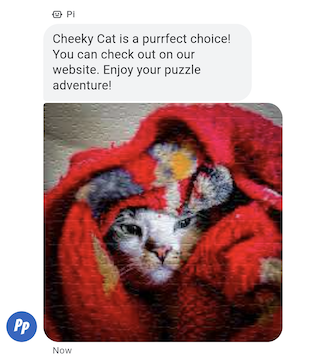
ส่งรูปภาพให้ผู้ใช้ในข้อความ
คุณส่งข้อความพร้อมรูปภาพพร้อม URL ไปยังรูปภาพและรูปภาพขนาดย่อของรูปภาพได้
ตัวอย่าง
โค้ดต่อไปนี้จะส่งรูปภาพ ดูตัวเลือกการจัดรูปแบบและค่าได้ที่
conversations.messages.create
และ
Image
cURL
# Copyright 2021 Google LLC # # Licensed under the Apache License, Version 2.0 (the "License"); # you may not use this file except in compliance with the License. # You may obtain a copy of the License at # https://www.apache.org/licenses/LICENSE-2.0 # Unless required by applicable law or agreed to in writing, software # distributed under the License is distributed on an "AS IS" BASIS, # WITHOUT WARRANTIES OR CONDITIONS OF ANY KIND, either express or implied. # See the License for the specific language governing permissions and # limitations under the License. # This code sends an image to the user with a fallback text. # Read more: https://developers.google.com/business-communications/business-messages/guides/how-to/message/send?hl=en#images # Replace the __CONVERSATION_ID__ with a conversation id that you can send messages to # Make sure a service account key file exists at ./service_account_key.json curl -X POST "https://businessmessages.googleapis.com/v1/conversations/__CONVERSATION_ID__/messages" \ -H "Content-Type: application/json" \ -H "User-Agent: curl/business-messages" \ -H "$(oauth2l header --json ./service_account_key.json businessmessages)" \ -d "{ 'messageId': '$(uuidgen)', 'representative': { 'avatarImage': 'https://developers.google.com/identity/images/g-logo.png', 'displayName': 'Chatbot', 'representativeType': 'BOT' }, 'fallback': 'Hello, world!\nAn image has been sent with Business Messages.', 'image': { 'contentInfo':{ 'altText': 'Image alternative text', 'fileUrl': 'https://storage.googleapis.com/kitchen-sink-sample-images/cute-dog.jpg', 'forceRefresh': 'false' } }, }"
Node.js
/** * This code sends an image to the user with a fallback text. * Read more: https://developers.google.com/business-communications/business-messages/guides/how-to/message/send?hl=en#images * * This code is based on the https://github.com/google-business-communications/nodejs-businessmessages Node.js * Business Messages client library. */ /** * Edit the values below: */ const PATH_TO_SERVICE_ACCOUNT_KEY = './service_account_key.json'; const CONVERSATION_ID = 'EDIT_HERE'; const businessmessages = require('businessmessages'); const uuidv4 = require('uuid').v4; const {google} = require('googleapis'); // Initialize the Business Messages API const bmApi = new businessmessages.businessmessages_v1.Businessmessages({}); // Set the scope that we need for the Business Messages API const scopes = [ 'https://www.googleapis.com/auth/businessmessages', ]; // Set the private key to the service account file const privatekey = require(PATH_TO_SERVICE_ACCOUNT_KEY); /** * Posts an image message to the Business Messages API. * * @param {string} conversationId The unique id for this user and agent. * @param {string} representativeType A value of BOT or HUMAN. */ async function sendMessage(conversationId, representativeType) { const authClient = await initCredentials(); if (authClient) { // Create the payload for sending an image message const apiParams = { auth: authClient, parent: 'conversations/' + conversationId, resource: { messageId: uuidv4(), representative: { representativeType: representativeType, }, fallback: 'Hello, world!\n An image has been sent with Business Messages.', image: { contentInfo: { altText: 'Some alternative text', fileUrl: 'https://www.google.com/images/branding/googlelogo/2x/googlelogo_color_272x92dp.png', forceRefresh: true, }, }, }, }; // Call the message create function using the // Business Messages client library bmApi.conversations.messages.create(apiParams, {auth: authClient}, (err, response) => { console.log(err); console.log(response); }); } else { console.log('Authentication failure.'); } } /** * Initializes the Google credentials for calling the * Business Messages API. */ async function initCredentials() { // configure a JWT auth client const authClient = new google.auth.JWT( privatekey.client_email, null, privatekey.private_key, scopes, ); return new Promise(function(resolve, reject) { // authenticate request authClient.authorize(function(err, tokens) { if (err) { reject(false); } else { resolve(authClient); } }); }); } sendMessage(CONVERSATION_ID, 'BOT');
Java
import com.google.api.client.googleapis.services.AbstractGoogleClientRequest; import com.google.api.client.http.HttpBackOffUnsuccessfulResponseHandler; import com.google.api.client.http.HttpRequest; import com.google.api.client.googleapis.auth.oauth2.GoogleCredential; import com.google.api.client.googleapis.javanet.GoogleNetHttpTransport; import com.google.api.client.http.HttpTransport; import com.google.api.client.json.jackson2.JacksonFactory; import com.google.api.client.util.ExponentialBackOff; import com.google.api.services.businessmessages.v1.Businessmessages; import com.google.api.services.businessmessages.v1.model.*; import com.google.communications.businessmessages.v1.MediaHeight; import java.io.FileInputStream; import java.util.Arrays; import java.util.UUID; class SendImageMessageSnippet { /** * Initializes credentials used by the Business Messages API. */ private static Businessmessages.Builder getBusinessMessagesBuilder() { Businessmessages.Builder builder = null; try { GoogleCredential credential = GoogleCredential .fromStream(new FileInputStream("PATH_TO_SERVICE_ACCOUNT_KEY")); credential = credential.createScoped(Arrays.asList( "https://www.googleapis.com/auth/businessmessages")); credential.refreshToken(); HttpTransport httpTransport = GoogleNetHttpTransport.newTrustedTransport(); JacksonFactory jsonFactory = JacksonFactory.getDefaultInstance(); // Create instance of the Business Messages API builder = new Businessmessages .Builder(httpTransport, jsonFactory, null) .setApplicationName("Sample Application"); // Set the API credentials and endpoint builder.setHttpRequestInitializer(credential); } catch (Exception e) { e.printStackTrace(); } return builder; } public static void main(String args[]) { try { String conversationId = "CONVERSATION_ID"; // Create client library reference Businessmessages.Builder builder = getBusinessMessagesBuilder(); // Create an Image BusinessMessagesMessage message = new BusinessMessagesMessage() .setMessageId(UUID.randomUUID().toString()) .setRepresentative(representative) .setImage(new BusinessMessagesImage() .setContentInfo( new BusinessMessagesContentInfo() .setFileUrl("FILE_URL") .setAltText("ALT_TEXT") .setForceRefresh("FORCE_REFRESH") )); // Create message request Businessmessages.Conversations.Messages.Create messageRequest = builder.build().conversations().messages() .create("conversations/" + conversationId, message); // Setup retries with exponential backoff HttpRequest httpRequest = ((AbstractGoogleClientRequest) messageRequest).buildHttpRequest(); httpRequest.setUnsuccessfulResponseHandler(new HttpBackOffUnsuccessfulResponseHandler( new ExponentialBackOff())); // Execute request httpRequest.execute(); } catch (Exception e) { e.printStackTrace(); } } }
Python
"""This code sends an image to the user with a fallback text. Read more: https://developers.google.com/business-communications/business-messages/guides/how-to/message/send?hl=en#images This code is based on the https://github.com/google-business-communications/python-businessmessages Python Business Messages client library. """ import uuid from businessmessages import businessmessages_v1_client as bm_client from businessmessages.businessmessages_v1_messages import BusinessMessagesContentInfo from businessmessages.businessmessages_v1_messages import BusinessmessagesConversationsMessagesCreateRequest from businessmessages.businessmessages_v1_messages import BusinessMessagesImage from businessmessages.businessmessages_v1_messages import BusinessMessagesMessage from businessmessages.businessmessages_v1_messages import BusinessMessagesRepresentative from oauth2client.service_account import ServiceAccountCredentials # Edit the values below: path_to_service_account_key = './service_account_key.json' conversation_id = 'EDIT_HERE' image_file_url = 'EDIT_HERE' credentials = ServiceAccountCredentials.from_json_keyfile_name( path_to_service_account_key, scopes=['https://www.googleapis.com/auth/businessmessages']) client = bm_client.BusinessmessagesV1(credentials=credentials) representative_type_as_string = 'BOT' if representative_type_as_string == 'BOT': representative_type = BusinessMessagesRepresentative.RepresentativeTypeValueValuesEnum.BOT else: representative_type = BusinessMessagesRepresentative.RepresentativeTypeValueValuesEnum.HUMAN # Create an image message with fallback text message = BusinessMessagesMessage( messageId=str(uuid.uuid4().int), representative=BusinessMessagesRepresentative( representativeType=representative_type ), fallback='Hello, world!\nAn image has been sent with Business Messages.', image=BusinessMessagesImage( contentInfo=BusinessMessagesContentInfo( altText='Alternative text', fileUrl=image_file_url, forceRefresh=True ) )) # Create the message request create_request = BusinessmessagesConversationsMessagesCreateRequest( businessMessagesMessage=message, parent='conversations/' + conversation_id) # Send the message bm_client.BusinessmessagesV1.ConversationsMessagesService( client=client).Create(request=create_request)
คำตอบที่แนะนำ
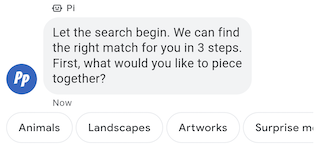
คำตอบที่แนะนำจะนำผู้ใช้ผ่านการสนทนาด้วยการให้คำตอบที่ เอเจนต์ของคุณรู้วิธีตอบโต้
เมื่อผู้ใช้แตะคำตอบที่แนะนำ ตัวแทนของคุณจะได้รับข้อความที่มีข้อความของคำตอบและข้อมูลการรายงานผล Conversion
การตอบกลับที่แนะนำมีอักขระได้สูงสุด 25 ตัว และข้อความมีคำแนะนำได้สูงสุด 13 รายการ
ตัวอย่าง
โค้ดต่อไปนี้จะส่งข้อความพร้อมคำตอบที่แนะนำ 2 รายการ ดูตัวเลือกการจัดรูปแบบและค่าได้ที่
conversations.messages.create
และ
SuggestedReply
cURL
# Copyright 2021 Google LLC # # Licensed under the Apache License, Version 2.0 (the "License"); # you may not use this file except in compliance with the License. # You may obtain a copy of the License at # https://www.apache.org/licenses/LICENSE-2.0 # Unless required by applicable law or agreed to in writing, software # distributed under the License is distributed on an "AS IS" BASIS, # WITHOUT WARRANTIES OR CONDITIONS OF ANY KIND, either express or implied. # See the License for the specific language governing permissions and # limitations under the License. # This code sends a text mesage to the user with suggested replies. # Read more: https://developers.google.com/business-communications/business-messages/guides/how-to/message/send?hl=en#suggested_replies # Replace the __CONVERSATION_ID__ with a conversation id that you can send messages to # Make sure a service account key file exists at ./service_account_key.json curl -X POST "https://businessmessages.googleapis.com/v1/conversations/__CONVERSATION_ID__/messages" \ -H "Content-Type: application/json" \ -H "User-Agent: curl/business-messages" \ -H "$(oauth2l header --json ./service_account_key.json businessmessages)" \ -d "{ 'messageId': '$(uuidgen)', 'text': 'Hello, world!', 'fallback': 'Hello, world!\n\nReply with \"Hello\" or \"Hi!\"', 'suggestions': [ { 'reply': { 'text': 'Hello', 'postbackData': 'hello-formal', }, }, { 'reply': { 'text': 'Hi!', 'postbackData': 'hello-informal', }, }, ], 'representative': { 'avatarImage': 'https://developers.google.com/identity/images/g-logo.png', 'displayName': 'Chatbot', 'representativeType': 'BOT' }, }"
Node.js
/** * This code sends a text mesage to the user with suggested replies. * Read more: https://developers.google.com/business-communications/business-messages/guides/how-to/message/send?hl=en#suggested_replies * * This code is based on the https://github.com/google-business-communications/nodejs-businessmessages Node.js * Business Messages client library. */ /** * Edit the values below: */ const PATH_TO_SERVICE_ACCOUNT_KEY = './service_account_key.json'; const CONVERSATION_ID = 'EDIT_HERE'; const businessmessages = require('businessmessages'); const uuidv4 = require('uuid').v4; const {google} = require('googleapis'); // Initialize the Business Messages API const bmApi = new businessmessages.businessmessages_v1.Businessmessages({}); // Set the scope that we need for the Business Messages API const scopes = [ 'https://www.googleapis.com/auth/businessmessages', ]; // Set the private key to the service account file const privatekey = require(PATH_TO_SERVICE_ACCOUNT_KEY); /** * Posts a message of "Hello, world!" to the Business Messages API along with two suggested replies. * * @param {string} conversationId The unique id for this user and agent. * @param {string} representativeType A value of BOT or HUMAN. */ async function sendMessage(conversationId, representativeType) { const authClient = await initCredentials(); // Create a text message with two suggested replies const apiParams = { auth: authClient, parent: 'conversations/' + conversationId, resource: { messageId: uuidv4(), representative: { representativeType: representativeType, }, fallback: 'Hello, world!\n\nReply with "Hello" or "Hi!"', text: 'Hello, world!', suggestions: [ { reply: { text: 'Hello', postbackData: 'hello-formal', }, }, { reply: { text: 'Hello', postbackData: 'hello-informal', }, }, ], }, }; // Call the message create function using the // Business Messages client library bmApi.conversations.messages.create(apiParams, {auth: authClient}, (err, response) => { console.log(err); console.log(response); }); } /** * Initializes the Google credentials for calling the * Business Messages API. */ async function initCredentials() { // configure a JWT auth client const authClient = new google.auth.JWT( privatekey.client_email, null, privatekey.private_key, scopes, ); return new Promise(function(resolve, reject) { // authenticate request authClient.authorize(function(err, tokens) { if (err) { reject(false); } else { resolve(authClient); } }); }); } sendMessage(CONVERSATION_ID, 'BOT');
Java
import com.google.api.client.googleapis.services.AbstractGoogleClientRequest; import com.google.api.client.http.HttpBackOffUnsuccessfulResponseHandler; import com.google.api.client.http.HttpRequest; import com.google.api.client.googleapis.auth.oauth2.GoogleCredential; import com.google.api.client.googleapis.javanet.GoogleNetHttpTransport; import com.google.api.client.http.HttpTransport; import com.google.api.client.json.jackson2.JacksonFactory; import com.google.api.client.util.ExponentialBackOff; import com.google.api.services.businessmessages.v1.Businessmessages; import com.google.api.services.businessmessages.v1.model.*; import java.io.FileInputStream; import java.util.Arrays; import java.util.UUID; class SendSuggestedReplySnippet { /** * Initializes credentials used by the Business Messages API. */ private static Businessmessages.Builder getBusinessMessagesBuilder() { Businessmessages.Builder builder = null; try { GoogleCredential credential = GoogleCredential .fromStream(new FileInputStream("PATH_TO_SERVICE_ACCOUNT_KEY")); credential = credential.createScoped(Arrays.asList( "https://www.googleapis.com/auth/businessmessages")); credential.refreshToken(); HttpTransport httpTransport = GoogleNetHttpTransport.newTrustedTransport(); JacksonFactory jsonFactory = JacksonFactory.getDefaultInstance(); // Create instance of the Business Messages API builder = new Businessmessages .Builder(httpTransport, jsonFactory, null) .setApplicationName("Sample Application"); // Set the API credentials and endpoint builder.setHttpRequestInitializer(credential); } catch (Exception e) { e.printStackTrace(); } return builder; } public static void main(String args[]) { try { String conversationId = "CONVERSATION_ID"; // Create client library reference Businessmessages.Builder builder = getBusinessMessagesBuilder(); // Create a text message with two suggested replies BusinessMessagesMessage message = new BusinessMessagesMessage() .setMessageId(UUID.randomUUID().toString()) .setText("Hello, world!") .setFallback("Hello, world!\n\nReply with \"Hello\" or \"Hi!\"") .setSuggestions(Arrays.asList( new BusinessMessagesSuggestion() .setReply(new BusinessMessagesSuggestedReply() .setText("Hello").setPostbackData("hello-formal") ), new BusinessMessagesSuggestion() .setReply(new BusinessMessagesSuggestedReply() .setText("Hi!").setPostbackData("hello-informal") )) ) .setRepresentative(new BusinessMessagesRepresentative() .setRepresentativeType("TYPE")); // Create message request Businessmessages.Conversations.Messages.Create messageRequest = builder.build().conversations().messages() .create("conversations/" + conversationId, message); // Setup retries with exponential backoff HttpRequest httpRequest = ((AbstractGoogleClientRequest) messageRequest).buildHttpRequest(); httpRequest.setUnsuccessfulResponseHandler(new HttpBackOffUnsuccessfulResponseHandler( new ExponentialBackOff())); // Execute request httpRequest.execute(); } catch (Exception e) { e.printStackTrace(); } } }
Python
"""This code sends a text mesage to the user with suggested replies. Read more: https://developers.google.com/business-communications/business-messages/guides/how-to/message/send?hl=en#suggested_replies This code is based on the https://github.com/google-business-communications/python-businessmessages Python Business Messages client library. """ import uuid from businessmessages import businessmessages_v1_client as bm_client from businessmessages.businessmessages_v1_messages import BusinessmessagesConversationsMessagesCreateRequest from businessmessages.businessmessages_v1_messages import BusinessMessagesMessage from businessmessages.businessmessages_v1_messages import BusinessMessagesRepresentative from businessmessages.businessmessages_v1_messages import BusinessMessagesSuggestedReply from businessmessages.businessmessages_v1_messages import BusinessMessagesSuggestion from oauth2client.service_account import ServiceAccountCredentials # Edit the values below: path_to_service_account_key = './service_account_key.json' conversation_id = 'EDIT_HERE' credentials = ServiceAccountCredentials.from_json_keyfile_name( path_to_service_account_key, scopes=['https://www.googleapis.com/auth/businessmessages']) client = bm_client.BusinessmessagesV1(credentials=credentials) representative_type_as_string = 'BOT' if representative_type_as_string == 'BOT': representative_type = BusinessMessagesRepresentative.RepresentativeTypeValueValuesEnum.BOT else: representative_type = BusinessMessagesRepresentative.RepresentativeTypeValueValuesEnum.HUMAN # Create a text message with two suggested replies and fallback text message = BusinessMessagesMessage( messageId=str(uuid.uuid4().int), representative=BusinessMessagesRepresentative( representativeType=representative_type ), text='Hello, world!', fallback='Hello, world!\n\nReply with \"Hello\" or \"Hi!\"', suggestions=[ BusinessMessagesSuggestion( reply=BusinessMessagesSuggestedReply( text='Hello', postbackData='hello-formal') ), BusinessMessagesSuggestion( reply=BusinessMessagesSuggestedReply( text='Hi!', postbackData='hello-informal') ) ]) # Create the message request create_request = BusinessmessagesConversationsMessagesCreateRequest( businessMessagesMessage=message, parent='conversations/' + conversation_id) # Send the message bm_client.BusinessmessagesV1.ConversationsMessagesService( client=client).Create(request=create_request)
การดำเนินการที่แนะนำ
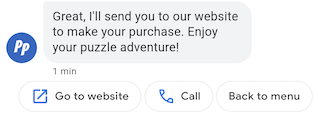
การดำเนินการที่แนะนำจะแนะนําผู้ใช้ผ่านการสนทนาโดยใช้ประโยชน์จากฟังก์ชันการทํางานดั้งเดิมของอุปกรณ์ เมื่อผู้ใช้แตะการดำเนินการที่แนะนำ เอเจนต์จะได้รับข้อความที่มีข้อความของการดำเนินการและข้อมูลการรายงานผล Conversion
การดำเนินการที่แนะนำมีความยาวได้สูงสุด 25 อักขระ และข้อความมีคำแนะนำได้สูงสุด 13 รายการ
ดูตัวเลือกการจัดรูปแบบและค่าได้ที่
conversations.messages.create
และ
SuggestedAction
การดำเนินการ OpenURL
การดำเนินการ Open URL ช่วยให้ Agent แนะนำ URL ให้ผู้ใช้เปิดได้ หาก แอปได้รับการลงทะเบียนเป็นตัวแฮนเดิลเริ่มต้นสำหรับ URL แอปจะเปิดขึ้นแทน และ ไอคอนสำหรับการดำเนินการจะเป็นไอคอนของแอป การดำเนินการเปิด URL รองรับเฉพาะ URL ที่มีโปรโตคอล HTTP และ HTTPS เท่านั้น ส่วนโปรโตคอลอื่นๆ (เช่น mailto) จะไม่รองรับ
โค้ดต่อไปนี้จะส่งข้อความพร้อมการดำเนินการเปิด URL ดูตัวเลือกการจัดรูปแบบและค่าได้ที่
OpenUrlAction
cURL
# Copyright 2021 Google LLC # # Licensed under the Apache License, Version 2.0 (the "License"); # you may not use this file except in compliance with the License. # You may obtain a copy of the License at # https://www.apache.org/licenses/LICENSE-2.0 # Unless required by applicable law or agreed to in writing, software # distributed under the License is distributed on an "AS IS" BASIS, # WITHOUT WARRANTIES OR CONDITIONS OF ANY KIND, either express or implied. # See the License for the specific language governing permissions and # limitations under the License. # This code sends a text mesage to the user with a suggestion action toopen a URL # and a fallback text. # Read more: https://developers.google.com/business-communications/business-messages/guides/how-to/message/send?hl=en#open_url_action # Replace the __CONVERSATION_ID__ with a conversation id that you can send messages to # Make sure a service account key file exists at ./service_account_key.json curl -X POST "https://businessmessages.googleapis.com/v1/conversations/__CONVERSATION_ID__/messages" \ -H "Content-Type: application/json" \ -H "User-Agent: curl/business-messages" \ -H "$(oauth2l header --json ./service_account_key.json businessmessages)" \ -d "{ 'messageId': '$(uuidgen)', 'text': 'Hello world!', 'fallback': 'Hello, world!\n\nSay \"Hello\" at https://www.growingtreebank.com', 'suggestions': [ { 'action': { 'text': 'Hello', 'postbackData': 'hello-formal', 'openUrlAction': { 'url': 'https://www.growingtreebank.com', } }, }, ], 'representative': { 'avatarImage': 'https://developers.google.com/identity/images/g-logo.png', 'displayName': 'Chatbot', 'representativeType': 'BOT' }, }"
Node.js
/** * This code sends a text mesage to the user with a suggestion action toopen a URL * and a fallback text. * Read more: https://developers.google.com/business-communications/business-messages/guides/how-to/message/send?hl=en#open_url_action * * This code is based on the https://github.com/google-business-communications/nodejs-businessmessages Node.js * Business Messages client library. */ /** * Edit the values below: */ const PATH_TO_SERVICE_ACCOUNT_KEY = './service_account_key.json'; const CONVERSATION_ID = 'EDIT_HERE'; const businessmessages = require('businessmessages'); const uuidv4 = require('uuid').v4; const {google} = require('googleapis'); // Initialize the Business Messages API const bmApi = new businessmessages.businessmessages_v1.Businessmessages({}); // Set the scope that we need for the Business Messages API const scopes = [ 'https://www.googleapis.com/auth/businessmessages', ]; // Set the private key to the service account file const privatekey = require(PATH_TO_SERVICE_ACCOUNT_KEY); /** * Posts a message with an open URL action to the Business Messages API. * * @param {string} conversationId The unique id for this user and agent. * @param {string} representativeType A value of BOT or HUMAN. */ async function sendMessage(conversationId, representativeType) { const authClient = await initCredentials(); if (authClient) { // Create the payload for sending a message along with an open url action const apiParams = { auth: authClient, parent: 'conversations/' + conversationId, resource: { messageId: uuidv4(), representative: { representativeType: representativeType, }, fallback: 'Hello, world!\n\nSay \"Hello\" at https://www.growingtreebank.com', text: 'Hello world!', suggestions: [ { action: { text: 'Hello', postbackData: 'hello-formal', openUrlAction: { url: 'https://www.growingtreebank.com', }, }, }, ], }, }; // Call the message create function using the // Business Messages client library bmApi.conversations.messages.create(apiParams, {auth: authClient}, (err, response) => { console.log(err); console.log(response); }); } else { console.log('Authentication failure.'); } } /** * Initializes the Google credentials for calling the * Business Messages API. */ async function initCredentials() { // configure a JWT auth client const authClient = new google.auth.JWT( privatekey.client_email, null, privatekey.private_key, scopes, ); return new Promise(function(resolve, reject) { // authenticate request authClient.authorize(function(err, tokens) { if (err) { reject(false); } else { resolve(authClient); } }); }); } sendMessage(CONVERSATION_ID, 'BOT');
Java
import com.google.api.client.googleapis.services.AbstractGoogleClientRequest; import com.google.api.client.http.HttpBackOffUnsuccessfulResponseHandler; import com.google.api.client.http.HttpRequest; import com.google.api.client.googleapis.auth.oauth2.GoogleCredential; import com.google.api.client.googleapis.javanet.GoogleNetHttpTransport; import com.google.api.client.http.HttpTransport; import com.google.api.client.json.jackson2.JacksonFactory; import com.google.api.client.util.ExponentialBackOff; import com.google.api.services.businessmessages.v1.Businessmessages; import com.google.api.services.businessmessages.v1.model.*; import java.io.FileInputStream; import java.util.Arrays; import java.util.UUID; class SendSuggestedActionSnippet { /** * Initializes credentials used by the Business Messages API. */ private static Businessmessages.Builder getBusinessMessagesBuilder() { Businessmessages.Builder builder = null; try { GoogleCredential credential = GoogleCredential .fromStream(new FileInputStream("PATH_TO_SERVICE_ACCOUNT_KEY")); credential = credential.createScoped(Arrays.asList( "https://www.googleapis.com/auth/businessmessages")); credential.refreshToken(); HttpTransport httpTransport = GoogleNetHttpTransport.newTrustedTransport(); JacksonFactory jsonFactory = JacksonFactory.getDefaultInstance(); // Create instance of the Business Messages API builder = new Businessmessages .Builder(httpTransport, jsonFactory, null) .setApplicationName("Sample Application"); // Set the API credentials and endpoint builder.setHttpRequestInitializer(credential); } catch (Exception e) { e.printStackTrace(); } return builder; } public static void main(String args[]) { try { String conversationId = "CONVERSATION_ID"; // Create client library reference Businessmessages.Builder builder = getBusinessMessagesBuilder(); // Create a text message with an open url action BusinessMessagesMessage message = new BusinessMessagesMessage() .setMessageId(UUID.randomUUID().toString()) .setText("Hello world!") .setFallback("Hello, world!\n\nSay \"Hello\" at https://www.growingtreebank.com") .setSuggestions(Arrays.asList(new BusinessMessagesSuggestion() .setAction(new BusinessMessagesSuggestedAction() .setText("Hello").setPostbackData("hello-formal") .setOpenUrlAction( new BusinessMessagesOpenUrlAction().setUrl("https://www.growingtreebank.com")) )) ) .setRepresentative(new BusinessMessagesRepresentative() .setRepresentativeType("TYPE")); // Create message request Businessmessages.Conversations.Messages.Create messageRequest = builder.build().conversations().messages() .create("conversations/" + conversationId, message); // Setup retries with exponential backoff HttpRequest httpRequest = ((AbstractGoogleClientRequest) messageRequest).buildHttpRequest(); httpRequest.setUnsuccessfulResponseHandler(new HttpBackOffUnsuccessfulResponseHandler( new ExponentialBackOff())); // Execute request httpRequest.execute(); } catch (Exception e) { e.printStackTrace(); } } }
Python
"""This code sends a text mesage to the user with a suggestion action to open a URL. Read more: https://developers.google.com/business-communications/business-messages/guides/how-to/message/send?hl=en#open_url_action This code is based on the https://github.com/google-business-communications/python-businessmessages Python Business Messages client library. """ import uuid from businessmessages import businessmessages_v1_client as bm_client from businessmessages.businessmessages_v1_messages import BusinessmessagesConversationsMessagesCreateRequest from businessmessages.businessmessages_v1_messages import BusinessMessagesMessage from businessmessages.businessmessages_v1_messages import BusinessMessagesOpenUrlAction from businessmessages.businessmessages_v1_messages import BusinessMessagesRepresentative from businessmessages.businessmessages_v1_messages import BusinessMessagesSuggestedAction from businessmessages.businessmessages_v1_messages import BusinessMessagesSuggestion from oauth2client.service_account import ServiceAccountCredentials # Edit the values below: path_to_service_account_key = './service_account_key.json' conversation_id = 'EDIT_HERE' credentials = ServiceAccountCredentials.from_json_keyfile_name( path_to_service_account_key, scopes=['https://www.googleapis.com/auth/businessmessages']) client = bm_client.BusinessmessagesV1(credentials=credentials) representative_type_as_string = 'BOT' if representative_type_as_string == 'BOT': representative_type = BusinessMessagesRepresentative.RepresentativeTypeValueValuesEnum.BOT else: representative_type = BusinessMessagesRepresentative.RepresentativeTypeValueValuesEnum.HUMAN # Create a text message with an open url action and fallback text message = BusinessMessagesMessage( messageId=str(uuid.uuid4().int), representative=BusinessMessagesRepresentative( representativeType=representative_type ), text='Hello, world!', fallback='Hello, world!\n\nReply with \"Hello\" or \"Hi!\"', suggestions=[ BusinessMessagesSuggestion( action=BusinessMessagesSuggestedAction( text='Hello', postbackData='hello-formal', openUrlAction=BusinessMessagesOpenUrlAction( url='https://www.growingtreebank.com')) ), ]) # Create the message request create_request = BusinessmessagesConversationsMessagesCreateRequest( businessMessagesMessage=message, parent='conversations/' + conversation_id) # Send the message bm_client.BusinessmessagesV1.ConversationsMessagesService( client=client).Create(request=create_request)
การดำเนินการโทร
การดำเนินการโทรจะแนะนำหมายเลขโทรศัพท์ให้ผู้ใช้โทรออก เมื่อผู้ใช้แตะชิป คำแนะนำการดำเนินการโทร แอปแป้นโทรศัพท์เริ่มต้นของผู้ใช้จะเปิดขึ้นพร้อม หมายเลขโทรศัพท์ที่ระบุซึ่งป้อนไว้ล่วงหน้า
โค้ดต่อไปนี้จะส่งข้อความพร้อมการดำเนินการโทร ดูตัวเลือกการจัดรูปแบบและค่าได้ที่
DialAction
cURL
# Copyright 2021 Google LLC # # Licensed under the Apache License, Version 2.0 (the "License"); # you may not use this file except in compliance with the License. # You may obtain a copy of the License at # https://www.apache.org/licenses/LICENSE-2.0 # Unless required by applicable law or agreed to in writing, software # distributed under the License is distributed on an "AS IS" BASIS, # WITHOUT WARRANTIES OR CONDITIONS OF ANY KIND, either express or implied. # See the License for the specific language governing permissions and # limitations under the License. # This code sends a text mesage to the user with a suggestion action to dial # a phone number and a fallback text. # Read more: https://developers.google.com/business-communications/business-messages/guides/how-to/message/send?hl=en#dial_action # Replace the __CONVERSATION_ID__ with a conversation id that you can send messages to # Make sure a service account key file exists at ./service_account_key.json curl -X POST "https://businessmessages.googleapis.com/v1/conversations/__CONVERSATION_ID__/messages" \ -H "Content-Type: application/json" \ -H "User-Agent: curl/business-messages" \ -H "$(oauth2l header --json ./service_account_key.json businessmessages)" \ -d "{ 'messageId': '$(uuidgen)', 'text': 'Contact support for help with this issue.', 'fallback': 'Give us a call at +12223334444.', 'suggestions': [ { 'action': { 'text': 'Call support', 'postbackData': 'call-support', 'dialAction': { 'phoneNumber': '+12223334444', } }, }, ], 'representative': { 'avatarImage': 'https://developers.google.com/identity/images/g-logo.png', 'displayName': 'Chatbot', 'representativeType': 'BOT' }, }"
Node.js
/** * This code sends a text mesage to the user with a suggestion action to dial * a phone number and a fallback text. * Read more: https://developers.google.com/business-communications/business-messages/guides/how-to/message/send?hl=en#dial_action * * This code is based on the https://github.com/google-business-communications/nodejs-businessmessages Node.js * Business Messages client library. */ /** * Edit the values below: */ const PATH_TO_SERVICE_ACCOUNT_KEY = './service_account_key.json'; const CONVERSATION_ID = 'EDIT_HERE'; const businessmessages = require('businessmessages'); const uuidv4 = require('uuid').v4; const {google} = require('googleapis'); // Initialize the Business Messages API const bmApi = new businessmessages.businessmessages_v1.Businessmessages({}); // Set the scope that we need for the Business Messages API const scopes = [ 'https://www.googleapis.com/auth/businessmessages', ]; // Set the private key to the service account file const privatekey = require(PATH_TO_SERVICE_ACCOUNT_KEY); /** * Posts a message with a dial suggested action to the Business Messages API. * * @param {string} conversationId The unique id for this user and agent. * @param {string} representativeType A value of BOT or HUMAN. */ async function sendMessage(conversationId, representativeType) { const authClient = await initCredentials(); if (authClient) { // Create the payload for sending a message along with a dial action const apiParams = { auth: authClient, parent: 'conversations/' + conversationId, resource: { messageId: uuidv4(), representative: { representativeType: representativeType, }, fallback: 'Give us a call at +12223334444.', text: 'Contact support for help with this issue.', suggestions: [ { action: { text: 'Call support', postbackData: 'call-support', dialAction: { phoneNumber: '+12223334444', }, }, }, ], }, }; // Call the message create function using the // Business Messages client library bmApi.conversations.messages.create(apiParams, {auth: authClient}, (err, response) => { console.log(err); console.log(response); }); } else { console.log('Authentication failure.'); } } /** * Initializes the Google credentials for calling the * Business Messages API. */ async function initCredentials() { // configure a JWT auth client const authClient = new google.auth.JWT( privatekey.client_email, null, privatekey.private_key, scopes, ); return new Promise(function(resolve, reject) { // authenticate request authClient.authorize(function(err, tokens) { if (err) { reject(false); } else { resolve(authClient); } }); }); } sendMessage(CONVERSATION_ID, 'BOT');
Java
import com.google.api.client.googleapis.services.AbstractGoogleClientRequest; import com.google.api.client.http.HttpBackOffUnsuccessfulResponseHandler; import com.google.api.client.http.HttpRequest; import com.google.api.client.googleapis.auth.oauth2.GoogleCredential; import com.google.api.client.googleapis.javanet.GoogleNetHttpTransport; import com.google.api.client.http.HttpTransport; import com.google.api.client.json.jackson2.JacksonFactory; import com.google.api.client.util.ExponentialBackOff; import com.google.api.services.businessmessages.v1.Businessmessages; import com.google.api.services.businessmessages.v1.model.*; import java.io.FileInputStream; import java.util.Arrays; import java.util.UUID; class SendDialActionSnippet { /** * Initializes credentials used by the Business Messages API. */ private static Businessmessages.Builder getBusinessMessagesBuilder() { Businessmessages.Builder builder = null; try { GoogleCredential credential = GoogleCredential .fromStream(new FileInputStream("PATH_TO_SERVICE_ACCOUNT_KEY")); credential = credential.createScoped(Arrays.asList( "https://www.googleapis.com/auth/businessmessages")); credential.refreshToken(); HttpTransport httpTransport = GoogleNetHttpTransport.newTrustedTransport(); JacksonFactory jsonFactory = JacksonFactory.getDefaultInstance(); // Create instance of the Business Messages API builder = new Businessmessages .Builder(httpTransport, jsonFactory, null) .setApplicationName("Sample Application"); // Set the API credentials and endpoint builder.setHttpRequestInitializer(credential); } catch (Exception e) { e.printStackTrace(); } return builder; } public static void main(String args[]) { try { String conversationId = "CONVERSATION_ID"; // Create client library reference Businessmessages.Builder builder = getBusinessMessagesBuilder(); // Create a text message with a dial action BusinessMessagesMessage message = new BusinessMessagesMessage() .setMessageId(UUID.randomUUID().toString()) .setText("Contact support for help with this issue.") .setFallback("Give us a call at +12223334444.") .setSuggestions(Arrays.asList(new BusinessMessagesSuggestion() .setAction(new BusinessMessagesSuggestedAction() .setText("Call support").setPostbackData("call-support") .setDialAction( new BusinessMessagesDialAction().setPhoneNumber("+12223334444")) ))) .setRepresentative(new BusinessMessagesRepresentative() .setRepresentativeType("TYPE")); // Create message request Businessmessages.Conversations.Messages.Create messageRequest = builder.build().conversations().messages() .create("conversations/" + conversationId, message); // Setup retries with exponential backoff HttpRequest httpRequest = ((AbstractGoogleClientRequest) messageRequest).buildHttpRequest(); httpRequest.setUnsuccessfulResponseHandler(new HttpBackOffUnsuccessfulResponseHandler( new ExponentialBackOff())); // Execute request httpRequest.execute(); } catch (Exception e) { e.printStackTrace(); } } }
Python
"""Sends a text mesage to the user with a suggestion action to dial a phone number. Read more: https://developers.google.com/business-communications/business-messages/guides/how-to/message/send?hl=en#dial_action This code is based on the https://github.com/google-business-communications/python-businessmessages Python Business Messages client library. """ import uuid from businessmessages import businessmessages_v1_client as bm_client from businessmessages.businessmessages_v1_messages import BusinessmessagesConversationsMessagesCreateRequest from businessmessages.businessmessages_v1_messages import BusinessMessagesDialAction from businessmessages.businessmessages_v1_messages import BusinessMessagesMessage from businessmessages.businessmessages_v1_messages import BusinessMessagesRepresentative from businessmessages.businessmessages_v1_messages import BusinessMessagesSuggestedAction from businessmessages.businessmessages_v1_messages import BusinessMessagesSuggestion from oauth2client.service_account import ServiceAccountCredentials # Edit the values below: path_to_service_account_key = './service_account_key.json' conversation_id = 'EDIT_HERE' credentials = ServiceAccountCredentials.from_json_keyfile_name( path_to_service_account_key, scopes=['https://www.googleapis.com/auth/businessmessages']) client = bm_client.BusinessmessagesV1(credentials=credentials) representative_type_as_string = 'BOT' if representative_type_as_string == 'BOT': representative_type = BusinessMessagesRepresentative.RepresentativeTypeValueValuesEnum.BOT else: representative_type = BusinessMessagesRepresentative.RepresentativeTypeValueValuesEnum.HUMAN # Create a text message with a dial action and fallback text message = BusinessMessagesMessage( messageId=str(uuid.uuid4().int), representative=BusinessMessagesRepresentative( representativeType=representative_type ), text='Contact support for help with this issue.', fallback='Give us a call at +12223334444.', suggestions=[ BusinessMessagesSuggestion( action=BusinessMessagesSuggestedAction( text='Call support', postbackData='call-support', dialAction=BusinessMessagesDialAction( phoneNumber='+12223334444')) ), ]) # Create the message request create_request = BusinessmessagesConversationsMessagesCreateRequest( businessMessagesMessage=message, parent='conversations/' + conversation_id) # Send the message bm_client.BusinessmessagesV1.ConversationsMessagesService( client=client).Create(request=create_request)
คำแนะนำเกี่ยวกับคำขอตรวจสอบสิทธิ์
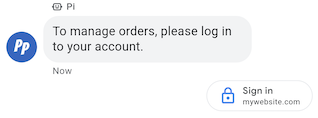
คำแนะนำในการขอการตรวจสอบสิทธิ์จะแจ้งให้ผู้ใช้ลงชื่อเข้าใช้แอปพลิเคชันที่สอดคล้องกับ OAuth 2.0 โดยส่งรหัสการตรวจสอบสิทธิ์เพื่อยืนยันข้อมูลบัญชี และเปิดใช้ประสบการณ์ของผู้ใช้ที่ปรับแต่งแล้วและขั้นตอนการสนทนาโดยละเอียด ดูตรวจสอบสิทธิ์ด้วย OAuth
ตัวอย่าง
โค้ดต่อไปนี้จะส่งข้อความพร้อมคำแนะนำเกี่ยวกับคำขอการตรวจสอบสิทธิ์ ดูตัวเลือกการจัดรูปแบบและค่าได้ที่
conversations.messages.create
และ
Suggestion
cURL
# Copyright 2021 Google LLC # # Licensed under the Apache License, Version 2.0 (the "License"); # you may not use this file except in compliance with the License. # You may obtain a copy of the License at # https://www.apache.org/licenses/LICENSE-2.0 # Unless required by applicable law or agreed to in writing, software # distributed under the License is distributed on an "AS IS" BASIS, # WITHOUT WARRANTIES OR CONDITIONS OF ANY KIND, either express or implied. # See the License for the specific language governing permissions and # limitations under the License. # This code sends a text message to the user with an authentication request suggestion # that allows the user to authenticate with OAuth. It also has a fallback text. # Read more: https://developers.google.com/business-communications/business-messages/guides/how-to/message/send?hl=en#authentication-request-suggestion # Replace the __CONVERSATION_ID__ with a conversation id that you can send messages to # Make sure a service account key file exists at ./service_account_key.json # Replace the __CLIENT_ID__ # Replace the __CODE_CHALLENGE__ # Replace the __SCOPE__ curl -X POST "https://businessmessages.googleapis.com/v1/conversations/__CONVERSATION_ID__/messages" \ -H "Content-Type: application/json" \ -H "User-Agent: curl/business-messages" \ -H "$(oauth2l header --json ./service_account_key.json businessmessages)" \ -d "{ 'messageId': '$(uuidgen)', 'text': 'Sign in to continue the conversation.', 'fallback': 'Visit support.growingtreebank.com to continue.', 'suggestions': [ { 'authenticationRequest': { 'oauth': { 'clientId': '__CLIENT_ID__', 'codeChallenge': '__CODE_CHALLENGE__', 'scopes': [ '__SCOPE__', ], }, }, }, ], 'representative': { 'avatarImage': 'https://developers.google.com/identity/images/g-logo.png', 'displayName': 'Chatbot', 'representativeType': 'BOT' } }"
Node.js
/** * This code sends a text message to the user with an authentication request suggestion * that allows the user to authenticate with OAuth. It also has a fallback text. * Read more: https://developers.google.com/business-communications/business-messages/guides/how-to/message/send?hl=en#authentication-request-suggestion * * This code is based on the https://github.com/google-business-communications/nodejs-businessmessages Node.js * Business Messages client library. */ /** * Before continuing, learn more about the prerequisites for authenticating * with OAuth at: https://developers.google.com/business-communications/business-messages/guides/how-to/integrate/oauth?hl=en * * Edit the values below: */ const PATH_TO_SERVICE_ACCOUNT_KEY = './service_account_key.json'; const CONVERSATION_ID = 'EDIT_HERE'; const OAUTH_CLIENT_ID = 'EDIT_HERE'; const OAUTH_CODE_CHALLENGE = 'EDIT_HERE'; const OAUTH_SCOPE = 'EDIT_HERE'; const businessmessages = require('businessmessages'); const uuidv4 = require('uuid').v4; const {google} = require('googleapis'); // Initialize the Business Messages API const bmApi = new businessmessages.businessmessages_v1.Businessmessages({}); // Set the scope that we need for the Business Messages API const scopes = [ 'https://www.googleapis.com/auth/businessmessages', ]; // Set the private key to the service account file const privatekey = require(PATH_TO_SERVICE_ACCOUNT_KEY); /** * Posts a message to the Business Messages API along with an authentication request. * * @param {string} conversationId The unique id for this user and agent. * @param {string} representativeType A value of BOT or HUMAN. */ async function sendMessage(conversationId, representativeType) { const authClient = await initCredentials(); if (authClient) { // Create the payload for sending a message along with an authentication request const apiParams = { auth: authClient, parent: 'conversations/' + conversationId, resource: { messageId: uuidv4(), representative: { representativeType: representativeType, }, fallback: 'Visit support.growingtreebank.com to continue.', text: 'Sign in to continue the conversation.', suggestions: [ { authenticationRequest: { oauth: { clientId: OAUTH_CLIENT_ID, codeChallenge: OAUTH_CODE_CHALLENGE, scopes: [OAUTH_SCOPE] } } }, ], }, }; // Call the message create function using the // Business Messages client library bmApi.conversations.messages.create(apiParams, {auth: authClient}, (err, response) => { console.log(err); console.log(response); }); } else { console.log('Authentication failure.'); } } /** * Initializes the Google credentials for calling the * Business Messages API. */ async function initCredentials() { // configure a JWT auth client const authClient = new google.auth.JWT( privatekey.client_email, null, privatekey.private_key, scopes, ); return new Promise(function(resolve, reject) { // authenticate request authClient.authorize(function(err, tokens) { if (err) { reject(false); } else { resolve(authClient); } }); }); } sendMessage(CONVERSATION_ID, 'BOT');
Java
import com.google.api.client.googleapis.services.AbstractGoogleClientRequest; import com.google.api.client.http.HttpBackOffUnsuccessfulResponseHandler; import com.google.api.client.http.HttpRequest; import com.google.api.client.googleapis.auth.oauth2.GoogleCredential; import com.google.api.client.googleapis.javanet.GoogleNetHttpTransport; import com.google.api.client.http.HttpTransport; import com.google.api.client.json.jackson2.JacksonFactory; import com.google.api.client.util.ExponentialBackOff; import com.google.api.services.businessmessages.v1.Businessmessages; import com.google.api.services.businessmessages.v1.model.*; import java.io.FileInputStream; import java.util.Arrays; import java.util.UUID; class SendAuthenticationRequestSuggestionSnippet { /** * Initializes credentials used by the Business Messages API. */ private static Businessmessages.Builder getBusinessMessagesBuilder() { Businessmessages.Builder builder = null; try { GoogleCredential credential = GoogleCredential .fromStream(new FileInputStream("PATH_TO_SERVICE_ACCOUNT_KEY")); credential = credential.createScoped(Arrays.asList( "https://www.googleapis.com/auth/businessmessages")); credential.refreshToken(); HttpTransport httpTransport = GoogleNetHttpTransport.newTrustedTransport(); JacksonFactory jsonFactory = JacksonFactory.getDefaultInstance(); // Create instance of the Business Messages API builder = new Businessmessages .Builder(httpTransport, jsonFactory, null) .setApplicationName("Sample Application"); // Set the API credentials and endpoint builder.setHttpRequestInitializer(credential); } catch (Exception e) { e.printStackTrace(); } return builder; } public static void main(String args[]) { try { String conversationId = "CONVERSATION_ID"; // Create client library reference Businessmessages.Builder builder = getBusinessMessagesBuilder(); // Create a text message with an authentication request BusinessMessagesMessage message = new BusinessMessagesMessage() .setMessageId(UUID.randomUUID().toString()) .setText("Would you like to chat with a live agent?") .setFallback("Would you like to chat with a live agent?") .setSuggestions(Arrays.asList(new BusinessMessagesSuggestion() .setAuthenticationRequest(new BusinessMessagesAuthenticationRequest() .setOauth(new BusinessMessagesAuthenticationRequestOauth() .setClientId("CLIENT_ID") .setCodeChallenge("CODE_CHALLENGE") .setScopes(Arrays.asList("SCOPE")) ))) ) .setRepresentative(new BusinessMessagesRepresentative() .setRepresentativeType("TYPE")); // Create message request Businessmessages.Conversations.Messages.Create messageRequest = builder.build().conversations().messages() .create("conversations/" + conversationId, message); // Setup retries with exponential backoff HttpRequest httpRequest = ((AbstractGoogleClientRequest) messageRequest).buildHttpRequest(); httpRequest.setUnsuccessfulResponseHandler(new HttpBackOffUnsuccessfulResponseHandler( new ExponentialBackOff())); // Execute request httpRequest.execute(); } catch (Exception e) { e.printStackTrace(); } } }
Python
"""Sends a text message to the user with an authentication request suggestion. It allows the user to authenticate with OAuth and has a fallback text. Read more: https://developers.google.com/business-communications/business-messages/guides/how-to/message/send?hl=en#authentication-request-suggestion This code is based on the https://github.com/google-business-communications/python-businessmessages Python Business Messages client library. """ import uuid from businessmessages import businessmessages_v1_client as bm_client from businessmessages.businessmessages_v1_messages import BusinessMessagesAuthenticationRequest from businessmessages.businessmessages_v1_messages import BusinessMessagesAuthenticationRequestOauth from businessmessages.businessmessages_v1_messages import BusinessmessagesConversationsMessagesCreateRequest from businessmessages.businessmessages_v1_messages import BusinessMessagesMessage from businessmessages.businessmessages_v1_messages import BusinessMessagesRepresentative from businessmessages.businessmessages_v1_messages import BusinessMessagesSuggestion from oauth2client.service_account import ServiceAccountCredentials # Before continuing, learn more about the prerequisites for authenticating # with OAuth at: https://developers.google.com/business-communications/business-messages/guides/how-to/integrate/oauth?hl=en # Edit the values below: path_to_service_account_key = './service_account_key.json' conversation_id = 'EDIT_HERE' oauth_client_id = 'EDIT_HERE' oauth_code_challenge = 'EDIT_HERE' oauth_scope = 'EDIT_HERE' credentials = ServiceAccountCredentials.from_json_keyfile_name( path_to_service_account_key, scopes=['https://www.googleapis.com/auth/businessmessages']) client = bm_client.BusinessmessagesV1(credentials=credentials) representative_type_as_string = 'BOT' if representative_type_as_string == 'BOT': representative_type = BusinessMessagesRepresentative.RepresentativeTypeValueValuesEnum.BOT else: representative_type = BusinessMessagesRepresentative.RepresentativeTypeValueValuesEnum.HUMAN # Create a text message with an authentication request message = BusinessMessagesMessage( messageId=str(uuid.uuid4().int), representative=BusinessMessagesRepresentative( representativeType=representative_type ), text='Sign in to continue the conversation.', fallback='Visit support.growingtreebank.com to continue.', suggestions=[ BusinessMessagesSuggestion( authenticationRequest=BusinessMessagesAuthenticationRequest( oauth=BusinessMessagesAuthenticationRequestOauth( clientId=oauth_client_id, codeChallenge=oauth_code_challenge, scopes=[oauth_scope]) ) ), ] ) # Create the message request create_request = BusinessmessagesConversationsMessagesCreateRequest( businessMessagesMessage=message, parent='conversations/' + conversation_id) # Send the message bm_client.BusinessmessagesV1.ConversationsMessagesService( client=client).Create(request=create_request)
คำแนะนำในการขอความช่วยเหลือจากเจ้าหน้าที่บริการลูกค้า

คำแนะนำในการขอรับบริการจากตัวแทนแบบเรียลไทม์ช่วยให้คุณแนะนำผู้ใช้ให้โต้ตอบกับ ตัวแทนที่เป็นมนุษย์ในระหว่างการโต้ตอบที่ซับซ้อน หรือเมื่อระบบอัตโนมัติไม่สามารถ จัดการคำขอของผู้ใช้ได้
ผู้ใช้ขอรับบริการจากตัวแทนแบบเรียลไทม์ได้ทุกเมื่อในการสนทนาจากเมนูการล้น คำแนะนำนี้ช่วยให้ตัวแทนมีวิธีแนะนำการโต้ตอบกับตัวแทนที่เป็นมนุษย์โดยอัตโนมัติตามบริบทของการสนทนา ตัวแทนของคุณควรพร้อมตอบสนองต่อเหตุการณ์ที่ขอเจ้าหน้าที่บริการลูกค้าเสมอ แม้ว่าจะไม่ได้ส่งคำแนะนำในการขอเจ้าหน้าที่บริการลูกค้าก็ตาม
เมื่อผู้ใช้แตะคำแนะนำในการขอรับบริการจากเจ้าหน้าที่แบบเรียลไทม์ ระบบจะทริกเกอร์เหตุการณ์ที่ระบุว่ามีการขอรับบริการจากเจ้าหน้าที่แบบเรียลไทม์ แล้ว
ตัวอย่าง
โค้ดต่อไปนี้จะส่งข้อความพร้อมคำแนะนำในการขอรับการสนับสนุนจากตัวแทนแบบเรียลไทม์ ดูตัวเลือกการจัดรูปแบบและค่าได้ที่
conversations.messages.create
และ
Suggestion
cURL
# Copyright 2021 Google LLC # # Licensed under the Apache License, Version 2.0 (the "License"); # you may not use this file except in compliance with the License. # You may obtain a copy of the License at # https://www.apache.org/licenses/LICENSE-2.0 # Unless required by applicable law or agreed to in writing, software # distributed under the License is distributed on an "AS IS" BASIS, # WITHOUT WARRANTIES OR CONDITIONS OF ANY KIND, either express or implied. # See the License for the specific language governing permissions and # limitations under the License. # This code sends a text message to the user with a Live agent request suggestion # that allows the user to connect with a Live agent. # Read more: https://developers.google.com/business-communications/business-messages/guides/how-to/message/send?hl=en#live_agent_request_suggestion # Replace the __CONVERSATION_ID__ with a conversation id that you can send messages to # Make sure a service account key file exists at ./service_account_key.json curl -X POST "https://businessmessages.googleapis.com/v1/conversations/__CONVERSATION_ID__/messages" \ -H "Content-Type: application/json" \ -H "User-Agent: curl/business-messages" \ -H "$(oauth2l header --json ./service_account_key.json businessmessages)" \ -d "{ 'messageId': '$(uuidgen)', 'text': 'Would you like to chat with a live agent?', 'fallback': 'Would you like to chat with a live agent?', 'suggestions': [ { 'liveAgentRequest': {}, }, ], 'representative': { 'avatarImage': 'https://developers.google.com/identity/images/g-logo.png', 'displayName': 'Chatbot', 'representativeType': 'BOT' }, }"
Node.js
/** * This code sends a text message to the user with a Live agent request suggestion * that allows the user to connect with a Live agent. * Read more: https://developers.google.com/business-communications/business-messages/guides/how-to/message/send?hl=en#live_agent_request_suggestion * * This code is based on the https://github.com/google-business-communications/nodejs-businessmessages Node.js * Business Messages client library. */ /** * Edit the values below: */ const PATH_TO_SERVICE_ACCOUNT_KEY = './service_account_key.json'; const CONVERSATION_ID = 'EDIT_HERE'; const businessmessages = require('businessmessages'); const uuidv4 = require('uuid').v4; const {google} = require('googleapis'); // Initialize the Business Messages API const bmApi = new businessmessages.businessmessages_v1.Businessmessages({}); // Set the scope that we need for the Business Messages API const scopes = [ 'https://www.googleapis.com/auth/businessmessages', ]; // Set the private key to the service account file const privatekey = require(PATH_TO_SERVICE_ACCOUNT_KEY); /** * Posts a message with a live agent request action to the Business Messages API. * * @param {string} conversationId The unique id for this user and agent. */ async function sendMessage(conversationId) { const authClient = await initCredentials(); if (authClient) { // Create the payload for sending a message along with a request for live agent action const apiParams = { auth: authClient, parent: 'conversations/' + conversationId, resource: { messageId: uuidv4(), representative: { representativeType: 'BOT', // Must be sent from a BOT representative }, fallback: 'Would you like to chat with a live agent?', text: 'Would you like to chat with a live agent?', suggestions: [ { liveAgentRequest: {} }, ], }, }; // Call the message create function using the // Business Messages client library bmApi.conversations.messages.create(apiParams, {auth: authClient}, (err, response) => { console.log(err); console.log(response); }); } else { console.log('Authentication failure.'); } } /** * Initializes the Google credentials for calling the * Business Messages API. */ async function initCredentials() { // configure a JWT auth client const authClient = new google.auth.JWT( privatekey.client_email, null, privatekey.private_key, scopes, ); return new Promise(function(resolve, reject) { // authenticate request authClient.authorize(function(err, tokens) { if (err) { reject(false); } else { resolve(authClient); } }); }); } sendMessage(CONVERSATION_ID);
Java
import com.google.api.client.googleapis.services.AbstractGoogleClientRequest; import com.google.api.client.http.HttpBackOffUnsuccessfulResponseHandler; import com.google.api.client.http.HttpRequest; import com.google.api.client.googleapis.auth.oauth2.GoogleCredential; import com.google.api.client.googleapis.javanet.GoogleNetHttpTransport; import com.google.api.client.http.HttpTransport; import com.google.api.client.json.jackson2.JacksonFactory; import com.google.api.client.util.ExponentialBackOff; import com.google.api.services.businessmessages.v1.Businessmessages; import com.google.api.services.businessmessages.v1.model.*; import java.io.FileInputStream; import java.util.Arrays; import java.util.UUID; class SendLiveAgentRequestSuggestionSnippet { /** * Initializes credentials used by the Business Messages API. */ private static Businessmessages.Builder getBusinessMessagesBuilder() { Businessmessages.Builder builder = null; try { GoogleCredential credential = GoogleCredential .fromStream(new FileInputStream("PATH_TO_SERVICE_ACCOUNT_KEY")); credential = credential.createScoped(Arrays.asList( "https://www.googleapis.com/auth/businessmessages")); credential.refreshToken(); HttpTransport httpTransport = GoogleNetHttpTransport.newTrustedTransport(); JacksonFactory jsonFactory = JacksonFactory.getDefaultInstance(); // Create instance of the Business Messages API builder = new Businessmessages .Builder(httpTransport, jsonFactory, null) .setApplicationName("Sample Application"); // Set the API credentials and endpoint builder.setHttpRequestInitializer(credential); } catch (Exception e) { e.printStackTrace(); } return builder; } public static void main(String args[]) { try { String conversationId = "CONVERSATION_ID"; // Create client library reference Businessmessages.Builder builder = getBusinessMessagesBuilder(); // Create a text message with a live request action BusinessMessagesMessage message = new BusinessMessagesMessage() .setMessageId(UUID.randomUUID().toString()) .setText("Would you like to chat with a live agent?") .setFallback("Would you like to chat with a live agent?") .setSuggestions(Arrays.asList(new BusinessMessagesSuggestion() .setLiveAgentRequest(new BusinessMessagesLiveAgentRequest())) ) .setRepresentative(new BusinessMessagesRepresentative() .setRepresentativeType("BOT")); // Must be sent from a BOT representative // Create message request Businessmessages.Conversations.Messages.Create messageRequest = builder.build().conversations().messages() .create("conversations/" + conversationId, message); // Setup retries with exponential backoff HttpRequest httpRequest = ((AbstractGoogleClientRequest) messageRequest).buildHttpRequest(); httpRequest.setUnsuccessfulResponseHandler(new HttpBackOffUnsuccessfulResponseHandler( new ExponentialBackOff())); // Execute request httpRequest.execute(); } catch (Exception e) { e.printStackTrace(); } } }
Python
"""Sends a text message to the user with a Live agent request suggestion. It allows the user to connect with a Live agent. Read more: https://developers.google.com/business-communications/business-messages/guides/how-to/message/send?hl=en#live_agent_request_suggestion This code is based on the https://github.com/google-business-communications/python-businessmessages Python Business Messages client library. """ import uuid from businessmessages import businessmessages_v1_client as bm_client from businessmessages.businessmessages_v1_messages import BusinessmessagesConversationsMessagesCreateRequest from businessmessages.businessmessages_v1_messages import BusinessMessagesLiveAgentRequest from businessmessages.businessmessages_v1_messages import BusinessMessagesMessage from businessmessages.businessmessages_v1_messages import BusinessMessagesRepresentative from businessmessages.businessmessages_v1_messages import BusinessMessagesSuggestion from oauth2client.service_account import ServiceAccountCredentials # Edit the values below: path_to_service_account_key = './service_account_key.json' conversation_id = 'EDIT_HERE' credentials = ServiceAccountCredentials.from_json_keyfile_name( path_to_service_account_key, scopes=['https://www.googleapis.com/auth/businessmessages']) client = bm_client.BusinessmessagesV1(credentials=credentials) # Create a text message with a live agent request action and fallback text # Follow instructions at https://developers.google.com/business-communications/business-messages/guides/how-to/message/send?hl=en#live_agent_request_suggestion message = BusinessMessagesMessage( messageId=str(uuid.uuid4().int), representative=BusinessMessagesRepresentative( # Must be sent from a BOT representative representativeType=BusinessMessagesRepresentative.RepresentativeTypeValueValuesEnum.BOT ), text='Would you like to chat with a live agent?', fallback='Would you like to chat with a live agent?', suggestions=[ BusinessMessagesSuggestion( liveAgentRequest=BusinessMessagesLiveAgentRequest() ) ]) # Create the message request create_request = BusinessmessagesConversationsMessagesCreateRequest( businessMessagesMessage=message, parent='conversations/' + conversation_id) # Send the message bm_client.BusinessmessagesV1.ConversationsMessagesService( client=client).Create(request=create_request)
การ์ดริชมีเดีย
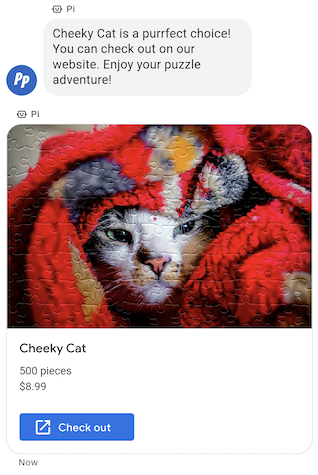
เมื่อต้องการส่งข้อมูล สื่อ หรือคำแนะนำที่เกี่ยวข้องเป็นกลุ่ม คุณควรส่งการ์ดริชมีเดีย ริชการ์ดช่วยให้ตัวแทนส่งข้อมูลหลายหน่วยในข้อความเดียวได้
ริชการ์ดอาจมีรายการต่อไปนี้
- สื่อ (JPG, JPEG หรือ PNG ขนาดสูงสุด 5 MB)
- ภาพขนาดย่อของสื่อ (JPG, JPEG หรือ PNG สูงสุด 25 KB)
- ชื่อ (ไม่เกิน 200 อักขระ)
- คำอธิบาย (ไม่เกิน 2,000 อักขระ)
- รายการการตอบกลับที่แนะนำ และการดำเนินการที่แนะนำ (สูงสุด 4 รายการ)
ริชการ์ดอาจมีรายการใดก็ได้ที่ระบุไว้ทั้งหมด แต่การ์ดต้องมีสื่อหรือชื่ออย่างน้อย 1 รายการจึงจะใช้ได้ ริชการ์ดมีคำตอบที่แนะนำและการดำเนินการที่แนะนำได้สูงสุด 4 รายการ
ตัวแทนของคุณสามารถส่งริชการ์ดหลายใบพร้อมกันในริชการ์ด แคร์รอสเซล
ตัวอย่าง
โค้ดต่อไปนี้จะส่งริชการ์ดพร้อมรูปภาพและการตอบกลับที่แนะนำ ดูตัวเลือกการจัดรูปแบบและค่าได้ที่
conversations.messages.create
และ
RichCard
cURL
# Copyright 2021 Google LLC # # Licensed under the Apache License, Version 2.0 (the "License"); # you may not use this file except in compliance with the License. # You may obtain a copy of the License at # https://www.apache.org/licenses/LICENSE-2.0 # Unless required by applicable law or agreed to in writing, software # distributed under the License is distributed on an "AS IS" BASIS, # WITHOUT WARRANTIES OR CONDITIONS OF ANY KIND, either express or implied. # See the License for the specific language governing permissions and # limitations under the License. # This code sends a rich card to the user with a fallback text. # Read more: https://developers.google.com/business-communications/business-messages/guides/how-to/message/send?hl=en#rich-cards # Replace the __CONVERSATION_ID__ with a conversation id that you can send messages to # Make sure a service account key file exists at ./service_account_key.json curl -X POST "https://businessmessages.googleapis.com/v1/conversations/__CONVERSATION_ID__/messages" \ -H "Content-Type: application/json" \ -H "User-Agent: curl/business-messages" \ -H "$(oauth2l header --json ./service_account_key.json businessmessages)" \ -d "{ 'messageId': '$(uuidgen)', 'representative': { 'avatarImage': 'https://developers.google.com/identity/images/g-logo.png', 'displayName': 'Chatbot', 'representativeType': 'BOT' }, 'fallback': 'Hello, world!\nSent with Business Messages\n\nReply with \"Suggestion #1\" or \"Suggestion #2\"', 'richCard': { 'standaloneCard': { 'cardContent': { 'title': 'Hello, world!', 'description': 'Sent with Business Messages.', 'media': { 'height': 'TALL', 'contentInfo':{ 'altText': 'Google logo', 'fileUrl': 'https://www.google.com/images/branding/googlelogo/2x/googlelogo_color_272x92dp.png', 'forceRefresh': 'false' } }, 'suggestions': [ { 'reply': { 'text': 'Suggestion #1', 'postbackData': 'suggestion_1' } }, { 'reply': { 'text': 'Suggestion #2', 'postbackData': 'suggestion_2' } } ] } } } }"
Node.js
/** * This code sends a rich card to the user with a fallback text. * Read more: https://developers.google.com/business-communications/business-messages/guides/how-to/message/send?hl=en#rich-cards * * This code is based on the https://github.com/google-business-communications/nodejs-businessmessages Node.js * Business Messages client library. */ /** * Edit the values below: */ const PATH_TO_SERVICE_ACCOUNT_KEY = './service_account_key.json'; const CONVERSATION_ID = 'EDIT_HERE'; const businessmessages = require('businessmessages'); const uuidv4 = require('uuid').v4; const {google} = require('googleapis'); // Initialize the Business Messages API const bmApi = new businessmessages.businessmessages_v1.Businessmessages({}); // Set the scope that we need for the Business Messages API const scopes = [ 'https://www.googleapis.com/auth/businessmessages', ]; // Set the private key to the service account file const privatekey = require(PATH_TO_SERVICE_ACCOUNT_KEY); /** * Posts a rich card message to the Business Messages API. * * @param {string} conversationId The unique id for this user and agent. * @param {string} representativeType A value of BOT or HUMAN. */ async function sendMessage(conversationId, representativeType) { const authClient = await initCredentials(); if (authClient) { // Create the payload for sending a rich card message with two suggested replies const apiParams = { auth: authClient, parent: 'conversations/' + conversationId, resource: { messageId: uuidv4(), representative: { representativeType: representativeType, }, fallback: 'Hello, world!\nSent with Business Messages\n\nReply with \"Suggestion #1\" or \"Suggestion #2\"', richCard: { standaloneCard: { cardContent: { title: 'Hello, world!', description: 'Sent with Business Messages.', media: { height: 'TALL', contentInfo: { altText: 'Google logo', fileUrl: 'https://www.google.com/images/branding/googlelogo/2x/googlelogo_color_272x92dp.png', forceRefresh: false, }, }, suggestions: [ { reply: { text: 'Suggestion #1', postbackData: 'suggestion_1', }, }, { reply: { text: 'Suggestion #2', postbackData: 'suggestion_2', }, }, ], }, }, }, }, }; // Call the message create function using the // Business Messages client library bmApi.conversations.messages.create(apiParams, {auth: authClient}, (err, response) => { console.log(err); console.log(response); }); } else { console.log('Authentication failure.'); } } /** * Initializes the Google credentials for calling the * Business Messages API. */ async function initCredentials() { // configure a JWT auth client const authClient = new google.auth.JWT( privatekey.client_email, null, privatekey.private_key, scopes, ); return new Promise(function(resolve, reject) { // authenticate request authClient.authorize(function(err, tokens) { if (err) { reject(false); } else { resolve(authClient); } }); }); } sendMessage(CONVERSATION_ID, 'BOT');
Java
import com.google.api.client.googleapis.services.AbstractGoogleClientRequest; import com.google.api.client.http.HttpBackOffUnsuccessfulResponseHandler; import com.google.api.client.http.HttpRequest; import com.google.api.client.googleapis.auth.oauth2.GoogleCredential; import com.google.api.client.googleapis.javanet.GoogleNetHttpTransport; import com.google.api.client.http.HttpTransport; import com.google.api.client.json.jackson2.JacksonFactory; import com.google.api.client.util.ExponentialBackOff; import com.google.api.services.businessmessages.v1.Businessmessages; import com.google.api.services.businessmessages.v1.model.*; import com.google.communications.businessmessages.v1.MediaHeight; import java.io.FileInputStream; import java.util.Arrays; import java.util.UUID; class SendRichCardMessageSnippet { /** * Initializes credentials used by the Business Messages API. */ private static Businessmessages.Builder getBusinessMessagesBuilder() { Businessmessages.Builder builder = null; try { GoogleCredential credential = GoogleCredential .fromStream(new FileInputStream("PATH_TO_SERVICE_ACCOUNT_KEY")); credential = credential.createScoped(Arrays.asList( "https://www.googleapis.com/auth/businessmessages")); credential.refreshToken(); HttpTransport httpTransport = GoogleNetHttpTransport.newTrustedTransport(); JacksonFactory jsonFactory = JacksonFactory.getDefaultInstance(); // Create instance of the Business Messages API builder = new Businessmessages .Builder(httpTransport, jsonFactory, null) .setApplicationName("Sample Application"); // Set the API credentials and endpoint builder.setHttpRequestInitializer(credential); } catch (Exception e) { e.printStackTrace(); } return builder; } public static void main(String args[]) { try { String conversationId = "CONVERSATION_ID"; // Create client library reference Businessmessages.Builder builder = getBusinessMessagesBuilder(); // Create a rich card with two suggested replies BusinessMessagesMessage message = new BusinessMessagesMessage() .setMessageId(UUID.randomUUID().toString()) .setFallback("Hello, world!\nSent with Business Messages\n\nReply with \"Suggestion #1\" or \"Suggestion #2\"") .setRichCard(new BusinessMessagesRichCard() .setStandaloneCard(new BusinessMessagesStandaloneCard() .setCardContent( new BusinessMessagesCardContent() .setTitle("Hello, world!") .setDescription("Sent with Business Messages.") .setSuggestions(Arrays.asList( new BusinessMessagesSuggestion() .setReply(new BusinessMessagesSuggestedReply() .setText("Suggestion #1").setPostbackData("suggestion_1") ), new BusinessMessagesSuggestion() .setReply(new BusinessMessagesSuggestedReply() .setText("Suggestion #2").setPostbackData("suggestion_2") )) ) .setMedia(new BusinessMessagesMedia() .setHeight(MediaHeight.MEDIUM.toString()) .setContentInfo( new BusinessMessagesContentInfo() .setAltText("Google logo") .setFileUrl("https://www.google.com/images/branding/googlelogo/2x/googlelogo_color_272x92dp.png") .setForceRefresh(false) )) ))) .setRepresentative(new BusinessMessagesRepresentative() .setRepresentativeType("TYPE")); // Create message request Businessmessages.Conversations.Messages.Create messageRequest = builder.build().conversations().messages() .create("conversations/" + conversationId, message); // Setup retries with exponential backoff HttpRequest httpRequest = ((AbstractGoogleClientRequest) messageRequest).buildHttpRequest(); httpRequest.setUnsuccessfulResponseHandler(new HttpBackOffUnsuccessfulResponseHandler( new ExponentialBackOff())); // Execute request httpRequest.execute(); } catch (Exception e) { e.printStackTrace(); } } }
Python
"""This code sends a rich card to the user with a fallback text. Read more: https://developers.google.com/business-communications/business-messages/guides/how-to/message/send?hl=en#rich-cards This code is based on the https://github.com/google-business-communications/python-businessmessages Python Business Messages client library. """ import uuid from businessmessages import businessmessages_v1_client as bm_client from businessmessages.businessmessages_v1_messages import BusinessMessagesCardContent from businessmessages.businessmessages_v1_messages import BusinessMessagesContentInfo from businessmessages.businessmessages_v1_messages import BusinessmessagesConversationsMessagesCreateRequest from businessmessages.businessmessages_v1_messages import BusinessMessagesMedia from businessmessages.businessmessages_v1_messages import BusinessMessagesMessage from businessmessages.businessmessages_v1_messages import BusinessMessagesRepresentative from businessmessages.businessmessages_v1_messages import BusinessMessagesRichCard from businessmessages.businessmessages_v1_messages import BusinessMessagesStandaloneCard from businessmessages.businessmessages_v1_messages import BusinessMessagesSuggestedReply from businessmessages.businessmessages_v1_messages import BusinessMessagesSuggestion from oauth2client.service_account import ServiceAccountCredentials # Edit the values below: path_to_service_account_key = './service_account_key.json' conversation_id = 'EDIT_HERE' credentials = ServiceAccountCredentials.from_json_keyfile_name( path_to_service_account_key, scopes=['https://www.googleapis.com/auth/businessmessages']) client = bm_client.BusinessmessagesV1(credentials=credentials) representative_type_as_string = 'BOT' if representative_type_as_string == 'BOT': representative_type = BusinessMessagesRepresentative.RepresentativeTypeValueValuesEnum.BOT else: representative_type = BusinessMessagesRepresentative.RepresentativeTypeValueValuesEnum.HUMAN # Create a rich card message with two suggested replies and fallback text message = BusinessMessagesMessage( messageId=str(uuid.uuid4().int), representative=BusinessMessagesRepresentative( representativeType=representative_type ), fallback='Hello, world!\nSent with Business Messages\n\nReply with \"Suggestion #1\" or \"Suggestion #2\"', richCard=BusinessMessagesRichCard( standaloneCard=BusinessMessagesStandaloneCard( cardContent=BusinessMessagesCardContent( title='Hello, world!', description='Sent with Business Messages.', suggestions=[ BusinessMessagesSuggestion( reply=BusinessMessagesSuggestedReply( text='Suggestion #1', postbackData='suggestion_1') ), BusinessMessagesSuggestion( reply=BusinessMessagesSuggestedReply( text='Suggestion #2', postbackData='suggestion_2') ) ], media=BusinessMessagesMedia( height=BusinessMessagesMedia.HeightValueValuesEnum.TALL, contentInfo=BusinessMessagesContentInfo( altText='Google logo', fileUrl='https://www.google.com/images/branding/googlelogo/2x/googlelogo_color_272x92dp.png', forceRefresh=False )) )))) # Create the message request create_request = BusinessmessagesConversationsMessagesCreateRequest( businessMessagesMessage=message, parent='conversations/' + conversation_id) # Send the message bm_client.BusinessmessagesV1.ConversationsMessagesService( client=client).Create(request=create_request)
ภาพสไลด์ Rich Card
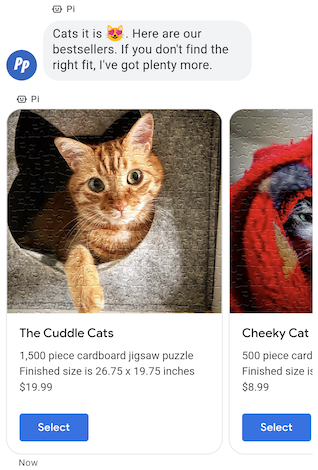
เมื่อต้องการแสดงตัวเลือกหลายรายการให้ผู้ใช้เลือก ให้ใช้ ภาพสไลด์ของการ์ดที่สมบูรณ์ ภาพสไลด์จะรวบรวมการ์ดริชมีเดียหลายรายการเข้าด้วยกัน เพื่อให้ผู้ใช้เปรียบเทียบสินค้าและโต้ตอบกับแต่ละรายการได้
ภาพสไลด์อาจมีริชการ์ดอย่างน้อย 2 ใบและสูงสุด 10 ใบ ริชการ์ดภายในภาพสไลด์ต้องเป็นไปตามข้อกำหนดทั่วไปของริชการ์ดสำหรับเนื้อหาและความสูง
ตัวอย่าง
โค้ดต่อไปนี้จะส่งภาพสไลด์ของการ์ดริชมีเดีย ดูตัวเลือกการจัดรูปแบบและค่าได้ที่
conversations.messages.create
และ
RichCard
cURL
# Copyright 2021 Google LLC # # Licensed under the Apache License, Version 2.0 (the "License"); # you may not use this file except in compliance with the License. # You may obtain a copy of the License at # https://www.apache.org/licenses/LICENSE-2.0 # Unless required by applicable law or agreed to in writing, software # distributed under the License is distributed on an "AS IS" BASIS, # WITHOUT WARRANTIES OR CONDITIONS OF ANY KIND, either express or implied. # See the License for the specific language governing permissions and # limitations under the License. # This code sends to the user a carousel with rich cards and a fallback text. # Read more: https://developers.google.com/business-communications/business-messages/guides/how-to/message/send?hl=en#rich-card-carousels # Replace the __CONVERSATION_ID__ with a conversation id that you can send messages to # Make sure a service account key file exists at ./service_account_key.json curl -X POST "https://businessmessages.googleapis.com/v1/conversations/__CONVERSATION_ID__/messages" \ -H "Content-Type: application/json" \ -H "User-Agent: curl/business-messages" \ -H "$(oauth2l header --json ./service_account_key.json businessmessages)" \ -d "{ 'messageId': '$(uuidgen)', 'representative': { 'avatarImage': 'https://developers.google.com/identity/images/g-logo.png', 'displayName': 'Chatbot', 'representativeType': 'BOT' }, 'fallback': 'Card #1\nThe description for card #1\n\nCard #2\nThe description for card #2\n\nReply with \"Card #1\" or \"Card #2\"', 'richCard': { 'carouselCard': { 'cardWidth': 'MEDIUM', 'cardContents': [ { 'title': 'Card #1', 'description': 'The description for card #1', 'suggestions': [ { 'reply': { 'text': 'Card #1', 'postbackData': 'card_1' } } ], 'media': { 'height': 'MEDIUM', 'contentInfo': { 'fileUrl': 'https://storage.googleapis.com/kitchen-sink-sample-images/cute-dog.jpg', 'forceRefresh': 'false', } } }, { 'title': 'Card #2', 'description': 'The description for card #2', 'suggestions': [ { 'reply': { 'text': 'Card #2', 'postbackData': 'card_2' } } ], 'media': { 'height': 'MEDIUM', 'contentInfo': { 'fileUrl': 'https://storage.googleapis.com/kitchen-sink-sample-images/elephant.jpg', 'forceRefresh': 'false', } } } ] } } }"
Node.js
/** * This code sends to the user a carousel with rich cards and a fallback text. * Read more: https://developers.google.com/business-communications/business-messages/guides/how-to/message/send?hl=en#rich-card-carousels * * This code is based on the https://github.com/google-business-communications/nodejs-businessmessages Node.js * Business Messages client library. */ /** * Edit the values below: */ const PATH_TO_SERVICE_ACCOUNT_KEY = './service_account_key.json'; const CONVERSATION_ID = 'EDIT_HERE'; const businessmessages = require('businessmessages'); const uuidv4 = require('uuid').v4; const {google} = require('googleapis'); // Initialize the Business Messages API const bmApi = new businessmessages.businessmessages_v1.Businessmessages({}); // Set the scope that we need for the Business Messages API const scopes = [ 'https://www.googleapis.com/auth/businessmessages', ]; // Set the private key to the service account file const privatekey = require(PATH_TO_SERVICE_ACCOUNT_KEY); /** * Posts a carousel card message to the Business Messages API. * * @param {string} conversationId The unique id for this user and agent. * @param {string} representativeType A value of BOT or HUMAN. */ async function sendMessage(conversationId, representativeType) { const authClient = await initCredentials(); if (authClient) { // Create the payload for sending carousel message // with two cards and a suggested reply for each card const apiParams = { auth: authClient, parent: 'conversations/' + conversationId, resource: { messageId: uuidv4(), representative: { representativeType: representativeType, }, fallback: 'Card #1\nThe description for card #1\n\nCard #2\nThe description for card #2\n\nReply with \"Card #1\" or \"Card #2\"', richCard: { carouselCard: { cardWidth: 'MEDIUM', cardContents: [ { title: 'Card #1', description: 'The description for card #1', suggestions: [ { reply: { text: 'Card #1', postbackData: 'card_1' } } ], media: { height: 'MEDIUM', contentInfo: { fileUrl: 'https://storage.googleapis.com/kitchen-sink-sample-images/cute-dog.jpg', forceRefresh: 'false', } } }, { title: 'Card #2', description: 'The description for card #2', suggestions: [ { reply: { text: 'Card #2', postbackData: 'card_2' } } ], media: { height: 'MEDIUM', contentInfo: { fileUrl: 'https://storage.googleapis.com/kitchen-sink-sample-images/elephant.jpg', forceRefresh: 'false', } } } ] } } }, }; // Call the message create function using the // Business Messages client library bmApi.conversations.messages.create(apiParams, {auth: authClient}, (err, response) => { console.log(err); console.log(response); }); } else { console.log('Authentication failure.'); } } /** * Initializes the Google credentials for calling the * Business Messages API. */ async function initCredentials() { // configure a JWT auth client const authClient = new google.auth.JWT( privatekey.client_email, null, privatekey.private_key, scopes, ); return new Promise(function(resolve, reject) { // authenticate request authClient.authorize(function(err, tokens) { if (err) { reject(false); } else { resolve(authClient); } }); }); } sendMessage(CONVERSATION_ID, 'BOT');
Java
import com.google.api.client.googleapis.services.AbstractGoogleClientRequest; import com.google.api.client.http.HttpBackOffUnsuccessfulResponseHandler; import com.google.api.client.http.HttpRequest; import com.google.api.client.googleapis.auth.oauth2.GoogleCredential; import com.google.api.client.googleapis.javanet.GoogleNetHttpTransport; import com.google.api.client.http.HttpTransport; import com.google.api.client.json.jackson2.JacksonFactory; import com.google.api.client.util.ExponentialBackOff; import com.google.api.services.businessmessages.v1.Businessmessages; import com.google.api.services.businessmessages.v1.model.*; import com.google.communications.businessmessages.v1.MediaHeight; import java.io.FileInputStream; import java.util.Arrays; import java.util.UUID; class SendRichCardCarouselMessage { /** * Initializes credentials used by the Business Messages API. */ private static Businessmessages.Builder getBusinessMessagesBuilder() { Businessmessages.Builder builder = null; try { GoogleCredential credential = GoogleCredential .fromStream(new FileInputStream("PATH_TO_SERVICE_ACCOUNT_KEY")); credential = credential.createScoped(Arrays.asList( "https://www.googleapis.com/auth/businessmessages")); credential.refreshToken(); HttpTransport httpTransport = GoogleNetHttpTransport.newTrustedTransport(); JacksonFactory jsonFactory = JacksonFactory.getDefaultInstance(); // Create instance of the Business Messages API builder = new Businessmessages .Builder(httpTransport, jsonFactory, null) .setApplicationName("Sample Application"); // Set the API credentials and endpoint builder.setHttpRequestInitializer(credential); } catch (Exception e) { e.printStackTrace(); } return builder; } public static void main(String args[]) { try { String conversationId = "CONVERSATION_ID"; // Create client library reference Businessmessages.Builder builder = getBusinessMessagesBuilder(); // Create a rich card with two suggested replies BusinessMessagesMessage message = new BusinessMessagesMessage() .setMessageId(UUID.randomUUID().toString()) .setFallback("Hello, world!\nSent with Business Messages\n\nReply with \"Suggestion #1\" or \"Suggestion #2\"") .setRichCard(new BusinessMessagesRichCard() .setCarouselCard(new BusinessMessagesCarouselCard().setCardWidth("MEDIUM") .setCardContents(Arrays.asList( new BusinessMessagesCardContent() .setTitle("Card #1") .setDescription("The description for card #1") .setSuggestions(Arrays.asList(new BusinessMessagesSuggestion() .setReply(new BusinessMessagesSuggestedReply() .setText("Card #1").setPostbackData("card_1") ))) .setMedia(new BusinessMessagesMedia() .setHeight(MediaHeight.MEDIUM.toString()) .setContentInfo(new BusinessMessagesContentInfo() .setFileUrl("https://storage.googleapis.com/kitchen-sink-sample-images/cute-dog.jpg"))), new BusinessMessagesCardContent() .setTitle("Card #2") .setDescription("The description for card #2") .setSuggestions(Arrays.asList(new BusinessMessagesSuggestion() .setReply(new BusinessMessagesSuggestedReply() .setText("Card #2").setPostbackData("card_2") ))) .setMedia(new BusinessMessagesMedia() .setHeight(MediaHeight.MEDIUM.toString()) .setContentInfo(new BusinessMessagesContentInfo() .setFileUrl("https://storage.googleapis.com/kitchen-sink-sample-images/elephant.jpg"))) ) ))) .setRepresentative(new BusinessMessagesRepresentative() .setRepresentativeType("TYPE")); // Create message request Businessmessages.Conversations.Messages.Create messageRequest = builder.build().conversations().messages() .create("conversations/" + conversationId, message); // Setup retries with exponential backoff HttpRequest httpRequest = ((AbstractGoogleClientRequest) messageRequest).buildHttpRequest(); httpRequest.setUnsuccessfulResponseHandler(new HttpBackOffUnsuccessfulResponseHandler( new ExponentialBackOff())); // Execute request httpRequest.execute(); } catch (Exception e) { e.printStackTrace(); } } }
Python
"""This code sends to the user a carousel with rich cards and a fallback text. Read more: https://developers.google.com/business-communications/business-messages/guides/how-to/message/send?hl=en#rich-card-carousels This code is based on the https://github.com/google-business-communications/python-businessmessages Python Business Messages client library. """ import uuid from businessmessages import businessmessages_v1_client as bm_client from businessmessages.businessmessages_v1_messages import BusinessMessagesCardContent from businessmessages.businessmessages_v1_messages import BusinessMessagesCarouselCard from businessmessages.businessmessages_v1_messages import BusinessMessagesContentInfo from businessmessages.businessmessages_v1_messages import BusinessmessagesConversationsMessagesCreateRequest from businessmessages.businessmessages_v1_messages import BusinessMessagesMedia from businessmessages.businessmessages_v1_messages import BusinessMessagesMessage from businessmessages.businessmessages_v1_messages import BusinessMessagesRepresentative from businessmessages.businessmessages_v1_messages import BusinessMessagesRichCard from businessmessages.businessmessages_v1_messages import BusinessMessagesSuggestedReply from businessmessages.businessmessages_v1_messages import BusinessMessagesSuggestion from oauth2client.service_account import ServiceAccountCredentials # Edit the values below: path_to_service_account_key = './service_account_key.json' conversation_id = 'EDIT_HERE' credentials = ServiceAccountCredentials.from_json_keyfile_name( path_to_service_account_key, scopes=['https://www.googleapis.com/auth/businessmessages']) client = bm_client.BusinessmessagesV1(credentials=credentials) representative_type_as_string = 'BOT' if representative_type_as_string == 'BOT': representative_type = BusinessMessagesRepresentative.RepresentativeTypeValueValuesEnum.BOT else: representative_type = BusinessMessagesRepresentative.RepresentativeTypeValueValuesEnum.HUMAN # Create a carousel message with two cards and a suggested reply for each card # and fallback text message = BusinessMessagesMessage( messageId=str(uuid.uuid4().int), representative=BusinessMessagesRepresentative( representativeType=representative_type ), fallback='Card #1\nThe description for card #1\n\nCard #2\nThe description for card #2\n\nReply with \"Card #1\" or \"Card #2\"', richCard=BusinessMessagesRichCard( carouselCard=BusinessMessagesCarouselCard( cardWidth=BusinessMessagesCarouselCard.CardWidthValueValuesEnum.MEDIUM, cardContents=[ BusinessMessagesCardContent( title='Card #1', description='The description for card #1', suggestions=[ BusinessMessagesSuggestion( reply=BusinessMessagesSuggestedReply( text='Card #1', postbackData='card_1') ) ], media=BusinessMessagesMedia( height=BusinessMessagesMedia.HeightValueValuesEnum.MEDIUM, contentInfo=BusinessMessagesContentInfo( fileUrl='https://storage.googleapis.com/kitchen-sink-sample-images/cute-dog.jpg', forceRefresh=False))), BusinessMessagesCardContent( title='Card #2', description='The description for card #2', suggestions=[ BusinessMessagesSuggestion( reply=BusinessMessagesSuggestedReply( text='Card #2', postbackData='card_2') ) ], media=BusinessMessagesMedia( height=BusinessMessagesMedia.HeightValueValuesEnum.MEDIUM, contentInfo=BusinessMessagesContentInfo( fileUrl='https://storage.googleapis.com/kitchen-sink-sample-images/elephant.jpg', forceRefresh=False))) ]))) # Create the message request create_request = BusinessmessagesConversationsMessagesCreateRequest( businessMessagesMessage=message, parent='conversations/' + conversation_id) # Send the message bm_client.BusinessmessagesV1.ConversationsMessagesService( client=client).Create(request=create_request)