

Gdy otrzymasz wiadomość od użytkownika, możesz wysłać odpowiedź, aby kontynuować rozmowę. Możesz wysyłać wiadomości do użytkownika przez maksymalnie 30 dni od wysłania przez niego ostatniej wiadomości.
Agenci komunikują się z użytkownikami, wysyłając i odbierając wiadomości. Aby wysyłać wiadomości do użytkowników, agent wysyła do Wiadomości Biznesowych prośby o wiadomości.
Aby wysłać wiadomość, wyślij żądanie HTTP POST do interfejsu Business Messages API, które zawiera:
- unikalny identyfikator wiadomości,
- identyfikator rozmowy,
- treść wiadomości,
Gdy interfejs Business Messages API wyśle Twoją wiadomość do użytkownika, zwróci wartość
200 OK. Jeśli w wiadomości brakuje wymaganych wartości, interfejs API zwraca błąd 400. Jeśli wiadomość używa nieprawidłowych danych logowania, interfejs API zwraca błąd 401.
Aby rozwiązywać problemy z dostarczaniem wiadomości, użyj strony z dziennikami Konsoli programisty usług komunikacji biznesowej.
Strategia zastępcza
Jeśli urządzenie użytkownika nie obsługuje wiadomości, którą próbujesz wysłać (np. użytkownik nie obsługuje sugerowanych odpowiedzi), interfejs API zwraca błąd 400 (FAILED
PRECONDITION). Możesz jednak obejść ograniczenia dotyczące nieobsługiwanych typów wiadomości, określając fallback tekst dla każdej wysyłanej wiadomości. Jeśli określisz fallback
text, interfejs API zwróci odpowiedź 200 OK, nawet jeśli urządzenie użytkownika nie obsługuje tego typu wiadomości.
Jeśli użytkownik otrzyma wiadomość, której jego urządzenie nie obsługuje, ale zawiera ona tekst fallback, urządzenie wyświetli ten tekst.fallback Dzięki temu możesz kontynuować rozmowę w proaktywny sposób, nie przerywając jej toku ani nie tracąc dodatkowego czasu na przetworzenie błędu 400
(FAILED PRECONDITION) i znalezienie alternatywnej wiadomości.
fallback w przypadku każdej wiadomości powinien odzwierciedlać jej funkcję.
Na przykład
- W przypadku wiadomości z sugerowanymi odpowiedziami lub działaniami umieść tekst wiadomości w polu
fallbacktext i podaj wskazówki dotyczące opcji, które użytkownicy mają do dyspozycji, aby kontynuować rozmowę. - W przypadku kart lub karuzel z elementami multimedialnymi umieść tytuł i opis w atrybucie
fallbacktext oraz dodaj linki do obrazów lub stron internetowych.
Aby wstawić podziały wierszy w tekście fallback, użyj \n lub \r\n.
Testowy tekst zastępczy
Przed uruchomieniem agenta możesz sprawdzić, jak tekst rezerwowy będzie wyświetlany w rozmowie, wysyłając wiadomość z parametrem adresu URL forceFallback ustawionym na true. Gdy wymusisz tekst zastępczy, rozmowa zignoruje główną treść wiadomości (tekst i sugestię „Otwórz adres URL” w poniższym przykładzie) i zamiast tego wyświetli tekst zastępczy.
cURL
# Copyright 2021 Google LLC # # Licensed under the Apache License, Version 2.0 (the "License"); # you may not use this file except in compliance with the License. # You may obtain a copy of the License at # https://www.apache.org/licenses/LICENSE-2.0 # Unless required by applicable law or agreed to in writing, software # distributed under the License is distributed on an "AS IS" BASIS, # WITHOUT WARRANTIES OR CONDITIONS OF ANY KIND, either express or implied. # See the License for the specific language governing permissions and # limitations under the License. # This code sends a text message to the user with a fallback text. # Read more: https://developers.google.com/business-communications/business-messages/guides/how-to/message/send?hl=en#fallback_strategy # Replace the __CONVERSATION_ID__ with a conversation id that you can send messages to # Make sure a service account key file exists at ./service_account_key.json curl -X POST \ "https://businessmessages.googleapis.com/v1/conversations/__CONVERSATION_ID__/messages?forceFallback=true" \ -H "Content-Type: application/json" \ -H "User-Agent: curl/business-messages" \ -H "$(oauth2l header --json ./service_account_key.json businessmessages)" \ -d "{ 'messageId': '$(uuidgen)', 'text': 'Hello world!', 'fallback': 'Hello, world!\n\nSay \"Hello\" at https://www.growingtreebank.com', 'suggestions': [ { 'action': { 'text': 'Hello', 'postbackData': 'hello-formal', 'openUrlAction': { 'url': 'https://www.growingtreebank.com', } }, }, ], 'representative': { 'avatarImage': 'https://developers.google.com/identity/images/g-logo.png', 'displayName': 'Chatbot', 'representativeType': 'BOT' } }"
Node.js
/** * This code sends a text message to the user with a fallback text. * Read more: https://developers.google.com/business-communications/business-messages/guides/how-to/message/send?hl=en#fallback_strategy * * This code is based on the https://github.com/google-business-communications/nodejs-businessmessages Node.js * Business Messages client library. */ /** * Edit the values below: */ const PATH_TO_SERVICE_ACCOUNT_KEY = './service_account_key.json'; const CONVERSATION_ID = 'EDIT_HERE'; const businessmessages = require('businessmessages'); const uuidv4 = require('uuid').v4; const {google} = require('googleapis'); // Initialize the Business Messages API const bmApi = new businessmessages.businessmessages_v1.Businessmessages({}); // Set the scope that we need for the Business Messages API const scopes = [ 'https://www.googleapis.com/auth/businessmessages', ]; // Set the private key to the service account file const privatekey = require(PATH_TO_SERVICE_ACCOUNT_KEY); /** * Posts a message to the Business Messages API defaulting to the fallback text. * * @param {string} conversationId The unique id for this user and agent. * @param {string} message The message text to send the user. * @param {string} representativeType A value of BOT or HUMAN. */ async function sendMessage(conversationId, message, representativeType) { const authClient = await initCredentials(); // Create the payload for sending a message const apiParams = { auth: authClient, parent: 'conversations/' + conversationId, forceFallback: true, // Force usage of the fallback text resource: { messageId: uuidv4(), representative: { representativeType: representativeType, }, text: message, fallback: 'This is the fallback text' }, }; // Call the message create function using the // Business Messages client library bmApi.conversations.messages.create(apiParams, {auth: authClient}, (err, response) => { console.log(err); console.log(response); }); } /** * Initializes the Google credentials for calling the * Business Messages API. */ async function initCredentials() { // configure a JWT auth client const authClient = new google.auth.JWT( privatekey.client_email, null, privatekey.private_key, scopes, ); return new Promise(function(resolve, reject) { // authenticate request authClient.authorize(function(err, tokens) { if (err) { reject(false); } else { resolve(authClient); } }); }); } sendMessage(CONVERSATION_ID, 'BOT');
Java
import com.google.api.client.googleapis.services.AbstractGoogleClientRequest; import com.google.api.client.http.HttpBackOffUnsuccessfulResponseHandler; import com.google.api.client.http.HttpRequest; import com.google.api.client.googleapis.auth.oauth2.GoogleCredential; import com.google.api.client.googleapis.javanet.GoogleNetHttpTransport; import com.google.api.client.http.HttpTransport; import com.google.api.client.json.jackson2.JacksonFactory; import com.google.api.client.util.ExponentialBackOff; import com.google.api.services.businessmessages.v1.Businessmessages; import com.google.api.services.businessmessages.v1.model.*; import java.io.FileInputStream; import java.util.Arrays; import java.util.UUID; class TestFallbackTestSnippet { /** * Initializes credentials used by the Business Messages API. */ private static Businessmessages.Builder getBusinessMessagesBuilder() { Businessmessages.Builder builder = null; try { GoogleCredential credential = GoogleCredential .fromStream(new FileInputStream("PATH_TO_SERVICE_ACCOUNT_KEY")); credential = credential.createScoped(Arrays.asList( "https://www.googleapis.com/auth/businessmessages")); credential.refreshToken(); HttpTransport httpTransport = GoogleNetHttpTransport.newTrustedTransport(); JacksonFactory jsonFactory = JacksonFactory.getDefaultInstance(); // Create instance of the Business Messages API builder = new Businessmessages .Builder(httpTransport, jsonFactory, null) .setApplicationName("Sample Application"); // Set the API credentials and endpoint builder.setHttpRequestInitializer(credential); } catch (Exception e) { e.printStackTrace(); } return builder; } public static void main(String args[]) { try { String conversationId = "CONVERSATION_ID"; // Create client library reference Businessmessages.Builder builder = getBusinessMessagesBuilder(); // Create a basic text message with fallback text BusinessMessagesMessage message = new BusinessMessagesMessage() .setMessageId(UUID.randomUUID().toString()) .setFallback("This is the fallback text") .setText("MESSAGE_TEXT") .setRepresentative(new BusinessMessagesRepresentative() .setRepresentativeType("TYPE")); // Create message request Businessmessages.Conversations.Messages.Create messageRequest = builder.build().conversations().messages() .create("conversations/" + conversationId, message); // Force usage of the fallback text messageRequest.setForceFallback(true); // Setup retries with exponential backoff HttpRequest httpRequest = ((AbstractGoogleClientRequest) messageRequest).buildHttpRequest(); httpRequest.setUnsuccessfulResponseHandler(new HttpBackOffUnsuccessfulResponseHandler( new ExponentialBackOff())); // Execute request httpRequest.execute(); } catch (Exception e) { e.printStackTrace(); } } }
Python
"""This code sends a text message to the user with a fallback text. Read more: https://developers.google.com/business-communications/business-messages/guides/how-to/message/send?hl=en#fallback_strategy This code is based on the https://github.com/google-business-communications/python-businessmessages Python Business Messages client library. """ import uuid from businessmessages import businessmessages_v1_client as bm_client from businessmessages.businessmessages_v1_messages import BusinessmessagesConversationsMessagesCreateRequest from businessmessages.businessmessages_v1_messages import BusinessMessagesMessage from businessmessages.businessmessages_v1_messages import BusinessMessagesRepresentative from oauth2client.service_account import ServiceAccountCredentials # Edit the values below: path_to_service_account_key = './service_account_key.json' conversation_id = 'EDIT_HERE' credentials = ServiceAccountCredentials.from_json_keyfile_name( path_to_service_account_key, scopes=['https://www.googleapis.com/auth/businessmessages']) client = bm_client.BusinessmessagesV1(credentials=credentials) representative_type_as_string = 'BOT' if representative_type_as_string == 'BOT': representative_type = BusinessMessagesRepresentative.RepresentativeTypeValueValuesEnum.BOT else: representative_type = BusinessMessagesRepresentative.RepresentativeTypeValueValuesEnum.HUMAN # Create message with fallback text message = BusinessMessagesMessage( messageId=str(uuid.uuid4().int), fallback='This is the fallback text', representative=BusinessMessagesRepresentative( representativeType=representative_type ), text='This is a sample text') # Create the message request, force usage of the fallback text create_request = BusinessmessagesConversationsMessagesCreateRequest( businessMessagesMessage=message, forceFallback=True, parent='conversations/' + conversation_id) # Send the message bm_client.BusinessmessagesV1.ConversationsMessagesService( client=client).Create(request=create_request)
Więcej informacji znajdziesz w sekcji Message.
Przedstawiciele
Gdy agent wysyła wiadomość, musisz wskazać przedstawiciela: osobę lub automatyzację, która ją utworzyła. Business Messages obsługuje przedstawicieli HUMAN i BOT.
Określ BOTreprezentanta, gdy wiadomość jest tworzona przez dowolny rodzaj automatyzacji,
niezależnie od tego, czy jest to automatyczna odpowiedź informująca użytkowników o ich miejscu w kolejce, złożony agent rozumienia języka naturalnego, który ma dynamiczny dostęp do szczegółów użytkownika, czy cokolwiek innego. Wiadomości od BOTprzedstawicieli są oznaczone małą ikoną, która pomaga użytkownikom określić, jakiego rodzaju interakcje mogą się pojawić.
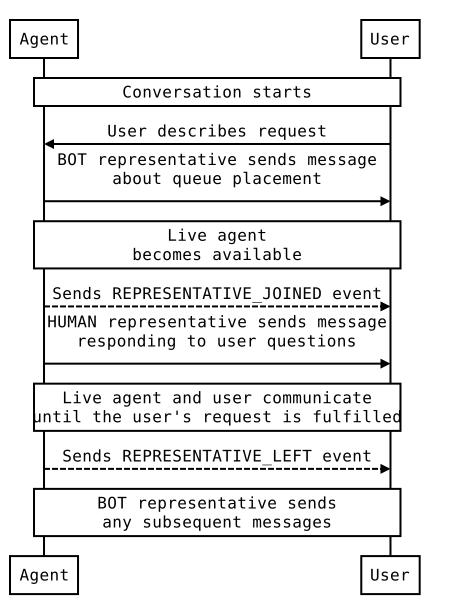
Wskaż HUMAN przedstawiciela tylko wtedy, gdy wiadomość jest tworzona przez pracownika obsługi klienta.
Zanim wyślesz jakiekolwiek wiadomości od HUMAN przedstawiciela, wyślij REPRESENTATIVE_JOINED
zdarzenie, aby poinformować użytkowników, że mogą wysyłać bardziej złożone wiadomości w dowolnym formacie. Po wysłaniu ostatniej wiadomości od HUMAN przedstawiciela wyślij REPRESENTATIVE_LEFT zdarzenie, aby ponownie ustawić oczekiwania użytkownika.
Jeśli na przykład użytkownik rozpocznie rozmowę z Twoim agentem, a Ty wyślesz automatyczną wiadomość, że w ciągu 2 minut skontaktuje się z nim przedstawiciel, ta wiadomość powinna zostać wysłana przez BOT przedstawiciela. Przed dołączeniem agenta na żywo wyślij zdarzenie REPRESENTATIVE_JOINED. Wszystkie wiadomości od pracownika obsługi klienta powinny być oznaczone jako pochodzące od HUMAN przedstawiciela. Gdy pracownik obsługi klienta opuści rozmowę, wyślij zdarzenie REPRESENTATIVE_LEFT. Wszystkie kolejne wiadomości powinny pochodzić od przedstawiciela BOT, chyba że do rozmowy dołączy inny konsultant.
Przykładową rozmowę i kod do przełączania się między przedstawicielami BOT i HUMAN znajdziesz w artykule Przekazywanie rozmowy z bota do przedstawiciela na żywo.
Niezależnie od tego, czy przedstawiciel jest BOT czy HUMAN, możesz określić wyświetlaną nazwę i awatara przedstawiciela. Zarówno nazwy wyświetlane, jak i awatary są widoczne dla użytkowników.
Obrazy awatarów muszą mieć wymiary 1024 x 1024 piksele i rozmiar maksymalnie 50 KB. Muszą być podane jako publicznie dostępne adresy URL. Jeśli nie podasz obrazu awatara, jako awatar przedstawiciela zostanie użyte logo agenta.
Tekst
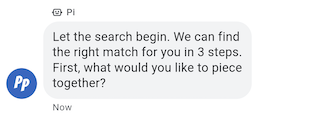
Najprostsze wiadomości składają się z tekstu. Wiadomości tekstowe najlepiej nadają się do przekazywania informacji bez potrzeby używania elementów wizualnych, złożonych interakcji czy odpowiedzi.
Przykład
Poniższy kod wysyła prosty SMS. Informacje referencyjne znajdziesz w sekcji conversations.messages.create.
cURL
# Copyright 2021 Google LLC # # Licensed under the Apache License, Version 2.0 (the "License"); # you may not use this file except in compliance with the License. # You may obtain a copy of the License at # https://www.apache.org/licenses/LICENSE-2.0 # Unless required by applicable law or agreed to in writing, software # distributed under the License is distributed on an "AS IS" BASIS, # WITHOUT WARRANTIES OR CONDITIONS OF ANY KIND, either express or implied. # See the License for the specific language governing permissions and # limitations under the License. # This code sends a text message to the user. # Read more: https://developers.google.com/business-communications/business-messages/guides/how-to/message/send?hl=en#text # Replace the __CONVERSATION_ID__ with a conversation id that you can send messages to # Make sure a service account key file exists at ./service_account_key.json curl -X POST "https://businessmessages.googleapis.com/v1/conversations/__CONVERSATION_ID__/messages" \ -H "Content-Type: application/json" \ -H "User-Agent: curl/business-messages" \ -H "$(oauth2l header --json ./service_account_key.json businessmessages)" \ -d "{ 'messageId': '$(uuidgen)', 'text': 'Hello world!', 'representative': { 'avatarImage': 'https://developers.google.com/identity/images/g-logo.png', 'displayName': 'Chatbot', 'representativeType': 'BOT' } }"
Node.js
/** * This code sends a text message to the user. * Read more: https://developers.google.com/business-communications/business-messages/guides/how-to/message/send?hl=en#text * * This code is based on the https://github.com/google-business-communications/nodejs-businessmessages Node.js * Business Messages client library. */ /** * Edit the values below: */ const PATH_TO_SERVICE_ACCOUNT_KEY = './service_account_key.json'; const CONVERSATION_ID = 'EDIT_HERE'; const businessmessages = require('businessmessages'); const uuidv4 = require('uuid').v4; const {google} = require('googleapis'); // Initialize the Business Messages API const bmApi = new businessmessages.businessmessages_v1.Businessmessages({}); // Set the scope that we need for the Business Messages API const scopes = [ 'https://www.googleapis.com/auth/businessmessages', ]; // Set the private key to the service account file const privatekey = require(PATH_TO_SERVICE_ACCOUNT_KEY); /** * Posts a text message to the Business Messages API. * * @param {string} conversationId The unique id for this user and agent. * @param {string} message The message text to send the user. * @param {string} representativeType A value of BOT or HUMAN. */ async function sendMessage(conversationId, message, representativeType) { const authClient = await initCredentials(); // Create the payload for sending a message const apiParams = { auth: authClient, parent: 'conversations/' + conversationId, resource: { messageId: uuidv4(), representative: { representativeType: representativeType, }, text: message, }, }; // Call the message create function using the // Business Messages client library bmApi.conversations.messages.create(apiParams, {auth: authClient}, (err, response) => { console.log(err); console.log(response); }); } /** * Initializes the Google credentials for calling the * Business Messages API. */ async function initCredentials() { // configure a JWT auth client const authClient = new google.auth.JWT( privatekey.client_email, null, privatekey.private_key, scopes, ); return new Promise(function(resolve, reject) { // authenticate request authClient.authorize(function(err, tokens) { if (err) { reject(false); } else { resolve(authClient); } }); }); } sendMessage(CONVERSATION_ID, 'This is a test message', 'BOT');
Java
import com.google.api.client.googleapis.services.AbstractGoogleClientRequest; import com.google.api.client.http.HttpBackOffUnsuccessfulResponseHandler; import com.google.api.client.http.HttpRequest; import com.google.api.client.googleapis.auth.oauth2.GoogleCredential; import com.google.api.client.googleapis.javanet.GoogleNetHttpTransport; import com.google.api.client.http.HttpTransport; import com.google.api.client.json.jackson2.JacksonFactory; import com.google.api.client.util.ExponentialBackOff; import com.google.api.services.businessmessages.v1.Businessmessages; import com.google.api.services.businessmessages.v1.model.*; import java.io.FileInputStream; import java.util.Arrays; import java.util.UUID; class SendTextMessageSnippet { /** * Initializes credentials used by the Business Messages API. */ private static Businessmessages.Builder getBusinessMessagesBuilder() { Businessmessages.Builder builder = null; try { GoogleCredential credential = GoogleCredential .fromStream(new FileInputStream("PATH_TO_SERVICE_ACCOUNT_KEY")); credential = credential.createScoped(Arrays.asList( "https://www.googleapis.com/auth/businessmessages")); credential.refreshToken(); HttpTransport httpTransport = GoogleNetHttpTransport.newTrustedTransport(); JacksonFactory jsonFactory = JacksonFactory.getDefaultInstance(); // Create instance of the Business Messages API builder = new Businessmessages .Builder(httpTransport, jsonFactory, null) .setApplicationName("Sample Application"); // Set the API credentials and endpoint builder.setHttpRequestInitializer(credential); } catch (Exception e) { e.printStackTrace(); } return builder; } public static void main(String args[]) { try { String conversationId = "CONVERSATION_ID"; // Create client library reference Businessmessages.Builder builder = getBusinessMessagesBuilder(); // Create a basic text message BusinessMessagesMessage message = new BusinessMessagesMessage() .setMessageId(UUID.randomUUID().toString()) .setText("MESSAGE_TEXT") .setRepresentative(new BusinessMessagesRepresentative() .setRepresentativeType("TYPE")); // Create message request Businessmessages.Conversations.Messages.Create messageRequest = builder.build().conversations().messages() .create("conversations/" + conversationId, message); // Setup retries with exponential backoff HttpRequest httpRequest = ((AbstractGoogleClientRequest) messageRequest).buildHttpRequest(); httpRequest.setUnsuccessfulResponseHandler(new HttpBackOffUnsuccessfulResponseHandler( new ExponentialBackOff())); // Execute request httpRequest.execute(); } catch (Exception e) { e.printStackTrace(); } } }
Python
"""This code sends a text message to the user. Read more: https://developers.google.com/business-communications/business-messages/guides/how-to/message/send?hl=en#text This code is based on the https://github.com/google-business-communications/python-businessmessages Python Business Messages client library. """ import uuid from businessmessages import businessmessages_v1_client as bm_client from businessmessages.businessmessages_v1_messages import BusinessmessagesConversationsMessagesCreateRequest from businessmessages.businessmessages_v1_messages import BusinessMessagesMessage from businessmessages.businessmessages_v1_messages import BusinessMessagesRepresentative from oauth2client.service_account import ServiceAccountCredentials # Edit the values below: path_to_service_account_key = './service_account_key.json' conversation_id = 'EDIT_HERE' credentials = ServiceAccountCredentials.from_json_keyfile_name( path_to_service_account_key, scopes=['https://www.googleapis.com/auth/businessmessages']) client = bm_client.BusinessmessagesV1(credentials=credentials) representative_type_as_string = 'BOT' if representative_type_as_string == 'BOT': representative_type = BusinessMessagesRepresentative.RepresentativeTypeValueValuesEnum.BOT else: representative_type = BusinessMessagesRepresentative.RepresentativeTypeValueValuesEnum.HUMAN # Create a text message message = BusinessMessagesMessage( messageId=str(uuid.uuid4().int), representative=BusinessMessagesRepresentative( representativeType=representative_type ), text='This is a sample text') # Create the message request create_request = BusinessmessagesConversationsMessagesCreateRequest( businessMessagesMessage=message, parent='conversations/' + conversation_id) # Send the message bm_client.BusinessmessagesV1.ConversationsMessagesService( client=client).Create(request=create_request)
Tekst sformatowany
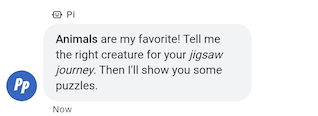
SMS-y z ustawieniem containsRichText na true mogą zawierać podstawowe formatowanie Markdown. Możesz dodawać hiperlinki oraz stosować pogrubienie lub kursywę. W tabeli znajdziesz kilka prawidłowych przykładów:
| Format | Znaki | Zwykły tekst | Wyrenderowany tekst |
|---|---|---|---|
| Pogrubienie | ** |
**Some text** |
Some text |
| Kursywa | * |
*Some text* |
Some text |
| Hiperlink | []() |
[Click here](https://www.example.com) |
Kliknij tutaj |
| Podział wiersza | \n
|
Line one\nLine two
|
Wiersz 1 Wiersz 2 |
Formatowanie musi być zgodne z dodatkowymi regułami:
- Wszystkie linki muszą zaczynać się od
https://lubhttp:// - Różne typy formatowania mogą być zagnieżdżone, ale nie mogą się nakładać.
- Znaki podziału wiersza
\nsą dozwolone w dowolnym miejscu wiadomości, ale znaki podziału wiersza na końcu wiadomości nie są wyświetlane. - Aby wyświetlić dowolny znak zastrzeżony (
*,\,[lub]), musisz poprzedzić go znakiem ukośnika odwrotnego (\).
Wiadomości o nieprawidłowym formacie nie zostaną wysłane i pojawi się komunikat o błędzie dotyczący nieprawidłowego formatu Markdown. W tabeli znajdziesz więcej prawidłowych i nieprawidłowych przykładów zgodnych z powyższymi regułami:
| Zwykły tekst | Ważność | Wyrenderowany tekst |
|---|---|---|
[Click here](www.example.com) |
Nieprawidłowe. Link nie zaczyna się od http:// lub https:// |
Nie renderuje się. |
[**Click here**](https://www.example.com) |
Prawidłowe. Zagnieżdżanie jest dozwolone. | Kliknij tutaj |
**This is [not** valid](https://www.example.com) |
Nieprawidłowe. Nakładające się formatowanie jest niedozwolone. | Nie renderuje się. |
** Some bold text ** |
Nieprawidłowe. W elemencie ** nie można używać spacji na końcu. |
Nie renderuje się. |
Citation below\* |
Prawidłowe. Znak * jest poprzedzony znakiem zmiany znaczenia. |
Cytat poniżej* |
Przykład
Poniższy kod wysyła wiadomość w formacie RTF. Informacje referencyjne znajdziesz w sekcji conversations.messages.create.
cURL
# Copyright 2021 Google LLC # # Licensed under the Apache License, Version 2.0 (the "License"); # you may not use this file except in compliance with the License. # You may obtain a copy of the License at # https://www.apache.org/licenses/LICENSE-2.0 # Unless required by applicable law or agreed to in writing, software # distributed under the License is distributed on an "AS IS" BASIS, # WITHOUT WARRANTIES OR CONDITIONS OF ANY KIND, either express or implied. # See the License for the specific language governing permissions and # limitations under the License. # This code sends a rich text to the user with a fallback text. # Read more: https://developers.google.com/business-communications/business-messages/guides/how-to/message/send?hl=en#rich_text # Replace the __CONVERSATION_ID__ with a conversation id that you can send messages to # Make sure a service account key file exists at ./service_account_key.json curl -X POST "https://businessmessages.googleapis.com/v1/conversations/__CONVERSATION_ID__/messages" \ -H "Content-Type: application/json" \ -H "User-Agent: curl/business-messages" \ -H "$(oauth2l header --json ./service_account_key.json businessmessages)" \ -d "{ 'messageId': '$(uuidgen)', 'fallback': 'Hello, check out this link https://www.google.com.', 'text': 'Hello, here is some **bold text**, *italicized text*, and a [link](https://www.google.com).', 'containsRichText': 'true', 'representative': { 'avatarImage': 'https://developers.google.com/identity/images/g-logo.png', 'displayName': 'Chatbot', 'representativeType': 'BOT' } }"
Node.js
/** * This code sends a rich text to the user with a fallback text. * Read more: https://developers.google.com/business-communications/business-messages/guides/how-to/message/send?hl=en#rich_text * * This code is based on the https://github.com/google-business-communications/nodejs-businessmessages Node.js * Business Messages client library. */ /** * Edit the values below: */ const PATH_TO_SERVICE_ACCOUNT_KEY = './service_account_key.json'; const CONVERSATION_ID = 'EDIT_HERE'; const businessmessages = require('businessmessages'); const uuidv4 = require('uuid').v4; const {google} = require('googleapis'); // Initialize the Business Messages API const bmApi = new businessmessages.businessmessages_v1.Businessmessages({}); // Set the scope that we need for the Business Messages API const scopes = [ 'https://www.googleapis.com/auth/businessmessages', ]; // Set the private key to the service account file const privatekey = require(PATH_TO_SERVICE_ACCOUNT_KEY); /** * Posts a rich text message using markdown to the Business Messages API. * * @param {string} conversationId The unique id for this user and agent. * @param {string} representativeType A value of BOT or HUMAN. */ async function sendMessage(conversationId, message, representativeType) { const authClient = await initCredentials(); // Create the payload for sending a rich text message const apiParams = { auth: authClient, parent: 'conversations/' + conversationId, resource: { messageId: uuidv4(), representative: { representativeType: representativeType, }, containsRichText: true, // Force this message to be processed as rich text text: 'Hello, here is some **bold text**, *italicized text*, and a [link](https://www.google.com).', fallback: 'Hello, check out this link https://www.google.com.' }, }; // Call the message create function using the // Business Messages client library bmApi.conversations.messages.create(apiParams, {auth: authClient}, (err, response) => { console.log(err); console.log(response); }); } /** * Initializes the Google credentials for calling the * Business Messages API. */ async function initCredentials() { // configure a JWT auth client const authClient = new google.auth.JWT( privatekey.client_email, null, privatekey.private_key, scopes, ); return new Promise(function(resolve, reject) { // authenticate request authClient.authorize(function(err, tokens) { if (err) { reject(false); } else { resolve(authClient); } }); }); } sendMessage(CONVERSATION_ID, 'BOT');
Java
import com.google.api.client.googleapis.services.AbstractGoogleClientRequest; import com.google.api.client.http.HttpBackOffUnsuccessfulResponseHandler; import com.google.api.client.http.HttpRequest; import com.google.api.client.googleapis.auth.oauth2.GoogleCredential; import com.google.api.client.googleapis.javanet.GoogleNetHttpTransport; import com.google.api.client.http.HttpTransport; import com.google.api.client.json.jackson2.JacksonFactory; import com.google.api.client.util.ExponentialBackOff; import com.google.api.services.businessmessages.v1.Businessmessages; import com.google.api.services.businessmessages.v1.model.*; import java.io.FileInputStream; import java.util.Arrays; import java.util.UUID; class SendRichTextMessageSnippet { /** * Initializes credentials used by the Business Messages API. */ private static Businessmessages.Builder getBusinessMessagesBuilder() { Businessmessages.Builder builder = null; try { GoogleCredential credential = GoogleCredential .fromStream(new FileInputStream("PATH_TO_SERVICE_ACCOUNT_KEY")); credential = credential.createScoped(Arrays.asList( "https://www.googleapis.com/auth/businessmessages")); credential.refreshToken(); HttpTransport httpTransport = GoogleNetHttpTransport.newTrustedTransport(); JacksonFactory jsonFactory = JacksonFactory.getDefaultInstance(); // Create instance of the Business Messages API builder = new Businessmessages .Builder(httpTransport, jsonFactory, null) .setApplicationName("Sample Application"); // Set the API credentials and endpoint builder.setHttpRequestInitializer(credential); } catch (Exception e) { e.printStackTrace(); } return builder; } public static void main(String args[]) { try { String conversationId = "CONVERSATION_ID"; // Create client library reference Businessmessages.Builder builder = getBusinessMessagesBuilder(); // Create a rich text message BusinessMessagesMessage message = new BusinessMessagesMessage() .setMessageId(UUID.randomUUID().toString()) .setContainsRichText(true) // Force this message to be processed as rich text .setText("Hello, here is some **bold text**, *italicized text*, and a [link](https://www.google.com).") .setFallback("Hello, check out this link https://www.google.com.") .setRepresentative(new BusinessMessagesRepresentative() .setRepresentativeType("TYPE")); // Create message request Businessmessages.Conversations.Messages.Create messageRequest = builder.build().conversations().messages() .create("conversations/" + conversationId, message); // Setup retries with exponential backoff HttpRequest httpRequest = ((AbstractGoogleClientRequest) messageRequest).buildHttpRequest(); httpRequest.setUnsuccessfulResponseHandler(new HttpBackOffUnsuccessfulResponseHandler( new ExponentialBackOff())); // Execute request httpRequest.execute(); } catch (Exception e) { e.printStackTrace(); } } }
Python
"""This code sends a rich text to the user with a fallback text. Read more: https://developers.google.com/business-communications/business-messages/guides/how-to/message/send?hl=en#rich_text This code is based on the https://github.com/google-business-communications/python-businessmessages Python Business Messages client library. """ import uuid from businessmessages import businessmessages_v1_client as bm_client from businessmessages.businessmessages_v1_messages import BusinessmessagesConversationsMessagesCreateRequest from businessmessages.businessmessages_v1_messages import BusinessMessagesMessage from businessmessages.businessmessages_v1_messages import BusinessMessagesRepresentative from oauth2client.service_account import ServiceAccountCredentials # Edit the values below: path_to_service_account_key = './service_account_key.json' conversation_id = 'EDIT_HERE' credentials = ServiceAccountCredentials.from_json_keyfile_name( path_to_service_account_key, scopes=['https://www.googleapis.com/auth/businessmessages']) client = bm_client.BusinessmessagesV1(credentials=credentials) representative_type_as_string = 'BOT' if representative_type_as_string == 'BOT': representative_type = BusinessMessagesRepresentative.RepresentativeTypeValueValuesEnum.BOT else: representative_type = BusinessMessagesRepresentative.RepresentativeTypeValueValuesEnum.HUMAN # Create a rich text message with fallback text message = BusinessMessagesMessage( messageId=str(uuid.uuid4().int), fallback='Hello, check out this link https://www.google.com.', containsRichText=True, # Force this message to be processed as rich text representative=BusinessMessagesRepresentative( representativeType=representative_type ), text='Hello, here is some **bold text**, *italicized text*, and a [link](https://www.google.com).') # Create the message request create_request = BusinessmessagesConversationsMessagesCreateRequest( businessMessagesMessage=message, parent='conversations/' + conversation_id) # Send the message bm_client.BusinessmessagesV1.ConversationsMessagesService( client=client).Create(request=create_request)
Obrazy
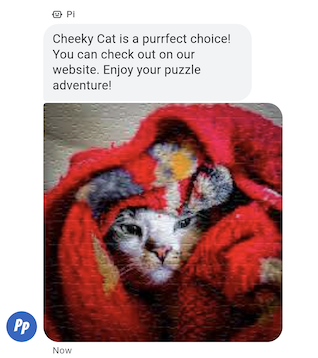
Wysyłanie obrazu do użytkownika w wiadomości.
Możesz wysłać wiadomość o obrazie, która zawiera adresy URL obrazu i miniatury obrazu.
Przykład
Poniższy kod wysyła obraz. Opcje formatowania i wartości znajdziesz w sekcjach conversations.messages.create i Image.
cURL
# Copyright 2021 Google LLC # # Licensed under the Apache License, Version 2.0 (the "License"); # you may not use this file except in compliance with the License. # You may obtain a copy of the License at # https://www.apache.org/licenses/LICENSE-2.0 # Unless required by applicable law or agreed to in writing, software # distributed under the License is distributed on an "AS IS" BASIS, # WITHOUT WARRANTIES OR CONDITIONS OF ANY KIND, either express or implied. # See the License for the specific language governing permissions and # limitations under the License. # This code sends an image to the user with a fallback text. # Read more: https://developers.google.com/business-communications/business-messages/guides/how-to/message/send?hl=en#images # Replace the __CONVERSATION_ID__ with a conversation id that you can send messages to # Make sure a service account key file exists at ./service_account_key.json curl -X POST "https://businessmessages.googleapis.com/v1/conversations/__CONVERSATION_ID__/messages" \ -H "Content-Type: application/json" \ -H "User-Agent: curl/business-messages" \ -H "$(oauth2l header --json ./service_account_key.json businessmessages)" \ -d "{ 'messageId': '$(uuidgen)', 'representative': { 'avatarImage': 'https://developers.google.com/identity/images/g-logo.png', 'displayName': 'Chatbot', 'representativeType': 'BOT' }, 'fallback': 'Hello, world!\nAn image has been sent with Business Messages.', 'image': { 'contentInfo':{ 'altText': 'Image alternative text', 'fileUrl': 'https://storage.googleapis.com/kitchen-sink-sample-images/cute-dog.jpg', 'forceRefresh': 'false' } }, }"
Node.js
/** * This code sends an image to the user with a fallback text. * Read more: https://developers.google.com/business-communications/business-messages/guides/how-to/message/send?hl=en#images * * This code is based on the https://github.com/google-business-communications/nodejs-businessmessages Node.js * Business Messages client library. */ /** * Edit the values below: */ const PATH_TO_SERVICE_ACCOUNT_KEY = './service_account_key.json'; const CONVERSATION_ID = 'EDIT_HERE'; const businessmessages = require('businessmessages'); const uuidv4 = require('uuid').v4; const {google} = require('googleapis'); // Initialize the Business Messages API const bmApi = new businessmessages.businessmessages_v1.Businessmessages({}); // Set the scope that we need for the Business Messages API const scopes = [ 'https://www.googleapis.com/auth/businessmessages', ]; // Set the private key to the service account file const privatekey = require(PATH_TO_SERVICE_ACCOUNT_KEY); /** * Posts an image message to the Business Messages API. * * @param {string} conversationId The unique id for this user and agent. * @param {string} representativeType A value of BOT or HUMAN. */ async function sendMessage(conversationId, representativeType) { const authClient = await initCredentials(); if (authClient) { // Create the payload for sending an image message const apiParams = { auth: authClient, parent: 'conversations/' + conversationId, resource: { messageId: uuidv4(), representative: { representativeType: representativeType, }, fallback: 'Hello, world!\n An image has been sent with Business Messages.', image: { contentInfo: { altText: 'Some alternative text', fileUrl: 'https://www.google.com/images/branding/googlelogo/2x/googlelogo_color_272x92dp.png', forceRefresh: true, }, }, }, }; // Call the message create function using the // Business Messages client library bmApi.conversations.messages.create(apiParams, {auth: authClient}, (err, response) => { console.log(err); console.log(response); }); } else { console.log('Authentication failure.'); } } /** * Initializes the Google credentials for calling the * Business Messages API. */ async function initCredentials() { // configure a JWT auth client const authClient = new google.auth.JWT( privatekey.client_email, null, privatekey.private_key, scopes, ); return new Promise(function(resolve, reject) { // authenticate request authClient.authorize(function(err, tokens) { if (err) { reject(false); } else { resolve(authClient); } }); }); } sendMessage(CONVERSATION_ID, 'BOT');
Java
import com.google.api.client.googleapis.services.AbstractGoogleClientRequest; import com.google.api.client.http.HttpBackOffUnsuccessfulResponseHandler; import com.google.api.client.http.HttpRequest; import com.google.api.client.googleapis.auth.oauth2.GoogleCredential; import com.google.api.client.googleapis.javanet.GoogleNetHttpTransport; import com.google.api.client.http.HttpTransport; import com.google.api.client.json.jackson2.JacksonFactory; import com.google.api.client.util.ExponentialBackOff; import com.google.api.services.businessmessages.v1.Businessmessages; import com.google.api.services.businessmessages.v1.model.*; import com.google.communications.businessmessages.v1.MediaHeight; import java.io.FileInputStream; import java.util.Arrays; import java.util.UUID; class SendImageMessageSnippet { /** * Initializes credentials used by the Business Messages API. */ private static Businessmessages.Builder getBusinessMessagesBuilder() { Businessmessages.Builder builder = null; try { GoogleCredential credential = GoogleCredential .fromStream(new FileInputStream("PATH_TO_SERVICE_ACCOUNT_KEY")); credential = credential.createScoped(Arrays.asList( "https://www.googleapis.com/auth/businessmessages")); credential.refreshToken(); HttpTransport httpTransport = GoogleNetHttpTransport.newTrustedTransport(); JacksonFactory jsonFactory = JacksonFactory.getDefaultInstance(); // Create instance of the Business Messages API builder = new Businessmessages .Builder(httpTransport, jsonFactory, null) .setApplicationName("Sample Application"); // Set the API credentials and endpoint builder.setHttpRequestInitializer(credential); } catch (Exception e) { e.printStackTrace(); } return builder; } public static void main(String args[]) { try { String conversationId = "CONVERSATION_ID"; // Create client library reference Businessmessages.Builder builder = getBusinessMessagesBuilder(); // Create an Image BusinessMessagesMessage message = new BusinessMessagesMessage() .setMessageId(UUID.randomUUID().toString()) .setRepresentative(representative) .setImage(new BusinessMessagesImage() .setContentInfo( new BusinessMessagesContentInfo() .setFileUrl("FILE_URL") .setAltText("ALT_TEXT") .setForceRefresh("FORCE_REFRESH") )); // Create message request Businessmessages.Conversations.Messages.Create messageRequest = builder.build().conversations().messages() .create("conversations/" + conversationId, message); // Setup retries with exponential backoff HttpRequest httpRequest = ((AbstractGoogleClientRequest) messageRequest).buildHttpRequest(); httpRequest.setUnsuccessfulResponseHandler(new HttpBackOffUnsuccessfulResponseHandler( new ExponentialBackOff())); // Execute request httpRequest.execute(); } catch (Exception e) { e.printStackTrace(); } } }
Python
"""This code sends an image to the user with a fallback text. Read more: https://developers.google.com/business-communications/business-messages/guides/how-to/message/send?hl=en#images This code is based on the https://github.com/google-business-communications/python-businessmessages Python Business Messages client library. """ import uuid from businessmessages import businessmessages_v1_client as bm_client from businessmessages.businessmessages_v1_messages import BusinessMessagesContentInfo from businessmessages.businessmessages_v1_messages import BusinessmessagesConversationsMessagesCreateRequest from businessmessages.businessmessages_v1_messages import BusinessMessagesImage from businessmessages.businessmessages_v1_messages import BusinessMessagesMessage from businessmessages.businessmessages_v1_messages import BusinessMessagesRepresentative from oauth2client.service_account import ServiceAccountCredentials # Edit the values below: path_to_service_account_key = './service_account_key.json' conversation_id = 'EDIT_HERE' image_file_url = 'EDIT_HERE' credentials = ServiceAccountCredentials.from_json_keyfile_name( path_to_service_account_key, scopes=['https://www.googleapis.com/auth/businessmessages']) client = bm_client.BusinessmessagesV1(credentials=credentials) representative_type_as_string = 'BOT' if representative_type_as_string == 'BOT': representative_type = BusinessMessagesRepresentative.RepresentativeTypeValueValuesEnum.BOT else: representative_type = BusinessMessagesRepresentative.RepresentativeTypeValueValuesEnum.HUMAN # Create an image message with fallback text message = BusinessMessagesMessage( messageId=str(uuid.uuid4().int), representative=BusinessMessagesRepresentative( representativeType=representative_type ), fallback='Hello, world!\nAn image has been sent with Business Messages.', image=BusinessMessagesImage( contentInfo=BusinessMessagesContentInfo( altText='Alternative text', fileUrl=image_file_url, forceRefresh=True ) )) # Create the message request create_request = BusinessmessagesConversationsMessagesCreateRequest( businessMessagesMessage=message, parent='conversations/' + conversation_id) # Send the message bm_client.BusinessmessagesV1.ConversationsMessagesService( client=client).Create(request=create_request)
Sugerowane odpowiedzi
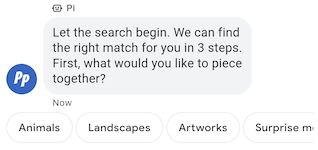
Sugerowane odpowiedzi prowadzą użytkowników przez rozmowy, ponieważ zawierają reakcje, na które Twój agent wie, jak odpowiedzieć.
Gdy użytkownik kliknie sugerowaną odpowiedź, Twój agent otrzyma wiadomość zawierającą tekst odpowiedzi i dane zwrotne.
Sugerowane odpowiedzi mogą mieć maksymalnie 25 znaków, a wiadomość może zawierać maksymalnie 13 sugestii.
Przykład
Poniższy kod wysyła tekst z 2 sugerowanymi odpowiedziami. Opcje formatowania i wartości znajdziesz w sekcjach conversations.messages.create i SuggestedReply.
cURL
# Copyright 2021 Google LLC # # Licensed under the Apache License, Version 2.0 (the "License"); # you may not use this file except in compliance with the License. # You may obtain a copy of the License at # https://www.apache.org/licenses/LICENSE-2.0 # Unless required by applicable law or agreed to in writing, software # distributed under the License is distributed on an "AS IS" BASIS, # WITHOUT WARRANTIES OR CONDITIONS OF ANY KIND, either express or implied. # See the License for the specific language governing permissions and # limitations under the License. # This code sends a text mesage to the user with suggested replies. # Read more: https://developers.google.com/business-communications/business-messages/guides/how-to/message/send?hl=en#suggested_replies # Replace the __CONVERSATION_ID__ with a conversation id that you can send messages to # Make sure a service account key file exists at ./service_account_key.json curl -X POST "https://businessmessages.googleapis.com/v1/conversations/__CONVERSATION_ID__/messages" \ -H "Content-Type: application/json" \ -H "User-Agent: curl/business-messages" \ -H "$(oauth2l header --json ./service_account_key.json businessmessages)" \ -d "{ 'messageId': '$(uuidgen)', 'text': 'Hello, world!', 'fallback': 'Hello, world!\n\nReply with \"Hello\" or \"Hi!\"', 'suggestions': [ { 'reply': { 'text': 'Hello', 'postbackData': 'hello-formal', }, }, { 'reply': { 'text': 'Hi!', 'postbackData': 'hello-informal', }, }, ], 'representative': { 'avatarImage': 'https://developers.google.com/identity/images/g-logo.png', 'displayName': 'Chatbot', 'representativeType': 'BOT' }, }"
Node.js
/** * This code sends a text mesage to the user with suggested replies. * Read more: https://developers.google.com/business-communications/business-messages/guides/how-to/message/send?hl=en#suggested_replies * * This code is based on the https://github.com/google-business-communications/nodejs-businessmessages Node.js * Business Messages client library. */ /** * Edit the values below: */ const PATH_TO_SERVICE_ACCOUNT_KEY = './service_account_key.json'; const CONVERSATION_ID = 'EDIT_HERE'; const businessmessages = require('businessmessages'); const uuidv4 = require('uuid').v4; const {google} = require('googleapis'); // Initialize the Business Messages API const bmApi = new businessmessages.businessmessages_v1.Businessmessages({}); // Set the scope that we need for the Business Messages API const scopes = [ 'https://www.googleapis.com/auth/businessmessages', ]; // Set the private key to the service account file const privatekey = require(PATH_TO_SERVICE_ACCOUNT_KEY); /** * Posts a message of "Hello, world!" to the Business Messages API along with two suggested replies. * * @param {string} conversationId The unique id for this user and agent. * @param {string} representativeType A value of BOT or HUMAN. */ async function sendMessage(conversationId, representativeType) { const authClient = await initCredentials(); // Create a text message with two suggested replies const apiParams = { auth: authClient, parent: 'conversations/' + conversationId, resource: { messageId: uuidv4(), representative: { representativeType: representativeType, }, fallback: 'Hello, world!\n\nReply with "Hello" or "Hi!"', text: 'Hello, world!', suggestions: [ { reply: { text: 'Hello', postbackData: 'hello-formal', }, }, { reply: { text: 'Hello', postbackData: 'hello-informal', }, }, ], }, }; // Call the message create function using the // Business Messages client library bmApi.conversations.messages.create(apiParams, {auth: authClient}, (err, response) => { console.log(err); console.log(response); }); } /** * Initializes the Google credentials for calling the * Business Messages API. */ async function initCredentials() { // configure a JWT auth client const authClient = new google.auth.JWT( privatekey.client_email, null, privatekey.private_key, scopes, ); return new Promise(function(resolve, reject) { // authenticate request authClient.authorize(function(err, tokens) { if (err) { reject(false); } else { resolve(authClient); } }); }); } sendMessage(CONVERSATION_ID, 'BOT');
Java
import com.google.api.client.googleapis.services.AbstractGoogleClientRequest; import com.google.api.client.http.HttpBackOffUnsuccessfulResponseHandler; import com.google.api.client.http.HttpRequest; import com.google.api.client.googleapis.auth.oauth2.GoogleCredential; import com.google.api.client.googleapis.javanet.GoogleNetHttpTransport; import com.google.api.client.http.HttpTransport; import com.google.api.client.json.jackson2.JacksonFactory; import com.google.api.client.util.ExponentialBackOff; import com.google.api.services.businessmessages.v1.Businessmessages; import com.google.api.services.businessmessages.v1.model.*; import java.io.FileInputStream; import java.util.Arrays; import java.util.UUID; class SendSuggestedReplySnippet { /** * Initializes credentials used by the Business Messages API. */ private static Businessmessages.Builder getBusinessMessagesBuilder() { Businessmessages.Builder builder = null; try { GoogleCredential credential = GoogleCredential .fromStream(new FileInputStream("PATH_TO_SERVICE_ACCOUNT_KEY")); credential = credential.createScoped(Arrays.asList( "https://www.googleapis.com/auth/businessmessages")); credential.refreshToken(); HttpTransport httpTransport = GoogleNetHttpTransport.newTrustedTransport(); JacksonFactory jsonFactory = JacksonFactory.getDefaultInstance(); // Create instance of the Business Messages API builder = new Businessmessages .Builder(httpTransport, jsonFactory, null) .setApplicationName("Sample Application"); // Set the API credentials and endpoint builder.setHttpRequestInitializer(credential); } catch (Exception e) { e.printStackTrace(); } return builder; } public static void main(String args[]) { try { String conversationId = "CONVERSATION_ID"; // Create client library reference Businessmessages.Builder builder = getBusinessMessagesBuilder(); // Create a text message with two suggested replies BusinessMessagesMessage message = new BusinessMessagesMessage() .setMessageId(UUID.randomUUID().toString()) .setText("Hello, world!") .setFallback("Hello, world!\n\nReply with \"Hello\" or \"Hi!\"") .setSuggestions(Arrays.asList( new BusinessMessagesSuggestion() .setReply(new BusinessMessagesSuggestedReply() .setText("Hello").setPostbackData("hello-formal") ), new BusinessMessagesSuggestion() .setReply(new BusinessMessagesSuggestedReply() .setText("Hi!").setPostbackData("hello-informal") )) ) .setRepresentative(new BusinessMessagesRepresentative() .setRepresentativeType("TYPE")); // Create message request Businessmessages.Conversations.Messages.Create messageRequest = builder.build().conversations().messages() .create("conversations/" + conversationId, message); // Setup retries with exponential backoff HttpRequest httpRequest = ((AbstractGoogleClientRequest) messageRequest).buildHttpRequest(); httpRequest.setUnsuccessfulResponseHandler(new HttpBackOffUnsuccessfulResponseHandler( new ExponentialBackOff())); // Execute request httpRequest.execute(); } catch (Exception e) { e.printStackTrace(); } } }
Python
"""This code sends a text mesage to the user with suggested replies. Read more: https://developers.google.com/business-communications/business-messages/guides/how-to/message/send?hl=en#suggested_replies This code is based on the https://github.com/google-business-communications/python-businessmessages Python Business Messages client library. """ import uuid from businessmessages import businessmessages_v1_client as bm_client from businessmessages.businessmessages_v1_messages import BusinessmessagesConversationsMessagesCreateRequest from businessmessages.businessmessages_v1_messages import BusinessMessagesMessage from businessmessages.businessmessages_v1_messages import BusinessMessagesRepresentative from businessmessages.businessmessages_v1_messages import BusinessMessagesSuggestedReply from businessmessages.businessmessages_v1_messages import BusinessMessagesSuggestion from oauth2client.service_account import ServiceAccountCredentials # Edit the values below: path_to_service_account_key = './service_account_key.json' conversation_id = 'EDIT_HERE' credentials = ServiceAccountCredentials.from_json_keyfile_name( path_to_service_account_key, scopes=['https://www.googleapis.com/auth/businessmessages']) client = bm_client.BusinessmessagesV1(credentials=credentials) representative_type_as_string = 'BOT' if representative_type_as_string == 'BOT': representative_type = BusinessMessagesRepresentative.RepresentativeTypeValueValuesEnum.BOT else: representative_type = BusinessMessagesRepresentative.RepresentativeTypeValueValuesEnum.HUMAN # Create a text message with two suggested replies and fallback text message = BusinessMessagesMessage( messageId=str(uuid.uuid4().int), representative=BusinessMessagesRepresentative( representativeType=representative_type ), text='Hello, world!', fallback='Hello, world!\n\nReply with \"Hello\" or \"Hi!\"', suggestions=[ BusinessMessagesSuggestion( reply=BusinessMessagesSuggestedReply( text='Hello', postbackData='hello-formal') ), BusinessMessagesSuggestion( reply=BusinessMessagesSuggestedReply( text='Hi!', postbackData='hello-informal') ) ]) # Create the message request create_request = BusinessmessagesConversationsMessagesCreateRequest( businessMessagesMessage=message, parent='conversations/' + conversation_id) # Send the message bm_client.BusinessmessagesV1.ConversationsMessagesService( client=client).Create(request=create_request)
Sugerowane działania
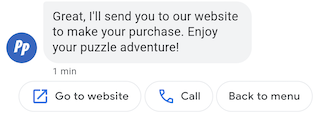
Sugerowane działania prowadzą użytkowników przez rozmowy, wykorzystując natywną funkcjonalność ich urządzeń. Gdy użytkownik kliknie sugerowane działanie, Twój agent otrzyma wiadomość zawierającą tekst działania i dane zwrotne.
Sugerowane działania mogą mieć maksymalnie 25 znaków, a wiadomość może zawierać maksymalnie 13 sugestii.
Opcje formatowania i wartości znajdziesz w sekcjach
conversations.messages.create
i
SuggestedAction.
Otwórz działanie URL
Dzięki działaniu Otwórz adres URL agent sugeruje użytkownikowi adres URL do otwarcia. Jeśli aplikacja jest zarejestrowana jako domyślna aplikacja do obsługi adresu URL, otworzy się ona, a ikoną działania będzie ikona aplikacji. Działania „Otwórz adres URL” obsługują tylko adresy URL z protokołami HTTP i HTTPS. Inne protokoły (np. mailto) nie są obsługiwane.
Poniższy kod wysyła tekst z działaniem Otwórz URL. Opcje formatowania i wartości znajdziesz w sekcji OpenUrlAction.
cURL
# Copyright 2021 Google LLC # # Licensed under the Apache License, Version 2.0 (the "License"); # you may not use this file except in compliance with the License. # You may obtain a copy of the License at # https://www.apache.org/licenses/LICENSE-2.0 # Unless required by applicable law or agreed to in writing, software # distributed under the License is distributed on an "AS IS" BASIS, # WITHOUT WARRANTIES OR CONDITIONS OF ANY KIND, either express or implied. # See the License for the specific language governing permissions and # limitations under the License. # This code sends a text mesage to the user with a suggestion action toopen a URL # and a fallback text. # Read more: https://developers.google.com/business-communications/business-messages/guides/how-to/message/send?hl=en#open_url_action # Replace the __CONVERSATION_ID__ with a conversation id that you can send messages to # Make sure a service account key file exists at ./service_account_key.json curl -X POST "https://businessmessages.googleapis.com/v1/conversations/__CONVERSATION_ID__/messages" \ -H "Content-Type: application/json" \ -H "User-Agent: curl/business-messages" \ -H "$(oauth2l header --json ./service_account_key.json businessmessages)" \ -d "{ 'messageId': '$(uuidgen)', 'text': 'Hello world!', 'fallback': 'Hello, world!\n\nSay \"Hello\" at https://www.growingtreebank.com', 'suggestions': [ { 'action': { 'text': 'Hello', 'postbackData': 'hello-formal', 'openUrlAction': { 'url': 'https://www.growingtreebank.com', } }, }, ], 'representative': { 'avatarImage': 'https://developers.google.com/identity/images/g-logo.png', 'displayName': 'Chatbot', 'representativeType': 'BOT' }, }"
Node.js
/** * This code sends a text mesage to the user with a suggestion action toopen a URL * and a fallback text. * Read more: https://developers.google.com/business-communications/business-messages/guides/how-to/message/send?hl=en#open_url_action * * This code is based on the https://github.com/google-business-communications/nodejs-businessmessages Node.js * Business Messages client library. */ /** * Edit the values below: */ const PATH_TO_SERVICE_ACCOUNT_KEY = './service_account_key.json'; const CONVERSATION_ID = 'EDIT_HERE'; const businessmessages = require('businessmessages'); const uuidv4 = require('uuid').v4; const {google} = require('googleapis'); // Initialize the Business Messages API const bmApi = new businessmessages.businessmessages_v1.Businessmessages({}); // Set the scope that we need for the Business Messages API const scopes = [ 'https://www.googleapis.com/auth/businessmessages', ]; // Set the private key to the service account file const privatekey = require(PATH_TO_SERVICE_ACCOUNT_KEY); /** * Posts a message with an open URL action to the Business Messages API. * * @param {string} conversationId The unique id for this user and agent. * @param {string} representativeType A value of BOT or HUMAN. */ async function sendMessage(conversationId, representativeType) { const authClient = await initCredentials(); if (authClient) { // Create the payload for sending a message along with an open url action const apiParams = { auth: authClient, parent: 'conversations/' + conversationId, resource: { messageId: uuidv4(), representative: { representativeType: representativeType, }, fallback: 'Hello, world!\n\nSay \"Hello\" at https://www.growingtreebank.com', text: 'Hello world!', suggestions: [ { action: { text: 'Hello', postbackData: 'hello-formal', openUrlAction: { url: 'https://www.growingtreebank.com', }, }, }, ], }, }; // Call the message create function using the // Business Messages client library bmApi.conversations.messages.create(apiParams, {auth: authClient}, (err, response) => { console.log(err); console.log(response); }); } else { console.log('Authentication failure.'); } } /** * Initializes the Google credentials for calling the * Business Messages API. */ async function initCredentials() { // configure a JWT auth client const authClient = new google.auth.JWT( privatekey.client_email, null, privatekey.private_key, scopes, ); return new Promise(function(resolve, reject) { // authenticate request authClient.authorize(function(err, tokens) { if (err) { reject(false); } else { resolve(authClient); } }); }); } sendMessage(CONVERSATION_ID, 'BOT');
Java
import com.google.api.client.googleapis.services.AbstractGoogleClientRequest; import com.google.api.client.http.HttpBackOffUnsuccessfulResponseHandler; import com.google.api.client.http.HttpRequest; import com.google.api.client.googleapis.auth.oauth2.GoogleCredential; import com.google.api.client.googleapis.javanet.GoogleNetHttpTransport; import com.google.api.client.http.HttpTransport; import com.google.api.client.json.jackson2.JacksonFactory; import com.google.api.client.util.ExponentialBackOff; import com.google.api.services.businessmessages.v1.Businessmessages; import com.google.api.services.businessmessages.v1.model.*; import java.io.FileInputStream; import java.util.Arrays; import java.util.UUID; class SendSuggestedActionSnippet { /** * Initializes credentials used by the Business Messages API. */ private static Businessmessages.Builder getBusinessMessagesBuilder() { Businessmessages.Builder builder = null; try { GoogleCredential credential = GoogleCredential .fromStream(new FileInputStream("PATH_TO_SERVICE_ACCOUNT_KEY")); credential = credential.createScoped(Arrays.asList( "https://www.googleapis.com/auth/businessmessages")); credential.refreshToken(); HttpTransport httpTransport = GoogleNetHttpTransport.newTrustedTransport(); JacksonFactory jsonFactory = JacksonFactory.getDefaultInstance(); // Create instance of the Business Messages API builder = new Businessmessages .Builder(httpTransport, jsonFactory, null) .setApplicationName("Sample Application"); // Set the API credentials and endpoint builder.setHttpRequestInitializer(credential); } catch (Exception e) { e.printStackTrace(); } return builder; } public static void main(String args[]) { try { String conversationId = "CONVERSATION_ID"; // Create client library reference Businessmessages.Builder builder = getBusinessMessagesBuilder(); // Create a text message with an open url action BusinessMessagesMessage message = new BusinessMessagesMessage() .setMessageId(UUID.randomUUID().toString()) .setText("Hello world!") .setFallback("Hello, world!\n\nSay \"Hello\" at https://www.growingtreebank.com") .setSuggestions(Arrays.asList(new BusinessMessagesSuggestion() .setAction(new BusinessMessagesSuggestedAction() .setText("Hello").setPostbackData("hello-formal") .setOpenUrlAction( new BusinessMessagesOpenUrlAction().setUrl("https://www.growingtreebank.com")) )) ) .setRepresentative(new BusinessMessagesRepresentative() .setRepresentativeType("TYPE")); // Create message request Businessmessages.Conversations.Messages.Create messageRequest = builder.build().conversations().messages() .create("conversations/" + conversationId, message); // Setup retries with exponential backoff HttpRequest httpRequest = ((AbstractGoogleClientRequest) messageRequest).buildHttpRequest(); httpRequest.setUnsuccessfulResponseHandler(new HttpBackOffUnsuccessfulResponseHandler( new ExponentialBackOff())); // Execute request httpRequest.execute(); } catch (Exception e) { e.printStackTrace(); } } }
Python
"""This code sends a text mesage to the user with a suggestion action to open a URL. Read more: https://developers.google.com/business-communications/business-messages/guides/how-to/message/send?hl=en#open_url_action This code is based on the https://github.com/google-business-communications/python-businessmessages Python Business Messages client library. """ import uuid from businessmessages import businessmessages_v1_client as bm_client from businessmessages.businessmessages_v1_messages import BusinessmessagesConversationsMessagesCreateRequest from businessmessages.businessmessages_v1_messages import BusinessMessagesMessage from businessmessages.businessmessages_v1_messages import BusinessMessagesOpenUrlAction from businessmessages.businessmessages_v1_messages import BusinessMessagesRepresentative from businessmessages.businessmessages_v1_messages import BusinessMessagesSuggestedAction from businessmessages.businessmessages_v1_messages import BusinessMessagesSuggestion from oauth2client.service_account import ServiceAccountCredentials # Edit the values below: path_to_service_account_key = './service_account_key.json' conversation_id = 'EDIT_HERE' credentials = ServiceAccountCredentials.from_json_keyfile_name( path_to_service_account_key, scopes=['https://www.googleapis.com/auth/businessmessages']) client = bm_client.BusinessmessagesV1(credentials=credentials) representative_type_as_string = 'BOT' if representative_type_as_string == 'BOT': representative_type = BusinessMessagesRepresentative.RepresentativeTypeValueValuesEnum.BOT else: representative_type = BusinessMessagesRepresentative.RepresentativeTypeValueValuesEnum.HUMAN # Create a text message with an open url action and fallback text message = BusinessMessagesMessage( messageId=str(uuid.uuid4().int), representative=BusinessMessagesRepresentative( representativeType=representative_type ), text='Hello, world!', fallback='Hello, world!\n\nReply with \"Hello\" or \"Hi!\"', suggestions=[ BusinessMessagesSuggestion( action=BusinessMessagesSuggestedAction( text='Hello', postbackData='hello-formal', openUrlAction=BusinessMessagesOpenUrlAction( url='https://www.growingtreebank.com')) ), ]) # Create the message request create_request = BusinessmessagesConversationsMessagesCreateRequest( businessMessagesMessage=message, parent='conversations/' + conversation_id) # Send the message bm_client.BusinessmessagesV1.ConversationsMessagesService( client=client).Create(request=create_request)
Działanie wybierania numeru
Działanie Wybieranie sugeruje numer telefonu, który użytkownik może wybrać. Gdy użytkownik kliknie element z sugestią działania „Zadzwoń”, otworzy się domyślna aplikacja Telefon z wstępnie wpisanym numerem telefonu.
Poniższy kod wysyła tekst z działaniem Wybieranie. Opcje formatowania i wartości znajdziesz w sekcji DialAction.
cURL
# Copyright 2021 Google LLC # # Licensed under the Apache License, Version 2.0 (the "License"); # you may not use this file except in compliance with the License. # You may obtain a copy of the License at # https://www.apache.org/licenses/LICENSE-2.0 # Unless required by applicable law or agreed to in writing, software # distributed under the License is distributed on an "AS IS" BASIS, # WITHOUT WARRANTIES OR CONDITIONS OF ANY KIND, either express or implied. # See the License for the specific language governing permissions and # limitations under the License. # This code sends a text mesage to the user with a suggestion action to dial # a phone number and a fallback text. # Read more: https://developers.google.com/business-communications/business-messages/guides/how-to/message/send?hl=en#dial_action # Replace the __CONVERSATION_ID__ with a conversation id that you can send messages to # Make sure a service account key file exists at ./service_account_key.json curl -X POST "https://businessmessages.googleapis.com/v1/conversations/__CONVERSATION_ID__/messages" \ -H "Content-Type: application/json" \ -H "User-Agent: curl/business-messages" \ -H "$(oauth2l header --json ./service_account_key.json businessmessages)" \ -d "{ 'messageId': '$(uuidgen)', 'text': 'Contact support for help with this issue.', 'fallback': 'Give us a call at +12223334444.', 'suggestions': [ { 'action': { 'text': 'Call support', 'postbackData': 'call-support', 'dialAction': { 'phoneNumber': '+12223334444', } }, }, ], 'representative': { 'avatarImage': 'https://developers.google.com/identity/images/g-logo.png', 'displayName': 'Chatbot', 'representativeType': 'BOT' }, }"
Node.js
/** * This code sends a text mesage to the user with a suggestion action to dial * a phone number and a fallback text. * Read more: https://developers.google.com/business-communications/business-messages/guides/how-to/message/send?hl=en#dial_action * * This code is based on the https://github.com/google-business-communications/nodejs-businessmessages Node.js * Business Messages client library. */ /** * Edit the values below: */ const PATH_TO_SERVICE_ACCOUNT_KEY = './service_account_key.json'; const CONVERSATION_ID = 'EDIT_HERE'; const businessmessages = require('businessmessages'); const uuidv4 = require('uuid').v4; const {google} = require('googleapis'); // Initialize the Business Messages API const bmApi = new businessmessages.businessmessages_v1.Businessmessages({}); // Set the scope that we need for the Business Messages API const scopes = [ 'https://www.googleapis.com/auth/businessmessages', ]; // Set the private key to the service account file const privatekey = require(PATH_TO_SERVICE_ACCOUNT_KEY); /** * Posts a message with a dial suggested action to the Business Messages API. * * @param {string} conversationId The unique id for this user and agent. * @param {string} representativeType A value of BOT or HUMAN. */ async function sendMessage(conversationId, representativeType) { const authClient = await initCredentials(); if (authClient) { // Create the payload for sending a message along with a dial action const apiParams = { auth: authClient, parent: 'conversations/' + conversationId, resource: { messageId: uuidv4(), representative: { representativeType: representativeType, }, fallback: 'Give us a call at +12223334444.', text: 'Contact support for help with this issue.', suggestions: [ { action: { text: 'Call support', postbackData: 'call-support', dialAction: { phoneNumber: '+12223334444', }, }, }, ], }, }; // Call the message create function using the // Business Messages client library bmApi.conversations.messages.create(apiParams, {auth: authClient}, (err, response) => { console.log(err); console.log(response); }); } else { console.log('Authentication failure.'); } } /** * Initializes the Google credentials for calling the * Business Messages API. */ async function initCredentials() { // configure a JWT auth client const authClient = new google.auth.JWT( privatekey.client_email, null, privatekey.private_key, scopes, ); return new Promise(function(resolve, reject) { // authenticate request authClient.authorize(function(err, tokens) { if (err) { reject(false); } else { resolve(authClient); } }); }); } sendMessage(CONVERSATION_ID, 'BOT');
Java
import com.google.api.client.googleapis.services.AbstractGoogleClientRequest; import com.google.api.client.http.HttpBackOffUnsuccessfulResponseHandler; import com.google.api.client.http.HttpRequest; import com.google.api.client.googleapis.auth.oauth2.GoogleCredential; import com.google.api.client.googleapis.javanet.GoogleNetHttpTransport; import com.google.api.client.http.HttpTransport; import com.google.api.client.json.jackson2.JacksonFactory; import com.google.api.client.util.ExponentialBackOff; import com.google.api.services.businessmessages.v1.Businessmessages; import com.google.api.services.businessmessages.v1.model.*; import java.io.FileInputStream; import java.util.Arrays; import java.util.UUID; class SendDialActionSnippet { /** * Initializes credentials used by the Business Messages API. */ private static Businessmessages.Builder getBusinessMessagesBuilder() { Businessmessages.Builder builder = null; try { GoogleCredential credential = GoogleCredential .fromStream(new FileInputStream("PATH_TO_SERVICE_ACCOUNT_KEY")); credential = credential.createScoped(Arrays.asList( "https://www.googleapis.com/auth/businessmessages")); credential.refreshToken(); HttpTransport httpTransport = GoogleNetHttpTransport.newTrustedTransport(); JacksonFactory jsonFactory = JacksonFactory.getDefaultInstance(); // Create instance of the Business Messages API builder = new Businessmessages .Builder(httpTransport, jsonFactory, null) .setApplicationName("Sample Application"); // Set the API credentials and endpoint builder.setHttpRequestInitializer(credential); } catch (Exception e) { e.printStackTrace(); } return builder; } public static void main(String args[]) { try { String conversationId = "CONVERSATION_ID"; // Create client library reference Businessmessages.Builder builder = getBusinessMessagesBuilder(); // Create a text message with a dial action BusinessMessagesMessage message = new BusinessMessagesMessage() .setMessageId(UUID.randomUUID().toString()) .setText("Contact support for help with this issue.") .setFallback("Give us a call at +12223334444.") .setSuggestions(Arrays.asList(new BusinessMessagesSuggestion() .setAction(new BusinessMessagesSuggestedAction() .setText("Call support").setPostbackData("call-support") .setDialAction( new BusinessMessagesDialAction().setPhoneNumber("+12223334444")) ))) .setRepresentative(new BusinessMessagesRepresentative() .setRepresentativeType("TYPE")); // Create message request Businessmessages.Conversations.Messages.Create messageRequest = builder.build().conversations().messages() .create("conversations/" + conversationId, message); // Setup retries with exponential backoff HttpRequest httpRequest = ((AbstractGoogleClientRequest) messageRequest).buildHttpRequest(); httpRequest.setUnsuccessfulResponseHandler(new HttpBackOffUnsuccessfulResponseHandler( new ExponentialBackOff())); // Execute request httpRequest.execute(); } catch (Exception e) { e.printStackTrace(); } } }
Python
"""Sends a text mesage to the user with a suggestion action to dial a phone number. Read more: https://developers.google.com/business-communications/business-messages/guides/how-to/message/send?hl=en#dial_action This code is based on the https://github.com/google-business-communications/python-businessmessages Python Business Messages client library. """ import uuid from businessmessages import businessmessages_v1_client as bm_client from businessmessages.businessmessages_v1_messages import BusinessmessagesConversationsMessagesCreateRequest from businessmessages.businessmessages_v1_messages import BusinessMessagesDialAction from businessmessages.businessmessages_v1_messages import BusinessMessagesMessage from businessmessages.businessmessages_v1_messages import BusinessMessagesRepresentative from businessmessages.businessmessages_v1_messages import BusinessMessagesSuggestedAction from businessmessages.businessmessages_v1_messages import BusinessMessagesSuggestion from oauth2client.service_account import ServiceAccountCredentials # Edit the values below: path_to_service_account_key = './service_account_key.json' conversation_id = 'EDIT_HERE' credentials = ServiceAccountCredentials.from_json_keyfile_name( path_to_service_account_key, scopes=['https://www.googleapis.com/auth/businessmessages']) client = bm_client.BusinessmessagesV1(credentials=credentials) representative_type_as_string = 'BOT' if representative_type_as_string == 'BOT': representative_type = BusinessMessagesRepresentative.RepresentativeTypeValueValuesEnum.BOT else: representative_type = BusinessMessagesRepresentative.RepresentativeTypeValueValuesEnum.HUMAN # Create a text message with a dial action and fallback text message = BusinessMessagesMessage( messageId=str(uuid.uuid4().int), representative=BusinessMessagesRepresentative( representativeType=representative_type ), text='Contact support for help with this issue.', fallback='Give us a call at +12223334444.', suggestions=[ BusinessMessagesSuggestion( action=BusinessMessagesSuggestedAction( text='Call support', postbackData='call-support', dialAction=BusinessMessagesDialAction( phoneNumber='+12223334444')) ), ]) # Create the message request create_request = BusinessmessagesConversationsMessagesCreateRequest( businessMessagesMessage=message, parent='conversations/' + conversation_id) # Send the message bm_client.BusinessmessagesV1.ConversationsMessagesService( client=client).Create(request=create_request)
Sugestia prośby o uwierzytelnienie
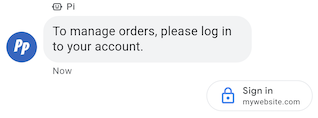
Sugestia prośby o uwierzytelnienie zachęca użytkowników do zalogowania się w aplikacji zgodnej z protokołem OAuth 2.0. Przekazuje kody uwierzytelniania, aby potwierdzić dane konta, i umożliwia dostosowywanie interfejsu użytkownika oraz szczegółowe przepływy rozmów. Zobacz Uwierzytelnianie za pomocą OAuth.
Przykład
Poniższy kod wysyła tekst z sugestią dotyczącą żądania uwierzytelniania. Opcje formatowania i wartości znajdziesz w sekcjach conversations.messages.create i Suggestion.
cURL
# Copyright 2021 Google LLC # # Licensed under the Apache License, Version 2.0 (the "License"); # you may not use this file except in compliance with the License. # You may obtain a copy of the License at # https://www.apache.org/licenses/LICENSE-2.0 # Unless required by applicable law or agreed to in writing, software # distributed under the License is distributed on an "AS IS" BASIS, # WITHOUT WARRANTIES OR CONDITIONS OF ANY KIND, either express or implied. # See the License for the specific language governing permissions and # limitations under the License. # This code sends a text message to the user with an authentication request suggestion # that allows the user to authenticate with OAuth. It also has a fallback text. # Read more: https://developers.google.com/business-communications/business-messages/guides/how-to/message/send?hl=en#authentication-request-suggestion # Replace the __CONVERSATION_ID__ with a conversation id that you can send messages to # Make sure a service account key file exists at ./service_account_key.json # Replace the __CLIENT_ID__ # Replace the __CODE_CHALLENGE__ # Replace the __SCOPE__ curl -X POST "https://businessmessages.googleapis.com/v1/conversations/__CONVERSATION_ID__/messages" \ -H "Content-Type: application/json" \ -H "User-Agent: curl/business-messages" \ -H "$(oauth2l header --json ./service_account_key.json businessmessages)" \ -d "{ 'messageId': '$(uuidgen)', 'text': 'Sign in to continue the conversation.', 'fallback': 'Visit support.growingtreebank.com to continue.', 'suggestions': [ { 'authenticationRequest': { 'oauth': { 'clientId': '__CLIENT_ID__', 'codeChallenge': '__CODE_CHALLENGE__', 'scopes': [ '__SCOPE__', ], }, }, }, ], 'representative': { 'avatarImage': 'https://developers.google.com/identity/images/g-logo.png', 'displayName': 'Chatbot', 'representativeType': 'BOT' } }"
Node.js
/** * This code sends a text message to the user with an authentication request suggestion * that allows the user to authenticate with OAuth. It also has a fallback text. * Read more: https://developers.google.com/business-communications/business-messages/guides/how-to/message/send?hl=en#authentication-request-suggestion * * This code is based on the https://github.com/google-business-communications/nodejs-businessmessages Node.js * Business Messages client library. */ /** * Before continuing, learn more about the prerequisites for authenticating * with OAuth at: https://developers.google.com/business-communications/business-messages/guides/how-to/integrate/oauth?hl=en * * Edit the values below: */ const PATH_TO_SERVICE_ACCOUNT_KEY = './service_account_key.json'; const CONVERSATION_ID = 'EDIT_HERE'; const OAUTH_CLIENT_ID = 'EDIT_HERE'; const OAUTH_CODE_CHALLENGE = 'EDIT_HERE'; const OAUTH_SCOPE = 'EDIT_HERE'; const businessmessages = require('businessmessages'); const uuidv4 = require('uuid').v4; const {google} = require('googleapis'); // Initialize the Business Messages API const bmApi = new businessmessages.businessmessages_v1.Businessmessages({}); // Set the scope that we need for the Business Messages API const scopes = [ 'https://www.googleapis.com/auth/businessmessages', ]; // Set the private key to the service account file const privatekey = require(PATH_TO_SERVICE_ACCOUNT_KEY); /** * Posts a message to the Business Messages API along with an authentication request. * * @param {string} conversationId The unique id for this user and agent. * @param {string} representativeType A value of BOT or HUMAN. */ async function sendMessage(conversationId, representativeType) { const authClient = await initCredentials(); if (authClient) { // Create the payload for sending a message along with an authentication request const apiParams = { auth: authClient, parent: 'conversations/' + conversationId, resource: { messageId: uuidv4(), representative: { representativeType: representativeType, }, fallback: 'Visit support.growingtreebank.com to continue.', text: 'Sign in to continue the conversation.', suggestions: [ { authenticationRequest: { oauth: { clientId: OAUTH_CLIENT_ID, codeChallenge: OAUTH_CODE_CHALLENGE, scopes: [OAUTH_SCOPE] } } }, ], }, }; // Call the message create function using the // Business Messages client library bmApi.conversations.messages.create(apiParams, {auth: authClient}, (err, response) => { console.log(err); console.log(response); }); } else { console.log('Authentication failure.'); } } /** * Initializes the Google credentials for calling the * Business Messages API. */ async function initCredentials() { // configure a JWT auth client const authClient = new google.auth.JWT( privatekey.client_email, null, privatekey.private_key, scopes, ); return new Promise(function(resolve, reject) { // authenticate request authClient.authorize(function(err, tokens) { if (err) { reject(false); } else { resolve(authClient); } }); }); } sendMessage(CONVERSATION_ID, 'BOT');
Java
import com.google.api.client.googleapis.services.AbstractGoogleClientRequest; import com.google.api.client.http.HttpBackOffUnsuccessfulResponseHandler; import com.google.api.client.http.HttpRequest; import com.google.api.client.googleapis.auth.oauth2.GoogleCredential; import com.google.api.client.googleapis.javanet.GoogleNetHttpTransport; import com.google.api.client.http.HttpTransport; import com.google.api.client.json.jackson2.JacksonFactory; import com.google.api.client.util.ExponentialBackOff; import com.google.api.services.businessmessages.v1.Businessmessages; import com.google.api.services.businessmessages.v1.model.*; import java.io.FileInputStream; import java.util.Arrays; import java.util.UUID; class SendAuthenticationRequestSuggestionSnippet { /** * Initializes credentials used by the Business Messages API. */ private static Businessmessages.Builder getBusinessMessagesBuilder() { Businessmessages.Builder builder = null; try { GoogleCredential credential = GoogleCredential .fromStream(new FileInputStream("PATH_TO_SERVICE_ACCOUNT_KEY")); credential = credential.createScoped(Arrays.asList( "https://www.googleapis.com/auth/businessmessages")); credential.refreshToken(); HttpTransport httpTransport = GoogleNetHttpTransport.newTrustedTransport(); JacksonFactory jsonFactory = JacksonFactory.getDefaultInstance(); // Create instance of the Business Messages API builder = new Businessmessages .Builder(httpTransport, jsonFactory, null) .setApplicationName("Sample Application"); // Set the API credentials and endpoint builder.setHttpRequestInitializer(credential); } catch (Exception e) { e.printStackTrace(); } return builder; } public static void main(String args[]) { try { String conversationId = "CONVERSATION_ID"; // Create client library reference Businessmessages.Builder builder = getBusinessMessagesBuilder(); // Create a text message with an authentication request BusinessMessagesMessage message = new BusinessMessagesMessage() .setMessageId(UUID.randomUUID().toString()) .setText("Would you like to chat with a live agent?") .setFallback("Would you like to chat with a live agent?") .setSuggestions(Arrays.asList(new BusinessMessagesSuggestion() .setAuthenticationRequest(new BusinessMessagesAuthenticationRequest() .setOauth(new BusinessMessagesAuthenticationRequestOauth() .setClientId("CLIENT_ID") .setCodeChallenge("CODE_CHALLENGE") .setScopes(Arrays.asList("SCOPE")) ))) ) .setRepresentative(new BusinessMessagesRepresentative() .setRepresentativeType("TYPE")); // Create message request Businessmessages.Conversations.Messages.Create messageRequest = builder.build().conversations().messages() .create("conversations/" + conversationId, message); // Setup retries with exponential backoff HttpRequest httpRequest = ((AbstractGoogleClientRequest) messageRequest).buildHttpRequest(); httpRequest.setUnsuccessfulResponseHandler(new HttpBackOffUnsuccessfulResponseHandler( new ExponentialBackOff())); // Execute request httpRequest.execute(); } catch (Exception e) { e.printStackTrace(); } } }
Python
"""Sends a text message to the user with an authentication request suggestion. It allows the user to authenticate with OAuth and has a fallback text. Read more: https://developers.google.com/business-communications/business-messages/guides/how-to/message/send?hl=en#authentication-request-suggestion This code is based on the https://github.com/google-business-communications/python-businessmessages Python Business Messages client library. """ import uuid from businessmessages import businessmessages_v1_client as bm_client from businessmessages.businessmessages_v1_messages import BusinessMessagesAuthenticationRequest from businessmessages.businessmessages_v1_messages import BusinessMessagesAuthenticationRequestOauth from businessmessages.businessmessages_v1_messages import BusinessmessagesConversationsMessagesCreateRequest from businessmessages.businessmessages_v1_messages import BusinessMessagesMessage from businessmessages.businessmessages_v1_messages import BusinessMessagesRepresentative from businessmessages.businessmessages_v1_messages import BusinessMessagesSuggestion from oauth2client.service_account import ServiceAccountCredentials # Before continuing, learn more about the prerequisites for authenticating # with OAuth at: https://developers.google.com/business-communications/business-messages/guides/how-to/integrate/oauth?hl=en # Edit the values below: path_to_service_account_key = './service_account_key.json' conversation_id = 'EDIT_HERE' oauth_client_id = 'EDIT_HERE' oauth_code_challenge = 'EDIT_HERE' oauth_scope = 'EDIT_HERE' credentials = ServiceAccountCredentials.from_json_keyfile_name( path_to_service_account_key, scopes=['https://www.googleapis.com/auth/businessmessages']) client = bm_client.BusinessmessagesV1(credentials=credentials) representative_type_as_string = 'BOT' if representative_type_as_string == 'BOT': representative_type = BusinessMessagesRepresentative.RepresentativeTypeValueValuesEnum.BOT else: representative_type = BusinessMessagesRepresentative.RepresentativeTypeValueValuesEnum.HUMAN # Create a text message with an authentication request message = BusinessMessagesMessage( messageId=str(uuid.uuid4().int), representative=BusinessMessagesRepresentative( representativeType=representative_type ), text='Sign in to continue the conversation.', fallback='Visit support.growingtreebank.com to continue.', suggestions=[ BusinessMessagesSuggestion( authenticationRequest=BusinessMessagesAuthenticationRequest( oauth=BusinessMessagesAuthenticationRequestOauth( clientId=oauth_client_id, codeChallenge=oauth_code_challenge, scopes=[oauth_scope]) ) ), ] ) # Create the message request create_request = BusinessmessagesConversationsMessagesCreateRequest( businessMessagesMessage=message, parent='conversations/' + conversation_id) # Send the message bm_client.BusinessmessagesV1.ConversationsMessagesService( client=client).Create(request=create_request)
Sugestia dotycząca prośby o kontakt z pracownikiem obsługi klienta

Sugestia prośby o kontakt z konsultantem na żywo umożliwia kierowanie użytkowników do interakcji z konsultantami podczas złożonych interakcji lub gdy automatyzacja nie może obsłużyć prośby użytkownika.
Użytkownicy mogą w dowolnym momencie rozmowy poprosić o pomoc agenta na żywo w menu dodatkowym. Ta sugestia umożliwia agentom programowe sugerowanie interakcji z pracownikami obsługi klienta na podstawie kontekstu rozmowy. Agent powinien zawsze być gotowy do odpowiedzi na zdarzenie Live agent requested (Prośba o kontakt z pracownikiem obsługi klienta), nawet jeśli nie wysłał sugestii dotyczącej prośby o kontakt z pracownikiem obsługi klienta.
Gdy użytkownik kliknie sugestię dotyczącą prośby o kontakt z pracownikiem obsługi klienta na żywo, zostanie wywołane zdarzenie Live agent requested.
Przykład
Poniższy kod wysyła sugestię dotyczącą prośby o rozmowę z agentem. Opcje formatowania i wartości znajdziesz w sekcjach conversations.messages.create i Suggestion.
cURL
# Copyright 2021 Google LLC # # Licensed under the Apache License, Version 2.0 (the "License"); # you may not use this file except in compliance with the License. # You may obtain a copy of the License at # https://www.apache.org/licenses/LICENSE-2.0 # Unless required by applicable law or agreed to in writing, software # distributed under the License is distributed on an "AS IS" BASIS, # WITHOUT WARRANTIES OR CONDITIONS OF ANY KIND, either express or implied. # See the License for the specific language governing permissions and # limitations under the License. # This code sends a text message to the user with a Live agent request suggestion # that allows the user to connect with a Live agent. # Read more: https://developers.google.com/business-communications/business-messages/guides/how-to/message/send?hl=en#live_agent_request_suggestion # Replace the __CONVERSATION_ID__ with a conversation id that you can send messages to # Make sure a service account key file exists at ./service_account_key.json curl -X POST "https://businessmessages.googleapis.com/v1/conversations/__CONVERSATION_ID__/messages" \ -H "Content-Type: application/json" \ -H "User-Agent: curl/business-messages" \ -H "$(oauth2l header --json ./service_account_key.json businessmessages)" \ -d "{ 'messageId': '$(uuidgen)', 'text': 'Would you like to chat with a live agent?', 'fallback': 'Would you like to chat with a live agent?', 'suggestions': [ { 'liveAgentRequest': {}, }, ], 'representative': { 'avatarImage': 'https://developers.google.com/identity/images/g-logo.png', 'displayName': 'Chatbot', 'representativeType': 'BOT' }, }"
Node.js
/** * This code sends a text message to the user with a Live agent request suggestion * that allows the user to connect with a Live agent. * Read more: https://developers.google.com/business-communications/business-messages/guides/how-to/message/send?hl=en#live_agent_request_suggestion * * This code is based on the https://github.com/google-business-communications/nodejs-businessmessages Node.js * Business Messages client library. */ /** * Edit the values below: */ const PATH_TO_SERVICE_ACCOUNT_KEY = './service_account_key.json'; const CONVERSATION_ID = 'EDIT_HERE'; const businessmessages = require('businessmessages'); const uuidv4 = require('uuid').v4; const {google} = require('googleapis'); // Initialize the Business Messages API const bmApi = new businessmessages.businessmessages_v1.Businessmessages({}); // Set the scope that we need for the Business Messages API const scopes = [ 'https://www.googleapis.com/auth/businessmessages', ]; // Set the private key to the service account file const privatekey = require(PATH_TO_SERVICE_ACCOUNT_KEY); /** * Posts a message with a live agent request action to the Business Messages API. * * @param {string} conversationId The unique id for this user and agent. */ async function sendMessage(conversationId) { const authClient = await initCredentials(); if (authClient) { // Create the payload for sending a message along with a request for live agent action const apiParams = { auth: authClient, parent: 'conversations/' + conversationId, resource: { messageId: uuidv4(), representative: { representativeType: 'BOT', // Must be sent from a BOT representative }, fallback: 'Would you like to chat with a live agent?', text: 'Would you like to chat with a live agent?', suggestions: [ { liveAgentRequest: {} }, ], }, }; // Call the message create function using the // Business Messages client library bmApi.conversations.messages.create(apiParams, {auth: authClient}, (err, response) => { console.log(err); console.log(response); }); } else { console.log('Authentication failure.'); } } /** * Initializes the Google credentials for calling the * Business Messages API. */ async function initCredentials() { // configure a JWT auth client const authClient = new google.auth.JWT( privatekey.client_email, null, privatekey.private_key, scopes, ); return new Promise(function(resolve, reject) { // authenticate request authClient.authorize(function(err, tokens) { if (err) { reject(false); } else { resolve(authClient); } }); }); } sendMessage(CONVERSATION_ID);
Java
import com.google.api.client.googleapis.services.AbstractGoogleClientRequest; import com.google.api.client.http.HttpBackOffUnsuccessfulResponseHandler; import com.google.api.client.http.HttpRequest; import com.google.api.client.googleapis.auth.oauth2.GoogleCredential; import com.google.api.client.googleapis.javanet.GoogleNetHttpTransport; import com.google.api.client.http.HttpTransport; import com.google.api.client.json.jackson2.JacksonFactory; import com.google.api.client.util.ExponentialBackOff; import com.google.api.services.businessmessages.v1.Businessmessages; import com.google.api.services.businessmessages.v1.model.*; import java.io.FileInputStream; import java.util.Arrays; import java.util.UUID; class SendLiveAgentRequestSuggestionSnippet { /** * Initializes credentials used by the Business Messages API. */ private static Businessmessages.Builder getBusinessMessagesBuilder() { Businessmessages.Builder builder = null; try { GoogleCredential credential = GoogleCredential .fromStream(new FileInputStream("PATH_TO_SERVICE_ACCOUNT_KEY")); credential = credential.createScoped(Arrays.asList( "https://www.googleapis.com/auth/businessmessages")); credential.refreshToken(); HttpTransport httpTransport = GoogleNetHttpTransport.newTrustedTransport(); JacksonFactory jsonFactory = JacksonFactory.getDefaultInstance(); // Create instance of the Business Messages API builder = new Businessmessages .Builder(httpTransport, jsonFactory, null) .setApplicationName("Sample Application"); // Set the API credentials and endpoint builder.setHttpRequestInitializer(credential); } catch (Exception e) { e.printStackTrace(); } return builder; } public static void main(String args[]) { try { String conversationId = "CONVERSATION_ID"; // Create client library reference Businessmessages.Builder builder = getBusinessMessagesBuilder(); // Create a text message with a live request action BusinessMessagesMessage message = new BusinessMessagesMessage() .setMessageId(UUID.randomUUID().toString()) .setText("Would you like to chat with a live agent?") .setFallback("Would you like to chat with a live agent?") .setSuggestions(Arrays.asList(new BusinessMessagesSuggestion() .setLiveAgentRequest(new BusinessMessagesLiveAgentRequest())) ) .setRepresentative(new BusinessMessagesRepresentative() .setRepresentativeType("BOT")); // Must be sent from a BOT representative // Create message request Businessmessages.Conversations.Messages.Create messageRequest = builder.build().conversations().messages() .create("conversations/" + conversationId, message); // Setup retries with exponential backoff HttpRequest httpRequest = ((AbstractGoogleClientRequest) messageRequest).buildHttpRequest(); httpRequest.setUnsuccessfulResponseHandler(new HttpBackOffUnsuccessfulResponseHandler( new ExponentialBackOff())); // Execute request httpRequest.execute(); } catch (Exception e) { e.printStackTrace(); } } }
Python
"""Sends a text message to the user with a Live agent request suggestion. It allows the user to connect with a Live agent. Read more: https://developers.google.com/business-communications/business-messages/guides/how-to/message/send?hl=en#live_agent_request_suggestion This code is based on the https://github.com/google-business-communications/python-businessmessages Python Business Messages client library. """ import uuid from businessmessages import businessmessages_v1_client as bm_client from businessmessages.businessmessages_v1_messages import BusinessmessagesConversationsMessagesCreateRequest from businessmessages.businessmessages_v1_messages import BusinessMessagesLiveAgentRequest from businessmessages.businessmessages_v1_messages import BusinessMessagesMessage from businessmessages.businessmessages_v1_messages import BusinessMessagesRepresentative from businessmessages.businessmessages_v1_messages import BusinessMessagesSuggestion from oauth2client.service_account import ServiceAccountCredentials # Edit the values below: path_to_service_account_key = './service_account_key.json' conversation_id = 'EDIT_HERE' credentials = ServiceAccountCredentials.from_json_keyfile_name( path_to_service_account_key, scopes=['https://www.googleapis.com/auth/businessmessages']) client = bm_client.BusinessmessagesV1(credentials=credentials) # Create a text message with a live agent request action and fallback text # Follow instructions at https://developers.google.com/business-communications/business-messages/guides/how-to/message/send?hl=en#live_agent_request_suggestion message = BusinessMessagesMessage( messageId=str(uuid.uuid4().int), representative=BusinessMessagesRepresentative( # Must be sent from a BOT representative representativeType=BusinessMessagesRepresentative.RepresentativeTypeValueValuesEnum.BOT ), text='Would you like to chat with a live agent?', fallback='Would you like to chat with a live agent?', suggestions=[ BusinessMessagesSuggestion( liveAgentRequest=BusinessMessagesLiveAgentRequest() ) ]) # Create the message request create_request = BusinessmessagesConversationsMessagesCreateRequest( businessMessagesMessage=message, parent='conversations/' + conversation_id) # Send the message bm_client.BusinessmessagesV1.ConversationsMessagesService( client=client).Create(request=create_request)
Karty informacyjne
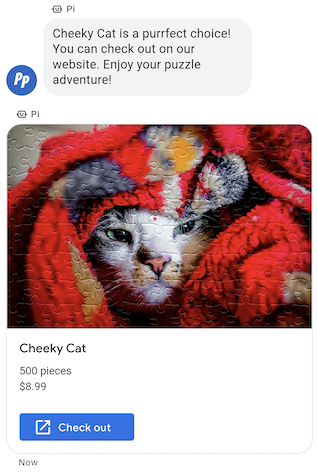
Jeśli chcesz wysłać pakiet powiązanych informacji, multimediów lub sugestii, użyj karty informacyjnej. Karty z elementami multimedialnymi umożliwiają agentowi wysyłanie wielu jednostek informacji w jednej wiadomości.
Karty z elementami rozszerzonymi mogą zawierać te elementy:
- Media (JPG, JPEG lub PNG, maksymalnie 5 MB)
- Miniatura multimediów (JPG, JPEG lub PNG, maksymalnie 25 KB)
- Tytuł (maksymalnie 200 znaków)
- Opis (maksymalnie 2000 znaków)
- Lista sugerowanych odpowiedzi i sugerowanych działań (maksymalnie 4).
Karta z elementami multimedialnymi może zawierać dowolne z wymienionych elementów lub wszystkie z nich, ale aby była prawidłowa, musi zawierać co najmniej multimedia lub tytuł. Karta rozszerzona może zawierać maksymalnie 4 sugerowane działania i sugerowane odpowiedzi.
Agent może wysłać kilka kart informacyjnych jednocześnie w karuzeli kart informacyjnych.
Przykład
Poniższy kod wysyła kartę z obrazem i proponowanymi odpowiedziami. Opcje formatowania i wartości znajdziesz w sekcjach conversations.messages.create i RichCard.
cURL
# Copyright 2021 Google LLC # # Licensed under the Apache License, Version 2.0 (the "License"); # you may not use this file except in compliance with the License. # You may obtain a copy of the License at # https://www.apache.org/licenses/LICENSE-2.0 # Unless required by applicable law or agreed to in writing, software # distributed under the License is distributed on an "AS IS" BASIS, # WITHOUT WARRANTIES OR CONDITIONS OF ANY KIND, either express or implied. # See the License for the specific language governing permissions and # limitations under the License. # This code sends a rich card to the user with a fallback text. # Read more: https://developers.google.com/business-communications/business-messages/guides/how-to/message/send?hl=en#rich-cards # Replace the __CONVERSATION_ID__ with a conversation id that you can send messages to # Make sure a service account key file exists at ./service_account_key.json curl -X POST "https://businessmessages.googleapis.com/v1/conversations/__CONVERSATION_ID__/messages" \ -H "Content-Type: application/json" \ -H "User-Agent: curl/business-messages" \ -H "$(oauth2l header --json ./service_account_key.json businessmessages)" \ -d "{ 'messageId': '$(uuidgen)', 'representative': { 'avatarImage': 'https://developers.google.com/identity/images/g-logo.png', 'displayName': 'Chatbot', 'representativeType': 'BOT' }, 'fallback': 'Hello, world!\nSent with Business Messages\n\nReply with \"Suggestion #1\" or \"Suggestion #2\"', 'richCard': { 'standaloneCard': { 'cardContent': { 'title': 'Hello, world!', 'description': 'Sent with Business Messages.', 'media': { 'height': 'TALL', 'contentInfo':{ 'altText': 'Google logo', 'fileUrl': 'https://www.google.com/images/branding/googlelogo/2x/googlelogo_color_272x92dp.png', 'forceRefresh': 'false' } }, 'suggestions': [ { 'reply': { 'text': 'Suggestion #1', 'postbackData': 'suggestion_1' } }, { 'reply': { 'text': 'Suggestion #2', 'postbackData': 'suggestion_2' } } ] } } } }"
Node.js
/** * This code sends a rich card to the user with a fallback text. * Read more: https://developers.google.com/business-communications/business-messages/guides/how-to/message/send?hl=en#rich-cards * * This code is based on the https://github.com/google-business-communications/nodejs-businessmessages Node.js * Business Messages client library. */ /** * Edit the values below: */ const PATH_TO_SERVICE_ACCOUNT_KEY = './service_account_key.json'; const CONVERSATION_ID = 'EDIT_HERE'; const businessmessages = require('businessmessages'); const uuidv4 = require('uuid').v4; const {google} = require('googleapis'); // Initialize the Business Messages API const bmApi = new businessmessages.businessmessages_v1.Businessmessages({}); // Set the scope that we need for the Business Messages API const scopes = [ 'https://www.googleapis.com/auth/businessmessages', ]; // Set the private key to the service account file const privatekey = require(PATH_TO_SERVICE_ACCOUNT_KEY); /** * Posts a rich card message to the Business Messages API. * * @param {string} conversationId The unique id for this user and agent. * @param {string} representativeType A value of BOT or HUMAN. */ async function sendMessage(conversationId, representativeType) { const authClient = await initCredentials(); if (authClient) { // Create the payload for sending a rich card message with two suggested replies const apiParams = { auth: authClient, parent: 'conversations/' + conversationId, resource: { messageId: uuidv4(), representative: { representativeType: representativeType, }, fallback: 'Hello, world!\nSent with Business Messages\n\nReply with \"Suggestion #1\" or \"Suggestion #2\"', richCard: { standaloneCard: { cardContent: { title: 'Hello, world!', description: 'Sent with Business Messages.', media: { height: 'TALL', contentInfo: { altText: 'Google logo', fileUrl: 'https://www.google.com/images/branding/googlelogo/2x/googlelogo_color_272x92dp.png', forceRefresh: false, }, }, suggestions: [ { reply: { text: 'Suggestion #1', postbackData: 'suggestion_1', }, }, { reply: { text: 'Suggestion #2', postbackData: 'suggestion_2', }, }, ], }, }, }, }, }; // Call the message create function using the // Business Messages client library bmApi.conversations.messages.create(apiParams, {auth: authClient}, (err, response) => { console.log(err); console.log(response); }); } else { console.log('Authentication failure.'); } } /** * Initializes the Google credentials for calling the * Business Messages API. */ async function initCredentials() { // configure a JWT auth client const authClient = new google.auth.JWT( privatekey.client_email, null, privatekey.private_key, scopes, ); return new Promise(function(resolve, reject) { // authenticate request authClient.authorize(function(err, tokens) { if (err) { reject(false); } else { resolve(authClient); } }); }); } sendMessage(CONVERSATION_ID, 'BOT');
Java
import com.google.api.client.googleapis.services.AbstractGoogleClientRequest; import com.google.api.client.http.HttpBackOffUnsuccessfulResponseHandler; import com.google.api.client.http.HttpRequest; import com.google.api.client.googleapis.auth.oauth2.GoogleCredential; import com.google.api.client.googleapis.javanet.GoogleNetHttpTransport; import com.google.api.client.http.HttpTransport; import com.google.api.client.json.jackson2.JacksonFactory; import com.google.api.client.util.ExponentialBackOff; import com.google.api.services.businessmessages.v1.Businessmessages; import com.google.api.services.businessmessages.v1.model.*; import com.google.communications.businessmessages.v1.MediaHeight; import java.io.FileInputStream; import java.util.Arrays; import java.util.UUID; class SendRichCardMessageSnippet { /** * Initializes credentials used by the Business Messages API. */ private static Businessmessages.Builder getBusinessMessagesBuilder() { Businessmessages.Builder builder = null; try { GoogleCredential credential = GoogleCredential .fromStream(new FileInputStream("PATH_TO_SERVICE_ACCOUNT_KEY")); credential = credential.createScoped(Arrays.asList( "https://www.googleapis.com/auth/businessmessages")); credential.refreshToken(); HttpTransport httpTransport = GoogleNetHttpTransport.newTrustedTransport(); JacksonFactory jsonFactory = JacksonFactory.getDefaultInstance(); // Create instance of the Business Messages API builder = new Businessmessages .Builder(httpTransport, jsonFactory, null) .setApplicationName("Sample Application"); // Set the API credentials and endpoint builder.setHttpRequestInitializer(credential); } catch (Exception e) { e.printStackTrace(); } return builder; } public static void main(String args[]) { try { String conversationId = "CONVERSATION_ID"; // Create client library reference Businessmessages.Builder builder = getBusinessMessagesBuilder(); // Create a rich card with two suggested replies BusinessMessagesMessage message = new BusinessMessagesMessage() .setMessageId(UUID.randomUUID().toString()) .setFallback("Hello, world!\nSent with Business Messages\n\nReply with \"Suggestion #1\" or \"Suggestion #2\"") .setRichCard(new BusinessMessagesRichCard() .setStandaloneCard(new BusinessMessagesStandaloneCard() .setCardContent( new BusinessMessagesCardContent() .setTitle("Hello, world!") .setDescription("Sent with Business Messages.") .setSuggestions(Arrays.asList( new BusinessMessagesSuggestion() .setReply(new BusinessMessagesSuggestedReply() .setText("Suggestion #1").setPostbackData("suggestion_1") ), new BusinessMessagesSuggestion() .setReply(new BusinessMessagesSuggestedReply() .setText("Suggestion #2").setPostbackData("suggestion_2") )) ) .setMedia(new BusinessMessagesMedia() .setHeight(MediaHeight.MEDIUM.toString()) .setContentInfo( new BusinessMessagesContentInfo() .setAltText("Google logo") .setFileUrl("https://www.google.com/images/branding/googlelogo/2x/googlelogo_color_272x92dp.png") .setForceRefresh(false) )) ))) .setRepresentative(new BusinessMessagesRepresentative() .setRepresentativeType("TYPE")); // Create message request Businessmessages.Conversations.Messages.Create messageRequest = builder.build().conversations().messages() .create("conversations/" + conversationId, message); // Setup retries with exponential backoff HttpRequest httpRequest = ((AbstractGoogleClientRequest) messageRequest).buildHttpRequest(); httpRequest.setUnsuccessfulResponseHandler(new HttpBackOffUnsuccessfulResponseHandler( new ExponentialBackOff())); // Execute request httpRequest.execute(); } catch (Exception e) { e.printStackTrace(); } } }
Python
"""This code sends a rich card to the user with a fallback text. Read more: https://developers.google.com/business-communications/business-messages/guides/how-to/message/send?hl=en#rich-cards This code is based on the https://github.com/google-business-communications/python-businessmessages Python Business Messages client library. """ import uuid from businessmessages import businessmessages_v1_client as bm_client from businessmessages.businessmessages_v1_messages import BusinessMessagesCardContent from businessmessages.businessmessages_v1_messages import BusinessMessagesContentInfo from businessmessages.businessmessages_v1_messages import BusinessmessagesConversationsMessagesCreateRequest from businessmessages.businessmessages_v1_messages import BusinessMessagesMedia from businessmessages.businessmessages_v1_messages import BusinessMessagesMessage from businessmessages.businessmessages_v1_messages import BusinessMessagesRepresentative from businessmessages.businessmessages_v1_messages import BusinessMessagesRichCard from businessmessages.businessmessages_v1_messages import BusinessMessagesStandaloneCard from businessmessages.businessmessages_v1_messages import BusinessMessagesSuggestedReply from businessmessages.businessmessages_v1_messages import BusinessMessagesSuggestion from oauth2client.service_account import ServiceAccountCredentials # Edit the values below: path_to_service_account_key = './service_account_key.json' conversation_id = 'EDIT_HERE' credentials = ServiceAccountCredentials.from_json_keyfile_name( path_to_service_account_key, scopes=['https://www.googleapis.com/auth/businessmessages']) client = bm_client.BusinessmessagesV1(credentials=credentials) representative_type_as_string = 'BOT' if representative_type_as_string == 'BOT': representative_type = BusinessMessagesRepresentative.RepresentativeTypeValueValuesEnum.BOT else: representative_type = BusinessMessagesRepresentative.RepresentativeTypeValueValuesEnum.HUMAN # Create a rich card message with two suggested replies and fallback text message = BusinessMessagesMessage( messageId=str(uuid.uuid4().int), representative=BusinessMessagesRepresentative( representativeType=representative_type ), fallback='Hello, world!\nSent with Business Messages\n\nReply with \"Suggestion #1\" or \"Suggestion #2\"', richCard=BusinessMessagesRichCard( standaloneCard=BusinessMessagesStandaloneCard( cardContent=BusinessMessagesCardContent( title='Hello, world!', description='Sent with Business Messages.', suggestions=[ BusinessMessagesSuggestion( reply=BusinessMessagesSuggestedReply( text='Suggestion #1', postbackData='suggestion_1') ), BusinessMessagesSuggestion( reply=BusinessMessagesSuggestedReply( text='Suggestion #2', postbackData='suggestion_2') ) ], media=BusinessMessagesMedia( height=BusinessMessagesMedia.HeightValueValuesEnum.TALL, contentInfo=BusinessMessagesContentInfo( altText='Google logo', fileUrl='https://www.google.com/images/branding/googlelogo/2x/googlelogo_color_272x92dp.png', forceRefresh=False )) )))) # Create the message request create_request = BusinessmessagesConversationsMessagesCreateRequest( businessMessagesMessage=message, parent='conversations/' + conversation_id) # Send the message bm_client.BusinessmessagesV1.ConversationsMessagesService( client=client).Create(request=create_request)
Karuzela kart informacyjnych
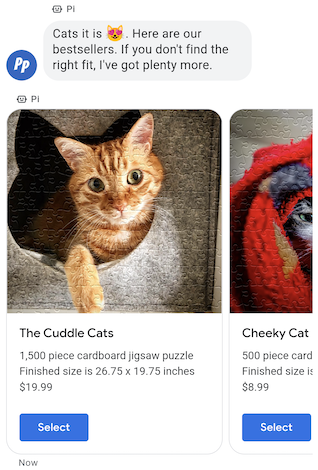
Jeśli chcesz przedstawić użytkownikowi kilka opcji do wyboru, użyj karuzeli kart z elementami multimedialnymi. Karuzela łączy wiele kart z elementami rozszerzonymi, dzięki czemu użytkownicy mogą porównywać produkty i reagować na każdy z nich z osobna.
Karuzela może zawierać od 2 do 10 kart z elementami multimedialnymi. Karty z elementami rozszerzonymi w karuzelach muszą spełniać ogólne wymagania dotyczące treści i wysokości.
Przykład
Poniższy kod wysyła karuzelę kart informacyjnych. Opcje formatowania i wartości znajdziesz w sekcjach conversations.messages.create i RichCard.
cURL
# Copyright 2021 Google LLC # # Licensed under the Apache License, Version 2.0 (the "License"); # you may not use this file except in compliance with the License. # You may obtain a copy of the License at # https://www.apache.org/licenses/LICENSE-2.0 # Unless required by applicable law or agreed to in writing, software # distributed under the License is distributed on an "AS IS" BASIS, # WITHOUT WARRANTIES OR CONDITIONS OF ANY KIND, either express or implied. # See the License for the specific language governing permissions and # limitations under the License. # This code sends to the user a carousel with rich cards and a fallback text. # Read more: https://developers.google.com/business-communications/business-messages/guides/how-to/message/send?hl=en#rich-card-carousels # Replace the __CONVERSATION_ID__ with a conversation id that you can send messages to # Make sure a service account key file exists at ./service_account_key.json curl -X POST "https://businessmessages.googleapis.com/v1/conversations/__CONVERSATION_ID__/messages" \ -H "Content-Type: application/json" \ -H "User-Agent: curl/business-messages" \ -H "$(oauth2l header --json ./service_account_key.json businessmessages)" \ -d "{ 'messageId': '$(uuidgen)', 'representative': { 'avatarImage': 'https://developers.google.com/identity/images/g-logo.png', 'displayName': 'Chatbot', 'representativeType': 'BOT' }, 'fallback': 'Card #1\nThe description for card #1\n\nCard #2\nThe description for card #2\n\nReply with \"Card #1\" or \"Card #2\"', 'richCard': { 'carouselCard': { 'cardWidth': 'MEDIUM', 'cardContents': [ { 'title': 'Card #1', 'description': 'The description for card #1', 'suggestions': [ { 'reply': { 'text': 'Card #1', 'postbackData': 'card_1' } } ], 'media': { 'height': 'MEDIUM', 'contentInfo': { 'fileUrl': 'https://storage.googleapis.com/kitchen-sink-sample-images/cute-dog.jpg', 'forceRefresh': 'false', } } }, { 'title': 'Card #2', 'description': 'The description for card #2', 'suggestions': [ { 'reply': { 'text': 'Card #2', 'postbackData': 'card_2' } } ], 'media': { 'height': 'MEDIUM', 'contentInfo': { 'fileUrl': 'https://storage.googleapis.com/kitchen-sink-sample-images/elephant.jpg', 'forceRefresh': 'false', } } } ] } } }"
Node.js
/** * This code sends to the user a carousel with rich cards and a fallback text. * Read more: https://developers.google.com/business-communications/business-messages/guides/how-to/message/send?hl=en#rich-card-carousels * * This code is based on the https://github.com/google-business-communications/nodejs-businessmessages Node.js * Business Messages client library. */ /** * Edit the values below: */ const PATH_TO_SERVICE_ACCOUNT_KEY = './service_account_key.json'; const CONVERSATION_ID = 'EDIT_HERE'; const businessmessages = require('businessmessages'); const uuidv4 = require('uuid').v4; const {google} = require('googleapis'); // Initialize the Business Messages API const bmApi = new businessmessages.businessmessages_v1.Businessmessages({}); // Set the scope that we need for the Business Messages API const scopes = [ 'https://www.googleapis.com/auth/businessmessages', ]; // Set the private key to the service account file const privatekey = require(PATH_TO_SERVICE_ACCOUNT_KEY); /** * Posts a carousel card message to the Business Messages API. * * @param {string} conversationId The unique id for this user and agent. * @param {string} representativeType A value of BOT or HUMAN. */ async function sendMessage(conversationId, representativeType) { const authClient = await initCredentials(); if (authClient) { // Create the payload for sending carousel message // with two cards and a suggested reply for each card const apiParams = { auth: authClient, parent: 'conversations/' + conversationId, resource: { messageId: uuidv4(), representative: { representativeType: representativeType, }, fallback: 'Card #1\nThe description for card #1\n\nCard #2\nThe description for card #2\n\nReply with \"Card #1\" or \"Card #2\"', richCard: { carouselCard: { cardWidth: 'MEDIUM', cardContents: [ { title: 'Card #1', description: 'The description for card #1', suggestions: [ { reply: { text: 'Card #1', postbackData: 'card_1' } } ], media: { height: 'MEDIUM', contentInfo: { fileUrl: 'https://storage.googleapis.com/kitchen-sink-sample-images/cute-dog.jpg', forceRefresh: 'false', } } }, { title: 'Card #2', description: 'The description for card #2', suggestions: [ { reply: { text: 'Card #2', postbackData: 'card_2' } } ], media: { height: 'MEDIUM', contentInfo: { fileUrl: 'https://storage.googleapis.com/kitchen-sink-sample-images/elephant.jpg', forceRefresh: 'false', } } } ] } } }, }; // Call the message create function using the // Business Messages client library bmApi.conversations.messages.create(apiParams, {auth: authClient}, (err, response) => { console.log(err); console.log(response); }); } else { console.log('Authentication failure.'); } } /** * Initializes the Google credentials for calling the * Business Messages API. */ async function initCredentials() { // configure a JWT auth client const authClient = new google.auth.JWT( privatekey.client_email, null, privatekey.private_key, scopes, ); return new Promise(function(resolve, reject) { // authenticate request authClient.authorize(function(err, tokens) { if (err) { reject(false); } else { resolve(authClient); } }); }); } sendMessage(CONVERSATION_ID, 'BOT');
Java
import com.google.api.client.googleapis.services.AbstractGoogleClientRequest; import com.google.api.client.http.HttpBackOffUnsuccessfulResponseHandler; import com.google.api.client.http.HttpRequest; import com.google.api.client.googleapis.auth.oauth2.GoogleCredential; import com.google.api.client.googleapis.javanet.GoogleNetHttpTransport; import com.google.api.client.http.HttpTransport; import com.google.api.client.json.jackson2.JacksonFactory; import com.google.api.client.util.ExponentialBackOff; import com.google.api.services.businessmessages.v1.Businessmessages; import com.google.api.services.businessmessages.v1.model.*; import com.google.communications.businessmessages.v1.MediaHeight; import java.io.FileInputStream; import java.util.Arrays; import java.util.UUID; class SendRichCardCarouselMessage { /** * Initializes credentials used by the Business Messages API. */ private static Businessmessages.Builder getBusinessMessagesBuilder() { Businessmessages.Builder builder = null; try { GoogleCredential credential = GoogleCredential .fromStream(new FileInputStream("PATH_TO_SERVICE_ACCOUNT_KEY")); credential = credential.createScoped(Arrays.asList( "https://www.googleapis.com/auth/businessmessages")); credential.refreshToken(); HttpTransport httpTransport = GoogleNetHttpTransport.newTrustedTransport(); JacksonFactory jsonFactory = JacksonFactory.getDefaultInstance(); // Create instance of the Business Messages API builder = new Businessmessages .Builder(httpTransport, jsonFactory, null) .setApplicationName("Sample Application"); // Set the API credentials and endpoint builder.setHttpRequestInitializer(credential); } catch (Exception e) { e.printStackTrace(); } return builder; } public static void main(String args[]) { try { String conversationId = "CONVERSATION_ID"; // Create client library reference Businessmessages.Builder builder = getBusinessMessagesBuilder(); // Create a rich card with two suggested replies BusinessMessagesMessage message = new BusinessMessagesMessage() .setMessageId(UUID.randomUUID().toString()) .setFallback("Hello, world!\nSent with Business Messages\n\nReply with \"Suggestion #1\" or \"Suggestion #2\"") .setRichCard(new BusinessMessagesRichCard() .setCarouselCard(new BusinessMessagesCarouselCard().setCardWidth("MEDIUM") .setCardContents(Arrays.asList( new BusinessMessagesCardContent() .setTitle("Card #1") .setDescription("The description for card #1") .setSuggestions(Arrays.asList(new BusinessMessagesSuggestion() .setReply(new BusinessMessagesSuggestedReply() .setText("Card #1").setPostbackData("card_1") ))) .setMedia(new BusinessMessagesMedia() .setHeight(MediaHeight.MEDIUM.toString()) .setContentInfo(new BusinessMessagesContentInfo() .setFileUrl("https://storage.googleapis.com/kitchen-sink-sample-images/cute-dog.jpg"))), new BusinessMessagesCardContent() .setTitle("Card #2") .setDescription("The description for card #2") .setSuggestions(Arrays.asList(new BusinessMessagesSuggestion() .setReply(new BusinessMessagesSuggestedReply() .setText("Card #2").setPostbackData("card_2") ))) .setMedia(new BusinessMessagesMedia() .setHeight(MediaHeight.MEDIUM.toString()) .setContentInfo(new BusinessMessagesContentInfo() .setFileUrl("https://storage.googleapis.com/kitchen-sink-sample-images/elephant.jpg"))) ) ))) .setRepresentative(new BusinessMessagesRepresentative() .setRepresentativeType("TYPE")); // Create message request Businessmessages.Conversations.Messages.Create messageRequest = builder.build().conversations().messages() .create("conversations/" + conversationId, message); // Setup retries with exponential backoff HttpRequest httpRequest = ((AbstractGoogleClientRequest) messageRequest).buildHttpRequest(); httpRequest.setUnsuccessfulResponseHandler(new HttpBackOffUnsuccessfulResponseHandler( new ExponentialBackOff())); // Execute request httpRequest.execute(); } catch (Exception e) { e.printStackTrace(); } } }
Python
"""This code sends to the user a carousel with rich cards and a fallback text. Read more: https://developers.google.com/business-communications/business-messages/guides/how-to/message/send?hl=en#rich-card-carousels This code is based on the https://github.com/google-business-communications/python-businessmessages Python Business Messages client library. """ import uuid from businessmessages import businessmessages_v1_client as bm_client from businessmessages.businessmessages_v1_messages import BusinessMessagesCardContent from businessmessages.businessmessages_v1_messages import BusinessMessagesCarouselCard from businessmessages.businessmessages_v1_messages import BusinessMessagesContentInfo from businessmessages.businessmessages_v1_messages import BusinessmessagesConversationsMessagesCreateRequest from businessmessages.businessmessages_v1_messages import BusinessMessagesMedia from businessmessages.businessmessages_v1_messages import BusinessMessagesMessage from businessmessages.businessmessages_v1_messages import BusinessMessagesRepresentative from businessmessages.businessmessages_v1_messages import BusinessMessagesRichCard from businessmessages.businessmessages_v1_messages import BusinessMessagesSuggestedReply from businessmessages.businessmessages_v1_messages import BusinessMessagesSuggestion from oauth2client.service_account import ServiceAccountCredentials # Edit the values below: path_to_service_account_key = './service_account_key.json' conversation_id = 'EDIT_HERE' credentials = ServiceAccountCredentials.from_json_keyfile_name( path_to_service_account_key, scopes=['https://www.googleapis.com/auth/businessmessages']) client = bm_client.BusinessmessagesV1(credentials=credentials) representative_type_as_string = 'BOT' if representative_type_as_string == 'BOT': representative_type = BusinessMessagesRepresentative.RepresentativeTypeValueValuesEnum.BOT else: representative_type = BusinessMessagesRepresentative.RepresentativeTypeValueValuesEnum.HUMAN # Create a carousel message with two cards and a suggested reply for each card # and fallback text message = BusinessMessagesMessage( messageId=str(uuid.uuid4().int), representative=BusinessMessagesRepresentative( representativeType=representative_type ), fallback='Card #1\nThe description for card #1\n\nCard #2\nThe description for card #2\n\nReply with \"Card #1\" or \"Card #2\"', richCard=BusinessMessagesRichCard( carouselCard=BusinessMessagesCarouselCard( cardWidth=BusinessMessagesCarouselCard.CardWidthValueValuesEnum.MEDIUM, cardContents=[ BusinessMessagesCardContent( title='Card #1', description='The description for card #1', suggestions=[ BusinessMessagesSuggestion( reply=BusinessMessagesSuggestedReply( text='Card #1', postbackData='card_1') ) ], media=BusinessMessagesMedia( height=BusinessMessagesMedia.HeightValueValuesEnum.MEDIUM, contentInfo=BusinessMessagesContentInfo( fileUrl='https://storage.googleapis.com/kitchen-sink-sample-images/cute-dog.jpg', forceRefresh=False))), BusinessMessagesCardContent( title='Card #2', description='The description for card #2', suggestions=[ BusinessMessagesSuggestion( reply=BusinessMessagesSuggestedReply( text='Card #2', postbackData='card_2') ) ], media=BusinessMessagesMedia( height=BusinessMessagesMedia.HeightValueValuesEnum.MEDIUM, contentInfo=BusinessMessagesContentInfo( fileUrl='https://storage.googleapis.com/kitchen-sink-sample-images/elephant.jpg', forceRefresh=False))) ]))) # Create the message request create_request = BusinessmessagesConversationsMessagesCreateRequest( businessMessagesMessage=message, parent='conversations/' + conversation_id) # Send the message bm_client.BusinessmessagesV1.ConversationsMessagesService( client=client).Create(request=create_request)