

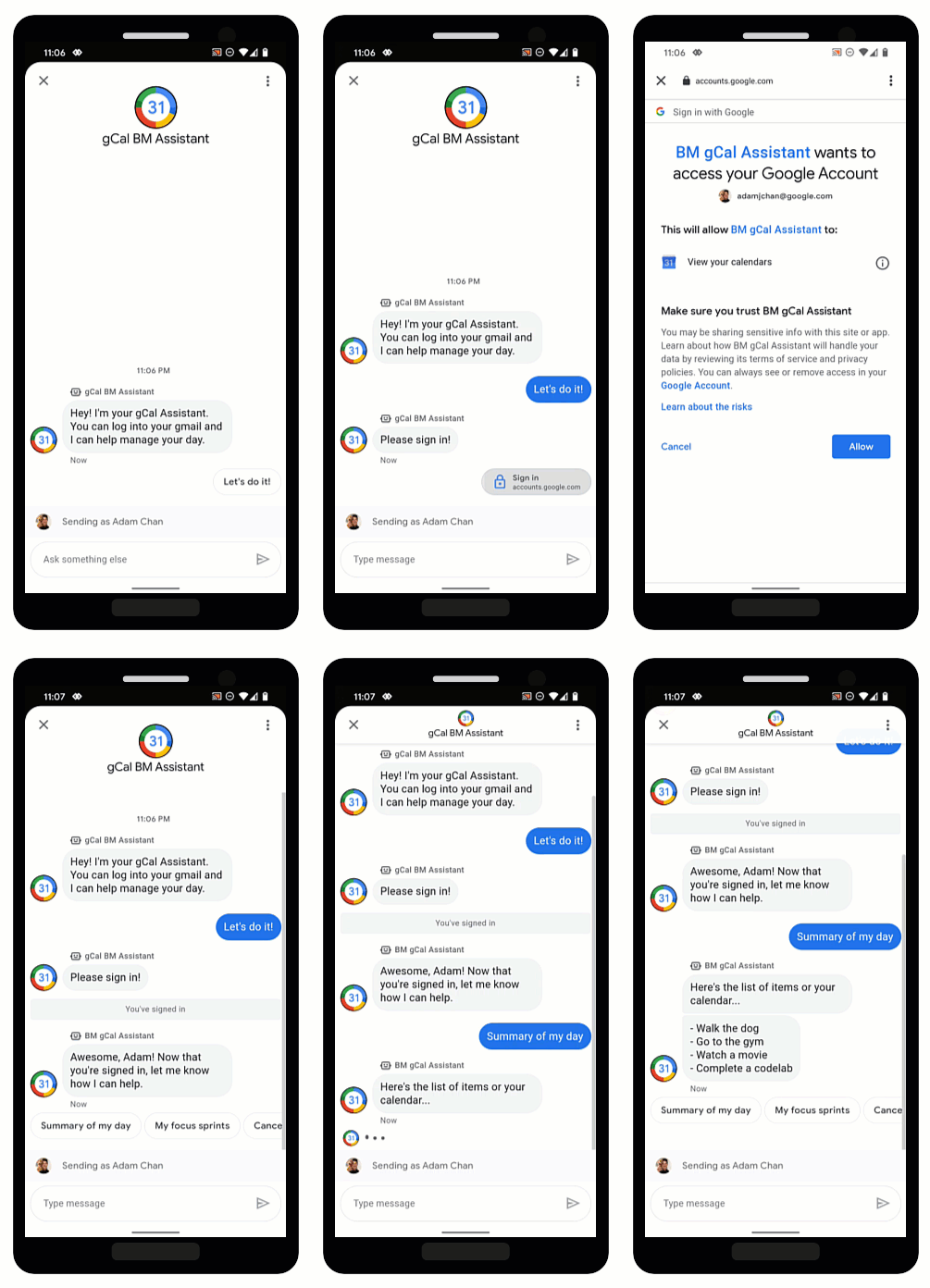
OAuth umożliwia agentom weryfikowanie tożsamości użytkowników i bezpieczne przekazywanie spersonalizowanych informacji w rozmowach. Gdy użytkownicy logują się u zaufanego dostawcy OAuth, agenci mogą uzyskiwać dostęp do danych użytkowników, które pomagają szybko odpowiadać dzięki automatyzacji i oszczędzają czas agentów na żywo.
Business Messages obsługuje OAuth 2.0 z sugestią żądania uwierzytelnienia , która prosi użytkowników o zalogowanie się u dostawcy OAuth skonfigurowanego przez Ciebie dla agenta. Gdy użytkownik zaloguje się, Business Messages przekaże kod autoryzacji z powrotem do agenta w postaci wiadomości.
Gdy uzyskasz kod autoryzacji od dostawcy OAuth, możesz zintegrować się z jego interfejsami API i obsługiwać przepływy rozmów, które wymagają informacji o tożsamości użytkownika. Pamiętaj, że każda usługa, z której korzystasz, ma własne warunki użytkowania.
Konfigurowanie OAuth dla agenta
Aby włączyć sugestię żądania uwierzytelnienia dla agenta, musisz najpierw skonfigurować OAuth.
Aby określić konfigurację OAuth, wyślij żądanie PATCH
za pomocą interfejsu Business Communications
API
aby zaktualizować pole endpointUrl agenta.
Po określeniu adresu URL punktu końcowego musisz zapisać identyfikatory URI przekierowania dla agenta i zaktualizować je w informacjach dostawcy OAuth.
Wymagania wstępne
Potrzebujesz tych elementów:
- dostawca OAuth, który jest zgodny ze specyfikacją OAuth 2.0,
- ścieżka do klucza konta usługi projektu GCP na komputerze używanym do programowania,
nameagenta (np. „brands/12345/agents/67890”).Jeśli nie znasz
nameagenta, zobacz List all agents for a brand (Wyświetlanie listy wszystkich agentów marki).Adres URL punktu końcowego, pod którym użytkownicy logują się u dostawcy OAuth.
Wysyłanie prośby o aktualizację
Aby zaktualizować agenta, uruchom to polecenie. Zastąp zmienne wartościami określonymi w sekcji Wymagania wstępne.
curl -X PATCH \
"https://businesscommunications.googleapis.com/v1/brands/BRAND_ID/agents/AGENT_ID?updateMask=businessMessagesAgent.authorizationConfig" \
-H "Content-Type: application/json" \
-H "User-Agent: curl/business-communications" \
-H "$(oauth2l header --json PATH_TO_SERVICE_ACCOUNT_KEY businesscommunications)" \
-d "{
    'businessMessagesAgent': {
        'authorizationConfig': {
            'endpointUrl': 'ENDPOINT_URL',
        },
    },
}"
Aktualizowanie identyfikatorów URI przekierowania
Gdy OAuth jest skonfigurowany dla agenta, musisz dodać 4 identyfikatory URI przekierowania do dostawcy OAuth:
https://business.google.com/callbackhttps://business.google.com/callback?https://business.google.com/message?az-intent-type=1https://business.google.com/message?az-intent-type=1&
Musisz uwzględnić wszystkie adresy URL przekierowania w informacjach dostawcy OAuth.
Proces aktualizowania identyfikatorów URI przekierowania różni się w zależności od dostawcy OAuth. Instrukcje znajdziesz u dostawcy OAuth.
Gdy OAuth jest skonfigurowany dla agenta, możesz uwierzytelniać użytkowników za pomocą sugestii żądania uwierzytelnienia.
Uwierzytelnianie użytkownika
Po skonfigurowaniu OAuth dla agenta możesz prosić użytkowników o zalogowanie się za pomocą sugestii żądania uwierzytelnienia.
Wymagania wstępne
Potrzebujesz tych elementów:
- ścieżka do klucza konta usługi projektu GCP na komputerze używanym do programowania,
nameagenta (np. „brands/12345/agents/67890”).Jeśli nie znasz
nameagenta, zobacz List all agents for a brand (Wyświetlanie listy wszystkich agentów marki).Identyfikator klienta od dostawcy OAuth.
Wymagania dotyczące wyzwania kodu od dostawcy OAuth.
Zakresy od dostawcy OAuth.
Wysyłanie sugestii żądania uwierzytelnienia
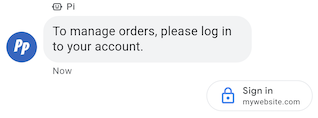
Aby uwierzytelnić użytkownika:
- Wygeneruj ciągi weryfikatora kodu i wyzwania kodu na potrzeby żądania OAuth. Wymagania i opcje znajdziesz u dostawcy OAuth.
- Wyślij wiadomość z sugestią żądania uwierzytelnienia.
cURL
# Copyright 2021 Google LLC # # Licensed under the Apache License, Version 2.0 (the "License"); # you may not use this file except in compliance with the License. # You may obtain a copy of the License at # https://www.apache.org/licenses/LICENSE-2.0 # Unless required by applicable law or agreed to in writing, software # distributed under the License is distributed on an "AS IS" BASIS, # WITHOUT WARRANTIES OR CONDITIONS OF ANY KIND, either express or implied. # See the License for the specific language governing permissions and # limitations under the License. # This code sends a text message to the user with an authentication request suggestion # that allows the user to authenticate with OAuth. It also has a fallback text. # Read more: https://developers.google.com/business-communications/business-messages/guides/how-to/message/send?hl=en#authentication-request-suggestion # Replace the __CONVERSATION_ID__ with a conversation id that you can send messages to # Make sure a service account key file exists at ./service_account_key.json # Replace the __CLIENT_ID__ # Replace the __CODE_CHALLENGE__ # Replace the __SCOPE__ curl -X POST "https://businessmessages.googleapis.com/v1/conversations/__CONVERSATION_ID__/messages" \ -H "Content-Type: application/json" \ -H "User-Agent: curl/business-messages" \ -H "$(oauth2l header --json ./service_account_key.json businessmessages)" \ -d "{ 'messageId': '$(uuidgen)', 'text': 'Sign in to continue the conversation.', 'fallback': 'Visit support.growingtreebank.com to continue.', 'suggestions': [ { 'authenticationRequest': { 'oauth': { 'clientId': '__CLIENT_ID__', 'codeChallenge': '__CODE_CHALLENGE__', 'scopes': [ '__SCOPE__', ], }, }, }, ], 'representative': { 'avatarImage': 'https://developers.google.com/identity/images/g-logo.png', 'displayName': 'Chatbot', 'representativeType': 'BOT' } }"
Node.js
/** * This code sends a text message to the user with an authentication request suggestion * that allows the user to authenticate with OAuth. It also has a fallback text. * Read more: https://developers.google.com/business-communications/business-messages/guides/how-to/message/send?hl=en#authentication-request-suggestion * * This code is based on the https://github.com/google-business-communications/nodejs-businessmessages Node.js * Business Messages client library. */ /** * Before continuing, learn more about the prerequisites for authenticating * with OAuth at: https://developers.google.com/business-communications/business-messages/guides/how-to/integrate/oauth?hl=en * * Edit the values below: */ const PATH_TO_SERVICE_ACCOUNT_KEY = './service_account_key.json'; const CONVERSATION_ID = 'EDIT_HERE'; const OAUTH_CLIENT_ID = 'EDIT_HERE'; const OAUTH_CODE_CHALLENGE = 'EDIT_HERE'; const OAUTH_SCOPE = 'EDIT_HERE'; const businessmessages = require('businessmessages'); const uuidv4 = require('uuid').v4; const {google} = require('googleapis'); // Initialize the Business Messages API const bmApi = new businessmessages.businessmessages_v1.Businessmessages({}); // Set the scope that we need for the Business Messages API const scopes = [ 'https://www.googleapis.com/auth/businessmessages', ]; // Set the private key to the service account file const privatekey = require(PATH_TO_SERVICE_ACCOUNT_KEY); /** * Posts a message to the Business Messages API along with an authentication request. * * @param {string} conversationId The unique id for this user and agent. * @param {string} representativeType A value of BOT or HUMAN. */ async function sendMessage(conversationId, representativeType) { const authClient = await initCredentials(); if (authClient) { // Create the payload for sending a message along with an authentication request const apiParams = { auth: authClient, parent: 'conversations/' + conversationId, resource: { messageId: uuidv4(), representative: { representativeType: representativeType, }, fallback: 'Visit support.growingtreebank.com to continue.', text: 'Sign in to continue the conversation.', suggestions: [ { authenticationRequest: { oauth: { clientId: OAUTH_CLIENT_ID, codeChallenge: OAUTH_CODE_CHALLENGE, scopes: [OAUTH_SCOPE] } } }, ], }, }; // Call the message create function using the // Business Messages client library bmApi.conversations.messages.create(apiParams, {auth: authClient}, (err, response) => { console.log(err); console.log(response); }); } else { console.log('Authentication failure.'); } } /** * Initializes the Google credentials for calling the * Business Messages API. */ async function initCredentials() { // configure a JWT auth client const authClient = new google.auth.JWT( privatekey.client_email, null, privatekey.private_key, scopes, ); return new Promise(function(resolve, reject) { // authenticate request authClient.authorize(function(err, tokens) { if (err) { reject(false); } else { resolve(authClient); } }); }); } sendMessage(CONVERSATION_ID, 'BOT');
Python
"""Sends a text message to the user with an authentication request suggestion. It allows the user to authenticate with OAuth and has a fallback text. Read more: https://developers.google.com/business-communications/business-messages/guides/how-to/message/send?hl=en#authentication-request-suggestion This code is based on the https://github.com/google-business-communications/python-businessmessages Python Business Messages client library. """ import uuid from businessmessages import businessmessages_v1_client as bm_client from businessmessages.businessmessages_v1_messages import BusinessMessagesAuthenticationRequest from businessmessages.businessmessages_v1_messages import BusinessMessagesAuthenticationRequestOauth from businessmessages.businessmessages_v1_messages import BusinessmessagesConversationsMessagesCreateRequest from businessmessages.businessmessages_v1_messages import BusinessMessagesMessage from businessmessages.businessmessages_v1_messages import BusinessMessagesRepresentative from businessmessages.businessmessages_v1_messages import BusinessMessagesSuggestion from oauth2client.service_account import ServiceAccountCredentials # Before continuing, learn more about the prerequisites for authenticating # with OAuth at: https://developers.google.com/business-communications/business-messages/guides/how-to/integrate/oauth?hl=en # Edit the values below: path_to_service_account_key = './service_account_key.json' conversation_id = 'EDIT_HERE' oauth_client_id = 'EDIT_HERE' oauth_code_challenge = 'EDIT_HERE' oauth_scope = 'EDIT_HERE' credentials = ServiceAccountCredentials.from_json_keyfile_name( path_to_service_account_key, scopes=['https://www.googleapis.com/auth/businessmessages']) client = bm_client.BusinessmessagesV1(credentials=credentials) representative_type_as_string = 'BOT' if representative_type_as_string == 'BOT': representative_type = BusinessMessagesRepresentative.RepresentativeTypeValueValuesEnum.BOT else: representative_type = BusinessMessagesRepresentative.RepresentativeTypeValueValuesEnum.HUMAN # Create a text message with an authentication request message = BusinessMessagesMessage( messageId=str(uuid.uuid4().int), representative=BusinessMessagesRepresentative( representativeType=representative_type ), text='Sign in to continue the conversation.', fallback='Visit support.growingtreebank.com to continue.', suggestions=[ BusinessMessagesSuggestion( authenticationRequest=BusinessMessagesAuthenticationRequest( oauth=BusinessMessagesAuthenticationRequestOauth( clientId=oauth_client_id, codeChallenge=oauth_code_challenge, scopes=[oauth_scope]) ) ), ] ) # Create the message request create_request = BusinessmessagesConversationsMessagesCreateRequest( businessMessagesMessage=message, parent='conversations/' + conversation_id) # Send the message bm_client.BusinessmessagesV1.ConversationsMessagesService( client=client).Create(request=create_request)
- Gdy użytkownik kliknie sugestię i zaloguje się, otrzymasz
wiadomość w
webhooku agenta. Pobierz kod autoryzacji z pola
authenticationResponse.code.
Gdy otrzymasz wiadomość, możesz wymienić kod autoryzacji i weryfikator kodu na token dostępu od dostawcy OAuth. Za pomocą tokena dostępu możesz uzyskiwać dostęp do danych użytkownika.
Przykładową rozmowę z uwierzytelnieniem, w tym przykłady kodu, znajdziesz w artykule Uwierzytelnianie użytkownika.