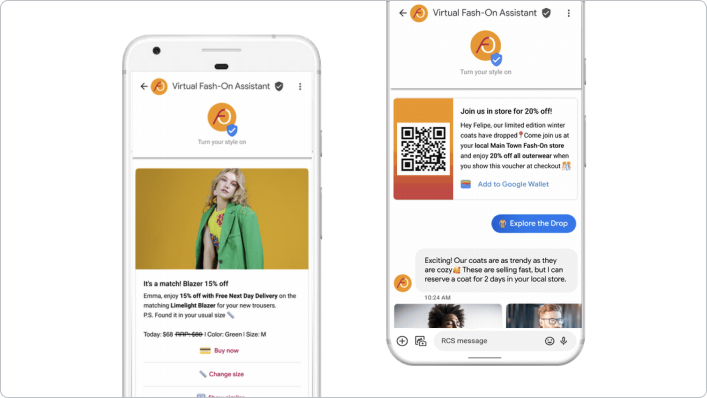
เริ่มการสนทนา

ในการสนทนากับตัวแทน Business Messages ข้อความต้อนรับจะเป็นตัวกำหนดโทนของการโต้ตอบ นอกจากนี้ยังช่วยให้ผู้ใช้ทราบถึงสิ่งที่ตัวแทนทำได้ ซึ่งจะกำหนดคำถามและความคาดหวังของผู้ใช้

ตัวแทนจะส่งข้อความต้อนรับทุกครั้งที่ผู้ใช้เปิดการสนทนา นอกจากนี้ ตัวแทนยังแสดง ข้อความเริ่มสนทนา เพื่อแนะนำผู้ใช้ไปยังเส้นทางที่ทราบหรือใช้บ่อย

หากผู้ใช้พยายามเริ่มการสนทนานอกเวลาทำการของตัวแทน ตัวแทนจะแสดงข้อความออฟไลน์ ที่คุณใช้แชร์ช่องทางอื่นหรือแนะนำขั้นตอนถัดไปได้ การใช้ประโยชน์จากการตั้งค่าเหล่านี้จะช่วยเพิ่มความน่าเชื่อถือและความสามารถในการใช้งานของตัวแทน

ข้อความเริ่มการสนทนา

การตั้งค่าระดับตัวแทนและระดับสถานที่

คุณระบุการตั้งค่าการสนทนาได้ที่ระดับตัวแทนหรือสถานที่

  • ระดับตัวแทน: การตั้งค่าการสนทนาเหล่านี้จะมีผลกับการสนทนาทั้งหมดกับตัวแทนในจุดเริ่มต้นทั้งหมด

    ข้อความต้อนรับระดับตัวแทนอาจเริ่มต้นด้วย "ขอขอบคุณที่ติดต่อ Bridgepoint Runners..." ข้อความเริ่มสนทนาสามารถมุ่งเน้นไปที่การดำเนินการหรือข้อมูลทั่วทั้งบริษัท

  • ระดับสถานที่: การตั้งค่าเหล่านี้จะลบล้างการตั้งค่าระดับตัวแทนและ จะมีผลกับการสนทนาที่มีสถานที่นั้นๆ ผ่านจุดเริ่มต้น PLACESHEET และ MAPS เท่านั้น

    ข้อความต้อนรับระดับสถานที่อาจเริ่มต้นด้วย "ขอขอบคุณที่ติดต่อ Bridgepoint Runners ที่ Amphitheatre Pkwy..." ข้อความเริ่มสนทนาสามารถมุ่งเน้นไปที่งานหรือข้อมูลตามสถานที่ ข้อความออฟไลน์อาจระบุเวลาที่สถานที่นั้นจะเปิดให้บริการอีกครั้ง

ภาษา

ตัวแทนและสถานที่สามารถระบุการตั้งค่าแยกกันสำหรับภาษาที่รองรับ ตัวอย่างเช่น ตัวแทนอาจระบุข้อความต้อนรับเป็นภาษาอังกฤษสำหรับภาษา "en" และมีข้อความต้อนรับเดียวกันเป็นภาษาสเปนสำหรับภาษา "es" Business Messages จะแก้ปัญหาการไม่ตรงกันระหว่างภาษาที่รายงานของอุปกรณ์ผู้ใช้กับภาษาที่ตัวแทนหรือสถานที่ตั้งมีการตั้งค่าการสนทนา

ระบบจะรายงานการจับคู่ภาษาในช่อง resolvedLocale ของแต่ละข้อความ คุณระบุ defaultLocale ของตัวแทนหรือสถานที่ได้ ซึ่งจะกำหนดน้ำหนักการจับคู่ภาษาที่แก้ไขแล้ว ดูการแปลเป็นภาษาท้องถิ่นและ ภาษา

Business Messages ใช้ภาษาที่แก้ไขแล้วเพื่อกำหนดการตั้งค่าการสนทนาที่จะใช้

ข้อความต้อนรับ

ข้อความแรกในการสนทนาระหว่างตัวแทนกับผู้ใช้คือข้อความต้อนรับของตัวแทน ข้อความต้อนรับจะปรากฏขึ้นโดยอัตโนมัติหลังจากที่ผู้ใช้เริ่มการสนทนาใหม่ ข้อความต้อนรับที่ดี จะกำหนดความคาดหวังของผู้ใช้ในการโต้ตอบกับตัวแทน หากต้องการแก้ไขข้อความต้อนรับ โปรดดูอัปเดตการตั้งค่าการสนทนา

ข้อความเริ่มสนทนา

แม้ว่าข้อความต้อนรับที่ดีจะครอบคลุมฟังก์ชันการทำงานของตัวแทนในระดับสูงและ เป็นแบบปลายเปิด ข้อความเริ่มสนทนาที่ดี จะแนะนำผู้ใช้ไปยังคำถามที่พบบ่อยหรือฟังก์ชันการทำงานที่ทราบ

ข้อความเริ่มสนทนาจะปรากฏเป็นคำตอบแนะนำพร้อมตัวเลือกที่เรียงกันในแนวตั้งและจะแสดงอยู่หลังข้อความต้อนรับ เมื่อผู้ใช้แตะข้อความเริ่มสนทนา ตัวแทนจะได้รับเนื้อหาที่กำหนดไว้ล่วงหน้าและข้อมูลการรายงานผล Conversion ที่คุณตั้งค่าไว้เมื่อระบุข้อความเริ่มสนทนา

หากตัวแทนรองรับฟังก์ชันการทำงานอัตโนมัติสำหรับคำขอที่เฉพาะเจาะจง ข้อความเริ่มสนทนาอาจเชื่อมโยงกับคำขอเหล่านั้น ซึ่งช่วยให้คุณใช้ข้อมูลที่ทราบสำหรับการทำงานอัตโนมัติและส่งคำถามของผู้ใช้แบบอิสระไปยังตัวแทนที่เป็นมนุษย์ที่พร้อมตอบได้

ตัวแทนหนึ่งๆ มีข้อความเริ่มสนทนาได้สูงสุด 5 รายการ และข้อความเริ่มสนทนาแต่ละรายการมีอักขระได้สูงสุด 35 ตัว

หากต้องการเพิ่มหรือแก้ไขข้อความเริ่มสนทนา โปรดดูอัปเดตการตั้งค่าการสนทนา

ข้อความออฟไลน์

เมื่อผู้ใช้เริ่มการสนทนากับตัวแทนนอกเวลาทำการของตัวแทน (ตามที่กำหนดโดย MessagingAvailability) ผู้ใช้จะได้รับข้อความออฟไลน์ของตัวแทน ระบบจะพิจารณาเฉพาะความพร้อมให้บริการของตัวแทนที่เป็นมนุษย์เมื่อทริกเกอร์ข้อความออฟไลน์ ตัวแทนที่มีเฉพาะตัวแทนบ็อตจะส่งข้อความต้อนรับเสมอ ข้อความออฟไลน์ที่ดี

  • ระบุเหตุผลที่ตัวแทนไม่พร้อมให้บริการ
  • แนะนำผู้ใช้เกี่ยวกับขั้นตอนถัดไปที่เหมาะสมหรือช่องทางการติดต่ออื่น
  • มีโทนเสียงที่สอดคล้องกับข้อความต้อนรับและข้อความเริ่มสนทนา

ข้อความออฟไลน์ที่ไม่ดี

"ขออภัย ขณะนี้เราปิดทำการอยู่"

ข้อความออฟไลน์ที่ดี

"ขณะนี้เราปิดทำการอยู่ แต่จะพร้อมให้บริการอีกครั้งในวันพรุ่งนี้เวลา 8:00 น. หากต้องการความช่วยเหลือเร่งด่วน โปรดติดต่อทีมสนับสนุนที่หมายเลข +12223334444 หรืออีเมล support@gtb.com"

หากต้องการแก้ไขข้อความออฟไลน์ โปรดดูอัปเดตการตั้งค่าการสนทนา

อัปเดตการตั้งค่าการสนทนา

หากต้องการจัดการข้อความต้อนรับหรือข้อความเริ่มสนทนา คุณต้องส่งคำขอ PATCH ด้วย Business Communications API เพื่ออัปเดตช่อง conversationalSettings ของตัวแทนหรือสถานที่

เมื่ออัปเดตช่อง conversationalSettings คุณต้องระบุค่าสำหรับ ทุกช่องใน ConversationalSetting ออบเจ็กต์ คำขออัปเดตจะเขียนทับเนื้อหาของช่องทั้งหมดที่คุณแก้ไข รวมถึงช่องย่อย ตัวอย่างเช่น หากคุณส่งคำขอแก้ไขข้อความต้อนรับแต่ไม่ได้ระบุข้อความเริ่มสนทนา คำขอจะนำข้อความเริ่มสนทนาก่อนหน้านี้ออก

ข้อกำหนดเบื้องต้น

คุณต้องมีรายการต่อไปนี้ก่อนที่จะอัปเดตการตั้งค่าการสนทนา

  • เส้นทางไปยังคีย์บัญชีบริการของโปรเจ็กต์ GCP ในเครื่องที่ใช้พัฒนา
  • ภาษาที่ต้องการอัปเดตการตั้งค่า
  • สำหรับการตั้งค่าระดับตัวแทน ให้ระบุ name ของตัวแทน (เช่น "brands/12345/agents/67890")

    หากไม่ทราบ name ของตัวแทน โปรดดูหัวข้อ แสดงตัวแทนทั้งหมดของ แบรนด์

  • สำหรับการตั้งค่าระดับสถานที่ ให้ระบุ name ของสถานที่ (เช่น "brands/12345/locations/67890")

    หากไม่ทราบ name ของสถานที่ โปรดดูหัวข้อ แสดงสถานที่ทั้งหมดของ แบรนด์

  • ภาษาที่จะอัปเดตเป็นรหัสภาษาแบบ 2 ตัวอักษรตามมาตรฐาน ISO 639-1

  • ข้อความต้อนรับใหม่

  • URL นโยบายความเป็นส่วนตัว

  • (ไม่บังคับ) ข้อความสำหรับข้อความเริ่มสนทนา

  • (ไม่บังคับ) ข้อมูลการรายงานผล Conversion สำหรับข้อความเริ่มสนทนา

  • (ไม่บังคับ) ข้อความออฟไลน์ใหม่

หากไม่ทราบค่า conversationalSettings ปัจจุบัน โปรดดูหัวข้อ รับข้อมูลตัวแทน และ รับข้อมูลสถานที่

ส่งคำขออัปเดต

หากต้องการอัปเดตตัวแทนหรือสถานที่ ให้เรียกใช้คำสั่งต่อไปนี้ แทนที่ตัวแปร ด้วยค่าที่คุณระบุไว้ใน ข้อกำหนดเบื้องต้น

หากไม่ต้องการข้อความเริ่มสนทนา ให้ละเว้น conversationStarters และช่องย่อยทั้งหมด

การตั้งค่าระดับตัวแทน

cURL

# This code updates the conversational settings of a Business Messages agent.
# Read more: https://developers.google.com/business-communications/business-messages/reference/business-communications/rest/v1/brands.agents/patch

# Replace the __BRAND_ID__, __AGENT_ID__ and __LOCALE__
# Make sure a service account key file exists at ./service_account_key.json

curl -X PATCH \
"https://businesscommunications.googleapis.com/v1/brands/__BRAND_ID__/agents/__AGENT_ID__?updateMask=businessMessagesAgent.conversationalSettings.__LOCALE__" \
-H "Content-Type: application/json" \
-H "User-Agent: curl/business-communications" \
-H "$(oauth2l header --json ./service_account_key.json businesscommunications)" \
-d '{
  "businessMessagesAgent": {
    "conversationalSettings": {
      "__LOCALE__": {
        "welcomeMessage": {
          "text": "My first welcome message"
        },
        "offlineMessage": {
          "text": "My first offline message"
        },
        "privacyPolicy": {
          "url": "https://www.your-company-website.com/privacy"
        },
        "conversationStarters": [
          {
            "suggestion": {
              "reply": {
                "text": "Suggestion 1",
                "postbackData": "post_back_suggestion_1"
              }
            }
          }
        ]
      }
    }
  }
}'

Node.js

/**
 * This code snippet updates the conversationalSettings of a Business Messages agent.
 * Read more: https://developers.google.com/business-communications/business-messages/reference/business-communications/rest/v1/brands.agents/patch
 *
 * This code is based on the https://github.com/google-business-communications/nodejs-businesscommunications Node.js
 * Business Communications client library.
 */

/**
 * Edit the values below:
 */
const BRAND_ID = 'EDIT_HERE';
const AGENT_ID = 'EDIT_HERE';
const LOCALE = 'en';
const PATH_TO_SERVICE_ACCOUNT_KEY = './service_account_key.json';

const businesscommunications = require('businesscommunications');
const {google} = require('googleapis');

// Initialize the Business Communications API
const bcApi = new businesscommunications.businesscommunications_v1.Businesscommunications({});

// Set the scope that we need for the Business Communications API
const scopes = [
  'https://www.googleapis.com/auth/businesscommunications',
];

// Set the private key to the service account file
const privatekey = require(PATH_TO_SERVICE_ACCOUNT_KEY);

async function main() {
  const authClient = await initCredentials();

  const agentName = 'brands/' + BRAND_ID + '/agents/' + AGENT_ID;

  if (authClient) {
    // Setup the parameters for the API call
    const apiParams = {
      auth: authClient,
      name: agentName,
      updateMask: 'businessMessagesAgent.conversationalSettings.' + LOCALE,
      resource: {
        businessMessagesAgent: {
          conversationalSettings: {
            [LOCALE]: {
              privacyPolicy: { url: 'https://www.your-company-website.com/privacy' },
              welcomeMessage: { text: 'My updated welcome message' },
              offlineMessage: { text: 'My updated offline message' },
              conversationStarters: [
                {
                  suggestion: {
                    reply: {
                      'text': 'Suggestion 2',
                     'postbackData': 'post_back_suggestion_2',
                    },
                  },
                }
              ],
            },
          }
        }
      }
    };

    bcApi.brands.agents.patch(apiParams, {}, (err, response) => {
      if (err !== undefined && err !== null) {
        console.dir(err);
      } else {
        // Agent found
        console.log(response.data);
      }
    });
  }
  else {
    console.log('Authentication failure.');
  }
}

/**
 * Initializes the Google credentials for calling the
 * Business Messages API.
 */
 async function initCredentials() {
  // Configure a JWT auth client
  const authClient = new google.auth.JWT(
    privatekey.client_email,
    null,
    privatekey.private_key,
    scopes,
  );

  return new Promise(function(resolve, reject) {
    // Authenticate request
    authClient.authorize(function(err, tokens) {
      if (err) {
        reject(false);
      } else {
        resolve(authClient);
      }
    });
  });
}

main();

Java

import com.google.api.client.googleapis.auth.oauth2.GoogleCredential;
import com.google.api.client.googleapis.javanet.GoogleNetHttpTransport;
import com.google.api.client.http.HttpTransport;
import com.google.api.client.json.jackson2.JacksonFactory;
import com.google.api.services.businesscommunications.v1.BusinessCommunications;
import com.google.api.services.businesscommunications.v1.model.*;
import com.google.common.collect.ImmutableMap;
import java.io.FileInputStream;
import java.util.Arrays;

class Main {
  /**
   * Initializes credentials used by the Business Communications API.
   */
  private static BusinessCommunications.Builder getBusinessCommunicationsBuilder() {
    BusinessCommunications.Builder builder = null;
    try {
      GoogleCredential credential = GoogleCredential
            .fromStream(new FileInputStream("PATH_TO_SERVICE_ACCOUNT_KEY"));

      credential = credential.createScoped(Arrays.asList(
          "https://www.googleapis.com/auth/businesscommunications"));

      credential.refreshToken();

      HttpTransport httpTransport = GoogleNetHttpTransport.newTrustedTransport();
      JacksonFactory jsonFactory = JacksonFactory.getDefaultInstance();

      // Create instance of the Business Communications API
      builder = new BusinessCommunications
          .Builder(httpTransport, jsonFactory, null)
          .setApplicationName(credential.getServiceAccountProjectId());

      // Set the API credentials and endpoint
      builder.setHttpRequestInitializer(credential);
    } catch (Exception e) {
      e.printStackTrace();
    }

    return builder;
  }

  public static void main(String args[]) {
    try {
      // Create client library reference
      BusinessCommunications.Builder builder = getBusinessCommunicationsBuilder();

      String agentName = "brands/BRAND_ID/agents/AGENT_ID";

      Agent agent = new Agent().setBusinessMessagesAgent(
          new BusinessMessagesAgent().setConversationalSettings(ImmutableMap.of("LOCALE",
              new ConversationalSetting()
                  .setPrivacyPolicy(new PrivacyPolicy().setUrl("PRIVACY_POLICY_URL"))
                  .setWelcomeMessage(new WelcomeMessage().setText("WELCOME_MESSAGE"))
                  .setOfflineMessage(new OfflineMessage().setText("OFFLINE_MESSAGE"))
                  .setConversationStarters(Arrays.asList(
                      new ConversationStarters().setSuggestion(new Suggestion()
                          .setReply(new SuggestedReply()
                              .setText("REPLY_TEXT")
                              .setPostbackData("POSTBACK_DATA"))),
                      )))));

      BusinessCommunications.Brands.Agents.Patch request = builder
          .build().brands().agents().patch(agentName, agent);

      request.setUpdateMask("businessMessagesAgent.conversationalSettings.LOCALE");

      Agent updatedAgent = request.execute();
      System.out.println(updatedAgent.toPrettyString());
    } catch (Exception e) {
      e.printStackTrace();
    }
  }
}
โค้ดนี้อิงตาม ไลบรารีของไคลเอ็นต์ Java Business Communications.

Python

"""This code updates the conversational settings of a Business Messages agent.

Read more: https://developers.google.com/business-communications/business-messages/reference/business-communications/rest/v1/brands.agents/patch

This code is based on the https://github.com/google-business-communications/python-businessmessages
Python Business Messages client library.
"""

from oauth2client.service_account import ServiceAccountCredentials
from businesscommunications.businesscommunications_v1_client import BusinesscommunicationsV1
from businesscommunications.businesscommunications_v1_messages import (
    Agent,
    BusinessMessagesAgent,
    ConversationStarters,
    ConversationalSetting,
    OfflineMessage,
    PrivacyPolicy,
    WelcomeMessage,
    NegativeBotFeedbackMessage,
    BusinesscommunicationsBrandsAgentsPatchRequest,
)

# Edit the values below:
BRAND_ID = 'EDIT_HERE'
AGENT_ID = 'EDIT_HERE'
SCOPES = ['https://www.googleapis.com/auth/businesscommunications']
SERVICE_ACCOUNT_FILE = './service_account_key.json'

credentials = ServiceAccountCredentials.from_json_keyfile_name(
    SERVICE_ACCOUNT_FILE, scopes=SCOPES)

client = BusinesscommunicationsV1(credentials=credentials)

agents_service = BusinesscommunicationsV1.BrandsAgentsService(client)

agent_name = 'brands/' + BRAND_ID + '/agents/' + AGENT_ID

agent=Agent(
                businessMessagesAgent=BusinessMessagesAgent(
                        conversationalSettings=BusinessMessagesAgent.ConversationalSettingsValue(
                        additionalProperties=[BusinessMessagesAgent.ConversationalSettingsValue.AdditionalProperty(
                            key='en',
                            value=ConversationalSetting(
                                privacyPolicy=PrivacyPolicy(url='https://www.your-company-website.com/privacy'),
                                welcomeMessage=WelcomeMessage(text='Welcome to Business Messages'),
                            offlineMessage=OfflineMessage(text='This is an offline message'),
                                conversationStarters=[
                                    ConversationStarters(
                                        suggestion=Suggestion(
                                           reply=SuggestedReply(text='Option 1',
                                  postbackData='option_1')
                                        )
                                    )]
                                )
                            )
                        ]
                    )
                )
)

updated_agent = agents_service.Patch(
        BusinesscommunicationsBrandsAgentsPatchRequest(
            agent=agent,
            name=agent_name,
            updateMask='businessMessagesAgent.conversationalSettings.en'
        )
    )

print(updated_agent)

การตั้งค่าระดับสถานที่

# This code updates the agent interaction of a bot and human representatives.
# Read more: https://developers.google.com/business-communications/business-messages/reference/business-communications/rest/v1/brands.locations/patch

# Replace the __BRAND_ID__, __AGENT_ID__, __LOCATION_ID__, __LOCALE__
# Make sure a service account key file exists at ./service_account_key.json

curl -X PATCH \
"https://businesscommunications.googleapis.com/v1/brands/__BRAND_ID__/locations/__LOCATION_ID__?updateMask=conversationalSettings.__LOCALE__" \
-H "Content-Type: application/json" \
-H "User-Agent: curl/business-communications" \
-H "$(oauth2l header --json ./service_account_key.json businesscommunications)" \
-d '{
  "conversationalSettings": {
    "__LOCALE__": {
      "welcomeMessage": {
        "text": "My second welcome message"
      },
      "offlineMessage": {
        "text": "My second offline message"
      },
      "privacyPolicy": {
        "url": "https://www.your-company-website.com/privacy"
      },
      "conversationStarters": [
        {
          "suggestion": {
            "reply": {
              "text": "Suggestion 2",
              "postbackData": "post_back_suggestion_2"
            }
          }
        }
      ]
    }
  }
}'

โปรดดูข้อมูลการจัดรูปแบบและค่าที่ brands.agents.patch, brands.locations.patch, และ ConversationalSetting

ตัวอย่าง

การตั้งค่าระดับตัวแทน

curl -X PATCH \
"https://businesscommunications.googleapis.com/v1/brands/BRAND_ID/agents/AGENT_ID?updateMask=businessMessagesAgent.conversationalSettings.en" \
-H "Content-Type: application/json" \
-H "User-Agent: curl/business-communications" \
-H "$(oauth2l header --json PATH_TO_SERVICE_ACCOUNT_KEY businesscommunications)" \
-d "{
    'businessMessagesAgent': {
        'conversationalSettings': {
            'en': {
                'welcomeMessage': {
                    'text': 'Thanks for contacting Growing Tree Bank. What can I help with today?',
                },
                'offlineMessage': {
                    'text': 'We\'re closed for the night. Please reach out to us again tomorrow.',
                },
                'privacyPolicy': {
                    'url': 'https://www.growingtreebank.com/privacy',
                },
                'conversationStarters': [
                    {
                        'suggestion': {
                            'reply': {
                                'text': 'Set up an account',
                                'postbackData': 'new-account',
                            },
                        },
                    },
                    {
                        'suggestion': {
                            'reply': {
                                'text': 'Look up account information',
                                'postbackData': 'account-lookup',
                            },
                        },
                    },
                ],
            },
        },
    },
}"

การตั้งค่าระดับสถานที่

curl -X PATCH \
"https://businesscommunications.googleapis.com/v1/brands/12345/locations/67890?updateMask=conversationalSettings.en" \
-H "Content-Type: application/json" \
-H "User-Agent: curl/business-communications" \
-H "$(oauth2l header --json /path/to/service/account/key businesscommunications)" \
-d "{
    'conversationalSettings': {
        'en': {
            'welcomeMessage': {
                'text': 'Thanks for contacting Growing Tree Bank on Amphitheatre Pkwy. What can I help with today?',
            },
            'offlineMessage': {
                'text': 'We\'re closed for the night. Please reach out to us again tomorrow.',
            },
            'privacyPolicy': {
                'url': 'https://www.growingtreebank.com/privacy',
            },
            'conversationStarters': [
                {
                    'suggestion': {
                        'reply': {
                            'text': 'What are your hours?',
                            'postbackData': 'hours',
                        },
                    },
                },
                {
                    'suggestion': {
                        'reply': {
                            'text': 'Set up an account',
                            'postbackData': 'new-account',
                        },
                    },
                },
                {
                    'suggestion': {
                        'reply': {
                            'text': 'Look up account information',
                            'postbackData': 'account-lookup',
                        },
                    },
                },
                {
                    'suggestion': {
                        'action': {
                            'text': 'Call us',
                            'postbackData': 'call',
                            'dialAction': {
                              'phoneNumber': '+12223334444',
                            },
                        },
                    },
                },
            ],
        },
    },
}"