

سطح کدنویسی : مبتدی
مدت زمان : ۵ دقیقه
نوع پروژه : اتوماسیون با منوی سفارشی
اهداف
- بفهمید که راه حل چه کاری انجام میدهد.
- درک کنید که سرویسهای Apps Script در این راهکار چه کاری انجام میدهند.
- اسکریپت را تنظیم کنید.
- اسکریپت را اجرا کنید.
درباره این راهکار
یک سیستم ثبت فعالیتهای خارج از محل کار ایجاد کنید. این راهکار فرمی ایجاد میکند تا کارمندان بتوانند ترجیحات فعالیت خود را بیان کنند و ترجیحات کارمندان را با برنامه فعالیت مطابقت میدهد.
چگونه کار میکند؟
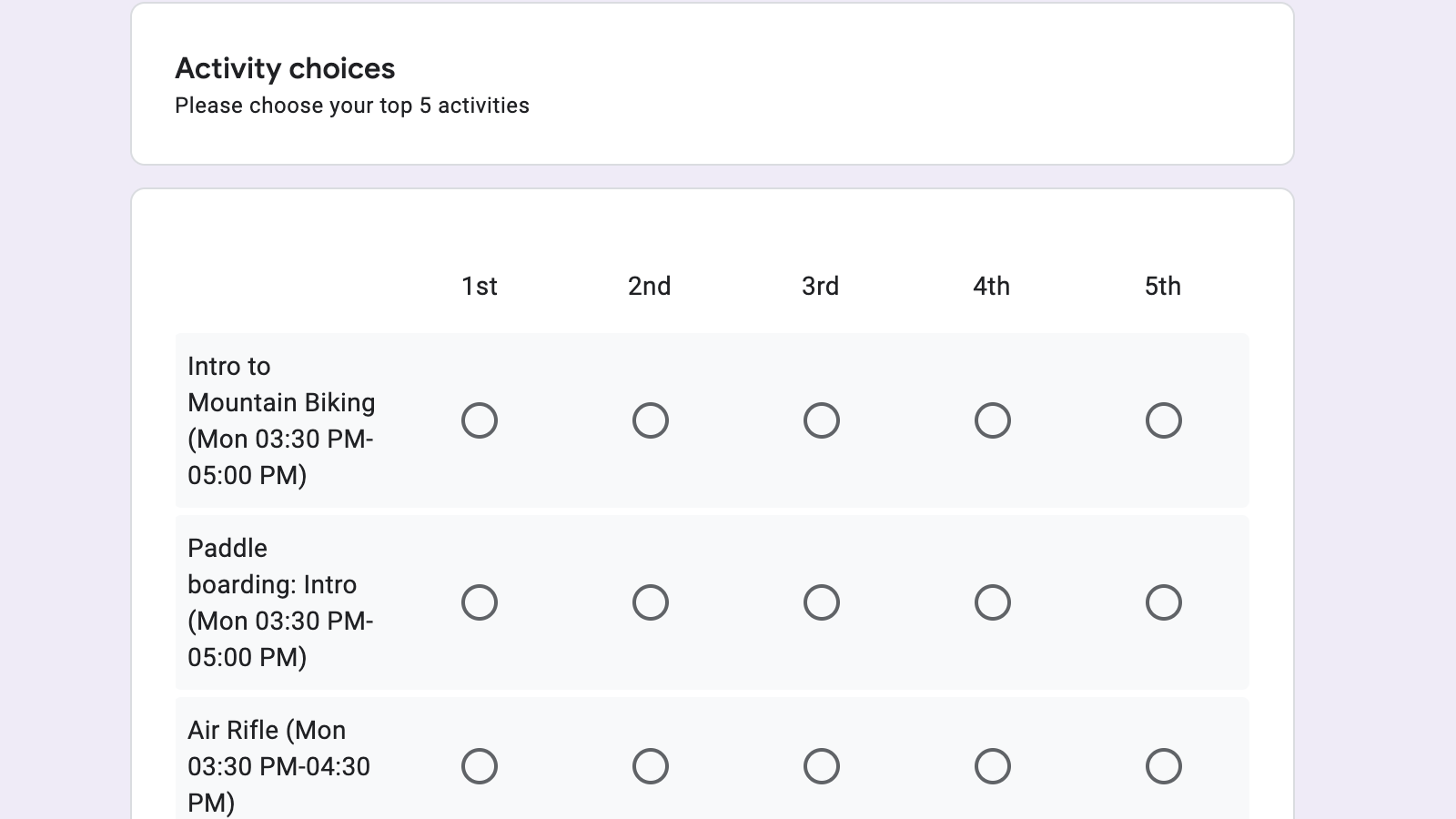
با استفاده از یک برنامه فعالیت در Google Sheets، اسکریپت یک فرم Google Forms ایجاد میکند تا کارمندان بتوانند تنظیمات فعالیت خود را انتخاب کنند. پس از دریافت پاسخها، اسکریپت تنظیمات کارمندان را با برنامه و ظرفیت هر فعالیت مطابقت میدهد. این تطابقها در دو صفحه جدید ارائه میشوند، یکی بر اساس کارمند و دیگری بر اساس فعالیت.
سرویسهای اسکریپت برنامهها
این راهکار از سرویسهای زیر استفاده میکند:
- سرویس صفحه گسترده : برنامه فعالیتها و پاسخهای فرم را نگهداری میکند و فعالیتها را به کارمندان اختصاص میدهد.
- سرویس فرمها : فرمی ایجاد میکند تا کارمندان بتوانند تنظیمات فعالیت خود را در آن وارد کنند.
- سرویس Utilities : رشتهها و تاریخها را قالببندی میکند.
پیشنیازها
برای استفاده از این نمونه، به پیشنیازهای زیر نیاز دارید:
- یک حساب گوگل (حسابهای کاربری گوگل ورکاسپیس ممکن است نیاز به تأیید مدیر داشته باشند).
- یک مرورگر وب با دسترسی به اینترنت.
اسکریپت را تنظیم کنید
برای کپی کردن صفحه گسترده و اسکریپت پیوست شده به آن، روی دکمه زیر کلیک کنید:
اسکریپت را اجرا کنید
- در صفحه گسترده کپی شده خود، روی فعالیتها > ایجاد فرم کلیک کنید. ممکن است لازم باشد صفحه را برای نمایش این منوی سفارشی رفرش کنید.
- وقتی از شما خواسته شد، اسکریپت را تأیید کنید. <<../_snippets/oauth.md>>
- دوباره روی فعالیتها > ایجاد فرم کلیک کنید.
- برای تولید پاسخهای آزمایشی، روی فعالیتها > تولید دادههای آزمایشی کلیک کنید.
- برای آزمایش فرم خودتان، روی ابزارها > مدیریت فرم > رفتن به فرم زنده کلیک کنید.
- فرم را پر کنید و آن را ارسال کنید.
- در صفحه گسترده، روی فعالیتها > اختصاص فعالیتها کلیک کنید.
- دو برگه جدید را مرور کنید: فعالیتها بر اساس شخص و فهرست فعالیتها .
کد را مرور کنید
برای بررسی کد Apps Script برای این راهکار، روی مشاهده کد منبع کلیک کنید:
مشاهده کد منبع
کد.gs
// To learn how to use this script, refer to the documentation:
// https://developers.google.com/apps-script/samples/automations/offsite-activity-signup

/*
Copyright 2022 Google LLC

Licensed under the Apache License, Version 2.0 (the "License");
you may not use this file except in compliance with the License.
You may obtain a copy of the License at

    https://www.apache.org/licenses/LICENSE-2.0

Unless required by applicable law or agreed to in writing, software
distributed under the License is distributed on an "AS IS" BASIS,
WITHOUT WARRANTIES OR CONDITIONS OF ANY KIND, either express or implied.
See the License for the specific language governing permissions and
limitations under the License.
*/

const NUM_ITEMS_TO_RANK = 5;
const ACTIVITIES_PER_PERSON = 2;
const NUM_TEST_USERS = 150;

/**
 * Adds custom menu items when opening the sheet.
 */
function onOpen() {
  const menu = SpreadsheetApp.getUi()
    .createMenu("Activities")
    .addItem("Create form", "buildForm_")
    .addItem("Generate test data", "generateTestData_")
    .addItem("Assign activities", "assignActivities_")
    .addToUi();
}

/**
 * Builds a form based on the "Activity Schedule" sheet. The form asks attendees to rank their top
 * N choices of activities, where N is defined by NUM_ITEMS_TO_RANK.
 */
function buildForm_() {
  const ss = SpreadsheetApp.getActiveSpreadsheet();
  if (ss.getFormUrl()) {
    const msg = "Form already exists. Unlink the form and try again.";
    SpreadsheetApp.getUi().alert(msg);
    return;
  }
  const form = FormApp.create("Activity Signup")
    .setDestination(FormApp.DestinationType.SPREADSHEET, ss.getId())
    .setAllowResponseEdits(true)
    .setLimitOneResponsePerUser(true)
    .setCollectEmail(true);
  const sectionHelpText = Utilities.formatString(
    "Please choose your top %d activities",
    NUM_ITEMS_TO_RANK,
  );
  form
    .addSectionHeaderItem()
    .setTitle("Activity choices")
    .setHelpText(sectionHelpText);

  // Presents activity ranking as a form grid with each activity as a row and rank as a column.
  const rows = loadActivitySchedule_(ss).map(
    (activity) => activity.description,
  );
  const columns = range_(1, NUM_ITEMS_TO_RANK).map((value) =>
    Utilities.formatString("%s", toOrdinal_(value)),
  );
  const gridValidation = FormApp.createGridValidation()
    .setHelpText("Select one item per column.")
    .requireLimitOneResponsePerColumn()
    .build();
  form
    .addGridItem()
    .setColumns(columns)
    .setRows(rows)
    .setValidation(gridValidation);

  form
    .addListItem()
    .setTitle("Assign other activities if choices are not available?")
    .setChoiceValues(["Yes", "No"]);
}

/**
 * Assigns activities using a random priority/random serial dictatorship approach. The results
 * are then populated into two new sheets, one listing activities per person, the other listing
 * the rosters for each activity.
 *
 * See https://en.wikipedia.org/wiki/Random_serial_dictatorship for additional information.
 */
function assignActivities_() {
  const ss = SpreadsheetApp.getActiveSpreadsheet();
  const activities = loadActivitySchedule_(ss);
  const activityIds = activities.map((activity) => activity.id);
  const attendees = loadAttendeeResponses_(ss, activityIds);
  assignWithRandomPriority_(attendees, activities, 2);
  writeAttendeeAssignments_(ss, attendees);
  writeActivityRosters_(ss, activities);
}

/**
 * Selects activities via random priority.
 *
 * @param {object[]} attendees - Array of attendees to assign activities to
 * @param {object[]} activities - Array of all available activities
 * @param {number} numActivitiesPerPerson - Maximum number of activities to assign
 */
function assignWithRandomPriority_(
  attendees,
  activities,
  numActivitiesPerPerson,
) {
  const activitiesById = activities.reduce((obj, activity) => {
    obj[activity.id] = activity;
    return obj;
  }, {});
  for (let i = 0; i < numActivitiesPerPerson; ++i) {
    const randomizedAttendees = shuffleArray_(attendees);
    for (const attendee of randomizedAttendees) {
      makeChoice_(attendee, activitiesById);
    }
  }
}

/**
 * Attempts to assign an activity for an attendee based on their preferences and current schedule.
 *
 * @param {object} attendee - Attendee looking to join an activity
 * @param {object} activitiesById - Map of all available activities
 */
function makeChoice_(attendee, activitiesById) {
  for (let i = 0; i < attendee.preferences.length; ++i) {
    const activity = activitiesById[attendee.preferences[i]];
    if (!activity) {
      continue;
    }
    const canJoin = checkAvailability_(attendee, activity);
    if (canJoin) {
      attendee.assigned.push(activity);
      activity.roster.push(attendee);
      break;
    }
  }
}

/**
 * Checks that an activity has capacity and doesn't conflict with previously assigned
 * activities.
 *
 * @param {object} attendee - Attendee looking to join the activity
 * @param {object} activity - Proposed activity
 * @return {boolean} - True if attendee can join the activity
 */
function checkAvailability_(attendee, activity) {
  if (activity.capacity <= activity.roster.length) {
    return false;
  }
  const timesConflict = attendee.assigned.some(
    (assignedActivity) =>
      !(
        assignedActivity.startAt.getTime() > activity.endAt.getTime() ||
        activity.startAt.getTime() > assignedActivity.endAt.getTime()
      ),
  );
  return !timesConflict;
}

/**
 * Populates a sheet with the assigned activities for each attendee.
 *
 * @param {Spreadsheet} ss - Spreadsheet to write to.
 * @param {object[]} attendees - Array of attendees with their activity assignments
 */
function writeAttendeeAssignments_(ss, attendees) {
  const sheet = findOrCreateSheetByName_(ss, "Activities by person");
  sheet.clear();
  sheet.appendRow(["Email address", "Activities"]);
  sheet.getRange("B1:1").merge();
  const rows = attendees.map((attendee) => {
    // Prefill row to ensure consistent length otherwise
    // can't bulk update the sheet with range.setValues()
    const row = fillArray_([], ACTIVITIES_PER_PERSON + 1, "");
    row[0] = attendee.email;
    attendee.assigned.forEach((activity, index) => {
      row[index + 1] = activity.description;
    });
    return row;
  });
  bulkAppendRows_(sheet, rows);
  sheet.setFrozenRows(1);
  sheet.getRange("1:1").setFontWeight("bold");
  sheet.autoResizeColumns(1, sheet.getLastColumn());
}

/**
 * Populates a sheet with the rosters for each activity.
 *
 * @param {Spreadsheet} ss - Spreadsheet to write to.
 * @param {object[]} activities - Array of activities with their rosters
 */
function writeActivityRosters_(ss, activities) {
  const sheet = findOrCreateSheetByName_(ss, "Activity rosters");
  sheet.clear();
  let rows = activities.map((activity) => {
    const roster = activity.roster.map((attendee) => attendee.email);
    return [activity.description].concat(roster);
  });
  // Transpose the data so each activity is a column
  rows = transpose_(rows, "");
  bulkAppendRows_(sheet, rows);
  sheet.setFrozenRows(1);
  sheet.getRange("1:1").setFontWeight("bold");
  sheet.autoResizeColumns(1, sheet.getLastColumn());
}

/**
 * Loads the activity schedule.
 *
 * @param {Spreadsheet} ss - Spreadsheet to load from
 * @return {object[]} Array of available activities.
 */
function loadActivitySchedule_(ss) {
  const timeZone = ss.getSpreadsheetTimeZone();
  const sheet = ss.getSheetByName("Activity Schedule");
  const rows = sheet.getSheetValues(
    sheet.getFrozenRows() + 1,
    1,
    sheet.getLastRow() - 1,
    sheet.getLastRow(),
  );
  const activities = rows.map((row, index) => {
    const name = row[0];
    const startAt = new Date(row[1]);
    const endAt = new Date(row[2]);
    const capacity = Number.parseInt(row[3]);
    const formattedStartAt = Utilities.formatDate(
      startAt,
      timeZone,
      "EEE hh:mm a",
    );
    const formattedEndAt = Utilities.formatDate(endAt, timeZone, "hh:mm a");
    const description = Utilities.formatString(
      "%s (%s-%s)",
      name,
      formattedStartAt,
      formattedEndAt,
    );
    return {
      id: index,
      name: name,
      description: description,
      capacity: capacity,
      startAt: startAt,
      endAt: endAt,
      roster: [],
    };
  });
  return activities;
}

/**
 * Loads the attendeee response data.
 *
 * @param {Spreadsheet} ss - Spreadsheet to load from
 * @param {number[]} allActivityIds - Full set of available activity IDs
 * @return {object[]} Array of parsed attendee respones.
 */
function loadAttendeeResponses_(ss, allActivityIds) {
  const sheet = findResponseSheetForForm_(ss);

  if (!sheet || sheet.getLastRow() === 1) {
    return undefined;
  }

  const rows = sheet.getSheetValues(
    sheet.getFrozenRows() + 1,
    1,
    sheet.getLastRow() - 1,
    sheet.getLastRow(),
  );
  const attendees = rows.map((row) => {
    const _ = row.shift(); // Ignore timestamp
    const email = row.shift();
    const autoAssign = row.pop();
    // Find ranked items in the response data.
    let preferences = row.reduce((prefs, value, index) => {
      const match = value.match(/(\d+).*/);
      if (!match) {
        return prefs;
      }
      const rank = Number.parseInt(match[1]) - 1; // Convert ordinal to array index
      prefs[rank] = index;
      return prefs;
    }, []);
    if (autoAssign === "Yes") {
      // If auto assigning additional activites, append a randomized list of all the activities.
      // These will then be considered as if the attendee ranked them.
      const additionalChoices = shuffleArray_(allActivityIds);
      preferences = preferences.concat(additionalChoices);
    }
    return {
      email: email,
      preferences: preferences,
      assigned: [],
    };
  });
  return attendees;
}

/**
 * Simulates a large number of users responding to the form. This enables users to quickly
 * experience the full solution without having to collect sufficient form responses
 * through other means.
 */
function generateTestData_() {
  const ss = SpreadsheetApp.getActiveSpreadsheet();
  const sheet = findResponseSheetForForm_(ss);
  if (!sheet) {
    const msg = "No response sheet found. Create the form and try again.";
    SpreadsheetApp.getUi().alert(msg);
  }
  if (sheet.getLastRow() > 1) {
    const msg =
      "Response sheet is not empty, can not generate test data. " +
      "Remove responses and try again.";
    SpreadsheetApp.getUi().alert(msg);
    return;
  }

  const activities = loadActivitySchedule_(ss);
  const choices = fillArray_([], activities.length, "");
  for (const value of range_(1, 5)) {
    choices[value] = toOrdinal_(value);
  }

  const rows = range_(1, NUM_TEST_USERS).map((value) => {
    const randomizedChoices = shuffleArray_(choices);
    const email = Utilities.formatString("person%d@example.com", value);
    return [new Date(), email].concat(randomizedChoices).concat(["Yes"]);
  });
  bulkAppendRows_(sheet, rows);
}

/**
 * Retrieves a sheet by name, creating it if it doesn't yet exist.
 *
 * @param {Spreadsheet} ss - Containing spreadsheet
 * @Param {string} name - Name of sheet to return
 * @return {Sheet} Sheet instance
 */
function findOrCreateSheetByName_(ss, name) {
  const sheet = ss.getSheetByName(name);
  if (sheet) {
    return sheet;
  }
  return ss.insertSheet(name);
}

/**
 * Faster version of appending multiple rows via ranges. Requires all rows are equal length.
 *
 * @param {Sheet} sheet - Sheet to append to
 * @param {Array<Array<object>>} rows - Rows to append
 */
function bulkAppendRows_(sheet, rows) {
  const startRow = sheet.getLastRow() + 1;
  const startColumn = 1;
  const numRows = rows.length;
  const numColumns = rows[0].length;
  sheet.getRange(startRow, startColumn, numRows, numColumns).setValues(rows);
}

/**
 * Copies and randomizes an array.
 *
 * @param {object[]} array - Array to shuffle
 * @return {object[]} randomized copy of the array
 */
function shuffleArray_(array) {
  const clone = array.slice(0);
  for (let i = clone.length - 1; i > 0; i--) {
    const j = Math.floor(Math.random() * (i + 1));
    const temp = clone[i];
    clone[i] = clone[j];
    clone[j] = temp;
  }
  return clone;
}

/**
 * Formats an number as an ordinal.
 *
 * See: https://stackoverflow.com/questions/13627308/add-st-nd-rd-and-th-ordinal-suffix-to-a-number/13627586
 *
 * @param {number} i - Number to format
 * @return {string} Formatted string
 */
function toOrdinal_(i) {
  const j = i % 10;
  const k = i % 100;
  if (j === 1 && k !== 11) {
    return `${i}st`;
  }
  if (j === 2 && k !== 12) {
    return `${i}nd`;
  }
  if (j === 3 && k !== 13) {
    return `${i}rd`;
  }
  return `${i}th`;
}

/**
 * Locates the sheet containing the form responses.
 *
 * @param {Spreadsheet} ss - Spreadsheet instance to search
 * @return {Sheet} Sheet with form responses, undefined if not found.
 */
function findResponseSheetForForm_(ss) {
  const formUrl = ss.getFormUrl();
  if (!ss || !formUrl) {
    return undefined;
  }
  const sheets = ss.getSheets();
  for (const i in sheets) {
    if (sheets[i].getFormUrl() === formUrl) {
      return sheets[i];
    }
  }
  return undefined;
}

/**
 * Fills an array with a value ([].fill() not supported in Apps Script).
 *
 * @param {object[]} arr - Array to fill
 * @param {number} length - Number of items to fill.
 * @param {object} value - Value to place at each index.
 * @return {object[]} the array, for chaining purposes
 */
function fillArray_(arr, length, value) {
  for (let i = 0; i < length; ++i) {
    arr[i] = value;
  }
  return arr;
}

/**
 * Creates and fills an array with numbers in the range [start, end].
 *
 * @param {number} start - First value in the range, inclusive
 * @param {number} end - Last value in the range, inclusive
 * @return {number[]} Array of values representing the range
 */
function range_(start, end) {
  const arr = [start];
  let i = start;
  while (i < end) {
    i += 1;
    arr.push(i);
  }
  return arr;
}

/**
 * Transposes a matrix/2d array. For cases where the rows are not the same length,
 * `fillValue` is used where no other value would otherwise be present.
 *
 * @param {Array<Array<object>>} arr - 2D array to transpose
 * @param {object} fillValue - Placeholder for undefined values created as a result
 *     of the transpose. Only required if rows aren't all of equal length.
 * @return {Array<Array<object>>} New transposed array
 */
function transpose_(arr, fillValue) {
  const transposed = [];
  for (const [rowIndex, row] of arr.entries()) {
    for (const [colIndex, col] of row.entries()) {
      transposed[colIndex] =
        transposed[colIndex] || fillArray_([], arr.length, fillValue);
      transposed[colIndex][rowIndex] = row[colIndex];
    }
  }
  return transposed;
}
مشارکتکنندگان
این نمونه توسط گوگل و با کمک متخصصان توسعهدهنده گوگل نگهداری میشود.