
新しい従業員用備品のリクエストを管理する

コーディング レベル: 初級
所要時間: 10 分
プロジェクト タイプ: イベント ドリブン トリガー時間ドリブン トリガーを使用した自動化

目標

  • ソリューションの機能について理解する。
  • ソリューション内の Apps Script サービスの機能について理解する。
  • スクリプトを設定する。
  • スクリプトを実行する。

このソリューションについて

通常、新しい従業員は IT 部門にシステム アクセスと機器をリクエストする必要があります。このようなリクエストを管理するには、Google フォームでフォームを作成して、従業員が必要とするアクセス権とデバイスを指定できるようにします。IT 部門がリクエストを完了してステータスを更新すると、リクエスト送信者にメール通知が届きます。
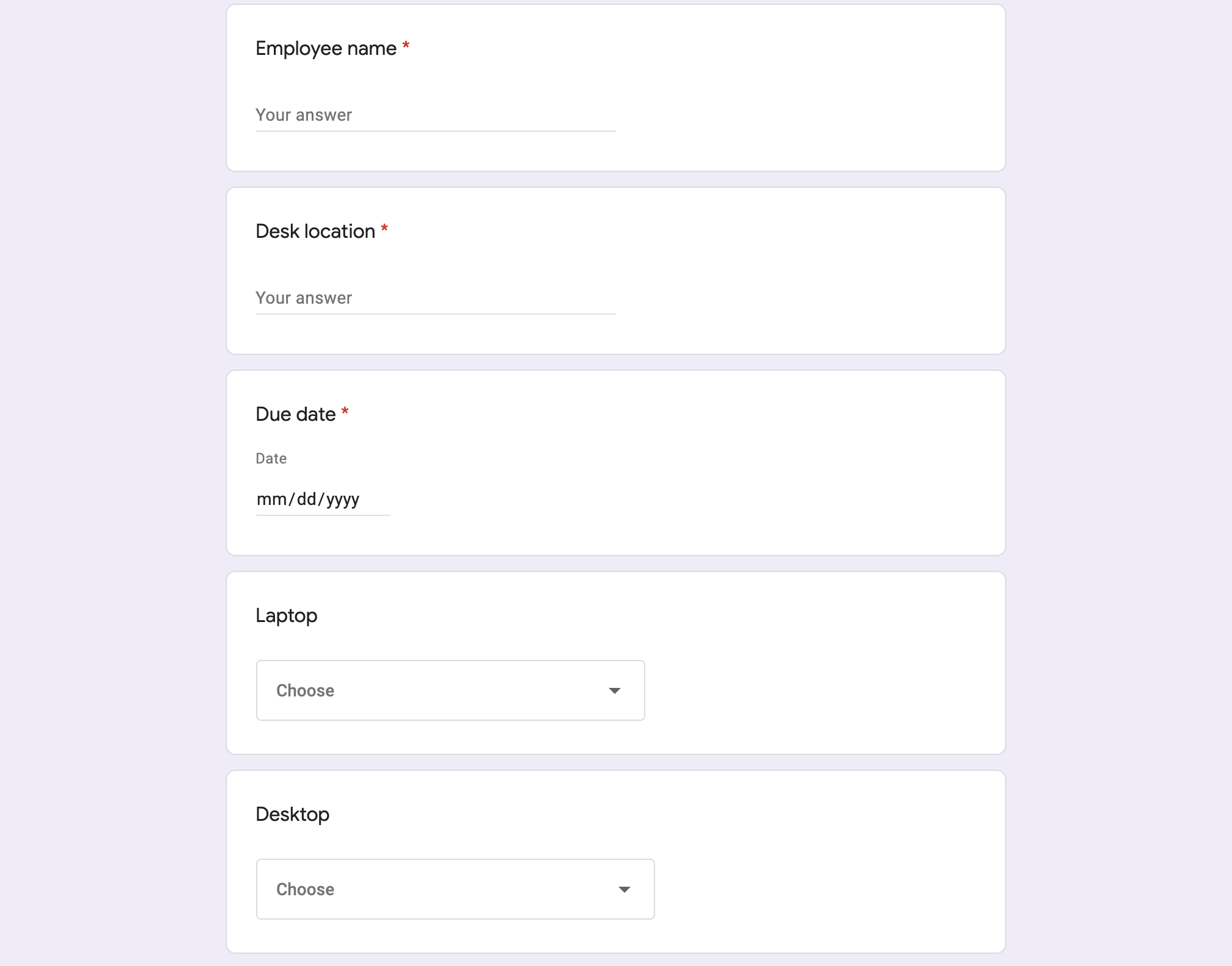
新入社員の備品リクエスト用の Google フォーム。

仕組み

スクリプトは機器リクエスト フォームを作成します。フォームの項目は、 サンプル スクリプトのコードでカスタマイズできます。フォームが送信されると、スクリプトはリクエストの指定された連絡先にメール通知を送信します。スプレッドシートのリクエスト ステータスが [完了] に変更されると、スクリプトはフォームを送信したユーザーに確認メールを送信します。

Apps Script サービス

このソリューションでは、次のサービスを使用します。

  • Forms サービス: IT リクエスト用のフォーム を作成します。
  • スプレッドシート サービス: リクエスト フォームがすでに存在するかどうかを確認して、重複を軽減します。必要に応じて、フォームの回答を [保留中] シートと [完了] シートに移動して管理します。
  • メールサービス: リクエスト と完了の通知メールを作成して送信します。
  • スクリプト サービス: トリガーを作成します。1 つはフォームが送信されたときに実行され、もう 1 つは 5 分ごとに実行されて、リクエストのステータスが [完了] とマークされているかどうかを確認します。

前提条件

このサンプルを使用するには、次の前提条件を満たす必要があります。

  • Google アカウント(Google Workspace アカウントの場合、管理者の承認が必要となる可能性があります)。
  • インターネットにアクセスできるウェブブラウザ。

スクリプトを設定する

スクリプトを設定する手順は次のとおりです。

Apps Script プロジェクトを作成する

  1. 次のボタンをクリックして、従業員の機器リクエストを管理する スプレッドシートのコピーを作成します。このソリューションの Apps Script プロジェクトは、スプレッドシートに添付されています。

    コピーを作成

  2. [拡張機能] > [Apps Script] をクリックします。

  3. REQUEST_NOTIFICATION_EMAIL 変数の横にあるサンプルメールを自分のメールアドレスに置き換えます。

  4. [保存] Apps Script エディタでプロジェクトを保存する をクリックします。

スプレッドシートを設定する

  1. スプレッドシートに戻り、[Equipment requests] > [Set up] をクリックします。このカスタム メニューが表示されるまでに、ページの更新が必要になる場合があります。
  2. メッセージが表示されたら、スクリプトを承認します。 <<../_snippets/oauth.md>>
  3. [**機器リクエスト**] > [**設定**] をもう一度クリックします。

スクリプトを実行する

  1. [ツール] [>] [フォームを管理] [>] [公開フォームに移動] をクリックします。
  2. フォームに情報を入力して送信します。
  3. 機器リクエストに関する通知がメールで届いていることを確認します。
  4. スプレッドシートに戻り、[保留中のリクエスト] シートで、リクエストのステータスを [完了] に変更します。
  5. 5 分以内に、リクエストが完了したことを通知するメールが送信されます。スクリプトは、リクエストを [保留中のリクエスト] シートから [完了したリクエスト] シートに移動します。

コードを確認する

このソリューションの Apps Script コードを確認するには、 [ソースコードを表示]をクリックします:

ソースコードを表示

Code.gs

solutions/automations/equipment-requests/Code.js
// To learn how to use this script, refer to the documentation:
// https://developers.google.com/apps-script/samples/automations/equipment-requests

/*
Copyright 2022 Google LLC

Licensed under the Apache License, Version 2.0 (the "License");
you may not use this file except in compliance with the License.
You may obtain a copy of the License at

    https://www.apache.org/licenses/LICENSE-2.0

Unless required by applicable law or agreed to in writing, software
distributed under the License is distributed on an "AS IS" BASIS,
WITHOUT WARRANTIES OR CONDITIONS OF ANY KIND, either express or implied.
See the License for the specific language governing permissions and
limitations under the License.
*/

// Update this variable with the email address you want to send equipment requests to.
const REQUEST_NOTIFICATION_EMAIL = "request_intake@example.com";

// Update the following variables with your own equipment options.
const AVAILABLE_LAPTOPS = [
  '15" high Performance Laptop (OS X)',
  '15" high Performance Laptop (Windows)',
  '15" high performance Laptop (Linux)',
  '13" lightweight laptop (Windows)',
];
const AVAILABLE_DESKTOPS = [
  "Standard workstation (Windows)",
  "Standard workstation (Linux)",
  "High performance workstation (Windows)",
  "High performance workstation (Linux)",
  "Mac Pro (OS X)",
];
const AVAILABLE_MONITORS = ['Single 27"', 'Single 32"', 'Dual 24"'];

// Form field titles, used for creating the form and as keys when handling
// responses.
/**
 * Adds a custom menu to the spreadsheet.
 */
function onOpen() {
  SpreadsheetApp.getUi()
    .createMenu("Equipment requests")
    .addItem("Set up", "setup_")
    .addItem("Clean up", "cleanup_")
    .addToUi();
}

/**
 * Creates the form and triggers for the workflow.
 */
function setup_() {
  const ss = SpreadsheetApp.getActiveSpreadsheet();
  if (ss.getFormUrl()) {
    const msg = "Form already exists. Unlink the form and try again.";
    SpreadsheetApp.getUi().alert(msg);
    return;
  }
  const form = FormApp.create("Equipment Requests")
    .setCollectEmail(true)
    .setDestination(FormApp.DestinationType.SPREADSHEET, ss.getId())
    .setLimitOneResponsePerUser(false);
  form.addTextItem().setTitle("Employee name").setRequired(true);
  form.addTextItem().setTitle("Desk location").setRequired(true);
  form.addDateItem().setTitle("Due date").setRequired(true);
  form.addListItem().setTitle("Laptop").setChoiceValues(AVAILABLE_LAPTOPS);
  form.addListItem().setTitle("Desktop").setChoiceValues(AVAILABLE_DESKTOPS);
  form.addListItem().setTitle("Monitor").setChoiceValues(AVAILABLE_MONITORS);

  // Hide the raw form responses.
  for (const sheet of ss.getSheets()) {
    if (sheet.getFormUrl() === ss.getFormUrl()) {
      sheet.hideSheet();
    }
  }
  // Start workflow on each form submit
  ScriptApp.newTrigger("onFormSubmit_").forForm(form).onFormSubmit().create();
  // Archive completed items every 5m.
  ScriptApp.newTrigger("processCompletedItems_")
    .timeBased()
    .everyMinutes(5)
    .create();
}

/**
 * Cleans up the project (stop triggers, form submission, etc.)
 */
function cleanup_() {
  const formUrl = SpreadsheetApp.getActiveSpreadsheet().getFormUrl();
  if (!formUrl) {
    return;
  }
  for (const trigger of ScriptApp.getProjectTriggers()) {
    ScriptApp.deleteTrigger(trigger);
  }
  FormApp.openByUrl(formUrl).deleteAllResponses().setAcceptingResponses(false);
}

/**
 * Handles new form submissions to trigger the workflow.
 *
 * @param {Object} event - Form submit event
 */
function onFormSubmit_(event) {
  const response = mapResponse_(event.response);
  sendNewEquipmentRequestEmail_(response);
  const equipmentDetails = Utilities.formatString(
    "%s\n%s\n%s",
    response.Laptop,
    response.Desktop,
    response.Monitor,
  );
  const row = [
    "New",
    "",
    response["Due date"],
    response["Employee name"],
    response["Desk location"],
    equipmentDetails,
    response.email,
  ];
  const ss = SpreadsheetApp.getActiveSpreadsheet();
  const sheet = ss.getSheetByName("Pending requests");
  sheet.appendRow(row);
}

/**
 * Sweeps completed and cancelled requests, notifying the requestors and archiving them
 * to the completed sheet.
 *
 * @param {Object} event
 */
function processCompletedItems_() {
  const ss = SpreadsheetApp.getActiveSpreadsheet();
  const pending = ss.getSheetByName("Pending requests");
  const completed = ss.getSheetByName("Completed requests");
  const rows = pending.getDataRange().getValues();
  for (let i = rows.length; i >= 2; i--) {
    const row = rows[i - 1];
    const status = row[0];
    if (status === "Completed" || status === "Cancelled") {
      pending.deleteRow(i);
      completed.appendRow(row);
      console.log(`Deleted row: ${i}`);
      sendEquipmentRequestCompletedEmail_({
        "Employee name": row[3],
        "Desk location": row[4],
        email: row[6],
      });
    }
  }
}

/**
 * Sends an email notification that a new equipment request has been submitted.
 *
 * @param {Object} request - Request details
 */
function sendNewEquipmentRequestEmail_(request) {
  const template = HtmlService.createTemplateFromFile(
    "new-equipment-request.html",
  );
  template.request = request;
  template.sheetUrl = SpreadsheetApp.getActiveSpreadsheet().getUrl();
  const msg = template.evaluate();
  MailApp.sendEmail({
    to: REQUEST_NOTIFICATION_EMAIL,
    subject: "New equipment request",
    htmlBody: msg.getContent(),
  });
}

/**
 * Sends an email notifying the requestor that the request is complete.
 *
 * @param {Object} request - Request details
 */
function sendEquipmentRequestCompletedEmail_(request) {
  const template = HtmlService.createTemplateFromFile("request-complete.html");
  template.request = request;
  const msg = template.evaluate();
  MailApp.sendEmail({
    to: request.email,
    subject: "Equipment request completed",
    htmlBody: msg.getContent(),
  });
}

/**
 * Converts a form response to an object keyed by the item titles. Allows easier
 * access to response values.
 *
 * @param {FormResponse} response
 * @return {Object} Form values keyed by question title
 */
function mapResponse_(response) {
  const initialValue = {
    email: response.getRespondentEmail(),
    timestamp: response.getTimestamp(),
  };
  return response.getItemResponses().reduce((obj, itemResponse) => {
    const key = itemResponse.getItem().getTitle();
    obj[key] = itemResponse.getResponse();
    return obj;
  }, initialValue);
}
</section>
<section>
  <h3>new-equipment-request.html</h3>
solutions/automations/equipment-requests/new-equipment-request.html
<!DOCTYPE html>
<!--
 Copyright 2022 Google LLC

 Licensed under the Apache License, Version 2.0 (the "License");
 you may not use this file except in compliance with the License.
 You may obtain a copy of the License at

      http://www.apache.org/licenses/LICENSE-2.0

 Unless required by applicable law or agreed to in writing, software
 distributed under the License is distributed on an "AS IS" BASIS,
 WITHOUT WARRANTIES OR CONDITIONS OF ANY KIND, either express or implied.
 See the License for the specific language governing permissions and
 limitations under the License.
-->

<html>
  <body>
    <p>
    A new equipment request has been made by <?= request.email ?>.
    </p>

    <p>
    Employee name: <?= request['Employee name'] ?><br/>
    Desk location name: <?= request['Desk location'] ?><br/>
    Due date: <?= request['Due date'] ?><br/>
    Laptop model: <?= request['Laptop'] ?><br/>
    Desktop model: <?= request['Desktop'] ?><br/>
    Monitor(s): <?= request['Monitor'] ?><br/>
    </p>

    See <a href="<?= sheetUrl ?>">the spreadsheet</a> to take or assign this item.
  </body>
</html>
</section>
<section>
  <h3>request-complete.html</h3>
solutions/automations/equipment-requests/request-complete.html
<!DOCTYPE html>
<!--
 Copyright 2022 Google LLC

 Licensed under the Apache License, Version 2.0 (the "License");
 you may not use this file except in compliance with the License.
 You may obtain a copy of the License at

      http://www.apache.org/licenses/LICENSE-2.0

 Unless required by applicable law or agreed to in writing, software
 distributed under the License is distributed on an "AS IS" BASIS,
 WITHOUT WARRANTIES OR CONDITIONS OF ANY KIND, either express or implied.
 See the License for the specific language governing permissions and
 limitations under the License.
-->

<html>
  <body>
    <p>
    An equipment request has been completed.
    </p>

    <p>
    Employee name: <?= request['Employee name'] ?><br/>
    Desk location name: <?= request['Desk location'] ?><br/>
    </p>
  </body>
</html>
</section>

寄稿者

このサンプルは、Google デベロッパー エキスパートの協力のもと、Google によって管理されています。

次のステップ