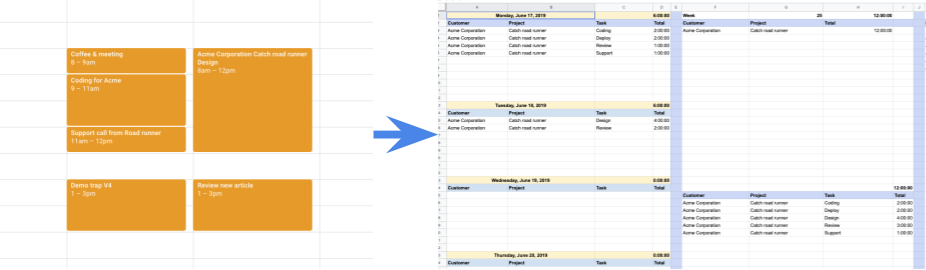
// To learn how to use this script, refer to the documentation:
// https://developers.google.com/apps-script/samples/automations/calendar-timesheet

/*
Copyright 2022 Jasper Duizendstra

Licensed under the Apache License, Version 2.0 (the "License");
you may not use this file except in compliance with the License.
You may obtain a copy of the License at

    https://www.apache.org/licenses/LICENSE-2.0

Unless required by applicable law or agreed to in writing, software
distributed under the License is distributed on an "AS IS" BASIS,
WITHOUT WARRANTIES OR CONDITIONS OF ANY KIND, either express or implied.
See the License for the specific language governing permissions and
limitations under the License.
*/

/**
 * Runs when the spreadsheet is opened and adds the menu options
 * to the spreadsheet menu
 */
const onOpen = () => {
  SpreadsheetApp.getUi()
    .createMenu("myTime")
    .addItem("Sync calendar events", "run")
    .addItem("Settings", "settings")
    .addToUi();
};

/**
 * Opens the sidebar
 */
const settings = () => {
  const html =
    HtmlService.createHtmlOutputFromFile("Page").setTitle("Settings");

  SpreadsheetApp.getUi().showSidebar(html);
};

/**
 * returns the settings from the script properties
 */
const getSettings = () => {
  const settings = {};

  // get the current settings
  const savedCalendarSettings = JSON.parse(
    PropertiesService.getScriptProperties().getProperty("calendar") || "[]",
  );

  // get the primary calendar
  const primaryCalendar = CalendarApp.getAllCalendars()
    .filter((cal) => cal.isMyPrimaryCalendar())
    .map((cal) => ({
      name: "Primary calendar",
      id: cal.getId(),
    }));

  // get the secondary calendars
  const secundaryCalendars = CalendarApp.getAllCalendars()
    .filter((cal) => cal.isOwnedByMe() && !cal.isMyPrimaryCalendar())
    .map((cal) => ({
      name: cal.getName(),
      id: cal.getId(),
    }));

  // the current available calendars
  const availableCalendars = primaryCalendar.concat(secundaryCalendars);

  // find any calendars that were removed
  const unavailebleCalendars = [];
  for (const savedCalendarSetting of savedCalendarSettings) {
    if (
      !availableCalendars.find(
        (availableCalendar) => availableCalendar.id === savedCalendarSetting.id,
      )
    ) {
      unavailebleCalendars.push(savedCalendarSetting);
    }
  }

  // map the current settings to the available calendars
  const calendarSettings = availableCalendars.map((availableCalendar) => {
    if (
      savedCalendarSettings.find(
        (savedCalendar) => savedCalendar.id === availableCalendar.id,
      )
    ) {
      availableCalendar.sync = true;
    }
    return availableCalendar;
  });

  // add the calendar settings to the settings
  settings.calendarSettings = calendarSettings;

  const savedFrom =
    PropertiesService.getScriptProperties().getProperty("syncFrom");
  settings.syncFrom = savedFrom;

  const savedTo = PropertiesService.getScriptProperties().getProperty("syncTo");
  settings.syncTo = savedTo;

  const savedIsUpdateTitle =
    PropertiesService.getScriptProperties().getProperty("isUpdateTitle") ===
    "true";
  settings.isUpdateCalendarItemTitle = savedIsUpdateTitle;

  const savedIsUseCategoriesAsCalendarItemTitle =
    PropertiesService.getScriptProperties().getProperty(
      "isUseCategoriesAsCalendarItemTitle",
    ) === "true";
  settings.isUseCategoriesAsCalendarItemTitle =
    savedIsUseCategoriesAsCalendarItemTitle;

  const savedIsUpdateDescription =
    PropertiesService.getScriptProperties().getProperty(
      "isUpdateDescription",
    ) === "true";
  settings.isUpdateCalendarItemDescription = savedIsUpdateDescription;

  return settings;
};

/**
 * Saves the settings from the sidebar
 */
const saveSettings = (settings) => {
  PropertiesService.getScriptProperties().setProperty(
    "calendar",
    JSON.stringify(settings.calendarSettings),
  );
  PropertiesService.getScriptProperties().setProperty(
    "syncFrom",
    settings.syncFrom,
  );
  PropertiesService.getScriptProperties().setProperty(
    "syncTo",
    settings.syncTo,
  );
  PropertiesService.getScriptProperties().setProperty(
    "isUpdateTitle",
    settings.isUpdateCalendarItemTitle,
  );
  PropertiesService.getScriptProperties().setProperty(
    "isUseCategoriesAsCalendarItemTitle",
    settings.isUseCategoriesAsCalendarItemTitle,
  );
  PropertiesService.getScriptProperties().setProperty(
    "isUpdateDescription",
    settings.isUpdateCalendarItemDescription,
  );
  return "Settings saved";
};

/**
 * Builds the myTime object and runs the synchronisation
 */
const run = () => {
  myTime({
    mainSpreadsheetId: SpreadsheetApp.getActiveSpreadsheet().getId(),
  }).run();
};

/**
 * The main function used for the synchronisation
 * @param {Object} par The main parameter object.
 * @return {Object} The myTime Object.
 */
const myTime = (par) => {
  /**
   * Format the sheet
   */
  const formatSheet = () => {
    // sort decending on start date
    hourSheet.sort(3, false);

    // hide the technical columns
    hourSheet.hideColumns(1, 2);

    // remove any extra rows
    if (
      hourSheet.getLastRow() > 1 &&
      hourSheet.getLastRow() < hourSheet.getMaxRows()
    ) {
      hourSheet.deleteRows(
        hourSheet.getLastRow() + 1,
        hourSheet.getMaxRows() - hourSheet.getLastRow(),
      );
    }

    // set the validation for the customers
    let rule = SpreadsheetApp.newDataValidation()
      .requireValueInRange(categoriesSheet.getRange("A2:A"), true)
      .setAllowInvalid(true)
      .build();
    hourSheet.getRange("I2:I").setDataValidation(rule);

    // set the validation for the projects
    rule = SpreadsheetApp.newDataValidation()
      .requireValueInRange(categoriesSheet.getRange("B2:B"), true)
      .setAllowInvalid(true)
      .build();
    hourSheet.getRange("J2:J").setDataValidation(rule);

    // set the validation for the tsaks
    rule = SpreadsheetApp.newDataValidation()
      .requireValueInRange(categoriesSheet.getRange("C2:C"), true)
      .setAllowInvalid(true)
      .build();
    hourSheet.getRange("K2:K").setDataValidation(rule);

    if (isUseCategoriesAsCalendarItemTitle) {
      hourSheet
        .getRange("L2:L")
        .setFormulaR1C1(
          'IF(OR(R[0]C[-3]="tbd";R[0]C[-2]="tbd";R[0]C[-1]="tbd");""; CONCATENATE(R[0]C[-3];"|";R[0]C[-2];"|";R[0]C[-1];"|"))',
        );
    }
    // set the hours, month, week and number collumns
    hourSheet
      .getRange("P2:P")
      .setFormulaR1C1('=IF(R[0]C[-12]="";"";R[0]C[-12]-R[0]C[-13])');
    hourSheet
      .getRange("Q2:Q")
      .setFormulaR1C1('=IF(R[0]C[-13]="";"";month(R[0]C[-13]))');
    hourSheet
      .getRange("R2:R")
      .setFormulaR1C1('=IF(R[0]C[-14]="";"";WEEKNUM(R[0]C[-14];2))');
    hourSheet.getRange("S2:S").setFormulaR1C1("=R[0]C[-3]");
  };

  /**
   * Activate the synchronisation
   */
  function run() {
    console.log("Started processing hours.");

    const processCalendar = (setting) => {
      SpreadsheetApp.flush();

      // current calendar info
      const calendarName = setting.name;
      const calendarId = setting.id;

      console.log(
        `processing ${calendarName} with the id ${calendarId} from ${syncStartDate} to ${syncEndDate}`,
      );

      // get the calendar
      const calendar = CalendarApp.getCalendarById(calendarId);

      // get the calendar events and create lookups
      const events = calendar.getEvents(syncStartDate, syncEndDate);
      const eventsLookup = events.reduce((jsn, event) => {
        jsn[event.getId()] = event;
        return jsn;
      }, {});

      // get the sheet events and create lookups
      const existingEvents = hourSheet.getDataRange().getValues().slice(1);
      const existingEventsLookUp = existingEvents.reduce((jsn, row, index) => {
        if (row[0] !== calendarId) {
          return jsn;
        }
        jsn[row[1]] = {
          event: row,
          row: index + 2,
        };
        return jsn;
      }, {});

      // handle a calendar event
      const handleEvent = (event) => {
        const eventId = event.getId();

        // new event
        if (!existingEventsLookUp[eventId]) {
          hourSheet.appendRow([
            calendarId,
            eventId,
            event.getStartTime(),
            event.getEndTime(),
            calendarName,
            event.getCreators().join(","),
            event.getTitle(),
            event.getDescription(),
            event.getTag("Client") || "tbd",
            event.getTag("Project") || "tbd",
            event.getTag("Task") || "tbd",
            isUpdateCalendarItemTitle ? "" : event.getTitle(),
            isUpdateCalendarItemDescription ? "" : event.getDescription(),
            event
              .getGuestList()
              .map((guest) => guest.getEmail())
              .join(","),
            event.getLocation(),
            undefined,
            undefined,
            undefined,
            undefined,
          ]);
          return true;
        }

        // existing event
        const exisitingEvent = existingEventsLookUp[eventId].event;
        const exisitingEventRow = existingEventsLookUp[eventId].row;

        if (event.getStartTime() - exisitingEvent[startTimeColumn - 1] !== 0) {
          hourSheet
            .getRange(exisitingEventRow, startTimeColumn)
            .setValue(event.getStartTime());
        }

        if (event.getEndTime() - exisitingEvent[endTimeColumn - 1] !== 0) {
          hourSheet
            .getRange(exisitingEventRow, endTimeColumn)
            .setValue(event.getEndTime());
        }

        if (
          event.getCreators().join(",") !== exisitingEvent[creatorsColumn - 1]
        ) {
          hourSheet
            .getRange(exisitingEventRow, creatorsColumn)
            .setValue(event.getCreators()[0]);
        }

        if (
          event
            .getGuestList()
            .map((guest) => guest.getEmail())
            .join(",") !== exisitingEvent[guestListColumn - 1]
        ) {
          hourSheet.getRange(exisitingEventRow, guestListColumn).setValue(
            event
              .getGuestList()
              .map((guest) => guest.getEmail())
              .join(","),
          );
        }

        if (event.getLocation() !== exisitingEvent[locationColumn - 1]) {
          hourSheet
            .getRange(exisitingEventRow, locationColumn)
            .setValue(event.getLocation());
        }

        if (event.getTitle() !== exisitingEvent[titleColumn - 1]) {
          if (!isUpdateCalendarItemTitle) {
            hourSheet
              .getRange(exisitingEventRow, titleColumn)
              .setValue(event.getTitle());
          }
          if (isUpdateCalendarItemTitle) {
            event.setTitle(exisitingEvent[titleColumn - 1]);
          }
        }

        if (event.getDescription() !== exisitingEvent[descriptionColumn - 1]) {
          if (!isUpdateCalendarItemDescription) {
            hourSheet
              .getRange(exisitingEventRow, descriptionColumn)
              .setValue(event.getDescription());
          }
          if (isUpdateCalendarItemDescription) {
            event.setDescription(exisitingEvent[descriptionColumn - 1]);
          }
        }

        return true;
      };

      // process each event for the calendar
      events.every(handleEvent);

      // remove any events in the sheet that are not in de calendar
      existingEvents.every((event, index) => {
        if (event[0] !== calendarId) {
          return true;
        }

        if (eventsLookup[event[1]]) {
          return true;
        }

        if (event[3] < syncStartDate) {
          return true;
        }

        hourSheet.getRange(index + 2, 1, 1, 20).clear();
        return true;
      });

      return true;
    };

    // process the calendars
    settings.calendarSettings
      .filter((calenderSetting) => calenderSetting.sync === true)
      .every(processCalendar);

    formatSheet();
    SpreadsheetApp.setActiveSheet(hourSheet);

    console.log("Finished processing hours.");
  }

  const mainSpreadSheetId = par.mainSpreadsheetId;
  const mainSpreadsheet = SpreadsheetApp.openById(mainSpreadSheetId);
  const hourSheet = mainSpreadsheet.getSheetByName("Hours");
  const categoriesSheet = mainSpreadsheet.getSheetByName("Categories");
  const settings = getSettings();

  const syncStartDate = new Date();
  syncStartDate.setDate(syncStartDate.getDate() - Number(settings.syncFrom));

  const syncEndDate = new Date();
  syncEndDate.setDate(syncEndDate.getDate() + Number(settings.syncTo));

  const isUpdateCalendarItemTitle = settings.isUpdateCalendarItemTitle;
  const isUseCategoriesAsCalendarItemTitle =
    settings.isUseCategoriesAsCalendarItemTitle;
  const isUpdateCalendarItemDescription =
    settings.isUpdateCalendarItemDescription;

  const startTimeColumn = 3;
  const endTimeColumn = 4;
  const creatorsColumn = 6;
  const originalTitleColumn = 7;
  const originalDescriptionColumn = 8;
  const clientColumn = 9;
  const projectColumn = 10;
  const taskColumn = 11;
  const titleColumn = 12;
  const descriptionColumn = 13;
  const guestListColumn = 14;
  const locationColumn = 15;

  return Object.freeze({
    run: run,
  });
};