 Google 会使用 AI 技术将内容翻译成您偏好的语言。AI 翻译可能包含错误。
显示 Google 选择器
使用集合让一切井井有条
根据您的偏好保存内容并对其进行分类。
Google Picker 是一个“打开文件”对话框,用于打开存储在 Google 云端硬盘中的信息。如需了解详情,请参阅 Google Picker
概览。
您可以使用 Google Picker API for web
apps 或 Google Picker API for
desktop and mobile apps
,让用户打开或上传云端硬盘文件。Google Picker API 与 Google Drive API 是分开的。
如需让用户从移动应用打开云端硬盘文件,请参阅
将 Google Picker 与 Android
应用搭配使用。
如需查看 Web 应用的完整代码示例,请参阅在 Web 应用中使用 Google Picker API 功能
。
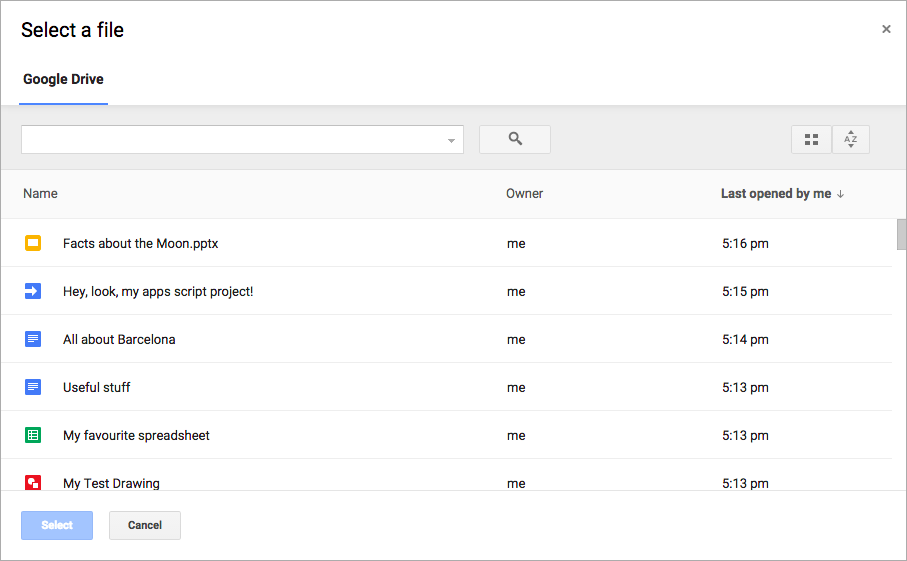 图 1.Google Picker 对话框。
如未另行说明,那么本页面中的内容已根据知识共享署名 4.0 许可获得了许可,并且代码示例已根据 Apache 2.0 许可获得了许可。有关详情,请参阅 Google 开发者网站政策。Java 是 Oracle 和/或其关联公司的注册商标。
最后更新时间 (UTC):2026-07-14。
[[["易于理解","easyToUnderstand","thumb-up"],["解决了我的问题","solvedMyProblem","thumb-up"],["其他","otherUp","thumb-up"]],[["没有我需要的信息","missingTheInformationINeed","thumb-down"],["太复杂/步骤太多","tooComplicatedTooManySteps","thumb-down"],["内容需要更新","outOfDate","thumb-down"],["翻译问题","translationIssue","thumb-down"],["示例/代码问题","samplesCodeIssue","thumb-down"],["其他","otherDown","thumb-down"]],["最后更新时间 (UTC):2026-07-14。"],[],[]]
