

หน้านี้อธิบายวิธีสร้างหน้าแรกสำหรับข้อความส่วนตัวด้วยแอป Google Chat ของคุณ หน้าแรกซึ่งเรียกว่าหน้าแรกของแอปใน Google Chat API คืออินเทอร์เฟซการ์ดที่ปรับแต่งได้ซึ่งจะปรากฏในแท็บหน้าแรกของพื้นที่ข้อความส่วนตัวแบบ 1:1 ระหว่างผู้ใช้กับแอปใน Chat

ส่วนเสริมที่ขยาย Chat จะไม่แสดงหน้าแรกในแผงเข้าถึงด่วนทางด้านขวาและจะไม่ใช้ addOns.common.homepageTrigger ในไฟล์ Manifest ซึ่งแตกต่างจากแอปพลิเคชันโฮสต์อื่นๆ ของ Google Workspace
แต่ Chat จะแสดงหน้าแรกเป็นการ์ดในแท็บหน้าแรก
ของข้อความส่วนตัวแบบ 1:1 กับแอป Chat และได้รับการกำหนดค่าในคอนโซล Google Cloud
คุณสามารถใช้หน้าแรกของแอปเพื่อแชร์เคล็ดลับในการโต้ตอบกับ แอป Chat แสดงแดชบอร์ดผู้ใช้ที่ปรับเปลี่ยนในแบบของคุณ หรือ ให้ผู้ใช้เข้าถึงและกำหนดค่าบริการหรือเครื่องมือภายนอกจาก Chat ได้
ใช้เครื่องมือสร้างการ์ดเพื่อออกแบบและแสดงตัวอย่างการรับส่งข้อความและอินเทอร์เฟซผู้ใช้สำหรับแอป Chat โดยทำดังนี้
เปิดเครื่องมือสร้างการ์ดข้อกำหนดเบื้องต้น
HTTP
แอป Google Chat ที่รับและตอบสนองต่อการโต้ตอบของผู้ใช้ หากต้องการสร้าง ให้ทำตามการเริ่มต้นใช้งาน HTTP
Apps Script
แอป Google Chat ที่รับและตอบสนองต่อการโต้ตอบของผู้ใช้ หากต้องการสร้าง ให้ทำตามการเริ่มต้นใช้งาน Apps Script อย่างรวดเร็ว
กำหนดค่าหน้าแรกของแอปสำหรับแอป Chat
หากต้องการรองรับ App Home ให้เปิดใช้รองรับ App Home และกำหนดค่าApp Home ทริกเกอร์ใน คอนโซล Google Cloud แอป Chat จะได้รับเหตุการณ์ทริกเกอร์หน้าแรกของแอป ทุกครั้งที่ผู้ใช้เปิดแท็บหน้าแรกในข้อความส่วนตัวแบบ 1:1 กับแอป Chat
วิธีกำหนดค่า App Home ในคอนโซล Google Cloud
ในคอนโซล Google Cloud ให้ไปที่เมนู > API และบริการ > API และบริการที่เปิดใช้ > Google Chat API > การกำหนดค่า
ในส่วนฟีเจอร์แบบอินเทอร์แอกทีฟ ให้ตรวจสอบว่าได้เปิดเปิดใช้ฟีเจอร์แบบอินเทอร์แอกทีฟแล้ว จากนั้นในส่วนฟังก์ชันการทำงาน ให้เลือกช่องทําเครื่องหมายรองรับหน้าแรกของแอป
ในส่วนการตั้งค่าการเชื่อมต่อ > ทริกเกอร์ ให้ระบุตัวแฮนเดิลหน้าแรกของแอปในช่องหน้าแรกของแอปตาม สถาปัตยกรรมของแอป Chat
- HTTP: ป้อน URL ของปลายทาง HTTPS ที่จัดการคำขอหน้าแรกของแอป (หรือเลือกใช้ URL ของปลายทาง HTTP ทั่วไปสำหรับทริกเกอร์ทั้งหมดเพื่อให้ URL ของปลายทาง HTTP ทั่วไปรับเหตุการณ์ทั้งหมด)
- Google Apps Script: ป้อนชื่อฟังก์ชัน Callback ของ Google Apps Script ที่สร้างและแสดงการ์ดหน้าแรก (ค่าเริ่มต้นคือ
onAppHome)
คลิกบันทึก
จัดการออบเจ็กต์เหตุการณ์หน้าแรกของแอป
เมื่อผู้ใช้เปิดแท็บหน้าแรกของข้อความส่วนตัวแบบ 1:1 กับแอป Chat ของคุณ Chat จะส่งออบเจ็กต์เหตุการณ์ไปยังปลายทางหน้าแรกของแอปหรือฟังก์ชัน Callback
ออบเจ็กต์เหตุการณ์ App Home เริ่มต้น
จะไม่มีเพย์โหลดการโต้ตอบแบบรวม (เช่น messagePayload) ซึ่งแตกต่างจากเหตุการณ์การโต้ตอบในพื้นที่หรือข้อความ
แต่จะมีฟิลด์ต่อไปนี้
commonEventObject: ประกอบด้วยclientPlatform,hostApp("CHAT"),userLocaleและuserTimezonechat.user: ผู้ใช้ Chat ที่ เปิดแท็บหน้าแรกchat.eventTime: การประทับเวลาเมื่อผู้ใช้เปิดแท็บหน้าแรก
สร้างการ์ดหน้าแรกของแอป
เมื่อผู้ใช้เปิดแท็บหน้าแรก ให้จัดการเหตุการณ์ทริกเกอร์หน้าแรกของแอปโดย
ส่งคืนออบเจ็กต์
RenderActions ที่มีpushCard
การดำเนินการนำทางและ
Card หากต้องการสร้างประสบการณ์แบบอินเทอร์แอกทีฟ การ์ดอาจมีวิดเจ็ตแบบอินเทอร์แอกทีฟ เช่น ปุ่มหรือช่องป้อนข้อความ
HTTP
{
  "action": {
    "navigations": [
      {
        "pushCard": {
          "header": {
            "title": "Welcome to App Home"
          },
          "sections": [
            {
              "widgets": [
                {
                  "textParagraph": {
                    "text": "Manage your settings and view your dashboard here."
                  }
                },
                {
                  "buttonList": {
                    "buttons": [
                      {
                        "text": "Refresh",
                        "onClick": {
                          "action": {
                            "function": "https://example.com/updateAppHome"
                          }
                        }
                      }
                    ]
                  }
                }
              ]
            }
          ]
        }
      }
    ]
  }
}
Apps Script
/**
 * Builds and returns the App Home card when a user opens the Home tab.
 *
 * @param {Object} event The event object from Google Chat.
 * @return {ActionResponse} The RenderActions response pushing the homepage card.
 */
function onAppHome(event) {
  const card = CardService.newCardBuilder()
      .setHeader(
          CardService.newCardHeader().setTitle('Welcome to App Home'))
      .addSection(
          CardService.newCardSection()
              .addWidget(
                  CardService.newTextParagraph().setText(
                      'Manage your settings and view your dashboard here.'))
              .addWidget(
                  CardService.newButtonSet().addButton(
                      CardService.newTextButton()
                          .setText('Refresh')
                          .setOnClickAction(
                              CardService.newAction().setFunctionName(
                                  'updateAppHome')))))
      .build();

  return CardService.newActionResponseBuilder()
      .setNavigation(CardService.newNavigation().pushCard(card))
      .build();
}
ตอบสนองต่อการโต้ตอบในหน้าแรกของแอป
หากการ์ดหน้าแรกของแอปมีวิดเจ็ตแบบอินเทอร์แอกทีฟ เช่น ปุ่มหรืออินพุตแบบฟอร์ม
การคลิกปุ่มจะส่งออบเจ็กต์เหตุการณ์ที่มี chat.buttonClickedPayload (พร้อมด้วย commonEventObject.parameters และ
commonEventObject.formInputs) ไปยังฟังก์ชันการทำงานหรือปลายทางที่กำหนดค่าไว้ของปุ่ม
หากต้องการอัปเดตการ์ดหน้าแรกของแอปเพื่อตอบสนองต่อการโต้ตอบของผู้ใช้ ให้ส่งออบเจ็กต์
RenderActions ที่มีupdateCard
การดำเนินการนำทาง ดูข้อมูลเพิ่มเติมเกี่ยวกับการอ่านข้อมูลที่ป้อนในแบบฟอร์มจากวิดเจ็ตแบบอินเทอร์แอกทีฟได้ที่อ่านข้อมูลแบบฟอร์มที่ผู้ใช้ป้อนในบัตร
HTTP
{
  "action": {
    "navigations": [
      {
        "updateCard": {
          "header": {
            "title": "Welcome to App Home"
          },
          "sections": [
            {
              "widgets": [
                {
                  "textParagraph": {
                    "text": "Last updated: 2026-10-02T23:00:00Z"
                  }
                }
              ]
            }
          ]
        }
      }
    ]
  }
}
Apps Script
/**
 * Updates the App Home card when a user clicks the Refresh button.
 *
 * @param {Object} event The event object from Google Chat.
 * @return {ActionResponse} The RenderActions response updating the homepage card.
 */
function updateAppHome(event) {
  const updatedCard = CardService.newCardBuilder()
      .setHeader(
          CardService.newCardHeader().setTitle('Welcome to App Home'))
      .addSection(
          CardService.newCardSection().addWidget(
              CardService.newTextParagraph().setText(
                  'Last updated: ' + new Date().toTimeString())))
      .build();

  return CardService.newActionResponseBuilder()
      .setNavigation(CardService.newNavigation().updateCard(updatedCard))
      .build();
}
เปิดกล่องโต้ตอบจากหน้าแรกของแอป
แอป Chat ยังตอบกลับการโต้ตอบใน App Home ได้ด้วยการเปิดกล่องโต้ตอบ
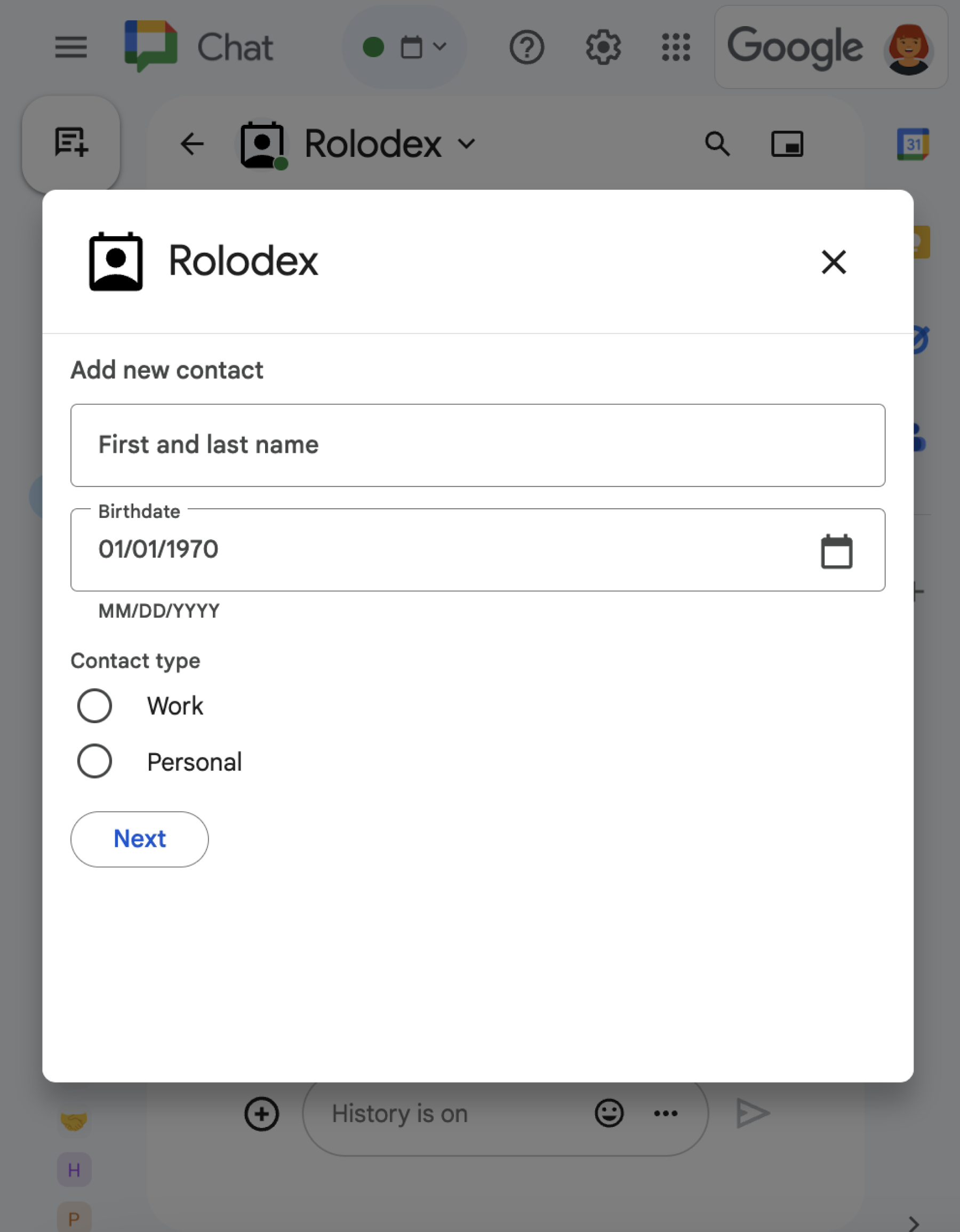
ดูวิธีเปิด อัปเดต และปิดกล่องโต้ตอบโดยใช้ RenderActions
(pushCard, updateCard และ endNavigation: "CLOSE_DIALOG") ได้ที่
เปิดกล่องโต้ตอบแบบอินเทอร์แอกทีฟ
หัวข้อที่เกี่ยวข้อง
- รับและตอบสนองต่อการโต้ตอบของผู้ใช้
- เปิดกล่องโต้ตอบแบบอินเทอร์แอกทีฟ
- อ่านข้อมูลแบบฟอร์มที่ผู้ใช้ป้อนในการ์ด
- ดูตัวอย่างแอปใน Chat
แอป Chat ที่ไม่ใช่ส่วนเสริม: สร้างหน้าแรกสำหรับแอป Chat
หากคุณดูแลแอป Chat ที่ไม่ใช่ส่วนเสริมของ Google Workspace อยู่ Chat จะส่งAPP_HOMEเหตุการณ์การโต้ตอบ
เมื่อผู้ใช้เปิดแท็บหน้าแรก และจะส่งเหตุการณ์การโต้ตอบ CARD_CLICKED หรือ SUBMIT_FORM
เมื่อผู้ใช้โต้ตอบกับวิดเจ็ตในการ์ดหน้าแรกของแอป
หากต้องการอัปเกรดแอป Chat ที่ไม่ใช่ส่วนเสริมเป็นเฟรมเวิร์กส่วนเสริมของ Google Workspace โปรดดูหัวข้อแปลงแอป Google Chat เป็นส่วนเสริมของ Google Workspace
สร้างการ์ดหน้าแรกของแอปในแอป Chat ที่ไม่ใช่ส่วนเสริม
ในแอป Chat ที่ไม่ใช่ส่วนเสริม ให้จัดการAPP_HOMEเหตุการณ์การโต้ตอบโดย
การส่งคืนการตอบกลับที่มีฟิลด์renderActionsระดับบนสุดพร้อม
pushCardการนำทาง
Node.js
Python
Java
Apps Script
ตัวอย่างนี้จะส่งข้อความการ์ดโดยการส่งคืน JSON ของการ์ด คุณยังใช้บริการการ์ด Apps Script ได้ด้วย
ตอบกลับการโต้ตอบในหน้าแรกของแอปในแอป Chat ที่ไม่ใช่ส่วนเสริม
ในแอป Chat ที่ไม่ใช่ส่วนเสริม ให้จัดการเหตุการณ์การโต้ตอบ CARD_CLICKED หรือ SUBMIT_FORM
จากการ์ดหน้าแรกของแอปโดยแสดงผลการตอบกลับที่มีฟิลด์ renderActions ระดับบนสุดพร้อมการนำทาง updateCard ดังนี้
Node.js
Python
Java
Apps Script
ตัวอย่างนี้จะส่งข้อความการ์ดโดยการส่งคืน JSON ของการ์ด คุณยังใช้บริการการ์ด Apps Script ได้ด้วย