
This page provides an overview of how to build an interactive Google Chat app. Interactive Chat apps are built as Google Workspace add-ons that extend Google Chat.
Interactive Chat apps let users do any of the following:
- Add Chat apps to Chat spaces or direct messages.
- Send messages to or receive messages from Chat apps that contain text, cards, and interactive UI elements.
- View and interact with an App Home card in the Home tab of 1:1 direct messages with the Chat app.
- Prompt Chat apps with slash commands, quick commands, or message actions.
- Preview links from Chat messages and take action without leaving the conversation.
- Submit information to Chat apps, such as entering text into a dialog or card message.
- Automate or perform tasks across Google Workspace applications and connect to external tools or services.
How users discover and use interactive Chat apps
In Chat, add-ons that extend Chat appear to users as Google Chat apps. Users can discover and use Chat apps published to the Marketplace in many ways, including the following:
- Search and install Chat apps from Google Chat or the Marketplace.
- Interact with a Chat app that's been added to a Chat space.
- Discover the Chat app in their direct messages panel after a Google Workspace administrator installs the Chat app on their behalf.
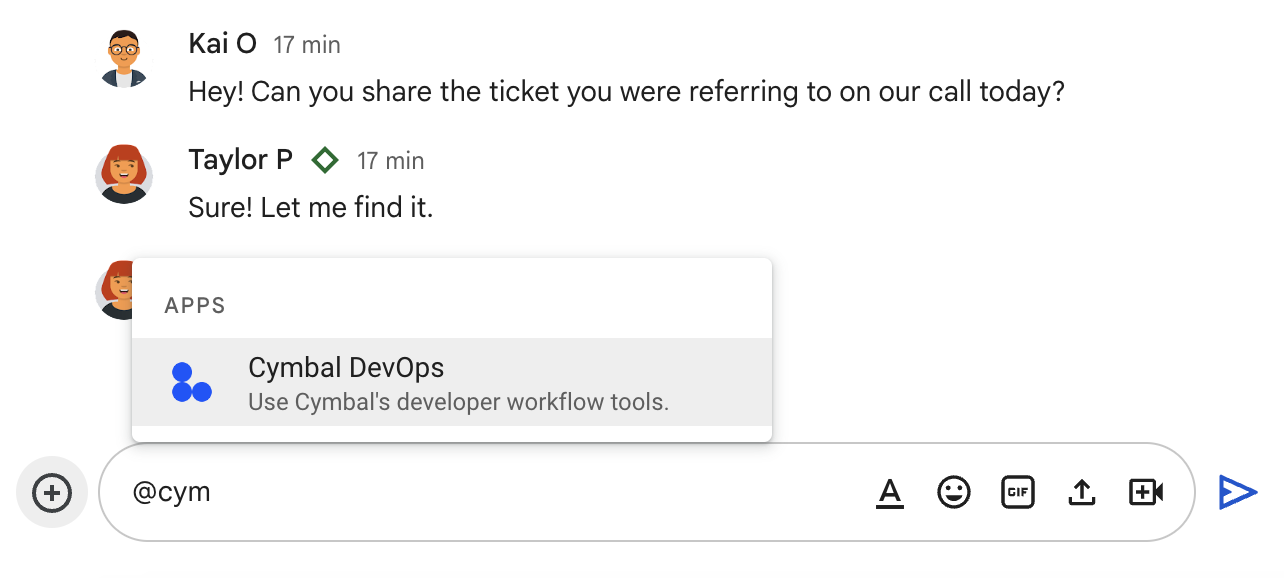
To start using a Chat app, Google Chat users can start a direct message with the Chat app or add it to a space. Users can also add the Chat app by @mentioning it. For more information, see Use Chat apps.
The following example shows how a user @mentions a Chat app to add it to a space:
Get started
To start building an interactive Chat app, see the following documentation:
- Configure the Google Chat API and enable interactive features for your Chat app.
- Learn how to receive and respond to user interactions using triggers, event objects, and actions.
- Try a quickstart to build a basic Chat app for your preferred Google Chat app architecture.
Configure and create a basic Chat app
The following table lists the documentation for configuring the Chat API and creating a basic interactive Chat app for each Google Chat app architecture:
| Architecture or task | Guide |
|---|---|
| Configure the Chat API | Configure the Google Chat API |
| Quickstarts | |
| Apps Script | Build a Chat app with Apps Script |
| HTTP service (Cloud Run functions) | Build an HTTP Chat app |
| Pub/Sub | Build a Chat app with Pub/Sub |
| Dialogflow CX | Build a Dialogflow CX Chat app |
| Dialogflow ES | Build a Dialogflow ES Chat app |
| Agent Development Kit (ADK) AI agent | Build an ADK AI agent Chat app |
| Agent2Agent (A2A) AI agent | Build an A2A AI agent Chat app |
| A2UI AI agent | Build an A2UI AI agent Chat app |
| Gemini Enterprise AI agent | Build a Gemini Enterprise AI agent Chat app |
Build interactive features
The following table shows the documentation for building interactive Chat app features:
| Feature | Guide |
|---|---|
| Receive and respond to user interactions | Receive and respond to user interactions |
| Send messages (reply to interactions or send proactively) | Reply with a message or Send a message using the Chat API |
| Respond to slash commands, quick commands, and message actions | Respond to commands |
| Build interactive dialogs | Open interactive dialogs |
| Collect and process information from cards and dialogs | Read form data input by users on cards |
| Preview links in Chat messages | Preview links |
| Build a homepage (App Home) in 1:1 direct messages | Build a homepage for a Chat app |
| Connect to external systems and tools | Connect a Chat app with other services and tools |
Limitations and considerations for Google Workspace add-ons
Because Chat apps are built as Google Workspace add-ons that extend Chat, keep the following feature limitations in mind:
- AppSheet Chat app architecture is unavailable when building as a Google Workspace add-on. Instead, build the Chat app using an HTTP service, Apps Script, Dialogflow ES, Dialogflow CX, or Pub/Sub.
- Custom authorization cards aren't supported in Chat. To authenticate and grant authorization to your service from Chat, the Chat app must return a basic authorization card.
- Add-on homepages
in the Chat sidebar aren't supported. If you've configured a
homepage trigger in your
manifest (
addons.common.homepageTrigger), the homepage only appears in the sidebar of the other Google Workspace applications that your add-on extends. Instead, you can build a homepage for a Chat app that appears in the Home tab of 1:1 direct messages with the Chat app.
If you're extending an existing Google Workspace add-on to work in Chat, consider the following configuration requirements for Chat apps:
- The Google Workspace Marketplace installation settings must permit both individuals and Google Workspace administrators to install the add-on.
- Any common configuration settings in the add-on's
manifest (
addons.common) are ignored in Chat. To configure the add-on to work in Chat, you must enable and configure the Chat API. For steps, see Configure the Google Chat API. - To deploy and test an add-on in Chat, you must use the Chat API's Visibility setting. Any visibility or testing settings that you've configured in the Google Workspace Marketplace SDK are ignored. To deploy a test version of the add-on in Chat, see Test interactive features for Google Chat apps.
- If your add-ons is published to the Google Workspace Marketplace, you can't save a draft of any changes to the Google Chat API configuration settings. When you update Chat API configuration settings, the updated Chat app is immediately available to all existing users. To update your Marketplace listing, you can create a draft before submitting any changes.
Related topics
- Google Chat API documentation overview
- Receive and respond to user interactions
- Choose a Google Chat app architecture
- Try a sample:
- Schedule meetings from Google Chat
- Integrate fundamental AI concepts in Chat apps
- Plan travels with an AI agent accessible across Google Workspace
- Build Gemini Enterprise agents that are tightly integrated with Workspace data stores, APIs, and Chat apps
- Build Vertex AI agents that are tightly integrated with Workspace data stores, APIs, and Chat apps
Chat apps that aren't add-ons: Build an interactive Google Chat app
Chat apps that aren't Google Workspace add-ons are built as
Chat-only apps that receive
Chat API interaction events (Event)
instead of
Google Workspace add-on event objects (EventObject)
and actions.
If you maintain a Chat app that isn't an add-on, you can:
- Convert your Chat app that isn't an add-on to a Google Workspace add-on that extends Google Chat. See Convert a Google Chat app to a Google Workspace add-on.
- Refer to the expandable Chat apps that aren't add-ons sections at the bottom of each interactive feature guide in this documentation set for request and response formats.