
Page Summary
-
The provisioning phase begins after an issuer approves a proofing request, storing a DC credential and mobile security objects (MSO) on the user's device.
-
The Google Wallet app initiates the process by calling
provisionCredentialupon notification of an accepted proofing request. -
Google servers facilitate communication between the user's device and the issuer's servers, managing the transfer of credential IDs, proofing IDs, and MSOs.
-
The issuer provides the DC and an issuer-generated credential version ID, as well as the MSOs during the provisioning process.
-
The Google Wallet app calls
provisionMobileSecurityObjectsand provides proof that the provisioning is complete, in order to receive the issuer-returned MSOs.
The provisioning phase occurs once an issuer has approved a proofing request. In this phase, an VDC credential and mobile security objects (MSO) are saved to the user's device. These can then be used when proceeding the VDC to relying parties.
Request flow
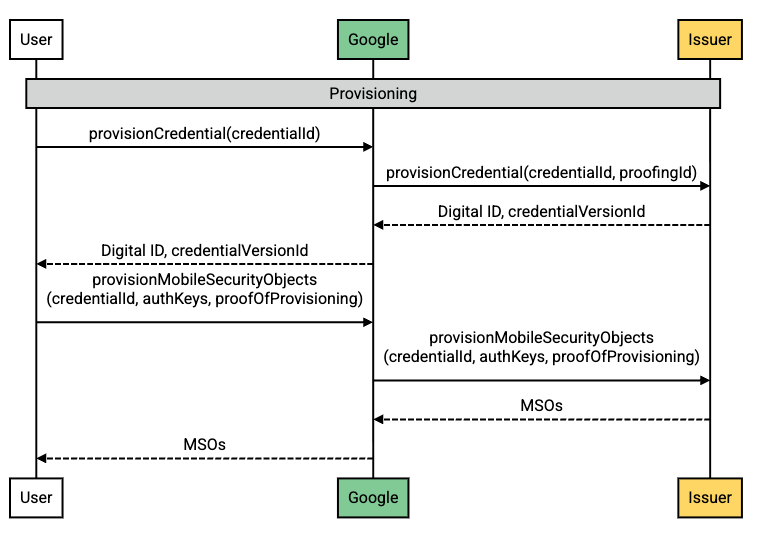
Flow description
| Step | Source | Description |
|---|---|---|
| 1 | Android-powered device |
The Google Wallet app calls provisionCredential once it has
been notified that the proofing request has been accepted.
|
| 2 | Google servers |
Google calls provisionCredential, supplying the credential
ID and the proofing ID.
|
| 3 | Issuer servers | The Issuer returns the VDC and an Issuer-generated credential version ID. |
| 4 | Google servers | Google relays the response to the user. |
| 5 | Android-powered device |
The Google Wallet app calls provisionMobileSecurityObjects,
supplying the credential ID, a list of x509 certificates to be
certified, and proof that provisioning has completed successfully.
|
| 6 | Issuer servers | The Issuer returns the MSOs. |
| 7 | Google servers | Google relays the MSOs to the user. |