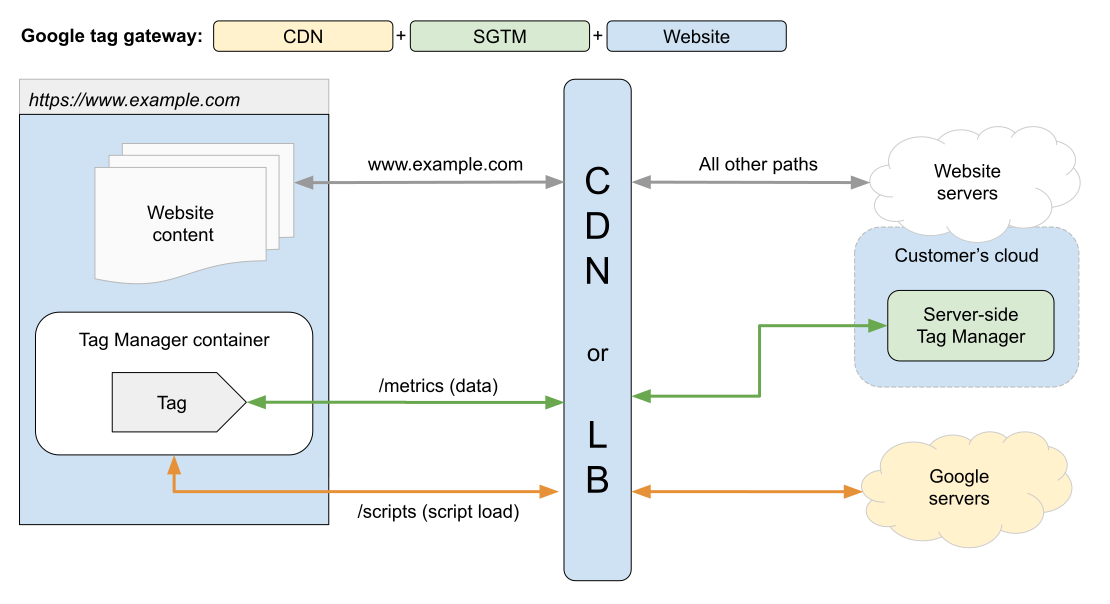
Google tag gateway with CDN + SGTM
Stay organized with collections
Save and categorize content based on your preferences.
This document guides developers on how to best combine Google tag gateway
with CDN (GTG) and server-side Tag Manager (SGTM). While both can function
independently, using them together offers the most robust and controlled
tagging setup.
Google tag gateway setup options
Google tag gateway with CDN:
The CDN serves Google scripts directly from your first-party domain for
durability. Data is sent to Google through your first-party domain.
Google tag gateway with CDN + SGTM (Recommended): The CDN serves Google
scripts directly from your first-party domain for durability, while a
separate SGTM server manages data collection, enrichment, and control.
This guide focuses on migrating to or implementing the Recommended setup (Option
3), which combines the benefits of CDN-based script serving (lower cost, reduced
SGTM server load) with the advanced data control features of SGTM.
Recommended Architecture
Before you begin
This guide assumes you have administrator access to your Google Tag Manager web
container.
Fill in the following to populate the examples throughout this document:

Your domain: example.com
Tag serving path (GTG): /scripts
Server-side path (SGTM): /metrics
Pick an implementation option to see instructions.
[[["Easy to understand","easyToUnderstand","thumb-up"],["Solved my problem","solvedMyProblem","thumb-up"],["Other","otherUp","thumb-up"]],[["Missing the information I need","missingTheInformationINeed","thumb-down"],["Too complicated / too many steps","tooComplicatedTooManySteps","thumb-down"],["Out of date","outOfDate","thumb-down"],["Samples / code issue","samplesCodeIssue","thumb-down"],["Other","otherDown","thumb-down"]],["Last updated 2026-05-08 UTC."],[],[]]