

進階地點搜尋元件
Place Search 元件的進階版與基本版提供相同功能,您也可以設定元件的動作按鈕,並對顯示的評論和媒體套用搜尋和篩選選項。
進階地點搜尋設定
使用 AdvancedPlaceSearchFragment 存取進階功能。
設定動作按鈕
使用 AdvancedPlaceSearchFragment 的 PlaceActionProvider 介面定義及自訂動作按鈕。
圖片出處資訊相關規定
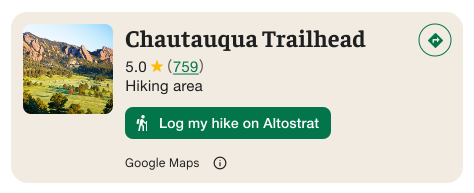
重要事項:如果自訂動作按鈕會將使用者資訊分享給 Google 以外的第三方,請務必向使用者清楚說明。請參閱視覺化出處資訊規定。
這個範例顯示自訂圖片,清楚說明使用者資訊將傳送至「Altostrat」。
套用搜尋和篩選選項
使用 AdvancedPlaceSearchFragment 的 SearchMediaOptions 和 SearchReviewsOptions 介面,啟用媒體或評論的搜尋和篩選功能。
進階地點搜尋範例
建立 AdvancedPlaceSearch 片段
Kotlin
// Initialize Places first
Places.initializeWithNewPlacesApiEnabled(context, API_KEY)

// How the fragment is created
AdvancedPlaceSearchFragment.newInstance(
          selectedContent,
          orientation,
          R.style.BrandedPlaceDetailsTheme,
        )

// Fragment supports the same configs that PlaceSearchFragment supported
fragment.preferTruncation = false
fragment.attributionPosition = AttributionPosition.BOTTOM
fragment.selectable = true
執行搜尋
Kotlin
// Performing a search works the same as with a regular placeSearchFragment.

advancedPlaceSearchFragment.configureFromSearchByTextRequest(searchByTextRequest)

advancedPlaceSearchFragment.configureFromSearchNearbyRequest(searchNearbyRequest)
聆聽結果
Kotlin
// attach the existing PlaceSearchFragmentListener to get notified about when places load or are selected from the results list.
override fun onAttachFragment(fragment: Fragment) {
    super.onAttachFragment(fragment)
    when (fragment) {
      // Reuse the placeSearchFragmetnListener from the Essentials version
      is AdvancedPlaceSearchFragment -> fragment.registerListener(placeSearchFragmentListener)
      // use placeListFragmentListener, its functionally identical but with a new name.
      is AdvancedPlaceListFragment -> fragment.registerListener(advancedPlaceListFragmentListener)
    }
}