

API lượt chuyển đổi ngoại tuyến của CM360 hỗ trợ việc nâng cao lượt chuyển đổi dựa trên thẻ trang web bằng giá trị nhận dạng người dùng.
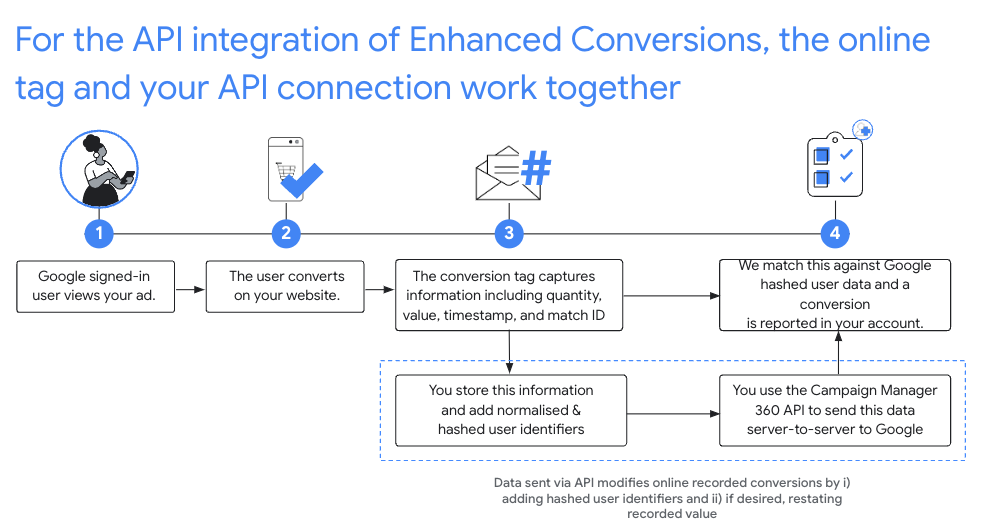
Chế độ thiết lập được đề xuất
- Chấp nhận Điều khoản dịch vụ về tính năng Lượt chuyển đổi nâng cao cho cấu hình Floodlight của bạn trong CM360.
- Đo lường trang web của bạn bằng mã nhận dạng để so khớp.
- Ghi lại những lượt chuyển đổi Floodlight xảy ra trên trang web của bạn. Hãy nhớ ghi lại tất cả những thông tin sau đây vì đây là các trường bắt buộc trong các lệnh gọi API tiếp theo:
matchIdordinaltimestampMicrosfloodlightActivityIdfloodlightConfigurationIdquantityvalue
- Sau 90 phút kể từ khi thẻ trực tuyến ghi nhận lượt chuyển đổi, hãy gọi
conversions.batchupdateđể nâng cao các lượt chuyển đổi này bằng giá trị nhận dạng người dùng.- Giá trị nhận dạng người dùng phải được định dạng và băm, đồng thời được thêm vào
trường
userIdentifierstrên đối tượng Chuyển đổi. - Bạn phải chỉ định số lượng và giá trị.
Bạn có thể tuỳ ý điều chỉnh số lượng và giá trị của lượt chuyển đổi trong cùng một lệnh gọi
conversions.batchupdatehoặc cung cấp số lượng và giá trị ban đầu. - Mỗi lô chèn và cập nhật có thể chứa cả các mục thành công và không thành công. Bạn nên thử lại các lỗi
NOT_FOUNDvàINTERNALtrong trường hợp quá trình xử lý lượt chuyển đổi bị chậm trễ lâu hơn bình thường, tối đa 6 giờ. - Lượt chuyển đổi phải được nâng cao bằng giá trị nhận dạng người dùng trong vòng 24 giờ sau khi được thẻ trực tuyến ghi lại.
- Giá trị nhận dạng người dùng phải được định dạng và băm, đồng thời được thêm vào
trường
Chuẩn hoá và băm
Để bảo vệ quyền riêng tư, bạn phải băm địa chỉ email, số điện thoại, tên, họ và địa chỉ đường phố bằng thuật toán SHA-256 trước khi tải lên. Để chuẩn hoá kết quả băm, trước khi băm một trong các giá trị này, bạn phải:
- Xoá khoảng trắng ở đầu hoặc ở cuối.
- Chuyển đổi văn bản thành chữ thường.
- Định dạng số điện thoại theo tiêu chuẩn E164.
Nhập cả dấu cộng (
+) và mã quốc gia. Ví dụ: số điện thoại(800)555-0200ở Hoa Kỳ phải được định dạng và chuẩn hoá thành+18005550200 Xoá tất cả dấu chấm (.) đứng trước tên miền trong địa chỉ email
gmail.comvàgooglemail.com.
C#
/// <summary>
/// Normalizes the email address and hashes it. For this use case, Campaign Manager 360
/// requires removal of any '.' characters preceding <code>gmail.com</code> or
/// <code>googlemail.com</code>.
/// </summary>
/// <param name="emailAddress">The email address.</param>
/// <returns>The hash code.</returns>
private string NormalizeAndHashEmailAddress(string emailAddress)
{
    string normalizedEmail = emailAddress.ToLower();
    string[] emailParts = normalizedEmail.Split('@');
    if (emailParts.Length > 1 && (emailParts[1] == "gmail.com" ||
        emailParts[1] == "googlemail.com"))
    {
        // Removes any '.' characters from the portion of the email address before
        // the domain if the domain is gmail.com or googlemail.com.
        emailParts[0] = emailParts[0].Replace(".", "");
        normalizedEmail = $"{emailParts[0]}@{emailParts[1]}";
    }
    return NormalizeAndHash(normalizedEmail);
}

/// <summary>
/// Normalizes and hashes a string value.
/// </summary>
/// <param name="value">The value to normalize and hash.</param>
/// <returns>The normalized and hashed value.</returns>
private static string NormalizeAndHash(string value)
{
    return ToSha256String(digest, ToNormalizedValue(value));
}

/// <summary>
/// Hash a string value using SHA-256 hashing algorithm.
/// </summary>
/// <param name="digest">Provides the algorithm for SHA-256.</param>
/// <param name="value">The string value (e.g. an email address) to hash.</param>
/// <returns>The hashed value.</returns>
private static string ToSha256String(SHA256 digest, string value)
{
    byte[] digestBytes = digest.ComputeHash(Encoding.UTF8.GetBytes(value));
    // Convert the byte array into an unhyphenated hexadecimal string.
    return BitConverter.ToString(digestBytes).Replace("-", string.Empty);
}

/// <summary>
/// Removes leading and trailing whitespace and converts all characters to
/// lower case.
/// </summary>
/// <param name="value">The value to normalize.</param>
/// <returns>The normalized value.</returns>
private static string ToNormalizedValue(string value)
{
    return value.Trim().ToLower();
}
Java
private String normalizeAndHash(MessageDigest digest, String s)
    throws UnsupportedEncodingException {
  // Normalizes by removing leading and trailing whitespace and converting all characters to
  // lower case.
  String normalized = s.trim().toLowerCase();
  // Hashes the normalized string using the hashing algorithm.
  byte[] hash = digest.digest(normalized.getBytes("UTF-8"));
  StringBuilder result = new StringBuilder();
  for (byte b : hash) {
    result.append(String.format("%02x", b));
  }

  return result.toString();
}

/**
 * Returns the result of normalizing and hashing an email address. For this use case, Campaign Manager 360
 * requires removal of any '.' characters preceding {@code gmail.com} or {@code googlemail.com}.
 *
 * @param digest the digest to use to hash the normalized string.
 * @param emailAddress the email address to normalize and hash.
 */
private String normalizeAndHashEmailAddress(MessageDigest digest, String emailAddress)
    throws UnsupportedEncodingException {
  String normalizedEmail = emailAddress.toLowerCase();
  String[] emailParts = normalizedEmail.split("@");
  if (emailParts.length > 1 && emailParts[1].matches("^(gmail|googlemail)\\.com\\s*")) {
    // Removes any '.' characters from the portion of the email address before the domain if the
    // domain is gmail.com or googlemail.com.
    emailParts[0] = emailParts[0].replaceAll("\\.", "");
    normalizedEmail = String.format("%s@%s", emailParts[0], emailParts[1]);
  }
  return normalizeAndHash(digest, normalizedEmail);
}
PHP
private static function normalizeAndHash(string $hashAlgorithm, string $value): string
{
    return hash($hashAlgorithm, strtolower(trim($value)));
}

/**
  * Returns the result of normalizing and hashing an email address. For this use case, Campaign
  * Manager 360 requires removal of any '.' characters preceding "gmail.com" or "googlemail.com".
  *
  * @param string $hashAlgorithm the hash algorithm to use
  * @param string $emailAddress the email address to normalize and hash
  * @return string the normalized and hashed email address
  */
private static function normalizeAndHashEmailAddress(
    string $hashAlgorithm,
    string $emailAddress
): string {
    $normalizedEmail = strtolower($emailAddress);
    $emailParts = explode("@", $normalizedEmail);
    if (
        count($emailParts) > 1
        && preg_match('/^(gmail|googlemail)\.com\s*/', $emailParts[1])
    ) {
        // Removes any '.' characters from the portion of the email address before the domain
        // if the domain is gmail.com or googlemail.com.
        $emailParts[0] = str_replace(".", "", $emailParts[0]);
        $normalizedEmail = sprintf('%s@%s', $emailParts[0], $emailParts[1]);
    }
    return self::normalizeAndHash($hashAlgorithm, $normalizedEmail);
}
Python
def normalize_and_hash_email_address(email_address):
    """Returns the result of normalizing and hashing an email address.

    For this use case, Campaign Manager 360 requires removal of any '.'
    characters preceding "gmail.com" or "googlemail.com"

    Args:
        email_address: An email address to normalize.

    Returns:
        A normalized (lowercase, removed whitespace) and SHA-265 hashed string.
    """
    normalized_email = email_address.lower()
    email_parts = normalized_email.split("@")
    # Checks whether the domain of the email address is either "gmail.com"
    # or "googlemail.com". If this regex does not match then this statement
    # will evaluate to None.
    is_gmail = re.match(r"^(gmail|googlemail)\.com$", email_parts[1])

    # Check that there are at least two segments and the second segment
    # matches the above regex expression validating the email domain name.
    if len(email_parts) > 1 and is_gmail:
        # Removes any '.' characters from the portion of the email address
        # before the domain if the domain is gmail.com or googlemail.com.
        email_parts[0] = email_parts[0].replace(".", "")
        normalized_email = "@".join(email_parts)

    return normalize_and_hash(normalized_email)

def normalize_and_hash(s):
    """Normalizes and hashes a string with SHA-256.

    Private customer data must be hashed during upload, as described at:
    https://support.google.com/google-ads/answer/7474263

    Args:
        s: The string to perform this operation on.

    Returns:
        A normalized (lowercase, removed whitespace) and SHA-256 hashed string.
    """
    return hashlib.sha256(s.strip().lower().encode()).hexdigest()
Ruby
# Returns the result of normalizing and then hashing the string using the
# provided digest.  Private customer data must be hashed during upload, as
# described at https://support.google.com/google-ads/answer/7474263.
def normalize_and_hash(str)
  # Remove leading and trailing whitespace and ensure all letters are lowercase
  # before hasing.
  Digest::SHA256.hexdigest(str.strip.downcase)
end

# Returns the result of normalizing and hashing an email address. For this use
# case, Campaign Manager 360 requires removal of any '.' characters preceding
# 'gmail.com' or 'googlemail.com'.
def normalize_and_hash_email(email)
  email_parts = email.downcase.split("@")
  # Removes any '.' characters from the portion of the email address before the
  # domain if the domain is gmail.com or googlemail.com.
  if email_parts.last =~ /^(gmail|googlemail)\.com\s*/
    email_parts[0] = email_parts[0].gsub('.', '')
  end
  normalize_and_hash(email_parts.join('@'))
end
Thêm giá trị nhận dạng người dùng vào lượt chuyển đổi
Trước tiên, hãy chuẩn bị đối tượng Conversion để tải lên hoặc chỉnh sửa như bình thường, sau đó đính kèm giá trị nhận dạng người dùng như sau:
{
  "matchId": "my-match-id-846513278",
  "ordinal": "my-ordinal-12345678512",
  "quantity": 1,
  "value": 104.23,
  "timestampMicros": 1656950400000000,
  "floodlightConfigurationId": 99999,
  "floodlightActivityId": 8888,
  "userIdentifiers": [
    { "hashedEmail": "0c7e6a405862e402eb76a70f8a26fc732d07c32931e9fae9ab1582911d2e8a3b" },
    { "hashedPhoneNumber": "1fb1f420856780a29719b994c8764b81770d79f97e2e1861ba938a7a5a15dfb9" },
    {
      "addressInfo": {
        "hashedFirstName": "81f8f6dde88365f3928796ec7aa53f72820b06db8664f5fe76a7eb13e24546a2",
        "hashedLastName": "799ef92a11af918e3fb741df42934f3b568ed2d93ac1df74f1b8d41a27932a6f",
        "hashedStreetAddress": "22b7e2d69b91e0ef4a88e81a73d897b92fd9c93ccfbe0a860f77db16c26f662e",
        "city": "seattle",
        "state": "washington",
        "countryCode": "US",
        "postalCode": "98101"
      }
    }
  ]
}
Phản hồi thành công sẽ có dạng như sau:
{
  "hasFailures": false,
  "status": [
    {
      "conversion": {
        "floodlightConfigurationId": 99999,
        "floodlightActivityId": 8888,
        "timestampMicros": 1656950400000000,
        "value": 104.23,
        "quantity": 1,
        "ordinal": "my-ordinal-12345678512",
        "matchId": "my-match-id-846513278",
        "userIdentifiers": [
          { "hashedEmail": "0c7e6a405862e402eb76a70f8a26fc732d07c32931e9fae9ab1582911d2e8a3b" },
          { "hashedPhoneNumber": "1fb1f420856780a29719b994c8764b81770d79f97e2e1861ba938a7a5a15dfb9" },
          {
            "addressInfo": {
              "hashedFirstName": "81f8f6dde88365f3928796ec7aa53f72820b06db8664f5fe76a7eb13e24546a2",
              "hashedLastName": "799ef92a11af918e3fb741df42934f3b568ed2d93ac1df74f1b8d41a27932a6f",
              "hashedStreetAddress": "22b7e2d69b91e0ef4a88e81a73d897b92fd9c93ccfbe0a860f77db16c26f662e",
              "city": "seattle",
              "state": "washington",
              "countryCode": "US",
              "postalCode": "98101"
            }
          }
        ],
        "kind": "dfareporting#conversion"
      },
      "kind": "dfareporting#conversionStatus"
    }
  ]
}
Lỗi thường gặp
Sau đây là một số lỗi bạn có thể gặp phải khi nâng cao lượt chuyển đổi bằng giá trị nhận dạng người dùng:
- Trường hashed_X không phải là giá trị băm SHA-256 hợp lệ
- Tất cả các trường có tiền tố là hashed chỉ chấp nhận hàm băm SHA-256 được mã hoá theo hệ thập lục phân.
- Trường country_code có độ dài không chính xác
country_codephải có đúng 2 chữ cái.- Cấu hình Floodlight chưa ký điều khoản dịch vụ về lượt chuyển đổi nâng cao
- Bạn chưa chấp nhận Điều khoản dịch vụ về tính năng Lượt chuyển đổi nâng cao cho mã cấu hình Floodlight của yêu cầu.
- Đã chỉ định hơn 5 user_identifiers
- Một lượt chuyển đổi chỉ có thể có tối đa 5 giá trị nhận dạng người dùng.
Câu hỏi thường gặp
- Tại sao bạn nên sử dụng mã nhận dạng để so khớp?
- Nội dung chỉnh sửa dựa trên mã lượt nhấp sẽ loại trừ những lượt chuyển đổi không có lượt nhấp trước đó và giới hạn giá trị của việc tích hợp tính năng lượt chuyển đổi nâng cao.
- Tại sao bạn nên ghi lại số lượng và giá trị?
- API lượt chuyển đổi ngoại tuyến của CM360 yêu cầu bạn phải chỉ định số lượng và giá trị.
- Tôi có cần lấy dấu thời gian chính xác đến từng micrô giây do Google ghi lại để chỉnh sửa lượt chuyển đổi dựa trên thẻ trực tuyến không?
- Đối với các nội dung chỉnh sửa dựa trên mã nhận dạng trận đấu, API hiện chấp nhận nội dung chỉnh sửa miễn là dấu thời gian được cung cấp trong yêu cầu nằm trong vòng 1 phút kể từ dấu thời gian mà Google ghi lại.
- Tại sao tôi cần đợi 90 phút sau khi một lượt chuyển đổi được ghi lại bằng thẻ trực tuyến rồi mới nâng cao lượt chuyển đổi đó?
- Có thể mất đến 90 phút để API lập chỉ mục lượt chuyển đổi trực tuyến và cho phép chỉnh sửa.
- Tôi nên chú ý đến điều gì trong phản hồi của API?
- Ngay cả khi API lượt chuyển đổi CM360 trả về phản hồi thành công, một số
lượt chuyển đổi riêng lẻ vẫn có thể không tải lên hoặc cập nhật được. Kiểm tra từng trường
ConversionStatusđể tìm lỗi:- Bạn có thể và nên thử lại các lỗi
NOT_FOUNDvàINTERNALtrong tối đa 6 giờ, phòng trường hợp quá trình xử lý lượt chuyển đổi bị chậm trễ lâu hơn bình thường. - Bạn không nên thử lại khi gặp lỗi
INVALID_ARGUMENTvàPERMISSION_DENIED. - Hãy tham khảo phần Câu hỏi thường gặp để biết thêm thông tin chi tiết.
- Bạn có thể và nên thử lại các lỗi