

CM360 오프라인 전환 API는 사용자 식별자를 사용하여 웹사이트 태그 기반 전환을 향상하는 기능을 지원합니다.
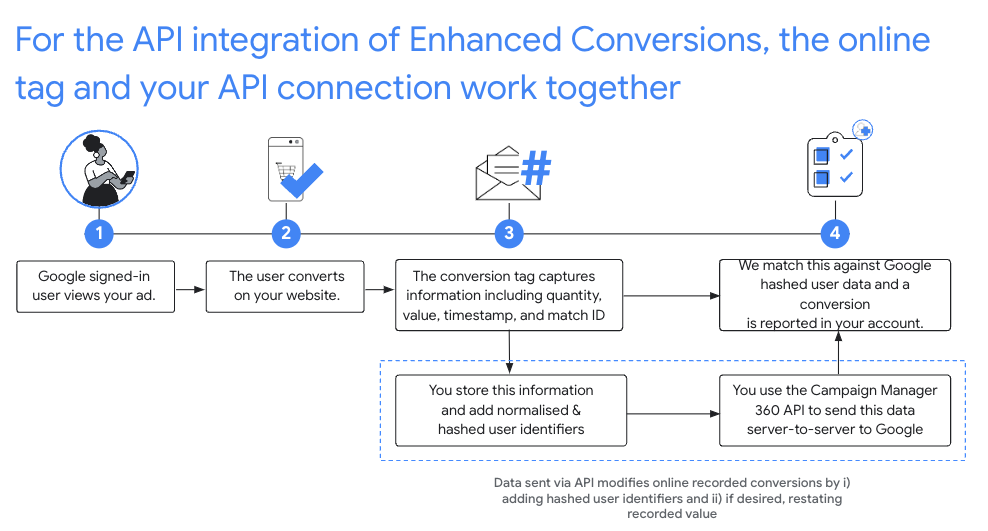
권장 설정
- CM360에서 플러드라이트 구성에 대한 향상된 전환 서비스 약관에 동의합니다.
- 일치 ID로 웹사이트를 계측합니다.
- 웹사이트에서 발생하는 플러드라이트 전환을 기록합니다. 다음은 후속 API 호출의 필수 필드이므로 모두 기록해야 합니다.
matchIdordinaltimestampMicrosfloodlightActivityIdfloodlightConfigurationIdquantityvalue
- 온라인 태그가 전환을 캡처한 후 90분이 지나면
conversions.batchupdate를 호출하여 사용자 식별자로 이러한 전환을 보정합니다.- 사용자 식별자는 형식을 지정하고 해싱하여 전환 객체의
userIdentifiers필드에 추가해야 합니다. - 수량과 값을 지정해야 합니다.
원하는 경우 동일한
conversions.batchupdate호출에서 전환의 수량과 가치를 조정하거나 원래 수량과 가치를 제공할 수 있습니다. - 각 삽입 및 업데이트 배치에는 성공과 실패가 혼합되어 있을 수 있습니다.
NOT_FOUND및INTERNAL실패는 전환 처리가 평소보다 오래 지연되는 경우 최대 6시간 동안 다시 시도해야 합니다. - 전환은 온라인 태그로 캡처된 후 24시간 이내에 사용자 식별자로 보강되어야 합니다.
- 사용자 식별자는 형식을 지정하고 해싱하여 전환 객체의
정규화 및 해싱
개인 정보 보호를 위해 이메일 주소, 전화번호, 이름, 성, 상세 주소는 업로드하기 전에 SHA-256 알고리즘을 사용하여 해싱해야 합니다. 해싱 결과를 표준화하려면 해당 값을 해싱하기 전에 다음을 따릅니다.
- 선행 또는 후행 공백을 삭제합니다.
- 텍스트를 소문자로 변환합니다.
- 전화번호는 E164 표준에 따른 형식으로 작성합니다.
더하기 기호 (
+)와 국가 코드를 포함합니다. 예를 들어 미국 전화번호(800)555-0200는+18005550200로 형식 지정 및 정규화되어야 합니다. gmail.com및googlemail.com이메일 주소의 도메인 이름 앞에 있는 모든 마침표(.)를 삭제합니다.
C#
/// <summary>
/// Normalizes the email address and hashes it. For this use case, Campaign Manager 360
/// requires removal of any '.' characters preceding <code>gmail.com</code> or
/// <code>googlemail.com</code>.
/// </summary>
/// <param name="emailAddress">The email address.</param>
/// <returns>The hash code.</returns>
private string NormalizeAndHashEmailAddress(string emailAddress)
{
    string normalizedEmail = emailAddress.ToLower();
    string[] emailParts = normalizedEmail.Split('@');
    if (emailParts.Length > 1 && (emailParts[1] == "gmail.com" ||
        emailParts[1] == "googlemail.com"))
    {
        // Removes any '.' characters from the portion of the email address before
        // the domain if the domain is gmail.com or googlemail.com.
        emailParts[0] = emailParts[0].Replace(".", "");
        normalizedEmail = $"{emailParts[0]}@{emailParts[1]}";
    }
    return NormalizeAndHash(normalizedEmail);
}

/// <summary>
/// Normalizes and hashes a string value.
/// </summary>
/// <param name="value">The value to normalize and hash.</param>
/// <returns>The normalized and hashed value.</returns>
private static string NormalizeAndHash(string value)
{
    return ToSha256String(digest, ToNormalizedValue(value));
}

/// <summary>
/// Hash a string value using SHA-256 hashing algorithm.
/// </summary>
/// <param name="digest">Provides the algorithm for SHA-256.</param>
/// <param name="value">The string value (e.g. an email address) to hash.</param>
/// <returns>The hashed value.</returns>
private static string ToSha256String(SHA256 digest, string value)
{
    byte[] digestBytes = digest.ComputeHash(Encoding.UTF8.GetBytes(value));
    // Convert the byte array into an unhyphenated hexadecimal string.
    return BitConverter.ToString(digestBytes).Replace("-", string.Empty);
}

/// <summary>
/// Removes leading and trailing whitespace and converts all characters to
/// lower case.
/// </summary>
/// <param name="value">The value to normalize.</param>
/// <returns>The normalized value.</returns>
private static string ToNormalizedValue(string value)
{
    return value.Trim().ToLower();
}
자바
private String normalizeAndHash(MessageDigest digest, String s)
    throws UnsupportedEncodingException {
  // Normalizes by removing leading and trailing whitespace and converting all characters to
  // lower case.
  String normalized = s.trim().toLowerCase();
  // Hashes the normalized string using the hashing algorithm.
  byte[] hash = digest.digest(normalized.getBytes("UTF-8"));
  StringBuilder result = new StringBuilder();
  for (byte b : hash) {
    result.append(String.format("%02x", b));
  }

  return result.toString();
}

/**
 * Returns the result of normalizing and hashing an email address. For this use case, Campaign Manager 360
 * requires removal of any '.' characters preceding {@code gmail.com} or {@code googlemail.com}.
 *
 * @param digest the digest to use to hash the normalized string.
 * @param emailAddress the email address to normalize and hash.
 */
private String normalizeAndHashEmailAddress(MessageDigest digest, String emailAddress)
    throws UnsupportedEncodingException {
  String normalizedEmail = emailAddress.toLowerCase();
  String[] emailParts = normalizedEmail.split("@");
  if (emailParts.length > 1 && emailParts[1].matches("^(gmail|googlemail)\\.com\\s*")) {
    // Removes any '.' characters from the portion of the email address before the domain if the
    // domain is gmail.com or googlemail.com.
    emailParts[0] = emailParts[0].replaceAll("\\.", "");
    normalizedEmail = String.format("%s@%s", emailParts[0], emailParts[1]);
  }
  return normalizeAndHash(digest, normalizedEmail);
}
PHP
private static function normalizeAndHash(string $hashAlgorithm, string $value): string
{
    return hash($hashAlgorithm, strtolower(trim($value)));
}

/**
  * Returns the result of normalizing and hashing an email address. For this use case, Campaign
  * Manager 360 requires removal of any '.' characters preceding "gmail.com" or "googlemail.com".
  *
  * @param string $hashAlgorithm the hash algorithm to use
  * @param string $emailAddress the email address to normalize and hash
  * @return string the normalized and hashed email address
  */
private static function normalizeAndHashEmailAddress(
    string $hashAlgorithm,
    string $emailAddress
): string {
    $normalizedEmail = strtolower($emailAddress);
    $emailParts = explode("@", $normalizedEmail);
    if (
        count($emailParts) > 1
        && preg_match('/^(gmail|googlemail)\.com\s*/', $emailParts[1])
    ) {
        // Removes any '.' characters from the portion of the email address before the domain
        // if the domain is gmail.com or googlemail.com.
        $emailParts[0] = str_replace(".", "", $emailParts[0]);
        $normalizedEmail = sprintf('%s@%s', $emailParts[0], $emailParts[1]);
    }
    return self::normalizeAndHash($hashAlgorithm, $normalizedEmail);
}
Python
def normalize_and_hash_email_address(email_address):
    """Returns the result of normalizing and hashing an email address.

    For this use case, Campaign Manager 360 requires removal of any '.'
    characters preceding "gmail.com" or "googlemail.com"

    Args:
        email_address: An email address to normalize.

    Returns:
        A normalized (lowercase, removed whitespace) and SHA-265 hashed string.
    """
    normalized_email = email_address.lower()
    email_parts = normalized_email.split("@")
    # Checks whether the domain of the email address is either "gmail.com"
    # or "googlemail.com". If this regex does not match then this statement
    # will evaluate to None.
    is_gmail = re.match(r"^(gmail|googlemail)\.com$", email_parts[1])

    # Check that there are at least two segments and the second segment
    # matches the above regex expression validating the email domain name.
    if len(email_parts) > 1 and is_gmail:
        # Removes any '.' characters from the portion of the email address
        # before the domain if the domain is gmail.com or googlemail.com.
        email_parts[0] = email_parts[0].replace(".", "")
        normalized_email = "@".join(email_parts)

    return normalize_and_hash(normalized_email)

def normalize_and_hash(s):
    """Normalizes and hashes a string with SHA-256.

    Private customer data must be hashed during upload, as described at:
    https://support.google.com/google-ads/answer/7474263

    Args:
        s: The string to perform this operation on.

    Returns:
        A normalized (lowercase, removed whitespace) and SHA-256 hashed string.
    """
    return hashlib.sha256(s.strip().lower().encode()).hexdigest()
Ruby
# Returns the result of normalizing and then hashing the string using the
# provided digest.  Private customer data must be hashed during upload, as
# described at https://support.google.com/google-ads/answer/7474263.
def normalize_and_hash(str)
  # Remove leading and trailing whitespace and ensure all letters are lowercase
  # before hasing.
  Digest::SHA256.hexdigest(str.strip.downcase)
end

# Returns the result of normalizing and hashing an email address. For this use
# case, Campaign Manager 360 requires removal of any '.' characters preceding
# 'gmail.com' or 'googlemail.com'.
def normalize_and_hash_email(email)
  email_parts = email.downcase.split("@")
  # Removes any '.' characters from the portion of the email address before the
  # domain if the domain is gmail.com or googlemail.com.
  if email_parts.last =~ /^(gmail|googlemail)\.com\s*/
    email_parts[0] = email_parts[0].gsub('.', '')
  end
  normalize_and_hash(email_parts.join('@'))
end
전환에 사용자 식별자 추가
먼저 평소와 같이 업로드 또는 수정을 위해 Conversion 객체를 준비한 후 다음과 같이 사용자 식별자를 연결합니다.
{
  "matchId": "my-match-id-846513278",
  "ordinal": "my-ordinal-12345678512",
  "quantity": 1,
  "value": 104.23,
  "timestampMicros": 1656950400000000,
  "floodlightConfigurationId": 99999,
  "floodlightActivityId": 8888,
  "userIdentifiers": [
    { "hashedEmail": "0c7e6a405862e402eb76a70f8a26fc732d07c32931e9fae9ab1582911d2e8a3b" },
    { "hashedPhoneNumber": "1fb1f420856780a29719b994c8764b81770d79f97e2e1861ba938a7a5a15dfb9" },
    {
      "addressInfo": {
        "hashedFirstName": "81f8f6dde88365f3928796ec7aa53f72820b06db8664f5fe76a7eb13e24546a2",
        "hashedLastName": "799ef92a11af918e3fb741df42934f3b568ed2d93ac1df74f1b8d41a27932a6f",
        "hashedStreetAddress": "22b7e2d69b91e0ef4a88e81a73d897b92fd9c93ccfbe0a860f77db16c26f662e",
        "city": "seattle",
        "state": "washington",
        "countryCode": "US",
        "postalCode": "98101"
      }
    }
  ]
}
성공적인 응답은 다음과 같이 표시됩니다.
{
  "hasFailures": false,
  "status": [
    {
      "conversion": {
        "floodlightConfigurationId": 99999,
        "floodlightActivityId": 8888,
        "timestampMicros": 1656950400000000,
        "value": 104.23,
        "quantity": 1,
        "ordinal": "my-ordinal-12345678512",
        "matchId": "my-match-id-846513278",
        "userIdentifiers": [
          { "hashedEmail": "0c7e6a405862e402eb76a70f8a26fc732d07c32931e9fae9ab1582911d2e8a3b" },
          { "hashedPhoneNumber": "1fb1f420856780a29719b994c8764b81770d79f97e2e1861ba938a7a5a15dfb9" },
          {
            "addressInfo": {
              "hashedFirstName": "81f8f6dde88365f3928796ec7aa53f72820b06db8664f5fe76a7eb13e24546a2",
              "hashedLastName": "799ef92a11af918e3fb741df42934f3b568ed2d93ac1df74f1b8d41a27932a6f",
              "hashedStreetAddress": "22b7e2d69b91e0ef4a88e81a73d897b92fd9c93ccfbe0a860f77db16c26f662e",
              "city": "seattle",
              "state": "washington",
              "countryCode": "US",
              "postalCode": "98101"
            }
          }
        ],
        "kind": "dfareporting#conversion"
      },
      "kind": "dfareporting#conversionStatus"
    }
  ]
}
일반적인 오류
다음은 사용자 식별자로 전환을 보강할 때 표시될 수 있는 몇 가지 오류입니다.
- hashed_X 필드가 유효한 SHA-256 해시가 아닙니다.
- 접두사로 해시가 붙은 모든 필드는 16진수로 인코딩된 SHA-256 해시만 허용합니다.
- country_code 필드의 길이가 잘못되었습니다.
country_code는 정확히 2글자여야 합니다.- 플러드라이트 구성에서 향상된 전환 서비스 약관에 서명하지 않았습니다.
- 요청의 플러드라이트 구성 ID에 대해 향상된 전환 서비스 약관에 동의하지 않았습니다.
- user_identifier가 6개 이상 지정됨
- 전환에는 사용자 식별자를 최대 5개까지만 사용할 수 있습니다.
자주 묻는 질문(FAQ)
- 일치 ID가 권장되는 이유는 무엇인가요?
- 클릭 ID 기반 수정은 클릭이 선행되지 않은 전환을 제외하고 향상된 전환 통합의 가치를 제한합니다.
- 수량과 가치를 기록해야 하는 이유는 무엇인가요?
- CM360 오프라인 전환 API를 사용하려면 수량과 값을 지정해야 합니다.
- 온라인 태그 기반 전환을 수정하려면 Google에서 기록한 정확한 마이크로초 타임스탬프를 가져와야 하나요?
- 일치 ID 기반 수정의 경우 이제 요청에 제공된 타임스탬프가 Google에서 기록한 타임스탬프와 1분 이내인 경우 API에서 수정을 허용합니다.
- 온라인 태그로 전환을 포착한 후 90분을 기다려야 전환을 보강할 수 있는 이유는 무엇인가요?
- 온라인 전환이 API에 의해 색인 생성되고 수정할 수 있게 되기까지 최대 90분이 걸릴 수 있습니다.
- API 응답에서 무엇에 주의해야 하나요?
- CM360 Conversion API가 성공 응답을 반환하더라도 일부 개별 전환은 업로드 또는 업데이트에 실패할 수 있습니다. 개별
ConversionStatus필드에서 실패를 검사합니다.NOT_FOUND및INTERNAL실패는 전환 처리가 평소보다 오래 지연되는 경우 최대 6시간까지 재시도할 수 있으며 재시도해야 합니다.INVALID_ARGUMENT및PERMISSION_DENIED오류는 다시 시도하지 않아야 합니다.- 자세한 내용은 FAQ를 참고하세요.