

CM360 オフライン コンバージョン API では、ユーザー ID を使用してウェブサイトのタグベースのコンバージョンを拡張できます。
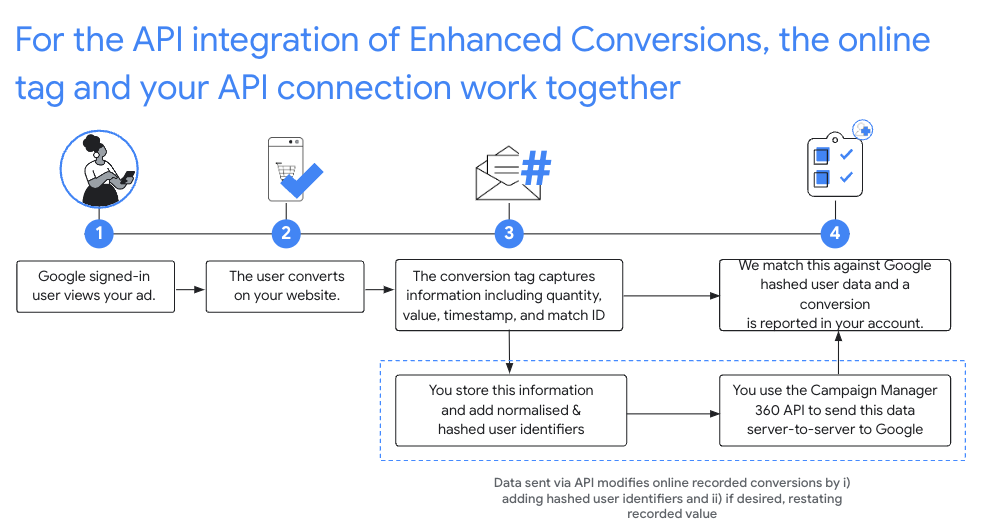
推奨の設定
- CM360 で Floodlight を設定するため、拡張コンバージョンの利用規約に同意します。
- ウェブサイトに照合用のウェブ商品アイテム ID を実装します。
- ウェブサイトで発生する Floodlight コンバージョンを記録します。以下のフィールドは後続の API 呼び出しに必須であるため、すべて記録します。
matchIdordinaltimestampMicrosfloodlightActivityIdfloodlightConfigurationIdquantityvalue
- オンライン タグがコンバージョンをキャプチャしてから 90 分が経過したら、
conversions.batchupdateを呼び出して、ユーザー識別子でこれらのコンバージョンを拡張します。- ユーザー ID は、正しい形式で入力してハッシュ化し、コンバージョン オブジェクトの
userIdentifiersフィールドに追加する必要があります。 - 数量と値を指定する必要があります。
同じ
conversions.batchupdate呼び出しでコンバージョンの数量と値を調整したり、元の数量と値を指定したりすることもできます。 - 挿入と更新の各バッチに、成功と失敗が混在する場合があります。
NOT_FOUNDエラーとINTERNALエラーは、コンバージョン処理で通常よりも長い遅延が発生する場合に備え、最大 6 時間まで再試行する必要があります。 - コンバージョンは、オンライン タグでキャプチャされてから 24 時間以内にユーザー識別子で拡張する必要があります。
- ユーザー ID は、正しい形式で入力してハッシュ化し、コンバージョン オブジェクトの
正規化とハッシュ化
プライバシー保護のため、メールアドレス、電話番号、姓、名、番地はアップロードする前に SHA-256 アルゴリズムでハッシュ化する必要があります。ハッシュ結果を標準化するには、こうした値をハッシュ化する前に次の作業が必要です。
- 先頭や末尾の空白文字を削除する。
- テキストを小文字に変換する。
- 電話番号を E164 規格の形式にする。プラス記号(
+)と国コードを含めます。たとえば、米国の電話番号(800)555-0200は、+18005550200にフォーマットして正規化する必要があります。 gmail.comとgooglemail.comのメールアドレスのドメイン名の前にあるすべてのピリオド(.)を削除する。
C#
/// <summary>
/// Normalizes the email address and hashes it. For this use case, Campaign Manager 360
/// requires removal of any '.' characters preceding <code>gmail.com</code> or
/// <code>googlemail.com</code>.
/// </summary>
/// <param name="emailAddress">The email address.</param>
/// <returns>The hash code.</returns>
private string NormalizeAndHashEmailAddress(string emailAddress)
{
    string normalizedEmail = emailAddress.ToLower();
    string[] emailParts = normalizedEmail.Split('@');
    if (emailParts.Length > 1 && (emailParts[1] == "gmail.com" ||
        emailParts[1] == "googlemail.com"))
    {
        // Removes any '.' characters from the portion of the email address before
        // the domain if the domain is gmail.com or googlemail.com.
        emailParts[0] = emailParts[0].Replace(".", "");
        normalizedEmail = $"{emailParts[0]}@{emailParts[1]}";
    }
    return NormalizeAndHash(normalizedEmail);
}

/// <summary>
/// Normalizes and hashes a string value.
/// </summary>
/// <param name="value">The value to normalize and hash.</param>
/// <returns>The normalized and hashed value.</returns>
private static string NormalizeAndHash(string value)
{
    return ToSha256String(digest, ToNormalizedValue(value));
}

/// <summary>
/// Hash a string value using SHA-256 hashing algorithm.
/// </summary>
/// <param name="digest">Provides the algorithm for SHA-256.</param>
/// <param name="value">The string value (e.g. an email address) to hash.</param>
/// <returns>The hashed value.</returns>
private static string ToSha256String(SHA256 digest, string value)
{
    byte[] digestBytes = digest.ComputeHash(Encoding.UTF8.GetBytes(value));
    // Convert the byte array into an unhyphenated hexadecimal string.
    return BitConverter.ToString(digestBytes).Replace("-", string.Empty);
}

/// <summary>
/// Removes leading and trailing whitespace and converts all characters to
/// lower case.
/// </summary>
/// <param name="value">The value to normalize.</param>
/// <returns>The normalized value.</returns>
private static string ToNormalizedValue(string value)
{
    return value.Trim().ToLower();
}
Java
private String normalizeAndHash(MessageDigest digest, String s)
    throws UnsupportedEncodingException {
  // Normalizes by removing leading and trailing whitespace and converting all characters to
  // lower case.
  String normalized = s.trim().toLowerCase();
  // Hashes the normalized string using the hashing algorithm.
  byte[] hash = digest.digest(normalized.getBytes("UTF-8"));
  StringBuilder result = new StringBuilder();
  for (byte b : hash) {
    result.append(String.format("%02x", b));
  }

  return result.toString();
}

/**
 * Returns the result of normalizing and hashing an email address. For this use case, Campaign Manager 360
 * requires removal of any '.' characters preceding {@code gmail.com} or {@code googlemail.com}.
 *
 * @param digest the digest to use to hash the normalized string.
 * @param emailAddress the email address to normalize and hash.
 */
private String normalizeAndHashEmailAddress(MessageDigest digest, String emailAddress)
    throws UnsupportedEncodingException {
  String normalizedEmail = emailAddress.toLowerCase();
  String[] emailParts = normalizedEmail.split("@");
  if (emailParts.length > 1 && emailParts[1].matches("^(gmail|googlemail)\\.com\\s*")) {
    // Removes any '.' characters from the portion of the email address before the domain if the
    // domain is gmail.com or googlemail.com.
    emailParts[0] = emailParts[0].replaceAll("\\.", "");
    normalizedEmail = String.format("%s@%s", emailParts[0], emailParts[1]);
  }
  return normalizeAndHash(digest, normalizedEmail);
}
PHP
private static function normalizeAndHash(string $hashAlgorithm, string $value): string
{
    return hash($hashAlgorithm, strtolower(trim($value)));
}

/**
  * Returns the result of normalizing and hashing an email address. For this use case, Campaign
  * Manager 360 requires removal of any '.' characters preceding "gmail.com" or "googlemail.com".
  *
  * @param string $hashAlgorithm the hash algorithm to use
  * @param string $emailAddress the email address to normalize and hash
  * @return string the normalized and hashed email address
  */
private static function normalizeAndHashEmailAddress(
    string $hashAlgorithm,
    string $emailAddress
): string {
    $normalizedEmail = strtolower($emailAddress);
    $emailParts = explode("@", $normalizedEmail);
    if (
        count($emailParts) > 1
        && preg_match('/^(gmail|googlemail)\.com\s*/', $emailParts[1])
    ) {
        // Removes any '.' characters from the portion of the email address before the domain
        // if the domain is gmail.com or googlemail.com.
        $emailParts[0] = str_replace(".", "", $emailParts[0]);
        $normalizedEmail = sprintf('%s@%s', $emailParts[0], $emailParts[1]);
    }
    return self::normalizeAndHash($hashAlgorithm, $normalizedEmail);
}
Python
def normalize_and_hash_email_address(email_address):
    """Returns the result of normalizing and hashing an email address.

    For this use case, Campaign Manager 360 requires removal of any '.'
    characters preceding "gmail.com" or "googlemail.com"

    Args:
        email_address: An email address to normalize.

    Returns:
        A normalized (lowercase, removed whitespace) and SHA-265 hashed string.
    """
    normalized_email = email_address.lower()
    email_parts = normalized_email.split("@")
    # Checks whether the domain of the email address is either "gmail.com"
    # or "googlemail.com". If this regex does not match then this statement
    # will evaluate to None.
    is_gmail = re.match(r"^(gmail|googlemail)\.com$", email_parts[1])

    # Check that there are at least two segments and the second segment
    # matches the above regex expression validating the email domain name.
    if len(email_parts) > 1 and is_gmail:
        # Removes any '.' characters from the portion of the email address
        # before the domain if the domain is gmail.com or googlemail.com.
        email_parts[0] = email_parts[0].replace(".", "")
        normalized_email = "@".join(email_parts)

    return normalize_and_hash(normalized_email)

def normalize_and_hash(s):
    """Normalizes and hashes a string with SHA-256.

    Private customer data must be hashed during upload, as described at:
    https://support.google.com/google-ads/answer/7474263

    Args:
        s: The string to perform this operation on.

    Returns:
        A normalized (lowercase, removed whitespace) and SHA-256 hashed string.
    """
    return hashlib.sha256(s.strip().lower().encode()).hexdigest()
Ruby
# Returns the result of normalizing and then hashing the string using the
# provided digest.  Private customer data must be hashed during upload, as
# described at https://support.google.com/google-ads/answer/7474263.
def normalize_and_hash(str)
  # Remove leading and trailing whitespace and ensure all letters are lowercase
  # before hasing.
  Digest::SHA256.hexdigest(str.strip.downcase)
end

# Returns the result of normalizing and hashing an email address. For this use
# case, Campaign Manager 360 requires removal of any '.' characters preceding
# 'gmail.com' or 'googlemail.com'.
def normalize_and_hash_email(email)
  email_parts = email.downcase.split("@")
  # Removes any '.' characters from the portion of the email address before the
  # domain if the domain is gmail.com or googlemail.com.
  if email_parts.last =~ /^(gmail|googlemail)\.com\s*/
    email_parts[0] = email_parts[0].gsub('.', '')
  end
  normalize_and_hash(email_parts.join('@'))
end
ユーザー ID をコンバージョンに追加する
まず、通常どおりアップロードまたは編集用の Conversion オブジェクトを準備してから、以下のコードでユーザー ID を付加します。
{
  "matchId": "my-match-id-846513278",
  "ordinal": "my-ordinal-12345678512",
  "quantity": 1,
  "value": 104.23,
  "timestampMicros": 1656950400000000,
  "floodlightConfigurationId": 99999,
  "floodlightActivityId": 8888,
  "userIdentifiers": [
    { "hashedEmail": "0c7e6a405862e402eb76a70f8a26fc732d07c32931e9fae9ab1582911d2e8a3b" },
    { "hashedPhoneNumber": "1fb1f420856780a29719b994c8764b81770d79f97e2e1861ba938a7a5a15dfb9" },
    {
      "addressInfo": {
        "hashedFirstName": "81f8f6dde88365f3928796ec7aa53f72820b06db8664f5fe76a7eb13e24546a2",
        "hashedLastName": "799ef92a11af918e3fb741df42934f3b568ed2d93ac1df74f1b8d41a27932a6f",
        "hashedStreetAddress": "22b7e2d69b91e0ef4a88e81a73d897b92fd9c93ccfbe0a860f77db16c26f662e",
        "city": "seattle",
        "state": "washington",
        "countryCode": "US",
        "postalCode": "98101"
      }
    }
  ]
}
成功した場合、レスポンスは以下のようになります。
{
  "hasFailures": false,
  "status": [
    {
      "conversion": {
        "floodlightConfigurationId": 99999,
        "floodlightActivityId": 8888,
        "timestampMicros": 1656950400000000,
        "value": 104.23,
        "quantity": 1,
        "ordinal": "my-ordinal-12345678512",
        "matchId": "my-match-id-846513278",
        "userIdentifiers": [
          { "hashedEmail": "0c7e6a405862e402eb76a70f8a26fc732d07c32931e9fae9ab1582911d2e8a3b" },
          { "hashedPhoneNumber": "1fb1f420856780a29719b994c8764b81770d79f97e2e1861ba938a7a5a15dfb9" },
          {
            "addressInfo": {
              "hashedFirstName": "81f8f6dde88365f3928796ec7aa53f72820b06db8664f5fe76a7eb13e24546a2",
              "hashedLastName": "799ef92a11af918e3fb741df42934f3b568ed2d93ac1df74f1b8d41a27932a6f",
              "hashedStreetAddress": "22b7e2d69b91e0ef4a88e81a73d897b92fd9c93ccfbe0a860f77db16c26f662e",
              "city": "seattle",
              "state": "washington",
              "countryCode": "US",
              "postalCode": "98101"
            }
          }
        ],
        "kind": "dfareporting#conversion"
      },
      "kind": "dfareporting#conversionStatus"
    }
  ]
}
一般的なエラー
ユーザー ID を指定してコンバージョンを拡張する場合に発生する可能性があるエラーをいくつか紹介します。
- フィールド hashed_X は有効な SHA-256 ハッシュではありません
- 先頭に「hashed」が付いているすべてのフィールドは、16 進数でエンコードされた SHA-256 ハッシュのみを受け付けます。
- フィールド country_code の長さが正しくありません
country_codeは 2 文字で指定する必要があります。- Floodlight 設定では、拡張コンバージョンの利用規約への署名がありません
- リクエストの Floodlight 設定 ID には、拡張コンバージョンの利用規約への同意がありません。
- 5 つを超える user_identifiers が指定されています
- コンバージョンに指定できるユーザー ID は 5 つまでに制限されています。
よくある質問
- マッチ ID が推奨されるのはなぜですか?
- クリック ID に基づいた編集では、クリック由来のコンバージョンが除外され、拡張コンバージョンの統合の値が制限されてしまうためです。
- 数量と値を記録する必要があるのはなぜですか?
- CM360 オフライン コンバージョン API で数量と値を指定する必要があるためです。
- タグに基づいたオンライン コンバージョンを編集するには、Google が記録した正確なタイムスタンプ(マイクロ秒単位)を取得する必要がありませんか?
- 照合用のウェブ商品アイテム ID に基づいた編集については、リクエストで指定されたタイムスタンプと、Google が記録したタイムスタンプの差が 1 分以内であれば API で編集を受け付けるようになりました。
- オンラインタグでコンバージョンが捕捉されてから拡張するまでに 90 分待つ必要があるのはなぜですか?
- オンライン コンバージョンが API によってインデックスに登録され、編集に利用できるようになるまでに最大で 90 分かかることがあります。
- API レスポンスで注意すべき点は何ですか?
- CM360 コンバージョン API が成功のレスポンスを返した場合でも、個別のコンバージョンがアップロードまたは更新に失敗している可能性があります。個々の
ConversionStatusフィールドを検証し、以下のエラーが発生していないか確認してください。NOT_FOUNDエラーとINTERNALエラーは、コンバージョン処理で通常よりも長い遅延が発生する場合に備え、最大 6 時間まで再試行が可能なため、再試行する必要があります。INVALID_ARGUMENTエラーとPERMISSION_DENIEDエラーに対しては、再試行しないでください。- 詳しくは、よくある質問をご覧ください。