

CM360 ऑफ़लाइन कन्वर्ज़न एपीआई, वेबसाइट टैग पर आधारित कन्वर्ज़न को यूज़र आइडेंटिफ़ायर के साथ बेहतर बनाने की सुविधा देता है.
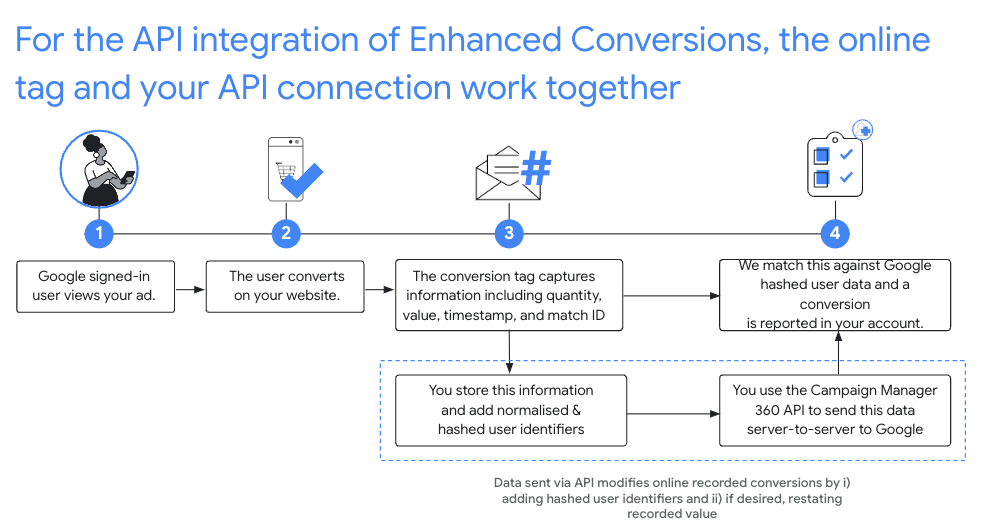
सुझाया गया सेटअप
- CM360 में Floodlight कॉन्फ़िगरेशन के लिए, बेहतर कन्वर्ज़न ट्रैकिंग की सेवा की शर्तें स्वीकार करें.
- अपनी वेबसाइटों को मेल खाने वाले आईडी के साथ इंस्ट्रुमेंट करें.
- आपकी वेबसाइट पर होने वाले Floodlight कन्वर्ज़न रिकॉर्ड करना. पक्का करें कि आपने इन सभी को रिकॉर्ड किया हो, क्योंकि ये बाद के एपीआई कॉल में ज़रूरी फ़ील्ड हैं:
matchIdordinaltimestampMicrosfloodlightActivityIdfloodlightConfigurationIdquantityvalue
- ऑनलाइन टैग से कन्वर्ज़न कैप्चर होने के 90 मिनट बाद,
conversions.batchupdateको कॉल करें, ताकि यूज़र आइडेंटिफ़ायर की मदद से इन कन्वर्ज़न को बेहतर बनाया जा सके.- यूज़र आइडेंटिफ़ायर फ़ॉर्मैट और हैश किए जाने चाहिए. साथ ही, उन्हें कन्वर्ज़न ऑब्जेक्ट के
userIdentifiersफ़ील्ड में जोड़ा जाना चाहिए. - संख्या और वैल्यू की जानकारी देना ज़रूरी है.
आपके पास उसी
conversions.batchupdateकॉल में कन्वर्ज़न की संख्या और वैल्यू में बदलाव करने का विकल्प होता है. इसके अलावा, ओरिजनल संख्या और वैल्यू भी दी जा सकती है. - इंसर्ट और अपडेट के हर बैच में, सफल और असफल, दोनों तरह के नतीजे हो सकते हैं. अगर कन्वर्ज़न प्रोसेस होने में सामान्य से ज़्यादा समय लग रहा है, तो
NOT_FOUNDऔरINTERNALगड़बड़ियों को ठीक करने की कोशिश फिर से की जानी चाहिए. यह समय छह घंटे तक हो सकता है. - ऑनलाइन टैग से कैप्चर किए जाने के 24 घंटों के अंदर, कन्वर्ज़न को यूज़र आइडेंटिफ़ायर के साथ बेहतर बनाया जाना चाहिए.
- यूज़र आइडेंटिफ़ायर फ़ॉर्मैट और हैश किए जाने चाहिए. साथ ही, उन्हें कन्वर्ज़न ऑब्जेक्ट के
नॉर्मलाइज़ेशन और हैशिंग
निजता बनाए रखने के लिए, ईमेल पते, फ़ोन नंबर, नाम, उपनाम, और मोहल्ले के पते को अपलोड करने से पहले, SHA-256 एल्गोरिदम का इस्तेमाल करके हैश करना ज़रूरी है. हैश के नतीजों का स्टैंडर्ड तय करने के लिए, इनमें से किसी भी वैल्यू को हैश करने से पहले, आपको ये काम करने होंगे:
- शुरू या पीछे की खाली सफ़ेद जगहों को हटाएं.
- टेक्स्ट को अंग्रेज़ी के छोटे अक्षरों में बदलें.
- फ़ोन नंबरों को E164 स्टैंडर्ड वाले फ़ॉर्मैट के हिसाब से रखें.
प्लस का निशान (
+) और देश का कोड शामिल करें. उदाहरण के लिए, अमेरिका के फ़ोन नंबर(800)555-0200को+18005550200के तौर पर फ़ॉर्मैट और नॉर्मलाइज़ किया जाना चाहिए gmail.comऔरgooglemail.comवाले ईमेल पतों में, डोमेन नेम से पहले आने वाले सभी पीरियड (.) हटा दें.
C#
/// <summary>
/// Normalizes the email address and hashes it. For this use case, Campaign Manager 360
/// requires removal of any '.' characters preceding <code>gmail.com</code> or
/// <code>googlemail.com</code>.
/// </summary>
/// <param name="emailAddress">The email address.</param>
/// <returns>The hash code.</returns>
private string NormalizeAndHashEmailAddress(string emailAddress)
{
    string normalizedEmail = emailAddress.ToLower();
    string[] emailParts = normalizedEmail.Split('@');
    if (emailParts.Length > 1 && (emailParts[1] == "gmail.com" ||
        emailParts[1] == "googlemail.com"))
    {
        // Removes any '.' characters from the portion of the email address before
        // the domain if the domain is gmail.com or googlemail.com.
        emailParts[0] = emailParts[0].Replace(".", "");
        normalizedEmail = $"{emailParts[0]}@{emailParts[1]}";
    }
    return NormalizeAndHash(normalizedEmail);
}

/// <summary>
/// Normalizes and hashes a string value.
/// </summary>
/// <param name="value">The value to normalize and hash.</param>
/// <returns>The normalized and hashed value.</returns>
private static string NormalizeAndHash(string value)
{
    return ToSha256String(digest, ToNormalizedValue(value));
}

/// <summary>
/// Hash a string value using SHA-256 hashing algorithm.
/// </summary>
/// <param name="digest">Provides the algorithm for SHA-256.</param>
/// <param name="value">The string value (e.g. an email address) to hash.</param>
/// <returns>The hashed value.</returns>
private static string ToSha256String(SHA256 digest, string value)
{
    byte[] digestBytes = digest.ComputeHash(Encoding.UTF8.GetBytes(value));
    // Convert the byte array into an unhyphenated hexadecimal string.
    return BitConverter.ToString(digestBytes).Replace("-", string.Empty);
}

/// <summary>
/// Removes leading and trailing whitespace and converts all characters to
/// lower case.
/// </summary>
/// <param name="value">The value to normalize.</param>
/// <returns>The normalized value.</returns>
private static string ToNormalizedValue(string value)
{
    return value.Trim().ToLower();
}
Java
private String normalizeAndHash(MessageDigest digest, String s)
    throws UnsupportedEncodingException {
  // Normalizes by removing leading and trailing whitespace and converting all characters to
  // lower case.
  String normalized = s.trim().toLowerCase();
  // Hashes the normalized string using the hashing algorithm.
  byte[] hash = digest.digest(normalized.getBytes("UTF-8"));
  StringBuilder result = new StringBuilder();
  for (byte b : hash) {
    result.append(String.format("%02x", b));
  }

  return result.toString();
}

/**
 * Returns the result of normalizing and hashing an email address. For this use case, Campaign Manager 360
 * requires removal of any '.' characters preceding {@code gmail.com} or {@code googlemail.com}.
 *
 * @param digest the digest to use to hash the normalized string.
 * @param emailAddress the email address to normalize and hash.
 */
private String normalizeAndHashEmailAddress(MessageDigest digest, String emailAddress)
    throws UnsupportedEncodingException {
  String normalizedEmail = emailAddress.toLowerCase();
  String[] emailParts = normalizedEmail.split("@");
  if (emailParts.length > 1 && emailParts[1].matches("^(gmail|googlemail)\\.com\\s*")) {
    // Removes any '.' characters from the portion of the email address before the domain if the
    // domain is gmail.com or googlemail.com.
    emailParts[0] = emailParts[0].replaceAll("\\.", "");
    normalizedEmail = String.format("%s@%s", emailParts[0], emailParts[1]);
  }
  return normalizeAndHash(digest, normalizedEmail);
}
PHP
private static function normalizeAndHash(string $hashAlgorithm, string $value): string
{
    return hash($hashAlgorithm, strtolower(trim($value)));
}

/**
  * Returns the result of normalizing and hashing an email address. For this use case, Campaign
  * Manager 360 requires removal of any '.' characters preceding "gmail.com" or "googlemail.com".
  *
  * @param string $hashAlgorithm the hash algorithm to use
  * @param string $emailAddress the email address to normalize and hash
  * @return string the normalized and hashed email address
  */
private static function normalizeAndHashEmailAddress(
    string $hashAlgorithm,
    string $emailAddress
): string {
    $normalizedEmail = strtolower($emailAddress);
    $emailParts = explode("@", $normalizedEmail);
    if (
        count($emailParts) > 1
        && preg_match('/^(gmail|googlemail)\.com\s*/', $emailParts[1])
    ) {
        // Removes any '.' characters from the portion of the email address before the domain
        // if the domain is gmail.com or googlemail.com.
        $emailParts[0] = str_replace(".", "", $emailParts[0]);
        $normalizedEmail = sprintf('%s@%s', $emailParts[0], $emailParts[1]);
    }
    return self::normalizeAndHash($hashAlgorithm, $normalizedEmail);
}
Python
def normalize_and_hash_email_address(email_address):
    """Returns the result of normalizing and hashing an email address.

    For this use case, Campaign Manager 360 requires removal of any '.'
    characters preceding "gmail.com" or "googlemail.com"

    Args:
        email_address: An email address to normalize.

    Returns:
        A normalized (lowercase, removed whitespace) and SHA-265 hashed string.
    """
    normalized_email = email_address.lower()
    email_parts = normalized_email.split("@")
    # Checks whether the domain of the email address is either "gmail.com"
    # or "googlemail.com". If this regex does not match then this statement
    # will evaluate to None.
    is_gmail = re.match(r"^(gmail|googlemail)\.com$", email_parts[1])

    # Check that there are at least two segments and the second segment
    # matches the above regex expression validating the email domain name.
    if len(email_parts) > 1 and is_gmail:
        # Removes any '.' characters from the portion of the email address
        # before the domain if the domain is gmail.com or googlemail.com.
        email_parts[0] = email_parts[0].replace(".", "")
        normalized_email = "@".join(email_parts)

    return normalize_and_hash(normalized_email)

def normalize_and_hash(s):
    """Normalizes and hashes a string with SHA-256.

    Private customer data must be hashed during upload, as described at:
    https://support.google.com/google-ads/answer/7474263

    Args:
        s: The string to perform this operation on.

    Returns:
        A normalized (lowercase, removed whitespace) and SHA-256 hashed string.
    """
    return hashlib.sha256(s.strip().lower().encode()).hexdigest()
Ruby
# Returns the result of normalizing and then hashing the string using the
# provided digest.  Private customer data must be hashed during upload, as
# described at https://support.google.com/google-ads/answer/7474263.
def normalize_and_hash(str)
  # Remove leading and trailing whitespace and ensure all letters are lowercase
  # before hasing.
  Digest::SHA256.hexdigest(str.strip.downcase)
end

# Returns the result of normalizing and hashing an email address. For this use
# case, Campaign Manager 360 requires removal of any '.' characters preceding
# 'gmail.com' or 'googlemail.com'.
def normalize_and_hash_email(email)
  email_parts = email.downcase.split("@")
  # Removes any '.' characters from the portion of the email address before the
  # domain if the domain is gmail.com or googlemail.com.
  if email_parts.last =~ /^(gmail|googlemail)\.com\s*/
    email_parts[0] = email_parts[0].gsub('.', '')
  end
  normalize_and_hash(email_parts.join('@'))
end
कन्वर्ज़न में यूज़र आइडेंटिफ़ायर जोड़ना
सबसे पहले, सामान्य तरीके से अपलोड करने या बदलाव करने के लिए, Conversion ऑब्जेक्ट तैयार करें. इसके बाद, यूज़र आइडेंटिफ़ायर को इस तरह अटैच करें:
{
  "matchId": "my-match-id-846513278",
  "ordinal": "my-ordinal-12345678512",
  "quantity": 1,
  "value": 104.23,
  "timestampMicros": 1656950400000000,
  "floodlightConfigurationId": 99999,
  "floodlightActivityId": 8888,
  "userIdentifiers": [
    { "hashedEmail": "0c7e6a405862e402eb76a70f8a26fc732d07c32931e9fae9ab1582911d2e8a3b" },
    { "hashedPhoneNumber": "1fb1f420856780a29719b994c8764b81770d79f97e2e1861ba938a7a5a15dfb9" },
    {
      "addressInfo": {
        "hashedFirstName": "81f8f6dde88365f3928796ec7aa53f72820b06db8664f5fe76a7eb13e24546a2",
        "hashedLastName": "799ef92a11af918e3fb741df42934f3b568ed2d93ac1df74f1b8d41a27932a6f",
        "hashedStreetAddress": "22b7e2d69b91e0ef4a88e81a73d897b92fd9c93ccfbe0a860f77db16c26f662e",
        "city": "seattle",
        "state": "washington",
        "countryCode": "US",
        "postalCode": "98101"
      }
    }
  ]
}
जवाब कुछ ऐसा दिखना चाहिए:
{
  "hasFailures": false,
  "status": [
    {
      "conversion": {
        "floodlightConfigurationId": 99999,
        "floodlightActivityId": 8888,
        "timestampMicros": 1656950400000000,
        "value": 104.23,
        "quantity": 1,
        "ordinal": "my-ordinal-12345678512",
        "matchId": "my-match-id-846513278",
        "userIdentifiers": [
          { "hashedEmail": "0c7e6a405862e402eb76a70f8a26fc732d07c32931e9fae9ab1582911d2e8a3b" },
          { "hashedPhoneNumber": "1fb1f420856780a29719b994c8764b81770d79f97e2e1861ba938a7a5a15dfb9" },
          {
            "addressInfo": {
              "hashedFirstName": "81f8f6dde88365f3928796ec7aa53f72820b06db8664f5fe76a7eb13e24546a2",
              "hashedLastName": "799ef92a11af918e3fb741df42934f3b568ed2d93ac1df74f1b8d41a27932a6f",
              "hashedStreetAddress": "22b7e2d69b91e0ef4a88e81a73d897b92fd9c93ccfbe0a860f77db16c26f662e",
              "city": "seattle",
              "state": "washington",
              "countryCode": "US",
              "postalCode": "98101"
            }
          }
        ],
        "kind": "dfareporting#conversion"
      },
      "kind": "dfareporting#conversionStatus"
    }
  ]
}
आम तौर पर होने वाली गड़बड़ियां
यूज़र आइडेंटिफ़ायर की मदद से कन्वर्ज़न को बेहतर बनाते समय, आपको कुछ गड़बड़ियां दिख सकती हैं:
- हैश किया गया फ़ील्ड_X, मान्य SHA-256 हैश नहीं है
- जिन फ़ील्ड के नाम की शुरुआत में 'हैश किया गया' लिखा होता है उनमें सिर्फ़ हेक्साडेसिमल में एन्कोड किए गए SHA-256 हैश ही स्वीकार किए जाते हैं.
- country_code फ़ील्ड की लंबाई गलत है
country_codeमें ठीक दो अक्षर होने चाहिए.- Floodlight कॉन्फ़िगरेशन के लिए, बेहतर कन्वर्ज़न ट्रैकिंग की सेवा की शर्तें स्वीकार नहीं की गई हैं
- अनुरोध में दिए गए Floodlight कॉन्फ़िगरेशन आईडी के लिए, बेहतर कन्वर्ज़न ट्रैकिंग की सेवा की शर्तें स्वीकार नहीं की गई हैं.
- पांच से ज़्यादा user_identifiers तय किए गए हैं
- किसी कन्वर्ज़न में ज़्यादा से ज़्यादा पांच यूज़र आइडेंटिफ़ायर हो सकते हैं.
अक्सर पूछे जाने वाले सवाल
- मेल खाने वाले आईडी का सुझाव क्यों दिया जाता है?
- क्लिक आईडी के आधार पर किए गए बदलावों में, ऐसे कन्वर्ज़न शामिल नहीं होते जो क्लिक से पहले नहीं हुए थे. साथ ही, इससे बेहतर कन्वर्ज़न ट्रैकिंग इंटिग्रेशन की वैल्यू सीमित हो जाती है.
- संख्या और वैल्यू को रिकॉर्ड क्यों करना चाहिए?
- CM360 ऑफ़लाइन कन्वर्ज़न एपीआई के लिए, संख्या और वैल्यू की जानकारी देना ज़रूरी है.
- क्या मुझे ऑनलाइन टैग-आधारित कन्वर्ज़न में बदलाव करने के लिए, Google से रिकॉर्ड किया गया सटीक माइक्रोसेकंड टाइमस्टैंप चाहिए?
- मैच आईडी के आधार पर किए जाने वाले बदलावों के लिए, एपीआई अब बदलाव को तब तक स्वीकार करता है, जब तक अनुरोध में दिया गया टाइमस्टैंप, Google के रिकॉर्ड किए गए टाइमस्टैंप के एक मिनट के अंदर का हो.
- ऑनलाइन टैग से कन्वर्ज़न कैप्चर होने के बाद, उसे बेहतर बनाने के लिए मुझे 90 मिनट तक इंतज़ार क्यों करना पड़ता है?
- एपीआई को ऑनलाइन कन्वर्ज़न को इंडेक्स करने और उसमें बदलाव करने की सुविधा उपलब्ध कराने में 90 मिनट लग सकते हैं.
- मुझे एपीआई से मिली जानकारी में किन बातों पर ध्यान देना चाहिए?
- CM360 Conversion API से सही जवाब मिलने के बाद भी, हो सकता है कि कुछ कन्वर्ज़न अपलोड या अपडेट न हो पाए हों. गड़बड़ियों का पता लगाने के लिए, हर
ConversionStatusफ़ील्ड की जांच करें:NOT_FOUNDऔरINTERNALगड़बड़ियों को ठीक करने के लिए, फिर से कोशिश की जा सकती है और की जानी चाहिए. अगर कन्वर्ज़न प्रोसेस होने में सामान्य से ज़्यादा समय लग रहा है, तो छह घंटे तक इंतज़ार करें.INVALID_ARGUMENTऔरPERMISSION_DENIEDगड़बड़ियों को ठीक करने की कोशिश नहीं की जानी चाहिए.- ज़्यादा जानकारी के लिए, अक्सर पूछे जाने वाले सवाल देखें.