

ה-API של CM360 להמרות אופליין תומך בשיפור המרות באתר שמבוססות על תגים באמצעות מזהי משתמשים.
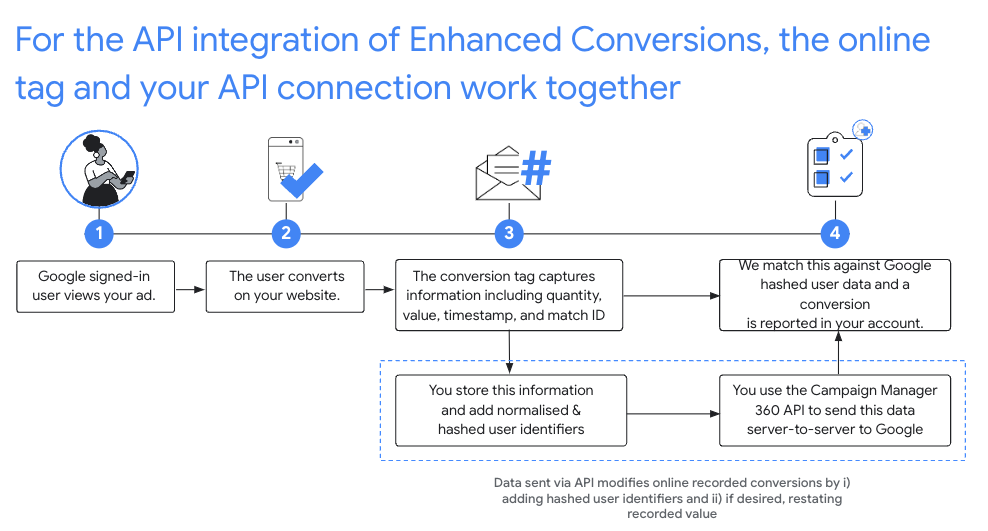
ההגדרה המומלצת
- מאשרים את התנאים וההגבלות של ההמרות המשופרות להגדרה האישית של Floodlight ב-CM360.
- מוסיפים לאתרים מזהה תואם.
- מתעדים המרות מ-Floodlight שמתרחשות באתר. חשוב לתעד את כל הפרטים הבאים, כי הם שדות חובה בקריאות הבאות ל-API:
matchIdordinaltimestampMicrosfloodlightActivityIdfloodlightConfigurationIdquantityvalue
- אחרי שחולפות 90 דקות מהרגע שהתג אונליין תיעד את ההמרה, מפעילים את
conversions.batchupdateכדי לשפר את ההמרות האלה באמצעות מזהי משתמשים.- מזהי המשתמשים צריכים להיות בפורמט הנכון ועוברים גיבוב (hash), וצריך להוסיף אותם לשדה
userIdentifiersבאובייקטים של ההמרות. - צריך לציין את הכמות והערך.
אפשר גם לשנות את הכמות והערך של ההמרה באותה קריאה ל-
conversions.batchupdate, או לספק את הכמות והערך המקוריים. - כל אצווה של הוספות ועדכונים יכולה להכיל שילוב של הצלחות וכישלונות. אם יש עיכוב ארוך מהרגיל בעיבוד ההמרות, כדאי לנסות שוב להעלות את ההמרות שנכשלו עם השגיאות
NOT_FOUNDו-INTERNAL, עד 6 שעות. - צריך לשפר את ההמרות באמצעות מזהי משתמשים תוך 24 שעות מרגע שהן מתועדות על ידי תגים אונליין.
- מזהי המשתמשים צריכים להיות בפורמט הנכון ועוברים גיבוב (hash), וצריך להוסיף אותם לשדה
נירמול וגיבוב (hashing)
כדי להגן על הפרטיות, צריך לבצע גיבוב של כתובות אימייל, מספרי טלפון, שמות פרטיים, שמות משפחה וכתובות מגורים באמצעות האלגוריתם SHA-256 לפני שמעלים אותם. כדי לבצע סטנדרטיזציה של תוצאות הגיבוב, צריך לבצע את הפעולות הבאות לפני שמגבבים את הערכים האלה:
- מסירים רווחים לבנים בתחילת הטקסט או בסופו.
- ממירים את הטקסט לאותיות קטנות.
- מזינים מספרי טלפון בפורמט שתואם לתקן E164.
צריך לכלול את סימן הפלוס (
+) ואת קוד המדינה. לדוגמה, מספר הטלפון(800)555-0200בארה"ב צריך להיות בפורמט+18005550200אחרי נרמול. מסירים את כל הנקודות (.) שלפני שם הדומיין בכתובות אימייל עם הסיומת
gmail.comו-googlemail.com.
C#
/// <summary>
/// Normalizes the email address and hashes it. For this use case, Campaign Manager 360
/// requires removal of any '.' characters preceding <code>gmail.com</code> or
/// <code>googlemail.com</code>.
/// </summary>
/// <param name="emailAddress">The email address.</param>
/// <returns>The hash code.</returns>
private string NormalizeAndHashEmailAddress(string emailAddress)
{
    string normalizedEmail = emailAddress.ToLower();
    string[] emailParts = normalizedEmail.Split('@');
    if (emailParts.Length > 1 && (emailParts[1] == "gmail.com" ||
        emailParts[1] == "googlemail.com"))
    {
        // Removes any '.' characters from the portion of the email address before
        // the domain if the domain is gmail.com or googlemail.com.
        emailParts[0] = emailParts[0].Replace(".", "");
        normalizedEmail = $"{emailParts[0]}@{emailParts[1]}";
    }
    return NormalizeAndHash(normalizedEmail);
}

/// <summary>
/// Normalizes and hashes a string value.
/// </summary>
/// <param name="value">The value to normalize and hash.</param>
/// <returns>The normalized and hashed value.</returns>
private static string NormalizeAndHash(string value)
{
    return ToSha256String(digest, ToNormalizedValue(value));
}

/// <summary>
/// Hash a string value using SHA-256 hashing algorithm.
/// </summary>
/// <param name="digest">Provides the algorithm for SHA-256.</param>
/// <param name="value">The string value (e.g. an email address) to hash.</param>
/// <returns>The hashed value.</returns>
private static string ToSha256String(SHA256 digest, string value)
{
    byte[] digestBytes = digest.ComputeHash(Encoding.UTF8.GetBytes(value));
    // Convert the byte array into an unhyphenated hexadecimal string.
    return BitConverter.ToString(digestBytes).Replace("-", string.Empty);
}

/// <summary>
/// Removes leading and trailing whitespace and converts all characters to
/// lower case.
/// </summary>
/// <param name="value">The value to normalize.</param>
/// <returns>The normalized value.</returns>
private static string ToNormalizedValue(string value)
{
    return value.Trim().ToLower();
}
Java
private String normalizeAndHash(MessageDigest digest, String s)
    throws UnsupportedEncodingException {
  // Normalizes by removing leading and trailing whitespace and converting all characters to
  // lower case.
  String normalized = s.trim().toLowerCase();
  // Hashes the normalized string using the hashing algorithm.
  byte[] hash = digest.digest(normalized.getBytes("UTF-8"));
  StringBuilder result = new StringBuilder();
  for (byte b : hash) {
    result.append(String.format("%02x", b));
  }

  return result.toString();
}

/**
 * Returns the result of normalizing and hashing an email address. For this use case, Campaign Manager 360
 * requires removal of any '.' characters preceding {@code gmail.com} or {@code googlemail.com}.
 *
 * @param digest the digest to use to hash the normalized string.
 * @param emailAddress the email address to normalize and hash.
 */
private String normalizeAndHashEmailAddress(MessageDigest digest, String emailAddress)
    throws UnsupportedEncodingException {
  String normalizedEmail = emailAddress.toLowerCase();
  String[] emailParts = normalizedEmail.split("@");
  if (emailParts.length > 1 && emailParts[1].matches("^(gmail|googlemail)\\.com\\s*")) {
    // Removes any '.' characters from the portion of the email address before the domain if the
    // domain is gmail.com or googlemail.com.
    emailParts[0] = emailParts[0].replaceAll("\\.", "");
    normalizedEmail = String.format("%s@%s", emailParts[0], emailParts[1]);
  }
  return normalizeAndHash(digest, normalizedEmail);
}
PHP
private static function normalizeAndHash(string $hashAlgorithm, string $value): string
{
    return hash($hashAlgorithm, strtolower(trim($value)));
}

/**
  * Returns the result of normalizing and hashing an email address. For this use case, Campaign
  * Manager 360 requires removal of any '.' characters preceding "gmail.com" or "googlemail.com".
  *
  * @param string $hashAlgorithm the hash algorithm to use
  * @param string $emailAddress the email address to normalize and hash
  * @return string the normalized and hashed email address
  */
private static function normalizeAndHashEmailAddress(
    string $hashAlgorithm,
    string $emailAddress
): string {
    $normalizedEmail = strtolower($emailAddress);
    $emailParts = explode("@", $normalizedEmail);
    if (
        count($emailParts) > 1
        && preg_match('/^(gmail|googlemail)\.com\s*/', $emailParts[1])
    ) {
        // Removes any '.' characters from the portion of the email address before the domain
        // if the domain is gmail.com or googlemail.com.
        $emailParts[0] = str_replace(".", "", $emailParts[0]);
        $normalizedEmail = sprintf('%s@%s', $emailParts[0], $emailParts[1]);
    }
    return self::normalizeAndHash($hashAlgorithm, $normalizedEmail);
}
Python
def normalize_and_hash_email_address(email_address):
    """Returns the result of normalizing and hashing an email address.

    For this use case, Campaign Manager 360 requires removal of any '.'
    characters preceding "gmail.com" or "googlemail.com"

    Args:
        email_address: An email address to normalize.

    Returns:
        A normalized (lowercase, removed whitespace) and SHA-265 hashed string.
    """
    normalized_email = email_address.lower()
    email_parts = normalized_email.split("@")
    # Checks whether the domain of the email address is either "gmail.com"
    # or "googlemail.com". If this regex does not match then this statement
    # will evaluate to None.
    is_gmail = re.match(r"^(gmail|googlemail)\.com$", email_parts[1])

    # Check that there are at least two segments and the second segment
    # matches the above regex expression validating the email domain name.
    if len(email_parts) > 1 and is_gmail:
        # Removes any '.' characters from the portion of the email address
        # before the domain if the domain is gmail.com or googlemail.com.
        email_parts[0] = email_parts[0].replace(".", "")
        normalized_email = "@".join(email_parts)

    return normalize_and_hash(normalized_email)

def normalize_and_hash(s):
    """Normalizes and hashes a string with SHA-256.

    Private customer data must be hashed during upload, as described at:
    https://support.google.com/google-ads/answer/7474263

    Args:
        s: The string to perform this operation on.

    Returns:
        A normalized (lowercase, removed whitespace) and SHA-256 hashed string.
    """
    return hashlib.sha256(s.strip().lower().encode()).hexdigest()
Ruby
# Returns the result of normalizing and then hashing the string using the
# provided digest.  Private customer data must be hashed during upload, as
# described at https://support.google.com/google-ads/answer/7474263.
def normalize_and_hash(str)
  # Remove leading and trailing whitespace and ensure all letters are lowercase
  # before hasing.
  Digest::SHA256.hexdigest(str.strip.downcase)
end

# Returns the result of normalizing and hashing an email address. For this use
# case, Campaign Manager 360 requires removal of any '.' characters preceding
# 'gmail.com' or 'googlemail.com'.
def normalize_and_hash_email(email)
  email_parts = email.downcase.split("@")
  # Removes any '.' characters from the portion of the email address before the
  # domain if the domain is gmail.com or googlemail.com.
  if email_parts.last =~ /^(gmail|googlemail)\.com\s*/
    email_parts[0] = email_parts[0].gsub('.', '')
  end
  normalize_and_hash(email_parts.join('@'))
end
הוספת מזהי משתמשים להמרות
קודם מכינים את האובייקט Conversion להעלאה או לעריכה כרגיל, ואז מצרפים את מזהה המשתמש באופן הבא:
{
  "matchId": "my-match-id-846513278",
  "ordinal": "my-ordinal-12345678512",
  "quantity": 1,
  "value": 104.23,
  "timestampMicros": 1656950400000000,
  "floodlightConfigurationId": 99999,
  "floodlightActivityId": 8888,
  "userIdentifiers": [
    { "hashedEmail": "0c7e6a405862e402eb76a70f8a26fc732d07c32931e9fae9ab1582911d2e8a3b" },
    { "hashedPhoneNumber": "1fb1f420856780a29719b994c8764b81770d79f97e2e1861ba938a7a5a15dfb9" },
    {
      "addressInfo": {
        "hashedFirstName": "81f8f6dde88365f3928796ec7aa53f72820b06db8664f5fe76a7eb13e24546a2",
        "hashedLastName": "799ef92a11af918e3fb741df42934f3b568ed2d93ac1df74f1b8d41a27932a6f",
        "hashedStreetAddress": "22b7e2d69b91e0ef4a88e81a73d897b92fd9c93ccfbe0a860f77db16c26f662e",
        "city": "seattle",
        "state": "washington",
        "countryCode": "US",
        "postalCode": "98101"
      }
    }
  ]
}
תגובה מוצלחת אמורה להיראות כך:
{
  "hasFailures": false,
  "status": [
    {
      "conversion": {
        "floodlightConfigurationId": 99999,
        "floodlightActivityId": 8888,
        "timestampMicros": 1656950400000000,
        "value": 104.23,
        "quantity": 1,
        "ordinal": "my-ordinal-12345678512",
        "matchId": "my-match-id-846513278",
        "userIdentifiers": [
          { "hashedEmail": "0c7e6a405862e402eb76a70f8a26fc732d07c32931e9fae9ab1582911d2e8a3b" },
          { "hashedPhoneNumber": "1fb1f420856780a29719b994c8764b81770d79f97e2e1861ba938a7a5a15dfb9" },
          {
            "addressInfo": {
              "hashedFirstName": "81f8f6dde88365f3928796ec7aa53f72820b06db8664f5fe76a7eb13e24546a2",
              "hashedLastName": "799ef92a11af918e3fb741df42934f3b568ed2d93ac1df74f1b8d41a27932a6f",
              "hashedStreetAddress": "22b7e2d69b91e0ef4a88e81a73d897b92fd9c93ccfbe0a860f77db16c26f662e",
              "city": "seattle",
              "state": "washington",
              "countryCode": "US",
              "postalCode": "98101"
            }
          }
        ],
        "kind": "dfareporting#conversion"
      },
      "kind": "dfareporting#conversionStatus"
    }
  ]
}
שגיאות נפוצות
ריכזנו כאן כמה שגיאות שאתם עשויים לראות כשאתם משפרים המרה באמצעות מזהי משתמשים:
- השדה hashed_X לא עבר גיבוב (hash) תקין באלגוריתם SHA-256
- כל השדות עם הקידומת hashed מקבלים רק גיבובי SHA-256 שמקודדים בבסיס הקסדצימלי.
- האורך של השדה country_code שגוי
country_codeהערך חייב להיות באורך של 2 אותיות בדיוק.- לא חתמתם על התנאים וההגבלות של ההמרות המשופרות בהגדרות של Floodlight
- לא אישרתם את התנאים וההגבלות של ההמרות המשופרות במזהה ההגדרה של Floodlight שצוין בבקשה.
- צוינו יותר מחמישה user_identifiers
- להמרה יכולים להיות עד 5 מזהי משתמשים.
שאלות נפוצות
- למה מומלץ להשתמש במזהה תואם?
- עריכות שמבוססות על מזהה קליק לא כוללות המרות שלא קדם להן קליק, ומגבילות את הערך של שילוב המרות משופרות.
- למה צריך לתעד את הכמות והערך?
- ב-CM360 Offline Conversions API צריך לציין כמות וערך.
- האם צריך לקבל את חותמת הזמן המדויקת במיקרו-שניות שתועדה על ידי Google כדי לערוך המרה אונליין שמבוססת על תגים?
- בעריכות שמבוססות על מזהה התאמה, ה-API מקבל עכשיו עריכה כל עוד חותמת הזמן שצוינה בבקשה היא בטווח של דקה אחת מחותמת הזמן ש-Google תיעדה.
- למה צריך להמתין 90 דקות אחרי שתג אונליין מתעד המרה לפני שמשפרים אותה?
- יכול להיות שיעברו עד 90 דקות עד שההמרה אונליין תתווסף לאינדקס על ידי ה-API ותהיה זמינה לעריכה.
- למה צריך לשים לב בתגובה מה-API?
- גם אם ה-CM360 Conversion API מחזיר תגובה שההעלאה הצליחה, יכול להיות שהעלאה או עדכון של המרות ספציפיות נכשלו. בודקים אם יש כשלים בשדות
ConversionStatusהספציפיים:- אם יש עיכוב ארוך מהרגיל בעיבוד ההמרות, אפשר ומומלץ לנסות שוב לשלוח את ההמרות שנכשלו עם השגיאות
NOT_FOUNDו-INTERNAL, עד 6 שעות אחרי הניסיון הראשון. - אין לנסות שוב שגיאות מסוג
INVALID_ARGUMENTו-PERMISSION_DENIED. - לפרטים נוספים, עיינו בשאלות הנפוצות.
- אם יש עיכוב ארוך מהרגיל בעיבוד ההמרות, אפשר ומומלץ לנסות שוב לשלוח את ההמרות שנכשלו עם השגיאות