

CM360 অফলাইন কনভার্সন API, ইউজার আইডেন্টিফায়ারের মাধ্যমে ওয়েবসাইট ট্যাগ-ভিত্তিক কনভার্সন উন্নত করতে সাহায্য করে।
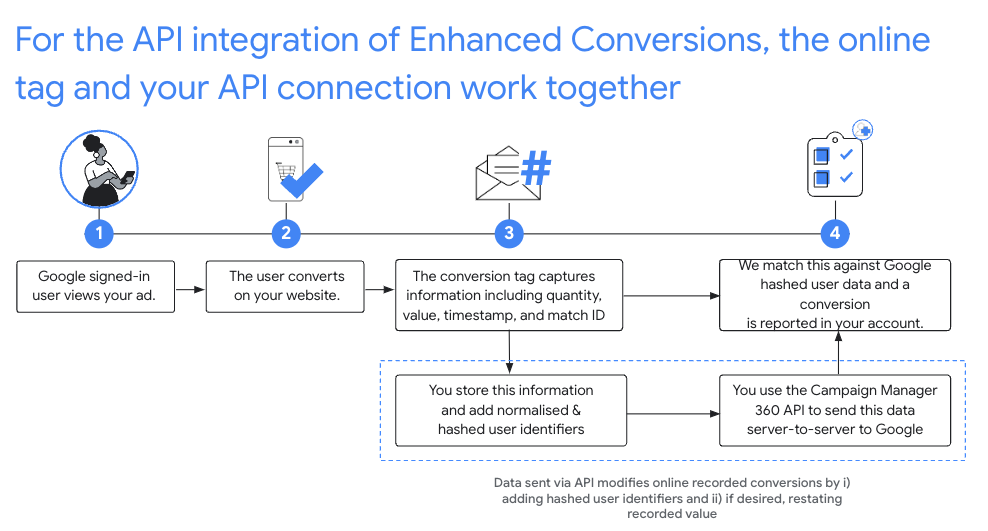
সাজেস্ট করা সেট-আপ
- CM360-এ আপনার Floodlight কনফিগারেশনের জন্য Enhanced Conversions-এর পরিষেবার শর্তাবলীতে সম্মতি জানান।
- ম্যাচ আইডি দিয়ে আপনার ওয়েবসাইট ইনস্ট্রুমেন্ট করুন।
- আপনার ওয়েবসাইটে হওয়া ফ্লাডলাইট কনভার্সন রেকর্ড করুন। নিশ্চিত করুন যে আপনি
নিম্নলিখিত সবকটি রেকর্ড করেছেন কারণ পরবর্তী API কলে এগুলি প্রয়োজনীয় ফিল্ড:
matchIdordinaltimestampMicrosfloodlightActivityIdfloodlightConfigurationIdquantityvalue
- অনলাইন ট্যাগ কনভার্সন ক্যাপচার করার ৯০ মিনিট পরে,
ইউজার আইডেন্টিফায়ারের মাধ্যমে এইসব কনভার্সন উন্নত করতে
conversions.batchupdateকল করুন।- ইউজার আইডেন্টিফায়ার ফর্ম্যাট ও হ্যাশ করতে হবে এবং
কনভার্সন অবজেক্টের
userIdentifiersফিল্ডে যোগ করতে হবে। - পরিমাণ এবং মান অবশ্যই নির্দিষ্ট করতে হবে।
আপনি চাইলে একই
conversions.batchupdateকলে কনভার্সনের পরিমাণ ও ভ্যালু অ্যাডজাস্ট করতে পারেন অথবা আসল পরিমাণ ও ভ্যালু প্রদান করতে পারেন। - যোগ করা ও আপডেট করার প্রতিটি ব্যাচে কিছু সফল ও কিছু ব্যর্থ প্রচেষ্টা
থাকতে পারে।
NOT_FOUNDএবংINTERNALব্যর্থতার ক্ষেত্রে আবার চেষ্টা করা উচিত কনভার্সন প্রসেস করতে স্বাভাবিকের চেয়ে বেশি দেরি হলে, সর্বাধিক ৬ ঘণ্টা পর্যন্ত। - অনলাইন ট্যাগ দ্বারা ক্যাপচার করার ২৪ ঘণ্টার মধ্যে কনভার্সন অবশ্যই ইউজার আইডেন্টিফায়ারের মাধ্যমে উন্নত করতে হবে।
- ইউজার আইডেন্টিফায়ার ফর্ম্যাট ও হ্যাশ করতে হবে এবং
কনভার্সন অবজেক্টের
নরমালাইজেশন ও হ্যাশিং
গোপনীয়তা সুরক্ষিত রাখতে, ইমেল আইডি, ফোন নম্বর, নাম, পদবি ও রাস্তার ঠিকানা আপলোড করার আগে SHA-256 অ্যালগরিদম ব্যবহার করে হ্যাশ করতে হবে। হ্যাশ ফলাফল স্ট্যান্ডার্ডাইজ করতে, এই ভ্যালুগুলির মধ্যে একটি হ্যাশ করার আগে আপনাকে অবশ্যই:
- শব্দের আগে বা পরে থাকা স্পেস সরিয়ে দিন।
- টেক্সট ছোট হাতের অক্ষরে পরিবর্তন করুন।
- E164 স্ট্যান্ডার্ড অনুযায়ী ফোন নম্বর ফর্ম্যাট করুন।
যোগ চিহ্ন (
+) ও দেশের কোড যোগ করুন। যেমন, মার্কিন যুক্তরাষ্ট্রের ফোন নম্বর(800)555-0200-কে ফর্ম্যাট ও নরমালাইজ করে+18005550200করতে হবে gmail.comএবংgooglemail.comইমেল আইডিতে ডোমেন নামের আগে থাকা সব ফুলস্টপ (.) সরিয়ে দিন।
C#
/// <summary>
/// Normalizes the email address and hashes it. For this use case, Campaign Manager 360
/// requires removal of any '.' characters preceding <code>gmail.com</code> or
/// <code>googlemail.com</code>.
/// </summary>
/// <param name="emailAddress">The email address.</param>
/// <returns>The hash code.</returns>
private string NormalizeAndHashEmailAddress(string emailAddress)
{
    string normalizedEmail = emailAddress.ToLower();
    string[] emailParts = normalizedEmail.Split('@');
    if (emailParts.Length > 1 && (emailParts[1] == "gmail.com" ||
        emailParts[1] == "googlemail.com"))
    {
        // Removes any '.' characters from the portion of the email address before
        // the domain if the domain is gmail.com or googlemail.com.
        emailParts[0] = emailParts[0].Replace(".", "");
        normalizedEmail = $"{emailParts[0]}@{emailParts[1]}";
    }
    return NormalizeAndHash(normalizedEmail);
}

/// <summary>
/// Normalizes and hashes a string value.
/// </summary>
/// <param name="value">The value to normalize and hash.</param>
/// <returns>The normalized and hashed value.</returns>
private static string NormalizeAndHash(string value)
{
    return ToSha256String(digest, ToNormalizedValue(value));
}

/// <summary>
/// Hash a string value using SHA-256 hashing algorithm.
/// </summary>
/// <param name="digest">Provides the algorithm for SHA-256.</param>
/// <param name="value">The string value (e.g. an email address) to hash.</param>
/// <returns>The hashed value.</returns>
private static string ToSha256String(SHA256 digest, string value)
{
    byte[] digestBytes = digest.ComputeHash(Encoding.UTF8.GetBytes(value));
    // Convert the byte array into an unhyphenated hexadecimal string.
    return BitConverter.ToString(digestBytes).Replace("-", string.Empty);
}

/// <summary>
/// Removes leading and trailing whitespace and converts all characters to
/// lower case.
/// </summary>
/// <param name="value">The value to normalize.</param>
/// <returns>The normalized value.</returns>
private static string ToNormalizedValue(string value)
{
    return value.Trim().ToLower();
}
Java
private String normalizeAndHash(MessageDigest digest, String s)
    throws UnsupportedEncodingException {
  // Normalizes by removing leading and trailing whitespace and converting all characters to
  // lower case.
  String normalized = s.trim().toLowerCase();
  // Hashes the normalized string using the hashing algorithm.
  byte[] hash = digest.digest(normalized.getBytes("UTF-8"));
  StringBuilder result = new StringBuilder();
  for (byte b : hash) {
    result.append(String.format("%02x", b));
  }

  return result.toString();
}

/**
 * Returns the result of normalizing and hashing an email address. For this use case, Campaign Manager 360
 * requires removal of any '.' characters preceding {@code gmail.com} or {@code googlemail.com}.
 *
 * @param digest the digest to use to hash the normalized string.
 * @param emailAddress the email address to normalize and hash.
 */
private String normalizeAndHashEmailAddress(MessageDigest digest, String emailAddress)
    throws UnsupportedEncodingException {
  String normalizedEmail = emailAddress.toLowerCase();
  String[] emailParts = normalizedEmail.split("@");
  if (emailParts.length > 1 && emailParts[1].matches("^(gmail|googlemail)\\.com\\s*")) {
    // Removes any '.' characters from the portion of the email address before the domain if the
    // domain is gmail.com or googlemail.com.
    emailParts[0] = emailParts[0].replaceAll("\\.", "");
    normalizedEmail = String.format("%s@%s", emailParts[0], emailParts[1]);
  }
  return normalizeAndHash(digest, normalizedEmail);
}
PHP
private static function normalizeAndHash(string $hashAlgorithm, string $value): string
{
    return hash($hashAlgorithm, strtolower(trim($value)));
}

/**
  * Returns the result of normalizing and hashing an email address. For this use case, Campaign
  * Manager 360 requires removal of any '.' characters preceding "gmail.com" or "googlemail.com".
  *
  * @param string $hashAlgorithm the hash algorithm to use
  * @param string $emailAddress the email address to normalize and hash
  * @return string the normalized and hashed email address
  */
private static function normalizeAndHashEmailAddress(
    string $hashAlgorithm,
    string $emailAddress
): string {
    $normalizedEmail = strtolower($emailAddress);
    $emailParts = explode("@", $normalizedEmail);
    if (
        count($emailParts) > 1
        && preg_match('/^(gmail|googlemail)\.com\s*/', $emailParts[1])
    ) {
        // Removes any '.' characters from the portion of the email address before the domain
        // if the domain is gmail.com or googlemail.com.
        $emailParts[0] = str_replace(".", "", $emailParts[0]);
        $normalizedEmail = sprintf('%s@%s', $emailParts[0], $emailParts[1]);
    }
    return self::normalizeAndHash($hashAlgorithm, $normalizedEmail);
}
Python
def normalize_and_hash_email_address(email_address):
    """Returns the result of normalizing and hashing an email address.

    For this use case, Campaign Manager 360 requires removal of any '.'
    characters preceding "gmail.com" or "googlemail.com"

    Args:
        email_address: An email address to normalize.

    Returns:
        A normalized (lowercase, removed whitespace) and SHA-265 hashed string.
    """
    normalized_email = email_address.lower()
    email_parts = normalized_email.split("@")
    # Checks whether the domain of the email address is either "gmail.com"
    # or "googlemail.com". If this regex does not match then this statement
    # will evaluate to None.
    is_gmail = re.match(r"^(gmail|googlemail)\.com$", email_parts[1])

    # Check that there are at least two segments and the second segment
    # matches the above regex expression validating the email domain name.
    if len(email_parts) > 1 and is_gmail:
        # Removes any '.' characters from the portion of the email address
        # before the domain if the domain is gmail.com or googlemail.com.
        email_parts[0] = email_parts[0].replace(".", "")
        normalized_email = "@".join(email_parts)

    return normalize_and_hash(normalized_email)

def normalize_and_hash(s):
    """Normalizes and hashes a string with SHA-256.

    Private customer data must be hashed during upload, as described at:
    https://support.google.com/google-ads/answer/7474263

    Args:
        s: The string to perform this operation on.

    Returns:
        A normalized (lowercase, removed whitespace) and SHA-256 hashed string.
    """
    return hashlib.sha256(s.strip().lower().encode()).hexdigest()
Ruby
# Returns the result of normalizing and then hashing the string using the
# provided digest.  Private customer data must be hashed during upload, as
# described at https://support.google.com/google-ads/answer/7474263.
def normalize_and_hash(str)
  # Remove leading and trailing whitespace and ensure all letters are lowercase
  # before hasing.
  Digest::SHA256.hexdigest(str.strip.downcase)
end

# Returns the result of normalizing and hashing an email address. For this use
# case, Campaign Manager 360 requires removal of any '.' characters preceding
# 'gmail.com' or 'googlemail.com'.
def normalize_and_hash_email(email)
  email_parts = email.downcase.split("@")
  # Removes any '.' characters from the portion of the email address before the
  # domain if the domain is gmail.com or googlemail.com.
  if email_parts.last =~ /^(gmail|googlemail)\.com\s*/
    email_parts[0] = email_parts[0].gsub('.', '')
  end
  normalize_and_hash(email_parts.join('@'))
end
কনভার্সনে ইউজার আইডেন্টিফায়ার যোগ করা
প্রথমে আপলোড বা
এডিট করার জন্য Conversion অবজেক্ট প্রস্তুত করুন, তারপর নিম্নলিখিত উপায়ে ইউজার আইডেন্টিফায়ার অ্যাটাচ করুন:
{
  "matchId": "my-match-id-846513278",
  "ordinal": "my-ordinal-12345678512",
  "quantity": 1,
  "value": 104.23,
  "timestampMicros": 1656950400000000,
  "floodlightConfigurationId": 99999,
  "floodlightActivityId": 8888,
  "userIdentifiers": [
    { "hashedEmail": "0c7e6a405862e402eb76a70f8a26fc732d07c32931e9fae9ab1582911d2e8a3b" },
    { "hashedPhoneNumber": "1fb1f420856780a29719b994c8764b81770d79f97e2e1861ba938a7a5a15dfb9" },
    {
      "addressInfo": {
        "hashedFirstName": "81f8f6dde88365f3928796ec7aa53f72820b06db8664f5fe76a7eb13e24546a2",
        "hashedLastName": "799ef92a11af918e3fb741df42934f3b568ed2d93ac1df74f1b8d41a27932a6f",
        "hashedStreetAddress": "22b7e2d69b91e0ef4a88e81a73d897b92fd9c93ccfbe0a860f77db16c26f662e",
        "city": "seattle",
        "state": "washington",
        "countryCode": "US",
        "postalCode": "98101"
      }
    }
  ]
}
সঠিক উত্তরটি এইরকম হওয়া উচিত:
{
  "hasFailures": false,
  "status": [
    {
      "conversion": {
        "floodlightConfigurationId": 99999,
        "floodlightActivityId": 8888,
        "timestampMicros": 1656950400000000,
        "value": 104.23,
        "quantity": 1,
        "ordinal": "my-ordinal-12345678512",
        "matchId": "my-match-id-846513278",
        "userIdentifiers": [
          { "hashedEmail": "0c7e6a405862e402eb76a70f8a26fc732d07c32931e9fae9ab1582911d2e8a3b" },
          { "hashedPhoneNumber": "1fb1f420856780a29719b994c8764b81770d79f97e2e1861ba938a7a5a15dfb9" },
          {
            "addressInfo": {
              "hashedFirstName": "81f8f6dde88365f3928796ec7aa53f72820b06db8664f5fe76a7eb13e24546a2",
              "hashedLastName": "799ef92a11af918e3fb741df42934f3b568ed2d93ac1df74f1b8d41a27932a6f",
              "hashedStreetAddress": "22b7e2d69b91e0ef4a88e81a73d897b92fd9c93ccfbe0a860f77db16c26f662e",
              "city": "seattle",
              "state": "washington",
              "countryCode": "US",
              "postalCode": "98101"
            }
          }
        ],
        "kind": "dfareporting#conversion"
      },
      "kind": "dfareporting#conversionStatus"
    }
  ]
}
যে ভুলগুলি প্রায়ই হয়ে থাকে
ইউজার আইডেন্টিফায়ারের মাধ্যমে কনভার্সন উন্নত করার সময় আপনি এইসব সমস্যা দেখতে পেতে পারেন:
- hashed_X ফিল্ডটি সঠিক SHA-256 হ্যাশ নয়
- হ্যাশ করা প্রিফিক্স সহ সব ফিল্ডে শুধুমাত্র হেক্সাডেসিমেলে এনকোড করা SHA-256 হ্যাশ গ্রহণ করা হয়।
- country_code ফিল্ডের দৈর্ঘ্য ভুল
country_codeঅবশ্যই ঠিক ২টি অক্ষর হতে হবে।- Floodlight কনফিগারেশন উন্নত কনভার্সনের পরিষেবার শর্তাবলীতে সম্মতি জানায়নি
- অনুরোধের Floodlight কনফিগারেশন আইডির জন্য উন্নত কনভার্সন পরিষেবার শর্তাবলী গ্রহণ করা হয়নি।
- পাঁচটির বেশি user_identifiers উল্লেখ করা হয়েছে
- একটি কনভার্সনে সর্বাধিক ৫টি ইউজার আইডেন্টিফায়ার থাকতে পারে।
প্রায়শই জিজ্ঞাসিত প্রশ্ন
- ম্যাচ আইডি কেন সাজেস্ট করা হয়?
- ক্লিক আইডি ভিত্তিক এডিট সেইসব কনভার্সনকে বাদ দেয় যেগুলি ক্লিকের মাধ্যমে হয়নি এবং উন্নত কনভার্সন ইন্টিগ্রেশনের ভ্যালুকে সীমিত করে।
- পরিমাণ ও মূল্য কেন রেকর্ড করা উচিত?
- CM360 অফলাইন কনভার্সন API-এর জন্য পরিমাণ এবং মান নির্দিষ্ট করা প্রয়োজন।
- অনলাইন ট্যাগ-ভিত্তিক কনভার্সন এডিট করার জন্য Google-এর রেকর্ড করা মাইক্রোসেকেন্ড টাইমস্ট্যাম্প কি আমাকে পেতে হবে?
- ম্যাচ আইডি ভিত্তিক এডিটের জন্য, API এখন এডিট গ্রহণ করে যতক্ষণ না অনুরোধে দেওয়া টাইমস্ট্যাম্প Google-এর রেকর্ড করা টাইমস্ট্যাম্পের ১ মিনিটের মধ্যে থাকে।
- কোনও অনলাইন ট্যাগ কনভার্সন ক্যাপচার করার পরে, সেটি এনহ্যান্স করার আগে আমাকে ৯০ মিনিট অপেক্ষা করতে হবে কেন?
- অনলাইন কনভার্সন API-এর মাধ্যমে ইন্ডেক্স করা এবং এডিট করার জন্য উপলভ্য হতে ৯০ মিনিট পর্যন্ত সময় লাগতে পারে।
- API রেসপন্সে আমাকে কোন বিষয়ে মনোযোগ দিতে হবে?
- CM360 কনভার্সন API সফলভাবে উত্তর দিলেও, কিছু
ব্যক্তিগত কনভার্সন আপলোড বা আপডেট করা নাও যেতে পারে। ব্যর্থতার জন্য
পৃথক
ConversionStatusফিল্ডগুলি পরীক্ষা করুন:- কনভার্সন প্রসেস করতে স্বাভাবিকের থেকে বেশি দেরি হলে,
NOT_FOUNDএবংINTERNALব্যর্থতা ৬ ঘণ্টা পর্যন্ত আবার চেষ্টা করা যেতে পারে এবং করা উচিত। INVALID_ARGUMENTএবংPERMISSION_DENIEDসমস্যার ক্ষেত্রে আবার চেষ্টা করা উচিত নয়।- আরও বিবরণের জন্য প্রায়শই জিজ্ঞাসিত প্রশ্ন দেখুন।
- কনভার্সন প্রসেস করতে স্বাভাবিকের থেকে বেশি দেরি হলে,