

Użytkownicy mogą ustawiać cele edukacyjne dla kursów i projektów w Google Classroom.
Te same cele edukacyjne są też dostępne w interfejsie Classroom API. Możesz ustawiać, pobierać i modyfikować zestawy standardów nauczania w Coursezasobach oraz cele edukacyjne w CourseWork, CourseWorkMaterial i Rubriczasobach.
Ten przewodnik wyjaśnia, jak uzyskiwać dostęp do celów edukacyjnych i zestawów standardów oraz je modyfikować za pomocą interfejsu Classroom API.
Jak to działa
Źródło danych
Cele nauczania w Classroom korzystają ze stabilnych, unikalnych globalnie identyfikatorów (GUID) dostarczanych przez Satchel Rosetta Exchange (wcześniej CASE Network). Standardy w Exchange są uporządkowane w drzewa węzłów, gdzie węzeł główny to kompleksowy zestaw standardów dla danego przedmiotu, a węzły podrzędne opisują coraz bardziej szczegółowe wyniki nauczania. Identyfikator dowolnego węzła ze standardowym kodem lub węzła liścia w sieci można ustawić jako cel edukacyjny w CourseWork, a dowolny węzeł niebędący węzłem liściem można ustawić jako zestaw standardów edukacyjnych w Course.
- Zestawy standardów edukacyjnych dla zasobu
Coursereprezentują grupę standardów, które pojawiają się w interfejsie Classroom, gdy nauczyciele oznaczają cele edukacyjne. - Cele edukacyjne dołączone do zasobu
CourseWork,CourseWorkMateriallubRubricreprezentują standard lub umiejętności powiązane z tym projektem, pytaniem, materiałem lub konkretnym kryterium oceny cząstkowej.
Google korzysta z 5 rodzajów informacji z Satchel Rosetta Exchange:
- Identyfikator dokumentu: identyfikator GUID węzła najwyższego poziomu. Ten identyfikator pasuje do kontenera standardów najwyższego poziomu i jest wspólny dla wszystkich węzłów podrzędnych.
- Tytuł dokumentu: czytelna dla użytkownika nazwa całego dokumentu standardowego.
- Identyfikator produktu: identyfikator GUID pojedynczego standardu (czyli węzła innego niż węzeł główny).
- Standard Title: zrozumiały dla człowieka tekst opisowy pojedynczego standardu.
- Kod standardowy: zrozumiały dla człowieka skrót określonego standardu.
Znajdowanie wartości dla standardów i celów
Aby dowiedzieć się, gdzie znaleźć te wartości, zapoznaj się z przykładowym standardem matematycznym ze stanu Nowy Jork. Zacznij od węzła głównego:
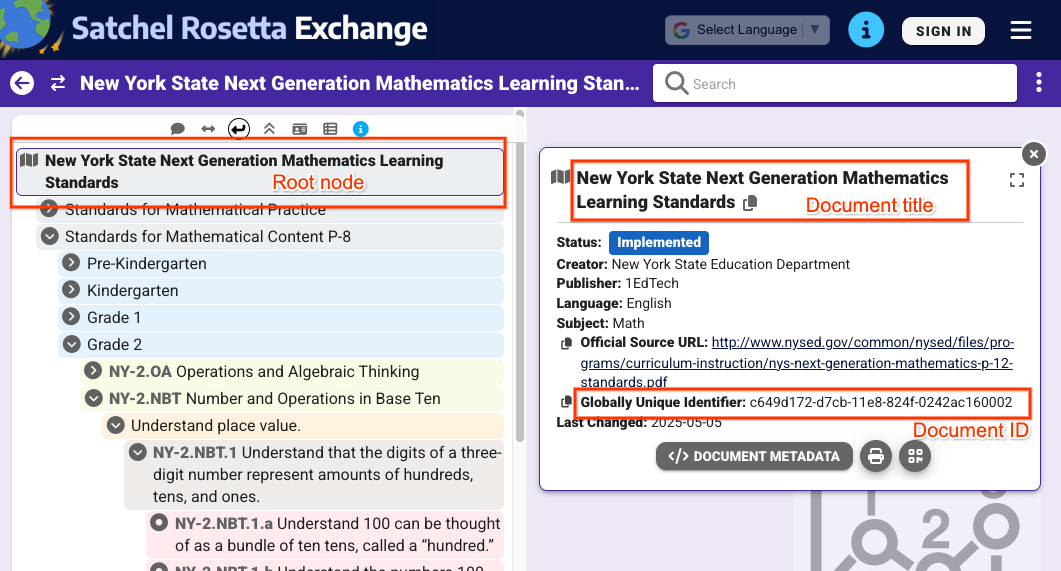 Ilustracja 1. Widok węzła głównego po wybraniu go w Satchel Rosetta Exchange. Wyświetla tytuł dokumentu i jego identyfikator, które są wspólne dla wszystkich węzłów na tej stronie.
Z widoku na rysunku 1 możesz wyodrębnić te wartości:
- Identyfikator dokumentu:
c649d172-d7cb-11e8-824f-0242ac160002 - Tytuł dokumentu:
New York State Next Generation Mathematics Learning
Standards
Aby uzyskać wartości poszczególnych standardów, kliknij standard i rozwiń jego metadane:
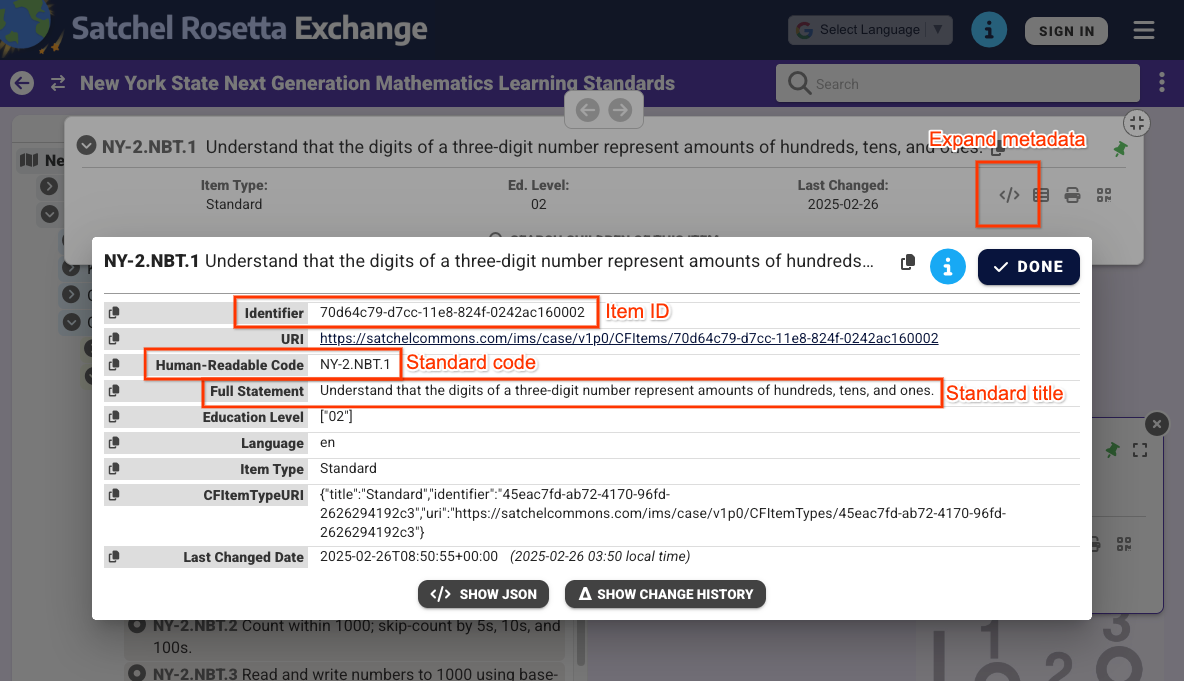 Ilustracja 2. Widok metadanych węzła innego niż węzeł główny po wybraniu go w Satchel Rosetta Exchange. Wyświetla identyfikator produktu, kod standardowy i standardowy tytuł. Te wartości są specyficzne tylko dla tego standardu.
Na podstawie widoku na rysunku 2 możesz znaleźć te wartości:
- Identyfikator produktu:
70d64c79-d7cc-11e8-824f-0242ac160002 - Standardowy tytuł:
Understand that the digits of a three-digit number represent amounts of hundreds, tens, and ones. - Kod standardowy:
NY-2.NBT.4
Pamiętaj, że identyfikatory dokumentów i elementów można też wyodrębnić z adresu URL Satchel Rosetta Exchange każdego węzła. Adresy URL są zgodne ze wzorcem https://rosetta.commongoodlt.com/{document_id}/{item_id}.
Maksymalna liczba połączonych elementów
- Każda
Coursemoże mieć maksymalnie 20 zestawów standardów uczenia się. - Każdy
CourseWorkmoże mieć maksymalnie 10 celów edukacyjnych. - Każda rubryka
Criterionmoże mieć 1 cel edukacyjny.
Zarządzanie zestawami standardów nauczania do zajęć
Modyfikowanie zestawów standardów nauczania
Aby zmodyfikować Course zestawy standardów nauczania, wypełnij pole Course.learningStandardSettings obiektami standardSets. Każdy element standardSet musi zawierać obiekt caseGuid, który zawiera element caseDocumentId i opcjonalnie element caseItemId.
Zestawy standardów nauczania możesz dodawać za pomocą dowolnego Course żądania zmiany, np. courses.create() lub courses.patch() z learningStandardSettings maską aktualizacji.
W przykładzie poniżej ustawiamy 2 standardowe zestawy na istniejącym kursie.
Python
service = build("classroom", "v1", credentials=creds)
course = {
    "learningStandardSettings": {
        # Each Course can have up to 20 learning standard sets.
        "standardSets": [
            # Construct a GUID for the NYS Next Gen Math Standards top-level node.
            # This is a top-level non-leaf node, so it only has a Document ID.
            {
                "caseGuid": {
                    "caseDocumentId": "c649d172-d7cb-11e8-824f-0242ac160002"
                }
            },
            # Construct a GUID for the AAS ELA21.AAS.K Standard node.
            # This is a mid-level non-leaf node, so it has both Document and Item IDs.
            {
                "caseGuid": {
                    "caseDocumentId": "bfc264b3-b4d1-4780-84ff-26b12e6945a6",
                    "caseItemId": "ada2cc30-7d6d-494e-8c6b-c998bae98f0b",
                }
            },
        ]
    }
}

course = (
    service.courses()
    .patch(
      id=course_id,
      updateMask="learningStandardSettings",
      body=course,
      # Specify the preview version while the feature is in Developer Preview.
      # Learning standards and goals are supported in V1_20260316_PREVIEW and
      # later.
      previewVersion="V1_20260316_PREVIEW")
    .execute()
)
print(f"Course updated: {course.get('name')}")
Pobieranie zestawów standardów nauczania
Aby wyświetlić bieżące zestawy standardów nauczania kursu, sprawdź pole Course.learningStandardSettings. To pole zawiera serię obiektów standardSets i może być puste, jeśli w kursie nie ma zestawów standardów nauczania.
Pamiętaj, że każdy znacznik standardSet w odpowiedzi zawiera opis standardu i tytuł dokumentu głównego. Te teksty są też widoczne dla nauczycieli i uczniów w interfejsie Classroom. Otrzymasz też sourceDataAvailabilityStatus, który wskazuje, czy standard jest dostępny w Satchel Rosetta Exchange.
{
  "id": "123456789",
  "name": "LSS test class",
  "learningStandardSettings": {
    "standardSets": [
      {
        "caseGuid": {
          "caseDocumentId": "c649d172-d7cb-11e8-824f-0242ac160002"
        },
        "documentTitle": "New York State Next Generation Mathematics Learning Standards",
        "sourceDataAvailabilityStatus": "LEARNING_STANDARD_AVAILABLE"
      },
      {
        "caseGuid": {
          "caseDocumentId": "bfc264b3-b4d1-4780-84ff-26b12e6945a6",
          "caseItemId": "ada2cc30-7d6d-494e-8c6b-c998bae98f0b"
        },
        "documentTitle": "AAS English Language Arts (2021)",
        "standardTitle": "Kindergarten",
        "sourceDataAvailabilityStatus": "LEARNING_STANDARD_AVAILABLE"
      }
    ]
  }
}
Zarządzanie celami szkoleniowymi w przypadku elementów CourseWork, CourseWorkMaterial i Rubric
Modyfikowanie celów edukacyjnych
Cele edukacyjne można dołączyć do CourseWork,CourseWorkMaterial i kryteriów oceny Criterion w dowolnym żądaniu modyfikacji. Ustaw identyfikatory dokumentu i produktu w polach CourseWork.learningGoals lub Rubric.Criterion.learningGoal. Są to te same identyfikatory, które zostały opisane wcześniej.
Pamiętaj, że cele edukacyjne dołączone do kryteriów Rubric muszą być już dołączone do projektu, z którym powiązane jest kryterium Rubric.
Ten przykład pokazuje, jak utworzyć projekt CourseWork z 2 dołączonymi celami edukacyjnymi.
Python
# Create a CourseWork assignment with two attached learning goals.
service = build("classroom", "v1", credentials=creds)
coursework = {
    "title": "Ant colonies",
    "description": "Read the article about ant colonies and complete the quiz.",
    "materials": [
        {"link": {"url": "http://example.com/ant-colonies"}},
        {"link": {"url": "http://example.com/ant-quiz"}},
    ],
    "workType": "ASSIGNMENT",
    "state": "PUBLISHED",
    # Each CourseWork can have up to 10 learning goals.
    "learningGoals": [
        {
            "learningStandardInfo": {
                # Construct a GUID for the ELA21.AAS.11.11c Standard node.
                # This is a non-root node, so it has both Document and Item IDs.
                "caseGuid": {
                    "caseDocumentId": "bfc264b3-b4d1-4780-84ff-26b12e6945a6",
                    "caseItemId": "6d922f1f-b580-42a1-b6d2-5ee5b39c561d",
                }
            }
        },
        {
            "learningStandardInfo": {
                # Construct a GUID for the ELA21.AAS.11.22a Standard node.
                # This is a non-root node, so it has both Document and Item IDs.
                "caseGuid": {
                    "caseDocumentId": "bfc264b3-b4d1-4780-84ff-26b12e6945a6",
                    "caseItemId": "a684609a-c3ec-42da-8b7f-7a325b31ea4a",
                }
            }
        },
    ],
}

coursework = (
    service.courses()
    .courseWork()
    .create(
      courseId=course_id,
      body=coursework,
      # Specify the preview version while the feature is in Developer Preview.
      # Learning standards and goals are supported in V1_20260316_PREVIEW and
      # later.
      previewVersion="V1_20260316_PREVIEW")
    .execute()
)
print(f"Assignment created with ID {coursework.get('id')}")
W tym przykładzie tworzone są Rubric z celem edukacyjnym dołączonym do każdego kryterium.
Python
# Create a new Rubric with a learning goal attached to each criterion.
service = build("classroom", "v1", credentials=creds)
body = {
    "criteria": [
        {
            "title": "Argument",
            "description": "How well structured your argument is.",
            "levels": [
                {
                    "title": "Convincing",
                    "description": "A compelling case is made.",
                    "points": 30,
                },
                {
                    "title": "Passable",
                    "description": "Missing some evidence.",
                    "points": 20,
                },
                {
                    "title": "Needs Work",
                    "description": "Not enough strong evidence.",
                    "points": 0,
                },
            ],
            # Each Criterion can have one learning goal.
            "learningGoal": {
                "learningStandardInfo": {
                    # Construct a GUID for the ELA21.AAS.11.11c Standard node.
                    # This is a non-root node, so it has both Document and Item IDs.
                    "caseGuid": {
                        "caseDocumentId": "bfc264b3-b4d1-4780-84ff-26b12e6945a6",
                        "caseItemId": "6d922f1f-b580-42a1-b6d2-5ee5b39c561d",
                    }
                }
            },
        },
        {
            "title": "Spelling",
            "description": "How well you spelled all the words.",
            "levels": [
                {"title": "Perfect", "description": "No mistakes.", "points": 20},
                {"title": "Great", "description": "A mistake or two.", "points": 15},
                {"title": "Needs Work", "description": "Many mistakes.", "points": 5},
            ],
            # Each Criterion can have one learning goal.
            "learningGoal": {
                "learningStandardInfo": {
                    # Construct a GUID for the ELA21.AAS.11.22a Standard node.
                    # This is a non-root node, so it has both Document and Item IDs.
                    "caseGuid": {
                        "caseDocumentId": "bfc264b3-b4d1-4780-84ff-26b12e6945a6",
                        "caseItemId": "a684609a-c3ec-42da-8b7f-7a325b31ea4a",
                    }
                }
            },
        },
    ]
}

rubric = (
    service.courses()
    .courseWork()
    .rubrics()
    .create(
      courseId=course_id,
      courseWorkId=coursework_id,
      body=body,
      # Specify the preview version while the feature is in Developer Preview.
      # Learning standards and goals are supported in V1_20260316_PREVIEW and
      # later.
      previewVersion="V1_20260316_PREVIEW")
    .execute()
)
print(f"Rubric created with ID {rubric.get('id')}")
Pobieranie celów edukacyjnych
Aby wyświetlić bieżące cele uczenia się w projekcie, pytaniu lub materiale, sprawdź pole CourseWork.learningGoals. Każdy obiekt celu nauczania zawiera tytuł dokumentu najwyższego poziomu i kod standardu nauczania.
Pamiętaj, że nauczyciele mogą też dodawać tagi umiejętności do zadań i materiałów w interfejsie Classroom. Tagi umiejętności nie są dostępne w interfejsie API.
{
  "course_id": "123456789",
  "id": "987654321",
  "title": "Test ELA Assignment",
  "state": "PUBLISHED",
  "learningGoals": [
    {
      "id": "871768554412",
      "courseId": "123456789",
      "learningStandardInfo": {
        "standardCode": "ELA21.AAS.11.22a",
        "caseGuid": {
          "caseDocumentId": "bfc264b3-b4d1-4780-84ff-26b12e6945a6",
          "caseItemId": "a684609a-c3ec-42da-8b7f-7a325b31ea4a"
        }
      },
      "title": "Identify a sentence that uses correct capitalization (i.e., beginning of sentence, names, cities, states, countries, towns, titles, days, months)."
    },
    {
      "id": "871768554411",
      "courseId": "123456789",
      "learningStandardInfo": {
        "standardCode": "ELA21.AAS.11.11c",
        "caseGuid": {
          "caseDocumentId": "bfc264b3-b4d1-4780-84ff-26b12e6945a6",
          "caseItemId": "6d922f1f-b580-42a1-b6d2-5ee5b39c561d"
        }
      },
      "title": "Compose argumentative texts by stating a topic, providing reasons that support the argument, and providing an appropriate conclusion related to the topic."
    }
  ]
}
Podobne dane są zwracane w odpowiedziach Rubric, które zawierają po jednym elemencie learningGoal na kryterium.